Working between two machines, building a streaming setup, or dragging an old projector into the modern era all hit the same wall: the right peripheral is missing. I pulled together eight input accessories that solve those exact friction points, from a tiny HDMI-to-VGA adapter to a streaming-grade audio mixer. The list leans practical, with clear trade-offs called out so you can match gear to the way you actually work.
The Shortlist At A Glance
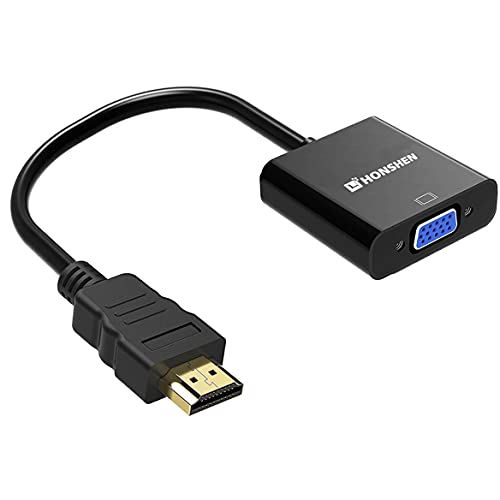
HONSHEN HDMI to VGA 1080P Video Converter Adapter

HP USB to PS2 Keyboard Mouse Adapter

PUPGSIS Gaming Audio Mixer with 48V Phantom Power
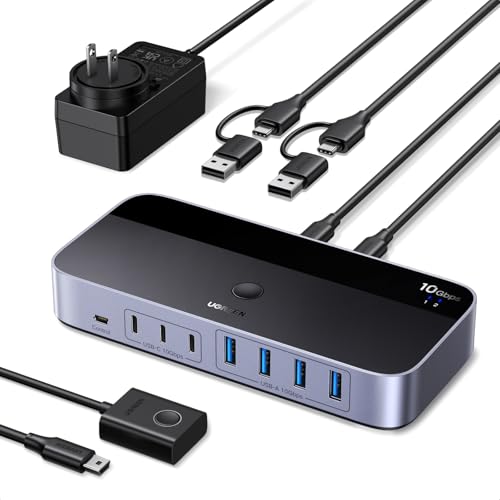
UGREEN 2-In 7-Out USB 3.2 Switch

UGREEN 2-In 7-Out USB 3.0 Switch

PUPGSIS Streaming Audio Mixer for PC and Phone

PUPGSIS Podcast Equipment Bundle with Dynamic Microphone

UGREEN 2-In 4-Out USB Switch with Remote
More On The Choices That Made The List
An aging projector or a VGA-only office monitor does not have to become e-waste just because your laptop dropped the analog port. The HONSHEN adapter bridges that gap with a short cable that takes an HDMI signal and outputs it to a VGA display, no driver software required. In an old classroom or a small-business conference room, this kind of plug-and-resume behavior matters more than chasing a brand name.
For most standard-definition and Full HD monitors, the adapter handles resolutions up to 1920×1080, which covers the bulk of legacy projectors still in service. Gold-plated connectors help the cable survive years of plugging and unplugging in shared spaces, and an active IC chip (a small built-in circuit that actively processes the signal) keeps the handshake stable between modern HDMI sources and older VGA panels. Compared to the HP USB-to-PS2 adapter reviewed next, this pick lives firmly in the display world rather than the input device category, but it solves a real-world compatibility headache.
A Favorable Mix
- Supports up to 1080p Full HD for clean output on most legacy monitors and projectors.
- Gold-plated HDMI and VGA connectors resist corrosion, useful in dusty classrooms or storerooms.
- Active IC chip improves compatibility across a wider range of HDMI source devices.
- Tiny footprint makes it easy to leave permanently attached to a projector cart.
Points To Keep In Mind
- Requires a separate VGA cable to complete the connection to the display.
- One-way conversion only, HDMI to VGA, so it cannot drive a VGA source to an HDMI monitor.
- Audio is not carried over VGA, which is the standard’s real-world limitation rather than a flaw in this unit.
Key Specs
Right Fit For
Office IT staff, teachers, and home users who need to extend the life of an older VGA monitor or projector without replacing working hardware.
Where Another Pick Suits Better
Anyone trying to bridge PS/2 keyboards to a USB-only PC should look at the HP USB to PS2 Keyboard Mouse Adapter instead, since it solves an entirely different legacy-port problem.
The PS/2 port (the small round purple and green connector used on motherboards for decades) has all but vanished from modern desktops, yet plenty of older keyboards, mice, and industrial input devices still rely on it. The HP USB to PS/2 adapter is one of the simplest ways to bring those peripherals back into service. You plug the PS/2 device into the adapter, then the adapter into a free USB port, and the PC recognizes the input without extra drivers on most systems.
The value here is purely functional, with no flashy housing or extra features to complicate things. HP’s brand reputation carries weight in IT procurement and repair workflows where reliability matters more than looks. Compared to the streaming-focused PUPGSIS mixers later on this list, this is a far more utilitarian pick built for repair benches and legacy hardware rooms rather than a content creator’s desk.
Strong Points
- Plug-and-play behavior on most operating systems means no driver hunting for IT staff.
- HP branding is widely recognized in business and repair environments.
- Compact adapter fits easily into a tool pouch or repair kit.
- Works with both PS/2 keyboards and mice that use the same legacy port.
Things To Consider
- Limited to PS/2 peripherals, so it offers no help with modern USB-only keyboards or mice.
- Adapter-level accessories like this can occasionally show up missing or mispacked in shipping, so it’s worth confirming contents on arrival.
Made For
Repair technicians, hobbyists, and IT departments maintaining older workstations or specialized industrial PCs that still depend on PS/2 input devices.
Look Elsewhere When
Someone outfitting a streaming or podcast desk should consider the PUPGSIS Gaming Audio Mixer instead, which targets a completely different audience.
Streamers and podcasters quickly run into the limits of a basic USB input when they want to use a real XLR microphone (the three-pin professional connector found on studio condensers and broadcast gear). The PUPGSIS mixer solves that by adding a dedicated preamp with 48V phantom power (the small electrical charge that condenser microphones need to operate), alongside DJ-style sound effects and a Bluetooth input. That combination turns a noisy desk into a tidy broadcast hub.
Four channels let you mix a mic, a game feed, music, and voice effects without juggling software windows. Voice changer effects are a fun bonus for creators who stream variety content, while the Bluetooth input keeps phone audio in the mix for call-ins or background music. Compared to the simpler PUPGSIS Streaming Audio Mixer covered later, this model adds phantom power and richer effects for users who already own an XLR microphone.
Reasons It Performs
- XLR input with phantom power supports studio-grade condenser microphones out of the box.
- Built-in voice changer and DJ effects reduce the need for extra software plug-ins.
- Bluetooth input makes it easy to drop in phone audio for interviews or music beds.
- Flexible volume controls keep levels balanced across game, voice, and music channels.
Honest Caveats
- Effects-heavy design is fun, but creators seeking a clean, flat signal may find the processing too colorful.
- Phantom power requires careful handling when hot-plugging mics, which is standard practice with any mixer, not a flaw unique to this unit.
- Some owners report that the bundled documentation is light, so first-time streamers may need to lean on online tutorials.
Quick Facts
Best Suited To
Aspiring streamers and podcasters with an XLR microphone who want an all-in-one audio hub with built-in effects rather than a software-based mixer.
Consider Something Else When
First-timers who don’t yet own a microphone may prefer the PUPGSIS Podcast Equipment Bundle, since it ships with a dynamic mic included.
Anyone juggling a work laptop and a personal desktop has probably resigned themselves to swapping keyboards and mice every time they switch machines. The UGREEN USB 3.2 switch ends that daily ritual by letting two computers share up to seven USB devices, four USB-A and three USB-C, through a single box. With 10 Gbps throughput, it moves data fast enough for external SSDs and high-end peripherals.
The hardware switch and included remote make jumping between machines feel almost instant, which is the kind of small quality-of-life win that adds up over months. The Type-C converter adapter and bundled power adapter keep everything stable, even when several high-draw devices are connected. Compared to the smaller 4-port UGREEN switch later on this list, this one is the better fit when you actually need to share a fuller desk of peripherals.
What Earns Its Place
- Seven downstream USB ports cover a full desk of keyboards, mice, drives, and dongles.
- 10 Gbps transfer speed handles external SSDs without bottlenecking the connection.
- Supports both USB-A and USB-C peripherals, which matters as more devices move to Type-C.
- Included remote control makes it easy to switch machines without reaching behind the desk.
Small Caveats
- This is a USB sharing switch, not a KVM, so it does not pass video between machines.
- External power adapter takes up an outlet, and the cable adds to cable-management effort on smaller desks.
Feature Snapshot
Who Should Grab It
Power users running both a work laptop and a personal desktop who want to share a full desk of peripherals without plugging and unplugging every morning.
Swap It Out When
Streamers building a content desk should consider the PUPGSIS Gaming Audio Mixer, which targets audio workflows instead of peripheral sharing.
The USB 3.0 sibling to the higher-speed 3.2 model sits in a more comfortable price range for casual dual-PC setups. It still shares four USB-A and three USB-C devices between two computers, but tops out at 5 Gbps, which is plenty for keyboards, mice, printers, and webcams. For home offices and dorm rooms where extreme transfer speed is not the priority, this is the smarter spend.
The included controller makes swapping between machines a one-tap action, and the Type-C male adapter keeps the wiring simple. Like its faster sibling, this is a USB sharing switch rather than a true KVM, so video signals still need their own cabling. Compared to the smaller 4-port UGREEN switch, this one is the right choice when your desk setup simply has too many devices to fit on a smaller box.
The Helpful Details
- Seven shared USB ports cover a wide mix of peripherals without needing a separate hub.
- Controller-based switching is intuitive for users who don’t want to learn software.
- 5 Gbps speed handles everyday peripherals and external drives comfortably.
- Type-C male adapter simplifies wiring between laptops and the switch.
Where It May Fall Short
- No video support, so users wanting a true KVM replacement should look elsewhere.
- External power brick adds another cable to manage behind the desk.
Built With In Mind
Home users, students, and small-office workers who need to share a stable set of peripherals between a work and personal computer without paying for bleeding-edge speed.
Another Choice May Suit
Anyone needing the highest USB throughput for fast external SSDs should step up to the UGREEN 2-In 7-Out USB 3.2 Switch instead.
Mobile streamers and content creators often need a small mixer that travels with them, and this PUPGSIS unit keeps the footprint tight while still supporting an XLR microphone. It targets users who mix audio from a PC and a phone at the same time, which is common for live shopping, gaming, or hybrid streaming setups. The trade-off is a tighter feature set than the larger PUPGSIS mixer covered earlier.
The lack of 48V phantom power is the big caveat. Owners commonly report that this model is not compatible with 48V dynamic microphones or USB microphones, so it really only fits XLR setups paired with the right cable. Compared to the bundle reviewed next, this is the right call when someone already owns a mic and just needs the mixer half.
Notable Upsides
- Compact housing travels well for creators who stream from multiple locations.
- XLR input keeps the audio path cleaner than a basic USB dongle.
- PC and phone compatibility covers a wide range of streaming workflows.
Less Ideal Details
- No 48V phantom power, so most condenser microphones are off the table.
- Requires a separate 1/4″ TRS to XLR cable (a balanced audio cable with a phone-jack style plug on one end) for XLR mics, which is a common gotcha at setup time.
- Effects library is smaller than the larger PUPGSIS model, so creators chasing heavy sound design may want to look elsewhere.
Whose Shelf It Belongs On
Mobile streamers and hybrid creators who already own an XLR microphone and need a compact mixer that works with both a PC and a phone.
Reach For A Different Pick When
Anyone starting from scratch should consider the PUPGSIS Podcast Equipment Bundle, since that package ships with a microphone included.
First-time podcasters usually want a kit that just works, and this PUPGSIS bundle pairs the audio mixer with a 1/4″ dynamic microphone so the entire vocal chain ships in one box. Dynamic microphones (mics that generate signal from coil movement rather than external power) are friendlier for untreated rooms than condensers, which is a real plus for home recordists. The mixer brings voice changing, denoise, and reverb effects into a single desktop unit.
Bluetooth support and broad device compatibility, including PC and PS5, make the bundle flexible for gaming creators and remote workers alike. The microphone plugs in via a 1/4″ TRS connection rather than XLR, which is part of why this kit stays approachable for beginners. Compared to the standalone mixers earlier in the list, this pick trades upgrade potential for out-of-box simplicity.
A Strong Showing
- Mixer and dynamic microphone arrive together, removing the guesswork of matching gear.
- Built-in denoise and reverb effects clean up vocals without extra software.
- Bluetooth input simplifies phone interviews or music beds.
- Works with PC, phone, and PS5, which broadens the audience beyond pure podcasting.
Factors To Consider
- Dynamic microphone is friendly for noisy rooms but typically less detailed than a condenser option, which is a real trade-off for studio work.
- Bundled microphone cable length is fixed, so a longer room may need an extension.
At A Glance
Who Will Love This
New podcasters and hobbyist streamers who want a complete, beginner-friendly recording kit without sourcing a separate microphone.
A Better Fit Elsewhere
Experienced creators with a preferred XLR condenser microphone should consider the PUPGSIS Gaming Audio Mixer, which adds phantom power for higher-end mics.
For tidy dual-laptop setups that don’t need seven shared ports, this compact UGREEN switch shares four USB devices between two computers through one box and a small remote. The 4-out configuration covers the basics: a keyboard, a mouse, a webcam, and a microphone or headset. Two USB-C data cables come in the box, so most users won’t need to hunt for extras.
The included remote is the differentiator. Reaching behind a desk to press a button is annoying, and the remote turns peripheral switching into a casual, almost invisible action. Compared to the larger 7-port UGREEN switches earlier on this list, this is the better match for minimal desks where fewer devices are in play and cable clutter matters more than port count.
What It Does Well
- Compact form factor keeps a minimal desk looking clean.
- Four shared ports cover the core input devices most people actually use.
- Remote control adds convenience for switching from across the desk.
- Two USB-C data cables included, so most setups are ready out of the box.
Practical Considerations
- Four downstream ports may feel tight for users with printers, scanners, and external drives all on the same desk.
- Like the larger UGREEN switches, this is a peripheral sharing device, not a KVM, so it doesn’t pass video.
The Right Fit
Minimalist desk users with two laptops who only need to share a keyboard, mouse, webcam, and headset, and who value a tidy setup over maximum port count.
Not Your Match When
Anyone with a wider mix of peripherals should step up to the UGREEN 2-In 7-Out USB 3.0 Switch or the 10 Gbps 3.2 model.
Sorting Through Adapters, Mixers, and USB Switches
Match The Accessory To The Real Problem
Start with the friction point that started the search. A projector refusing to recognize a laptop needs a video adapter, not a USB switch. A two-PC desk with too many peripherals needs a sharing switch, while a podcast-in-the-making calls for an audio mixer with the right microphone path. Mismatched gear wastes money, so defining the problem first shortens the entire decision tree.
Pay Attention To Connection Types And Standards
USB-C, USB-A, HDMI, VGA, XLR, and 1/4″ TRS all play different roles. A streaming mixer that lacks 48V phantom power won’t accept most condenser microphones, and a USB switch that only handles USB-A devices won’t help a Type-C-only laptop. Confirming the connector mix on both ends avoids the classic setup-day frustration where a “compatible” accessory simply does not fit the gear you already own.
Speed Ratings Only Matter For The Right Workloads
A 10 Gbps USB switch is excellent for external SSDs and high-resolution webcams, but overkill for keyboards and mice, where even USB 2.0 is fast enough. Likewise, an HDMI-to-VGA adapter running at 1080p is fine for projectors and monitors but will fall short on higher-end 1440p or 4K panels. Choosing the spec tier that matches the workload keeps the budget honest.
Build Quality And Brand Reputation Still Count
UGREEN, HP, and PUPGSIS each bring different strengths: UGREEN for cable and switch engineering, HP for legacy and IT-trusted accessories, and PUPGSIS for accessible streaming kits. A recognized brand usually signals better documentation, warranty support, and consistent quality control, which matters when a device lives behind a desk for years.
Key Considerations Across These Picks
Common Shopping Slip Ups
A surprisingly common mistake is treating every “USB switch” as a KVM (a device that carries Keyboard, Video, and Mouse signals together). The UGREEN models in this list are USB sharing switches, so video still needs its own cable between machines. Another trap is assuming all PUPGSIS mixers support condenser microphones, when only the model with 48V phantom power actually does. Checking those two details before purchase saves a lot of cable-swap regret.
When Paying More Pays Off
Spending up usually buys two things in this category: speed and durability. The 10 Gbps USB 3.2 switch moves external SSDs at full tilt, while the HDMI-to-VGA adapter’s gold-plated connectors survive years of plug-and-unplug cycles in shared rooms. For a podcast kit, the higher-tier mixer adds phantom power and richer effects, which removes the need for software plug-ins later. In each case, the upgrade pays off when the workload actually pushes the limits of the cheaper option.