A keyboard and mouse combo quietly shapes how every workday feels. The right pair fades into the background, supports long typing sessions, and stays out of the way during a packed schedule. The wrong one turns into a daily annoyance, with sticky keys, laggy clicks, or a wrist that protests by mid-afternoon.
I put together this roundup for commuters, hybrid workers, students, and gamers who want one setup that just works. Some picks lean toward office comfort, others toward competitive play, and a few cover travelers and multi-device households. The goal is simple: match the right combo to the right hands.
The Leading Options At A Glance

Logitech G502 Hero Mouse and G213 Gaming Keyboard
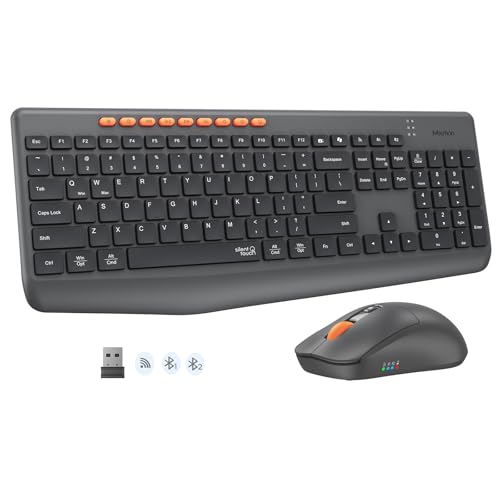
MEETION Wireless Bluetooth Keyboard and Mouse Combo

Faadar Wireless Keyboard and Mouse Combo Purple-A

Logitech Signature Slim Wired K620 Keyboard Graphite
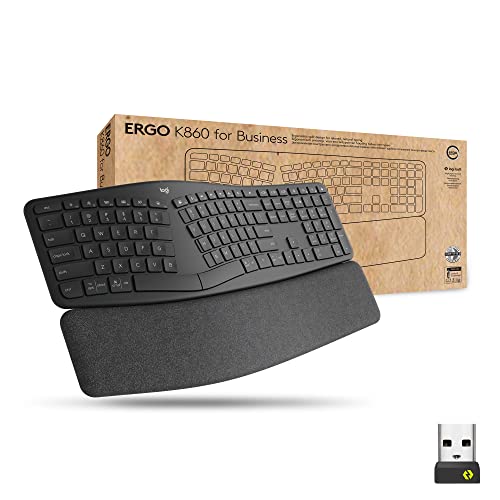
Logitech Ergo K860 Split Wireless Keyboard

Logitech MX Master 4 Wireless Mouse Graphite

Faadar Wireless Keyboard and Mouse Combo Black

Faadar Wireless Keyboard and Mouse Combo

seenda COE64-3 Pro Bluetooth Keyboard and Mouse Combo

Logitech Mobi Fold Wireless Mouse Graphite
The Details Behind The Selections
Competitive PC gamers get a familiar one-two punch here. The Logitech G502 Hero mouse carries a high-resolution sensor that tracks from 100 up to 25,600 DPI, which is the responsiveness rating that decides how precisely a flick lands on a target. Pair that with eleven programmable buttons and a weight tuning system, and the mouse adapts to almost any grip style or genre.
The G213 keyboard keeps things straightforward with membrane-style keys, full RGB backlighting, and a spill-resistant build that handles late-night snack runs. Unlike the silent office combos later in this list, this pair is loud, tactile, and tuned for reaction time rather than hush. For anyone running ranked matches or MOBAs at a desk all night, the wired reliability removes one more variable.
Practical Advantages
- Adjustable weight tray lets shoppers fine-tune the feel across long sessions.
- Eleven programmable buttons reduce keyboard clutter for hotkey-heavy games.
- LIGHTSYNC RGB syncs the mouse, keyboard, and any other Logitech G gear into one color scheme.
- Spill-resistant keyboard body tolerates the occasional drink mishap.
- Wired connection keeps latency predictable for esports play.
Trade Offs
- Wired only, so cable management matters on smaller desks.
- Membrane keys feel softer than mechanical alternatives, which some competitive players dislike.
- Heavier than typical office mice once all five weights are loaded.
Key Attributes
Right Fit For
Competitive PC gamers and esports players who want a wired setup with tunable weights and programmable macros.
Reach For A Different Pick When
The MEETION Wireless Bluetooth Keyboard and Mouse Combo suits shoppers who bounce between laptop, tablet, and phone throughout the day.
Hybrid workers juggling a laptop at the office, a tablet on the couch, and a phone in the kitchen will appreciate this MEETION combo. It runs both Bluetooth and a 2.4 GHz wireless receiver, so switching between three paired devices happens with a single keypress instead of digging through menus.
The full-size keyboard keeps a dedicated number pad, which matters for anyone running spreadsheets or data entry. Silent key switches keep typing volume low for shared rooms. Compared to the wired Logitech G502 Hero and G213 combo above, this one trades latency for flexibility, and that trade is worth it for productivity setups.
The Helpful Details
- Dual-mode connection (Bluetooth + 2.4 GHz) covers most modern devices.
- Silent typing suits open offices, dorms, and late-night study sessions.
- Full layout with number pad simplifies accounting and analytics tasks.
Small Caveats
- Plastic build feels lighter than premium aluminum rivals.
- Mouse runs on included batteries, so replacements eventually come into play.
Quick Facts
Made For
Hybrid workers and students who move between laptop, tablet, and phone multiple times a day.
Skip It When
The Logitech G502 Hero Mouse and G213 Gaming Keyboard fits better for competitive gamers needing wired precision.
Home offices that double as creative studios benefit from a combo that looks as good as it types. Faadar’s Purple-A edition uses curved, ergonomic keys shaped to match natural finger travel, and the wireless mouse keeps an ambidextrous shell that works for either hand.
Silent key presses and silent mouse clicks make this a strong pick for shared apartments, late-night journaling, or anyone on a lot of video calls. The purple finish adds a pop of personality without screaming for attention. For shoppers who care about desk aesthetics as much as function, this one leans design-first.
Strengths Worth Knowing
- Curved keycap layout supports longer typing sessions with less strain.
- Ambidextrous mouse fits both left- and right-handed users equally well.
- Quiet key and click noise suits shared rooms and recorded meetings.
- Color choice adds personality to minimalist desk setups.
Honest Caveats
- Color variant may clash with traditional office decor.
- Plastic shell feels lighter than aluminum-built office keyboards.
Best Suited To
Style-conscious home office users who want ergonomic shaping without giving up a colorful desk aesthetic.
Not Your Match When
The Logitech Signature Slim Wired K620 suits IT-managed offices that need a USB-C wired deployment.
Corporate IT teams and managed office environments lean toward wired reliability, and the K620 delivers exactly that. A USB-C cable runs the connection, while a multi-OS toggle lets the same keyboard switch between Windows, ChromeOS, and macOS without software tweaks.
Low-profile keys with a subtle scoop give it that familiar laptop-style typing feel that touch typists prefer. Dedicated shortcut keys for meetings and AI tools integrate with Logi Tune for customization. Compared to the MEETION combo earlier, this one is a single keyboard with no mouse, focused entirely on typing comfort and enterprise deployment.
Everyday Advantages
- Wired USB-C connection suits security-conscious office policies.
- Multi-OS toggle eases fleet deployment across mixed environments.
- Laptop-style low-profile keys reduce finger travel during long reports.
- Customizable meeting and AI shortcut keys save clicks during calls.
Factors To Consider
- Keyboard only, no bundled mouse in this listing.
- Wired cable limits desk flexibility compared to wireless picks.
Feature Snapshot
Who Should Grab It
IT managers and office administrators deploying one keyboard across a mixed Windows, ChromeOS, and macOS workforce.
A Better Fit Elsewhere
The Logitech Ergo K860 Split Wireless Keyboard fits individual workers logging marathon typing hours who want palm support.
Typists logging eight-hour days know that wrist pain changes everything. The Logitech Ergo K860 uses a split, curved keyframe that angles the hands into a more natural position, paired with an integrated palm rest that supports the wrists during marathon sessions.
Wireless connectivity keeps the desk uncluttered, and the layout feels closer to a standard keyboard than aggressive ergonomic alternatives. For shoppers used to flat boards, the adjustment period is real, but most acclimate within a week. This is the keyboard to consider when typing volume, not gaming speed, drives the purchase decision.
Key Advantages
- Curved split frame positions wrists at a more relaxed angle.
- Built-in palm rest reduces pressure on the wrists during long sessions.
- Wireless connection keeps the desk free of cable clutter.
- Standard-style key layout eases the transition from a flat keyboard.
Some Limits To Know
- Split layout requires an adjustment period for touch typists.
- Keyboard only, no mouse included.
- Takes more desk depth than compact travel keyboards.
Core Details
Perfect Match For
Writers, analysts, coders, and anyone typing more than four hours a day who wants ergonomic wrist support.
Where Another Pick Suits Better
The Logitech Signature Slim Wired K620 suits enterprises needing USB-C wired deployment across mixed-OS teams.
Creative professionals and data-heavy office workers tend to live inside their mouse, and the MX Master 4 was built for that reality. The 8K DPI Darkfield sensor tracks on virtually any surface, including glass, while MagSpeed scrolling lets shoppers blast through long documents or switch to precise click-by-click scrolling for spreadsheets.
Quiet Click technology reduces noise in shared rooms, and haptic feedback on the Actions Ring adds a subtle layer of control for shortcuts. USB-C charging and Logi Bolt receiver support round out the package. This is a standalone mouse without a keyboard, so pairing it with the Logitech Signature Slim K620 earlier in this list creates a serious workstation.
Real Benefits
- 8K DPI Darkfield sensor tracks accurately across glass and glossy desks.
- MagSpeed scrolling switches between hyper-fast and precise modes on the fly.
- Quiet Click mechanism keeps shared rooms calm during deep work.
- USB-C charging removes the disposable battery habit.
- Logi Bolt receiver improves connectivity in dense office environments.
Possible Compromises
- Mouse only, requires a separate keyboard purchase.
- Larger size may feel bulky to small-handed users.
- Premium features push the price higher than basic wireless mice.
Who Will Love This
Creative professionals, editors, and analysts who scroll, click, and gesture thousands of times per workday.
Swap It Out When
The Logitech Mobi Fold Wireless Mouse suits travelers who need a pocket-friendly foldable option over desktop precision.
Open-plan offices and shared apartments run on quiet discipline, and this Faadar combo leans fully into that. A 2.4 GHz wireless receiver plugs into one USB port and links both the keyboard and mouse, with silent key presses and silent clicks keeping noise complaints to a minimum.
Curved keys support a natural typing position, and the symmetrical mouse fits either hand. The black finish keeps the look neutral, which suits conservative workspaces where the purple edition earlier might feel out of place. For shoppers who want silence above all else, this combo covers the basics without overcomplicating the setup.
What Helps Most
- Single 2.4 GHz receiver keeps USB ports free for other peripherals.
- Silent typing and clicking suit roommates, libraries, and shared offices.
- Curved keycap shape reduces finger strain during longer sessions.
- Neutral black finish blends into traditional office decor.
Worth Bearing In Mind
- 2.4 GHz only, no Bluetooth for phone or tablet pairing.
- Plastic construction feels lighter than aluminum alternatives.
Built With In Mind
Open-office workers, students in shared dorms, and anyone whose priority is keeping typing volume low.
Consider Something Else When
The MEETION Wireless Bluetooth Keyboard and Mouse Combo fits shoppers who need Bluetooth pairing for phones and tablets.
Left-handed typists often get overlooked in combo design, but Faadar’s symmetrical mouse removes that friction. It works just as comfortably in the right hand as it does in the left, with the same button layout and tracking behavior.
Curved keys and quiet typing round out a setup that fits a wide range of households. Shoppers comparing this to the Purple-A edition earlier will find the same core ergonomics in a more neutral colorway. For multi-user homes where the mouse might switch hands depending on the day, the ambidextrous shell is a small but meaningful detail.
Points In Its Favor
- Ambidextrous mouse works equally well for left- and right-handed users.
- Curved ergonomic keys reduce finger travel across long documents.
- Silent key feedback supports video calls and quiet hours.
Trade-Offs To Consider
- No Bluetooth, only 2.4 GHz wireless via USB receiver.
- Plain visual design lacks the flair of color-variant siblings.
Whose Shelf It Belongs On
Multi-user households, ambidextrous workers, and shared family computers where handedness isn’t fixed.
Look Elsewhere When
The seenda COE64-3 Pro Bluetooth Keyboard and Mouse Combo fits shoppers who want backlighting and Bluetooth pairing.
Backlighting sets this seenda combo apart from the field. Seven color options and three brightness levels help with low-light typing, and a slim metal keyboard body keeps the desk footprint compact without feeling flimsy. Two typing angles (5.5° and 9°) let shoppers dial in the wrist tilt.
Bluetooth pairs the combo across three devices, similar to the MEETION earlier, and the full layout keeps the number pad for spreadsheet work. For late-night workers, students in dim dorms, or anyone who just likes a touch of color at the desk, the lighting adds personality without forcing a flashy RGB gaming aesthetic.
A Strong Showing
- 7-color backlighting with three brightness levels suits dim rooms.
- Slim metal keyboard shell feels sturdier than typical plastic boards.
- Adjustable typing angles (5.5° and 9°) fine-tune wrist comfort.
- Bluetooth pairing across up to three devices keeps multi-screen work fluid.
- Full layout with number pad handles data entry and finance tasks.
Points To Keep In Mind
- Rechargeable batteries need periodic top-ups on both pieces.
- Backlighting can feel unnecessary for daytime-only office users.
Right Fit For
Late-night typists, dorm students, and multi-device households that want backlighting and Bluetooth flexibility.
Another Choice May Suit
The Faadar Wireless Keyboard and Mouse Combo Black fits shoppers who don’t need backlighting and prefer a neutral look.
Road warriors and hybrid commuters know that hotel desks and coffee shop counters punish bulky mice. The Logitech Mobi Fold collapses into a pocketable shape, with a stain-resistant coating and a silicone sleeve that absorbs the bumps of a packed bag.
This is a standalone mouse, so it pairs with a laptop’s built-in keyboard rather than replacing a desktop setup. For anyone who travels weekly or works across multiple locations, the foldable form factor turns a heavy carry-on into a lighter one. Compared to the desktop-bound MX Master 4 earlier, this one trades sensor resolution for true portability.
Well-Handled Touches
- Foldable design slides into jacket pockets and small bag sleeves.
- Stain-resistant shell handles the realities of travel.
- Silicone sleeve adds drop protection for fast-paced days.
- Wireless connection removes the need to pack a cable.
Less Ideal Details
- Mouse only, requires a separate keyboard for full desktop replacement.
- Foldable hinges introduce moving parts that may wear over time.
- Compact shape feels cramped for long desktop sessions.
Who Should Grab It
Frequent flyers, sales reps, and hybrid commuters who need a pocket-ready mouse for hotel rooms and cafés.
Where A Sibling Pick Shines
The Logitech MX Master 4 Wireless Mouse fits desk-bound professionals who prioritize sensor precision over portability.
What To Weigh Before Choosing A Keyboard And Mouse Combo
Connection Type And Daily Workflow
Wired combos deliver predictable latency, which matters for gaming and high-stakes office work where dropped signals disrupt focus. Wireless options have matured enough for productivity tasks, and Bluetooth adds the freedom of pairing with phones and tablets. Commuters and hybrid workers usually prefer wireless for desk flexibility, while esports-leaning shoppers lean wired.
Dual-mode setups like the MEETION combo cover the widest range of devices in one purchase. If a household runs mixed hardware, dual-mode is the safest bet.
Ergonomics For Long Sessions
Anyone logging more than four hours of typing per day should pay attention to wrist support, key profile, and mouse shape. Split layouts like the Logitech Ergo K860 angle the hands into a more relaxed position, while curved keycaps reduce finger travel. Mouse size matters too; smaller hands may find large ergonomic mice tiring over time.
Comfort is highly individual, and an adjustment period is normal when switching from a flat board to a split one.
Noise Level And Shared Spaces
Open offices, dorm rooms, and apartments benefit from silent switches and quiet clicks. Membrane and scissor-switch keyboards generally run quieter than mechanical ones, and silent-click mice keep conference calls calm. The Faadar and seenda combos in this list specifically target low-noise environments.
Mouse Sensor And Surface Tracking
DPI, or dots per inch, measures cursor sensitivity. Higher DPI like the 8K found on the MX Master 4 means faster cursor travel per inch of physical movement, useful on multi-monitor setups. Lower DPI supports precision work like photo editing. Darkfield sensors track on glass and glossy surfaces, which removes the need for a mouse pad in many cases.
Picking Up On What The Category Offers
Where Shoppers Go Wrong
Picking purely on looks often backfires. A flashy RGB gaming keyboard feels excessive for someone typing in a quiet library, while an ultra-ergonomic split layout may frustrate a gamer needing fast key actuation. Match the combo to the actual environment, not the imagined one.
Another common slip is ignoring connection type. Buying a Bluetooth-only mouse for a desktop without Bluetooth wastes setup time, and grabbing a wired combo for a minimalist standing-desk setup creates cable clutter. Check ports and wireless needs before committing.
What The Higher Tier Buys
Stepping up to premium gear like the Logitech MX Master 4 or the G502 Hero mouse delivers better sensors, longer battery life, and smarter software integration. Premium mice track on more surfaces, scroll faster, and last through longer workdays on a single charge.
For shoppers logging heavy daily hours, premium durability and refined ergonomics justify the higher spend. Casual users typing a few emails a day get more than enough from budget-friendly combos.
Frequently Asked Questions
Are keyboard and mouse combos worth buying instead of separate pieces?
Yes, when the included mouse matches what you’d buy anyway. Combos save desk space, reduce USB port usage, and often arrive with matched battery lives. Power users with very specific mouse preferences sometimes buy separately instead.
What’s the difference between Bluetooth and 2.4 GHz wireless?
Bluetooth pairs directly with phones, tablets, and laptops without a USB receiver, which frees ports for other gear. The 2.4 GHz wireless connection uses a small USB dongle and tends to feel more responsive, which gamers and office workers often prefer.
How important is DPI on a mouse?
DPI matters most for gamers and creative professionals switching between precision and speed tasks. For general office use, anything between 1000 and 4000 DPI feels comfortable. Higher DPI ratings like the MX Master 4’s 8K help on large or multi-monitor setups.
Do ergonomic keyboards really help with wrist pain?
Split and curved layouts reduce ulnar deviation, the angle the wrists bend away from the body. For chronic wrist discomfort, an ergonomic design paired with proper desk height and breaks tends to help. The Logitech Ergo K860 is a strong starting point.
How long do wireless keyboard batteries typically last?
Battery life varies widely depending on backlighting, connection type, and usage. Most wireless combos last several months on standard batteries or rechargeable cells with moderate daily use. Rechargeable models like the seenda COE64-3 Pro may need weekly top-ups with heavy backlight use.
Wrap Up
The best keyboard and mouse combo is the one that fits the desk, the room, and the work. Competitive gamers will lean toward the Logitech G502 Hero and G213 pairing, while hybrid workers and travelers find more flexibility in Bluetooth-equipped combos like the MEETION or seenda options.
Take a moment to think about where the combo will live and what kind of work happens there, and the right pick usually becomes clear.