A 60% board pulls the arrow keys, function row, and numpad off the desk, leaving your mouse closer and your posture less strained. Throw in a JIS keycap set and the layout starts to feel native to Japanese typists: the extra key near right Shift, the wider Enter, the shorter bottom row. I picked seven compact mechanicals that either ship with JIS-friendly keycap sets, support the right key count for a JIS layout, or appeal to anyone who wants a tidier setup. Each one is wired or wireless, and each comes with a different reason to consider it.
How The Shortlist Stacks Up

YUNZII B98 PRO 96% Wireless Mechanical Keyboard (Matcha Green, Milk Switch)

8Bitdo Retro Mechanical Keyboard for Windows & Android, Fami Edition

Aula WIN60 HE 60% Mechanical Gaming Keyboard (Hall Effect, Wired)

Womier WK61 V2 60% Creamy Mechanical Wired Keyboard
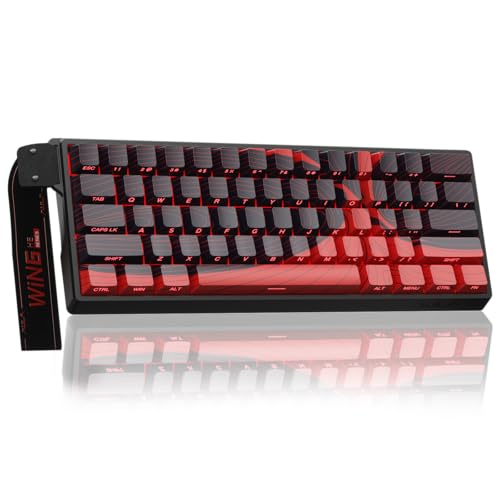
AULA WIN60 HE MAX 60% Mechanical Gaming Keyboard (Hall Effect, Wired)

KINESIS Gaming TKO Mechanical Keyboard (60%, Clicky, Aluminum)

GravaStar Mercury K1 75% Wireless Mechanical Gaming Keyboard
The Strengths Of Each Pick
The B98 PRO is a 96% layout (meaning it squeezes a full numpad into the main body while trimming the function row), and that makes it unusual on this list. Most compact boards force you to give up the numpad, but YUNZII keeps it while freeing your mouse from the desk edge. Wireless connectivity removes cable clutter, which helps if your desk doubles as a work-from-home setup by day and a gaming station by night.
Compared with the 8Bitdo Retro a few picks down, this one feels far more office-ready. The included knob handles volume by default, and the swappable knob design lets you switch between a 3D cat topper and a clean metal dial, a small touch that signals personality without going overboard.
A Few Strong Suits
- 96% layout keeps a full numpad for spreadsheet work while saving desk space.
- Wireless freedom cuts cable drag during long sessions.
- Swappable knob (cat or metal) gives light customization without software hassle.
- Matcha green colorway stands out in a sea of black boards.
Worth Noting
- Larger footprint than a true 60%, so travel-bag users may want something smaller.
- Keycap legends may not include native JIS sub-legends out of the box, so check before committing if exact JIS printing matters to you.
Key Product Details
Right Fit For
Anyone who types numbers daily, hates cable clutter, and wants personality without sacrificing the numpad.
Swap It Out When
Hardcore competitive FPS players should look at the Aula WIN60 HE instead, since its 8K polling rate and magnetic switches are tuned for fast inputs.
The 8Bitdo Retro leans hard into nostalgia, but the bones underneath are modern. An 87-key TKL (tenkeyless, meaning the numpad is dropped but arrows and function row stay) layout in a top-mount frame gives it a familiar footprint, while the Kailh Box White switches deliver a tactile click that feels closer to vintage computing than the linear milk switches in the B98 PRO above.
For anyone moving from a laptop keyboard, this 8Bitdo is the gentlest step into mechanicals I see on the list. Dye-sub PBT keycaps (a plastic that resists shine over years of use) keep legends crisp, and the hot-swappable PCB lets you change switch feel later without soldering.
What Works In Its Favor
- Kailh Box V2 White switches give a satisfying click without harsh scratchiness.
- Hot-swappable PCB invites experimentation with different switch types.
- Dye-sub PBT keycaps resist shine and oil buildup.
- Compatible with Windows 10 (1903 and up) and Android 9.0 and up for flexibility.
Trade-Offs To Consider
- Lacks wireless, so desk placement has to account for the cable.
- No native JIS keycap set; aftermarket JIS-fit caps require checking layout compatibility.
Right Fit For
Retro gaming fans and writers who want a clicky keyboard that nods to classic consoles without feeling kitschy.
Look Elsewhere When
Travel-heavy users should consider the GravaStar Mercury K1, which drops the cable and keeps a tidy 75% footprint.
The Aula WIN60 HE swaps traditional mechanical switches for Hall Effect magnetic switches, which sense keypress depth through magnetism rather than physical contact. That unlocks adjustable actuation (the depth at which the keyboard registers a press) and rapid trigger, a feature popular in competitive shooters that resets the key the moment it travels back up, so flick inputs register faster.
The 8000Hz polling rate sends positional data to the PC 8,000 times per second, eight times faster than the 1000Hz standard. For Valorant, CS2, or any game where input timing matters, this is where the WIN60 HE earns its keep. The trade-off shows up in typing, since the actuation-depth feel takes some adjustment for word-heavy sessions.
Points In Its Favor
- 8K polling rate reduces input lag in fast-paced games.
- Rapid trigger mode benefits flick inputs in shooters.
- Hot-swappable Hall Effect switches allow per-key actuation tuning.
- Compact 60% size frees up desk space for low-sensitivity mouse work.
Honest Caveats
- Wired only; no wireless freedom here.
- Hall Effect switches feel different from classic mechanicals, so typists coming from Cherry MX-style boards may notice the learning curve.
- Software setup is needed to dial in actuation depth and RT curves.
Quick Facts
Built With In Mind
Competitive FPS players who want every input edge and already understand RT mechanics.
Reach For A Different Pick When
Casual typists and writers should consider the Womier WK61 V2, which is tuned for creamy sound rather than competitive latency.
The Womier WK61 V2 targets the soft, “creamy” sound profile that has become a TikTok favorite, with multi-layer sound-dampening fillings inside the case to soak up hollow noise. Owners commonly report the result feels closer to a premium thock than a hollow clack.
The translucent matte bottom cover diffuses RGB when lights are on and stays clean when they are off. Compared to the Aula WIN60 HE above, this board skips rapid trigger and 8K polling in favor of a more accessible typing-first experience. The 60% layout keeps arrow keys reachable via Fn-layer, which most first-time builders adapt to within a week.
The Helpful Details
- Multi-layer dampening reduces hollow typing noise.
- Matte translucent case makes RGB lighting glow evenly.
- DIY-friendly with three extra sublimation keycaps for color swaps.
- Standard 60% size pairs easily with aftermarket JIS-capable keycap sets.
Some Limits To Know
- Wired only; no Bluetooth or 2.4GHz option.
- Sound quality depends on switch choice, so buyers who pick louder switches may miss the creamy feel.
Who Should Grab It
Beginners exploring mechanical keyboards who want a soft typing feel and RGB without paying for gaming-grade latency.
A Better Fit Elsewhere
The 8Bitdo Retro is a stronger match for clicky-switch devotees, since the WK61 V2 leans toward a muted profile.
The HE MAX is the upgraded sibling of the WIN60 HE, leaning further into the rapid-trigger category that competitive Valorant and CS2 players obsess over. It carries the same 8000Hz polling rate and hot-swappable Hall Effect switches, with refinements aimed at users already comfortable tuning actuation depth in software.
For most home setups, the standard WIN60 HE is enough, but the MAX version trims response inconsistency and tightens the actuation range, which becomes noticeable once you start calibrating for very low-millimeter key travel. I would not call this an everyday pick; it makes more sense for someone already chasing tournament-grade latency.
What Pays Off
- Tighter Hall Effect calibration for lower actuation points.
- 8K polling rate with consistent performance under fast input.
- Compact 60% leaves maximum room for wide mouse sweeps.
- Hot-swap support means the board grows with switch preferences.
Worth Bearing In Mind
- Heavier price tag than the standard WIN60 HE, with diminishing returns for casual users.
- Wired only and software-heavy, which adds setup friction for non-gamers.
Feature Snapshot
Made For
Hardcore competitive gamers already tuned into rapid trigger and looking for the lowest latency in this size class.
Skip It When
Anyone outside the competitive scene will find the standard Aula WIN60 HE a smarter balance of features and cost.
The KINESIS TKO is the most brick-like board on this list, in a good way. The aluminum chassis adds heft that keeps the board planted during aggressive typing, and Kailh Box White clicky switches give it a tactile snap that distinguishes it from the linear and creamy options earlier. PBT keycaps resist shine, which matters for users who game and type on the same board daily.
The triple split-spacebar design (a single spacebar divided into three independent keys, each mappable to different actions) sets the TKO apart from any other pick here. It is a niche feature that tournament players and accessibility-minded users appreciate, but casual typists may find the segmented keypress awkward until muscle memory catches up.
Reasons It Performs
- Aluminum body resists flex and stays planted on the desk.
- Hot-swap PCB simplifies switch experimentation.
- PBT keycaps hold up to heavy daily use without shine.
- Triple split-spacebar layout supports advanced key mappings.
Things To Weigh
- Heavier than plastic boards, so it is less travel-friendly.
- Clicky switches can be tiring in shared or quiet spaces.
Feature Rundown
Best Suited To
Tournament-style clicky fans who want a sturdy, no-wireless board with hot-swap flexibility.
Where Another Pick Suits Better
Quiet-office users may prefer the Womier WK61 V2, which delivers a softer sound profile than the TKO’s click.
The GravaStar Mercury K1 rounds out the list as the most desk-aesthetic pick. A 75% layout (compact form that keeps the function row and arrow keys but trims the numpad) hits a sweet spot for users who want arrow keys visible without sacrificing the small footprint. The aluminum alloy chassis and curved silhouette give it a sculptural look that fits cleanly into a styled battlestation.
Wireless connectivity is the headline feature here, with the listing also mentioning a dual-layer PBT keycap set. Compared to the wired Aula boards earlier, the K1 trades raw polling speed for cable-free flexibility, which most non-competitive users value more in 2026.
Noteworthy Benefits
- Wireless design removes cable clutter from minimalist setups.
- 75% layout keeps arrows and function row without numpad bloat.
- Aluminum chassis pairs durability and design-forward looks.
- Dual-layer PBT caps support long-term daily use.
Practical Considerations
- Style-focused board runs higher than purely functional 60% picks.
- Battery life depends on RGB usage, so turning down lighting extends runtime.
Technical Highlights
Whose Shelf It Belongs On
Style-conscious users who want wireless freedom, a 75% form factor, and a keyboard that looks like part of the setup.
Where A Sibling Pick Shines
Competitive gamers should consider the AULA WIN60 HE MAX, since the Mercury K1 prioritizes aesthetics over raw polling speed.
Picking The Right Japanese Style Board For Your Setup
Layout matters more than most first-time buyers expect. JIS (Japanese Industrial Standard) layouts add an extra key to the right of the backspace area, widen the Enter column, and shorten the bottom row. Compact boards like 60% and 75% layouts can support JIS keycap sets, but only when the PCB (printed circuit board, the electronic layer under the keys) exposes enough keys and the right plate cutouts (the slots in the metal or plastic frame that hold each switch in place). Always check whether a board supports JIS-specific caps before buying a replacement set.
Switch feel changes the entire experience. Linear switches (like the Milk switch on the YUNZII) press smoothly with no bump, tactile switches give a slight bump mid-press, and clicky switches add an audible click on top. Hall Effect magnetic switches, found in the Aula models, replace physical contacts with magnetic sensing, which enables adjustable actuation. Typists who spend hours writing often prefer tactile or linear, while data-entry users sometimes prefer the audible feedback of clicky.
Connectivity matters more in 2026 than it did a few years ago. Wireless boards like the YUNZII B98 PRO and GravaStar Mercury K1 trade a bit of latency for cable-free desks, but competitive gamers still tend to favor the steady wired connection of the Aula boards or the KINESIS TKO. For most people, the latency gap is invisible outside tournament play.
Build quality signals longevity. Aluminum chassis (KINESIS, GravaStar) outlast plastic shells and resist flex during heavy typing. PBT keycaps resist the shine that ABS keycaps develop after a year of oils. Hot-swappable PCBs let you change switch feel without soldering, which extends the useful life of the board.
Form factor drives daily comfort. A 60% board like the Aula or Womier is the most mouse-friendly but hides arrows under a Fn layer. A 75% like the GravaStar keeps arrows and the function row visible. The 96% YUNZII keeps the numpad too. Match the form factor to your real workflow: writers often prefer 75%, accountants and data workers often need a numpad, and FPS gamers usually want 60%.
Where Shoppers Go Wrong
Most pitfalls in this category come from assuming a 60% board will match the key count of a full-size layout. Compact boards shift keys into Fn-layer combinations, and many buyers do not realize how often they actually use the dedicated arrow keys until those are gone. Trying a friend’s 60% for a day or two before committing can save real frustration.
Aftermarket JIS keycap sets are another trap. Not every compact board has the right stem layout (the cross-shaped peg under each key that locks it to the switch) or plate cutouts for JIS-specific caps, so the set you buy may not seat cleanly. Match the keycap set to the exact keyboard model, not just the form factor.
Where The Extra Money Goes
Premium pricing in this category buys three things: better chassis materials (aluminum over plastic), longer-lasting keycaps (PBT over ABS), and refined switch tuning. The KINESIS TKO and GravaStar Mercury K1 sit higher because their aluminum bodies outlast plastic alternatives. The Aula HE MAX commands more than the standard WIN60 HE because its Hall Effect calibration is tighter, which competitive gamers notice in low-actuation flick inputs.
Whether the upgrade is worth it depends on how much daily use the board sees. A writer who types eight hours a day feels the chassis and keycap difference; a casual user typing two hours a week may not.
Frequently Asked Questions
What makes a keyboard “Japanese layout”? A true JIS layout adds an extra key near right Shift, widens the Enter column to two rows, and uses a shorter bottom row. Compact boards can host JIS keycap sets if they expose enough key positions.
Can 60% boards handle JIS keycap sets? Sometimes. The form factor fits, but the bottom-row length and Enter-key cutout vary between models. Always check the board’s supported keycap profile before ordering a JIS set.
Are Hall Effect switches better for typing or gaming? They shine in gaming, where rapid trigger and adjustable actuation matter most. Typists often prefer traditional mechanicals for their predictable tactile feel.
Do I need wireless for a Japanese layout keyboard? No. Wireless is a convenience, not a layout requirement. The YUNZII B98 PRO and GravaStar Mercury K1 are the wireless picks here; the rest are wired.
How long do PBT keycaps typically last? With daily use, PBT keycaps resist shine and legend wear for several years, which is one of the main reasons they cost more than ABS alternatives.
Closing Remarks
The right compact mechanical depends on what you actually do at your desk. Competitive gamers benefit most from the Aula HE boards, while writers and casual typists usually prefer the Womier or 8Bitdo. Anyone chasing a clean wireless setup should weigh the YUNZII B98 PRO or GravaStar Mercury K1. Pick the form factor that fits your workflow first, then match switches and connectivity to your habits.