The term “keyboard workstation” means different things depending on where someone sits. For a producer bent over a sequencer at 2 a.m., it is a paraphonic analog engine with patch cables and personality. For a writer juggling three devices on a hotel desk, it is a slim wireless board that switches between a laptop, tablet, and phone without missing a beat. Both belong on the same shortlist, so this roundup splits the difference between music-making hardware and desk-bound productivity gear.
A Closer Look At The Lineup

MOOG Matriarch Paraphonic Analog Synthesizer
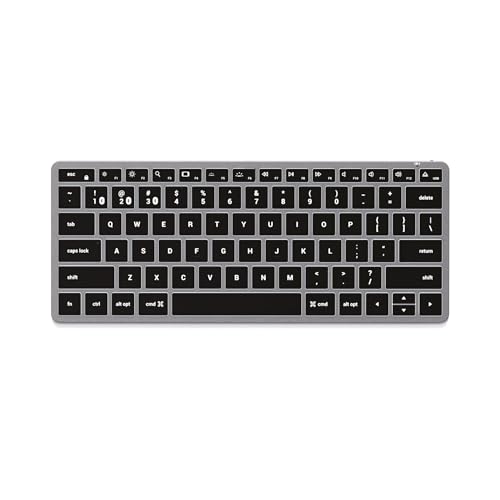
Satechi Slim X1 Bluetooth Backlit Keyboard (Space Gray)
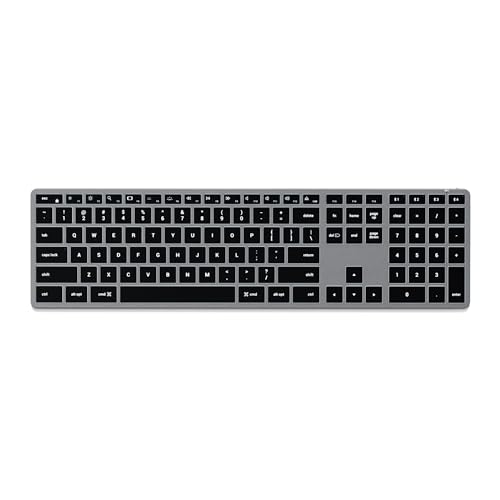
Satechi Slim X3 Bluetooth Backlit Keyboard (Space Gray)

Satechi SM3 Mechanical Keyboard (Dark Gray/Gray)
Satechi Slim EX1 Wireless Keyboard (Space Black)
Satechi SM1 75% Mechanical Keyboard (Dark Gray/Gray)

Satechi Slim EX3 Wireless Keyboard (Space Black)
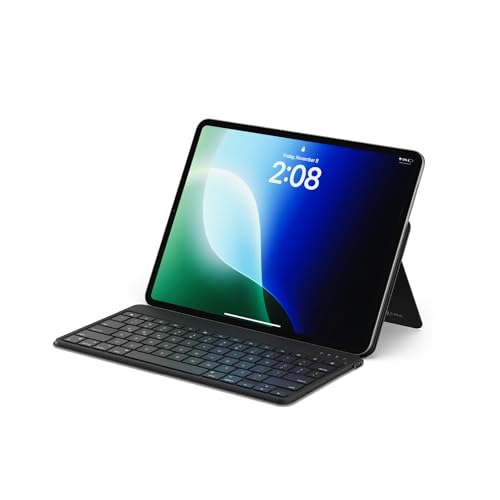
Satechi OntheGo Bluetooth Keyboard (Black)
The Strengths Of Each Pick
For someone whose idea of a workstation involves oscillators and patch cables rather than spreadsheets, the Matriarch occupies a corner of this category that nothing else on the list touches. It is a semi-modular paraphonic analog synth (paraphonic meaning it can play more than one note per voice through a shared signal path) with 49 full-size keys that respond to both velocity (how hard you strike a key) and aftertouch (additional pressure applied after the note is held). In a home studio that doubles as a creative escape hatch, the half-modular layout invites hands-on sound design without demanding a rack of outboard gear.
Compared to the productivity boards further down this list, the Matriarch operates on a completely different axis. It does not pair with a phone or jump between operating systems. It rewards owners who enjoy routing signals with 90 patch points, programming sequences, and sculpting stereo delays by ear.
Well-Handled Touches
- Semi-modular architecture with 90 patch points opens serious sound-design depth without forcing a fully modular setup.
- Velocity-sensitive keys with afterpressure give expressive players a more lifelike performance response.
- Stereo analog delay section adds lush, evolving repeats that suit ambient and cinematic work.
- Built-in sequencer and arpeggiator turn the unit into a self-contained workstation for sketching ideas.
- Paraphonic modes (mono, duo, and four-note) cover a useful spread of compositional textures from leads to layered pads.
Honest Caveats
- The learning curve is real: newcomers to modular synthesis may spend serious time studying signal flow before things click.
- Patching cables and small parts tend to migrate on a busy desk, so a dedicated storage tray pays off.
Key Product Details
Built With In Mind
Producers, sound designers, and electronic musicians who want an expressive analog centerpiece for a home or project studio.
Skip It When
Anyone looking for office productivity typing should jump straight to the Satechi boards below, since the Matriarch is purpose-built for music, not documents.
The Slim X1 is the kind of board that disappears into a backpack sleeve and shows up ready for work. Its compact tenkeyless footprint (no numeric keypad on the right) and aluminum shell match the visual language of Apple’s laptops, and the macOS-specific function keys keep shortcuts working as expected. For a digital nomad bouncing between a coffee shop, a hotel desk, and a home setup, this is a sensible everyday carry.
The trade-off versus the larger X3 below is clear: there is no numeric keypad. Spreadsheet-heavy users will feel that gap within minutes. For everyone else, the smaller size is the whole point.
What Makes Sense
- Multi-device Bluetooth pairing (up to three devices) means one keyboard can drive a MacBook, an iPad, and an iPhone in rotation.
- Aluminum chassis keeps the weight low while holding up to daily commuter abuse.
- Backlit keys help in dim hotel rooms and overnight flights.
- macOS-native shortcut row avoids the awkward Windows-key workarounds that plague generic Bluetooth boards.
Trade Offs
- No numeric keypad, so accountants and number crunchers will want the X3 instead.
- Tuned tightly to macOS; Windows users can use it, but key labeling on some shortcuts will not match.
Feature Snapshot
Whose Shelf It Belongs On
Travelers and Apple-centric users who want a slim, reliable keyboard that follows their devices from place to place.
Consider Something Else When
Number-heavy workflows point toward the Satechi Slim X3, which keeps the same Apple-friendly feel in a full-size frame.
The X3 takes everything useful about the smaller X1 and stretches it into a full-size layout. A numeric keypad returns, macOS shortcuts stay in their expected places, and ten levels of backlighting dial in for late-night work. In a permanent home-office setup, this is the natural pick over the more portable X1.
Side-by-side with the mechanical SM3 later in this list, the X3 keeps the low-profile scissor-switch feel rather than offering tactile mechanical feedback. That matters: typists who like a soft, laptop-like press tend to prefer this style.
What Stands Out
- Full-size layout with numeric keypad supports spreadsheet work and accounting apps without compromise.
- Ten adjustable backlight levels cover anything from a sunny desk to a darkened studio apartment.
- Aluminum chassis in Space Gray complements Apple device lineups.
- Multi-device Bluetooth pairing covers three simultaneous connections.
Things To Weigh
- Low-profile keys feel shallow for anyone migrating from a mechanical board.
- Larger footprint demands more desk real estate than the X1.
Best Suited To
macOS-focused home-office workers who type and crunch numbers equally, and want one keyboard that stays put on a permanent desk.
Look Elsewhere When
Typists craving physical feedback and a deeper key press should consider the Satechi SM3 mechanical board instead.
The SM3 brings mechanical switches into Satechi’s productivity line, and it does so without forcing a chunky enthusiast footprint. Its low-profile brown switches offer tactile feedback, meaning a small physical bump on each press, without the loud click of blue switches. With 108 keys and triple-connection support, the board pulls double duty for typists, coders, and anyone juggling multiple computers at once.
Unlike the SM1 further down the list, this one ships in a full 108-key layout with a numeric keypad. Build-wise, it leans into an aluminum frame that should handle years of daily typing.
What Earns Its Place
- Triple connection (Bluetooth 5.0, 2.4 GHz USB receiver, and wired USB-C) lets one keyboard command up to four devices.
- Low-profile brown mechanical switches give satisfying tactile feedback without the noise of full-height mechanicals.
- White LED backlighting keeps the keys readable in low-light setups.
- Removable keycaps make cleaning far less painful over years of use.
- Aluminum chassis adds reassuring heft on the desk.
Points To Keep In Mind
- Heavier than the slim scissor-switch boards above, so it is less of a travel companion.
- Some users may want a software layer for deeper key remapping, depending on workflow.
Quick Technical Notes
Best Suited To
Heavy typists, coders, and mixed-OS households who want a sturdy mechanical board that stays put and handles everything from emails to spreadsheets.
Swap It Out When
Anyone wanting a more compact mechanical feel should check the Satechi SM1 75% layout, which trims the footprint without dropping the switches.
The Slim EX1 leans into a minimalist, low-noise ethos that fits modern desks where open shelving and shared spaces rule. Its four-in-one connectivity (three Bluetooth channels plus a 2.4 GHz receiver) lets a single board drive a Mac, a Windows PC, a tablet, and a phone with no cable juggling. For someone working in a small apartment or a hot-desk office, that flexibility earns its place fast.
The EX1 sits between the slim X-series and the mechanical SM boards. It does not pretend to be mechanical, and it does not need to. The quiet scissor-switch feel is the feature.
Bright Spots
- Four simultaneous connections (three Bluetooth plus 2.4 GHz) cover Mac, Windows, tablet, and phone in one board.
- Low-profile keys keep typing quiet, a real plus near shared walls or in libraries.
- Compact footprint leaves more room for notebooks, trackpads, or a coffee cup on a tight desk.
- Cross-platform compatibility avoids the macOS-locked feel of the X1 and X3.
Where It May Fall Short
- No numeric keypad, so heavy number entry feels limited.
- Lacks the tactile feedback that mechanical fans want for long typing sessions.
The Right Fit
Minimalists and hybrid-OS workers in small or shared spaces who want a quiet, compact board that swaps between four devices without fuss.
Consider Something Else When
If a number pad is non-negotiable, the Satechi X3 covers that ground while staying slim and wireless.
The SM1 trims the SM3 down to a 75% layout, which keeps the function row and arrow cluster while dropping the numpad and tightening the frame. That makes it a sweet spot for writers and developers who want mechanical feel without surrendering desk space. Pairing via Bluetooth or the included USB receiver keeps the setup flexible.
Compared to the full-size SM3, the SM1 trades number-crunching real estate for compactness. For anyone whose right hand lives on the mouse more than the numpad, that is the right trade.
Useful Touches
- Low-profile brown mechanical switches deliver tactile feedback without the bulk of standard mechanicals.
- 84 keys in a 75% layout save desk space while preserving arrows and a function row.
- Removable keycaps help with cleaning dust, crumbs, and the occasional coffee splash.
- Quad-device pairing (Bluetooth, USB receiver, wired modes) supports mixed-platform workflows.
Trade Offs
- No numeric keypad, which accountants and data-entry users will notice immediately.
- More compact layouts sometimes have a steeper learning curve for users coming from full-size boards.
The Right Fit
Writers, students, and developers who want a tactile mechanical feel in a smaller footprint that fits a cramped desk or a coffee shop table.
Look Elsewhere When
Number-heavy work calls for the Satechi SM3, which keeps the same switch feel in a full-size frame.
The Slim EX3 takes the minimalist DNA of the EX1 and stretches it just enough to feel more like a daily workhorse. Its quiet low-profile keys, cross-platform support, and slim aluminum build make it an easy fit on a permanent desk where someone works across Mac, Windows, and a tablet without thinking about it. In a hybrid home-and-office routine, this is a board that earns its keep.
Compared to the EX1, the EX3 trades compactness for a slightly more spacious typing surface. For most desk setups, that is the better compromise.
Real-World Strengths
- Bluetooth plus 2.4 GHz connectivity supports cross-platform pairing across a laptop, tablet, and phone.
- Low-profile scissor switches keep typing quiet in shared spaces.
- Slim aluminum build complements Apple-leaning and minimalist desk setups.
- Compact form factor still leaves room for a mouse and notebook alongside it.
Some Limits To Know
- No dedicated numeric keypad, which limits rapid data entry.
- Limited tactile feedback compared to mechanical alternatives like the SM1 or SM3.
Made For
Hybrid workers running mixed-OS setups who want a quiet, low-profile keyboard that handles daily typing across multiple devices without drama.
Reach For A Different Pick When
Mechanical keyboard devotees will be happier with the Satechi SM1, which delivers tactile feedback in a similarly compact footprint.
The OntheGo board was built around a specific kind of workspace: a tablet propped on a café table, a phone turned into a second screen, maybe a laptop open in a tight airline tray. It pairs with up to three Bluetooth devices and ships with a built-in stand that props a phone or small tablet at a more ergonomic viewing angle. In a travel bag, it earns its slot fast.
Versus the larger X1, the OntheGo trades some typing comfort for portability. Versus a full mechanical board, it is in a different category entirely. The honest read is that this board does one thing well: getting a tablet setup closer to a laptop-like typing experience.
Useful Strengths
- Built-in stand lifts a phone or tablet to a more comfortable viewing angle for long sessions.
- Triple-device Bluetooth pairing covers an iPad, a phone, and a laptop on the fly.
- Low-profile scissor switches stay quiet in shared workspaces and travel settings.
- Reinforced metal hinge suggests it can handle being tossed into a daily-carry bag.
Points To Note
- Compact layout omits a numeric keypad, which limits data entry speed.
- Key feel is shallower than a mechanical board, so long-form typists may want more travel.
Feature Snapshot
Who Should Grab It
Tablet-first commuters, students, and remote workers who want a quiet, portable keyboard with a built-in stand for phone or tablet typing sessions.
Look Elsewhere When
Anyone wanting full-size typing comfort at a permanent desk should pick the Satechi X3, which keeps Apple-friendly shortcuts and adds a numeric keypad.
What Matters Most Before Choosing Keyboard Workstations
The first question to settle is whether the workstation is for making music, writing code, or simply driving a laptop through long days. A paraphonic analog synth like the Matriarch is a creative instrument first and foremost, while the Satechi boards in this roundup are productivity tools dressed for modern, mixed-device desks.
Layout comes next. Full-size boards with a numeric keypad suit spreadsheet-heavy work, while tenkeyless or 75% layouts free up desk space for a mouse or a notebook. Mechanical switches add tactile feedback and noise; low-profile scissor switches stay quiet and travel-friendly. For shared workspaces or library sessions, quieter is usually better.
Connectivity also matters. Bluetooth pairing across two, three, or four devices turns one keyboard into a multi-platform hub. Boards with a 2.4 GHz USB receiver tend to feel more responsive for gaming-style tasks, while wired USB-C keeps things simple at a permanent desk. Build materials like aluminum chassis shrug off daily commuting in ways that plastic shells rarely do, though the weight trade-off is worth weighing.
Smart Habits For Choosing Keyboard Workstations
Hidden Buying Traps
A common mistake is buying a board tuned to one operating system and expecting it to feel native on another. The macOS-leaning X1 and X3 are obvious culprits: their shortcut row assumes Mac muscle memory. Cross-platform boards like the EX1, EX3, SM1, and SM3 sidestep that frustration for mixed households.
Another trap is fixating on switch type without considering noise levels. Brown mechanical switches feel great for typing, but a shared apartment or a quiet office may push someone toward a low-profile scissor board instead. The reverse is also true: scissor-switch users who travel often may eventually miss the tactile bump of a mechanical board during long writing sessions.
The Upgrade Payoff
Higher-tier keyboards in this category tend to earn their keep through materials and flexibility. Aluminum chassis resist flex and wear, removable keycaps make cleaning realistic, and multi-device Bluetooth support turns one peripheral into a small switching station. The cost gap from a basic wireless board to a feature-rich model often comes down to whether the board will sit on a single desk for years or bounce between bags and rooms.
For music makers, the upgrade calculus works differently. Stepping up to a semi-modular paraphonic synth means moving from preset-driven sounds to fully patchable architecture, which is a leap rather than a small bump.
Frequently Asked Questions
What counts as a keyboard workstation?
In music gear, a keyboard workstation bundles sound generation, sequencing, and performance controls into one instrument. In productivity contexts, the term covers keyboards that pair with multiple devices, switch quickly between them, and support long typing sessions without drama.
Are mechanical switches always louder than scissor switches?
Generally, yes. Brown mechanical switches offer tactile feedback with moderate noise, while low-profile scissor switches stay closer to the quiet, shallow feel of a laptop keyboard. Acoustic environments often decide which feels right.
Do I need a numeric keypad?
Spreadsheet users, accountants, and data-entry workers usually do. Writers, developers, and people who travel with a keyboard often skip the numpad to save space.
Can one keyboard really pair with multiple devices?
Yes, every Satechi board in this roundup supports Bluetooth pairing across multiple devices, and several add a 2.4 GHz USB receiver or a wired USB-C connection for even more flexibility.
Is the MOOG Matriarch a good fit for beginners?
It rewards curiosity, but the modular workflow has a learning curve. Beginners comfortable with experimenting by ear will find a lot to explore, while anyone seeking instant presets may prefer a simpler synth first.
Closing Remarks
The right pick here depends entirely on the workstation someone is actually running. A producer chasing warm analog textures will find a very different answer than a writer juggling three devices on a tiny desk. Match the layout, switch feel, and connectivity to the real routine, and any of these boards will pull its weight.