Choosing a keyboard used to be simple, but the category has splintered. Some folks need a quiet wired board for a call-heavy office, others want a punchy mechanical deck for late-night matches, and plenty of people just want something that disappears under their hands while they type all day. I put together this shortlist to cover those everyday scenarios, pulling in office-friendly wired picks, ergonomic split designs, two business-focused mice for mixed setups, and a few mechanical options for people who care about how the keys feel.
How The Shortlist Stacks Up

Logitech Signature Slim Wired K620 for Business Full-Size Keyboard (Graphite)
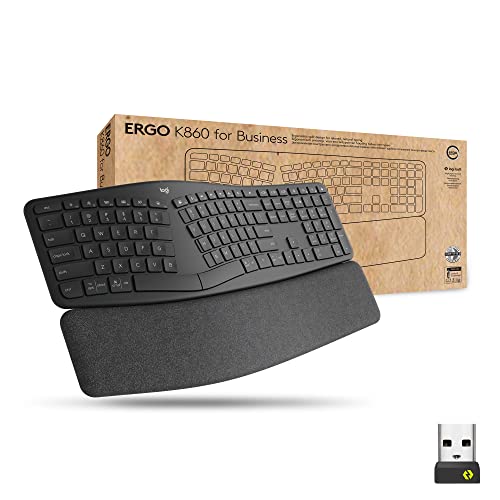
Logitech Ergo K860 Split for Business Wireless Keyboard (Graphite)

Logitech MX Master 4 for Business Wireless Mouse (Graphite)

MOTOSPEED GK82 RGB Mechanical Gaming Keyboard (Tactile Blue)

MOFII Wireless Keyboard and Mouse Combo (Black Purple Gradient)

MOFII Wireless Keyboard and Mouse Combo (Black Blue Gradient)
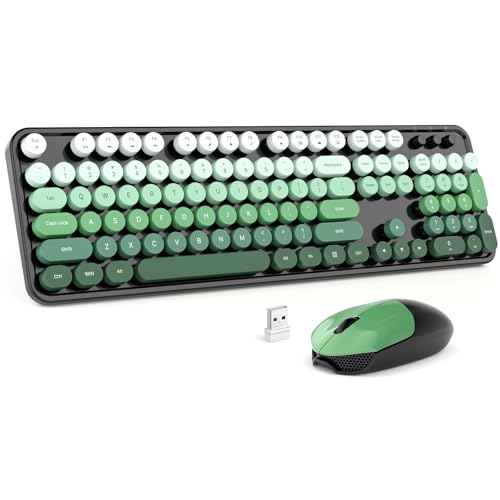
MOFII Wireless Keyboard and Mouse Combo (Black Green Gradient)

Logitech Mobi Fold for Business Foldable Wireless Mouse (Graphite)

Razer Huntsman Gaming Keyboard (Quartz Pink)
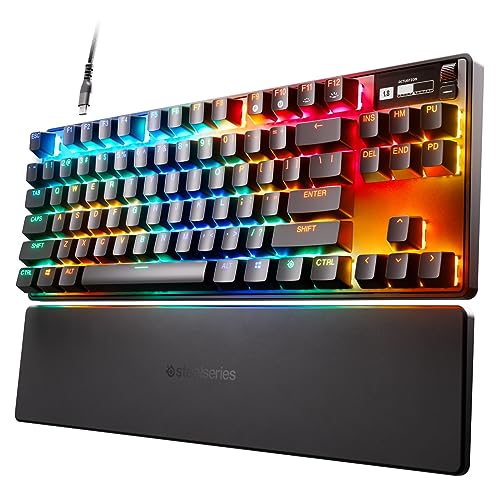
SteelSeries Apex Pro TKL HyperMagnetic Gaming Keyboard
More On The Choices That Made The List
The K620 is the kind of board that disappears under your hands, which is exactly what most office workers want. Low-profile scissor keys with a slight scoop recreate the laptop typing feel on a full-size frame, so touch typists don’t need to retrain muscle memory. IT teams get a USB-C wired connection that sidesteps pairing headaches and battery worries across a fleet.
Compared to the wireless K860 covered later, this K620 trades the split ergonomics for a traditional layout that fits hot-desking and shared workstations. A multi-OS toggle lets the same hardware ship to Windows, ChromeOS, and macOS desks without reconfiguration, which matters when you’re provisioning dozens of seats. Customizable shortcut keys, including an AI launcher and meeting controls, add genuine day-to-day utility beyond the standard F-row.
Positive Points
- Laptop-style low-profile keys keep typing fatigue low during long email threads.
- USB-C wired link removes charging routines and Bluetooth dropouts in busy offices.
- Multi-OS toggle simplifies deployment across mixed Windows, macOS, and ChromeOS environments.
- Programmable shortcut keys, including a meeting-mute key, save real time on calls.
Things To Consider
- Wired only, so desk cable management takes a bit more planning than wireless alternatives.
- No split frame, so power typists logging six-hour days may eventually want the K860’s palm support.
Key Specs
Best Suited To
Office teams and IT buyers outfitting shared desks who want a quiet, plug-and-play full-size board that works across operating systems.
Look Elsewhere When
Daily typists logging many hours should look at the Logitech Ergo K860 Split, whose palm rest and split frame reduce wrist strain more aggressively.
The K860 leans hard into ergonomics with a curved, split keyframe and an integrated palm rest that keeps wrists in a more neutral position. For someone typing reports, code, or copy all day, that small geometry change adds up to noticeably less shoulder tension by late afternoon. Wireless connectivity means one less cable on the desk, and the design slides cleanly next to a sit-stand monitor arm.
Where the K620 above prioritizes familiar laptop-style typing, this K860 asks you to adapt to a tented, split layout. The learning curve is real, and for the first week touch typists sometimes fumble the center keys. Once adjusted, though, the palm rest support reduces the wrist extension that causes most repetitive strain complaints.
Good Reasons To Consider
- Split, curved frame positions wrists more naturally for marathon typing sessions.
- Integrated palm rest removes the need to buy a separate accessory.
- Wireless connection keeps the desk clean and pairs with multiple hosts via Logi Bolt or Bluetooth.
Trade Offs
- The non-standard layout takes a few days of adjustment for touch typists.
- No dedicated numeric keypad, so accountants and data entry workers may miss a numpad.
- Battery-powered, which means occasional recharging or replacement over the board’s life.
Who Will Love This
Writers, developers, and analysts who type continuously and want a science-driven ergonomic layout that softens the daily grind on their shoulders and wrists.
A Better Fit Elsewhere
Shared workspaces that need a familiar layout should look at the Logitech Signature Slim Wired K620, which skips the split frame in favor of a more traditional typing geometry.
Yes, the MX Master 4 is technically a mouse, but no keyboard roundup is complete without acknowledging the input device on the other side of your hand. Pairing it with the K620 above creates a cohesive Logitech desk setup where both tools use the same Bolt receiver. Quiet Click technology keeps the office library-friendly, while the MagSpeed scroll wheel chews through long documents in seconds.
The MX Master 4 isn’t a one-trick peripheral. Haptic feedback on the Actions Ring delivers subtle notifications without audible interruptions, which works well for people in glass-walled conference rooms. An 8K DPI Darkfield sensor handles glass desks and glossy surfaces that frustrate cheaper mice, and the sculpted right-handed shape supports longer use than flat travel mice.
A Few Highlights
- Quiet Clicks keep shared workspaces calm without losing tactile response.
- MagSpeed scroll wheel shifts between precise and free-spin modes automatically.
- USB-C charging simplifies top-ups using the same cable as the K620 keyboard.
Honest Caveats
- Right-handed ergonomic shape excludes left-handed users from a comfortable grip.
- Larger footprint than a basic travel mouse, so it stays put on the desk rather than in a laptop bag.
Perfect Match For
Knowledge workers who already favor the slim K620 or K860 and want a flagship pointer that complements the keyboard’s enterprise feel.
Consider Something Else When
Road warriors who need something that disappears into a backpack should look at the Logitech Mobi Fold covered later, which collapses flat for travel.
The GK82 lands in that sweet spot between a starter board and a hardcore custom build. Hot-swappable sockets mean a buyer can pull out the included tactile blue switches and try linear or silent alternatives without soldering, which is rare at this level. An aluminum base plate adds a satisfying weight that keeps the board from sliding during fast WASD movements.
Noise-absorbing foams tucked under the keys take the edge off the clicky blue switch profile, softening the acoustics for shared rooms. RGB backlighting runs the full spectrum, though owners commonly cycle through a handful of presets rather than micromanaging per-key colors. At 82 keys, the layout drops the numpad to free up mouse space, which competitive FPS players tend to prefer.
Bright Spots
- Hot-swap switch sockets let curious owners experiment with different switch types.
- Aluminum base adds heft and durability for desktop gaming setups.
- Internal foam dampening reduces echo compared to bare mechanical boards.
Softer Spots
- Wired only, so cable routing on a packed gaming desk requires a bit of planning.
- TKL layout means no numpad, which limits the board for spreadsheet-heavy work.
Quick Technical Notes
Right Fit For
Casual gamers and curious tinkerers who want hot-swap flexibility without paying for a full custom build.
Skip It When
Esports players chasing adjustable actuation and rapid trigger should look at the SteelSeries Apex Pro TKL covered later, which offers per-key tuning.
MOFII leans into the retro typewriter aesthetic with round keycaps and a soft gradient finish, so the keyboard doubles as desk decor. Detachable caps make cleaning under the keys far less painful than sealed chiclet designs, and the foldable tilt stand lets you angle the board without buying a separate wrist accessory. The matching mouse carries the same color story, which keeps a small desk looking intentional.
A single 2.4 GHz USB dongle handles both the keyboard and mouse, so the only port claim is one USB slot. Owners commonly report the wireless connection stays stable at typical desk distances, though thick walls or USB hubs can shorten the effective range. Full-size layout means the numpad stays available for light bookkeeping.
Practical Advantages
- Single USB receiver pairs both keyboard and mouse, leaving ports free.
- Detachable round keycaps simplify cleaning around crumbs.
- Gradient colorways turn a utilitarian accessory into desk styling.
Points To Note
- Membrane-style switches feel quieter than mechanicals but lack the crisp feedback some typists prefer.
- Gradient finishes may show fingerprints on glossy keycap surfaces over time.
Best Suited To
Aesthetic-driven home offices where the keyboard sits out in the open and contributes to the room’s color palette.
Swap It Out When
Competitive typists who want mechanical feedback should look at the MOTOSPEED GK82 covered earlier, which swaps the design-first approach for tactile blue switches.
This MOFII combo leans cooler with a black-blue gradient that fits neatly into dorm desks and study nooks. Same 2.4 GHz plug-and-play receiver covers both pieces, so a laptop only needs one free USB-A slot to gain a full-size typing rig. The round keycaps reduce the visual noise that chunky gaming boards bring to small rooms.
Functionally identical to the purple variant earlier, the choice between this and its siblings comes down to color taste. A foldable stand and anti-slip base pad give the keyboard a stable platform on a glass or laminate dorm desk, which can be slippery with cheaper kits.
A Few Strong Suits
- Plug-and-play single dongle cuts setup time for students and casual users.
- Compact full-size layout fits smaller desks without sacrificing the numpad.
- Anti-slip pad keeps the board planted during quick note-taking.
Worth Bearing In Mind
- Membrane key feel suits general typing but won’t satisfy mechanical keyboard enthusiasts.
Who Should Grab It
Students and remote learners who want a colorful, low-effort upgrade from a laptop keyboard for essay writing and research.
Reach For A Different Pick When
Coders and engineering students who hammer keys all day should consider the Logitech Ergo K860 Split for better wrist posture during long study sessions.
The green gradient variant rounds out the MOFII trio with a calmer color profile that suits traditional home offices. Like its purple and blue siblings, the combo shares a single 2.4 GHz receiver between keyboard and mouse, which keeps the desktop uncluttered. The full-size layout includes a numpad, useful for anyone managing budgets or light bookkeeping from home.
The foldable tilt bar adds a mild ergonomic lift without committing to a full split keyboard like the K860 covered earlier. Round, detachable caps keep the typing feel gentle, and the wireless mouse matches the keyboard’s color story for a tidy desk.
Everyday Perks
- Single dongle reduces USB port demand on slim laptops.
- Detachable keycaps make periodic cleaning far easier than sealed designs.
Things To Weigh Up
- Membrane switches feel softer than mechanical, so heavy typists may want crisper feedback.
- Plastic construction feels lighter than the metal gaming boards earlier in this list.
Whose Shelf It Belongs On
Casual home office setups where the keyboard complements the room’s design and stays light on the desk.
Where A Sibling Pick Shines
Power users who need stronger wrist support should look at the Logitech Ergo K860 Split, which trades design flair for a more ergonomic typing posture.
The Mobi Fold is the rare peripheral that genuinely disappears into a laptop bag. It collapses flat for travel and pops back into a usable shape at a coffee shop or hotel desk, solving the perennial traveler’s problem of lugging a chunky mouse. A silicone sleeve and stain-resistant coating aim to absorb the inevitable bumps and coffee splashes of mobile life.
Pairing it with the K620 wired keyboard from earlier creates an odd but workable travel setup, since the keyboard stays at the home base while the foldable mouse handles the road. The MX Master 4 covered earlier offers more buttons and haptics, but it doesn’t fold, so it lives on the desk permanently.
Key Advantages
- Folding form factor shrinks the footprint for travel bags and laptop sleeves.
- Stain-resistant coating helps the mouse survive airport lounges and shared desks.
Honest Caveats
- Foldable hinge introduces more moving parts than a solid shell, so longevity depends on careful handling.
- Smaller unfolded size may feel cramped for users with larger hands during long sessions.
Feature Snapshot
Right Fit For
Frequent travelers and consultants who need a reliable pointer that fits in a laptop sleeve without sacrificing daily comfort.
Not Your Match When
Desktop-bound professionals with larger hands should look at the Logitech MX Master 4 for a sculpted shape that supports longer sessions.
The Huntsman leans on Razer’s optical switches, which use light beams to register key presses rather than physical metal contacts. The practical difference is shorter actuation travel and consistent feel across the lifetime of the switch, since there’s no metal leaf to wear out. For fast-paced shooters where milliseconds matter, that responsiveness shows up immediately.
A matte aluminum top plate stiffens the chassis and resists flex during aggressive key mashing. Chroma RGB lighting ties into a broad ecosystem of compatible games and partner hardware, so the keyboard often syncs with other gear on a battlestation. A programmable macro layer rounds out the package for players who bind complex ability combos.
Notable Gains
- Optical switch design registers presses at a shorter travel distance than traditional mechanical switches.
- Aluminum top frame adds rigidity and a premium desk presence.
- Onboard memory and cloud profiles save per-game setups across machines.
Where It May Fall Short
- Clicky optical switches are loud, so shared bedrooms or thin-walled apartments may complain.
- Wired connection adds cable drag for players who like to push their keyboard around the desk.
Quick Facts
Built With In Mind
Competitive FPS players who want every advantage in switch speed and can handle a louder click profile.
A Better Fit Elsewhere
Creators and streamers who also type for a living should look at the SteelSeries Apex Pro TKL covered next, which offers adjustable actuation for both gaming and writing.
The Apex Pro TKL is the kind of board that makes most other mechanicals feel one-dimensional. Its OmniPoint 2.0 switches let owners tune the actuation point of every individual key from 0.1 mm to 4.0 mm, so WASD can trigger on a feather touch while modifier keys require a deeper press. Rapid Trigger, a feature that resets keys based on travel distance rather than a fixed point, helps competitive players chain counter-strafing inputs without lifting fingers fully off the keys.
Compared to the Razer Huntsman covered earlier, the Apex Pro trades the clicky fixed actuation for tunable magnetic switches, which suits mixed-use players who also type for work. An OLED screen on the board surfaces notifications, profile switching, and per-key readouts without alt-tabbing. PBT keycaps resist the shine that ABS caps develop after months of typing.
The Upside
- Per-key actuation adjustment tailors responsiveness to specific games and key roles.
- Rapid Trigger reduces latency for counter-strafing and movement-heavy shooters.
- OLED display surfaces profile info without leaving the game.
- PBT keycaps resist shine from extended daily typing.
Worth Noting
- TKL layout drops the numpad, so spreadsheet-heavy workflows lose dedicated number entry.
- Software ecosystem required to unlock most features, which adds setup time for non-technical users.
Feature Rundown
Best Suited To
Esports-focused players and hybrid work-and-game users who want one board that handles both precise typing and twitch gameplay.
Consider Something Else When
Budget-conscious buyers should consider the MOTOSPEED GK82 from earlier, which offers hot-swap flexibility and mechanical feel without the premium magnetic price.
Factors That Matter When Choosing Your Next Keyboard
Match The Switch To Your Typing Style
Switches determine how a keyboard actually feels. Linear switches press smoothly with no bump, tactile switches offer a small feedback bump on actuation, and clicky switches add an audible click. Office users who share rooms often prefer linear or tactile-soft options, while competitive gamers typically chase the fast, consistent feel of optical or magnetic switches.
Weigh Wired Against Wireless Carefully
Wired boards like the Logitech Signature Slim K620 never need charging and avoid Bluetooth pairing headaches, which suits managed IT fleets. Wireless boards free up desk space and let you reposition freely, but they ask you to remember battery or recharge cycles. Think about whether you’ll use the keyboard in one fixed spot or shuttle it between rooms.
Decide Between Full-Size, TKL, And Compact
Full-size layouts include the numpad and are great for finance work and data entry. Tenkeyless, or TKL, drops the numpad to free mouse space, which competitive gamers usually prefer. Compact 60% and 75% layouts travel well but force muscle-memory adjustments for arrow keys and function rows.
Plan For Ergonomics And Layout
Long-hour typists often feel a real difference from split, tented keyboards like the Logitech K860. Palm rests reduce wrist extension, and tenting reduces forearm pronation. These features add size and a learning curve, so most people benefit from gradual adjustments rather than a full switch on day one.
Key Considerations Across These Picks
Pitfalls Shoppers Hit
Skipping the switch test is one of the most common mistakes. Specs only tell you the switch family, not how the keyboard actually feels under your fingers, so reading multiple ownership reports helps. Another trap is buying a mechanical board for a shared bedroom and discovering too late that clicky switches wake the household.
Ignoring cable and dongle requirements also catches people out. Some wireless boards need an open USB-A port for the receiver, which older slim laptops don’t always have. Confirming your machine’s available ports prevents the frustration of unboxing a board you can’t connect.
What The Higher Tier Buys
Premium boards earn their keep with per-key customization, magnetic switches, and OLED displays. The SteelSeries Apex Pro TKL proves the value: adjustable actuation and Rapid Trigger make the same keyboard sharper for gaming and gentler for typing. Those benefits only matter to people who already know what they want from their input devices, so newcomers often do better with a mid-tier board first.
Build materials also separate tiers. Aluminum top plates, PBT keycaps, and foam dampening reduce noise and extend lifespan, while plastic chassis boards feel lighter and often wear faster. For a daily-driver keyboard you intend to keep for years, those construction upgrades usually justify the higher cost.
Frequently Asked Questions
What switch type is best for typing and gaming?
Most people who do both end up on linear or tactile switches, since they balance speed and feedback without the noise of clicky switches. Magnetic switches in boards like the Apex Pro TKL add per-key tuning for those who want both precision gaming and comfortable typing.
Are wireless keyboards reliable for office work?
Modern wireless boards using Logi Bolt or quality 2.4 GHz receivers stay stable across typical office distances. Connection drops usually trace back to USB hubs, crowded Bluetooth environments, or depleted batteries, all of which a simple wired backup avoids.
How important is a palm rest?
A palm rest keeps wrists in a more neutral position during long sessions, which reduces the extension that causes fatigue. The benefit shows up most for people who type four or more hours at a stretch, while lighter users may not notice a meaningful difference.
Do I need a numpad on my keyboard?
Data entry, finance, and engineering work leans heavily on a numpad, so full-size layouts like the K620 serve those roles well. Gamers and writers typically prefer tenkeyless boards that free up mouse space, which is why most gaming picks in this list drop the numpad.
How long should a quality keyboard last?
Most membrane and scissor-switch boards run three to five years under daily office use. Mechanical and magnetic switches are typically rated for tens of millions of key presses, so the chassis, cable, and keycaps usually wear out before the switches themselves.
Bottom Line
The right keyboard comes down to where and how you type. Office workers tend to land on the quiet wired K620 or the ergonomic K860, while gamers gravitate to the Huntsman or the Apex Pro TKL. Pick the form factor and switch profile that match your real desk and daily routine, and the rest of the specs tend to fall into place.