Long nails and laptop keys have a famously tense relationship. A raised acrylic tip catches on the edge of a chiclet-style switch, a sharp corner slips between keys, and suddenly a paragraph turns into a typo graveyard. The picks below focus on layouts, key shapes, and accessories that treat longer nails as a normal typing condition rather than an inconvenience. Whether the goal is a cushioned palm rest, a quiet scissor-switch travel, or a thin silicone skin that smooths over sharp edges, each option addresses a different pain point. I leaned on the source specs and common ownership patterns to sort the real strengths from the filler.
A Quick View Of The Lineup

LEZE Keyboard Cover for Dell Latitude & Precision Laptops – Colorful Skin

CaseBuy Keyboard Cover Skin for Acer Chromebook 315/715/317 – Gradual Pink

SABLUTE Ergonomic Wireless Keyboard and Mouse Combo – Faux Lambskin Palm Rest
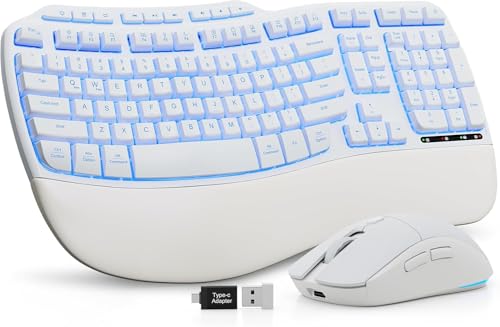
SABLUTE White Wireless Keyboard and Mouse Combo – Ergo Wave w/ Cushioned Palm Rest

MOSISO Keyboard Cover for MacBook Pro 13 inch M2/M1

Seaciyan Purple Retro Typewriter Wireless Keyboard and Mouse Combo

SABLUTE Wireless Backlit Keyboard and Mouse Combo – Rechargeable Quiet Set
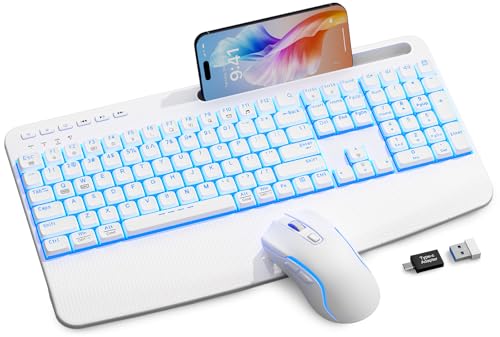
SABLUTE White Wireless Keyboard and Mouse Combo – 4000mAh w/ Wrist Rest & Phone Holder
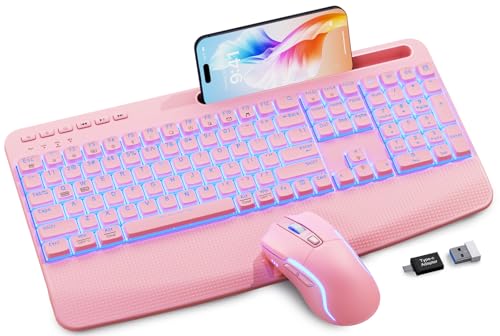
SABLUTE Pink Wireless Keyboard and Mouse Combo – 4000mAh w/ Wrist Rest & Phone Holder

SABLUTE Purple Wireless Keyboard and Mouse Combo – 4000mAh w/ Wrist Rest & Phone Holder
What Each Pick Brings To The Table
A thin silicone skin is often the first defense against long-nail snags on a laptop deck, and the LEZE cover is built specifically for the Dell Latitude and Precision 15.6-inch line. It lays flat over each chiclet-style key, smoothing the sharp gap between caps where an acrylic tip tends to wedge. Owners working from shared desks or cafés can toss the laptop in a bag without the worry of keys wearing down the legend print, since the film acts as a barrier.
Compatibility is unusually broad, covering Latitude 3550, 3540, 5550, 5540, 5530, 5531, 5520, 5521 and Precision 3590, 3591, 3580, 3581, 3560, 3570, 3561, 3571. That wide year range (2021 through 2024) helps anyone upgrading between generations reuse the same accessory.
What Pays Off
- Ultra-thin film keeps the laptop’s backlight visible through the keys, so night typing stays usable.
- Broad Dell Latitude and Precision model coverage reduces the guesswork when matching to a specific laptop.
- Silicone layer dampens the click sound during heavy typing sessions, a quiet bonus in shared spaces.
- Protects printed legends from wearing off, which matters for heavy daily typists who rely on shortcuts.
Trade Offs
- Fit is model-specific; a Latitude 5420 or any non-listed Dell will not align correctly.
- Some typists notice a slightly mushier feel through the film, a common trade-off for any silicone skin.
Right Fit For
Owners of the listed Dell Latitude 15.6-inch or Precision 15.6-inch models who type often on the go and want a low-profile guard for their keys and nails.
Look Elsewhere When
The MOSISO cover for MacBook Pro 13 inch M2/M1 is a better match if the laptop in question is a 2020-2023 MacBook Pro rather than a Dell.
The CaseBuy cover targets a very specific niche: Acer Chromebook owners who need a skin that fits a numeric keypad layout. The gradual pink finish adds personality without overwhelming a school-issued or work-issued device. For longer nails, the smooth silicone plane reduces the catching that happens when an acrylic tip slips between adjacent chiclet keys on the numeric row.
It is built for the Acer Chromebook 315 CB315-3HT, 715 CB715, and the larger 17.3-inch 317 CB317, all of which include the dedicated number pad. Anyone outside that model range should stop here and look at a different accessory.
Noteworthy Benefits
- Numeric keypad layout is covered, which most generic skins skip entirely.
- Soft pink fade gives the deck a calm, low-glare look for long writing sessions.
- Acts as a dust barrier in classroom or shared-cart environments.
Points To Keep In Mind
- Will not fit Acer Chromebook Spin 15.6 models or any Chromebook without a number pad.
- Buyers commonly confirm keyboard layout against the listing image before committing, since variants within the same Chromebook line vary.
Made For
Students or remote workers carrying an Acer Chromebook 315, 715, or 317 with a numeric keypad who want a soft, nail-friendly surface.
Skip It When
The LEZE cover is a better fit for Dell Latitude or Precision owners, since the CaseBuy design is exclusive to the listed Acer models.
The SABLUTE ergonomic combo earns its place by tackling long-nail typing from two angles at once. The split wave layout tilts the keys outward so fingers drop naturally rather than raking sideways across the deck, which keeps acrylic tips from scraping the key edges. The faux lambskin palm rest cushions the wrists during multi-hour writing blocks, reducing the strain that builds up when you compensate for long nails by pressing harder.
A built-in 4000mAh rechargeable battery powers the keyboard, and the unit pairs over a wireless connection to Windows, Mac, and Chrome OS. Backlighting helps in dim home offices, and the synthetic leather surface wipes clean easily if polish smudges transfer during a typing session.
Where It Helps
- Wave-shaped key alignment reduces sideways nail drag compared with a flat layout like the Seaciyan retro option.
- Faux lambskin palm rest is sweat-resistant, which matters for warm-handed typists during long days.
- Cross-platform support covers Windows, macOS, and Chrome OS without driver installs.
- Rechargeable 4000mAh battery cuts down on disposable cells, a small but real convenience win.
Worth Noting
- The wave shape takes a few days of adjustment for touch typists used to straight rows.
- Larger footprint than a tenkeyless board; small desk setups may struggle for mouse room.
Quick Facts
Who It Suits Best
Writers, editors, and remote staff who log four-plus hours of daily typing and want both ergonomic alignment and a soft palm surface.
Reach For A Different Pick When
The SABLUTE White Wireless Keyboard and Mouse Combo offers a similar layout in a brighter finish if the room runs more white and chrome than matte black.
For setups that lean bright and minimal, the white SABLUTE combo swaps the matte finish of the previous pick for a cleaner palette. The wave key alignment is identical, so the long-nail benefits carry over: fingers fall more directly onto each key instead of sweeping across the surface and catching on edges. The cushioned palm rest gives wrists a soft landing pad, which matters when acrylic tips force a slightly steeper finger angle.
The included mouse is tuned for quiet operation, a useful trait for shared bedrooms or open offices where a clicking mouse draws attention. A 2.4GHz wireless receiver handles the connection, and the keyboard works with Windows, Mac, and laptops alike.
Practical Advantages
- White finish stays neutral in photography setups and bright decor, a step beyond the darker SABLUTE ergonomic model.
- Silent mouse keeps click noise low for roommates and open-plan neighbors.
- Cushioned palm rest reduces wrist fatigue on deadline-driven typing days.
Trade Offs
- White surfaces show polish smudges and dust faster than darker boards; a microfiber wipe becomes part of the routine.
- Full-size layout still demands desk width, similar to the standard SABLUTE wave combo.
Best Suited To
Stylish home offices or content studios that want ergonomic comfort in a finish that photographs well.
Consider Something Else When
The Seaciyan Purple Retro Typewriter combo is a better pick for someone prioritizing visual flair over split ergonomics.
MacBook butterfly and scissor keyboards have notoriously tight tolerances, which is a real problem when longer nails wedge into the gaps between low-profile keys. The MOSISO skin is molded for the 13-inch MacBook Pro released between 2020 and 2023, covering M1 and M2 variants. The thin film rests over each keycap, smoothing the seam where two chiclet edges meet.
For anyone moving between a MacBook and an external display, the skin stays in place when the laptop closes, so it’s one less thing to remove before shutting the lid.
The Case For It
- Custom cut for MacBook Pro 13 M1 and M2 generations, including Touch Bar variants.
- Keeps crumbs and dust out of the tight key wells, which is where nail fragments often lodge.
- Lightweight enough to leave on during travel without adding noticeable bulk.
Less Ideal Details
- Not a fit for the MacBook Air or any 14-inch or 16-inch MacBook Pro.
- Long-term typing through the film can feel slightly dampened, a common silicone trade-off.
Feature Snapshot
Who Will Love This
MacBook Pro 13 owners who type directly on the built-in keyboard and want a barrier between their manicure and the low-profile keys.
Swap It Out When
An external combo like the SABLUTE Ergonomic Wireless set is a better choice for anyone who already docks the MacBook to an external monitor most of the day.
The Seaciyan retro combo leans hard into aesthetic charm with its rounded bubble keycaps and purple chassis. Bubble keys are notably more forgiving for long nails than flat chiclet designs: the raised dome gives an acrylic tip a clear target to land on instead of slipping between key edges. The included mouse matches the frame, which keeps the desk looking intentional rather than pieced together.
A single 2.4GHz receiver handles both peripherals, simplifying the setup for a tidy workstation. Anyone building a vanity-style desk or content creation backdrop will appreciate the visual cohesion.
The Helpful Details
- Rounded bubble keycaps give longer nails a defined landing spot, a real advantage over flat chiclet designs.
- Single receiver for keyboard and mouse cuts down on USB ports used.
- Distinctive purple finish stands out on camera and in styled office photos.
Potential Drawbacks
- Bubble keycaps are taller than standard chiclets, so the keyboard has a thicker profile on the desk.
- Retro styling is a visual commitment; minimalists may prefer the SABLUTE white or pink sets.
Perfect Match For
Aesthetic-focused home offices or content creators who want a typing deck that doubles as desk decor.
Not Your Match When
The SABLUTE ergonomic combo with the wave layout is better for anyone prioritizing wrist alignment over retro styling.
This SABLUTE set is the quietest option in the lineup, built around laptop-style scissor-switch keys that deliver a low-profile, soft press. Scissor switches sit flush with the deck, which is helpful for long nails because there’s no tall keycap edge to catch on an acrylic tip. The accompanying mouse carries a 750mAh rechargeable battery, while the keyboard uses a larger 4000mAh cell for longer daily use.
Backlighting helps in low-light rooms, and the low-profile design makes the keyboard easy to slip into a laptop bag or shift between work setups.
Benefits That Matter
- Scissor-switch keys keep the typing surface flat, removing the snag points common to mechanical switches.
- 4000mAh keyboard battery and 750mAh mouse battery handle heavy weekly use without constant recharging.
- Backlight supports dim rooms and late-night writing sessions.
Practical Considerations
- Lacks the cushioned palm rest included on the larger SABLUTE ergonomic combo, which may matter for long sessions.
- Low-profile keys offer less tactile feedback than taller switches; some typists miss the bump.
Right Fit For
Shared workspaces, late-night typists, and anyone who wants a quiet, slim keyboard that won’t catch on longer manicures.
Look Elsewhere When
The SABLUTE Ergonomic combo is a better fit if wrist support and a split layout matter more than switch type.
Where the SABLUTE Quiet set focuses on switch type, this white combo layers in two extras: a soft wrist rest and a built-in phone holder. For long nails, the wrist rest is the real draw, since it keeps the heel of the hand cushioned and prevents the fingers from angling awkwardly to compensate for stiff joints. Scissor-switch keys keep the typing surface flat, similar to the Quiet set above.
The integrated phone slot along the keyboard’s top edge is convenient for video calls or keeping notifications in view. The 4000mAh battery and backlit keys carry over from the rest of the SABLUTE family.
Standout Benefits
- Wrist rest supports longer typing sessions and reduces strain from over-flexing fingers.
- Phone holder keeps a device propped during calls, removing the need for a separate stand.
- White finish matches bright or minimalist office setups.
- Silent scissor switches keep the typing noise discreet.
Small Caveats
- Built-in phone holder may block part of the screen depending on monitor height.
- White chassis shows fingerprints and smudges from nail polish more readily than darker boards.
Feature Card
Who Should Grab It
Remote workers who juggle calls, long writing blocks, and multi-device desks where a phone holder earns its space.
Reach For A Different Pick When
The pink SABLUTE combo below offers the same feature set in a softer color for anyone who prefers a warmer palette.
The pink variant carries the same core spec sheet as the previous SABLUTE combo, swapping the white chassis for a soft rose finish that complements warmer desk setups. Scissor-switch keys, a 4000mAh battery, a wrist rest, and the integrated phone holder all return. The pink color reads as playful without veering into novelty territory.
For longer nails, the soft-touch wrist rest and flat scissor keys are the meaningful touches. The pink hue is forgiving when nail polish smudges transfer, since it tends to blend rather than show.
A Few Strong Suits
- Soft pink finish hides minor polish smudges better than the white SABLUTE variant.
- Same wrist rest and phone holder extras as the white version, with no missing features.
- Scissor-switch keys keep the surface flat and snag-free for acrylic or gel tips.
Honest Caveats
- Color choices are limited to the listed pink; anyone wanting a different shade needs to look at the purple option.
- Full-size layout demands desk depth similar to the other SABLUTE combos.
Built With In Mind
Stylish home offices or vanity desks that lean toward warm tones, soft textiles, and rose-gold hardware.
A Better Fit Elsewhere
The purple SABLUTE combo at #10 covers the same feature set for anyone who prefers a cooler finish on the same chassis.
The purple SABLUTE set rounds out the trio of color variants with the same spec backbone: scissor-switch keys, 4000mAh rechargeable battery, wrist rest, and integrated phone holder. The purple finish bridges pink-decor and white setups, which makes it a versatile pick for shared desks or rooms with mixed accent colors.
For long-nail typing, the meaningful detail is still the flat key surface and the cushioned palm support. The deeper hue also masks fingerprints from nail polish transfers more reliably than lighter boards, depending on polish color.
Useful Strengths
- Neutral purple finish suits mixed-color rooms and shared desks where pure pink or pure white feels too committed.
- Full feature set matches the white and pink SABLUTE combos without compromise.
- Scissor-switch layout keeps typing surface flat and gentle on longer nails.
Less-Strong Areas
- No mechanical key option for typists who prefer deeper key travel.
- Larger footprint than compact tenkeyless boards.
Whose Shelf It Belongs On
Anyone who wants the SABLUTE wrist-rest and phone-holder combo but prefers a color that sits between the white and pink options.
Not Your Match When
The Seaciyan retro typewriter combo is a better fit if retro bubble keycaps and a typewriter-style frame matter more than a wrist rest.
What To Look For Before Picking A Long-Nail Keyboard
Key Switch Type And Travel
Low-profile scissor switches and flat chiclet keys tend to treat long nails the kindest because there’s no tall cap edge to catch an acrylic tip. Mechanical switches offer great feedback but raise the lip between keys, and longer manicures can wedge into that gap. For most office work, a scissor-switch keyboard delivers enough tactile response without the snag risk. Taller keycaps, like the bubble design on the Seaciyan retro, are a separate story: the rounded dome actually helps nails land cleanly, since there’s a single defined target rather than a sharp corner.
Layout And Palm Support
Split wave layouts angle the keys outward so fingers drop straight down rather than raking sideways across the deck. That sideways raking is what causes nails to clip neighboring key edges, so a wave or ergonomic curve pays off for long nails. A cushioned palm rest is a quiet upgrade, since it keeps wrists neutral and reduces the over-flexing that strains fingers when compensating for stiff manicures.
Compatibility And Finish
Skin-style covers are model-specific, so verifying the exact laptop model number is non-negotiable. A skin for a Dell Latitude 5550 will not align with a Latitude 5420 or a Chromebook Spin 15.6. For external keyboards, finish matters more than people expect: lighter colors show polish smudges faster, while deeper purples and matte blacks are more forgiving between cleanings.
Connectivity And Extras
Wireless combos with a single USB receiver free up ports and keep the desk uncluttered. Built-in wrist rests and phone holders are useful if the desk doubles as a calls-and-writing station. None of these extras matter as much as switch type and layout, but they earn their cost on long workdays.
Things To Weigh Across These Picks
Common Shopping Slip Ups
The biggest trap is assuming any keyboard cover fits any laptop. Silicone skins are molded to specific layouts, including the presence or absence of a numeric keypad, so double-check the laptop model number against the listing before ordering. For external keyboards, don’t pick a wave layout expecting instant comfort; the learning curve is real, and the first few days of typing may feel slower.
Another common miss is overlooking the finish. A bright white keyboard on a desk with heavy daily nail work will show smudges faster than a darker or mid-tone board, so match the finish to the cleaning routine rather than just the photo on the listing.
What The Higher Tier Buys
Moving up the SABLUTE lineup from the basic Quiet set to the wrist-rest-and-phone-holder combos adds genuine ergonomic value, not just color. The cushioned palm rest reduces wrist fatigue on long sessions, and the phone holder keeps a device propped without a separate stand. The ergonomic wave version costs more still because the split layout is a structural change, not an accessory add-on, and it’s worth the upgrade for anyone logging four-plus hours of daily typing.
Frequently Asked Questions
Do keyboard covers actually help with long nails?
Yes, silicone skins smooth the gaps between chiclet-style keys where acrylic tips tend to wedge and break. They won’t eliminate every snag, but they reduce catching and protect the printed legends from wear. For external keyboards, flat scissor-switch keys and rounded bubble caps solve the same problem from a different angle.
Are scissor switches better than mechanical for long nails?
Scissor switches are usually gentler on nails because the keycap sits low and the travel is short, leaving less edge to catch. Mechanical switches have taller caps and more space between them, which can wedge longer manicures if the typing angle is steep. Neither is wrong; it’s a matter of how flat you want the surface.
Will a wrist rest help with long-nail typing strain?
A cushioned wrist rest keeps the hand in a neutral position, which reduces the over-flexing that builds when fingers compensate for stiff nails. The wrist rest alone won’t change key shape, but combined with a low-profile keyboard, it makes long sessions noticeably more comfortable.
Do wireless keyboard sets introduce typing lag for long nails?
Modern 2.4GHz wireless combos are responsive enough for everyday typing, and the lag is rarely noticeable at word-processing speeds. For competitive gaming or high-input-rate work, a wired board still wins, but for general office and writing tasks, wireless is a fair trade for the cleaner desk.
How do I clean a keyboard cover or cushioned palm rest?
Silicone covers lift off and wipe down with a lightly dampened microfiber cloth; most owners do a quick pass once a week. Faux lambskin palm rests handle a similar wipe-down, and deeper cleans call for a mild soap solution without harsh solvents, which can dry out the synthetic leather.
Bottom Line
Long nails don’t have to mean slow typing or constant snags. The right keyboard depends on where the snag actually happens: a silicone skin solves it on a built-in laptop deck, scissor switches and wave layouts solve it on an external board, and a cushioned wrist rest solves the strain that builds around the problem. Pick the layer that matches the device, and the rest of the typing day tends to take care of itself.