Keycap profile is the single detail that changes how a mechanical keyboard feels under your fingertips, more than the switch type, more than the case. For gamers, that translates directly into how fast you can re-position during a clutch round, and how your wrists feel after a six-hour session. I’ve spent years swapping caps and tracking which profiles hold up to aggressive play versus long typing marathons. This roundup covers the profiles that actually show up on gaming desks right now, including a few complete boards and accessory caps that pair nicely with them. Think of it as a way to skip the trial-and-error phase and land on a profile that matches the way you actually play.
The Leading Options At A Glance

KiiBoom Digital Dreams Pastel Y2K Keycap Set, 144 Keys

Rturbraz Cute Carousel Keycap, Pink Base
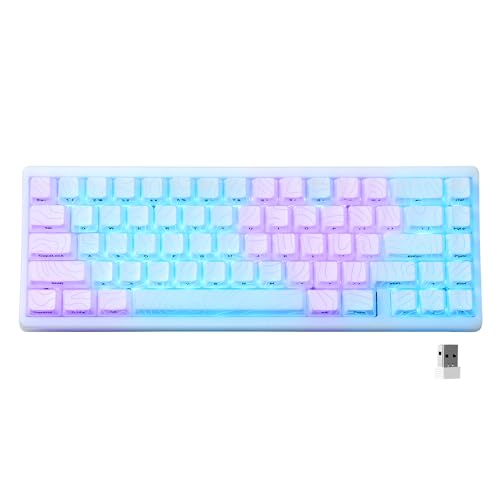
HITIME XVX M67 Wireless 60% Keyboard (JadeStone)
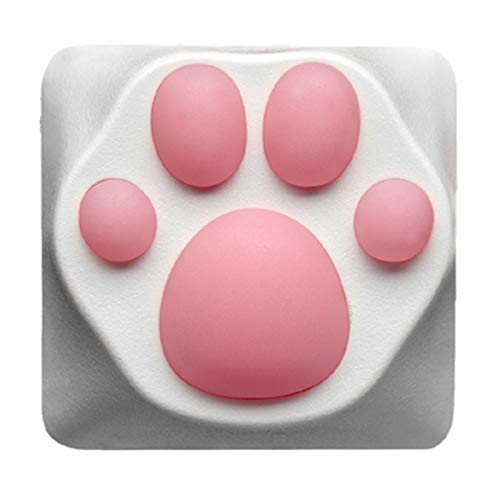
SYA ZOMOPLUS Novelty Cat-Claws Keycap (White/Pink)

XVX M98 Wireless Mechanical Keyboard with Shine-Through Caps

XVX M75 Wireless Gaming Keyboard with IMD Topographic Caps
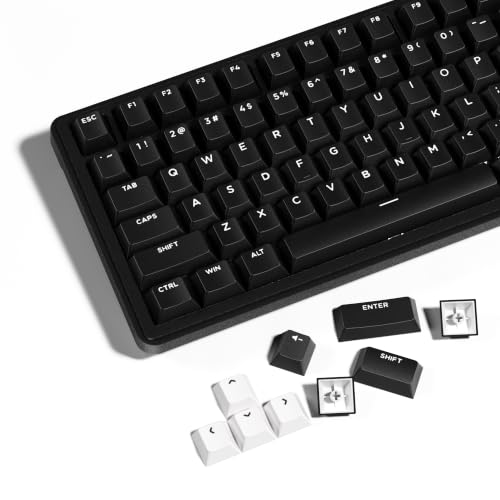
HITIME XVX WOB Double Shot PBT Keycaps Set, 138 Keys
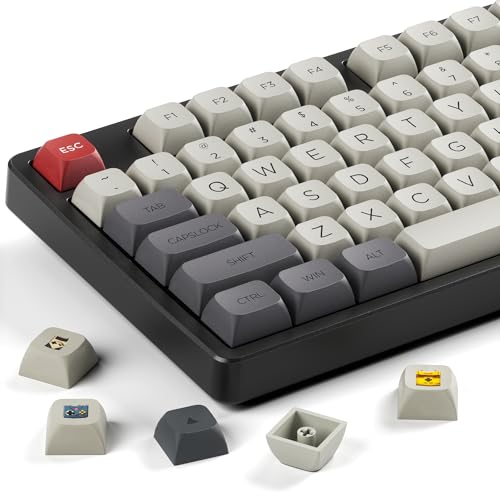
GMKWTL XDA Profile PBT Retro Console Keycap Set

dokodoko Panda Keycaps, PBT, Cherry Profile
The Picks, Examined More Closely
Most gaming keycap sets go monochrome or stick to safe colorways, which makes the KiiBoom Digital Dreams pastel Y2K set feel like it wandered in from a different category. The 144-key count covers full-size, TKL, and 75% layouts, so this set stays with you through a layout switch. Compared to the bare-bones single ESC keycap later in this list, this is the full-system option for someone ready to commit to a theme.
For gamers who want personality at the desk, the soft pastel palette and retro tech motifs do the heavy lifting. The set pairs well with neutral switches since the caps carry all the visual weight. Owners commonly report that themed sets like this can show wear faster on the most-used keys, so it helps to keep a spares kit handy.
Bright Spots
- Full 144-key coverage means you can swap layouts without leftover mismatched caps.
- Pastel Y2K aesthetic adds character to otherwise plain setups.
- Broad layout compatibility makes it a long-term investment across boards.
- Soft tones pair well with both light and dark cases.
Things To Consider
- Themed legends may not suit competitive players who prefer high-contrast key labels.
- Painted motifs on the most-pressed keys tend to fade with heavy daily use.
- Larger sets can take more time to install cleanly across the full layout.
Who Will Love This
Gamers who treat their keyboard as a desk centerpiece and want a cohesive look across multiple layout sizes.
Swap It Out When
You’d rather add one bold artisan piece, in which case the Rturbraz Cute Carousel Keycap is the better fit.
Single artisan keycaps live in a strange corner of the hobby: they’re tiny, hand-finished, and not really meant for the keys you hammer. The Rturbraz Cute Carousel keycap is built for cross-stem mechanical switches, which rules out low-profile boards. Where this one shines is the ESC slot in the R4 row, a common landing zone for decorative caps.
For someone who wants their gaming board to feel personal without buying a full themed set, a single artisan piece is the lowest-cost entry. The handmade construction means slight variation between caps, which most collectors actively enjoy. For daily gaming, keep the cap away from the WASD area where finger friction shows wear fastest.
Good Reasons To Consider
- Lowest-cost way to add personality to a stock board.
- Handmade construction gives each piece slight uniqueness.
- Cross-stem fit works with most Cherry MX-style switches.
Worth Noting
- Not compatible with low-profile mechanical keyboards.
- Placement matters; using it on a frequently typed key will wear the design.
- Resin or soft materials can scratch if stacked under other caps.
Key Product Details
Made For
Casual gamers who want a single decorative accent on the ESC or function row without changing the whole board.
Look Elsewhere When
You’re set on a low-profile mechanical board, in which case the KiiBoom Digital Dreams set gives you full coverage with a compatible height profile.
The 60% form factor is a love-it-or-leave-it layout, but for FPS players it removes every key not in the WASD cluster, leaving more mouse room. The HITIME XVX M67 (JadeStone) pairs that compact layout with a tri-mode wireless setup: Bluetooth 5.0, 2.4GHz, and USB-C wired. The gasket-mount construction is what gives the board its “thocky” sound signature, which is a deeper, rounder tone than typical clicky switches.
Gamers coming from larger boards should expect a learning curve with the missing arrow and function keys. QMK/VIA support lets you remap anything on any layer, so the missing keys become programmable shortcuts. Compared to the full-size XVX M98 covered later, this one trades key count for portability and desk real estate.
Where It Helps
- Tri-mode wireless keeps the desk clean and works across multiple devices.
- Gasket mount gives a softer, less hollow sound during typing and gaming.
- Hot-swappable PCB lets you change switches without soldering.
- Compact 60% frame frees up mouse movement for FPS players.
Small Caveats
- No dedicated arrow keys mean a learning period for new 60% adopters.
- Battery life depends heavily on RGB usage and wireless mode choice.
Quick Technical Notes
Best Suited To
FPS and competitive gamers who already prefer a compact layout and want wireless freedom without giving up hot-swap flexibility.
A Better Fit Elsewhere
You need a full number pad for work and play, in which case the XVX M98 Wireless Mechanical Keyboard is the obvious sibling board to consider.
Novelty keycaps exist because, sometimes, you want your keyboard to make you smile. The SYA ZOMOPLUS cat-claws keycap combines ABS plastic with silicone molded into claw shapes, giving it a squishy feel under the fingertip. The OEM profile (a slightly taller, sculpted row shape common on stock mechanical boards) keeps it compatible with most layouts.
Real talk: novelty caps are not built for marathon typing. The sculpted silicone looks great but compresses under hard presses, and the ABS surface can shine over time. For a single decorative key on the R4 row, this is a fun accent that survives normal play. For comparison, the Rturbraz Carousel keycap earlier is a similar single-slot novelty but trades the silicone squish for a hand-painted resin look.
A Favorable Mix
- 3D sculpted claw shape stands out in a way flat novelty caps cannot.
- Silicone squish gives a unique tactile feel under light pressure.
- OEM profile works with most Cherry MX-style boards.
Points To Note
- ABS material tends to develop shine on the most-used keys over time.
- Silicone details can collect dust in the crevices, so periodic cleaning matters.
- Not shine-through, so it disrupts RGB uniformity if that matters to you.
Right Fit For
Gamers who want a fun, themed single key without committing to a full novelty set, especially cat lovers and streamers with personality-driven setups.
Reach For A Different Pick When
You’d rather have a full themed set with consistent sculpting, in which case the KiiBoom Digital Dreams set covers the entire board with a unified look.
The 96% layout (sometimes called 1800, a near-full-size form with a compressed arrow cluster) is the sweet spot for gamers who want the number pad without the width penalty. The XVX M98 sits in that layout with tri-mode connectivity and a substantial 8000mAh battery that handles long play sessions. The shine-through striped keycaps let the RGB show through the legends, which makes a difference during late-night gaming.
For gamers who keep their board on a desk and rarely travel, the M98 is a strong daily driver. Compared to the compact M67 earlier, this is the full-keyboard version for someone who needs dedicated arrows and a numpad. The battery claim is generous, but actual runtime depends on which wireless mode you use and how heavy the RGB effects run.
What Makes Sense
- 8000mAh battery handles long sessions away from a charger.
- 96% layout includes arrows and numpad without the wide full-size footprint.
- Tri-mode connection covers desktop, mobile, and console setups.
- Shine-through legends make RGB lighting readable in dim rooms.
Things To Weigh
- Larger battery adds weight, so the board is less travel-friendly than the M67.
- Striped design may not appeal to gamers preferring minimalist keycaps.
Technical Highlights
Who Should Grab It
Gamers who want wireless freedom and a full numpad for inventory management or spreadsheet work without the bulk of a traditional full-size.
Where Another Pick Suits Better
You’re building a portable tournament setup, in which case the HITIME XVX M67’s 60% frame fits in a backpack much more easily.
The 75% layout has become the default for gamers who want arrows and a function row without going full-size. The XVX M75 layers in IMD keycap technology (a manufacturing process where the design is molded between two layers of plastic, making it more durable than surface printing), a rotary knob for volume control, and tri-mode wireless. The gasket structure and hot-swappable PCB round out a board aimed at the enthusiast crowd.
Compared to the M67 earlier, the M75 adds arrows, a function row, and a knob for tactile volume control. The IMD topographic caps are more durable than dye-sublimated sets and resist the shine that ABS develops. For a mid-sized gaming board with all the modern conveniences, this is the strongest all-around pick in this list.
Practical Advantages
- IMD keycap tech resists fading and shine better than surface-printed caps.
- Rotary knob offers tactile volume control without leaving the game.
- Hot-swappable PCB lets you mix linear, tactile, and clicky switches freely.
- Tri-mode wireless covers gaming, mobile, and productivity seamlessly.
Honest Caveats
- Enthusiast features come with a steeper learning curve for first-time builders.
- 75% layout still omits the numpad, which limits spreadsheet-heavy workflows.
Perfect Match For
Gamers who want a feature-rich board with room to grow into customization without committing to a full-size footprint.
Consider Something Else When
You need a numpad for work, in which case the XVX M98’s 96% layout gives you the same wireless flexibility with all the extra keys.
Cherry profile keycaps sit lower than OEM, with a sculpted curve that fits the natural arc of the fingers. The HITIME XVX WOB set uses double-shot PBT construction (the legend is molded as a separate piece of plastic, so it cannot wear off), which is the gold standard for durability. The 138-key count covers layouts from 60% all the way to full-size 108-key, including the unusual 64 and 68-key variants.
For gamers who want a single keycap set that survives multiple board swaps, this is the practical choice. The minimalist black-and-white WOB design pairs with virtually any case color or switch type. Owners commonly report that PBT double-shot caps feel slightly grainier than ABS out of the box, but they stay consistent where ABS develops shine.
The Good Stuff
- Double-shot PBT legends never fade or rub off.
- 138-key coverage spans 60% to 108-key layouts.
- Cherry profile fits natural finger curvature for extended play.
- Minimalist aesthetic works with any keyboard colorway.
Less Ideal Details
- PBT texture feels slightly rougher than ABS for some users.
- Not shine-through, so RGB shows only through the bottom gap.
Built With In Mind
Gamers building or maintaining multiple layouts who want one durable keycap set that travels between boards.
Not Your Match When
You want a themed or colorful aesthetic, in which case the GMKWTL Retro Console XDA set brings character the WOB set intentionally avoids.
XDA profile is the “uniform” keycap shape: every key sits at the same height with a flat top, unlike Cherry or OEM which sculpt each row. The result is a board that feels more like a vintage game controller or a retro computer keyboard. The GMKWTL Retro Console set leans fully into that aesthetic with dye-sublimated PBT (where the dye is heat-pressed into the plastic for legends that won’t peel) and large retro-style fonts.
For gamers who grew up on cartridge-era consoles, this is the most nostalgic option in the list. The uniform XDA height takes some adjustment if you’re used to sculpted profiles. Owners commonly note that XDA caps have a wider top surface, which makes them forgiving for less-precise typing. Compared to the themed KiiBoom set earlier, this one trades color variety for a tighter retro motif.
Useful Highlights
- Dye-sublimated legends bond into the plastic and resist peeling.
- Uniform XDA profile gives a wide, flat typing surface.
- Retro console motif appeals strongly to nostalgia-driven gamers.
- PBT material resists the shine that ABS develops over time.
Practical Considerations
- Uniform height lacks the sculpted ergonomics of Cherry or OEM profiles.
- Larger fonts reduce the number of legends per key, limiting modifier coverage.
Product At A Glance
Whose Shelf It Belongs On
Retro gaming enthusiasts who want their keyboard to match the aesthetic of classic console and computer setups.
A Better Fit Elsewhere
You prefer sculpted ergonomic profiles for long sessions, in which case the dokodoko Panda Cherry profile set keeps your hands in a more natural arc.
Cherry profile is the most common aftermarket profile because the sculpted rows fit the natural finger arc better than flat XDA or taller SA. The dokodoko Panda set delivers that profile in PBT plastic with broad layout compatibility: 60%, 65%, 75%, TKL, and full-size. Compatibility with Cherry MX and MX-style switches (Gateron, Kailh, Akko) covers most mechanical boards on the market.
For gamers who want a low-fuss upgrade that improves typing ergonomics without changing the look of their board dramatically, this is the safe daily pick. Owners commonly report that PBT caps feel slightly different from the stock ABS that ships on many boards, but the adjustment period is short. Compared to the colorful KiiBoom set earlier, this one goes monochrome black-and-white for a quieter desk.
Strong Points
- Sculpted Cherry profile reduces finger fatigue over long sessions.
- Broad switch compatibility covers Cherry MX and MX-style switches.
- PBT material resists shine and oils from extended gaming sessions.
- Layout coverage spans 60% through full-size boards.
Trade-Offs To Consider
- Low-profile and membrane keyboards are not supported.
- PBT texture takes a short adjustment period compared to ABS stock caps.
Feature Overview
Right Fit For
Gamers who want a comfortable, sculpted profile upgrade that works across multiple boards without fuss.
Skip It When
You’re on a low-profile or membrane keyboard, in which case a complete board like the HITIME XVX M67 is the better starting point.
What Matters Most Before Choosing Keycap Profiles For Gaming
Profile is the shape and height of the keycap, and it determines how your fingers sit on the board. Cherry and OEM are sculpted (each row tilts slightly), which generally feels more natural for long sessions. XDA is uniform and flat, which feels more retro and forgiving for casual typing. SA is taller and more dramatic, prized by typists who want a vintage feel.
Material matters as much as profile. PBT (polybutylene terephthalate) is denser, more oil-resistant, and develops a slight texture that improves grip over time. ABS (acrylonitrile butadiene styrene) is smoother and cheaper, but it develops a glossy shine on the most-used keys within months. For gaming where the WASD cluster sees thousands of presses daily, PBT tends to outlast ABS.
Layout coverage is the silent deal-breaker. A 60% board has roughly 61 keys; a full-size has 108. A keycap set with 87 keys covers TKL but leaves you short for full-size. Match the cap count to your board, or grab a 138-to-144 key set if you plan to switch layouts later. Switch compatibility is the other gate: Cherry MX and MX-style switches share a cross-stem that most caps fit, but low-profile and optical switches use different mounts and need specific caps.
Picking The Right Profile For Your Setup
Wrong Turns To Avoid
The most common mistake is buying a beautiful themed set without checking the key count against your actual board layout. A 108-key set leaves a 60% board with extra caps and a few gaps you cannot fill. The other pitfall is choosing ABS when you game daily; the shine appears on WASD within a year for most heavy users. Cross-check the profile image (Cherry vs OEM vs XDA) before buying, because returns on keycap sets are often limited once the plastic wrap is off.
What The Higher Tier Buys
Premium sets typically buy double-shot PBT construction, where the legend is molded as a separate plastic piece rather than printed on the surface. That means the legends cannot fade, no matter how many hours you log. Themed collaborations, dye-sublimation quality, and broader layout coverage also tend to climb with the price. For casual gamers, a mid-tier PBT set covers 95% of the durability benefit. For competitive players logging six-hour daily sessions, the upgrade to double-shot pays off in consistent feel over the life of the board.
Frequently Asked Questions
What keycap profile is best for gaming?
Cherry profile is the most popular gaming choice because the sculpted rows match the natural arc of your fingers and reduce fatigue during long sessions. OEM is similar but slightly taller, which some gamers prefer for a more pronounced press. XDA is flat and uniform, less ergonomic but with a wider top surface that forgives imprecise keystrokes.
Are thicker keycaps better for gaming?
Not necessarily. Thickness affects sound and durability more than performance. Thicker PBT caps feel slightly more solid and produce a deeper sound, but the typing feel depends mainly on profile and switch type. A thick SA-profile cap on linear switches feels different from a thin Cherry-profile cap on the same switches.
Do keycaps affect gaming performance?
Indirectly, yes. A profile that fits your hand reduces fatigue, which keeps your reaction time sharp over long sessions. Shine-through legends help when gaming in dim rooms, and durable PBT caps maintain consistent texture where ABS develops slip. The switch underneath matters more for raw actuation, but the cap determines the tactile finish.
Will these keycaps fit any mechanical keyboard?
Only if your board uses Cherry MX or MX-style switches (cross-stem). Low-profile boards, optical switches, and most membrane keyboards use different mounts and require specific caps. Check the switch type and stem shape before buying any aftermarket set.
How many keys do I need in a keycap set?
Match the count to your layout: 60% needs about 61-68 caps, TKL needs 87, and full-size needs 104-108. A 138-144 key set covers everything from 60% through full-size and is the safest choice if you plan to switch boards later.
Closing Remarks
Profile decides how your hands sit on the board, material decides how the caps age, and coverage decides whether everything fits. The picks above cover the spectrum from themed single caps to full enthusiast builds, all built around the profiles gamers actually use in 2026. Match the profile to your hand size and session length, then pick the material and coverage that fit your board. The right set disappears under your fingers and lets the game take over.