Cutting video means hammering the same handful of shortcuts for hours on end, and a generic office board rarely keeps up. A purpose-built editor keyboard with programmable keys, tactile feedback, and well-placed media controls can shave real minutes off each timeline pass. I pulled together ten options that genuinely help with the editing workflow, from compact macro decks to full mechanical boards built for marathon sessions.
A Closer Look At The Lineup
TreasLin/VSDinside XL Streaming Deck 32 Keys Macro Keypad

TreasLin/VSDinside Stream Dock XL Studio Controller (White)

TreasLin N3 Stream Controller Deck with 12 Macro Keys (Black)
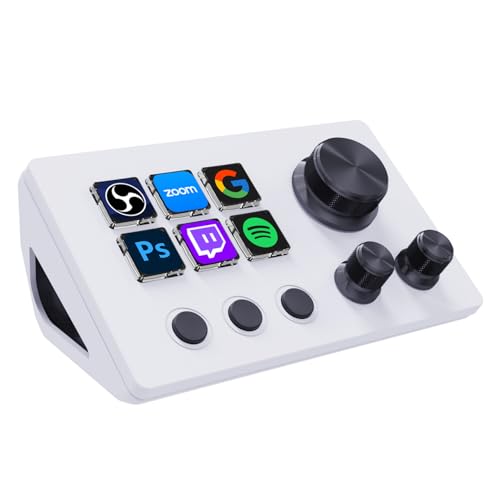
TreasLin VSDinside N3 Stream Controller Deck 12 Keys (White)
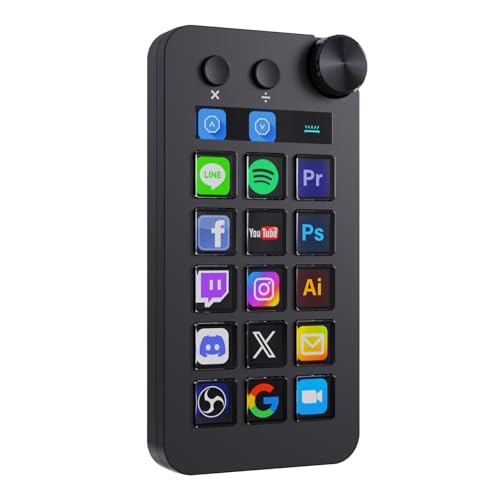
TreasLin VSDinside N1 Stream Controller Deck 18 Keys (Black)

TreasLin VSDinside N1 Macro Keyboard Stream Deck 18 Keys (White)

Redragon K580 Wired RGB Mechanical Gaming Keyboard

Microsoft Wired Keyboard 600 (Black)

RECCAZR Wireless Keyboard and Mouse Combo Curved Office Set

Logitech G PRO Mechanical TKL Gaming Keyboard (Clicky)
The XL variant aims squarely at editors who want one key per timeline action. Its 32 LCD keys (small color displays built into each switch) cover split, ripple delete, blade cuts, and export presets without scrolling through menus, while twin scroll wheels handle jog and shuttle on long clips.
Compared to the more compact decks that follow, this board commands desk space. RGB lighting adds atmosphere for live sessions but does not change the editing experience itself.
What Pays Off
- 32 LCD keys mean a dedicated button for almost every Premiere Pro or DaVinci Resolve shortcut
- Dual scroll wheels make frame-accurate scrubbing more intuitive than a mouse drag
- Per-app profiles let the same deck handle editing, streaming, and color work
- USB setup keeps the desk tidy with one cable to the workstation
Points To Note
- Owners commonly report the included software has a learning curve before profiles feel intuitive
- The footprint is larger than a standard keypad, so small desks may feel crowded
Right Fit For
Full-time editors who want maximum shortcut density and own a desk with room to spare.
A Better Fit Elsewhere
Travel-heavy editors may prefer the smaller form of the TreasLin N3 Stream Controller Deck (12 Keys, Black) below.
This white edition of the XL mirrors the black model’s key count and adds a fresh aesthetic for bright editing suites. App-aware profiles (saved layouts that switch when you change software) let one deck handle Premiere, OBS, and Audition in sequence.
It is the same deck as the first pick in capability, just repackaged. Editors who bounce between editing and streaming software may find the profile-switching logic more useful than the physical keys alone.
Useful Strengths
- 32 customizable keys keep every tool within a single tap
- Profiles auto-switch between Premiere, OBS, and YouTube without manual swapping
- Custom background and icon uploads match studio branding
- Mac and PC compatibility avoids driver headaches across machines
Trade-Offs Worth Weighing
- Identical footprint to the black XL, so desk real estate is the same
- White finish may show dust and fingerprints more readily during long sessions
Best Suited To
Hybrid editor-streamers who run several creative apps and want one controller that follows them across programs.
Consider Something Else When
Editors working in a single application from start to finish may not need profile switching and could grab the Redragon K580 instead.
The N3 trims the deck down to a focused toolset: 6 visual LCD keys, 3 standard buttons, and 3 rotary dials for precise scrubbing. The dials (small spinning knobs) handle jog, shuttle, and timeline zoom without ever leaving the keyboard.
It suits smaller desks and editors who would rather pick their ten favorite shortcuts than memorize 32 slots. Think of it as a quality-of-life add-on rather than a full replacement board.
What Earns Its Place
- Rotary dials add real scrub and zoom control that flat keys cannot match
- LCD key layer shows icons that change per app, reducing mental mapping
- Compact footprint fits beside a laptop or on a cramped corner desk
Soft Spots
- Only 6 visual keys means more nested folders for less common shortcuts
- Some users report the LCD firmware updates need occasional re-flashing
Feature Snapshot
Perfect Match For
Timeline editors working in tight spaces who rely on frame-by-frame scrubbing more than bulk shortcuts.
Skip It When
Someone running a large color-grading suite or complex multi-cam timeline may want the XL’s expanded key count.
The white N3 shares the same internals as the black version, pairing 6 LCD keys with 3 rotary dials in a cleaner shell. For minimalist desks and bright studio lighting, the lighter finish photographs and videos well.
It is functionally identical to the previous pick. The reason to choose this version is purely aesthetic, which matters more than it sounds on camera or in client calls.
What It Does Well
- Same 3 rotary dials deliver precise scrub control for timeline work
- White finish matches modern aluminum desks and Apple-centric setups
- App-switching profiles mirror the black N3’s workflow benefits
Less-Strong Areas
- Identical capability to the black N3, so the only real difference is appearance
- White surfaces tend to show coffee rings and dust during marathon sessions
Whose Shelf It Belongs On
Editors who film their workspace for YouTube tutorials or run client-facing studios where the deck ends up on camera.
Look Elsewhere When
Practicality-minded shoppers will find the black TreasLin N3 Stream Controller Deck delivers the same functionality at no aesthetic premium.
The N1 splits the difference between the XL and the N3 with 15 LCD keys, 2 standard buttons, and a single rotary dial. A triple-mode switch (stream deck, calculator, numeric keypad) lets the same hardware pull double duty outside the edit suite.
This makes the N1 a natural fit for freelancers who bill clients and edit from the same desk. The numeric pad mode fills the gap left when a tenkeyless (no number pad) laptop is the primary machine.
The Upside
- Triple-mode operation covers editing, billing, and data entry on one device
- 15 visual keys offer roomier shortcut sets than the N3 without the XL’s bulk
- Mac and PC compatibility keeps it useful across mixed environments
Where It May Fall Short
- Mode-switching knob adds a step before reaching familiar shortcuts
- Owners report the learning curve for layered folders is steeper than the simpler N3 layout
Quick Facts
Right Fit For
Freelance editors who also handle invoicing, time tracking, or numeric data entry on the same workstation.
Swap It Out When
Purestreamers or editors focused solely on Premiere may prefer the dedicated LCD space of the TreasLin/VSDinside XL Streaming Deck.
The white N1 keeps the same triple-mode design in a bright shell. Calculator mode is genuinely useful for editors running rate calculations without alt-tabbing to a spreadsheet app mid-edit.
It mirrors the black N1 in capability, so the value here is matching a lighter desk aesthetic without losing the numeric pad or shortcut density.
Why It Works Well
- Calculator mode handles billing math without leaving the editing workspace
- 18 keys balance shortcut space with reasonable desk footprint
- White finish complements bright Apple-and-aluminum setups
Minor Gripes
- Same mode-switching learning curve as the black N1
- No functional advantage over the black version if color is irrelevant
Who Should Grab It
Editors on hybrid Mac setups who want their controller to match a clean desk aesthetic without sacrificing functionality.
Where Another Pick Suits Better
Anyone running a darker battlestation may find the black N1 easier to keep looking clean over time.
The K580 steps away from dedicated macro decks and acts as a full-size mechanical typing board. Five programmable macro keys (G1-G5) sit on the left, and a media wheel handles scrubbing, volume, and timeline navigation.
For editors who type long-form descriptions, captions, and color notes, the tactile feedback of mechanical switches (individual spring-loaded key mechanisms) makes long sessions less fatiguing than membrane keys. Hot-swappable sockets (sockets that let you pull switches out without soldering) also mean quieter switches can be installed later if the clicky feel becomes too loud.
The Helpful Details
- 5 dedicated macro keys record complex shortcuts without separate software
- Mechanical switches give audible, tactile feedback that reduces typing errors
- Hot-swappable switch sockets let owners swap to silent switches later
- Media wheel and dedicated playback controls speed up timeline navigation
Honest Caveats
- Only 5 macro keys feels thin compared to 12- or 32-key decks
- Clicky stock switches can be loud in shared rooms or open offices
Spec Overview
Who Will Love This
Editors who type as much as they cut, want a single board for both tasks, and enjoy mechanical typing feel.
Reach For A Different Pick When
Workflows needing 12+ dedicated shortcuts will outgrow the K580 quickly. Consider the TreasLin N3 Stream Controller Deck instead.
The Wired Keyboard 600 is a humble, time-tested membrane board (a keyboard using soft rubber-dome switches rather than mechanical ones) with quiet-touch keys and a spill-resistant frame. For editors who want a basic typing surface and rely on keyboard shortcuts they already know, it stays out of the way.
There are no macro keys or LCD displays, so it leans on the software’s built-in shortcut mapping. The integrated water channels are a real-world win in editing bays where coffee lives nearby.
A Strong Showing
- Spill-resistant design protects against the inevitable coffee splash
- Quiet-touch keys keep shared rooms undisturbed
- Calculator hotkey speeds up simple math without leaving the timeline
- Wired USB means no batteries and no pairing headaches
What To Weigh
- No dedicated macro keys limits shortcut expansion
- Membrane keys lack the tactile feel many editors prefer for long sessions
Made For
Editors who already know their shortcuts and just want a reliable, easy-to-clean typing board that survives daily coffee use.
Where A Sibling Pick Shines
Anyone wanting physical shortcut buttons should look at the Redragon K580 or any TreasLin deck reviewed above.
RECCAZR’s combo pairs a curved ergonomic keyboard with a wireless mouse sharing one USB receiver. Silent key actuation (the clickless mechanism that registers keystrokes quietly) makes it a quiet companion for late-night edits in shared spaces.
The combo approach is convenient for editors who need to free USB ports for external drives and dongles. It is not built for shortcuts in the same way as a macro deck, but the silent feel and ergonomic curve win for long writing sessions.
What Stands Out
- Silent keys keep apartment editing sessions neighbor-friendly
- Shared USB receiver frees up a port on crowded workstations
- Curved key layout eases wrist strain during caption and description writing
- Wireless range up to 10 meters allows flexible desk placement
Room For Improvement
- Wireless input adds a small latency trade-off compared to wired boards
- No physical macro keys means shortcut expansion relies on software remapping
Product Snapshot
Who It Suits Best
Editors cutting late at night in shared apartments or co-working spaces where keyboard noise travels.
Not Your Match When
Anyone whose workflow depends on physical macro keys should pick up a dedicated deck like the TreasLin N3.
The G PRO is a tenkeyless mechanical board (a compact layout that drops the number pad for more mouse room) with clicky switches, programmable LIGHTSYNC RGB lighting, and a detachable USB cable. The compact frame leaves more desk space for mouse-driven editing.
It lacks dedicated macro keys, but the G HUB software (a free configuration tool from Logitech) maps any key to custom commands. The detachable cable makes travel between home and client setups painless.
Everyday Perks
- Tenkeyless layout gives the mouse more room for precise timeline work
- Detachable cable stows easily for travel between offices
- Onboard memory stores lighting profiles for use on different machines
- Clicky switches give clear feedback for typing-heavy captioning tasks
Factors To Consider
- No physical macro keys means shortcut mapping lives inside software
- Clicky switches can feel loud in quiet home studios
Feature Rundown
Built With In Mind
Editors who move between locations, value tactile typing, and are comfortable configuring shortcuts through software.
Another Choice May Suit
Anyone needing physical, one-tap macro access should consider the TreasLin/VSDinside XL Streaming Deck for dedicated shortcut keys.
Matching Hardware To Your Editing Workflow
Picking a keyboard for video editing starts with how you actually cut. Editors who lean on keyboard shortcuts rather than mouse clicks benefit most from boards with dedicated macro keys or assignable layers. Macro decks like the TreasLin/VSDinside line put dozens of shortcuts within a single tap, replacing nested menus with one-touch actions for split, ripple delete, blade cuts, and export presets.
Mechanical switch type matters for anyone typing long captions or descriptions alongside edits. Linear switches (smooth, no bump, quiet) suit fast typists who hate finger fatigue, while tactile and clicky switches give a defined press that catches typos before they reach the timeline. Hot-swappable sockets, like those on the Redragon K580, let owners swap switch types later without soldering equipment.
Connectivity is a quieter consideration. Wired USB gives zero-latency input that some editors prefer for frame-accurate scrubbing, while wireless setups like the RECCAZR combo free up desk space for capture devices and hard drives. For most home studios the wired standard still wins on reliability, but mobile editors benefit from the flexibility.
Key Points To Weigh Before Deciding
Desk footprint often decides the choice more than features. A 32-key deck sounds appealing until it eats half the desk and crowds the mouse pad. Tenkeyless boards and compact decks like the N3 keep the editing surface uncluttered while still adding macro power.
Software ecosystem matters too. Proprietary companion apps vary in quality, and some editors prefer boards whose macro memory lives onboard so profiles travel with the hardware. The Logitech G PRO stores lighting profiles in the board itself, while deck-style controllers usually tie profiles to the host computer.
Common Shopping Slip Ups
Buying on key count alone is the easiest trap. A 32-key deck looks generous until half the slots go unused. List your ten most-used shortcuts first and pick the smallest deck that fits them with room to grow.
Overlooking switch feel is the second. Mechanical clicky switches feel great in a quiet room and terrible in a shared apartment. Silent or linear switches (smooth, quieter alternatives) keep long sessions comfortable without disturbing housemates or neighbors.
Where The Extra Money Goes
Higher-tier decks typically add LCD keys that show icons per app, rotary dials for scrubbing, and per-app profile switching. These features save real time once shortcuts become muscle memory. For editors cutting daily, that workflow gain often outweighs the price difference. Beginners dabbling in editing can start with a simpler board and upgrade once they know which shortcuts they actually use.
Frequently Asked Questions
Do I still need a regular keyboard if I buy a macro deck? Yes, macro decks supplement rather than replace a typing keyboard. Most editors keep a full-size or tenkeyless board for typing and use the deck purely for shortcuts and timeline actions.
Are LCD keys worth the extra cost? LCD keys help once shortcuts outnumber labels you can memorize. Beginners can start with simpler boards and upgrade when shortcuts pile up.
What is the difference between TKL and full-size? Tenkeyless boards drop the number pad for a smaller footprint. Editors who do not enter numbers frequently benefit from the extra mouse space.
Can macro decks work on a laptop? Yes, most modern macro decks connect over USB and work with both PC and Mac. Wireless options are also available for minimal cable clutter.
Is a mechanical keyboard better for editing? Mechanical switches offer tactile feedback many editors prefer, but the choice depends on personal feel and noise tolerance. Silent switches exist for shared spaces.
Closing Remarks
The right keyboard for video editing matches the way you cut, not just the spec sheet. Macro decks speed up shortcut-heavy workflows, mechanical boards support long typing sessions, and wireless combos free up cramped desks. Pick the category that matches your routine, then dial in the switch feel, key count, and footprint from there.