Anyone who’s watched a healthy laptop slowly turn into a tethered desk companion knows the feeling. One minute the battery holds all morning, the next it’s gasping at 30% before lunch, swelling at the base, or refusing to charge past a stubborn percentage. A quality replacement kit can put that freedom back, and skip the awkward trip to a repair shop. I’ve narrowed the field to ten solid picks spanning Asus, Dell Inspiron, Dell Latitude, and both 13-inch and 15-inch MacBooks, so the right match for your machine is somewhere on this list.
The Choices Worth Comparing

ZTHY B31N1336 Replacement Battery for Asus VivoBook S551 V551L

GHU T54F3 T54FJ 60Wh Battery for Dell Latitude E5420-E6530

Xaocaige XCMRD 40Wh Battery for Dell Inspiron 15 3000 Series

GHU 9-Cell 87Wh Battery for Dell Inspiron N5010 N5110 N7110
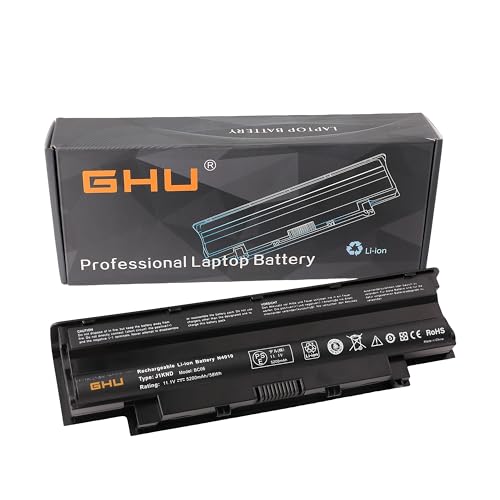
GHU J1KND 58Wh Battery for Dell Inspiron N4010 N5010 N7010

GHU 9-Cell 87Wh Battery for Dell Inspiron N5030 N5040 N7110

GHU 58Wh T54FJ Battery for Dell Latitude E5420-E6540

GHU NH6K9 60Wh Battery for Dell Latitude E5430 E6530

GingePro A1820 Battery for MacBook Pro 15-inch A1707 (2016-2017)
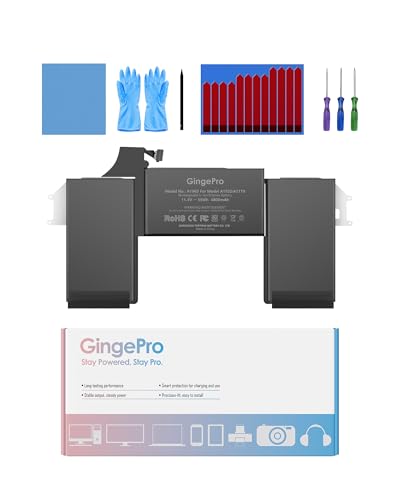
GingePro A1965 Battery for MacBook Air 13-inch A2179 (2020)
Why These Options Stand Out
The ZTHY B31N1336 targets a specific corner of the Asus lineup, the S551 and V551L families, where the original battery is a flat Li-Polymer slab rated 11.4V at 48Wh. Compared with the bulky 9-cell Dell options later in this list, this is a thin, low-profile pack designed to slide back into a slim ultrabook chassis without bulging the bottom cover.
For a student or remote worker nursing an aging VivoBook S551 through another semester, that form factor is the whole point. The compatible part numbers cover B31N1336, A42-S551, C31-S551, and a handful of Asus OEM identifiers, which gives a small safety margin when verifying fit.
The Case For It
- Li-Polymer chemistry (a flat, stable cell type that fits thin ultrabook lids without adding bulk)
- 11.4V / 48Wh rating matches the original VivoBook S551 spec
- Cross-compatible with V551L, K551L, and A551L chassis
- Up to 500 recharge cycles before noticeable capacity loss
Things To Consider
- Limited to Asus S551/V551L/K551L families, so it won’t cross over to a Dell or MacBook
- Self-installation requires a Torx driver and a steady hand around the ribbon cable near the trackpad
Key Specs
Right Fit For
Asus VivoBook S551 or V551L owners comfortable with a careful DIY swap who want to keep an older ultrabook alive.
Where Another Pick Suits Better
Anyone running a Dell Latitude should skip this and reach for the GHU T54F3 T54FJ 60Wh Battery for Dell Latitude E5420-E6530 instead.
For a road-warrior Latitude, 60Wh (watt-hours, the standard measure of how much energy a battery can store) is a meaningful bump over a tired original cell. The GHU T54F3 T54FJ covers a long list of Latitude E-series chassis from the E5420 through the E6530, and the broad part-number cross-list includes N3X1D, M5Y0X, HCJWT, X57F1, and 312-1163, which is reassuring when your laptop’s label is half worn off.
Field service techs and consultants carrying a Latitude through airport lounges will appreciate the runtime lift, though the pack does add a slight hump at the rear of the chassis compared to slimmer OEM equivalents.
Strong Points
- 60Wh capacity outpaces many factory Latitude cells from that era
- Spans E5420, E5430, E5520, E5530, E6420, E6430, E6520, E6530
- Long part-number compatibility list for safer verification
Worth Noting
- Adds a small rear bulge versus the original 6-cell OEM pack
- Stickers on the casing may need warming before removal to avoid residue on the palm rest
Best Suited To
Traveling professionals and field technicians running older Latitude E-series machines who need longer unplugged sessions.
Skip It When
Owners of a Latitude with an ATG ruggedized shell should look at the GHU NH6K9 60Wh Battery for Dell Latitude E5430 E6530 for a tighter chassis match.
The XCMRD replacement covers a sprawling family tree: Inspiron 14R, 15, 15R, 17, and 17R models from the 3000 and 5000 series built between 2013 and 2018, plus Vostro 2421 and 2521. That wide umbrella is the headline feature, because a lot of households have one of these older Dells tucked in a drawer.
The 14.8V / 40Wh / 2700mAh rating is on the modest side, so anyone hoping for a runtime upgrade over their aging 4-cell original should temper expectations. What you get is a faithful, dependable swap that brings a tired laptop back to baseline, not beyond it.
Features That Help
- Covers an unusually broad Inspiron 14/15/17 lineup from 2013-2018
- 4-cell Li-ion design with a built-in protection circuit
- Documented 12-month seller coverage for peace of mind
Room For Improvement
- 40Wh is the same capacity as many factory cells, so runtime is a reset, not an upgrade
- First-time self-installers may need a plastic spudger to pop the front bezel clips without snapping them
Who It Suits Best
Families or students reviving an older Inspiron 15 3000-series laptop for schoolwork, browsing, or basic office tasks.
A Better Fit Elsewhere
Anyone chasing longer runtime should consider the GHU 9-Cell 87Wh Battery for Dell Inspiron N5010 N5110 N7110 for a much bigger capacity jump.
Where the Xaocaige XCMRD plays it safe with a 4-cell 40Wh reset, the GHU 9-cell swings the opposite way, packing 87Wh into a chunky pack that turns an old Inspiron 15R into a genuine all-day machine. The “9-cell” label refers to the internal configuration: nine lithium cylinders wired together, compared to the six you’d find in a standard replacement.
The trade-off is physical: this battery sits noticeably higher off the bottom of the chassis. That tilt can be a feature, lifting the keyboard toward a more ergonomic typing angle, but it does mean a slightly off-look on a desk.
Reasons It Performs
- 87Wh capacity is more than double a typical 6-cell replacement
- Compatible across the N5010, M5110, M5010, M5040, M5030, N5030, N5040, N5050, and N7110
- Doubles as a wrist rest, lifting the keyboard for more comfortable typing
Trade Offs
- Adds visible bulk to the laptop’s rear, which won’t suit users who carry the machine in tight sleeves
- Heavier than a 6-cell, so backpack weight creeps up on long commutes
Made For
Long-haul users with an aging Inspiron 15R or 17R who want a full workday away from an outlet.
Look Elsewhere When
If you want a flatter profile, the GHU J1KND 58Wh Battery for Dell Inspiron N4010 N5010 N7010 keeps the original 6-cell footprint.
The 58Wh J1KND sits in the practical middle of the GHU lineup, lighter than the chunky 9-cell option but still a meaningful step above a stock 6-cell. It targets the N4010, N4110, N5010, N5110, N7010, and N3010, which is most of the laptops that were the heart of student life in the early 2010s.
Part-number coverage includes 4T7JN, TKV2V, W7H3N, YXVK2, and 383CW, which is a small but useful safety net when matching against the label on your existing battery. Capacity is rated for 500 recharge cycles before noticeable degradation.
Useful Strengths
- 58Wh gives a real-world upgrade over many original 48Wh cells
- Cross-compatible with 4T7JN, TKV2V, W7H3N, YXVK2, WT2P4, 383CW part numbers
- 500-cycle rated lifespan suits multi-year daily use
Honest Caveats
- Still a 6-cell design, so it won’t match the runtime of the 9-cell GHU 87Wh packs
- Compatible list focuses on the J1KND family only, not the broader M5Y0X Latitude range
Who Should Grab It
Daily Inspiron users with a worn J1KND cell who want a clean OEM-style replacement without the extra bulk of a 9-cell.
Reach For A Different Pick When
Heavier users on the same chassis family should look at the GHU 9-Cell 87Wh Battery for Dell Inspiron N5010 N5110 N7110 for longer runtime.
This second GHU 9-cell shares the same 87Wh / 7800mAh heart as the earlier N5010 N5110 N7110 pick, but the part-number list is broader: J1KND, YXVK2, 4T7JN, 04YRJH, 07XFJJ, 9T48V, 9TCXN, 383CW, W7H3N, FMHC10, and 312-0233. For anyone whose battery label has faded or whose laptop was sold as a refurbished unit, that long cross-reference is the most useful feature on the page.
Compared with the flatter 58Wh J1KND reviewed just above, this pack trades slimness for stamina. For someone working from cafés or on long flights, the runtime lift often justifies the extra weight.
Notable Gains
- 78
- Broad part-number cross-reference covers M5010, M5110, M5030, M5040, N5030, N5040, N7110
- 11.1V chemistry (also sold as 10.8V, the same standard laptop rail)
Points To Note
- Adds rear height that some users find awkward on lap
- Slightly heavier than a 6-cell replacement, which matters in a small messenger bag
Key Specs
Who Will Love This
Road-warrior Inspiron owners whose original battery is shot and who need the longest possible runtime from a single replacement.
Swap It Out When
Students carrying an Inspiron to class every day may prefer the lighter GHU J1KND 58Wh Battery for Dell Inspiron N4010 N5010 N7010 instead.
The T54FJ sits a step below the 60Wh T54F3 covered earlier, with a slightly smaller 58Wh rating but an even broader Latitude compatibility list. The supported chassis run from the E5420 all the way through the E6440 and E6540, with crossover to part numbers T54F3, 8858X, M5Y0X, YKF0M, X57F1, and N3X1D.
For IT teams managing a mixed fleet of Latitudes, having one battery that fits most E-series machines simplifies spare-parts inventory. Individual users will appreciate the broader fit margin if they’re not 100% sure which sub-model they own.
Everyday Wins
- Spans E5420, E5430, E5520, E5530, E6420, E6430, E6440, E6520, E6530, E6540
- Crosses into the 8858X and M5Y0X Latitude families
- Reasonable 58Wh capacity for typical office workloads
Small Caveats
- Lower capacity than the 60Wh T54F3 sibling, so heavy travelers may want the upgrade
- First install may require popping several keyboard retention clips along the top edge
Perfect Match For
Small business owners and IT staff juggling several Latitude E-series machines who want one replacement SKU on the shelf.
Not Your Match When
Anyone with a single Latitude E6430 chasing maximum runtime should pick the GHU T54F3 T54FJ 60Wh Battery for Dell Latitude E5420-E6530 instead.
The NH6K9 is built around the same 60Wh cell as the earlier T54F3 but is specifically aimed at ruggedized Latitude ATG variants, the semi-rugged laptops sold to field service, military, and public-sector users. The compatible list explicitly calls out the E6430 ATG, alongside the standard E5430, E5530, E6420, E6430, and E6530.
Part-number cross-reference is generous, covering NH6K9, 312-1242, NHXVW, PRRRF, UJ499, YKF0M, X57F1, 04NW9, 8858X, KJ321, M5Y0X, and P8TC7. That wide net is reassuring when the laptop’s original label is sun-faded from years outdoors.
Why It Works Well
- Specifically validated for Latitude E6430 ATG ruggedized chassis
- 60Wh capacity keeps field shifts running without an outlet
- Supports a long list of Dell Latitude part numbers for safer cross-matching
Factors To Consider
- For non-ATG Latitudes, the T54F3 above is usually the better-known pick
- ATG-specific installation may need a slightly longer Torx driver for the deeper captive screws
Built With In Mind
Field technicians, utility workers, and first responders running ruggedized Latitude ATG laptops in vehicles or outdoor settings.
Consider Something Else When
A standard home-office Latitude owner should pick the GHU 58Wh T54FJ Battery for Dell Latitude E5420-E6540 for a broader model fit.
Stepping away from Dell and Asus, the GingePro A1820 targets the 15-inch MacBook Pro A1707 sold in 2016 and 2017. The 76.15Wh / 6680mAh rating at 11.4V closely matches the original Apple spec, which matters more for Macs than for Windows laptops because the SMC (System Management Controller, the chip that monitors battery health) is picky about voltage and capacity deltas.
The package reportedly ships with installation tools, a meaningful plus since the MacBook Pro’s glued-down battery and Touch Bar ribbon cable make this swap harder than a typical Dell bottom-cover job. For most people, this is a “watch the video twice, then go slow” repair.
What Makes Sense
- 76.15Wh / 6680mAh closely matches the Apple A1820 factory rating
- 11.4V chemistry keeps the Mac’s battery health reporting happy
- Tool kit included, sparing a separate trip for pentalobe and tri-point drivers
Points To Keep In Mind
- MacBook Pro 15 batteries are glued in, so first-timers may want a service manual open
- Limited to the 2016-2017 A1707 chassis, not the newer 2018+ A1990
Feature Snapshot
Right Fit For
Creative professionals and developers with a 2016-2017 15-inch MacBook Pro whose battery is swelling or refusing to hold a charge.
Where Another Pick Suits Better
Owners of a 2020 MacBook Air 13 should skip this and pick up the GingePro A1965 Battery for MacBook Air 13-inch A2179 (2020) instead.
The A1965 closes the list by covering the late-2020 MacBook Air 13 (model A2179), one of the most popular ultraportables Apple ever shipped. The 55Wh / 4800mAh rating at 11.4V is the factory spec, so SMC reporting should remain accurate after the swap.
Like the A1820 reviewed just above, this pack ships with installation tools, helpful for anyone who doesn’t already own pentalobe and Y000 drivers. The MacBook Air’s battery is also adhered, though the 13-inch Air is generally a slightly gentler repair than the 15-inch Pro.
Everyday Perks
- 55Wh / 4800mAh matches the Apple A1965 factory rating
- 11.4V chemistry preserves accurate battery health readings in macOS
- Installation tools included in the box
A Few Limitations
- Limited strictly to the 2020 A2179 MacBook Air, not earlier or later models
- Battery is still adhered to the chassis, so plan on a slow adhesive-removal pass
Best Suited To
Students, commuters, and writers whose 2020 MacBook Air 13 has started swelling or refuses to hold a charge through a workday.
Where A Sibling Pick Shines
Owners of a 2016-2017 MacBook Pro 15 should grab the GingePro A1820 Battery for MacBook Pro 15-inch A1707 (2016-2017) for that model’s exact match.
Picking The Right Battery Before You Click Buy
Voltage and capacity matter, but only when they match your specific laptop. Whichever pack you lean toward, the safest path is to confirm two things from your current battery’s label: the part number (for example, B31N1336, J1KND, T54FJ, A1820) and the voltage. The watt-hour figure gives you a sense of how long the new pack will last on a charge, but a 60Wh pack at the wrong voltage simply won’t charge your machine.
Cell count is the next decision point. A 6-cell replacement (six internal lithium cylinders) is the closest to your original pack and keeps the laptop’s profile slim. A 9-cell upgrade extends runtime by roughly 50 percent in most cases, but it also adds visible bulk to the rear of the chassis. For an older laptop that lives on a desk, the extra height can actually tilt the keyboard toward a more comfortable angle. For one that lives in a messenger bag on a bike commute, the extra weight adds up fast.
For MacBooks, the equation shifts. The A1820 and A1965 replacements need to match the factory voltage and capacity closely, or macOS will misreport battery health. The included installation tools in both GingePro packs are a real time-saver, since the pentalobe and tri-point drivers required for these repairs aren’t typically in a household toolkit.
Finally, check the build environment. Older Dells from the 2010-2015 era usually need only a Phillips or Torx driver, while modern MacBooks require multiple specialty bits and a careful adhesive-removal process. A 15-minute swap on a Latitude can easily become a 90-minute project on a MacBook Pro, so it’s worth budgeting for the time.
How Battery Replacement Choices Vary
The same part number appearing in multiple listings is your friend, not a red flag. A pack that lists J1KND, 4T7JN, and YXVK2 is covering several of Dell’s internal SKUs that map to the same physical battery. The more part numbers in the compatibility list, the safer the fit for users whose original label is unreadable.
Capacity tiers, on the other hand, are a clear differentiator. Going from 40Wh (the XCMRD option) to 58Wh (the J1KND) to 87Wh (the 9-cell GHU packs) roughly doubles, then nearly doubles again. For someone who only needs the laptop to survive a coffee shop visit, the smaller packs are the practical choice. For someone whose laptop is also their mobile office, the 9-cell options are worth the extra rear height.
MacBook replacements are a separate conversation. The two GingePro packs on this list are the only Apple options here, and both are tied to specific model years. Mixing a 2016-2017 Pro battery with a 2020 Air won’t physically fit, won’t electrically match, and won’t report battery health correctly even if you forced it in. Always match the A-number (A1820, A1965) to your exact machine.
Key Considerations Across These Picks
Where Shoppers Go Wrong
The most common misstep is buying on watt-hours alone. A 9-cell 87Wh Inspiron battery looks like a clear upgrade over a 6-cell 48Wh pack, but if it doesn’t match your part number it simply won’t seat in the bay. Voltage mismatch is the second trap: 11.1V and 14.8V are not interchangeable, and a 14.8V pack on an 11.1V laptop can damage the charging circuit. Always verify the part number and voltage on your existing battery label before anything else.
For MacBooks, the third pitfall is assuming any “compatible” A-number is fine. Apple’s battery health reporting looks at the specific firmware handshake with the SMC (System Management Controller, the chip that monitors battery health), so a part listed for the A1990 won’t necessarily report correctly on an A1707. Match the A-number exactly.
Where The Extra Money Goes
The step up from a basic 40Wh Inspiron replacement to a 9-cell 87Wh pack is mostly about the cells themselves. A 9-cell pack holds roughly twice the active material in the same general casing shape, plus the extra housing, wiring, and protection circuitry to manage the higher energy density. The benefit shows up in unplugged runtime, not in any feature you can see.
For MacBooks, paying more often gets you the included installation tools and a pack that has been validated against Apple’s battery health reporting. The GingePro A1820 and A1965 are both in that category, and the tools alone can save a separate order for pentalobe and tri-point drivers. For someone who only owns one laptop and doesn’t have a bit set, that convenience is often the deciding factor.
Frequently Asked Questions
How do I confirm which battery fits my laptop?
Power off the machine, flip it over, and slide or unscrew the battery release. The part number is printed directly on the battery label, usually starting with letters like B31N, J1KND, T54FJ, or an A-number on MacBooks. Match that part number against the replacement’s compatibility list before anything else.
Is it worth paying more for a higher-capacity 9-cell battery?
For users who routinely work away from an outlet, the extra 30-40Wh over a 6-cell pack can add several hours of runtime, which is the difference between finishing a flight’s worth of work and hunting for a gate outlet. For home users who mostly stay near a charger, the extra weight and rear bulk usually aren’t worth it.
Can I install a laptop battery myself, or do I need a shop?
Most older Dell Inspiron and Latitude batteries slide out after a few screws, making them a friendly first repair. Modern MacBook batteries are glued in and require specialty drivers plus a slow adhesive-removal pass, so they’re a bigger project for first-timers. Videos for your specific model number are worth watching twice before starting.
How long should a replacement laptop battery last?
A well-made Li-ion or Li-Polymer pack is typically rated for 500 full charge cycles before capacity drops noticeably, which translates to two to four years of typical daily use. Heavy users who run the laptop plugged in 24/7 may see less, since heat from continuous charging stresses the cells.
Do I need to calibrate a new battery?
Modern Li-ion packs don’t need the deep-discharge calibration routines that older NiMH batteries did, though running the first charge to 100 percent and letting it sit on the charger for an hour or two is a reasonable habit. After that, partial charges between 20 and 80 percent tend to extend the long-term lifespan.
Wrap Up
A dead or swollen battery doesn’t have to mean a new laptop, especially for an older machine that’s still perfectly capable for everyday work. The right replacement is the one that matches your specific part number first, then offers the capacity tier your routine actually needs. Match the model, mind the voltage, and the rest tends to take care of itself.