I spent time digging through specs, layouts, and switch details so you can skip the guesswork. Linear mechanical switches are the smooth-glide option: no tactile bump, just a clean press straight down, which is why gamers and fast typists gravitate toward them. Whether you’re building a new board, hot-swapping an existing one, or hunting for a finished keyboard that ships with a linear feel, this list covers a mix of prebuilt boards and bare switches. Everything below is written for shoppers who want the truth about what they’re getting, not a marketing pitch.
A Closer Look At The Lineup

YUNZII C75 Cute 75% Wireless Mechanical Keyboard
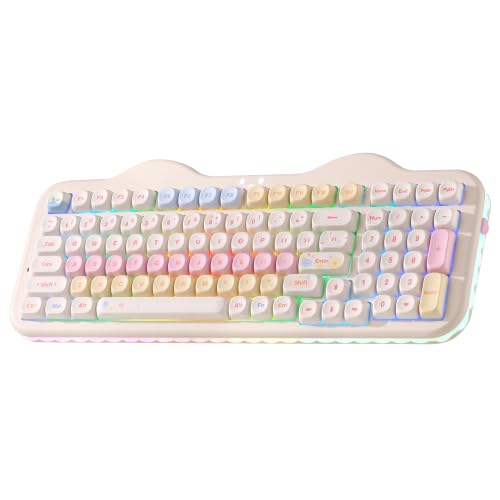
YUNZII C98 Cute Cake Wireless Mechanical Keyboard

KiiBoom Phantom98 Lite 96% Wireless Mechanical Gaming Keyboard

GravaStar Mercury K1 Pro 75% Wireless Mechanical Keyboard

Kailh Butterfly Blue Linear Pre-Lubed Switch

Akko V3 Creamy Yellow Pro Linear Switches

Akko Starlit Linear Switches 5-Pin

Akko V3 Creamy Blue Pro Keyboard Switch

Akko V3 Lavender Purple Pro Keyboard Switch

KINESIS Gaming TKO Mechanical Keyboard
What Each Pick Brings To The Table
The YUNZII C75 leans into a softer, character-driven aesthetic that makes it feel less like a tool and more like a desk accessory. The 75% layout (a compact form factor that keeps the function row and arrow keys but drops the numpad) gives you dedicated arrows and a function row without consuming a full-size footprint, which matters on smaller desks where a TKL feels too wide. The Candy Switch is YUNZII’s pre-installed linear, so there’s no bump to interrupt rapid keypresses during late-night work sprints or ranked matches.
Wireless, Bluetooth, and wired modes cover the typical setup scenarios: cable-free desktop, tablet pairing, or a hardwired link to reduce input latency. The creamy typing sound is a real feature in shared rooms, since linear switches tend to bottom-out (press all the way to the base of the key travel) more than tactile ones. For most home offices, this is enough personality and performance without crossing into novelty territory.
Standout Benefits
- 75% layout preserves arrows and function keys while reclaiming roughly 30% of the desk width a full-size board eats up.
- Three connectivity modes (wireless 2.4GHz, Bluetooth, and USB-C wired) let you swap between laptop, tablet, and desktop without re-pairing headaches.
- Pre-installed Candy linear switch removes the barrier for anyone who wants a smooth feel straight out of the box, no soldering required.
- The beige-and-pastel styling pairs well with light-themed setups, which is a small thing but genuinely nice in a workspace photo.
Things To Consider
- The decorative case theme won’t land with shoppers who prefer a minimal or industrial-looking board.
- Candy Switch specifics (actuation force, the grams of pressure needed to register a keystroke, and travel distance) aren’t published in detail, so enthusiasts who obsess over switch data may want more transparency.
Key Specs
Who It Suits Best
Style-conscious shoppers who want a wireless linear board for daily typing and casual gaming on a smaller desk.
Consider Something Else When
Pick the YUNZII C98 instead if you regularly enter numbers or work in spreadsheets, since its dedicated numpad saves constant column hopping.
Building on the C75’s cake-themed chassis, the C98 trades a bit of width for a dedicated numeric keypad. That 96% arrangement (a near-full-size layout that squeezes the numpad closer to the main cluster) is the practical sweet spot for shoppers who log invoices, balance spreadsheets, or play MMOs that lean on number bindings. The colorful dye-sublimated PBT keycaps (printed using heat to embed dye into the plastic, which resists shine over time) are an upgrade over typical ABS plastic since they won’t develop that greasy gloss after a year of heavy use.
Like its sibling, the C98 ships with the Candy linear switch, so the typing feel stays consistent across the line. Owners commonly report that the MOA profile (a taller, sculpted keycap shape) takes a short adjustment period if you’re moving from a flatter OEM or Cherry-profile board. For most home office setups that double as a casual gaming station, the trade-off is worth the extra numpad real estate.
Real-World Strengths
- The integrated numpad eliminates the need for a separate macropad in accounting-heavy workflows.
- Dye-sub PBT keycaps resist shine and keep legends crisp through years of daily use.
- Triple connectivity mirrors the C75, so swapping between office desktop and a streaming laptop is seamless.
- The ergonomic MOA keycap profile supports a more relaxed wrist angle for long sessions.
Honest Caveats
- The decorative aesthetic won’t appeal to anyone who wants a sober, matte-black office board.
- PBT caps and the themed housing are harder to mix with aftermarket keycap sets if you like recoloring your setup.
Made For
Hybrid shoppers who split time between number-heavy work and gaming, and want a linear feel without a second accessory on the desk.
Look Elsewhere When
Go with the YUNZII C75 if you never touch a numpad and want the smallest footprint this brand offers.
KiiBoom’s Phantom98 Lite skips the numpad-bloat of a full-size board while still packing 97 keys, including arrows and a function row, into a footprint that fits on most lap-desks. VIA compatibility (open-source firmware that lets you remap every key without flashing custom software) is the headline feature for tinkerers. You can reassign layers, swap QWERTY to Dvorak, or set up a streaming macro layer without ever installing vendor software, which keeps the board driver-free across operating systems.
The 96% arrangement splits the difference between the C75 and C98 from YUNZII, and the wireless freedom means fewer cable-management headaches in clutter-conscious setups. For most competitive gamers, the linear action plus VIA remapping is a real productivity multiplier since you can build per-game profiles on the fly.
Key Advantages
- VIA support lets you remap any key, create layers, and assign macros without proprietary software.
- The 97-key layout covers arrows, function row, and a small nav cluster without the bulk of a numpad.
- Wireless connectivity pairs with tablets and laptops cleanly for mobile work sessions.
- Compact design frees up mouse space on small gaming surfaces.
Points To Note
- VIA’s learning curve can overwhelm shoppers who just want plug-and-play out of the box.
- Owners commonly report that the included switch feel leans on the lighter side, so heavier typists may need heavier aftermarket options.
Right Fit For
Tinkerers and competitive gamers who want full keymap control without installing vendor software.
Skip It When
The GravaStar Mercury K1 Pro is a better pick if you want a heavy aluminum chassis and hot-swap flexibility under a more rugged build.
Where the YUNZII boards lean playful, the GravaStar Mercury K1 Pro goes industrial. The aluminum alloy exoskeleton (an outer frame that wraps the PCB and switches for rigidity) and skeletal open-frame design give it a cyberpunk vibe that pairs with metal-heavy desk setups. The hot-swap PCB (the printed circuit board inside the keyboard that holds the switches and routes signals to the computer) is the practical feature here: you can pull out the stock linear switches and drop in any MX-style replacement without a soldering iron, which extends the board’s useful life far beyond a typical prebuilt.
The 75% layout keeps everything reachable without forcing your mouse hand into an awkward reach, and the metal chassis adds structural stability during heavy typing marathons. For most shoppers who want a centerpiece board, the trade-off is the heavier weight, which is a downside for travel but a plus for desk stability.
A Few Highlights
- Aluminum chassis adds weight and stability, so the board stays planted during intense sessions.
- Hot-swap sockets let you swap switches without soldering, future-proofing your investment.
- The skeletal frame doubles as a design statement for themed setups.
Trade-Offs To Consider
- The heavier chassis is less travel-friendly than lighter boards like the YUNZII C75.
- The exposed-frame design collects dust around the switch plate more than closed boards, so periodic cleaning is a must.
Who Will Love This
Shoppers building a metal-themed battlestation who want hot-swap flexibility and a centerpiece industrial look.
A Better Fit Elsewhere
Pick the KiiBoom Phantom98 Lite if you prioritize VIA remapping and a slightly lighter, more compact build over metal heft.
The Kailh Butterfly Blue is purpose-built for speed. Pre-travel (the distance the key travels before the keystroke registers) sits at 1.2mm, which is meaningfully shorter than the typical 2mm on standard MX-style switches, so each press registers faster. The 5-pin PCB-mount design (five metal prongs on the bottom that anchor the switch firmly into the board, versus the simpler 3-pin layout used by hot-swap boards) and POM construction (polyoxymethylene plastic, prized for its low friction and self-lubricating feel) point toward a smoother glide than older Kailh designs.
Pre-lubed from the factory, these skip the most tedious part of switch ownership for newcomers. MX compatibility means they’ll drop into nearly any standard hot-swap board, though for most casual typists, the ultra-short pre-travel can feel twitchy if you’re used to longer travel on a stock board.
What It Does Well
- 1.2mm pre-travel registers inputs noticeably faster than the 2mm standard, which is a real edge in competitive FPS.
- POM stem and housing lower friction for a cleaner, scratch-free press on every key.
- Factory lubrication saves the 20-to-30-minute per-switch hand-lubing pass for newcomers.
- MX-compatible cross stem works with the vast majority of aftermarket keycap sets.
Things To Consider
- 5-pin mounting requires clipping the plastic legs for older 3-pin hot-swap boards, which adds setup time.
- The very short pre-travel can lead to accidental keypresses during slow, deliberate typing.
Key Specs
Best Suited To
Competitive FPS and rhythm-game players who prioritize faster registration over deeper key travel.
Another Choice May Suit
Pick the Akko V3 Creamy Yellow Pro switch if you prefer a heavier 50gf press and a more traditional travel distance for mixed typing and gaming.
Akko’s V3 Creamy Yellow Pro is the everyday workhorse of the linear switch world. The 50gf actuation force sits in the middle of the typical 45-to-55gf range, which means the press feels substantial without being heavy. The dustproof stem is a real ownership bonus since dust ingress is the most common cause of scratchy-feeling switches months after purchase. Alloy copper and palladium gold contact materials improve conductivity and resist oxidation (the gradual tarnish that can weaken the electrical signal over years of use), so the switch should stay consistent well past the first year.
For most first-time builders, the V3 Yellow Pro is the kind of switch you install and forget about, which is exactly what a daily-driver switch should do. Compared to the Kailh Butterfly Blue reviewed earlier, this one trades speed for a more traditional feel.
Benefits That Matter
- 50gf actuation hits a middle-ground force that suits both typing and gaming without favoring either.
- Dustproof stem design reduces scratchy-feel complaints after months of desk exposure.
- Alloy copper and palladium gold contacts resist oxidation for longer signal stability.
- 5-pin mounting fits both solder and most hot-swap boards with minimal fuss.
Small Caveats
- The 50gf force is heavier than the 45gf on Kailh Butterfly Blue, so fast-twitch gamers may want lighter switches.
- Owners commonly report that the factory lube job is light, and adding Krytox 205g0 (a popular aftermarket lubricant) improves the creamy feel noticeably.
Key Specs
Perfect Match For
First-time switch builders who want a balanced linear that handles both typing marathons and ranked games.
Reach For A Different Pick When
Grab the Akko Starlit Linear if you want LED-friendly diffusion and a slightly lighter 45gf feel for showpiece builds.
The Akko Starlit switch is half performance part, half decorative centerpiece. The glitter-infused PC top casing (polycarbonate plastic with metallic flecks embedded in it) catches RGB light and scatters it across the keycap, which makes shine-through PBT and PC keycap sets glow more evenly. The LED diffuser is engineered for clean light spread rather than the spotty hot-spot effect you get with budget switches. The POM stem and PA66 bottom housing (a tough nylon plastic often used in switch bases for durability) form a sturdy base, and the tightly coiled spring delivers even resistance from top to bottom.
At 45gf, the Starlit is on the lighter side, which favors marathon gaming sessions over heavy-handed typists. For most themed builds, the visual payoff is the real reason to pick this over a basic linear.
Where It Delivers
- The glitter PC top turns RGB lighting into a feature rather than a side effect, ideal for shine-through keycaps.
- Pre-lubed from the factory, saving the manual lubing step for newcomers.
- POM stem and PA66 bottom housing provide durability on the keys you hammer most.
- 45gf force keeps finger fatigue low during long raids or work sprints.
Points To Keep In Mind
- The glitter aesthetic only shows under RGB; on unlit boards, the visual benefit disappears.
- A switch opener is not included, so removing keycaps requires a separate tool or flat-blade screwdriver.
The Right Fit
Theme-build enthusiasts with shine-through keycaps who want their lighting to actually glow through the switch housing.
Swap It Out When
The Kailh Butterfly Blue is a stronger pick if you care more about short pre-travel than RGB diffusion.
The V3 Creamy Blue Pro is technically listed as a tactile switch (it has a small bump partway through the press that signals the keystroke has registered), but it lives in the same family as the linear V3 switches reviewed above. The 45gf actuation is lighter than the Yellow Pro, and the dustproof stem carries the same anti-scratch benefits. The alloy copper and palladium gold contact materials match the rest of the V3 generation, so conductivity and longevity should track similarly across the lineup.
For most office-shared workspaces, the tactile bump provides feedback that pure linears lack, which is helpful when you’re touch-typing and want confirmation each press registered. Shoppers who specifically want a bump should consider this alongside the Lavender Purple option below.
The Upside
- The light tactile bump gives typing confirmation without the louder click of clicky switches.
- Dustproof stem extends the smooth feel through months of daily use.
- 45gf force stays finger-friendly during full workdays.
- Alloy copper and palladium gold contacts reduce oxidation concerns over time.
A Few Limitations
- The bump can slow down rapid-fire inputs for gamers who need zero resistance.
- It’s sold as a 45-piece pack, so filling a full-size board plus extras is the typical buy-in.
Key Specs
Whose Shelf It Belongs On
Quiet-office typists who want tactile feedback without the clicky volume of traditional clicky switches.
Where A Sibling Pick Shines
Choose the Akko V3 Creamy Yellow Pro if you want a strictly linear press instead of a tactile bump.
The Lavender Purple Pro is the softest press in Akko’s V3 family. The 40gf actuation force is noticeably lighter than the Yellow Pro’s 50gf or the Creamy Blue’s 45gf, so finger fatigue drops for long-session typists. The 18mm extension spring is engineered to produce a unique tactile bump without feeling harsh. The V3 generation’s alloy copper and palladium gold contacts and dustproof stem carry the same ownership benefits as the rest of the lineup.
Owners commonly report that the additional lube on the switch rails improves the out-of-box feel compared to older Akko switches. For most people with a soft typing touch, the Lavender Purple Pro is the one that disappears into the background, exactly what an everyday switch should do.
Features That Help
- 40gf actuation is the lightest in the V3 lineup, ideal for soft-touch typists.
- The 18mm extension spring shapes a tactile bump without an aggressive snap.
- Dustproof stem keeps the feel consistent over months of daily use.
- Extra factory lube on the rails improves smoothness out of the box.
Points To Note
- The light 40gf force can trigger accidental presses for heavy-fingered gamers.
- Tactile bump adds slight resistance that pure-linear fans may not want.
Built With In Mind
Soft-touch typists who write or code for hours and want a tactile feel that doesn’t tire the fingers.
Not Your Match When
The Kailh Butterfly Blue is a stronger fit for competitive gamers who want fast linear switches without a bump.
KINESIS built the TKO around tournament-grade portability. The 60% layout (the smallest common layout, dropping function row, arrows, and numpad for a tight grid) keeps mouse movement free on small hotel-room desks, and the aluminum body survives the toss into a backpack. The split spacebar is unusual and useful: depending on the source description, it comes with Kailh Box White clicky switches, a clicky variant rather than a linear, so this pick actually skews toward a clicky preference inside an otherwise linear-focused list.
Hot-swap lets you swap the clicky switches for linears later without soldering, which extends the board’s life. The PBT keycaps (a harder plastic that resists shine better than ABS) and dual-zone RGB round out a compact package that’s been popular with tournament players and frequent travelers for years.
The Helpful Details
- 60% layout frees up desk space for wide mouse sweeps in FPS games.
- Aluminum chassis survives travel better than plastic-bodied boards.
- Hot-swap sockets let you replace the stock clicky switches with linears without tools.
- PBT keycaps resist shine over years of heavy use.
Soft Spots
- Stock Kailh Box White switches are clicky, not linear, so linear purists must swap them.
- No dedicated arrows or function row requires learning a Fn-layer for those keys.
Who Should Grab It
Tournament-going gamers who travel light and want a metal-bodied board they can toss into a backpack.
A Better Fit Elsewhere
The YUNZII C98 is more practical for home use with its full numpad and pre-installed linear switches.
Choosing Linear Switches That Actually Match Your Hands
Linear switches feel different in real hands than they do on paper, so the spec sheet only tells half the story. The two numbers that matter most are actuation force, measured in gram-force (gf), the pressure needed to register a key, and pre-travel, the millimeters the key descends before the press registers. A 45gf switch with 1.2mm pre-travel feels fast and twitchy, while a 50gf switch with 4mm total travel feels grounded and deliberate. Gamers chasing reaction speed usually want lighter and shorter; typists who care about rhythm usually want a touch heavier.
Hot-swap versus solder is the next decision. A hot-swap PCB lets you pull switches out with a small tool and try different ones without a soldering iron, which is invaluable for first-time builders. Pre-lubed switches save the most tedious step in switch ownership: hand-lubing a 100-switch board can eat a full afternoon. For most newcomers, factory-lubed linears like the Akko V3 family are worth the small upcharge over unlubed budget options.
Keycap compatibility is the silent trap. Standard MX-style cross stems fit the vast majority of aftermarket caps, but low-profile keycaps require low-profile switches, and not every switch supports both. If you plan to swap keycaps later, stick with full-height MX-compatible switches and standard profile caps.
Finally, think about noise. Linear switches bottom-out (the key hits the base of its travel at the bottom of the switch housing) more than tactile or clicky ones, which makes a sharper thud at the end of each press. In a shared office or late-night apartment, that matters more than the spec sheet suggests. For most shoppers, that’s the practical ownership concern that outweighs every other spec.
Common Shopper Mistakes And Where The Extra Money Goes
Traps First Timers Fall Into
The biggest mistake is chasing the lowest actuation force without considering accidental presses. A 35-to-40gf switch feels amazing for the first hour, then you start hitting keys you didn’t mean to during intense gameplay. For most newcomers, 45-to-50gf is the safer starting range. Another common slip is buying 5-pin switches for a 3-pin hot-swap board; the extra plastic legs need to be clipped before installation, which adds a fiddly step that frustrates first-timers.
What The Higher Tier Buys
Premium switches earn their upcharge through tighter manufacturing tolerances, factory lubrication, and materials like POM and polycarbonate that produce a smoother glide. On a budget switch, you may feel scratch on every other key; on a premium linear, the press feels uniform across the entire board. For most shoppers building one board to last several years, the upgrade pays off in daily consistency rather than headline-grabbing numbers.