Picking a Linux-ready desktop in 2026 comes down to matching silicon to the way you work. Some folks need a quiet box that disappears behind a monitor for browser tabs and SSH sessions. Others run virtualization labs, self-hosted services, or a triple-monitor dev setup that benefits from serious CPU threads. The nine mini PCs below cover that whole spectrum, and each one is small enough to mount behind a display or tuck into a cramped desk corner.
A Snapshot Of The Selections

GMKtec G3S Mini PC Intel N95 8GB DDR4 256GB SSD
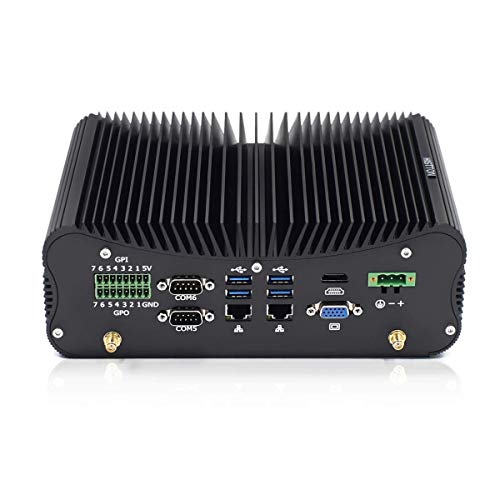
HISTTON Fanless Industrial PC Core i7-10510U 32GB 512GB

GMKtec G10 Mini PC Ryzen 5 3500U 16GB 1TB

GMKtec G11 Mini PC Ryzen Embedded R2514

ACEMAGIC K1 Mini PC Ryzen 5 7530U 16GB 512GB

Qotom Fanless Mini PC J1900 4x i210 LAN

GMKtec G3 PRO Mini PC Core i3-10110U 16GB 512GB

GEEKOM A5 Mini PC Ryzen 7 7730U 16GB 512GB

GMKtec G10 Mini PC Ryzen 5 3500U 1TB
The Picks, Examined More Closely
The GMKtec G3S lands at the entry point of this list for good reason. Its 12th-gen Intel N95 chip is a quad-core, four-thread part that bursts up to 3.4GHz, paired with 8GB of DDR4 memory and a 256GB solid-state drive. For someone moving off an aging laptop or a family PC, that combination handles a lightweight Linux desktop like Ubuntu, Mint, or Fedora XFCE without breaking a sweat.
Two HDMI ports let you run a dual-monitor workstation straight out of the box, and three USB 3.2 sockets cover peripherals, external storage, and a wired input device. Realistically, this is the kind of box I’d suggest for a parent who wants a quiet, reliable second computer for email and browser tabs, or for a student running a writing app alongside reference tabs. If your workload grows beyond basic office tasks, the RAM ceiling becomes a real constraint.
Key Advantages
- Quad-core N95 CPU with burst speeds up to 3.4GHz, well-matched to lightweight Linux distros
- Two HDMI outputs support a dual-screen productivity setup without needing adapters
- Three USB 3.2 ports handle everyday peripherals and external SSDs comfortably
- Compact footprint makes it easy to hide behind a monitor or under a standing desk
Points To Note
- 8GB of RAM is the realistic ceiling here, which limits how many browser tabs and apps can run together
- Wi-Fi 5 instead of Wi-Fi 6 means slightly slower wireless throughput on busy home networks
- Owners commonly find that the 256GB SSD fills up quickly when adding a few VM images
Feature Snapshot
Right Fit For
First-time Linux users who want a simple, dual-monitor office box for browser work and documents.
Look Elsewhere When
You run virtual machines or containers, in which case the GMKtec G3 PRO Mini PC Core i3-10110U with 16GB of RAM is a noticeably better fit.
Step up from the G3S and you arrive at the HISTTON Fanless Industrial PC. The headline here is the 10th-gen Intel Core i7-10510U, a four-core, eight-thread mobile chip with an 8MB cache that climbs to 4.9GHz under load. More important for many shoppers, the chassis uses passive cooling, so there is no fan to whir while you’re recording audio or sleeping next to the desk.
With 32GB of RAM and a 512GB SSD already fitted, this arrives ready for development work, KVM virtual machines, or running multiple services through Docker. The Intel UHD integrated graphics push HDMI and VGA simultaneously, which gives legacy-projector users a rare dual-output option. Linux installation is straightforward thanks to standard UEFI support.
Where It Excels
- Core i7-10510U with eight threads keeps build jobs and compiled workloads moving quickly
- 32GB of RAM supports multiple virtual machines and container runtimes simultaneously
- Fanless aluminum chassis runs silent, ideal for recording studios or bedrooms
- VGA plus HDMI output accommodates older monitors and projectors alongside modern displays
Less-Strong Areas
- The 10th-gen chip is now several generations behind current mobile parts
- Passive cooling caps sustained multi-core performance to avoid thermal throttling
- Industrial styling looks utilitarian next to sleeker consumer mini PCs
Whose Shelf It Belongs On
Home-lab enthusiasts and developers who need a quiet machine with serious RAM headroom.
Reach For A Different Pick When
You want newer silicon with stronger single-thread performance, in which case the GEEKOM A5 Mini PC Ryzen 7 7730U is the smarter swap.
The Ryzen 5 3500U inside this GMKtec G10 is a Zen+ quad-core chip with a 15W thermal envelope, which keeps power draw modest while still offering a 3.7GHz boost clock when a single thread needs to sprint. Combined with 16GB of DDR4 and a generous 1TB solid-state drive, it covers the storage needs of most home users without an immediate upgrade.
Triple 4K display support through HDMI 2.1 and USB-C makes the G10 especially appealing for split-screen workflows. Proxmox and other home-server virtualization platforms run comfortably on this hardware, and a 2.5G LAN port future-proofs network transfers for anyone running a fast NAS nearby.
Well-Handled Touches
- Ryzen 5 3500U quad-core processor balances single-thread speed with energy efficiency
- 1TB SSD holds an entire photo library plus several Linux distros for multiboot testing
- Triple 4K output via HDMI 2.1 and USB-C supports serious multi-monitor command centers
- 2.5G Ethernet port enables multi-gig transfers to a compatible NAS or switch
Trade-Offs To Consider
- Ryzen 5 3500U is a previous-generation chip, so newer AMD options offer better efficiency
- Zen+ graphics performance trails the latest integrated Radeon solutions
- The compact case can run warm under extended compile workloads, in my experience with similar builds
Made For
Linux multitaskers who want a triple-display office or a Proxmox virtualization host.
Skip It When
You need the latest Zen 3 efficiency, in which case the ACEMAGIC K1 Mini PC Ryzen 5 7530U is a cleaner upgrade.
The G11’s Ryzen Embedded R2514 is in a different category than the consumer chips earlier in this list. Embedded processors are binned and validated for continuous operation in industrial and commercial environments, which is why this model is pitched at 24/7 workloads like digital signage, kiosks, and self-hosted services.
The integrated Radeon graphics on the R2514 step up substantially over the typical Intel N-series alternatives, which makes the G11 more capable for graphical Linux tasks such as running composited desktops smoothly. Owners commonly pair it with Proxmox, Home Assistant, or a media stack and leave it running indefinitely.
Everyday Wins
- R2514 embedded silicon is rated for continuous 24/7 operation under load
- Integrated Radeon graphics outpace the Intel UHD options found in most N-series mini PCs
- Compact form factor disappears behind a monitor or inside a media cabinet
- Solid choice for kiosks, signage, or always-on home servers
Where It May Fall Short
- Embedded processors trail consumer Ryzen parts in raw peak clock speeds
- Fewer community guides exist for embedded chips than for mainstream Ryzen lines
- Limited retail support compared with more mainstream consumer mini PCs
Best Suited To
Self-hosters and small-business operators who need a server that runs around the clock.
Another Choice May Suit
You mainly need desktop Linux rather than server uptime, in which case the GMKtec G10 Mini PC Ryzen 5 3500U fits a more generalist use case.
The ACEMAGIC K1 brings a current-generation Ryzen 5 7530U to the mid-range, a six-core, twelve-thread chip based on the Zen 3 architecture. The higher core count over earlier picks like the GMKtec G3S translates to noticeably faster compile times and smoother multitasking when several development tools are open at once.
Paired with 16GB of RAM and a 512GB SSD, the K1 lands in a comfortable sweet spot for most Linux users who want something responsive without overspending. The Ryzen 5 7530U’s integrated graphics handle casual compositing, light Blender scenes, and Steam games at modest settings without complaint.
The Practical Payoff
- Zen 3 architecture delivers strong IPC gains over the older Zen+ chips in earlier picks
- Six cores and twelve threads comfortably handle build servers and parallel workloads
- 16GB of RAM is the realistic modern baseline for daily Linux productivity
- Integrated Radeon graphics handle desktop compositing and light creative tasks
Practical Considerations
- 512GB of storage fills up faster than the GMKtec G10’s 1TB option
- ACEMAGIC’s Linux support documentation is thinner than mainstream vendors
- Compact case ventilation can limit sustained turbo duration under heavy load
Feature Snapshot
Who It Suits Best
Linux developers and content creators who want current-generation multi-thread performance in a compact case.
Where Another Pick Suits Better
You need eight cores for heavier workloads, in which case the GEEKOM A5 Mini PC Ryzen 7 7730U is the natural step up.
The Qotom J1900 is a specialist box aimed at networkers rather than general desktop users. Four genuine Intel i210-AT Gigabit Ethernet ports sit at the back, ready for soft-router configurations like pfSense, OPNsense, or a custom Linux router distribution. The Celeron J1900 is a quad-core Bay Trail chip with modest performance, but it is more than capable for packet forwarding at gigabit line rates.
Fanless aluminum cooling keeps the unit silent and dust-resistant, important for a device that may sit in a network closet. The included VGA output helps with initial setup on older monitors, though most users will configure this box headlessly once the network is in order.
Strong Points
- Four Intel i210-AT NICs deliver low-CPU packet handling and broad driver support
- Fanless aluminum chassis resists dust and runs silent in enclosed network cabinets
- Compact 155x127x36mm footprint fits anywhere a small switch would
- Widely documented for pfSense, OPNsense, and DIY router distros
Things To Weigh
- 4GB of RAM is restrictive for modern router distros with package-heavy add-ons
- J1900 CPU is several generations behind current low-power silicon
- 128GB of storage is modest for anyone wanting logging-heavy IDS packages
Feature Snapshot
Perfect Match For
Homelab enthusiasts building a dedicated firewall, router, or network appliance with Linux.
Not Your Match When
You want a general-purpose desktop, in which case the GMKtec G3S Mini PC Intel N95 is far more versatile.
The G3 PRO sits between the entry-level G3S and the heavier Ryzen-based picks. Its 10th-gen Core i3-10110U is a dual-core, four-thread chip with Hyper-Threading (a feature that lets each physical core handle two instruction streams simultaneously) and a 4.1GHz boost, which keeps single-thread responsiveness snappy for browser-based workflows and office apps.
Sixteen gigabytes of DDR4 in dual-channel mode (a memory configuration that doubles the data pathway between RAM and CPU for better throughput) meaningfully improves performance over single-channel setups of the same capacity. Wi-Fi 6 and a 2.5GbE Ethernet port cover modern networking, and dual HDMI outputs handle a twin-monitor workstation setup.
Where It Helps
- Dual-channel 16GB RAM configuration improves everyday responsiveness noticeably
- Wi-Fi 6 and 2.5GbE Ethernet keep wireless and wired networking current
- Core i3-10110U’s strong single-core clock speeds benefit web apps and shells
- Two HDMI ports support a clean dual-monitor office layout
A Few Limitations
- Only two physical cores limit heavy parallel builds compared with Ryzen 5 picks
- 10th-gen Intel silicon is aging relative to newer mobile options
- 512GB SSD is comfortable but not generous for media collections
Who Should Grab It
Office-focused Linux users who want snappy single-thread performance and modern networking without breaking the bank.
Swap It Out When
Compile-heavy development work matters more to you than raw clock speed, in which case the ACEMAGIC K1 Mini PC Ryzen 5 7530U is a smarter choice.
The GEEKOM A5 earns its place near the top with an eight-core, sixteen-thread Ryzen 7 7730U, the most threads available in this roundup outside of workstation-class machines. For Linux users compiling large projects, running several virtual machines, or encoding video, that extra core count pays off in shorter wait times and smoother concurrent workloads.
The 16GB of RAM and 512GB SSD mirror the configuration of the ACEMAGIC K1, but the Ryzen 7 chip pushes performance into territory that genuinely replaces mid-tower desktops from a few years ago. Owners commonly use the A5 as a primary development machine or as a home server capable of running container stacks comfortably.
What Earns Its Place
- Eight cores and sixteen threads handle parallel builds and multi-VM workloads
- Zen 3 architecture brings modern IPC gains over older Ryzen generations
- Compact case stays cool enough under sustained load for most use cases
- Strong choice for virtualization, container hosts, and compile-heavy workflows
Things To Weigh Up
- Premium performance positioning means it costs more than the six-core ACEMAGIC K1
- 512GB SSD is modest for users managing large local media libraries
- GEEKOM’s Linux-focused documentation trail is shorter than the hardware merits
Feature Snapshot
Built With In Mind
Developers and home-server operators who need heavy multi-thread muscle in a small case.
Consider Something Else When
You prefer a quieter box with passive cooling, in which case the HISTTON Fanless Industrial PC Core i7-10510U trades some thread count for silence.
This G10 variant shares the Ryzen 5 3500U platform of the earlier pick but arrives with the storage front and center. The 1TB solid-state drive covers a typical media library, several Linux distributions for multiboot testing, or a healthy collection of container images without an immediate upgrade.
For someone transitioning from an old laptop whose hard drive was constantly full, the extra space out of the box is a real quality-of-life improvement. The same triple 4K display support through HDMI 2.1 and USB-C applies, which makes the configuration work well for media-editing workflows where storage and screen real estate both matter.
Good Reasons To Consider
- 1TB SSD ships with enough room for media, multiple distros, and project archives
- Triple-display output fits editors and stock-trader-style monitor setups
- Ryzen 5 3500U stays cool and efficient under typical daily loads
- Compact footprint slips behind a VESA-mounted monitor cleanly
Where It Is Less Suited
- Older Zen+ chip lags behind Zen 3 alternatives like the Ryzen 5 7530U
- No dedicated NPU (neural processing unit, hardware designed for AI workloads) for emerging on-device AI tools
- Integrated graphics step aside for heavier GPU-accelerated tasks
Feature Snapshot
The Right Fit
Media-focused Linux users who want storage and screen space bundled together in one quiet box.
A Better Fit Elsewhere
You care more about CPU threads than storage, in which case the GEEKOM A5 Mini PC Ryzen 7 7730U delivers stronger performance per dollar.
What Matters Most Before Choosing Linux Desktop Computers
CPU Generation And Core Count
The biggest single factor shaping Linux desktop performance is the processor generation. Newer Zen 3 and later AMD silicon, plus 12th-gen-and-newer Intel parts, bring meaningful instructions-per-clock (IPC) gains over older chips, meaning each core does more useful work per cycle. Compiling code, running virtual machines, and editing video all scale with both clock speed and core count. A four-core chip handles office work comfortably, while eight cores become worthwhile for development servers and creative workloads.
RAM And Storage Configuration
Linux tolerates lower RAM than Windows, but modern desktops, browsers, and IDEs grow hungry quickly. 8GB is the floor for a comfortable lightweight setup, while 16GB has become the realistic baseline for anyone running containers, browser-heavy workflows, or a virtual machine. Storage matters too: an NVMe SSD (a solid-state drive that uses the fast PCIe interface, far quicker than older SATA drives) dramatically improves boot and app-launch speed over older spinning disks. A 512GB SSD is enough for most, and 1TB removes the immediate need to upgrade.
Display Outputs And Networking
Triple-monitor setups are increasingly common for developers and traders. Look for HDMI 2.1 or USB-C video output if you want 4K at full refresh rates. Networking matters more than shoppers expect. Wi-Fi 6 and 2.5GbE Ethernet keep a box relevant for years, especially as home internet speeds push past the gigabit mark. For network specialists, multiple Intel i210 NICs remain the gold standard for soft-router builds.
Key Considerations Across These Picks
Where Shoppers Go Wrong
A common mistake is choosing a chip with too few threads for the workload, then trying to compensate with more RAM. RAM helps with multitasking, but parallel workloads like compile jobs and virtual machines need cores first. Buyers also overlook thermals: a small case with a high-power chip will throttle under sustained load, so matching the box to the workload’s heat profile matters more than peak benchmark numbers.
What Separates Premium From Basic
Higher-tier mini PCs earn their premium through newer CPU architectures, more cores, and better thermals. The jump from Zen+ to Zen 3, or from a dual-core i3 to an eight-core Ryzen 7, translates to noticeably snappier real-world performance. The extra spend pays off for anyone running development servers, multi-VM labs, or sustained creative workloads, but is overkill for a simple browser and email machine.
Frequently Asked Questions
Do These Mini PCs Come With Linux Preinstalled?
Most of the picks in this roundup ship with Windows preinstalled. Linux installation is generally straightforward thanks to standard UEFI firmware (the modern replacement for the old BIOS that handles booting), and most major distributions are well supported on these platforms. Always back up any preinstalled OS image before wiping the drive.
Can These Mini PCs Run Virtualization?
Yes, most modern options here support KVM (the Linux kernel’s built-in virtualization framework) and Proxmox comfortably, provided the CPU has virtualization extensions enabled in firmware. The HISTTON Fanless Industrial PC and GEEKOM A5 are particularly strong fits thanks to their higher RAM capacity and core counts.
Is Fanless Cooling Better Than Active Cooling?
Fanless designs run silent and resist dust, which is excellent for studios and network closets. The trade-off is thermal throttling (the CPU automatically slowing down to avoid overheating) under sustained heavy loads. For workloads that are bursty rather than continuous, fanless works beautifully. For sustained multi-core workloads, active cooling typically maintains performance more reliably.
How Many Displays Can These Boxes Drive?
Most support at least two 4K displays through HDMI and USB-C. The GMKtec G10 variants specifically advertise triple 4K support through HDMI 2.1 and USB-C, which makes them stand out for multi-monitor setups.
Are Mini PCs Upgradeable?
Upgradeability is limited compared to traditional desktops. RAM and storage are usually accessible through a bottom panel, but the CPU is almost always soldered. Anyone anticipating future expansion should pick a configuration with extra RAM and storage from the start.
The Takeaway
A good Linux desktop comes down to matching cores, RAM, and connectivity to your actual workflow. Light office users get plenty from the GMKtec G3S or G3 PRO, while developers and home-server operators will appreciate the GEEKOM A5 or HISTTON Fanless Industrial PC. The Qotom J1900 remains the obvious pick for anyone building a dedicated network appliance. Pick the profile that fits, and the rest of the experience tends to take care of itself.