I keep coming back to small-form-factor machines every time a desk gets cluttered or a home lab needs another node. Linux runs beautifully on lean hardware, so a tiny box with the right CPU, enough RAM, and a quiet cooling profile tends to outperform towers three times its size. The nine machines below cover everything from a fanless industrial unit to an AI-ready workstation, each chosen for a specific kind of Linux work.
The Essentials At A Glance

FANPEEC Fanless Mini PC Industrial Core i5-8350U

GMKtec G3S Mini PC Intel N95 8GB/256GB

MINISFORUM AI X1 Pro-370 Ryzen AI 9 HX 370

MINISFORUM M1 Pro Core Ultra 5 125H Mini PC

GMKtec G10 Mini PC Ryzen 5 3500U 16GB/1TB

GMKtec G11 Mini PC Ryzen Embedded R2514
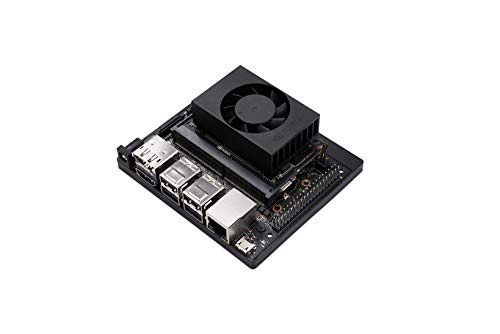
NVIDIA Jetson Xavier NX Developer Kit

GMKtec G10 Mini PC Ryzen 5 3500U 16GB/1TB

MINISFORUM X1-255 Ryzen 7 255 Barebone
Meet The Standout Selections
Where most mini PCs spin a tiny fan to cool an Intel mobile chip, the FANPEEC industrial box drops the fan entirely. That makes it a natural fit for a recording booth, a control room, or any corner of a home lab where background noise drives me up the wall. The Core i5-8350U is a familiar 8th-generation workhorse with four cores, eight threads, and a 3.6 GHz burst ceiling, so a lightweight Linux desktop or a small container host runs comfortably.
Storage is handled by a 256 GB M.2 SSD, which keeps boot and app launch times snappy. RAM comes in at 16 GB of DDR4, plenty for typical Linux workloads plus a handful of Docker containers. Compared to the fan-cooled G3S later in the list, this unit is built for environments where dust and silence matter more than peak clock speed.
A Few Strong Suits
- Truly silent operation with no moving parts, ideal for studios, bedrooms, and industrial panels.
- 16 GB of DDR4 handles typical Linux desktop and container workloads without breaking a sweat.
- 256 GB M.2 SSD delivers fast boot times and quick application launches.
- Industrial-grade chassis tends to tolerate dust and vibration better than consumer mini PCs.
- The 8th-gen i5 chip enjoys long-term Linux kernel support, including recent distributions.
Things To Consider
- The Core i5-8350U is older silicon, so newer AI inference and hardware-accelerated video tasks may feel slow.
- Passive cooling relies on the chassis acting as a heat sink, so owners commonly recommend leaving clearance around the unit for airflow.
- Limited expandability compared to larger NUC-style boxes with swappable SODIMM slots.
Key Product Details
Best Suited To
Anyone running a home server, a kiosk, or a media workstation in a noise-sensitive room where a fan-cooled box would be distracting.
Skip It When
The MINISFORUM AI X1 Pro-370 is a better call when AI inference and modern GPU-accelerated workflows sit at the top of the priority list.
Stepping up from phones and laptops, the G3S is the small desktop I recommend to friends who just want a clean Linux box for the family. The Intel N95 is a 12th-gen Alder Lake chip with four cores, four threads, and a 3.4 GHz burst, which is more than enough for a browser, a spreadsheet, and a streaming window running side by side. Dual HDMI outputs feed two 4K monitors, so the screen real estate stays generous.
Where the FANPEEC leans industrial, the G3S leans consumer-friendly. WiFi 5 and Bluetooth 5.0 cover wireless peripherals, and three USB 3.2 ports leave room for a keyboard, mouse, and external drive. Linux distributions like Ubuntu, Fedora, and Linux Mint install on this platform without ceremony, and the N95’s low TDP keeps the chassis cool under typical office loads.
What Helps Most
- Dual HDMI ports let a single G3S drive two 4K displays without an adapter.
- Low-TDP N95 chip keeps the chassis quiet and the power bill modest.
- 256 GB SSD provides responsive storage for the OS, documents, and modest media libraries.
- Built-in WiFi 5 and Bluetooth 5.0 simplify wireless keyboard and audio setups.
Worth Noting
- 8 GB of RAM is tight for heavy browser-tab workflows or multiple containers.
- The N95 is a frugal chip, so video editing and large compile jobs will feel sluggish.
Who It Suits Best
Households and small offices that need a quiet second PC for documents, browsing, and light media work on a tight budget.
Consider Something Else When
The GMKtec G10 with a Ryzen 5 3500U and triple 4K support is a better fit when multi-monitor productivity matters more than price.
If the prior two picks were appetizers, the MINISFORUM AI X1 Pro-370 is the main course. AMD’s Ryzen AI 9 HX 370 brings 12 cores, 24 threads, and a 5.1 GHz boost clock to a compact chassis, plus a 50 TOPS NPU that handles on-device AI inference without leaning on the cloud. The integrated Radeon 890M graphics handle light gaming and hardware-accelerated video on Linux surprisingly well.
Memory tops out at 32 GB of DDR5, paired with a 1 TB SSD, so the storage ceiling won’t feel small for most prosumer workflows. Dual USB4 ports, HDMI, DisplayPort, and two RJ45 jacks give this box a server-grade connectivity profile. Running Proxmox, running local LLMs, or hosting a multi-tenant Kubernetes cluster all feel at home on this hardware.
What Works In Its Favor
- Ryzen AI 9 HX 370 with 50 TOPS NPU accelerates on-device AI workloads, including local LLMs and image processing.
- 32 GB DDR5 and 1 TB SSD leave plenty of headroom for containers, VMs, and large datasets.
- Dual USB4 ports support high-speed external SSDs and dock-style expansion.
- Radeon 890M graphics handle casual gaming and hardware-accelerated media decoding on Linux.
Points To Keep In Mind
- High performance means higher power draw and more heat, so the fan curve tends to ramp under sustained load.
- Premium hardware commands a premium price, which can feel steep for a basic desktop replacement.
Made For
Developers, ML tinkerers, and home-lab owners who want workstation-class performance in a chassis small enough to hide behind a monitor.
Not Your Match When
The FANPEEC fanless industrial unit makes more sense for silent, dust-prone, or noise-sensitive installations.
The M1 Pro sits in the sweet spot between the budget G3S and the AI-focused X1 Pro-370. Intel’s Core Ultra 5 125H pairs 14 cores and 18 threads with Arc integrated graphics, so video transcoding and graphics-heavy Linux apps get a measurable lift over older UHD silicon. The 2.2 GHz graphics clock helps with ray-traced rendering on supported titles too.
32 GB of DDR5 at 5600 MHz, expandable to 6400 MHz, makes this box comfortable for memory-hungry IDEs, virtual machines, and Chrome with dozens of tabs. Two USB4 outputs, HDMI, DisplayPort, an Oculink port for external GPU enclosures, and 2.5 GbE networking round out a connectivity suite that should satisfy most prosumer setups.
Well-Handled Touches
- Core Ultra 5 125H with Arc graphics handles video work and modern workloads smoothly.
- Oculink port supports external GPU enclosures for users who occasionally need extra graphics horsepower.
- 2.5 GbE networking keeps transfer speeds high for NAS and backup workflows.
- WiFi 7 and Bluetooth 5.4 deliver modern wireless performance.
Trade Offs
- Core Ultra chips run warm under sustained load, so the cooling fans tend to ramp up.
- The feature density pushes the unit above simple desktop-replacement budgets.
Right Fit For
Power users who want a versatile Linux desktop for coding, content creation, and the occasional gaming session without stepping up to a full tower.
Look Elsewhere When
The GMKtec G10 is the right call for shoppers who prioritize triple 4K monitors over raw CPU cores.
Most mini PCs tap out at two displays, which becomes a real limitation in trading, monitoring, and editorial workflows. The GMKtec G10 sidesteps that with triple 4K display support through HDMI 2.1 and USB-C, letting one tiny box drive three high-resolution panels at once. The Ryzen 5 3500U is a Zen+ chip with four cores and a 3.7 GHz boost, which holds its own on everyday Linux desktop work.
1 TB of SSD storage and 16 GB of DDR4 keep the box capable for media libraries and parallel browser sessions. USB-C with 2.5 GbE LAN support, HDMI 2.1, and additional USB ports leave room for fast wired networking and external drives. Compared to the G3S, this is a more productive home-office machine for multi-monitor setups.
Useful Highlights
- Triple 4K display support through HDMI 2.1 and USB-C reduces the need for a separate dock.
- 1 TB SSD leaves space for sizable media collections and project files without an external drive.
- USB-C with 2.5 GbE LAN enables fast wired networking for backup and NAS workflows.
Honest Caveats
- Ryzen 5 3500U is mid-range Zen+, so heavy compile jobs and modern games will feel slow.
- Triple-display setups benefit from careful cable management around the compact chassis.
Who Will Love This
Remote workers, traders, and editors who depend on multiple monitors to keep tasks visible at a glance.
A Better Fit Elsewhere
The MINISFORUM X1-255 barebone makes more sense for tinkerers who want to bring their own RAM and storage.
The G11 is built around AMD’s Ryzen Embedded R2514, a Zen+ chip designed for commercial and industrial environments that run around the clock. That focus on continuous duty cycles makes it a natural fit for a Linux home server, a small business file host, or a digital signage player. The 1.2 GHz Radeon graphics core outperforms older Intel N-series integrated chips on graphics benchmarks, which is a nice bonus for media transcoding.
The “Beats 4300U/N150” framing in the title hints at the upgrade over the previous-generation embedded chips. For most home-server tasks like Plex, Nextcloud, or Pi-hole replacement, this kind of platform delivers steady throughput without the thermal strain of consumer mobile CPUs. Where the G3S aims at the desk, this one aims at the closet rack.
Advantages To Know
- Embedded design supports 24/7 operation in commercial and industrial settings.
- 1.2 GHz Radeon GPU accelerates media transcoding and graphics-heavy server tasks.
- Zen+ architecture delivers better per-watt efficiency than older embedded Intel alternatives.
Possible Compromises
- Embedded chips sometimes lag behind consumer silicon in raw single-core performance.
- Drivers for the embedded GPU may need extra configuration on some Linux distributions.
Perfect Match For
Home-lab enthusiasts who want an always-on server that handles media, backups, and lightweight container workloads without thermal stress.
Swap It Out When
The GMKtec G3S is a better fit for desk-bound users who prioritize dual HDMI and lower noise over server-grade endurance.
This kit sits in a different category from the rest of the list. The Jetson Xavier NX is a compact AI edge computer built around an NVIDIA GPU, paired with the full JetPack SDK and access to pre-trained models from NVIDIA NGC. Linux powers the underlying OS, and the cloud-native tooling makes container-based deployment feel familiar to anyone who has worked with Docker.
It pulls roughly 10 W under typical inference loads while delivering a substantial leap in throughput compared to its predecessor, the Jetson TX2. Robotics, computer vision, smart-city prototyping, and industrial automation are the kinds of projects where this kit earns its keep. For everyday desktop use, it’s overkill, but for AI prototyping on Linux, it’s a focused tool.
Everyday Wins
- Integrated NVIDIA GPU with CUDA support accelerates on-device AI inference.
- Cloud-native tooling and JetPack SDK streamline containerized AI deployment.
- Low 10 W power envelope suits robotics, drones, and remote deployments.
Where It Is Less Suited
- The kit is developer-focused, so everyday desktop use feels awkward without extra setup.
- Accessories like cameras, carriers, and storage are typically sold separately.
The Right Fit
Engineers and researchers building AI prototypes on Linux for robotics, vision, or edge applications.
Reach For A Different Pick When
The MINISFORUM AI X1 Pro-370 with its Ryzen AI NPU serves users who want a more conventional desktop form factor with AI capability.
This listing of the GMKtec G10 trims the marketing flourishes from the previous G10 entry and lands at a more approachable price for Linux learners. The core hardware is the same: Ryzen 5 3500U with four Zen+ cores, 16 GB of DDR4, and a 1 TB SSD. Triple 4K display support remains, making it a generous productivity platform for the cost.
For someone setting up a first Linux machine or a family computer that won’t see heavy gaming, this hits a sweet spot. Ubuntu, Fedora, and Linux Mint install cleanly, and the AMD platform enjoys strong community driver support. Compared to the GMKtec G3S earlier in the list, the G10 gives up a bit of single-thread speed for far better multitasking memory and storage.
A Favorable Mix
- 1 TB SSD and 16 GB DDR4 give meaningful headroom for daily Linux work.
- Triple 4K display support is rare at this end of the price spectrum.
- Radeon Vega graphics handle modern desktop compositing without breaking a sweat.
Small Caveats
- Ryzen 5 3500U is mid-range silicon, so modern AAA titles and heavy video work will feel slow.
- WiFi and Bluetooth module quality may vary between production runs.
Who Should Grab It
Students, families, and first-time Linux users who want a triple-monitor-ready desktop without overspending.
Another Choice May Suit
The GMKtec G11 with its embedded R2514 chip is a smarter pick for shoppers planning to leave the box running 24/7 as a server.
The X1-255 arrives as a barebone unit, which means the chassis, motherboard, and Ryzen 7 255 CPU are present, but RAM and storage arrive separately. That’s a deliberate choice for Linux tinkerers who already own quality SODIMMs and SSDs, or who want to size memory and disk for a specific workload. The Ryzen 7 255 brings 8 cores and 16 threads, which lands between the G10’s older 3500U and the AI X1’s HX 370.
Connectivity matches the rest of the high-end MINISFORUM line: HDMI 2.1, DisplayPort 2.0, two USB4 ports, an Oculink port for external GPUs, 2.5 GbE networking, WiFi 7, and Bluetooth 5.4. Linux distributions handle the AMD platform well, and barebone configurations tend to attract users who appreciate the freedom to customize.
The Case For It
- Barebone format lets users choose exact RAM and SSD modules to match their workload.
- Ryzen 7 255 delivers 8 cores and 16 threads for parallel Linux workloads.
- Oculink and dual USB4 ports support eGPU enclosures and high-speed external storage.
- WiFi 7 and 2.5 GbE networking future-proof the chassis for years.
Some Limits To Know
- Barebone units require separate purchases of RAM, SSD, and an OS, which raises the total spend.
- Buyers need basic hardware familiarity to install memory and storage without issue.
Built With In Mind
DIY enthusiasts and Linux system builders who want to assemble a custom machine from quality components they trust.
Where A Sibling Pick Shines
The MINISFORUM M1 Pro suits users who prefer a turnkey 32 GB / 1 TB configuration instead of buying parts separately.
Factors Worth Weighing Before Choosing A Linux Pc
CPU Architecture And Driver Support
AMD’s Ryzen and Intel’s Core/N-series chips handle Linux differently, and that matters more than raw benchmark numbers. Modern AMD platforms tend to enjoy strong out-of-the-box support across Ubuntu, Fedora, and Debian, while Intel’s Core Ultra line brings strong single-thread performance and Arc graphics with growing Linux maturity. Embedded chips like the Ryzen R2514 prioritize longevity over speed, and the Jetson Xavier NX delivers GPU acceleration that traditional CPUs simply can’t match. Pick a CPU whose driver landscape matches the distribution you plan to run.
Memory, Storage, And Expansion
For most Linux desktops, 16 GB of RAM is the comfortable minimum, and 32 GB opens the door to virtualization and heavier development work. Storage type matters too: NVMe M.2 SSDs dramatically outperform SATA drives on boot and app launch times, and 1 TB of storage has become the practical sweet spot for a home machine. Barebone units like the MINISFORUM X1-255 hand the choice over to you, which is great if you already own components or want to size memory precisely.
Connectivity And Display Output
The number and type of ports shape how a mini PC fits into a workspace. Dual HDMI covers most two-monitor setups, while triple 4K support from the GMKtec G10 series unlocks denser productivity layouts. USB4 and Oculink ports enable high-speed docks and external GPU enclosures, and 2.5 GbE networking keeps backups and NAS transfers quick. Wireless shoppers should look for WiFi 6, WiFi 7, and Bluetooth 5.x to avoid dongle clutter.
Form Factor, Cooling, And Use Case
A fanless industrial design suits dust-prone or noise-sensitive environments, while actively cooled boxes handle higher TDP chips under sustained loads. Servers and always-on hosts benefit from embedded silicon designed for 24/7 duty, whereas developers and creators tend to favor stronger CPU and GPU silicon with active cooling. Match the chassis and cooling profile to the room, the workload, and the expected runtime.
Common Shopping Slip Ups And Where The Money Goes
Pitfalls Shoppers Hit
It’s easy to focus on a CPU model number and ignore the memory ceiling or storage type. A barebone unit with no RAM or SSD looks like a bargain until the cost of compatible modules lands at checkout. Likewise, choosing a fan-cooled office box for a recording booth or a quiet bedroom leads to fan noise complaints later. Confirm port count, supported display resolutions, and included components before committing.
Where The Extra Money Goes
Higher tiers in the Linux mini PC market buy newer silicon with integrated NPUs, faster DDR5 memory, more capable integrated graphics, and richer port selections. The MINISFORUM AI X1 Pro-370 and M1 Pro demonstrate how stepping up unlocks AI inference, external GPU support, and WiFi 7. For users running demanding container workloads, local LLMs, or multi-monitor video pipelines, the upgrade tends to pay for itself in time saved. For basic Linux desktops, the budget picks deliver more than enough capability without overspending.
Frequently Asked Questions
Do mini PCs run Linux well?
Yes, most modern mini PCs ship with Linux-compatible hardware, and distributions like Ubuntu, Fedora, Linux Mint, and Debian install cleanly on the picks in this roundup. AMD and Intel both ship strong Linux drivers today, and embedded platforms like the Jetson Xavier NX are built Linux-first.
How much RAM do I need for a Linux mini PC?
For a basic Linux desktop with a browser and office apps, 8 GB is workable, and 16 GB is the comfortable minimum for most users. Developers running virtual machines, containers, or memory-heavy browsers benefit from 32 GB of DDR5, which the M1 Pro and AI X1 Pro-370 deliver out of the box.
What is a barebone mini PC?
A barebone unit ships with the chassis, motherboard, and CPU installed, but RAM, storage, and operating system arrive separately. The MINISFORUM X1-255 follows this format, which lets shoppers choose their own memory and SSD modules. Barebone configurations appeal to tinkerers who want to assemble a machine from parts they already trust.
Can I use a mini PC as a home server?
Absolutely, and several picks here lean into that role. The GMKtec G11 with its embedded Ryzen R2514 is designed for 24/7 operation, while the FANPEEC industrial unit runs silently in a closet or rack. Pair either with a lightweight Linux server distribution and you’re set for backups, media streaming, and self-hosted apps.
What is an NPU, and do I need one?
An NPU, or Neural Processing Unit, is a specialized processor that accelerates AI inference tasks like local LLMs, image recognition, and speech processing. Shoppers running those workloads locally will appreciate the Ryzen AI 9 HX 370 in the MINISFORUM AI X1 Pro-370. For traditional desktop Linux, an NPU is optional today but increasingly relevant as AI features land in mainstream apps.
Bottom Line
Any of these nine machines can anchor a productive Linux setup, and the right pick depends on the workload rather than raw specs. For silent industrial duty, the FANPEEC leads. For everyday office use, the GMKtec G3S delivers. For AI-heavy projects, the MINISFORUM AI X1 Pro-370 stands out. Match the chassis, CPU, and port layout to the room and the tasks, and the rest tends to fall into place.