Linux users tend to hit keyboard issues that Windows and Mac folks never see. Extra keys fire weird shortcuts, Super/Meta behaves oddly, and some firmware assumes a Windows layout. I put together this list to cover real scenarios: programmers remapping caps lock to ctrl, writers wanting silent boards, travelers needing something slim, and folks who want a proper mechanical feel without fighting the OS.
A Snapshot Of The Selections

Keychron V6 Wired Custom Mechanical Keyboard (Frosted Black-Translucent)

Dell KB216 Keyboard USB QWERTY US International (White)

EDJO Wireless Keyboard and Mouse Combo (Black)

MageGee MK-Box 60% Mechanical Keyboard 68 Keys (Sky Blue)

EDJO Wireless Keyboard 2.4G Plug & Play (Black)

Lemo 1640835 USB Foot Control Pedal HID

EDJO Wireless Keyboard and Mouse Combo, Quiet Key

nuphy Air96 V2 Wireless Mechanical Keyboard (Grey)
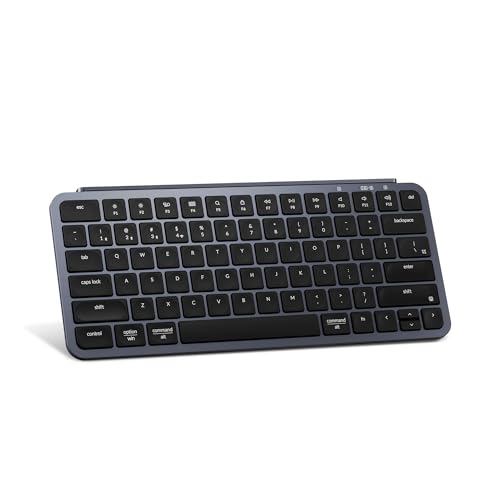
Keychron B1 Pro Ultra-Slim Wireless Keyboard (Gray)

Keychron K8 Pro Wireless Mechanical Keyboard, TKL
More Details On Our Top Picks
The Keychron V6 earns the top slot because Linux users rarely get this much control for the money. The board ships with QMK/VIA firmware, which is open-source keymap software that lets you remap every single key without flashing anything through a vendor tool. For a developer swapping caps lock to ctrl, or a Vim user who wants escape reachable from anywhere, that alone is huge.
You also get a full 108-key layout, which means a dedicated numpad for anyone doing data entry or running accounting tools. The frosted translucent case looks distinctive on a desk, and the K Pro brown switches come pre-lubed for a smoother feel out of the box. Where the V6 differs from the wireless Keychron K8 Pro later in this list: it stays wired, so there’s no battery to think about and input lag stays minimal for fast typists.
What Makes Sense
- Full QMK/VIA remapping on every layer, including the function row and numpad.
- Pre-lubed K Pro brown switches give a quieter, less scratchy tactile feel.
- Double-shot PBT keycaps resist shine after months of daily use.
- Hot-swappable PCB means you can swap switch types without soldering.
- Wired-only connection eliminates charging and Bluetooth quirks under Linux.
Things To Consider
- Full-size footprint demands serious desk space; small standing desks will feel cramped.
- The translucent case shows dust and fingerprints faster than a solid black finish.
Made For
Programmers, sysadmins, and hobbyists who want full keymap control on Linux without paying for a custom-build service.
Consider Something Else When
Pick the Keychron K8 Pro instead if you want the same QMK/VIA flexibility with Bluetooth and a smaller tenkeyless footprint.
The Dell KB216 is the opposite end of the spectrum from the V6, and that’s exactly why it earns a spot. Some users don’t want hot-swappable switches or layered macros; they want a basic, reliable membrane keyboard that the kernel sees as a standard HID device with zero drama. Linux distros rarely need any special driver, and that’s the KB216’s whole pitch.
The full layout includes a numpad and a row of multimedia shortcuts along the top, which work under most desktop environments after a quick keybind tweak. The white plastic housing keeps it light enough to toss in a bag, and the wired USB means you’re never hunting for batteries. Compared to the EDJO wireless options later, the KB216 trades cable convenience for a lower maintenance profile that just works in labs, schools, and front-desk setups.
A Few Strong Suits
- Standard HID device recognized by Linux without extra drivers or mapping files.
- Quiet membrane keys keep shared offices and classrooms happy.
- Full layout with numpad suits spreadsheets and terminal work.
Worth Noting
- Membrane switches feel mushy compared to any mechanical option on this list.
- No programmable firmware, so you’re stuck with the stock layout.
- Plastic shell tends to yellow or scuff with heavy daily handling over time.
Best Suited To
Home offices, school computer labs, and anyone outfitting multiple workstations on a tight budget.
A Better Fit Elsewhere
Step up to the Keychron B1 Pro if you want a similarly quiet feel but with Bluetooth and a much longer battery life.
EDJO’s wireless combo is built around an ergonomic idea that the mechanical boards in this roundup mostly ignore: a built-in palm rest with a folding tilt stand. For someone typing long emails or grinding through documentation on a Linux laptop, that tilt can keep the wrists flatter than a flat board on a flat desk.
The set pairs to your laptop through a single USB receiver stored in the mouse, so there’s only one dongle to lose. Anti-slide pads on the underside keep the keyboard planted when you type fast, and the full-size layout includes a numpad for spreadsheet work. Compared to the EDJO Wireless Keyboard without a mouse (further down the list), this combo saves a USB port and ships with everything in one box for first-time Linux users setting up a home office.
The Practical Payoff
- Integrated palm rest with adjustable tilt reduces wrist extension over long sessions.
- Single USB receiver handles both keyboard and mouse, freeing up ports.
- Full-size layout suits mixed workloads like spreadsheets and browser tabs.
Trade Offs
- Wireless input may add a few milliseconds of latency, noticeable in rhythm games.
- Membrane keys lack the tactile feedback many developers prefer.
- Receiver placement inside the mouse is easy to forget during travel.
Right Fit For
Remote workers and writers spending hours each day typing on a Linux laptop and wanting bundled peripherals.
Look Elsewhere When
Grab the MageGee MK-Box instead if a compact 68-key mechanical board with red switches fits your desk better.
The MageGee MK-Box takes the 60% layout trend and trims it down to 68 keys while keeping dedicated arrow keys and an F-row, which is a rare combination. Most compact boards force arrow keys behind a function layer, so this one feels more natural for navigating code or a terminal without thinking.
The red switches are linear, meaning the keystroke is smooth without the tactile bump you get from brown or blue switches. That makes them quieter than clicky options, and the speed is fast enough for gaming and rapid typing. The sky-blue colorway also stands out from the sea of black and gray boards in this category. Where the MK-Box differs from the nuphy Air96 V2 further down: it stays wired and skips wireless entirely, which keeps the price and complexity low.
Useful Highlights
- 68-key layout saves desk space while keeping arrows and a function row reachable.
- Linear red switches deliver smooth, fast keystrokes for gaming and coding.
- Wired-only design means no pairing headaches across Linux distros.
Room For Improvement
- No dedicated numpad, which hurts for spreadsheet-heavy work.
- Plastic chassis flexes a bit under heavy-handed typing.
- Limited firmware customization compared to QMK/VIA boards like the Keychron K8 Pro.
Perfect Match For
Coders, students, and casual gamers who want mechanical feel without giving up too much desk space.
Skip It When
Pick the nuphy Air96 V2 instead if you want a slim wireless mechanical with Bluetooth and a fuller layout.
This standalone EDJO keyboard exists for people who already have a mouse they love and just want to cut the cable. The 2.4 GHz wireless connection is rated for up to 33 feet of working range, so you could even control a media PC from across the room. There’s no Bluetooth pairing ritual, just plug the USB receiver in and the keyboard works on Linux without extra configuration.
The full-size layout includes a numpad and a folding tilt stand for a slightly angled typing position. The receiver stores inside the keyboard body itself, which keeps it from getting lost when you toss the keyboard into a drawer. Compared to the EDJO combo earlier, this version trades the bundled mouse for a cleaner desktop if you already use a trackball or a precision mouse.
Everyday Advantages
- Wireless range up to 33 feet for living-room or media-PC setups.
- Receiver tucked inside the keyboard body for safe storage.
- No driver install needed on most Linux distributions.
Honest Caveats
- 2.4 GHz wireless shares the band with USB 3.0 devices, sometimes causing brief interference.
- Membrane keys lack the durability and feel of mechanical switches.
Who Should Grab It
Anyone outfitting a Linux HTPC or shared workstation where a clean desk matters more than tactile feel.
Reach For A Different Pick When
Choose the Keychron K8 Pro if you want wireless freedom plus the option to remap every key through QMK.
The Lemo foot pedal is the wildcard in this lineup, and that’s on purpose. Transcription workers, court reporters, video editors, and people with accessibility needs sometimes need a hands-free way to trigger a key, and this is exactly what the HID pedal delivers. It presents as a standard HID keyboard to the OS, so Linux recognizes it as another input device the moment you plug it in.
The unit ships with three programmable switches, and the manufacturer offers programming software that supports Windows and Linux. The cable is around 1.7 meters, long enough to sit on the floor beside a chair without straining. Compared to any other pick in this roundup, the foot pedal isn’t a typing keyboard; it’s a peripheral extension for specific workflows, which is why it’s listed here as a specialty option.
What Pays Off
- Three programmable foot switches for custom shortcuts in editors or transcription tools.
- Cross-platform HID support, recognized by Linux without extra drivers.
- 1.7-meter cable fits typical desk-to-floor setups.
Points To Note
- Programming software is Windows-first, so Linux users may need a community tool.
- Single-purpose design means it’s not a replacement for a normal keyboard.
Quick Facts
Built With In Mind
Transcriptionists, video editors, and accessibility users who need hands-free input alongside their main keyboard.
Where A Sibling Pick Shines
For a full daily-driver keyboard with similar Linux friendliness at a low price, the Dell KB216 fits better in a normal office workflow.
This EDJO combo leans into quiet operation, which makes it a strong fit for shared offices or late-night writing sessions where a clacky mechanical board would bother housemates. The slim profile keeps the keyboard low to the desk, reducing wrist extension compared to taller boards.
A nice touch for Linux users is the Fn+P and Fn+O toggle that flips the keyboard between Windows and Mac layouts, which actually helps when you dual-boot or share hardware between systems. The combo pairs through one USB receiver for both the keyboard and mouse, keeping ports free. Compared to the original EDJO combo earlier, this version trims the palm rest for a smaller footprint and adds the quiet-key scissor switches.
Strong Points
- Quiet scissor switches keep noise down in shared spaces.
- OS toggle button helps when switching between Linux and Mac layouts.
- Slim profile takes less space on crowded desks.
Softer Spots
- Scissor switches feel shallow for users who prefer deeper key travel.
- No Bluetooth fallback if the USB receiver fails.
Who It Suits Best
Quiet-focused typists, open-office workers, and households where a loud keyboard would be a problem.
Swap It Out When
Step up to the Keychron B1 Pro if you want a similar quiet feel with Bluetooth and a much longer rated battery life.
The nuphy Air96 V2 is the thinnest mechanical option on this list by a wide margin, with a stated thickness of just 13.5mm at its slimmest point. That makes it easy to slip into a backpack alongside a laptop, which is exactly the use case it was built for. The aluminum frame adds rigidity without bulk, and the two-tone PBT keycaps resist shine even after long travel days.
You get Bluetooth 5.1, a 2.4 GHz wireless option, and a wired USB connection in one board, which means you can switch between a laptop, a phone, and a tablet without re-plugging. The 96% layout keeps the numpad and arrow cluster in a tight footprint. Compared to the MageGee MK-Box, this is heavier on portability and lighter on price-per-feature, with a much more refined typing feel thanks to the aluminum frame.
Advantages To Know
- Triple-mode connection: Bluetooth 5.1, 2.4 GHz, and wired USB.
- Aluminum frame keeps the board rigid despite the slim profile.
- Two-tone PBT keycaps stay matte and readable over time.
- 96% layout fits a numpad into a travel-friendly footprint.
Factors To Consider
- Slim design limits sound dampening, so mechanical clack is louder than thicker boards.
- Wireless mode may need re-pairing after firmware updates on Linux.
Quick Facts
Whose Shelf It Belongs On
Digital nomads, hybrid workers, and anyone who moves between coffee shops and home setups with the same keyboard.
Not Your Match When
Pick the Keychron K8 Pro instead if you want similar wireless freedom but prefer a more traditional tenkeyless layout.
The B1 Pro is Keychron’s answer to Apple Magic Keyboard fans who want the same low-profile, quiet feel but with Linux-friendly firmware. The ZMK-based firmware (an open-source keyboard firmware alternative to QMK) plus the Keychron Launcher tool means you can remap keys and tweak the layout from any browser, no installer required.
Battery life is rated at around 1200 hours, which is the standout spec here. For a writer or developer who forgets to charge devices, that’s weeks of real-world use before reaching for a cable. The 2.4 GHz wireless mode also hits a 1000 Hz polling rate, meaning the keyboard reports its position 1000 times per second, fast enough for casual gaming. Compared to the Dell KB216 earlier, you trade wired simplicity for portability and far longer uptime between charges.
What Earns Its Place
- Rated 1200-hour battery life for long trips without charging.
- 1000 Hz polling rate over 2.4 GHz keeps typing latency low.
- ZMK firmware with browser-based remapping tool.
- Silent scissor switches for shared spaces.
Things To Weigh
- Scissor switches feel shallow for heavy typists used to mechanical travel.
- No dedicated numpad, so spreadsheet work feels cramped.
- Browser-based remapping requires occasional firmware updates to stay stable.
Who Will Love This
Traveling writers, students, and remote workers who want a slim, quiet keyboard that lasts across long sessions away from an outlet.
Where Another Pick Suits Better
Pick the nuphy Air96 V2 if you want similar wireless flexibility but prefer mechanical switches and a numpad.
The Keychron K8 Pro is what the V6 would be if you cut the cable. Same QMK/VIA remapping story, but in a tenkeyless form factor with an aluminum frame, hot-swappable Gateron G Pro brown switches, and the option to switch between Bluetooth and wired mode. That flexibility matters on Linux because you can keep it wired at your desk and Bluetooth it to a laptop when traveling.
The brown switches give a light tactile bump without the loud click of blue switches, so it sits between the silent EDJO combo and the louder mechanical options. The aluminum chassis adds weight that helps the board stay planted during fast typing. The trade-off is size: tenkeyless means no numpad, so spreadsheet-heavy workflows may suffer.
Practical Pluses
- QMK/VIA firmware with full per-key remapping, including layers.
- Hot-swappable Gateron G Pro brown switches for easy upgrades.
- Bluetooth and wired dual mode for desktop and laptop pairing.
- Aluminum frame keeps the board rigid and stable on the desk.
Worth Bearing In Mind
- Tenkeyless layout drops the numpad, which hurts for data entry.
- Battery life drops fast with RGB lighting at full brightness.
- Aluminum frame adds noticeable weight to a backpack.
At A Glance
The Right Fit
Mechanical enthusiasts and developers who want Linux-friendly remapping plus wireless freedom and don’t need a numpad.
Another Choice May Suit
Choose the Keychron V6 if you prefer a wired-only full-size board and want the numpad for spreadsheet work.
What Matters Most Before Choosing Linux Laptop Keyboards
Linux compatibility isn’t binary. Most modern keyboards work at the HID level, the basic standard that lets any USB device announce itself to the operating system as a keyboard or mouse, so the kernel picks them up without extra drivers. The friction starts with remapping, layer toggles, and OS-specific keys. Boards that ship with QMK, VIA, or ZMK firmware give you a real chance to fix that, while plain membrane boards just lock you into whatever the manufacturer decided.
Keymap remapping tools deserve a look. QMK and VIA are open-source firmware ecosystems that store keymaps as text files you can edit and flash yourself. ZMK is a similar open-source project aimed at wireless boards. If you spend your day in Vim, Emacs, or a tiling window manager like i3 or Sway, those tools matter because you can move modifiers, add layers, and rebind Caps Lock to Escape without touching xmodmap.
Layout matters more than people expect. Full-size boards ship with a numpad that’s useful for spreadsheets, but the keyboard eats horizontal desk space. Tenkeyless (TKL) drops the numpad but keeps the function row and arrows, which most developers prefer. Sixty-percent layouts like the MageGee MK-Box go further, keeping only letters, numbers, and a small cluster of modifiers.
Switch type changes feel and sound. Mechanical switches come in three flavors: linear (smooth, fast, quieter), tactile (a small bump on the way down), and clicky (loud and pronounced). For shared spaces, tactile or linear wins. Scissor switches on slim boards like the Keychron B1 Pro are even quieter but feel shallower.
Connection type affects reliability. Wired keyboards never run out of battery and have zero input lag, which matters for gaming and fast typing. Bluetooth is convenient but can drop out in busy wireless environments. The 2.4 GHz wireless used by the EDJO boards hits a sweet spot: receiver-based, low-latency, but no cable.
Build material sets the long-term tone. Plastic shells flex and scratch. Aluminum frames like the ones on the nuphy Air96 V2 and Keychron K8 Pro stay rigid for years and feel more solid under the fingers.
Practical Pointers For Picking A Linux Laptop Keyboard
Wrong Turns To Avoid
Skipping firmware flexibility is the biggest mistake. A keyboard without QMK, VIA, or ZMK leaves you stuck with the stock layout, and Linux users often need to remap Super/Meta keys, swap Caps Lock and Ctrl, or set up custom layer keys. If remapping matters, pick a board that supports open-source firmware.
Buying a Bluetooth-only board with no wired fallback is another common slip. Bluetooth pairing on Linux is generally fine through BlueZ, the Linux Bluetooth stack, but it can be flaky after sleep or when switching users. A board that also offers wired USB, like the Keychron K8 Pro or nuphy Air96 V2, gives you a recovery option when wireless acts up.
Where The Extra Money Goes
The jump from a $20 membrane board to a $100 mechanical with QMK pays for three things: better switches, an aluminum or reinforced plastic frame, and open firmware. Each one compounds. Better switches last longer and feel more consistent after years of use. A stiffer frame means the board doesn’t ping or flex under hard typing. Open firmware turns a one-time purchase into a tool you can reconfigure for any new workflow.
For most Linux users, the upgrade is worth it once you realize how often you’ll want to remap a key. A programmable board becomes the foundation for a personalized setup, not just a typing surface.
Frequently Asked Questions
Do QMK and VIA keyboards actually work on Linux without extra setup?
Yes. QMK and VIA are open-source firmware projects, meaning the keyboard’s internal software is open and modifiable, and they store keymaps directly on the device. The operating system sees the keyboard as a standard HID input, so no driver or app is required to type. You only need a tool to reprogram the keys, and VIA works in any modern browser.
Can I remap the Super key on a non-programmable keyboard?
Yes, but it takes more work. You can use xmodmap or the newer xkb options in X11, or the equivalent settings in Wayland compositors. The remap resets when you switch sessions or plug the keyboard into a different machine, which is why a QMK or ZMK board is a cleaner long-term solution for Linux users.
Is Bluetooth reliable enough for a daily-driver Linux keyboard?
For most tasks, yes. Modern Bluetooth stacks like BlueZ handle HID keyboards reliably on Linux. The risk shows up during sleep/wake cycles, where some laptops briefly drop the connection. A board that also supports a wired or 2.4 GHz receiver, like the nuphy Air96 V2 or Keychron K8 Pro, avoids that issue.
Why would I pick a tenkeyless board over a full-size?
Tenkeyless drops the numpad to save desk space, which most developers prefer because the mouse sits closer to the typing position. If you spend hours each day in spreadsheets, a full-size board like the Keychron V6 is still worth it. The honest read is that TKL is the most balanced layout for mixed programming and writing.
Are hot-swappable switches worth it on a Linux keyboard?
Hot-swappable means you can pull switches out and replace them without soldering, which lets you try different switch types over the life of the board. For a long-term investment, yes. The Keychron K8 Pro and Keychron V6 both support it, so you can swap browns for linears or silent switches without buying a new keyboard.
Closing Remarks
Linux keyboards come down to two questions: how much do you want to remap, and how much desk space can you spare. Programmers tend to gravitate toward QMK/VIA boards for the firmware, while writers and travelers often want slim wireless builds that vanish into a backpack. Pick the option that matches your workflow, and the rest usually falls into place.