Putting together a computer on a tight budget used to mean choosing between a clunky office tower and a gaming rig that cost more than the chair it sat on. That gap has closed dramatically. Today’s affordable desktops and mini PCs handle everyday work, creative apps, and even modern gaming without forcing shoppers to pick one lane or the other.
I pulled nine prebuilt options that span the price spectrum from compact workstations to full gaming towers. Some prioritize raw processing power in a small box, others lean on newer dedicated graphics cards. A few focus on quiet, efficient office use. Each pick comes with a clear sense of who will actually be happy living with it day to day.
An Overview Of The Picks

GEEKOM NEW IT12 Mini PC Intel i3-12300HE 16GB 256GB

CyberpowerPC Gamer Xtreme VR Gaming PC GTX 1660 Super

GMKtec Gaming Mini PC Ryzen 7 H 255 32GB 1TB
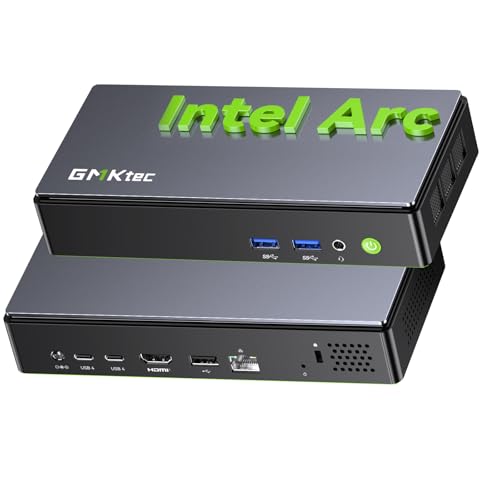
GMKtec K13 Mini PC Intel Ultra 7 256V LPDDR5

Skytech Gaming O11 Vision Gaming PC RTX 5070 Ti
GMKtec K11 Mini PC Ryzen 9 8945HS 32GB 2TB

CyberPowerPC Gamer Xtreme VR Gaming PC RTX 5060

GMKtec K8 Plus Gaming Mini PC Ryzen 7 8845HS

GMKtec M8 Mini PC Ryzen 5 PRO 6650H 1TB 16GB
The Strengths Of Each Pick
The GEEKOM IT12 is the kind of small box that quietly earns its place on a crowded desk. It runs an Intel Core i3-12300HE processor (a chip with eight threads across multiple cores) paired with 16GB of RAM and a 256GB SSD, which together keep document work, web apps, and video calls feeling responsive without making the room hum.
Where the earlier CyberpowerPC tower goes wide and aggressive, this IT12 stays low-key. It tucks behind a monitor, draws minimal power, and stays cool enough that most owners won’t notice it at all during a long workday. For shoppers who care more about a clean workspace than frame rates, that’s a meaningful win.
Useful Touches
- Eight-thread i3 outperforms many older i5 chips on day-to-day benchmarks.
- 16GB of RAM handles a dozen browser tabs plus spreadsheets without choking.
- Integrated Intel UHD graphics support AV1 hardware decoding, which lightens the load during 4K video playback.
- The compact chassis fits neatly behind most VESA-compatible monitors for an even cleaner setup.
- Low power draw keeps electricity costs minimal compared to a full tower.
Things To Consider
- 256GB of onboard storage fills up quickly with modern software installs and game libraries.
- The integrated GPU limits serious 3D work or high-refresh gaming.
Right Fit For
Remote workers, students, and writers who want a quiet productivity box that disappears into the background.
Consider Something Else When
Pick the Skytech Gaming O11 Vision Gaming PC if the goal is high-frame-rate gaming and creator work rather than pure office tasks.
The CyberpowerPC Gamer Xtreme VR sits in a comfortable middle spot for casual gamers who don’t need bleeding-edge hardware. It combines an Intel Core i5-10400F processor with a GeForce GTX 1660 Super graphics card, 8GB of DDR4 RAM, and a 500GB NVMe SSD, all in a traditional mid-tower.
Compared to the GEEKOM IT12’s compact silence, this is a louder, bigger machine built around a discrete GPU. That extra silicon pays off in 1080p gaming, where the GTX 1660 Super pushes comfortable frame rates in most modern games without requiring a power-supply upgrade. For shoppers stepping into PC gaming for the first time, the older but proven parts make the learning curve easier.
Noteworthy Benefits
- Dedicated GTX 1660 Super GPU delivers real 1080p gaming where integrated graphics fall short.
- NVMe SSD cuts load times and keeps the OS feeling snappy day to day.
- Standard mid-tower design leaves room for future storage or graphics upgrades.
Honest Caveats
- Only 8GB of RAM is tight by 2026 standards and may need an upgrade for modern titles.
- The platform uses older DDR4 memory and a previous-generation CPU socket, which limits long-term upgrade paths.
- Bundled Windows 10 Home will require a transition to Windows 11 down the road.
Key Product Details
Built With In Mind
New gamers and students who want a real graphics card in a familiar tower format.
Skip It When
Pick the CyberPowerPC Gamer Xtreme VR Gaming PC RTX 5060 instead if the goal is longer platform life and current-generation graphics.
GMKtec’s Gaming Mini PC pushes the small-form-factor idea further than the GEEKOM IT12. It runs an upgraded Ryzen 7 H 255 (an eight-core, sixteen-thread chip with a top boost of 4.9GHz) backed by 32GB of DDR5 memory and a full 1TB SSD. That puts real workstation territory inside something the size of a paperback book stack.
The trade-off shows up when compared to the CyberpowerPC tower: there’s no dedicated GPU. Gaming leans on the integrated Radeon graphics, which handle older titles and lighter esports well but struggle with demanding AAA games. For shoppers whose workloads are CPU-heavy (compiling, rendering, virtual machines), that’s a fair compromise.
What Stands Out
- 32GB of DDR5 memory is generous at this price point and handles heavy multitasking with ease.
- 1TB of internal storage removes the immediate need for an external drive.
- Ryzen 7 H 255’s eight cores excel at parallel workloads like video encoding.
- AVX-512 support helps with newer compute-intensive applications and simulations.
Points To Note
- Integrated Radeon graphics limit high-end gaming performance.
- Mini PC thermals can throttle under sustained all-core loads, depending on airflow.
Made For
Developers, streamers, and creators who prioritize CPU and memory muscle over a dedicated GPU.
Look Elsewhere When
Pick the Skytech Gaming O11 Vision Gaming PC if dedicated GPU power matters more than desk footprint.
The K13 Mini PC brings Intel’s Core Ultra 7 256V into the conversation, a chip built on a modern process that pairs traditional CPU cores with a dedicated NPU (neural processing unit) for AI tasks. SK Hynix LPDDR5 memory running at 8533 MT/s feeds that pipeline with very high bandwidth.
Unlike the GMKtec Gaming Mini PC’s AMD approach, this one leans on Intel’s newer architecture. The base clock sits at 2.2GHz with boosts up to 4.8GHz, and the chip targets users running AI-enhanced workflows like local language models, smart photo tools, and agent-style automation. For shoppers thinking about where computing is heading, it’s a relevant pick.
Useful Highlights
- Dedicated NPU handles AI workloads without taxing the main CPU cores.
- Extremely fast 8533 MT/s LPDDR5 memory keeps data pipelines fed.
- Efficient TSMC N3B process helps balance performance with thermals in a compact case.
Things To Consider
- Lower base clock means single-core performance trails some older Ryzen chips.
- Software support for AI acceleration is still maturing in many consumer apps.
Who It Suits Best
Early adopters and productivity-focused shoppers curious about local AI tools and modern Intel platforms.
Swap It Out When
Pick the GMKtec Gaming Mini PC Ryzen 7 H 255 if raw multi-core throughput matters more than AI-specific silicon.
Skytech’s O11 Vision Gaming PC pushes toward the high end of this roundup. It pairs an AMD Ryzen 7 9850X3D processor (with 3D V-Cache for gaming-heavy workloads) with an NVIDIA RTX 5070 Ti graphics card carrying 16GB of VRAM, and surrounds them with 32GB of DDR5-5600 RAM, a 2TB Gen4 NVMe SSD, and a 360mm AIO liquid cooler.
Compared to the GMKtec Gaming Mini PC, this is a different category entirely. The full tower form factor, 850W Gold-rated PSU, and dedicated GPU make it a serious gaming machine rather than a small-office productivity box. For shoppers who want modern ray-tracing performance at high settings, the RTX 5070 Ti is the headline draw.
What It Does Well
- 3D V-Cache on the Ryzen chip lifts frame rates in cache-sensitive games.
- 16GB of VRAM on the RTX 5070 Ti handles high-resolution textures and creative workloads.
- 2TB of fast NVMe storage removes the need for an immediate secondary drive.
- 360mm AIO liquid cooling keeps thermals in check during long gaming sessions.
A Few Limitations
- Full tower size requires meaningful desk space compared to mini PCs.
- Higher-end component cost puts it at the top end of the budget-friendly category.
- Owners should expect a louder system under sustained load than fanless mini PC options.
Perfect Match For
Enthusiast gamers and creative professionals who want current-generation GPU muscle without building a PC from scratch.
A Better Fit Elsewhere
Pick the CyberPowerPC Gamer Xtreme VR Gaming PC RTX 5060 if a smaller spend and lighter GPU demands are the priority.
The GMKtec K11 leans hard into raw CPU muscle. Its Ryzen 9 8945HS chip offers eight cores and sixteen threads with boosts up to 5.4GHz, while the dual-channel DDR5 memory and 2TB PCIe 4.0 SSD provide the bandwidth and storage headroom that creative work demands.
Where the GMKtec Gaming Mini PC sits in the upper tier of mid-range, the K11 steps up again with a faster CPU and double the storage. The 35W default TDP (configurable up to 70W) lets the system balance efficiency against sustained performance depending on workload. It is a quiet workhorse for people who run heavy compiles or editing sessions.
Where It Helps
- Eight-core Ryzen 9 accelerates video rendering and 3D scene work.
- 2TB of PCIe 4.0 storage handles large project files without external drives.
- Dual-channel DDR5 feeds the integrated GPU and CPU simultaneously.
- Configurable TDP gives owners flexibility between silent operation and full performance.
Honest Caveats
- Higher TDP modes can push fan noise up under sustained all-core loads.
- No dedicated GPU means this is not the right tool for AAA gaming at high settings.
Feature Snapshot
Who Will Love This
Video editors, 3D artists, and developers who want desktop-class CPU power in a small box.
Reach For A Different Pick When
Pick the Skytech Gaming O11 Vision Gaming PC if a dedicated GPU is non-negotiable for the workflow.
This newer CyberPowerPC Gamer Xtreme steps up the platform considerably over the older GTX 1660 Super build. It runs an Intel Core i5-13400F processor with 16GB of DDR5 memory, a 1TB PCIe 4.0 SSD, and an NVIDIA RTX 5060 graphics card with 8GB of VRAM. The platform feels current rather than recycled.
Compared to the Skytech O11 Vision, this build uses a more modest GPU but pairs it with modern DDR5 memory and a faster SSD. That balance suits 1080p and 1440p gaming rather than ultra-high-resolution work. For most shoppers stepping into modern PC gaming in 2026, this sits in the comfortable middle.
Why It Works Well
- RTX 5060 supports current-generation features like DLSS and hardware ray tracing.
- 16GB of DDR5 memory meets modern game recommendations out of the box.
- 1TB PCIe 4.0 SSD provides fast load times without immediate upgrade pressure.
- Windows 11 Home comes preinstalled for current software compatibility.
Soft Spots
- 8GB of VRAM may feel tight at 4K in newer titles.
- Mid-tower airflow depends on stock fans, which some owners report as average.
Right Fit For
Gamers who want modern GPU features at 1080p or 1440p without going to premium pricing.
Look Elsewhere When
Pick the CyberpowerPC Gamer Xtreme VR Gaming PC GTX 1660 Super if absolute minimal spend is the dominant constraint.
The K8 Plus lands in the middle of GMKtec’s mini PC lineup. Its Ryzen 7 8845HS processor brings the same eight-core, sixteen-thread design as the K11 but drops to a 5.1GHz boost and a more modest 35 to 54W TDP range. The dedicated NPU is the standout addition, handling AI tasks without leaning on the main cores.
Relative to the larger K11, the K8 Plus cuts storage in half to a 512GB SSD but keeps the same 32GB of dual-channel DDR5. For shoppers focused on AI workflows and lighter creative use, that balance lands well. Gamers will lean toward the CyberPowerPC towers for the discrete GPU advantage.
A Few Strong Suits
- Dedicated NPU accelerates AI features in supported creative apps.
- 32GB of DDR5 dual-channel memory handles heavy multitasking.
- Wide TDP range lets owners tune for quiet operation or higher performance.
Things To Consider
- 512GB of storage fills up fast with modern games and project files.
- Integrated graphics mean high-fidelity gaming is not realistic.
- Compact chassis thermals require attention to airflow in enclosed spaces.
Best Suited To
Hybrid creative and productivity users who want NPU support without paying for the largest storage tier.
Not Your Match When
Pick the GMKtec K11 Mini PC if 2TB of storage and the higher boost clocks matter more than cost.
The M8 rounds out the roundup with a slightly different angle. It runs an AMD Ryzen 5 PRO 6650H processor (six cores, twelve threads, boost to 4.5GHz), 16GB of LPDDR5 memory at 6400 MT/s, and a 1TB SSD. The PRO designation hints at business-oriented stability and security features.
Compared to the GMKtec Gaming Mini PC, this M8 is more conservative on specs but adds professional-grade connectivity. Dual 2.5G NICs, an Oculink port for external GPUs, USB-C 4.0, and triple 8K display support through HDMI 2.1 and DisplayPort 2.1 make it feel like a workstation dressed in mini PC clothing. The metal case is a nice touch for shoppers who prefer sturdier enclosures.
The Practical Payoff
- Oculink port allows external GPU connection when more graphics power becomes necessary.
- Dual 2.5G network ports enable faster LAN speeds for pro workflows and NAS use.
- Triple 8K display support benefits multi-monitor productivity setups.
- Metal chassis improves durability and heat dissipation.
Some Limits To Know
- 16GB of RAM is soldered LPDDR5, which limits future memory expansion.
- Older Ryzen 5 chip trails newer options on raw per-core speed.
- External GPU via Oculink adds extra cost if upgraded later.
Whose Shelf It Belongs On
Small business owners and home office users who value connectivity, multi-display support, and a durable build.
Where A Sibling Pick Shines
Pick the GMKtec K11 Mini PC if faster CPU performance and expandable memory matter more than multi-display flexibility.
Choosing A Budget PC That Actually Fits
Match The Build To The Workload
The biggest decision is whether the priority is CPU muscle, dedicated graphics, or pure compactness. Mini PCs from GMKtec and GEEKOM handle office and creative tasks well, but they lean on integrated graphics that limit gaming. Towers from CyberpowerPC and Skytech bring real GPUs into the picture at the cost of desk space.
A simple rule helps: anything that primarily runs spreadsheets, browsers, and video calls points toward the GEEKOM IT12 or GMKtec M8. Anyone running AAA games, 3D rendering, or video editing benefits more from the Skytech O11 Vision or CyberPowerPC RTX 5060 build. CPU-heavy but graphics-light work fits the GMKtec K11 or K8 Plus.
Look Closely At Memory And Storage Specs
Memory and storage define how long a budget PC stays usable. 16GB of RAM is the floor for comfortable modern use, while 32GB pays off for multitasking and creative work. Storage under 512GB gets tight fast once modern games and apps are installed. Shoppers who plan to keep files locally should prioritize 1TB or more.
DDR5 memory is becoming the standard and offers measurable bandwidth gains over older DDR4. For shoppers picking between two similarly priced builds, the one with DDR5 generally holds its value longer.
Consider Future Upgrade Paths
Mini PCs typically limit how much can be swapped later, especially when memory is soldered. Towers offer more flexibility: extra drive bays, replaceable graphics cards, and accessible DIMM slots for memory upgrades. For shoppers who treat a PC as a five-year investment rather than a sealed appliance, that expandability matters.
Connectivity also counts. The GMKtec M8’s Oculink port and dual 2.5G LAN show how some builds leave room for tomorrow’s accessories without forcing a full replacement.
Key Considerations Across These Picks
Where Shoppers Go Wrong
The most common mistake is buying based on a single headline spec, like RAM size, without checking the CPU generation or storage type. A 16GB DDR4 system with an older processor often loses to a 16GB DDR5 build with current silicon. Another trap is assuming a tower always outperforms a mini PC; integrated graphics on modern Ryzen chips can surprise shoppers who only compare form factors.
It also pays to read the warranty and return terms, since prebuilt PCs vary in support quality across brands. Skipping that step tends to bite people who run into a DOA unit or shipping damage.
Why Top Tier Costs More
Premium picks like the Skytech O11 Vision earn their price through dedicated graphics, larger SSDs, faster memory, and better cooling. Those parts matter when pushing high frame rates or running sustained creative workloads, but they add real cost. For shoppers whose needs stay within office work and lighter gaming, a mid-range build covers the use case without paying for headroom that never gets used.
Frequently Asked Questions
How Much RAM Do I Really Need For A Budget PC?
For most users, 16GB of RAM handles everyday computing well, while 32GB is the sweet spot for multitasking and creative work. Anything below 16GB tends to feel restrictive in 2026.
Are Mini PCs Powerful Enough For Gaming?
Some modern mini PCs handle light and esports gaming through integrated Radeon graphics, but demanding AAA titles still benefit from a dedicated GPU. Towers or external GPU setups handle that scenario more comfortably.
Should I Buy A Prebuilt Or Build My Own PC?
Prebuilt systems save time and come with warranty coverage, which appeals to shoppers who want a turnkey experience. Building a PC offers more customization but requires comfort with hardware assembly.
What Is An NPU And Why Does It Matter?
An NPU, or neural processing unit, handles AI-related tasks directly on the chip instead of using CPU or GPU resources. It speeds up features like background blur, transcription, and local AI tools in supported software.
How Long Will A Budget PC Stay Relevant?
A well-chosen budget PC should stay comfortable for three to five years, depending on workload. Shoppers who prioritize current-generation memory and a recent CPU tend to see the longest useful life.
Closing Remarks
The right pick depends less on raw numbers and more on how the PC will be used day to day. Compact mini PCs reward shoppers who value a quiet desk and simple productivity, while mid-towers step in for gaming and creative work that benefits from a dedicated GPU. Each option here solves a different version of the budget PC problem, and the trade-offs are worth weighing before committing. The honest read is that a thoughtful match to the workload will outperform a bigger spend that misses the use case.