Gaming laptops have a reputation for costing as much as a used car, but that reputation is slowly out of date. The current generation of budget chips from AMD and Intel, paired with integrated Radeon graphics that punch well above their weight, means a satisfying gaming experience no longer demands a four-figure outlay. I focused this roundup on machines that handle today’s popular titles at sensible settings, run cool enough for an actual lap, and don’t make you choose between storage and memory. Casual players, students, and anyone replacing an aging workhorse will find something useful below.
Your Options, Compared

KAIGERR Gaming Laptop 1TB NVMe SSD 16GB RAM AMD Ryzen 7 5825U
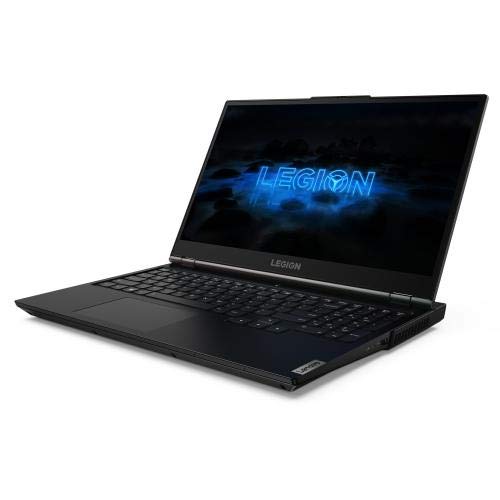
Lenovo Legion 5 Gaming Laptop 144Hz RTX 2060 (Renewed)
HP Victus 15.6″ Full HD 144Hz Gaming Laptop RTX 3050

Acer Nitro 5 Gaming Laptop 15.6″ FHD IPS GTX 1650
NIMO 17.3″ Light Gaming AI Laptop R7-8745HS 32GB 1TB

NIMO 17.3″ FHD AI Ready Laptop R7 8745HS 32GB DDR5

NIMO 15.6″ IPS FHD Gaming Laptop R7 8745HS 32GB DDR5
A Closer Look At Each Pick
The KAIGERR LX15PRO arrives with the sort of spec sheet that quietly undercuts expectations. An AMD Ryzen 7 5825U with eight cores and sixteen threads handles background apps without choking when the action picks up, while Radeon RX Vega 8 integrated graphics push esports titles comfortably at 1080p. I find the 1TB NVMe SSD particularly appealing for shoppers who don’t want to juggle a tiny boot drive, since game installs balloon quickly and most budget machines ship with half the space.
For students moving between lectures and dorm rooms, the 15.6-inch Windows 11 form factor hits a familiar sweet spot. Wi-Fi 6 keeps wireless lag low in crowded campus networks, which matters more than people realize when a roommate three walls away is also streaming.
Bright Spots
- 1TB NVMe SSD leaves room for a hefty Steam library out of the box
- Ryzen 7 5825U’s 8-core layout keeps Discord, browsers, and a game running side by side
- 16GB of RAM avoids the early bottleneck that frustrates most budget laptops
- Wi-Fi 6 helps in dense environments like apartments or dorms
Things To Consider
- Vega 8 integrated graphics cap you at medium settings in modern AAA releases
- No discrete GPU means ray tracing is off the table
- Plastic chassis picks up fingerprints; a microfiber cloth tends to live nearby
Feature Snapshot
Made For
Casual gamers and students who want a single machine for classwork and lighter titles, and who don’t need a discrete GPU.
Consider Something Else When
The HP Victus suits shoppers who want real RTX ray tracing and a dedicated graphics card for heavier 1080p releases.
Lenovo’s Legion line carries a strong reputation among competitive players, and this renewed Phantom Black unit brings that heritage into budget territory. The pairing of an AMD Ryzen 7 4800H with a dedicated NVIDIA RTX 2060 graphics card is the headline act, especially for shoppers running games like Valorant, Apex Legends, or Counter-Strike 2 at high refresh rates. The 144Hz Full HD panel gives fast-twitch genres the smoothness they demand.
Since this is a refurbished model, condition varies between units and shoppers should read the listing carefully. For anyone who prioritizes frame rates over absolute storage space, the 512GB SSD and 16GB of RAM remain a credible foundation.
What Stands Out
- RTX 2060 discrete GPU enables real-time ray tracing and DLSS support
- 144Hz display refresh rate keeps competitive shooters feeling snappy
- Ryzen 7 4800H octa-core CPU handles streaming and gameplay together
- Legion chassis has a reputation for sturdy thermals under load
Honest Caveats
- Renewed condition means cosmetic wear and shorter remaining lifespan
- 512GB storage fills up fast with modern titles; an external SSD helps
- Warranty terms differ from a new-unit purchase
Feature Snapshot
Right Fit For
Competitive and esports-minded gamers who want a dedicated GPU and high-refresh panel at the lowest outlay.
Look Elsewhere When
The Acer Nitro 5 is a smarter pick for shoppers who want a new-unit purchase with manufacturer warranty rather than a renewed machine.
HP positions the Victus as a thoughtful bridge between casual use and serious gaming, and the spec sheet supports that framing. An Intel Core i5-12450H drives the system forward, while the NVIDIA GeForce RTX 3050 with 6GB of GDDR6 video memory handles modern releases at 1080p with DLSS helping out where it counts. For shoppers who don’t want to learn what ray tracing is the hard way, the inclusion of an RTX card is meaningful.
The 1TB PCIe SSD is generous for the tier, and the backlit keyboard comes in handy during late-night sessions. Windows 11 Pro is preinstalled, which appeals to anyone who tinker with BitLocker or Remote Desktop.
Practical Pluses
- RTX 3050 dedicated GPU brings DLSS to budget territory
- 1TB PCIe SSD means fewer storage compromises early on
- 144Hz display keeps everyday use feeling responsive
- Backlit keyboard helps in dim rooms
Worth Noting
- Plastic build can flex near the hinge over time
- Battery life under gaming load is modest; keep the charger close
- Fan noise ramps up during heavier scenes
Quick Facts
Best Suited To
Mainstream gamers who want a current-generation CPU, a real dedicated GPU, and enough storage for a healthy library.
Skip It When
The NIMO 17.3-inch options are a better fit for shoppers who prefer a larger screen and more memory for content work alongside gaming.
Acer’s Nitro 5 has been a familiar name in budget gaming for several generations, and the AN515-54-5812 variant stays true to that formula. A 9th-gen Intel Core i5-9300H is older but still capable for 1080p duty, paired with an NVIDIA GTX 1650 that handles esports titles at high frame rates without drama. The 15.6-inch Full HD IPS display (IPS is a panel technology with wider viewing angles than older TN screens) keeps colors honest when watching video or playing story-driven games.
For shoppers who prioritize a new-unit purchase over raw specs, this Acer feels reassuringly solid. Wi-Fi 6 support and a backlit keyboard round out a sensible package, though storage and memory start on the lean side compared to newer rivals.
A Few Strong Suits
- Proven Nitro chassis design with decent cooling for the tier
- IPS display offers better viewing angles than older budget TN screens
- Backlit keyboard aids late-night sessions
- Wi-Fi 6 included despite the older CPU generation
Points To Keep In Mind
- 8GB of RAM is the minimum for modern games and may need an upgrade
- 256GB SSD fills quickly; budget for an internal or external expansion
- 9th-gen CPU trails newer chips in efficiency
Feature Card
Who It Suits Best
Entry-level gamers who want a recognizable brand and a new-unit purchase with predictable behavior, and who don’t mind expanding storage later.
A Better Fit Elsewhere
The KAIGERR LX15PRO is the smarter call for shoppers who want 16GB of RAM and a larger SSD without stretching into a discrete GPU.
NIMO leans hard into the content-creator overlap with this 17.3-inch machine, and the spec sheet reads like a small workstation wearing a gaming costume. The AMD Ryzen 7 8745HS at 54W TDP (thermal design power, meaning how much heat the chip is designed to dissipate) keeps clocks high under sustained load, while Radeon 780M integrated graphics, the strongest iGPU (integrated graphics processing unit) AMD currently ships, hold their own in lighter titles and creative tools.
The 32GB of RAM and 1TB SSD combination removes the usual budget compromises. USB 4.0 support (a high-bandwidth port standard rivaling Thunderbolt) means connecting an external GPU enclosure later is straightforward, which extends the machine’s useful life for shoppers willing to invest down the road.
Good Reasons To Consider
- 17.3-inch screen gives games and video timelines room to breathe
- 32GB DDR5 RAM handles large project files and many browser tabs
- USB 4.0 enables future expansion through external GPU docks
- Backlit keyboard with full layout improves typing comfort
Trade-Offs
- Larger chassis weighs more than a 15-inch alternative; commuting shoppers will notice
- Integrated Radeon 780M still trails any discrete GPU in heavier releases
- Battery life on a 17-inch panel is shorter than smaller siblings
Whose Shelf It Belongs On
Hybrid gamers and streamers who split time between play, video editing, and chat, and who want one machine to handle both.
Another Choice May Suit
The HP Victus is a stronger fit for shoppers who care more about a dedicated RTX GPU and a more compact 15-inch form factor.
This NIMO variant keeps the same 17.3-inch panel and Ryzen 7 8745HS engine as its sibling above, but the marketing tilts harder toward AI workloads and developer tasks. With 32GB of DDR5 RAM (the latest memory standard, offering higher bandwidth than DDR4), the system handles memory-heavy jobs like running local AI models, compiling code, or editing high-resolution video with more headroom than typical budget laptops.
For shoppers who want a do-everything desktop replacement and don’t mind the larger footprint, the spec sheet punches above what most budget machines offer. The Radeon 780M graphics still won’t replace a discrete card, but they pair well with the CPU for everyday productivity.
Positive Points
- DDR5 memory bandwidth keeps large workloads responsive
- 1TB SSD removes storage anxiety for sizable project files
- Zen 4 architecture (AMD’s latest CPU design) brings modern instruction support
- Full HD display on a 17.3-inch panel is easier on the eyes for long sessions
Potential Drawbacks
- No dedicated GPU means heavy 3D titles will lean on lower settings
- Bigger chassis is harder to fit on cafe tables and airline trays
- RAM is generous but the iGPU shares system memory, which can affect gaming performance under heavy multitasking
Perfect Match For
Students and developers who want a single machine for gaming, coding, and AI experimentation without juggling storage limits.
Swap It Out When
The Lenovo Legion 5 makes more sense for shoppers who want a discrete GPU and don’t mind a renewed unit.
The 15.6-inch NIMO brings the Ryzen 7 8745HS and 32GB of DDR5 memory into a more portable shell than its 17.3-inch siblings. Radeon 780M graphics handle everyday gaming at sensible settings, while the 100W Type-C charging support means a single cable can power the machine on the road. A fingerprint reader adds a small but appreciated convenience for daily logins.
For shoppers splitting time between home, office, and a backpack, this is the most travel-ready option in the NIMO lineup without sacrificing the modern CPU and memory combination.
The Practical Payoff
- 100W Type-C charging simplifies cable management on the go
- Fingerprint reader speeds up daily sign-ins
- 32GB DDR5 RAM keeps multitasking smooth for years
- 15.6-inch form factor fits standard backpacks and laptop sleeves
Where It May Fall Short
- Radeon 780M integrated graphics still cap modern 3D settings
- Smaller chassis can run warmer under sustained CPU load
- Webcam and speakers are typical for the tier, nothing special
Who Should Grab It
Commuters and frequent travelers who want modern memory and a current AMD CPU in a manageable size, and who game mostly on lighter titles.
Reach For A Different Pick When
The Acer Nitro 5 is the better call for shoppers who want a dedicated GPU and traditional Acer support rather than integrated graphics.
What Matters Most Before Choosing Low Priced Gaming Laptops
GPU Choice Drives The Experience
The single biggest decision in this category is whether to prioritize integrated or dedicated graphics. Integrated Radeon options like Vega 8 and 780M handle esports and indie titles comfortably but bend under modern AAA releases. Dedicated RTX 3050 and RTX 2060 cards unlock higher settings, ray tracing, and DLSS, an AI-driven upscaling tech that boosts frame rates. For shoppers who only play League of Legends or Stardew Valley, integrated graphics are fine. For anyone eyeing Cyberpunk or Alan Wake 2, a discrete GPU is the honest answer.
Memory And Storage Are Easier To Get Right Now
Several picks in this roundup ship with 32GB of RAM, which is more than many budget machines offered just two years ago. That headroom matters because modern games and browsers both consume memory aggressively, and 8GB has become genuinely uncomfortable. Storage is similar: 512GB used to feel roomy, but today’s titles push past 100GB each. The 1TB options here future-proof the purchase longer.
Display Refresh Rate And Resolution
A 144Hz panel makes fast-paced games feel noticeably smoother than a 60Hz screen at the same resolution. For slower-paced genres and creative work, color accuracy and resolution matter more than refresh rate. IPS panels, which offer wider viewing angles and better color than older TN panels, generally beat non-IPS options at the same price.
Real-World Use Scenarios
Daily commuters benefit from compact 15.6-inch designs with USB-C charging. Students who want one machine for classes and play need generous RAM and storage. Home-bound gamers who never move the laptop can prioritize screen size and raw specs over portability. Match the machine to where it will actually live.
Smart Buying Notes Across These Picks
Mistakes Worth Dodging
Choosing a machine with only 8GB of RAM is one of the most common regrets in this category. Modern games and chat apps together eat that quickly, and an upgrade later is rarely straightforward on budget chassis. Skimping on storage to save a small amount is another frequent trap, since installing three modern titles can fill a 256GB drive. Always factor an external SSD or upgrade plan into the budget.
When Paying More Pays Off
The step up from integrated graphics to a dedicated RTX card usually brings the largest real-world improvement for gamers. Higher refresh panels, more RAM, and larger SSDs matter, but the GPU determines whether a modern game runs at all. For shoppers who play a mix of older and newer titles, allocating budget toward graphics tends to deliver the most visible payoff.