A tired MacBook keyboard can wreck a workday long before the battery gives up. Sticky keys, missing travel, or a layout that fights your shortcuts are the kind of friction that adds up fast. The right external keyboard brings the snap back, gives you ergonomic breathing room, and lets you work the way your hands actually want to move.
An Overview Of The Picks

Logitech Pebble 2 Silent Compact Wireless Keyboard and Mouse Combo – Black

ProtoArc K90-A Backlit Bluetooth Keyboard for Mac/iPad, Space Gray
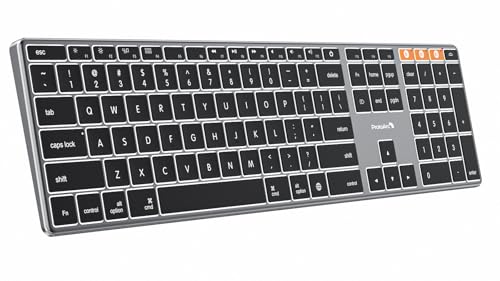
ProtoArc K110-A Backlit Wireless Keyboard for Mac, Aluminum, Space Gray

Macally Wireless Bluetooth Keyboard for Mac – Compatible Apple Keyboard or MacBook Pro/Air, iMac – Multi-Device, Up to 3 Devices with 110 Keys, 20 Shortcuts, Numeric Keypad, and Rechargeable – Silver

Macally Wireless Bluetooth Keyboard for Mac – Compatible Apple Keyboard or MacBook Pro/Air, iMac – Multi-Device, Up to 3 Devices with 110 Keys, 20 Shortcuts, Numeric Keypad, and Rechargeable
TECKNET Wired Keyboard for MacOS Devices with Dual Interface, Slim Mac Keyboard, Comfortable Ergonomic Typing Angle & Stable Connection for PC/Laptop, Compatible with MacBook, iMac, Mac mini/Pro

ProtoArc K100-A Backlit Wireless Bluetooth Keyboard for Mac, Space Gray
ProtoArc K90-A Backlit Bluetooth Keyboard for Mac/iPad, White Silver

Macally Wireless Bluetooth Keyboard for Mac – Compatible Apple Keyboard or MacBook Pro/Air, iMac – Multi-Device, Up to 3 Devices with 110 Keys, 20 Shortcuts, Numeric Keypad, and Rechargeable – White
Taking A Closer Look At The Options
The Logitech Pebble 2 combo lands as the gentlest pair on the list, designed for anyone whose typing needs to stay quiet. The slim shell slips into a backpack pocket alongside a MacBook Air without bulging the sleeve, and the rounded keycaps dampen the click so shared apartments and late-night sessions stop echoing.
Built partly from recycled plastic, the keyboard keeps weight low and adds a low-impact footprint for shoppers who care about materials. The mouse matches the keyboard’s compact footprint, and pairing across devices is the kind of convenience that pays off the first time you bounce from a MacBook to an iPad without fishing for a USB dongle.
Positive Points
- Silent switches reduce click noise for shared rooms and open offices
- Compact dual-piece design fits in laptop bags alongside a MacBook
- Multi-device pairing streamlines switching between a laptop and tablet
- Recycled plastic construction appeals to eco-minded shoppers
- Slim profile saves desk space on minimalist workstations
Things To Consider
- Compact layout omits a numeric keypad, which matters for spreadsheet-heavy work
- Lacks Mac-specific legends like Command and Option markings, so Mac users may rely on key muscle memory
Feature Snapshot
Who It Suits Best
MacBook owners working in shared or quiet spaces who want a tidy wireless combo without disrupting the people around them.
A Better Fit Elsewhere
Spreadsheet-heavy accountants and data entry workers may find the Macally Wireless Bluetooth Keyboard a stronger match because it includes a dedicated numeric keypad.
The ProtoArc K90-A in Space Gray is a tidy tenkeyless board with Mac-native key markings, the kind of keyboard that disappears into a clean desk setup. Built specifically for macOS 10.12 and newer plus iPadOS 13 and up, it skips the Command/Option confusion that plagues generic PC keyboards paired with Apple hardware.
Bluetooth 5.1 keeps the connection steady across a MacBook and an iPad on the same desk, and backlit keys help when working in dim rooms or on evening flights. The compact 78-key layout trims the numeric pad, which frees up desk real estate for a trackpad or a notebook.
What It Does Well
- Mac-specific legends remove guesswork around Command and Option shortcuts
- Bluetooth 5.1 pairing feels stable with both MacBooks and iPads
- Backlit keys improve visibility in low-light environments
- Compact footprint opens up space on smaller desks
Trade Offs
- No numeric keypad can slow down spreadsheet workflows
- macOS-only design means Windows or Linux users should look at cross-platform picks
- Compact size may feel cramped for those with larger hands during long typing sessions
Who Should Grab It
Mobile MacBook users who want a clean, Mac-aware keyboard without a numeric pad taking up bag space.
Look Elsewhere When
Shoppers needing a dedicated number pad should consider the ProtoArc K100-A, which keeps the Mac-native layout while adding the extra column.
The ProtoArc K110-A trades plastic for an aluminum top frame, and that single material swap changes how the board feels under the hands. Compared to the smaller K90-A reviewed above, this one carries more weight and lands harder on a desk, which keeps it planted while typing rather than sliding across the surface.
Bluetooth 5.1 handles the wireless side, and the layout mirrors Apple’s Magic Keyboard conventions so Command and Option keys sit where Mac users expect. Backlit Mac legends make late-night writing sessions easier, and the brushed finish matches the Space Gray MacBook aesthetic almost too neatly.
Positive Takeaways
- Aluminum chassis adds rigidity and a premium desk presence
- Mac-correct key labels cut the learning curve for new users
- Backlit legends improve low-light typing accuracy
Room For Improvement
- macOS-only focus rules out Windows or Linux machines in the same setup
- Aluminum body adds carrying weight compared to the lighter K90-A
- Premium feel typically reflects in the price tier versus plastic options
Right Fit For
Studio-based MacBook owners who want a board visually and physically anchored to their Apple ecosystem.
Swap It Out When
Shoppers who travel frequently should look at the ProtoArc K90-A, which keeps the Mac-native layout in a lighter, more bag-friendly form.
The silver Macally keyboard earns its place by pairing three-device Bluetooth switching with a slim 110-key layout, so MacBook users juggling an iPad and an iPhone no longer have to keep re-pairing. Twenty Mac-specific shortcuts live above the number row, and a numeric keypad stays intact for accounting and data tasks.
At roughly 15 mm thick, the board keeps its full size without dominating a desk, which is helpful for anyone upgrading from a stock MacBook keyboard but short on space. The rechargeable battery removes the ongoing cost of replacement cells, a quiet long-term saving depending on usage patterns.
What Earns Its Place
- Three-device pairing streamlines work across MacBook, iPad, and iPhone
- Dedicated numeric keypad supports spreadsheet and finance workflows
- 20 Mac shortcuts speed up common commands
- Slim 15 mm body keeps a full-size board from dominating the desk
Points To Keep In Mind
- Full-size footprint demands more desk width than the tenkeyless ProtoArc K90-A
- Plastic construction feels less premium than the ProtoArc K110-A aluminum body
Feature Snapshot
Perfect Match For
MacBook Pro and MacBook Air owners who split work between a laptop, an iPad, and an iPhone every day.
Consider Something Else When
Shoppers prioritizing a smaller desk footprint should reach for the ProtoArc K90-A, which trims the number pad for a tighter layout.
Where the previous Macally model leans hard into macOS, this sibling board opens the door to Windows, iOS, and Android devices without losing its Mac muscle. The same 110-key slim layout carries over, with 20 dedicated shortcuts and the same three-device Bluetooth juggling, so mixed-OS households stop hunting for the right board at the right desk.
The rechargeable battery and the slim 15 mm profile stay consistent with the silver version reviewed earlier. It’s a useful bridge for households where one person lives in macOS and another lives in Windows, assuming a single keyboard needs to serve both.
Where It Delivers
- Works across macOS, Windows, iOS, and Android from the same board
- Three-device pairing supports a laptop, tablet, and phone on the same desk
- 20 shortcuts keep common commands within reach
- Numeric keypad suits spreadsheet and finance tasks
Softer Spots
- Full-size body needs more desk real estate than compact boards
- Cross-platform flexibility sometimes costs a few Mac-specific shortcuts that pure-Mac boards include
Best Suited To
Shared-desk households where one workstation sees both macOS and Windows machines throughout the week.
Another Choice May Suit
Pure-Mac studios who never touch Windows should look at the silver Macally board instead, since it leans harder into Mac-specific shortcuts.
The TECKNET wired Mac keyboard skips Bluetooth entirely, which sounds like a step backward until you remember that wired setups never need charging and never drop a connection mid-paragraph. Plug-and-play over USB keeps the install boring in the best way: connect, type, move on.
The slim low-profile chassis is built exclusively for macOS, with the familiar Option and Command legends sitting where Mac users expect them. The slight typing angle reduces wrist strain during long sessions, and the wired link removes one more thing to charge or pair.
Practical Pluses
- Wired USB link delivers dependable typing without battery management
- Plug-and-play setup avoids driver installs for MacBook and iMac
- Slim low-profile chassis saves vertical desk space
- Mac-correct legends reduce the learning curve
Worth Bearing In Mind
- Cable limits placement flexibility compared to wireless picks like the ProtoArc K90-A
- macOS-only design means Windows setups need a different board
- No backlighting, which matters for late-night writers
Feature Snapshot
Built With In Mind
Single-station MacBook or iMac users who want a fuss-free wired board and prefer not to charge another device.
Reach For A Different Pick When
Anyone needing wireless freedom to switch between a MacBook and an iPad should look at the Macally multi-device board instead.
The ProtoArc K100-A is the full-size cousin to the compact K90-A reviewed earlier, adding a numeric keypad while keeping the Mac-specific key legends and the Space Gray finish. Bluetooth 5.1 holds the wireless connection steady across macOS, iPadOS, and iOS devices, and the backlit keys help in dim rooms.
The slim shell keeps the larger layout from sprawling across the desk, so it works for accountants and writers who need every key but still want a clean workstation. Mac-aware shortcuts sit above the number row where the muscle memory expects them.
The Value In It
- Full-size layout includes the numeric pad for data-heavy work
- Mac-correct legends reduce shortcut guesswork
- Bluetooth 5.1 supports stable pairing with MacBooks and iPads
- Backlit keys improve low-light visibility
Honest Caveats
- macOS-only design rules out Windows or Linux in the same setup
- Slim plastic frame feels lighter than the aluminum ProtoArc K110-A
- Larger footprint demands more desk width than the compact K90-A
Feature Snapshot
Whose Shelf It Belongs On
MacBook owners who type numbers daily and want the extra column without sacrificing Mac-native shortcuts.
Where A Sibling Pick Shines
Shoppers with tighter desks should look at the ProtoArc K90-A, which keeps the Mac layout in a more compact footprint.
Functionally identical to the Space Gray K90-A reviewed earlier, this White Silver finish lands for shoppers who prefer a brighter desk. The compact 78-key layout still trims the numeric pad, which keeps the board portable enough to slip into a laptop bag next to a MacBook.
The Mac-native key legends stay in place, and the backlit keys light up evening sessions without washing out the light-tone chassis. Bluetooth 5.1 keeps the connection steady with macOS, iPadOS, and iOS gear, and the absence of Windows support is a clean trade-off for pure-Mac households.
Useful Highlights
- Light-tone finish brightens minimalist workspaces
- Compact layout saves desk space and bag weight
- Mac-specific legends cut shortcut confusion
- Backlit keys support low-light typing
Less Ideal Details
- White Silver finish shows dust and fingerprints more readily than darker boards
- macOS-only focus rules out Windows or Linux use
- No numeric pad limits spreadsheet-heavy workflows
Feature Snapshot
Made For
MacBook owners who curate bright, minimalist desks and prefer a board that blends into a light-toned setup.
Skip It When
Spreadsheet-heavy users should reach for the ProtoArc K100-A, which keeps the Mac-native approach while adding a numeric pad.
This white-finish Macally board matches the silver and cross-platform versions reviewed above but slots into bright, minimalist home offices with its lighter tone. The 110-key layout keeps the numeric pad intact for finance and spreadsheet work, and 20 Mac shortcuts speed up common commands without menu diving.
Three-device Bluetooth pairing still anchors the workflow, letting a MacBook, an iPad, and an iPhone share one board without constant re-pairing. The rechargeable battery keeps the desk uncluttered, and the slim 15 mm profile holds the larger layout to a manageable footprint.
Where It Helps
- White finish suits bright, minimalist home offices
- Three-device pairing simplifies work across Apple gear
- Numeric keypad supports data-heavy workflows
- Slim 15 mm body keeps the full-size board manageable
Practical Considerations
- White finish tends to show dust and smudges more visibly than darker boards
- Full-size body still demands more desk width than tenkeyless picks like the ProtoArc K90-A
Who Will Love This
MacBook owners with bright home offices who need a full-size Mac-friendly board and frequently switch between Apple devices.
Not Your Match When
Shoppers wanting the smallest possible footprint should consider the ProtoArc K90-A, which trims the number pad for a more compact layout.
What Matters Most Before Choosing Macbook Laptop Keyboards
Form Factor And Footprint
Compact tenkeyless boards like the ProtoArc K90-A free up desk space and slide into laptop bags, while full-size options like the Macally 110-key models keep the numeric pad for data-heavy work. The honest read is that mobile users usually sacrifice the number column without much pain, while accountants and analysts feel the loss quickly.
Connection Style
Bluetooth frees the desk from cables and supports pairing across multiple devices, which is the reason the Macally boards list three-device switching as a headline feature. Wired options like the TECKNET trade that flexibility for a stable link that never asks for charging, which suits a single-station setup where the keyboard never moves.
Mac-Specific Layouts
Mac keyboards place Command and Option keys where Mac muscle memory expects them, and the ProtoArc K90-A, K100-A, and K110-A all lean into that native layout. Generic PC layouts force a mental swap on every shortcut, so pure-Mac households benefit from Mac-specific legends.
Material And Build
Aluminum shells like the ProtoArc K110-A add weight and rigidity, which keeps the board planted during heavy typing sessions. Plastic shells cut weight and cost, a trade-off that matters more for commuters than for studio setups.
Key Considerations Across These Picks
Where Shoppers Go Wrong
A common slip is buying a Windows-focused board for a MacBook and then fighting the Control-versus-Command mismatch on every shortcut. Another mistake is overpaying for backlighting when the board lives on a bright, well-lit desk. Measure the desk before committing to a full-size board, since the difference between a tenkeyless and a 110-key layout is roughly a hand’s width of usable space.
What The Higher Tier Buys
Spending more in this category typically brings an aluminum chassis, deeper Bluetooth range, or backlit Mac legends rather than raw typing improvement. The premium ProtoArc K110-A, for example, earns its tier through material and aesthetic match rather than typing mechanics. For shoppers typing in dim rooms or curating a studio look, those upgrades pay off. For plain productivity setups, the budget tiers handle the job cleanly.