I spent enough years logging numbers in spreadsheets to know a missing numpad on a MacBook turns fast typing into one-fingered hunting. The picks below solve the most common frustrations: Bluetooth pairing headaches, plastic-feeling keys, a chunky desktop footprint, and the dreaded “no numpad on the plane tray table” problem. Each option here pairs cleanly with macOS, runs on internal batteries (with one USB-C wired exception), and stays slim enough to slip into a sleeve. Whether you crunch numbers daily or just hate the top-row number row on a 13-inch MacBook, this list covers the realistic setups I see people running.
A Snapshot Of The Selections
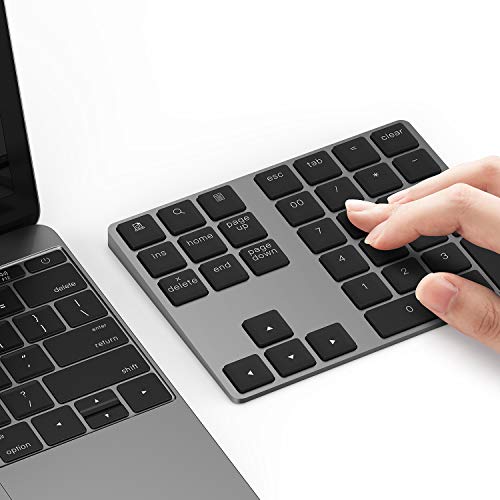
Lekvey Bluetooth Aluminum Wireless Numeric Keypad

Macally Bluetooth 22-Key Wireless Numeric Keypad

Satechi Slim Aluminum Bluetooth Keypad (Space Gray)

Macally Bluetooth 18-Key Rechargeable Numpad

Macally Slim Aluminum 35-Key Bluetooth Numpad

Macally Slim 35-Key Rechargeable Wireless Numpad

Lekvey Bluetooth 28-Key Wireless Numeric Keypad

Macally USB-C Wired 22-Key Numeric Keypad

Macally Bluetooth 22-Key Wireless Numeric Keypad
More Details On Our Top Picks
The first Lekvey entry sets the bar for what a slim MacBook companion should feel like. Its aluminum shell tips the scales around 0.46 lb and measures roughly 5.7 x 4.4 x 0.47 inches, which lands it in sleeve-friendly territory for anyone juggling a MacBook Air in a cafe. Bluetooth 5.0 (the wireless standard that improves connection stability and battery life over older versions) handles pairing, and the gentle built-in tilt keeps the wrist neutral during a long ledger session.
I see this slot fitting best next to a 13 or 14-inch MacBook where real estate on the desk is tight. The aesthetic tracks close to Apple’s own keyboards, so it visually disappears into a clean workspace.
A Favorable Mix
- Aluminum body matches the look and feel of Apple’s laptops
- Bluetooth 5.0 delivers more stable pairing than older 3.0 pads
- Internal rechargeable battery cuts down on disposable cells
- Compact footprint travels easily inside a laptop sleeve
- Tilted slope reduces wrist fatigue during extended entry work
Points To Keep In Mind
- Full layout means no dedicated arrow cluster, which may bother spreadsheet power users
- Aluminum body can show fingerprints and smudges over time, depending on hand oil and cleaning habits
Key Specs
Who It Suits Best
MacBook Air and Pro owners who want a slim aluminum numpad with modern Bluetooth for travel-heavy work.
Where Another Pick Suits Better
Bookkeepers who need a full 35-key layout with shortcut keys should look at the Macally Slim Aluminum 35-Key Bluetooth Numpad instead.
This Macally pad trades the bare-bones 18-key layout for 22 keys with a dedicated arrow cluster, a quiet scissor-switch feel, and broad device support across Mac, iPad, iPhone, PC, and Android. For someone bouncing between an iPad for travel and a MacBook at home, that flexibility is the whole pitch. It pairs without drivers, which removes the usual IT friction.
Compared to the Lekvey aluminum option above, this one leans lighter on metal and heavier on portability. It’s the pick I’d recommend to anyone who needs arrow keys without hauling a full keypad around.
Positive Takeaways
- Arrow keys sit alongside the number grid for spreadsheet navigation
- Scissor switches keep the typing feel close to a MacBook keyboard
- Works across macOS, iPadOS, iOS, Windows, and Android out of the box
Worth Noting
- Plastic-leaning chassis lacks the aluminum heft of premium picks
- Arrow cluster sits close to the numbers, which can take adjustment for touch typists
Made For
Cross-platform shoppers who split time between a MacBook, iPad, and Windows machine and want a single quiet numpad for all three.
Skip It When
Owners who want a premium aluminum body that matches a MacBook should consider the Satechi Slim Aluminum Bluetooth Keypad instead.
Satechi built this 18-key pad to disappear into an Apple-centric desk, and the Space Gray finish against a MacBook Pro reads as one continuous setup. It uses Bluetooth 3.0 for pairing, which is older than the Lekvey’s 5.0 but remains perfectly workable at numpad distances. The pad is USB-C rechargeable, which lines up with the cables already on most Apple desks.
For someone who cares about a clean, color-matched workspace more than maximum key count, this slot earns its place. I’d pair it with a MacBook Pro and an external Studio Display.
Where It Delivers
- Aluminum body in Space Gray visually matches MacBook Pro finishes
- USB-C recharging uses the same cable as most modern MacBooks
- Compact 18-key footprint keeps the desk uncluttered
Trade Offs
- Bluetooth 3.0 is older than what newer pads ship with
- No arrow keys on the unit itself
- Setup on Windows 10 requires adding the device through Control Panel
Quick Facts
Best Suited To
Design-conscious Mac owners who want a color-matched aluminum numpad and already live in the USB-C ecosystem.
Reach For A Different Pick When
Windows-first users who want a truly plug-and-play pad should look at the Macally USB-C Wired 22-Key Numeric Keypad instead.
This older Macally design strips the experience down to what most people actually need: 18 quiet full-size keys, a tilted slope for wrist comfort, and Bluetooth pairing with no driver dance. It’s the kind of pad I’d hand to a parent or non-techie friend who just wants their MacBook to feel like a real computer again.
It lacks the metal body of the Lekvey and Satechi picks above, which keeps the weight down and the price approachable. For daily Excel sessions in a home office, that’s usually a worthwhile trade.
Useful Highlights
- Quiet full-size keys keep shared spaces peaceful
- Tilted slope reduces wrist strain during long entry sessions
- No-driver setup works right out of the box
Honest Caveats
- Plastic shell feels lighter than aluminum alternatives
- No arrow keys or extra shortcut cluster
- Bluetooth version isn’t specified for newer protocol gains
Perfect Match For
Everyday users who want a quiet, no-fuss rechargeable numpad for spreadsheets and bookkeeping on a Mac or PC.
Not Your Match When
Heavy data-entry pros who need 35 keys and shortcut buttons should consider the Macally Slim Aluminum 35-Key Bluetooth Numpad instead.
Bookkeepers and accountants are the obvious home for this pad. It packs 35 scissor-switch keys into a slim aluminum body, including a row of six shortcut keys that turn repetitive spreadsheet hops into one-tap moves. The aluminum shell gives it the same visual weight as a MacBook, so it sits on the desk without looking like an afterthought.
Compared to the 18 and 22-key picks earlier in this list, the trade is size for utility. Expect a wider footprint that may not suit tight airplane tray tables, depending on your travel style.
A Strong Showing
- 35 keys cover the full numpad plus a six-key shortcut row
- Aluminum body aligns visually with premium MacBooks
- Scissor switches deliver the low-profile feel of a laptop keyboard
- Rechargeable battery eliminates disposable cells
Softer Spots
- Larger footprint compared to 18-key pads, which can crowd small desks
- Shortcut key labels may take time to memorize for first-time users
Feature Snapshot
Who Should Grab It
Power spreadsheet users and bookkeepers who want the most keys possible in a MacBook-matching aluminum body.
Look Elsewhere When
Travel-first users who want the smallest possible footprint should consider the Macally Bluetooth 22-Key Wireless Numeric Keypad instead.
This sibling to the previous Macally pad keeps the 35-key layout but trims the price by leaning on a slightly less premium shell. It still pairs via Bluetooth, runs on an internal rechargeable battery, and works across Mac, iPad, PC, and Android. For a household where one person uses a Mac and another a Windows laptop, that compatibility pays off.
The honest read is that you give up some of the aluminum prestige of the pricier Satechi and Lekvey options, but gain key count and broad compatibility.
Standout Benefits
- 35 keys in a slim profile for serious data entry
- Works across Mac, iOS, PC, Windows, and Android
- Rechargeable battery avoids constant cell swaps
Things To Consider
- Body finish doesn’t quite match premium aluminum picks
- Footprint is wider than 18-key alternatives
Feature Card
Built With In Mind
Multi-device households that need one rechargeable numpad to share between a MacBook and a Windows laptop without fuss.
A Better Fit Elsewhere
Owners who want a more design-forward aluminum body should consider the Satechi Slim Aluminum Bluetooth Keypad instead.
The second Lekvey on this list doubles down on functionality with 28 keys, a calculator shortcut, and a full navigation cluster that includes Tab, Esc, and arrow keys. It’s the closest thing to a desktop calculator replacement, which makes it a natural fit for anyone who misses the old wired numpads of the pre-laptop era.
Compared to the slim aluminum Lekvey earlier, this one feels more functional and less style-driven. I’d point it at spreadsheet users who want maximum key options over minimalist aesthetics.
Bright Spots
- 28 keys include Numlock, Tab, Esc, Delete, and a full arrow cluster
- Dedicated calculator shortcut speeds up quick math
- Bluetooth pairing removes cable clutter from the desk
Room For Improvement
- Larger footprint than minimalist 18-key pads
- More keys means a longer learning curve for users coming from a basic numpad
The Right Fit
Spreadsheet veterans who want a calculator-style shortcut plus a navigation cluster on a single Bluetooth pad.
Swap It Out When
Minimalists who care about a slim aluminum look should consider the Lekvey Bluetooth Aluminum Wireless Numeric Keypad instead.
For anyone tired of charging another gadget, this wired pad plugs straight into a MacBook’s USB-C port and stays out of the Bluetooth stack entirely. The 22-key layout includes arrow keys for spreadsheet navigation, and the 5-foot cable reaches across most standing desks without strain.
It’s the only non-Bluetooth option in this roundup, and that alone makes it the right call for some setups, especially fixed workstations where the laptop rarely leaves the dock.
The Value In It
- Plug-and-play USB-C connection means zero charging or pairing
- 22 full-size keys cover both numbers and arrows
- 5-foot cable reaches across most desk layouts
Things To Weigh
- Cable limits portability compared to wireless picks
- Occupies a USB-C port that may be needed for other peripherals
- No internal battery means no wireless flexibility at all
Whose Shelf It Belongs On
Stationary MacBook Pro or MacBook Air setups at a fixed desk where charging another device feels like wasted effort.
Consider Something Else When
Coffee shop and travel users should consider the Lekvey Bluetooth Aluminum Wireless Numeric Keypad instead for cable-free mornings.
This Macally pad shares much of its DNA with the second pick on this list, leaning into the same 22-key, scissor-switch, cross-platform formula. The differences tend to come down to internal generation and stock availability, so I’d treat it as a close sibling rather than a rival. It pairs over Bluetooth without drivers and works across MacBook, iPad, iPhone, PC, and Android.
It lands last here mostly because the earlier picks cover the same ground with slight advantages in design or materials, depending on the model.
A Few Strong Suits
- Arrow keys plus 22-key grid handle spreadsheet navigation
- Quiet scissor switches suit shared and open offices
- Broad OS compatibility across Apple and PC ecosystems
Practical Considerations
- Plastic-leaning chassis lacks the aluminum finish of premium picks
- Closely overlaps with the Macally Bluetooth 22-Key Wireless Numeric Keypad in features
Who Will Love This
Travelers and minimal-desk users who want a quiet, compact 22-key wireless numpad that works across Mac and PC.
Where A Sibling Pick Shines
Anyone who wants a more premium aluminum feel should pick the Satechi Slim Aluminum Bluetooth Keypad instead.
What Matters Most Before Choosing Macbook Numeric Keypads
Connectivity and Pairing Behavior
Bluetooth is the default for almost every modern numpad, and the version number tells you something about reliability. Bluetooth 5.0 (as on the Lekvey aluminum pad) generally means more stable connections and better battery life than older 3.0 hardware, which is most noticeable in cluttered wireless environments like coffee shops or shared offices.
Wired USB-C is the alternative, and the Macally wired pad is the lone example here. It’s worth considering for stationary desks, where charging anxiety and Bluetooth dropouts are non-issues, but it’s a poor fit for travel.
Key Count and Layout Priorities
Eighteen keys cover basic number entry. Twenty-two keys add arrow navigation, which matters the moment you start hopping between cells in a large spreadsheet. Thirty-five keys bring dedicated shortcuts and calculator functions, useful for bookkeepers but bulky enough to crowd smaller desks.
Match the layout to the actual job. Heavy data entry earns the extra real estate; casual expense tracking does not.
Build Material and Travel Habits
Aluminum shells look and feel closer to a MacBook, but they also pick up fingerprints and add weight. Plastic or composite builds keep things light, which helps anyone carrying the pad alongside a laptop in a sleeve.
Consider the desk, not just the keyboard. A stationary setup rewards aluminum heft; a mobile setup rewards lighter builds.
Power Source and Charging Routine
Internal rechargeable batteries have become standard, but the charging port varies. USB-C recharging aligns with modern MacBook cables and removes one more proprietary brick from the drawer. Older Micro-USB pads still exist and can be inconvenient if you’ve moved past that cable.
A wired pad sidesteps the question entirely, at the cost of portability.
Key Considerations Across These Picks
Mistakes Worth Dodging
The most common slip is buying on key count alone and ending up with a 35-key pad that swallows a small desk. For most casual users, an 18 or 22-key layout covers everyday number entry without taking over the workspace.
Another trap is ignoring Bluetooth version. A pad using Bluetooth 3.0 in a crowded wireless environment may stutter, depending on the room, while a Bluetooth 5.0 model tends to hold its connection more reliably.
What The Higher Tier Buys
Stepping up to a premium pick typically means an aluminum body, a newer Bluetooth version, and a USB-C charging port that matches the rest of an Apple-centered desk. None of those upgrades are essential, but they add up to a more cohesive workspace for someone who already invests in their setup.
The honest read is that mid-tier pads do the same numeric work; the upgrade pays off in feel, finish, and longevity rather than raw function.
Frequently Asked Questions
Do Bluetooth numeric keypads drain a MacBook’s battery faster than wired ones?
Modern Bluetooth 5.0 pads draw very little power from the host laptop, so the impact on a MacBook’s battery is usually negligible during typical use. A wired USB-C pad draws power from the laptop itself, which can shorten runtime during heavy use.
Will any of these pads work with an iPad or iPhone?
Yes, the Macally and Lekvey pads listed here support iPadOS and iOS over Bluetooth, though older iPad models may not recognize every key. Always check the individual product page for the latest iPad compatibility notes.
How long does the internal battery usually last on these numpads?
Battery life varies by model and usage, but most rechargeable numpads in this category last several weeks between charges under typical typing loads. Heavy daily data entry will shorten that interval.
Is a wired USB-C numpad a better choice for a fixed desk?
For a stationary setup, a wired USB-C pad like the Macally wired option removes charging and pairing from the routine, which is a real convenience. The trade-off is losing portability the moment you take the laptop on the road.
Can I use these numpads with Windows or Linux machines?
Most of the picks here list Windows compatibility, and Linux generally recognizes them as standard Bluetooth or USB HID input devices. The Satechi pad’s Windows 10 setup may require adding the device through Control Panel, depending on the build.
Final Verdict
The right numpad comes down to how you work. Heavy spreadsheet users will feel the difference a 35-key layout makes, while travelers and minimalists will appreciate a slim 18 or 22-key pad that disappears into a sleeve. Aluminum builds match a MacBook’s aesthetic, plastic builds keep weight down, and the lone wired option solves charging for good at a fixed desk. Pick the layout that matches the workload, and the rest tends to fall into place.