A flaky trackpad is one of those small problems that can quietly wreck an otherwise great laptop. Click registers half the time, the cursor drifts, or a corner has stopped responding entirely. I’ve spent time digging through listings for Macbook Pro trackpads that actually fit specific model years, so the picks below focus on real compatibility, the right flex cable situation, and a couple of genuinely different options for people who want a fresh external surface instead.
The Shortlist At A Glance

Willhom 923-00541 Trackpad for MacBook Pro 15″ A1398

Willhom 923-00518 IPD Trackpad for MacBook Pro 13″ A1502

ICTION A1989 Trackpad for MacBook Pro 13″ 2018-2019

Padarsey 923-00541 Trackpad for MacBook Pro 15″ A1398

Apple Magic Trackpad Multi-Touch Surface

HAWSON A1502 Trackpad for MacBook Pro 13″ Early 2015

HAWSON A1989 Trackpad for MacBook Pro 13″ 2018-2019
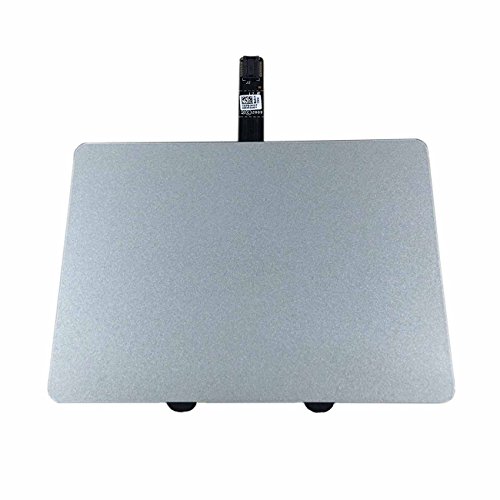
Willhom A1278 Trackpad Kit for MacBook Pro 13″ 2009-2012
Meet The Standout Selections
For anyone nursing a 15-inch Retina from 2015, the Willhom 923-00541 trackpad targets the A1398 chassis, which is the specific model identifier Apple used for the Mid 2015 generation. This is a bare trackpad module, so it’s the right pick when you only need to replace the surface itself and your existing flex cable is still healthy. A1398 owners chasing a worn-out or cracked pad have a fairly narrow compatibility window, which makes a part like this valuable.
Compared to the later Padarsey option below, this version skips the flex cable and assumes you can reuse the original. For someone doing a single-piece swap after a coffee spill, that keeps the job simple. I’d expect a moderate comfort level with screwdrivers and prying tools to come in handy during the install.
The Upside
- Direct fit for the Mid 2015 A1398 15-inch chassis, so model-year guesswork is removed.
- Trackpad-only design keeps the cost lower for owners who don’t need a new flex cable.
- Restores click and multi-touch response on machines where the surface is damaged but the cable is intact.
Things To Consider
- No flex cable included, so if the original cable is torn, this swap won’t fully fix the laptop.
- Disassembly requires patience and a steady hand with the battery connector and trackpad screws.
Who It Suits Best
Owners of a Mid 2015 15-inch MacBook Pro with a cracked or unresponsive trackpad and a still-working internal flex cable who want a focused replacement part.
Look Elsewhere When
If the flex cable is suspect, the Padarsey 923-00541 trackpad further down this list bundles a fresh cable and is the better match.
The 13-inch cousin to the first pick, this Willhom unit is built for the Early 2015 A1502 model. The part number 923-00518 maps to a specific Apple replacement component, which is the kind of detail that helps narrow down compatibility for older machines. Like the prior pick, it ships as the trackpad module alone.
For students and remote workers still depending on an Early 2015 13-inch machine, this addresses the common failure mode of a sticky click or dead zone in one corner. The trade-off is the same: no flex cable, so the original has to be reusable. Compared to the HAWSON A1502 unit later on, you get the same model coverage but without a bundled cable.
Notable Upsides
- Matches Early 2015 A1502 model identifiers, including the MF839LL/A, MF841LL/A, and MF843LL/A variants.
- Restores smooth cursor movement and click response across the entire surface.
- Useful for owners who just need a fresh trackpad after years of palm-rub wear.
Honest Caveats
- Flex cable is not included, so a separate cable purchase may be required if the original has degraded.
- Requires opening the lower case and disconnecting the battery, which is a careful job for first-timers.
Made For
Early 2015 MacBook Pro 13-inch owners with a trackpad that has visible wear or intermittent response and a flex cable that still seems intact.
Skip It When
The HAWSON A1502 replacement lower in this roundup is a better match if you’d rather have the flex cable included from the start.
Moving forward in time, the ICTION A1989 trackpad fits the 13-inch MacBook Pro with Touch Bar from 2018 and 2019. The A1989 identifier covers both years in this generation, so the listing works for either model year within that range. The silver finish matches the lighter color option of that era.
What sets this part apart from the older Willhom picks is that it includes a flex cable, so the swap is more complete and you don’t have to gamble on the condition of the existing one. For anyone doing a deep repair or buying parts to refurbish a used machine, the bundled cable matters.
Where It Delivers
- Compatible with both the 2018 and 2019 A1989 models, which simplifies the buying decision.
- Bundled flex cable means the installer isn’t left hunting down a separate part.
- Silver color blends cleanly with the lighter aluminum chassis from that generation.
Points To Note
- Not suited for the darker Space Gray variants, which need the matching color version.
- Touch Bar generation trackpads are tightly integrated, so installation care is important.
Feature Snapshot
Right Fit For
Anyone with a silver 13-inch A1989 MacBook Pro whose trackpad has lost click firmness or multi-touch reliability and who wants the flex cable replaced at the same time.
Consider Something Else When
Space Gray A1989 owners should reach for the HAWSON A1989 trackpad further down, which is matched to the darker color.
The Padarsey 923-00541 covers the same A1398 Mid 2015 15-inch chassis as the first Willhom unit, but adds a flex cable into the package. That single addition changes who this part makes sense for, because a torn or oxidized cable is one of the most common reasons a trackpad swap doesn’t fully resolve the issue.
For owners chasing a complete fix in one order, this is the more thorough option. The 923-00541 Apple part number alignment also means the listing maps to the same internal component reference Apple uses for its service replacements.
Useful Touches
- Bundled trackpad and flex cable simplify a full repair into one order.
- Aligns with Apple part number 923-00541 for confident model matching.
- Targets both the MJLQ2LL/A and MJLT2LL/A 15-inch variants from Mid 2015.
A Few Limitations
- Costs more than the trackpad-only Willhom version, which doesn’t matter if you need the cable.
- Disassembly is the same time-consuming process regardless of brand.
Best Suited To
Mid 2015 15-inch MacBook Pro owners whose trackpad AND flex cable both need attention, or anyone who’d rather replace both parts preventively in one job.
Reach For A Different Pick When
If your existing flex cable is fine, the Willhom 923-00541 trackpad above saves money by skipping the cable.
Breaking the pattern, the Apple Magic Trackpad isn’t a replacement part at all. It’s an external wireless trackpad designed to sit next to a desktop Mac or as a companion to a docked laptop. The white multi-touch surface brings the same gesture language Apple’s built-in trackpads use, including Force Touch, which senses press depth.
For someone whose laptop trackpad works fine but who wants a larger surface at a desk, this is the obvious answer. It charges over a Lightning-adjacent cable and pairs over Bluetooth, so it travels easily between workstations.
The Good Stuff
- Edge-to-edge glass surface gives the cursor room to roam during long editing sessions.
- Force Touch support means pressure-sensitive gestures transfer directly from the built-in pad.
- Wireless design removes cable clutter and pairs with multiple Apple devices.
Worth Noting
- Carries a higher cost than any internal replacement part on this list.
- Doesn’t fix a broken internal trackpad, so it’s a companion rather than a repair.
Feature Snapshot
Who Should Grab It
Desktop users, docked laptop users, or anyone who wants a larger gesture surface than the built-in trackpad provides.
Swap It Out When
Pick one of the internal replacement trackpads earlier on this list if the goal is to repair a malfunctioning built-in pad.
The HAWSON A1502 module is another Early 2015 13-inch option, with part numbers 923-00518 and 923-01376 both referenced, along with the printed board identifiers 821-00184-A and 821-00721-A. For DIYers who triple-check compatibility, that depth of part detail is reassuring. The unit ships with a flex cable attached, which differentiates it from the Willhom 923-00518 above.
HAWSON markets pre-shipping testing on this part, which is a small but meaningful reassurance when ordering a non-OEM module. The honest read is that this gives owners more confidence in receiving a working module out of the box.
The Case For It
- Includes a flex cable, so a single part covers the most common failure combination.
- Multiple part number references make it easier to confirm model match before ordering.
- Pre-tested before shipping, which reduces the chance of receiving a dead module.
Trade Offs
- Priced higher than the cable-free Willhom version for the same model.
- Still requires careful case opening and battery disconnection during installation.
Perfect Match For
Cautious DIYers who want the flex cable replaced at the same time as the trackpad and appreciate a tested-out-of-the-box part.
Another Choice May Suit
If you already know your flex cable is healthy, the Willhom 923-00518 trackpad above saves money by skipping the cable.
Where the ICTION pick covers the silver A1989, this HAWSON module finishes the picture by targeting the Space Gray finish. The 2018 and 2019 A1989 models came in both colors, so the dark version gets its own replacement part. The flex cable is included, similar to the lighter ICTION counterpart.
For owners who care about the visual match staying consistent across the chassis, picking the right color is more than cosmetic. A silver trackpad in a Space Gray laptop would look immediately off.
A Strong Showing
- Space Gray color matches the darker aluminum chassis from this generation.
- Flex cable bundled for a one-order repair experience.
- Compatible with both 2018 and 2019 A1989 model years.
Where It May Fall Short
- Not interchangeable with silver chassis models without a visible color mismatch.
- Trackpad adhesive and screw patterns still demand patience during install.
Whose Shelf It Belongs On
Space Gray A1989 MacBook Pro 13-inch owners who want a color-matched replacement trackpad with the flex cable included.
A Better Fit Elsewhere
Silver A1989 owners should grab the ICTION A1989 trackpad earlier on this list for the correct finish.
The oldest pick on this list, this Willhom kit targets the MacBook Pro 13-inch Unibody A1278, which covered Mid 2009 through Mid 2012 model years. The included flex cable makes it a true kit rather than just a surface, and the part number references 922-9063, 922-9525, and 922-9773 cover the variations across those years.
For someone keeping an aging A1278 alive as a secondary machine, this is the kind of replacement that lets a perfectly good laptop stay in service. The catch is the 2008 model year and MacBook Air series are explicitly excluded, so model year verification is mandatory before ordering.
Positive Points
- Kit includes both the trackpad and the cable, simplifying an older-laptop repair.
- Covers a wide 2009 to 2012 production range for the A1278 chassis.
- Multi-year compatibility is helpful for refurbishers with mixed inventory.
Practical Considerations
- Does not fit 2008 A1278 machines or any MacBook Air, so part-year verification is essential.
- Older laptops may have additional wear on battery or hinges that a trackpad fix alone won’t address.
Feature Snapshot
Built With In Mind
Refurbishers and long-term owners of A1278 MacBook Pro 13-inch machines from 2009 to 2012 who want to extend the usable life of an aging laptop.
Not Your Match When
Owners of 2008 A1278 models or any MacBook Air should look elsewhere, since this kit explicitly excludes both.
What To Match Up Before Swapping In Macbook Pro Trackpads
Compatibility is the single biggest factor, and it’s also where most repair jobs go wrong. The model identifier printed on the underside of the laptop, things like A1398, A1502, A1989, or A1278, has to match the part listing exactly. The Apple part number, which usually starts with 923-, is a second cross-check that catches mid-year revisions.
For internal trackpads, decide whether you need just the surface or a flex cable as well. A swollen battery, a coffee spill, or a botched prior repair can all damage the cable, and replacing only the trackpad on top of a bad cable leaves the same problem behind. The Padarsey and HAWSON kits bundle the cable for this reason.
Think honestly about your comfort with the repair itself. The A1398 and A1508 swaps involve removing the lower case, disconnecting the battery, and working around fragile ribbon connectors. Owners who only plan to do this once may prefer a service appointment over a DIY swap.
Key Considerations Across These Picks
Common Shopping Slip Ups
Ordering by year alone is risky, because the same calendar year often contains multiple model identifiers. An A1502 and an A1706 look similar but take different trackpads, so always confirm the model number before checkout. A second common slip is assuming a cable-less trackpad will fix a cable problem, which leaves the original fault in place.
What The Higher Tier Buys
Bundled flex cables and pre-shipment testing explain the price gap between basic and premium listings. For a vintage machine or a laptop you want to keep running for years, paying for the cable and the testing is a reasonable hedge against doing the job twice.
Frequently Asked Questions
How do I find my MacBook Pro model identifier? Flip the laptop over and look for a line of small text near the regulatory markings. It will start with “A” followed by four numbers, like A1398 or A1989.
Do all MacBook Pro trackpads include the flex cable? No, and this varies by listing. Some are trackpad-only, others bundle the cable. Always check what’s in the box before assuming a cable is included.
Can I use a 2018 trackpad in a 2019 model? Often yes, since the A1989 identifier covers both years. Confirm the part number and color match for the specific chassis variant before ordering.
Is replacing a MacBook Pro trackpad difficult? It varies by model, but most require removing the lower case, disconnecting the battery, and handling thin flex cables carefully. First-timers should budget extra time and watch a model-specific guide.
When should I replace the trackpad instead of buying an external one? Replacement makes sense when the built-in pad is physically damaged or unresponsive. An external Magic Trackpad is better when the internal pad works fine but you want a larger desktop surface.
The Takeaway
The right Macbook Pro trackpad depends entirely on which machine you’re repairing and whether the flex cable needs attention too. Match the model identifier first, decide on a bare module versus a bundled kit, and pick the color that suits the chassis. A careful part match saves both money and a second round of disassembly.