Spilled coffee, sandwich crumbs, pet hair, the slow grind of daily typing. Anyone who actually uses a MacBook day in and day out eventually watches the keys start to look lived-in, and a thin barrier between your fingers and that aluminum deck makes a real difference. I’ve spent time comparing what shoppers actually need, from shortcut-print covers for creative work to featherlight TPU skins and rugged shells. Here’s the shortlist I’d trust for protecting a 2026-era keyboard without ruining the typing feel.
The Essentials At A Glance

JCPal Photoshop Shortcut Keyboard Cover for MacBook

Batianda Heavy Duty Case for MacBook Air 15″
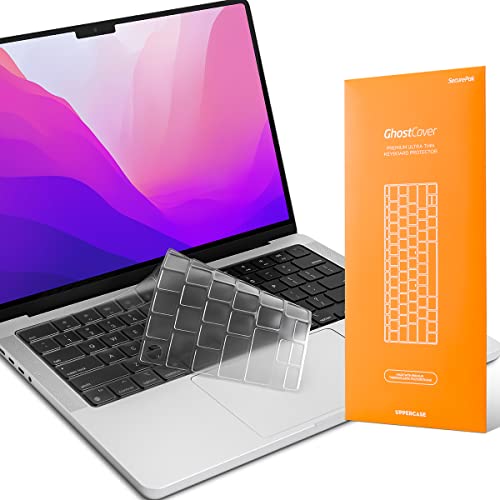
GhostCover Ultra Thin TPU Keyboard Cover for MacBook

GhostCover Ultra Thin TPU Cover for MacBook Neo 13″
A Closer Look At Each Pick
The JCPal keyboard cover is built around a specific workflow: opening Adobe Photoshop and getting to work without ever glancing at the screen for tool reminders. The whole top surface is screen-printed with shortcuts tied to the current Photoshop release, and the silicone stays thin enough at roughly 0.3mm that most people adapt within a day or two.
It’s the only item on this list that treats the keyboard cover as a learning tool. Anyone editing photos for a living, or studying for an Adobe certification, will appreciate that the printed shortcuts cover three keys deep for layered combos, not just single-key labels.
Everyday Advantages
- Printed shortcuts accelerate recall when you’re learning or refreshing Photoshop
- Thin silicone keeps typing feedback close to a bare keyboard
- Color-coded combinations make multi-key shortcuts easy to spot at a glance
- Doubles as everyday spill and dust protection during long editing sessions
- Designed for recent Pro, Air, and the 2026 Neo footprint
Things To Consider
- Printed legends only help if Photoshop is your main app day to day
- The screen-printed icons can wear over many months of heavy typing
Who Will Love This
Designers, retouchers, and photo editors who live in Photoshop and want their keyboard to teach them the shortcuts in the background.
Reach For A Different Pick When
The GhostCover Ultra Thin TPU Cover for MacBook is the better match for anyone who wants invisible, app-agnostic protection.
The Batianda case leans hard into the reality that a 15-inch MacBook Air lives a rough life. It’s a hard shell over a TPU bumper, with thicker corners built to absorb shock from drops, backpack pressure, and the general chaos of commuting.
Unlike the keyboard covers above, this is about the chassis. The cutouts match the 2023-2026 MacBook Air 15-inch footprint, so the fit is clean if your machine matches. Ventilation cutouts along the bottom are designed to keep airflow steady while the case stays on.
Everyday Perks
- Reinforced corner zones spread impact away from the deck and screen hinge
- Matte hard-shell back resists scratches from zippers and keys
- TPU edges flex during installation so the shell doesn’t crack on snap-on
- Neutral grey finish hides scuffs between cleanings
Trade-Offs
- Adds visible bulk around the perimeter, which changes the laptop’s slim profile
- Hard shells can show scuffs at high-friction contact points like the palm rest edge
- Only fits the 15-inch Air, not the smaller 13-inch models or the Neo
Feature Snapshot
Built With In Mind
Students, commuters, and travelers with a 15-inch MacBook Air who carry their laptop daily and prioritize drop and bump protection over a flush profile.
A Better Fit Elsewhere
The GhostCover Ultra Thin TPU Keyboard Cover for MacBook suits someone who wants keyboard-level defense without adding any chassis weight.
The GhostCover from UPPERCASE is the cover I think of when someone says they want protection that basically disappears. The TPU is rated at roughly 0.12mm thin, which is closer to a film than a skin, and it sits transparent over the keys so the backlight reads through cleanly.
Compatibility is the headline. One cover supports a long run of Apple Silicon MacBooks, including the 14- and 16-inch Pro from M1 Pro through M5 Pro and Max, plus the 13- and 15-inch Air on M2 through M5, and the 2026 MacBook Neo 13-inch with Touch ID. For households juggling more than one Mac, that range is genuinely useful.
Noteworthy Benefits
- Ultra-thin TPU keeps typing feel nearly identical to a bare keyboard
- Tested clear of the Touch ID sensor, so fingerprint login still works
- Washable and reusable when crumbs eventually show up
- Covers an unusually wide range of recent MacBook generations in one SKU
Some Limits To Know
- US ANSI layout only, so non-US keyboard shoppers need a different SKU
- Clear film picks up fingerprint oils and looks smudgy between washes
Right Fit For
Multi-Mac households, students, and remote workers who want a barely-there barrier across several recent MacBook models without buying a separate cover for each.
Look Elsewhere When
The GhostCover Ultra Thin TPU Cover for MacBook Neo 13-inch is the cleaner fit for someone who owns that specific newer laptop and wants a tailored cut.
This is the Neo-specific GhostCover, cut for the 2026 MacBook Neo 13-inch with model number A3404. It’s the same engineering-grade TPU at the same 0.12mm thickness as the multi-fit version above, just dialed in for one machine.
For Neo owners who don’t need cross-generation flexibility, the tighter cut is the selling point. Each key well sits flat, the Touch ID sensor has dedicated clearance, and the clear finish lets the keyboard backlight do its thing without a visible plastic haze.
A Few Highlights
- Tailored Neo A3404 cut leaves no slack around the edges
- Keeps the typing feel close to the bare keys, which matters on a slim Neo deck
- Tested to leave Touch ID operation undisturbed
- Reusable after a quick wash, handy in dusty or snack-prone setups
Possible Compromises
- US ANSI layout only, like its sibling cover
- Single-model fit means it can’t follow you to a different Mac later
Whose Shelf It Belongs On
2026 MacBook Neo 13-inch owners who want a clean, model-specific fit and don’t need a cover that doubles for older machines.
Swap It Out When
The GhostCover Ultra Thin TPU Keyboard Cover for MacBook is the smarter choice for households sharing one cover across multiple recent Apple Silicon laptops.
Choosing the Right Keyboard Cover for Your MacBook
A good keyboard cover should protect without changing how the laptop feels to type on. Material is the first fork in the road. TPU (thermoplastic polyurethane) is a soft, flexible film that lays almost flat on the keys, while silicone is slightly thicker and grippier, often used for printed shortcut designs like the JCPal option. TPU wins for typing feel; silicone wins when you want a tactile, slightly rubbery surface or printed legends on top.
Thickness matters more than most shoppers expect. Anything around 0.3mm or thicker changes key travel noticeably, and your fingers will feel the difference after the first hour. The GhostCover designs at roughly 0.12mm sit closer to a screen protector than a skin, and most touch typists adapt within a day or two. If you write for a living, thinner is almost always better.
Fit is non-negotiable. Apple has changed the keyboard layout subtly across the M1 through M5 generations, and the 2026 Neo introduces its own footprint. A cover cut for the wrong generation can slide, cover the Touch ID sensor awkwardly, or peel up at the edges within a week. Confirm the exact model number, not just the screen size, before checking out.
Touch ID compatibility is the detail that decides whether a cover is actually usable day to day. Apple places the sensor at the top-right corner of the keyboard, and a thick or misaligned cover can interfere with fingerprint recognition. Reputable covers designed for Touch ID, like the GhostCover line, leave a tested clearance zone around that sensor.
Layout matters quietly. US ANSI covers won’t sit correctly over ISO keyboards used in the UK, Europe, and most of Asia, and the Enter, Shift, and function key shapes will all be off. Always match the cover’s listed layout to the laptop’s actual layout, especially if you bought a MacBook abroad.
Key Considerations Across These Picks
Traps First Timers Fall Into
The most common mistake is buying a cover based on screen size alone. A 13-inch MacBook Air and a 13-inch MacBook Neo aren’t the same keyboard, and a 15-inch Air shell won’t fit a 15-inch Pro. The other frequent miss is overlooking Touch ID clearance. A thick cover that sits over the sensor can cause intermittent fingerprint failures that look like a software bug, but they’re really a fit issue. Always check the model number on the underside of the laptop before clicking add to cart.
Where The Extra Money Goes
The price gap between a generic clear skin and a premium TPU cover usually reflects three things: thinner material, better key-well precision, and Touch ID testing. Cheaper films stretch over time, yellow at the edges after a few months, and can muffle backlight visibility. A premium cover stays clear longer, holds its cut around the function row, and leaves the backlight reading through cleanly. If you use your MacBook daily, the upgrade tends to pay for itself in fewer replacements and a typing feel you stop noticing.
Frequently Asked Questions
Do MacBook keyboard covers affect typing feel?
Yes, but the impact varies widely by thickness and material. Ultra-thin TPU covers around 0.12mm add almost no perceptible resistance, while silicone covers above 0.3mm can noticeably change key travel and feedback. Most touch typists adapt within a few days either way.
Will a keyboard cover block the Touch ID sensor?
A well-fitted cover designed for Touch ID should leave a tested clearance around the sensor and not interfere with fingerprint recognition. Covers cut for older layouts or thicker generic films are more likely to cause intermittent Touch ID issues.
How do I clean a MacBook keyboard cover?
Most TPU and silicone covers can be lifted off, rinsed under cool water, and air-dried before being placed back. A mild soap helps with oils. Avoid alcohol or harsh cleaners, which can cloud clear TPU and weaken silicone edges over time.
Can I use one keyboard cover across multiple MacBook models?
Sometimes. Wider-fit covers like the GhostCover Ultra Thin TPU Keyboard Cover for MacBook support a long list of recent Apple Silicon machines in one SKU. Model-specific covers, like the Neo 13-inch version, only fit their stated machine, so plan accordingly if you upgrade often.
Do keyboard covers trap heat under the keys?
Modern covers are thin enough that heat dissipation is rarely an issue during normal use. Hard cases like the Batianda shell can affect bottom-panel airflow if ventilation cutouts are blocked, so look for cases with open vents along the underside.
Closing Remarks
A keyboard cover is one of the cheapest ways to add years to a MacBook you rely on every day. Pick the material and thickness that match how you type, confirm the exact model number on your laptop, and don’t skip the Touch ID fit check. The right cover is the one you forget you’re even using.