Macropads have quietly become one of the most practical upgrades for anyone who lives inside creative software, a streaming app, or a sprawling game keybind list. I keep one on my desk, and the difference between reaching for a mouse and tapping a single labeled key adds up faster than most people expect. The four options below cover different working styles, from streamer-friendly LCD keys to driver-free builds for restricted work computers.
An Overview Of The Picks
ActionRing Stream Deck N1 Macropad/Calculator/Numeric

ActionRing Stream Controller Deck Macropad
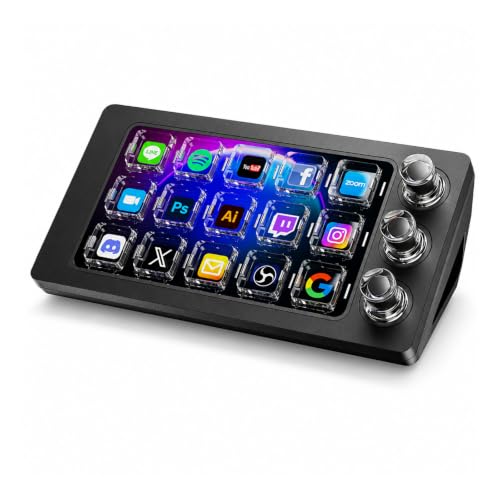
ActionRing Megtran M3 Macropad for PC Work
EezBotFun 3.5″ TFT Macropad 8 Programmable Keys
A Breakdown Of The Leading Choices
The ActionRing Stream Deck N1 takes a different path than the LCD-heavy picks on this list. Instead of a wide, horizontal footprint, it stands tall in a vertical layout that frees up desk space for a mouse, drawing tablet, or a wide monitor arm.
What sets it apart is the trio of switchable modes, which turn the same physical keys into a left-hand shortcut board, a standalone calculator, or a numeric keypad that pairs nicely with a tenkeyless keyboard. For someone juggling spreadsheets and creative software in the same afternoon, that flexibility has real value.
A Few Strong Suits
- Vertical chassis keeps a wider workspace clear for mouse movement and monitor bases
- Three switchable modes cover calculator, shortcut, and numeric pad duties in one device
- Calculator mode works without launching companion software, so it stays useful even on locked-down PCs
- Left-hand ergonomic shaping reduces the wrist reach compared to standard horizontal decks
Points To Keep In Mind
- Fewer customizable keys than the LCD-equipped picks further down, so heavy macro users may outgrow it
- The vertical orientation takes some adjustment if you are used to reaching across a flat deck
Right Fit For
Shoppers with compact desks who split time between number-crunching and creative work.
A Better Fit Elsewhere
Streamers wanting labeled icons on each key should look at the ActionRing Stream Controller Deck Macropad, which is built specifically around LCD labeling.
Six LCD keys sit at the center of the ActionRing Stream Controller Deck Macropad, and that small screen on every key is the main reason it appeals to streamers and editors. You can drop a JPG, PNG, or GIF onto each one so the icons track the function, which matters more than raw key count when the deck sits next to a busy timeline.
Setup leans on drag-and-drop assignment rather than dense configuration menus, so it stays approachable for someone who does not want to learn a new scripting language. Compared with the Stream Deck N1 above, this one trades vertical minimalism for visual flexibility.
A Few Highlights
- LCD keys display custom icons and animations for fast recognition during live sessions
- Drag-and-drop macro assignment lowers the learning curve for first-time deck owners
- Multi-action bindings let a single key fire a string of commands in sequence
- Compact six-key layout fits neatly beside a keyboard without crowding a streamer’s camera frame
Honest Caveats
- Only six assignable keys, so users with deep macro libraries will need to layer profiles
- LCD screens are visually driven and harder to read in very bright, sunlit rooms
Quick Facts
Made For
Creators and streamers who label-heavy workflows and prefer a gentle setup process.
Look Elsewhere When
Builders who need open scripting should try the EezBotFun 3.5″ TFT Macropad 8 Programmable Keys, which exposes scripts on the device itself.
The Megtran M3 leans into a different feel under the fingers. Magnetic switches replace traditional mechanical contacts, which the maker describes as offering ultra-low trigger latency and a smoother press. For long editing sessions or extended streams, that lighter actuation can mean less finger fatigue.
Visually, the design leans into transparency, with dynamic background options that turn the deck into a small light show on the desk. It sits between the LCD-heavy Stream Controller Deck and the calculator-focused N1, aiming at users who care as much about typing comfort as macro count.
Strengths Worth Knowing
- Magnetic switch design aims at faster response and gentler long-session typing
- Customizable background library adds visual personality beyond standard decks
- Suited to creators who run both gaming and editing workloads from the same station
Small Caveats
- Magnetic switches feel different from classic mechanical tactiles, so mechanical-keyboard fans may need adjustment time
- Background-driven aesthetics may not appeal to anyone wanting a plain, minimal look
- Limited public detail on total key count means verifying layout before purchase matters
Who Will Love This
Creators and gamers logging long sessions who value switch feel and visual flair over raw key count.
Swap It Out When
Streamers wanting labeled icons on every key are better served by the ActionRing Stream Controller Deck Macropad.
Where most macropads depend on a background driver, this EezBotFun model acts as a standard HID (Human Interface Device). HID is the generic term for any USB device that talks to a computer without custom software, like a regular keyboard or mouse. That makes it a quiet hero on locked-down work PCs where installs are blocked.
An ESP32S2 chip drives the board, which is a small microcontroller that handles the macro execution, and the 3.5-inch TFT (thin-film transistor) color screen gives the deck a clear visual hub for icons and profile names. Automation runs through scripts that you copy onto the device’s USB drive, so tinkering feels closer to editing a config file than wrestling with vendor software.
Noteworthy Benefits
- Driver-free HID behavior works on restricted work computers where installs are blocked
- 3.5-inch TFT color display shows profile names and icons at a glance
- Eight mechanical keys with tactile feedback suit gaming and editing rhythms
- Script-based automation loads by copying files onto the device, with no background service required
Some Limits To Know
- Open-source scripting requires comfort with editing config files rather than a polished GUI
- Open-source 3D-printed case construction may show minor cosmetic variance between units
Feature Snapshot
Who Should Grab It
Tinkerers and gamers on restricted PCs who want script-driven control and a visible profile hub.
Reach For A Different Pick When
Anyone wanting a calculator and numeric pad built into the deck should try the ActionRing Stream Deck N1 Macropad/Calculator/Numeric instead.
What To Weigh Before Choosing a Macropad
The first call is layout. Horizontal decks spread keys wide and pair naturally with a wide mouse sweep, while vertical units like the ActionRing Stream Deck N1 Macropad/Calculator/Numeric keep a smaller footprint. Your monitor arm and tablet position should drive that choice more than aesthetics.
Next, think about whether your work computer will let you install companion software. Locked-down office PCs usually block background drivers, which is exactly where HID-based units like the EezBotFun 3.5″ TFT Macropad 8 Programmable Keys shine. If installs are allowed, an LCD-key deck opens up richer icon customization.
Key feel matters too. Mechanical switches deliver a familiar tactile bump, while magnetic switches (a design that uses magnets rather than metal contacts to register a press) aim for lower trigger latency and a softer press. Long-session editors and gamers tend to feel the difference fastest.
Finally, count the macros you actually need. Six assignable keys cover most streamers, but designers and editors working in Photoshop, Premiere Pro, OBS, and Excel often want more slots for tool-specific profiles. A larger key count plus a profile screen reduces the time spent memorizing what each button does.
Common Pitfalls And Premium Tradeoffs In Macropads
Traps First Timers Fall Into
The biggest miss is buying a deck with beautiful LCD keys and then realizing your work laptop blocks the companion software. Always check whether the deck runs as a standard HID (Human Interface Device, meaning it works like a regular keyboard) before falling for icon-heavy designs. A second common slip is underestimating how often you will switch profiles, so a deck without a clear profile indicator ends up harder to use than expected. Finally, buyers often ignore switch feel, then discover the chosen deck tires their fingers during long sessions.
Where The Extra Money Goes
Higher-tier macropads tend to spend the budget on switch quality, screen resolution, and chipset speed. The ActionRing Megtran M3 Macropad for PC Work, for example, leans on magnetic switches and dynamic visuals rather than extra keys. Paying more usually buys quieter, smoother, or more responsive inputs, along with better-looking displays, and that matters most for users who press these keys thousands of times per day.
Frequently Asked Questions
What Is a Macropad Used For?
A macropad is a small keyboard that fires custom shortcuts, multi-key combos, or software commands from a single tap. Creators, streamers, and gamers use them to keep frequent actions within easy reach.
Do I Need Software To Use a Macropad?
Most macropads need a companion app to map keys, though driver-free HID (Human Interface Device) models work without installs on any computer. If your machine blocks new software, look for HID-based options.
How Many Keys Do I Actually Need?
Six keys cover most streamers and casual users, while editors and designers often want eight or more for tool-specific profiles. Count the shortcuts you use daily before deciding.
Are Mechanical Switches Better Than Magnetic?
Mechanical switches deliver a familiar tactile bump, while magnetic switches (a design that registers presses through magnets rather than metal contacts) aim for lower trigger latency and smoother travel. Personal comfort and session length usually decide the winner.
Can a Macropad Replace a Numeric Keypad?
Some vertical decks, like the ActionRing Stream Deck N1 Macropad/Calculator/Numeric, include a dedicated numeric pad mode. A standard horizontal macropad usually does not cover spreadsheet work as comfortably.
Wrap Up
A good macropad is less about flashy specs and more about how naturally it fades into the workflow. Pick the layout that fits your desk, match the switch feel to your session length, and confirm that the software rules at your machine will play nicely with the deck. Once those basics line up, the right pick almost picks itself.