A good gaming keyboard is the surface your hands live on for hours, so the wrong switch feel or layout quietly ruins every match. Most shoppers settle for whatever sits at the top of the marketplace, then regret the mushy typing or the noisy living room a few nights later. I went through six strong options that split across tenkeyless compact boards, full-size workhorses, wireless customs, and an adjustable-switch flagship, then matched each one to the kind of gamer who would actually enjoy it.
A Snapshot Of The Selections

SteelSeries Apex 3 TKL White RGB Gaming Keyboard

KiiBoom Phantom98 Lite 96% Wireless Mechanical Gaming Keyboard

SteelSeries Apex 5 Hybrid Mechanical Gaming Keyboard
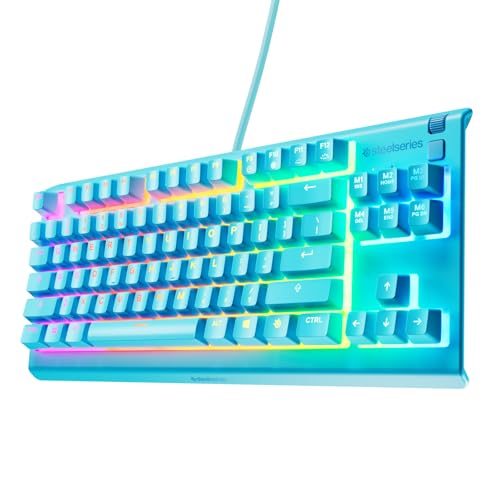
SteelSeries Apex 3 TKL Aqua RGB Gaming Keyboard

SteelSeries Apex 3 RGB Gaming Keyboard
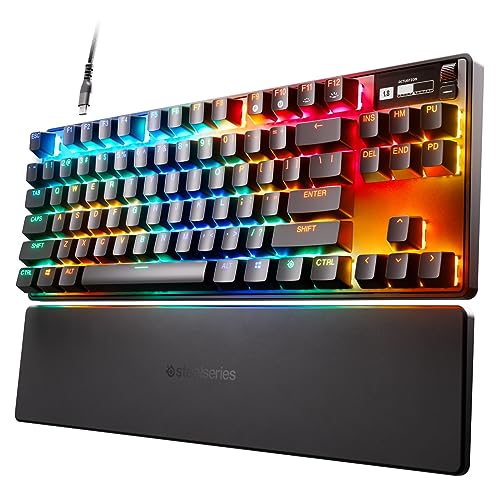
SteelSeries Apex Pro TKL HyperMagnetic Gaming Keyboard
The Details Behind The Selections
Tenkeyless boards (keyboards without the number pad on the right) keep a clean, esports-style footprint, and the white Apex 3 TKL leans hard into that aesthetic. The Whisper-Quiet Gaming Switch is a low-profile membrane-mechanical hybrid that types softer than a standard mechanical, which is great news if your gaming hours bleed into someone else’s sleep schedule.
Built for casual ranked nights and long Discord sessions, it still has anti-ghosting, meaning it registers multiple simultaneous key presses without missing inputs, plus IP32 water resistance against the occasional energy drink casualty. If your rig already leans toward the SteelSeries Apex 5 below but you need a quieter shared-room build, this lands a smart middle step.
Key Advantages
- Whisper-Quiet switches keep late-night play from waking roommates or partners.
- Tenkeyless layout frees up desk space for sweeping mouse aim.
- Eight-zone RGB adds personality without overwhelming the surface.
- IP32-rated protection helps the keyboard survive small drink spills.
Things To Consider
- Low-profile switches feel shallower than full mechanicals, so tactile-feedback fans may want more depth.
Who It Suits Best
Shared-space gamers, streamers recording voice nearby, and anyone who prefers a softer, less clicky typing feel.
A Better Fit Elsewhere
Competitive players chasing adjustable actuation should step up to the SteelSeries Apex Pro TKL HyperMagnetic Gaming Keyboard instead.
The Phantom98 Lite is the only wireless entry on this list, and its 96% layout crams a full function row, arrow cluster, and nav keys into a frame smaller than most traditional boards. A 96% layout keeps the numpad off but squeezes in every other key group, making it a sweet spot for productivity plus gaming.
Where the SteelSeries Apex 3 TKL stays wired and minimalist, this KiiBoom trades the cable for desktop flexibility and VIA remapping (a free software tool that lets you reassign every key, set macros, and tune RGB without installing manufacturer software). For hybrid setups where the same keyboard lives between a console rig, a laptop dock, and a clean desk, the wireless angle matters more than a hundred-key layout.
Points In Its Favor
- Wireless freedom keeps the desk clean and easy to rearrange.
- 96% layout retains function and arrow keys without numpad bulk.
- VIA remapping means endless customization without proprietary software.
- Compact footprint fits smaller battlestations and lap setups.
Trade Offs
- Wireless keyboards need charging or batteries, which can interrupt long tournament days.
- Smaller brands can have less mature firmware, so occasional remapping hiccups are commonly reported.
Made For
Minimalist desk enthusiasts and gamers who shuttle between a laptop dock, a console, and a tidy shared workspace.
Consider Something Else When
Hardcore FPS players who refuse to risk wireless input lag should grab the wired SteelSeries Apex Pro TKL HyperMagnetic Gaming Keyboard.
The Apex 5 is the upgrade step from the Apex 3 line, swapping the low-profile hybrid switches for tactile clicky Hybrids (a middle ground between silent membrane and loud mechanical, giving a noticeable bump without a sharp click). Add the aircraft-grade aluminum frame, per-key RGB, and a tiny OLED smart display for in-game stats and Discord alerts, and you have a board that earns its keep across work and play.
Where the Apex 3 TKL above is a compact value play, this full-size Apex 5 brings premium materials and per-key lighting for gamers who also live in spreadsheets. The included magnetic wrist rest helps when the gaming session turns into a writing sprint.
Everyday Wins
- Aircraft-grade aluminum frame delivers a rigid, desk-planted typing feel.
- Per-key RGB lighting means each key can show its own color and effect.
- OLED smart display surfaces Spotify tracks, Discord pings, and in-game telemetry.
- Magnetic wrist rest snaps on and off for travel and storage.
Room For Improvement
- Hybrid Blue switches are noticeably louder than the Apex 3’s whisper switches.
- Full-size footprint is a step up in desk real estate from the TKL siblings.
Built With In Mind
Hybrid work-and-game users who want a single premium keyboard for spreadsheets, Discord, and ranked evenings alike.
Look Elsewhere When
Quiet-room gamers who type into a mic during streams should lean back toward the SteelSeries Apex 3 TKL White RGB Gaming Keyboard.
The Aqua version of the Apex 3 TKL swaps the white chassis for a softer blue-teal finish that blends into modern pastel battlestations. Everything else stays familiar: tenkeyless form, eight-zone RGB, whisper-quiet switches, and IP32 water resistance. It is essentially the same keyboard as pick number one in a different skin.
Compared to the larger Apex 5 above, this stays lighter and more portable, which makes it easy to toss in a bag for LAN parties. The Aqua finish hides dust a touch better than pure white, a small but real maintenance perk for a daily driver.
Good Reasons To Consider
- Pastel Aqua finish adds a softer aesthetic without changing the feature set.
- Compact TKL keeps the mouse pad zone wide for low-DPI aiming.
- Whisper-quiet switches suit bedroom and dorm setups.
Honest Caveats
- Eight-zone RGB is less granular than the Apex 5’s per-key lighting.
- Low-profile keycaps can feel cramped for shoppers used to full-height mechanicals.
Perfect Match For
Style-conscious gamers building a clean, soft-toned setup who still want the spill-resistant peace of mind.
Skip It When
Competitive players who want per-key customization should look at the SteelSeries Apex Pro TKL HyperMagnetic Gaming Keyboard instead.
The full-size Apex 3 keeps the same quiet switch feel as the TKL versions but stretches out with a full numpad, ten-zone RGB, and the magnetic wrist rest. If your gaming is mixed with spreadsheets, data entry, or MMO keybinds, the numpad pulls real weight.
The Apex 5 above is the obvious step up if you want aluminum and per-key lighting, but the Apex 3 full-size hits a sweet spot for shoppers who want quiet, durable typing without the premium price. Owners commonly report the magnetic wrist rest makes a noticeable difference during long ranked sessions.
The Case For It
- Full-size layout includes a numpad for MMO keybinds and productivity.
- Magnetic wrist rest snaps off when you want a flatter, competitive posture.
- Ten-zone RGB lighting is brighter and more layered than the eight-zone TKL.
- IP32 rating protects against common desk spills during marathon sessions.
- Whisper-quiet switches keep the noise down for streamers and roommates.
Small Caveats
- The wrist rest attaches magnetically, which is convenient but can shift slightly under heavy typing.
- Full-size footprint demands more desk depth than the TKL boards above.
Best Suited To
MMO players, Excel-heavy gamers, and anyone whose right hand lives on the numpad as much as WASD.
Another Choice May Suit
Esports-style players who never touch the numpad should pick the SteelSeries Apex 3 TKL White RGB Gaming Keyboard for a wider mouse zone.
The Apex Pro TKL is the flagship of this list, built around OmniPoint 2.0 switches that let you adjust the actuation point (the depth at which a key press is registered) from 0.1mm to 4.0mm on every individual key. That means WASD can register on a hair-light touch while ability keys demand a deliberate deep press, all on the same keyboard.
Where the Apex 5 above leans hybrid-work, this one stays pure competitive. The tenkeyless frame, PBT keycaps (a tougher plastic that resists shine and wear over time), and OLED screen make it the board for ranked grinders who tweak every setting. It costs more and demands time to dial in, but for the right player the payoff shows up in ranked numbers.
Noteworthy Benefits
- Adjustable actuation per key lets competitive players tune sensitivity key by key.
- Rapid Trigger dynamically re-registers keys based on travel distance rather than a fixed reset point, helping fast movement in shooters.
- PBT keycaps resist the greasy shine that builds up on cheaper ABS caps.
- OLED screen surfaces game info, Discord alerts, and profile switching.
- TKL layout keeps the desk wide for low-sense mouse players.
Where It May Fall Short
- Sits at a higher price point than every other board on this list.
- Per-key actuation setup takes time and software tinkering before it feels right.
- HyperMagnetic switches feel different from classic mechanicals, and traditional clicky fans may want a heavier bump.
Who Should Grab It
Competitive FPS and MOBA players chasing every possible edge, plus enthusiasts who enjoy dialing in software profiles.
Swap It Out When
Casual gamers who just want a clean, quiet typing feel will get more value from the SteelSeries Apex 3 TKL White RGB Gaming Keyboard.
What Matters Most Before Choosing A Gaming Mechanical Keyboard
Switch Feel And Sound Define The Daily Experience. The two biggest forks in the road are quiet hybrids like the Apex 3 line and tactile clicky switches like the Apex 5 Hybrid Blues. Quieter switches are kinder to roommates and streamers with open mics, while clicky switches give a louder confirmation bump some typists love. For most gamers logging long sessions, a quieter switch protects your wrists and your relationships.
Layout Affects Desk Space More Than People Expect. Tenkeyless boards like the Apex 3 TKL and Apex Pro TKL free up several inches of mouse movement, which matters for low-DPI aiming in shooters. Full-size boards with a numpad, like the standard Apex 3, are better for MMO keybinds, macros, and heavy spreadsheet use. The 96% KiiBoom Phantom98 Lite splits the difference, keeping the arrow keys and function row while ditching the numpad.
Connectivity Choices Have Real Tradeoffs. Wired boards deliver consistent input with zero battery anxiety, which is why every SteelSeries in this list stays tethered. The KiiBoom Phantom98 Lite goes wireless for a cable-free desk, but that means charging cycles and the small risk of wireless lag. For tournament play and serious ranked grind, wired is still the safe default.
Key Considerations Across These Picks
Pitfalls First Timers Hit
First-time shoppers often chase specs and overlook switch type, then wonder why a brand-new keyboard feels wrong after a week. Switch feel is a personal preference that no spec sheet can solve remotely, so reading about linear (smooth, no bump) versus tactile (noticeable bump at actuation) versus clicky (bump with an audible click) options matters before you commit. Another trap is buying a flashy RGB board only to find the wrist rest, keycaps, or software experience feels cheap. The Apex 3 line and Apex Pro avoid this by pairing lighting with proven switch platforms, but cheaper alternatives sometimes cut corners where you cannot see them.
Where The Extra Money Goes
Stepping up to the Apex 5 brings an aluminum frame, per-key RGB, and an OLED screen for noticeably more polish over the Apex 3 line. The Apex Pro TKL jumps higher still, adding adjustable actuation, Rapid Trigger, and PBT keycaps that resist shine. For casual gamers those upgrades are luxuries, but for competitive players the adjustable actuation alone can shift how every key responds in a match. The honest read is that the Apex Pro is worth the spend only if you will actually configure it.