A solid Micro-ATX build hits a sweet spot that full-towers can’t match. You get genuine gaming-grade hardware, modern cooling support, and a chassis that disappears under a desk instead of dominating it. The nine cases below cover nearly every sensible reason someone would choose this form factor, from glass-panel showcases to whisper-quiet workstations to budget gaming rigs you can still tinker with later.
Your Options, Compared

NZXT H6 Flow RGB Mid-Tower Airflow Case
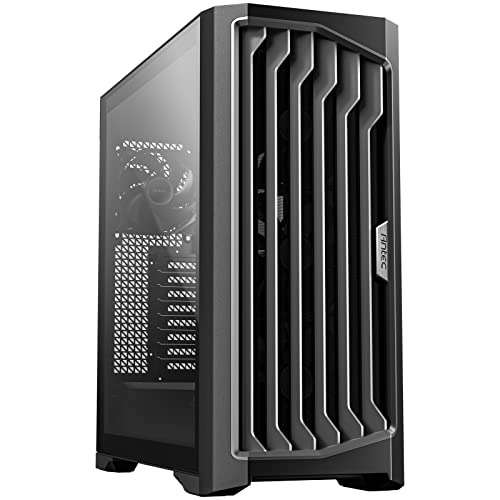
Antec Performance 1 FT Full Tower E-ATX Case

NZXT H3 Flow Micro-ATX Airflow PC Case
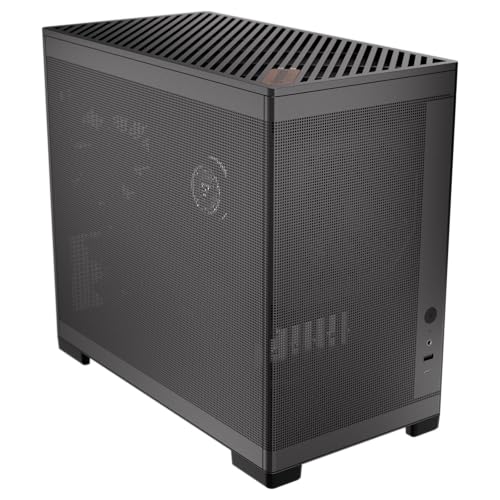
Okinos MiniArt 4 Micro ATX PC Case
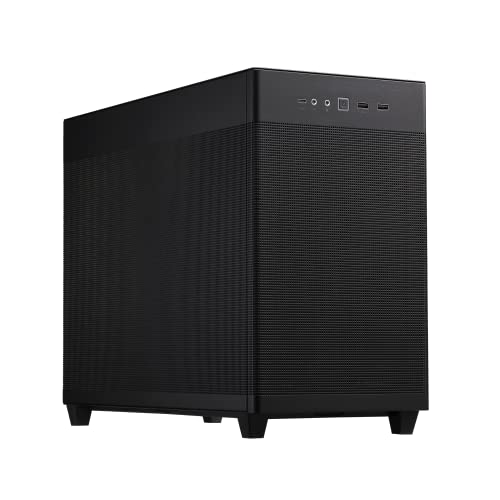
ASUS Prime AP201 Micro ATX PC Case

JONSBO D32 STD Micro-ATX PC Case

Thermaltake Versa H18 Micro ATX Case

Vetroo AL900 Black ATX PC Case

MUSETEX K2 Mid Tower Gaming PC Case
A Breakdown Of The Leading Choices
The H6 Flow sits at the larger end of what most people picture for a Micro-ATX build, which is part of why it works so well as a showcase piece. NZXT uses wraparound glass panels that run seamlessly from front to side, so once a GPU and a few RGB fans are inside, the whole interior reads like a single continuous display. The dual-chamber layout tucks the power supply and storage drives behind a separate wall, which keeps the main viewing area clean.
Three preinstalled RGB fans save a real chunk of money and setup time for anyone building their first rig. The cable routing channels behind the motherboard tray are wide enough to hide excess cabling without forcing it flat. For users who care more about how the build looks on a desk than how small the chassis is, this case lands in a comfortable middle ground.
Benefits That Matter
- Panoramic glass removes the visual seam between front and side panels, so RGB lighting looks unbroken from any angle.
- The dual-chamber split keeps the power supply heat away from the GPU, which matters during long gaming sessions in warm rooms.
- Three RGB fans ship preinstalled, removing the most common first-build bottleneck.
- Dedicated cable management space behind the motherboard tray means a clean final build without aftermarket accessories.
- Strong GPU clearance gives room for oversized graphics cards without airflow choking.
Things To Consider
- Glass panels mean fingerprints show up during installation, so builders commonly keep a microfiber cloth handy.
- It runs larger than a true mATX footprint, so tight shelf setups may feel cramped.
Made For
Display-minded builders who want their components to look like part of the room, not hidden away under a desk.
Consider Something Else When
Compact desk real estate matters more than visual flair; the ASUS Prime AP201 delivers similar airflow in a noticeably smaller body.
The Performance 1 FT is the opposite end of the spectrum from the compact picks lower on this list. Antec builds it as a full tower with E-ATX support, four PWM fans (the Storm T3 line), and a temperature display built into the front panel. For users running oversized graphics cards or custom loop cooling, the room inside is genuinely useful rather than marketing fluff.
The dual tempered glass side panels show off hardware from both sides of the build, and the high-airflow mesh front keeps intake strong even with multiple radiators installed. A 10Gbps Type-C port is a nice touch for anyone moving large files between drives. Compared to the NZXT H6 Flow above, this case trades visual cohesion for raw expandability.
Everyday Perks
- Four Storm T3 PWM fans preinstalled give serious out-of-box airflow for hot-running components.
- The integrated temperature display offers real-time system feedback without opening monitoring software.
- E-ATX support means future motherboard upgrades are not constrained by case size.
- 10Gbps Type-C front port handles fast external storage and modern peripherals.
- Mesh front intake supports multiple radiators without choking airflow to the GPU.
Trade Offs
- The full-tower footprint demands real floor or desk space, so apartment dwellers may struggle to place it.
- Dual glass panels require extra cleaning time during and after the build process.
Feature Snapshot
Who It Suits Best
Power users running custom cooling, oversized GPUs, or E-ATX motherboards who want headroom to upgrade over the next several years.
Where Another Pick Suits Better
Limited desk space is the priority; the NZXT H3 Flow delivers much of the airflow in a far tighter micro-ATX footprint.
NZXT’s H3 Flow is the smaller sibling to the H6, and it sticks closer to the actual micro-ATX promise. The case keeps the mesh front panel and ventilated PSU shroud that made the larger H6 popular with builders chasing low temperatures. For anyone working with a small desk, a TV stand, or a shelf-mounted setup, this is a more realistic daily fit.
It still accepts full-size graphics cards and standard ATX power supplies, which removes the usual small-form-factor compromises. The reduced height compared to mid-towers means builders should plan cable runs carefully since there is less room behind the motherboard tray. For most home users, this is the kind of case that disappears into the room instead of dominating it.
A Favorable Mix
- True micro-ATX footprint fits shelves and small desks where mid-towers would not.
- Mesh panel front and PSU shroud keep intake temperatures lower during extended gaming sessions.
- Standard ATX PSU compatibility avoids the premium pricing of SFX units.
- Accepts full-length GPUs, so there is no compromise on graphics power.
Points To Note
- Cable management space is tighter than in the H6, so builders commonly plan their routing before snapping panels back on.
- The compact body may limit radiator options compared to larger mid-towers.
Right Fit For
Small-room builders, dorm setups, and anyone who wants genuine micro-ATX dimensions without giving up modern component support.
Not Your Match When
Maximum radiator room and showcase aesthetics are the priority; the Vetroo AL900 with its 270° glass panels serves that crowd better.
Okinos positions the MiniArt 4 as a deliberately compact case, with a stated 24.5L volume that lands well under most micro-ATX towers. Full-mesh panels cover the front, sides, and top, which keeps air moving through every direction the case faces. The walnut wood logo badge adds a small visual touch that breaks up what would otherwise be an all-black box.
Three 120mm fans ship preinstalled, including reverse-blade units that pull air through the side mesh rather than pushing it from the front. A 240mm radiator fits on top for users who want liquid cooling without moving to a larger case. The front-mounted PSU position is unusual for this form factor, but it helps keep the GPU area unobstructed.
Positive Takeaways
- 24.5L volume makes this one of the tightest real micro-ATX cases in this roundup.
- Full-mesh panels on all sides maximize passive airflow potential.
- Reverse-blade preinstalled fans pull cool air through side vents, a layout uncommon at this size.
- Walnut accent offers a small break from the typical all-black aesthetic.
- Tool-free panel access speeds up upgrades and routine cleaning.
Honest Caveats
- Full-mesh panels collect dust more visibly than solid or glass panels, so routine cleaning becomes essential.
- The front PSU layout may require short custom cable sets for clean routing.
- Smaller internal volume can make tall memory modules or large AIO pump heads tricky to fit.
Best Suited To
Apartment dwellers and minimal-desk owners who want maximum airflow in a case that visually disappears.
Skip It When
Glass-panel showcase aesthetics matter; the MUSETEX K2 with its panoramic tempered glass fits that mindset much better.
The ASUS Prime AP201 hits a balance that few micro-ATX cases manage. ASUS squeezes a 33-liter internal volume (relatively compact for mATX) while still supporting 360mm AIO coolers and graphics cards up to 338mm long. For first-time builders who want a small case without giving up modern cooling options, this one checks most boxes.
The tool-free side panels remove a frustrating part of routine maintenance. Quasi-filter mesh over the front and sides lets air in while keeping large dust particles out. Compared to the Okinos MiniArt 4, the AP201 offers a slightly larger build area but with similar mesh-front airflow characteristics.
The Helpful Details
- Tool-free side panels make component swaps and dust cleanup faster than traditional screw designs.
- 360mm AIO support inside a 33L footprint is unusual and welcome for liquid-cooling users.
- 338mm GPU clearance handles nearly every current graphics card on the market.
- Quasi-filter mesh balances dust filtering with unrestricted airflow.
- Standard ATX PSU compatibility avoids the SFX power supply premium.
Room For Improvement
- Only one fan ships preinstalled, so most builders add at least two more for balanced airflow.
- Mesh surfaces still gather dust over time, though the quasi-filter helps reduce buildup.
Quick Facts
Who Should Grab It
First-time builders and small-room gamers who want modern cooling support without the SFX power supply trade-off.
A Better Fit Elsewhere
Massive GPU clearance and E-ATX support are needed; the Antec Performance 1 FT serves that upgrade path.
The JONSBO D32 STD targets users who have moved to back-connect (also called BTF) motherboards, where the power and data cables plug into the rear of the board instead of the front. For builders chasing the cleanest possible interior, this case is built around that layout. It also accepts traditional mATX boards, so the BTF feature is a bonus rather than a requirement.
The case accepts GPUs up to 365mm, which is more than enough for the current flagship graphics cards. A 240mm AIO fits on top, and 163mm air coolers clear the side panel. JONSBO also includes USB 3.2 on the front panel, which is a meaningful upgrade from older USB 3.0 headers.
Advantages To Know
- Back-connect motherboard support enables a fully cable-free front view of the components.
- 365mm GPU clearance handles every current high-end graphics card without compromise.
- 240mm AIO support means liquid cooling is on the table for users who want it.
- USB 3.2 front port handles modern external storage at full speed.
- Accepts ATX, SFX-L, and SFX power supplies, giving flexibility for different build budgets.
Some Limits To Know
- Bottom-mounted magnetic dust filter is convenient but requires removing the case to clean thoroughly.
- Back-connect support only matters if the motherboard matches; traditional builds gain no extra benefit from this feature.
Feature Card
Perfect Match For
Clean-cable enthusiasts with BTF motherboards who want the front view free of wiring entirely.
Reach For A Different Pick When
A traditional mATX build without back-connect is the plan; the ASUS Prime AP201 offers comparable airflow with broader compatibility.
The Versa H18 is Thermaltake’s long-standing entry-level mATX case, and it remains a sensible pick for first-time builders on a tight budget. The tempered glass side panel lets users see their build without paying premium case pricing. SPCC steel construction keeps the chassis rigid enough to handle multiple component swaps over the years.
It supports AIO liquid cooling and most high-end GPUs, so builders do not need to compromise on hardware just because the case is affordable. Cable management is reasonable for the price, though not as polished as premium options. For users building a capable gaming PC without spending on aesthetics, this case is the honest baseline.
What Makes Sense
- Entry-level pricing makes it accessible for first-build shoppers on a strict budget.
- Tempered glass side panel offers a clear view of components at a fraction of showcase case pricing.
- SPCC steel construction keeps the chassis sturdy for repeated component swaps.
- AIO liquid cooling compatibility avoids limiting cooler choices down the road.
Worth Bearing In Mind
- Cable management space is more limited than newer designs, so clean builds require extra effort.
- Airflow is more restricted than mesh-front competitors, which can push GPU and CPU temps higher under load.
- The included fan count is lower than premium alternatives, so additional fan purchases are likely.
Right Fit For
First-time builders and budget-conscious shoppers who want a capable mATX case without paying for premium features.
Look Elsewhere When
Top-tier airflow and modern aesthetics matter; the Okinos MiniArt 4 with full-mesh panels serves that need better.
The Vetroo AL900 is built around visual presentation. The 270° tempered glass design wraps around the front and side, exposing almost the entire interior to view. For builders running RGB fans, custom cable work, or simply a clean component layout, this case turns the PC into a display piece rather than a hidden box.
Internally, the case supports hidden-connector motherboards (the YTX design) for fully clean cable management. 360mm radiator support and broad GPU clearance mean the visual focus does not come at the cost of cooling performance. Compared to the NZXT H6 Flow earlier in this list, the AL900 pushes the panoramic glass concept even further.
What It Does Well
- 270° glass design exposes almost the entire build to view, maximizing RGB impact.
- Hidden-connector motherboard support enables fully cable-free front panels.
- 360mm radiator support handles premium liquid cooling without chassis limitations.
- Wide GPU clearance accommodates oversized graphics cards from current and previous generations.
Areas To Watch
- Glass-heavy design requires more frequent cleaning to keep the showcase look intact.
- Airflow depends heavily on fan setup; the open glass does not feed cool air on its own.
Who Will Love This
Showcase builders who treat the PC like a desk centerpiece and want RGB lighting to read clearly from every angle.
Swap It Out When
Compact dimensions and mesh cooling matter more than visual presentation; the ASUS Prime AP201 fits that profile.
MUSETEX ships the K2 with seven PWM ARGB fans preinstalled, expandable to ten. For anyone who has priced out individual ARGB fans for a build, this saves both money and the hassle of wiring and mounting each unit. The 270° panoramic dual tempered glass design matches the Vetroo AL900 above for showcase visibility.
Front Type-C connectivity handles modern devices, and the mid-tower form factor gives enough room for oversized GPUs and radiators. The fan-heavy design runs cool out of the box, which makes it well suited to gaming sessions or sustained creative workloads. The honest read is that the K2 leans heavily into visual drama, so it appeals most to builders who want both airflow and a display-ready look from day one.
A Few Highlights
- Seven ARGB PWM fans preinstalled covers most airflow needs without buying extras.
- 270° dual tempered glass gives nearly unobstructed views of the interior.
- Type-C front port supports modern peripherals and fast external storage.
- Expandable to ten fans total, leaving room for radiator setups or additional intake later.
- Mid-tower form factor balances component room with reasonable desk placement.
Practical Considerations
- Preinstalled fans require a compatible ARGB controller or motherboard header; mismatched headers limit lighting control.
- Mid-tower size means a larger footprint than dedicated mATX options like the NZXT H3 Flow.
Feature Overview
Made For
RGB-first builders and gaming enthusiasts who want strong airflow and a display-ready look without buying fans separately.
Where A Sibling Pick Shines
Tight micro-ATX dimensions are the priority; the NZXT H3 Flow delivers the airflow concept in a noticeably smaller body.
Matching A Chassis To Your Build Goals
A micro-ATX case is the kind of decision that quietly shapes every future upgrade. GPU length, radiator room, PSU clearance, and front-panel connectivity all matter, but the priority order depends on the build. A first-time builder running a modest GPU cares more about ease of assembly and tool-free panels than about 360mm radiator support. A streamer running an oversized graphics card and custom cooling needs exactly the opposite.
Airflow design is the most underrated spec. Mesh-front cases like the ASUS Prime AP201 or Okinos MiniArt 4 move noticeably more air than closed-panel designs at the same fan count, which keeps CPU and GPU temperatures lower during long sessions. Glass-front showcase cases look dramatic, but they depend entirely on the fan configuration to keep components cool. Builders should match case airflow to their expected workload: idle web browsing has different needs than eight-hour gaming marathons.
Compatibility is the silent killer of small builds. Builders should check three measurements before buying: GPU length, CPU cooler height, and PSU clearance. Most modern GPUs run 300mm or longer, and many air coolers clear 160mm. A compact mATX case may technically fit the motherboard but reject the GPU that comes with it. PSU size is the third trap; some compact cases require SFX power supplies, which carry a price premium over standard ATX units.
Key Considerations Across These Picks
Common Shopping Slip Ups
The biggest mistake is buying a case that fits the motherboard but rejects the GPU. Component dimensions vary widely between models, and a case that lists “mATX support” tells you nothing about maximum graphics card length. Always check three measurements before purchasing: GPU clearance, CPU cooler height, and PSU size. Skipping this step is how builders end up returning cases or buying smaller components than planned.
Another trap is assuming more fans automatically mean better cooling. Fan placement matters more than fan count. A case with seven fans poorly positioned will run hotter than a case with three fans placed correctly at intake and exhaust. Builders should think about airflow direction before adding fans, and remember that dust filters need routine cleaning to stay effective.
When Paying More Pays Off
Higher-tier cases earn their cost through three things: better cable management, broader component compatibility, and longer useful life. A premium case with tool-free panels, ample routing space, and standard ATX PSU support makes every future upgrade easier. Budget cases force builders into compromises, often requiring extra accessories or limiting future hardware swaps.
The upgrade is most justified for builders who plan to keep their case across multiple system generations. A well-built case can outlive two or three complete builds inside it, while a budget case often gets replaced alongside its first system. For one-off builds on a strict budget, the lower-priced picks on this list still deliver solid value, assuming the compatibility checks above are done first.
Frequently Asked Questions
What Is Micro-ATX?
Micro-ATX (often shortened to mATX) is a motherboard form factor that is smaller than standard ATX but larger than Mini-ITX. It typically offers fewer expansion slots than ATX but supports many of the same CPUs and features. Cases built around mATX motherboards are usually more compact than mid-towers while accepting standard ATX power supplies and full-size graphics cards.
Can I Put A Full-Size GPU In A Micro-ATX Case?
Most modern micro-ATX cases accept full-size graphics cards, but the maximum length varies by model. Cases like the ASUS Prime AP201 (338mm clearance) and Antec Performance 1 FT handle nearly every current GPU, while tighter compact cases may reject oversized models. Always check the GPU clearance spec before pairing a graphics card with a case.
Do Micro-ATX Cases Run Hotter Than Mid-Towers?
Smaller cases can run warmer under sustained load, but airflow design matters more than size alone. Mesh-front cases with good fan placement can match or even beat larger mid-towers in cooling performance. Glass-front showcase cases typically run warmer unless paired with strong fan configurations.
Are SFX Power Supplies Required?
Not always. Many micro-ATX cases like the ASUS Prime AP201 and Antec Performance 1 FT accept standard ATX power supplies. Smaller compact cases sometimes require SFX units, which are physically smaller but more expensive. Builders should check PSU support before committing to a specific case.
How Do I Clean A Micro-ATX Case?
Routine cleaning depends on the panel design. Mesh-front cases need filter cleaning every few months, while glass-panel cases need wiping down during and after builds. Compressed air works well for clearing dust from fans and heatsinks, and a microfiber cloth handles glass surfaces without scratching.
The Takeaway
The right micro-ATX case depends less on specs and more on the build plan behind it. Compact mATX options like the NZXT H3 Flow and Okinos MiniArt 4 suit small rooms and modest budgets. Showcase cases like the NZXT H6 Flow, Vetroo AL900, and MUSETEX K2 prioritize visual presentation. The ASUS Prime AP201 hits a balance that works for most first-time builders, while the Antec Performance 1 FT serves users who plan aggressive component upgrades. Pick the case that matches the build, not the one with the loudest feature list.