Small-footprint PCs have grown up. The current crop of micro-desktops handles serious multitasking, light creative work, and even casual gaming, all while sipping power and disappearing behind a monitor. I pulled together ten options worth a serious look, from whisper-quiet fanless builds to Ryzen 7 rigs that punch well above their weight.
The right pick depends on what you actually do. Someone running a triple-monitor stock-trading setup has different needs than a student who just wants a clean desk and fast boot times. Inside, each pick gets a candid look at strengths, honest trade-offs, and the reader profile it’s built for.
The Shortlist At A Glance
ACEMAGIC X3 Mini Gaming PC Ryzen 7 H 255 16GB 1TB

MINIX NEO Z300-0dB Fanless Mini PC Intel i3-N300
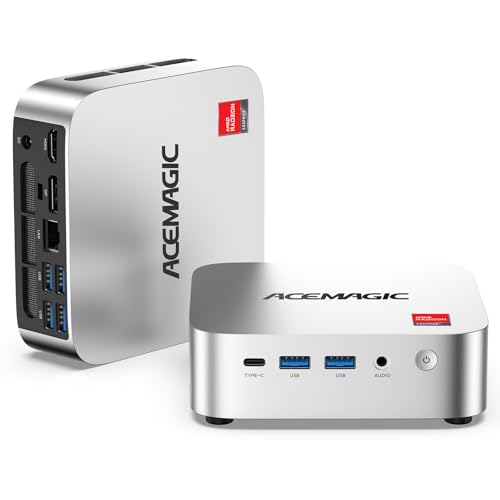
ACEMAGIC K1 Mini PC AMD Ryzen R2544 8GB 256GB

ACEMAGIC K1 Mini PC Windows 11 Pro Ryzen R2544

Beelink SER3 Mini PC Ryzen 3 3200U 16GB 500GB

ACEMAGIC K1 Gaming Mini PC Ryzen 7 7730U 16GB

ACEMAGIC M1 Mini PC Ryzen 7 7735HS 24GB 1TB

GEEKOM A5 2027 Edition Mini PC Ryzen 7 7730U

Beelink EQR5 Mini PC Ryzen 5 5500U 16GB 480GB

ACEMAGIC Mini PC AMD Ryzen 7330U 16GB Triple 4K
The Strengths Of Each Pick
The ACEMAGIC X3 Mini Gaming PC sits at the top of this list for a reason. It runs an AMD Ryzen 7 H 255 processor with eight cores and sixteen threads, paired with integrated Radeon 780M graphics, 16GB of RAM, and a full 1TB SSD. For a micro-desktop that fits behind a monitor, that’s a serious spread of silicon.
Where this rig really earns its keep is in tasks that punish lesser hardware. Video editing timelines scrub smoothly, large Photoshop files stay responsive, and 1080p gaming is genuinely playable without a discrete graphics card. The 1TB drive also means most people won’t need an external SSD for a long time.
A Few Strong Suits
- Eight-core Ryzen 7 handles heavy multitasking and content creation without breaking a sweat
- Radeon 780M integrated graphics push 1080p gaming past older Vega iGPUs
- 1TB NVMe storage leaves room for project files, game libraries, and media
- 16GB RAM covers most workloads; the system stays responsive with dozens of browser tabs open
Honest Caveats
- Under sustained load, the cooling fan ramps up and becomes audible in a quiet room
- No dedicated GPU means AAA gaming at high settings is out of reach
Built With In Mind
Content creators, streamers, and anyone who runs demanding software on a small-footprint desk setup will get the most from the Ryzen 7 H 255 and Radeon 780M combo.
Where Another Pick Suits Better
The MINIX NEO Z300-0dB is a better match for people who need absolute silence in a recording booth or shared office.
The MINIX NEO Z300-0dB is one of those rare PCs that produces no fan noise at all. It uses passive cooling, meaning heat dissipates through the chassis itself rather than a spinning fan. For a home recording setup, bedroom office, or shared workspace, that silence is genuinely valuable.
Inside sits an Intel i3-N300 chip, 16GB of DDR4 RAM, and a 512GB PCIe SSD. That’s plenty of muscle for document editing, web browsing, video calls, and streaming 4K content. It won’t handle heavy creative workloads, but it wasn’t built to.
What Stands Out
- Truly fanless operation: zero mechanical noise, ever
- 16GB DDR4 and a 512GB PCIe SSD make it responsive for office work
- Compact chassis fits anywhere a small book would
- Pre-installed Windows 11 Pro is ready to go out of the box
Trade-Offs To Consider
- Passive cooling caps sustained performance; the i3-N300 throttles under long heavy loads
- Integrated graphics are limited to light photo work and casual games
Made For
People who value a silent workspace above all else: podcasters, writers, accountants, and anyone in a noise-sensitive environment.
Skip It When
The ACEMAGIC X3 Mini Gaming PC is the better pick for users running CPU-heavy creative software that would overwhelm passive cooling.
The ACEMAGIC K1 with the Ryzen R2544 processor lands in entry-level territory, and that’s exactly its lane. Four cores and eight threads at a 3.7GHz boost handle everyday computing without complaint, including spreadsheets, web research, and video conferencing.
8GB of DDR4 RAM is enough for basic multitasking, and the 256GB SSD keeps boot times short. For a student dorm, a kitchen computer for recipes, or a secondary family PC, the math works.
Useful Strengths
- Quad-core R2544 covers standard office and school workloads comfortably
- 256GB SSD gives faster boot and app launches than older HDD-based mini PCs
- Compact body tucks behind monitors or slides under keyboards
- Integrated Radeon graphics handle 4K video playback
Points To Note
- 8GB RAM fills up quickly with many browser tabs or large spreadsheets open
- 256GB storage runs tight for users with large media libraries
- Not suitable for modern gaming or video editing beyond short clips
Right Fit For
Students, casual home users, and anyone setting up a basic productivity station on a limited budget.
Consider Something Else When
The ACEMAGIC K1 with 16GB RAM and 512GB storage makes more sense for users planning to keep dozens of tabs open at once.
This ACEMAGIC K1 variant shares the same Ryzen R2544 platform as the entry-level model above, but the chassis offers dual memory slots that owners can upgrade later. That’s a meaningful difference for anyone thinking beyond the out-of-box configuration.
8GB of DDR4 and 256GB of SSD storage are present at launch, but the upgrade path is there. For a small business that wants to standardize on one machine and grow into it, that flexibility helps justify the spend.
Strengths Worth Knowing
- Dual SO-DIMM slots let owners expand RAM without replacing the unit
- Quad-core R2544 with 3.7GHz boost handles standard workloads reliably
- Pre-installed Windows 11 Pro unlocks BitLocker and remote desktop features
- Compact form factor fits cleanly in kiosk or reception setups
Soft Spots
- Standard 256GB SSD still feels constrained for power users
- Cooling under sustained load can get warm to the touch on a desk
Best Suited To
Small offices and home users who want a starter PC with a clear path to expand memory later.
A Better Fit Elsewhere
The Beelink EQR5 suits remote workers who want a six-core chip and bigger SSD out of the box.
The Beelink SER3 is a familiar face in the mini-PC world, and the Ryzen 3 3200U version keeps that reputation intact. Two cores and four threads sound modest on paper, but combined with 16GB of RAM and a 500GB SSD, it handles day-to-day tasks with room to spare.
Family computers, reception desks, and homework stations get exactly what they need: reliable performance, enough storage for schoolwork and photos, and a footprint small enough to mount behind any monitor.
The Practical Payoff
- 16GB RAM is generous for the price point, future-proofing for browser-heavy tasks
- 500GB SSD handles years of documents, photos, and school files
- Radeon Vega graphics handle dual-monitor setups and HD streaming
- Compact Beelink chassis has earned a track record for reliability
Worth Bearing In Mind
- Two cores limit heavy multitasking; large compiles will crawl
- Radeon Vega iGPU is not suited to modern gaming beyond light esports titles
Who Should Grab It
Families and home offices who want a no-fuss PC for browsing, email, streaming, and schoolwork.
Look Elsewhere When
The Beelink EQR5 with its six-core Ryzen 5 is a better fit for users juggling heavier workloads.
The ACEMAGIC K1 Gaming Mini PC leans into its name with a Ryzen 7 7730U and Radeon 680M graphics. Eight cores, sixteen threads, and modern integrated graphics make this a legit entry-level gaming rig in a tiny box.
16GB of RAM and 512GB of SSD storage round out a build that can handle esports titles at high refresh rates and many AAA games at 1080p with reasonable settings. Compared to the standard ACEMAGIC K1 models reviewed earlier, the gaming variant is a real step up.
Noteworthy Benefits
- Ryzen 7 7730U’s eight cores keep frame rates stable during streaming and gameplay
- Radeon 680M delivers playable 1080p in many modern titles without a discrete GPU
- 512GB SSD leaves room for several large game installs
- Windows 11 Pro unlocks features like BitLocker and remote desktop
Small Caveats
- Demanding AAA titles still require lowered settings for smooth framerates
- Cooling noise rises under extended gaming sessions
Perfect Match For
Casual gamers, indie enthusiasts, and streamers who want console-sized gaming performance without a tower.
Not Your Match When
The ACEMAGIC X3 with the Ryzen 7 H 255 offers stronger CPU performance for creative work paired with similar gaming capability.
The ACEMAGIC M1 Mini PC is the configuration most people wish they had. 24GB of LPDDR5 RAM, a 1TB NVMe SSD, and a Ryzen 7 7735HS with eight cores and sixteen threads: that’s a workstation-class spec sheet in a chassis the size of a hardcover book.
For developers, video editors, and anyone running virtual machines, the memory headroom is the headline. LPDDR5 is faster and more efficient than older DDR4, so multitasking feels snappier even when dozens of apps are open.
What It Does Well
- 24GB LPDDR5 RAM handles virtual machines, video timelines, and dozens of tabs simultaneously
- 1TB NVMe SSD offers fast read and write speeds for large project files
- Ryzen 7 7735HS pushes past 4.7GHz for demanding single-threaded work
- Extra M.2 slot allows storage expansion down the road
Less Ideal Details
- LPDDR5 is soldered, so RAM upgrades aren’t possible after purchase
- Premium pricing reflects the spec sheet; budget shoppers should look elsewhere
Whose Shelf It Belongs On
Power users, developers, and creative professionals who want maximum RAM and storage in a tiny footprint.
Reach For A Different Pick When
The ACEMAGIC K1 Gaming Mini PC is the smarter choice for users who prioritize gaming performance over raw RAM capacity.
The GEEKOM A5 2027 Edition distinguishes itself with a longer three-year warranty that outlasts the typical one-year PC coverage. For businesses standardizing on hardware or anyone who simply hates replacing computers, that peace of mind has real value.
Under the hood, the Ryzen 7 7730U and Radeon graphics deliver solid performance for productivity and light creative work. 16GB of RAM and 512GB of storage cover most mainstream workflows without complaint.
The Case For It
- Three-year warranty beats most competitors’ standard coverage
- Ryzen 7 7730U handles productivity and light creative work reliably
- 512GB SSD gives comfortable working space for apps and files
- Compact GEEKOM chassis runs cool and quiet under typical loads
Factors To Consider
- Three-year warranty term is shorter than some business-class desktop offerings
- Not designed for heavy gaming or intensive video editing workloads
Who Will Love This
Long-term planners: small business owners, IT managers, and homeowners who want hardware that stays covered well past year one.
Swap It Out When
The ACEMAGIC M1 is the smarter pick for users who need more RAM and storage than the A5 offers.
The Beelink EQR5 lands in a sweet spot for most productivity users. Six cores and twelve threads from the Ryzen 5 5500U give it real multitasking muscle, while 16GB of RAM and a 480GB SSD cover typical workloads with breathing room.
Beelink pairs the chip with a heat-pipe and fin cooling design, plus a single fan for active cooling. The result is steady performance under sustained load without the thermal throttling some mini PCs suffer.
Everyday Perks
- Six-core Ryzen 5 5500U breezes through office apps, browsing, and light photo editing
- 16GB RAM keeps multitasking smooth across dozens of browser tabs
- 480GB SSD balances capacity and speed for typical home use
- Heat pipe and fan combo manages sustained loads better than passive designs
A Few Limitations
- Active cooling fan becomes noticeable under heavy sustained loads
- Integrated Radeon graphics limit gaming to esports and older titles
Best Suited To
Remote workers, freelancers, and home office users who run lots of browser tabs and productivity apps at once.
Where A Sibling Pick Shines
The ACEMAGIC M1 is the better match for users running virtual machines or professional creative suites.
The ACEMAGIC Mini PC with the Ryzen 7330U is built for multi-monitor setups. Triple 4K display support through HDMI and additional video outputs makes it a natural fit for trading desks, control rooms, and productivity power users who live in spreadsheets and dashboards.
At 28 watts, the chip stays efficient, and the cooling design keeps noise down for a desk-side experience. 16GB of RAM is plenty for office work, even with several 4K displays pushing pixels.
What Earns Its Place
- Triple 4K display output handles complex multi-monitor workflows
- Ryzen 7330U runs at just 28W, keeping power draw and heat low
- Compact chassis slides behind monitors or under desks
- Windows 11 Pro comes pre-installed and configured
Possible Compromises
- 256GB SSD is small for users handling large media collections
- Integrated graphics cap out at office work and HD streaming
Feature Snapshot
Made For
Multi-monitor productivity users, traders, and home office pros who want triple 4K output in a quiet, efficient package.
Another Choice May Suit
The ACEMAGIC X3 is the better fit when gaming or heavier creative tasks enter the mix.
What Matters Most Before Choosing Micro-Desktops
CPU Generations And Core Counts
The processor is the heart of any micro-desktop, and the gap between a four-core chip and an eight-core one is enormous in real-world use. Modern Ryzen and Intel mobile CPUs pack desktop-class performance into laptop-style power envelopes. For document work and browsing, a four-core chip is fine. For video editing, virtualization, or running multiple monitors with demanding apps, six or eight cores pay off.
Integrated graphics have also improved dramatically. Radeon 680M and 780M graphics can handle light gaming without a discrete GPU, which is why these mini PCs keep gaining ground. If gaming matters at all, prioritize newer integrated graphics or accept the limits honestly.
Memory And Storage Considerations
8GB of RAM is the bare minimum for Windows 11 in 2026. It works for light use, but heavy multitaskers will feel the squeeze within months. 16GB is the practical sweet spot for most households, and 24GB or more matters once virtual machines or large media files enter the picture.
SSD storage has basically replaced hard drives in this category, and the difference in boot times is night and day. 256GB works for minimal setups but fills fast. 512GB or 1TB gives breathing room, and most of these mini PCs accept NVMe upgrades through accessible M.2 slots.
Connectivity And Expansion
Micro-desktops live or die by their ports. Triple 4K display support is a real differentiator for productivity users, and HDMI plus DisplayPort outputs offer flexibility for mixed monitor brands. USB-C adds modern peripheral support, while gigabit Ethernet handles stable wired networking that Wi-Fi sometimes struggles to match.
Upgradability varies more than specs suggest. Some mini PCs use soldered LPDDR5 memory, which can’t be expanded after purchase. Others use SO-DIMM slots that welcome upgrades. Check the spec sheet carefully before committing, especially if future-proofing matters.
Noise, Thermals, And Real-World Use
Fanless designs run silent but throttle under sustained load. Active cooling handles heat better but adds noise. For a recording studio or bedroom office, passive designs win. For sustained productivity work or gaming, active cooling with a quality heat-pipe setup is the safer bet.
Placement matters too. A mini PC tucked behind a monitor runs warmer than one sitting on an open desk. Most of these machines are designed for tight spaces, but airflow still matters. Keep at least a few inches of clearance around the vents.
Key Considerations Across These Picks
Pitfalls Shoppers Hit
The most common mistake is underestimating how fast 256GB fills up. Operating systems and productivity apps consume a big slice, leaving surprisingly little for personal files. Buyers sometimes also pick a fanless model expecting gaming performance, only to discover thermal throttling cuts performance in half under sustained load. Match the cooling design to the workload, not the spec sheet.
When Paying More Pays Off
Higher-tier micro-desktops earn their price through better CPUs, more RAM, and stronger integrated graphics. For users running virtual machines, editing video, or juggling dozens of apps, the jump from 8GB to 16GB or 24GB of RAM is transformative. Premium models also tend to use faster NVMe storage and offer better warranty coverage, which compounds over years of ownership.
Frequently Asked Questions
Are Micro-Desktops Powerful Enough For Video Editing?
Yes, for most casual and prosumer workflows. Modern Ryzen 7 chips with Radeon 680M or 780M integrated graphics handle 1080p and even 4K timelines in software like DaVinci Resolve. Heavy 4K multicam work still benefits from a dedicated GPU tower.
Can A Mini PC Replace A Traditional Desktop?
For most productivity and home office use, absolutely. Where full towers still win is in dedicated gaming, professional 3D rendering, and workstation-class tasks with multiple GPUs. For everyone else, micro-desktops cover the same ground in a much smaller footprint.
What Is The Lifespan Of A Micro-Desktop?
Realistically five to seven years for most users. The CPU and RAM typically outlast usefulness, while storage may need replacing around year five. Keeping the chassis dust-free extends cooling longevity significantly.
Do Micro-Desktops Overheat Easily?
Not when properly ventilated. Modern designs handle sustained loads through heat pipes and small fans. The risk comes from placing them inside enclosed shelves or stacking objects on top of vents. Most owners report steady thermals with basic airflow awareness.
Is 8GB Of RAM Enough In 2026?
For a single user running a browser and a few apps, 8GB still works. Anyone juggling dozens of tabs, video calls, and spreadsheets simultaneously will notice slowdowns. 16GB is the practical minimum for comfortable long-term use.
Closing Thoughts
The right micro-desktop depends entirely on what fills your workday. Creative pros and streamers should start at the ACEMAGIC X3 and ACEMAGIC M1. Silence-seekers land on the MINIX NEO Z300-0dB. Tight-budget shoppers find their fit with the ACEMAGIC K1 R2544 or the Beelink SER3. Whatever the priority, this list covers the realistic spread without padding the ranks.