A 34-inch ultrawide monitor changes how a desk feels, but it also changes what the desk has to hold up. A proper monitor arm clears the stand footprint, lifts the panel to eye level, and turns that wide canvas into something the neck and shoulders stop fighting. I put this list together for anyone staring at a heavy 34-inch panel on a flimsy stock stand, weighing whether a single arm or a dual setup makes more sense, and wondering which mount will actually stay put after a month of daily adjustments.
The Choices Worth Comparing

HUANUO 17-32 Inch Dual Monitor Stand Stacked VESA 75/100mm

HUANUO Dual Monitor Stand 13″-40″ Premium with USB HNDS7

WALI Tall Monitor Arm Mount 13-34″ Screens 22 lbs
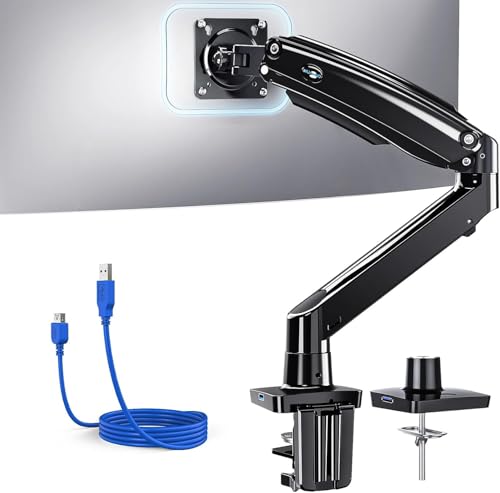
HUANUO Single Monitor Arm 13-49″ Ultrawide VESA Mount

EVEO Premium Single Monitor Arm 14″-34″ Gas Spring

HUANUO FlowLift Dual Monitor Stand 13-32″ Gaming Mount

monTEK USB Monitor Arm 17-57″ Ultrawide 59.4 lbs
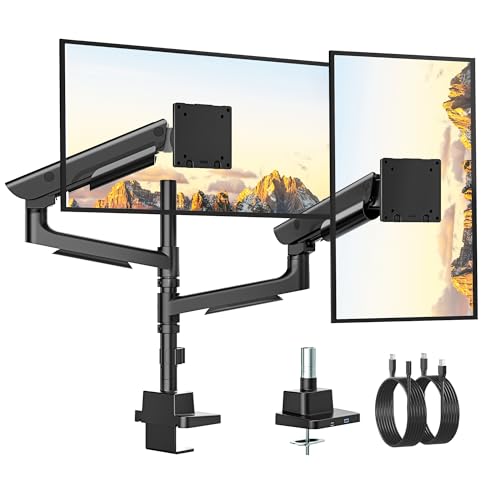
monTEK Dual Ultrawide Monitor Arm 17-57″ USB
A Breakdown Of The Leading Choices
Most monitor arms spread screens left and right, but this HUANUO mount stacks them vertically, which is the move when desk width is the bottleneck. Each arm supports screens up to 32 inches with a 19.8 lb capacity, and the standard VESA 75x75mm or 100x100mm plate covers most office panels.
Compared to the side-by-side HUANUO HNDS7 covered next, this layout feels more like a command tower than a wide horizon, and that fits certain workflows far better.
Noteworthy Benefits
- Vertical stacking frees up side-to-side desk space
- VESA 75x75mm or 100x100mm fits common office monitors
- Adjustable tilt, swivel, and rotate for ergonomic positioning
- Two-arm setup keeps a reference screen elevated above the main one
Worth Noting
- 32-inch ceiling rules out true 34-inch ultrawides
- Stacked layout takes vertical headroom, so short ceilings can feel cramped
Made For
Traders, coders, and writers who live in vertically scrolling windows and want two stacked panels rather than one wide canvas.
Consider Something Else When
The HUANUO HNDS7 is the better match for anyone running two 34-inch ultrawides side by side instead of stacked.
This is the HNDS7, HUANUO’s heavier-duty answer to the question “can one stand hold two real ultrawides.” It is built from solid aluminum arms with a beefier base and a dual C-clamp design that grips the desk from both sides. Each arm takes up to 26.4 lbs across a 13- to 40-inch range.
For a desk holding two 34-inch panels, that margin matters. The wider VESA compatibility (75x75mm or 100x100mm) and the integrated USB passthrough also make cable clutter easier to live with day to day.
A Favorable Mix
- 26.4 lb per arm supports true ultrawide panels without sag
- Aluminum arms plus dual C-clamp keep the rig planted during height adjustments
- Integrated USB ports cut down on reaching under the desk
- 40-inch ceiling leaves room to grow into super-ultrawide screens
Trade Offs
- Dual clamp needs a sturdy desk edge and a grommet option for thicker tops
- Two-arm reach can crowd shallow desks shorter than about 24 inches deep
Feature Snapshot
Best Suited To
Anyone running two 34-inch ultrawides side by side and who wants a single mount that does not feel like it’s about to give up.
A Better Fit Elsewhere
The WALI Single Arm is the more practical pick for someone only lifting one panel and watching budget closely.
The WALI mount is the kind of arm that quietly gets the job done for a single 34-inch panel without forcing a price rethink. It fits flat-panel displays up to 34 inches at 22 lbs per arm, and the detachable VESA plate (75x75mm or 100x100mm) keeps installation straightforward.
Versus the HUANUO Single Arm covered in pick 4, this one trades a higher weight rating for a noticeably friendlier price, which is the right call for a lot of home offices.
Practical Advantages
- 22 lb capacity covers most 34-inch ultrawides under typical weights
- Two-stage C-clamp and grommet base handle desk edges up to 3 inches thick
- Full ±90° tilt and swivel range for sharing the screen with a seatmate
- Detachable VESA plate speeds up mounting and unmounting
Points To Note
- 22 lb ceiling is tighter than the HUANUO HNDS7, so heavier curved ultrawides may push the limit
- Spring tension needs a manual tune after a few weeks of use
Whose Shelf It Belongs On
Home and small-office setups where one 34-inch panel is the daily workhorse and budget matters.
Look Elsewhere When
Anyone running a 38-inch or 49-inch super-ultrawide should reach for the monTEK single arm instead.
For a single-monitor desk that needs to handle anything from a 24-inch office panel to a 49-inch monster, this HUANUO single arm is one of the more flexible mounts around. The 26.48 lb rating covers most heavy ultrawides, and the broad 13- to 49-inch range means a future monitor swap won’t force a new arm.
Compared to the WALI just covered, this trades some simplicity for raw capacity and a USB passthrough that the cheaper WALI does not offer.
Key Advantages
- 26.48 lb capacity handles large aluminum-framed ultrawides
- Tilt range from +85° to -30° supports portrait orientation for coding or reading
- 180° swivel and 360° rotate make screen sharing painless
- USB passthrough built into the base trims cable mess
Honest Caveats
- Longer arm creates more leverage, so a sturdy desk clamp matters more than with shorter mounts
- Setup takes longer than a basic single-pivot arm because of the gas-spring tensioning
Quick Facts
Who Should Grab It
Single-screen pros who treat their monitor like the main tool and don’t want to revisit the arm choice next year.
Swap It Out When
Two-panel setups are common in the workflow, in which case the HUANUO HNDS7 or the monTEK Dual Ultrawide is the better call.
The EVEO single arm is built around a gas spring that lets the screen glide up and down with one finger, which is the kind of feature that sounds small until the monitor is on the desk. It is tuned for 14- to 34-inch displays and ships with both a clamp and a grommet base so the install can match the desk.
Where the WALI feels like a workhorse, this EVEO feels like an ergonomic tool. For anyone who regularly shifts between sitting and standing, that difference shows up fast.
Good Reasons To Consider
- Gas-spring mechanism makes one-handed height changes easy
- VESA compatibility covers the standard 75x75mm and 100x100mm patterns
- Clamp and grommet options handle a wide range of desk thicknesses
- Black finish blends with most monitors without a visible color clash
Room For Improvement
- 34-inch ceiling is right at the edge for some heavier ultrawides, so the spec sheet deserves a close read
- Gas-spring tension can drift after a few months, which means an occasional re-tune
At A Glance
Right Fit For
Single-monitor setups where the screen height changes throughout the day, like shared desks or sit-stand work.
Another Choice May Suit
The HUANUO Single Arm is worth a look for anyone wanting a higher weight ceiling or a 49-inch-ready future.
The FlowLift is HUANUO’s gaming-flavored dual mount, and it shows in the full-motion articulation: each arm tilts, swivels, and rotates independently so a chat screen can sit vertical while the game stays landscape. Each arm handles 4.4 to 19.8 lbs across 13- to 32-inch screens.
Compared to the dual stacked option from pick 1, this one is built for side-by-side, which fits how most gaming desks are actually arranged.
The Case For It
- Full-motion arms let each panel rotate independently
- VESA 75x75mm or 100x100mm fits standard gaming panels
- Clamp and grommet mounting covers thin and thick desk edges
- Lower weight minimum keeps lighter 24-inch panels from springing upward
Points To Keep In Mind
- 32-inch ceiling rules out most 34-inch ultrawides, so this is a side-by-side gaming pick rather than a true ultrawide mount
- 19.8 lb per arm caps heavier curved panels
Who It Suits Best
Streamers and gamers running a main display plus a chat or reference panel who want each one angled independently.
Where Another Pick Suits Better
Two real 34-inch ultrawides belong on the monTEK Dual Ultrawide arm rather than this one.
monTEK’s single-arm mount is what happens when a 34-inch ultrawide is just the starting point. The aluminum build supports displays from 17 to 57 inches at up to 59.4 lbs, with a hidden gas-spring tension port that keeps the arm looking clean. Integrated USB ports round out the cable story.
Versus the HUANUO single arm, this is a serious step up in materials and capacity, and the iF Design Award pedigree shows in how the cables route.
The Upside
- 59.4 lb capacity handles the heaviest super-ultrawide panels
- Aluminum construction reduces flex and long-term sag
- 17- to 57-inch range means a single mount for years of monitor upgrades
- USB passthrough simplifies connecting peripherals at the screen
Some Limits To Know
- Premium materials show up in the price, which not every home office needs
- Heavy-duty clamp requires a thick, solid desk edge for a secure grip
Technical Highlights
Built With In Mind
Pros and power users who already own (or plan to buy) a heavy 38-inch or 49-inch super-ultrawide panel.
Skip It When
A single 34-inch monitor at moderate weight is the use case, in which case the HUANUO single arm or WALI mount is plenty.
The dual version of the monTEK arm takes the same aluminum build and pairs it across two panels, supporting 17- to 57-inch screens at up to 59.4 lbs each. For a desk running two true ultrawides, this is the mount that treats each one like the main screen, not the sidekick.
Compared to the HUANUO HNDS7 from pick 2, this is the heavier-duty sibling, aimed at shoppers who care more about panel stability than budget.
Real Benefits
- 59.4 lb per arm handles two heavy ultrawides without drift
- Aluminum build keeps the structure rigid under full load
- 17- to 57-inch range covers current and future monitor upgrades
- USB ports integrated into the base clean up desk-side cable runs
Factors To Consider
- Wide dual-arm footprint needs a deep desk to spread panels out properly
- Setup is more involved than a single arm, so first-timers should set aside a bit of extra time
Perfect Match For
Command-center setups where two ultrawides share the workload and the desk can handle a wide stance.
Not Your Match When
Only one screen is in play, where the monTEK single arm keeps things simpler and lighter on the desk.
What To Weigh Before Choosing A Monitor Arm
Weight capacity deserves the first look. A 34-inch ultrawide commonly lands between 15 and 25 lbs depending on the panel and stand, and that number climbs fast with curved or super-ultrawide designs. Picking an arm rated well above the actual monitor weight gives the gas spring or mechanical tension room to hold position without slowly drifting downward over weeks of use.
VESA compatibility is the next gate. The standard patterns are 75x75mm and 100x100mm, and every arm in this list supports both, which covers virtually every modern flat panel. Still, it pays to peek at the back of the monitor before any purchase, since a missing or non-standard plate forces an adapter into the picture.
Desk thickness and mounting style quietly decide whether an install feels solid. C-clamps grip the edge of the desk, while grommet bases thread through a drilled hole for a cleaner look. A desk thinner than about half an inch tends to need a clamp with a wider footprint, while thicker tops (above three inches) sometimes need a grommet setup to avoid pinching damage. Cable management and integrated USB ports are small details until the cables pile up, and at that point they matter a lot.
Key Considerations Across These Picks
Pitfalls Shoppers Hit
The most common slip is grabbing an arm rated exactly at the monitor’s weight, then watching the panel sag after a few weeks. The fix is straightforward: leave at least 20% headroom above the panel weight so the spring tension has somewhere to land. The other classic miss is assuming every ultrawide has standard VESA holes. Some curved panels ship with proprietary mounting plates, and those need an adapter or a different arm entirely before any clamping happens.
Where The Extra Money Goes
Higher-tier arms earn their cost through aluminum construction, hidden gas-spring mechanisms, and wider weight ranges that survive monitor upgrades. For a single 34-inch monitor that won’t change for years, a mid-range HUANUO or WALI mount handles the job without much fuss. For a desk that may grow into a second ultrawide or a super-ultrawide, the monTEK builds make that future swap a non-event.
Frequently Asked Questions
Will a 34-inch ultrawide fit on a monitor arm rated for 32-inch screens?
Most 34-inch ultrawides physically fit on arms listed up to 32 inches, since the VESA plate spacing is identical. The real question is weight, since heavier 34-inch panels can push past the smaller arm’s rated capacity and cause slow sag.
Do gas-spring arms need maintenance?
Gas-spring arms hold tension well over time, but a quick re-tune every few months keeps the panel at exactly the height it’s set to. The adjustment usually means turning a single tension screw at the joint.
Can a dual monitor arm hold two 34-inch ultrawides?
A dual arm rated for 26 lbs or more per arm can typically handle two 34-inch ultrawides, especially if the panels sit under 20 lbs each. Going with a heavier-duty dual mount like the monTEK option gives more margin for heavier aluminum-framed screens.
Is a clamp or grommet mount better for a thick desk?
For desks thicker than three inches, a grommet mount tends to grip better without stressing the desk edge. A clamp works fine on most standard desks between half an inch and three inches thick.
Do monitor arms work with curved ultrawides?
Curved ultrawides use the same VESA 75x75mm or 100x100mm mounting pattern as flat panels, so standard arms fit them. The wider stance of a curved panel just means the arm’s tilt and swivel range deserves a closer look before installing.
Bottom Line
A 34-inch ultrawide is the kind of upgrade that makes the rest of the desk feel like it needs an upgrade too, and the right monitor arm is the most visible part of that change. Single-panel users get plenty from a WALI or EVEO mount, dual-ultrawide setups earn their keep on a HUANUO HNDS7 or monTEK dual arm, and anyone eyeing a future super-ultrawide should think about the monTEK aluminum builds from the start. Pick the arm that matches the actual weight, panel count, and desk depth in the room, and the wide canvas stops being a fight and starts being a tool.