Anyone working from a home desk knows the strain of two screens stacked on stands, fighting for space and forcing awkward neck angles. A solid dual monitor arm changes the equation entirely: screens float at the height your posture actually needs, the desk beneath them becomes usable again, and cable clutter tucks into built-in channels. The challenge is that the category spans everything from featherweight gas-spring arms for office monitors to wall-mounted beasts built for 49-inch ultrawides.
I focused this roundup on ten options covering desk-clamp gas-spring arms, free-standing bases, wall mounts, and triple-screen rigs, so the right fit is here whether you run two 24-inch office panels or pair of curved 32-inch gaming displays. The list mixes heavy-duty picks for ultrawide users with compact arms for smaller screens, and includes bundle options that pair a monitor arm with a laptop tray.
The Essentials At A Glance

HUANUO Dual Monitor Stand for 13″–40″
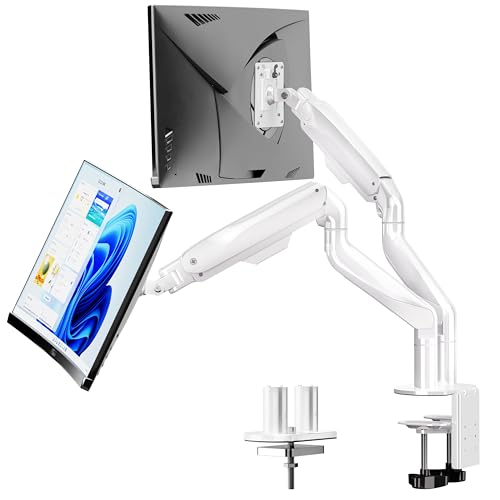
BIZUM Dual Monitor Stand for 17″–42″

Suptek Dual LED LCD Monitor Stand ML6802

VIVO Dual Monitor and Laptop Desk Mount Kit

HUANUO FlowLift™ Pro Monitor Arm

ARES WING Dual Monitor Wall Mount

VIVO Pneumatic Arm Dual Ultrawide Wall Mount

HUANUO FlowLift™ Dual Monitor Stand

HUANUO FlowLift™ Single Monitor Mount

HUANUO Triple Monitor Mount for 17–32″
Why These Options Stand Out
The HUANUO Dual Monitor Stand covers an unusually wide 13-to-40-inch screen range, which means it handles almost any mainstream office monitor without forcing a compatibility check at every turn. Each arm supports up to 26.4 lbs, and the built-in USB hub at the base adds real day-to-day utility, since most workstations end up needing a free USB port for a headset or webcam.
Compared to the BIZUM pick below, this arm trades ultrawide capacity for that integrated USB convenience. The clamp and grommet base lets the arm attach to most standard desks, and VESA (the standard mounting hole pattern on the back of monitors) 75×75 or 100×100 plates fit the majority of flat panels on the market today.
The Practical Payoff
- The integrated USB hub replaces a small docking station for a headset, webcam, or charging cable.
- Solid aluminum arms stay steady at full extension, which matters when a screen floats past the desk edge.
- C-clamp and grommet base options accommodate thick and thin desk edges alike.
- The 26.4 lb per arm rating covers most 27-inch and 32-inch office monitors without sagging.
Worth Noting
- The USB hub does not charge laptops; it handles peripherals only.
- Some owners report that the included documentation assumes familiarity with gas-spring tensioning, which can confuse first-timers.
Who Will Love This
Remote workers running dual 24-to-32-inch office monitors who want cable management and a USB port built into the base.
Consider Something Else When
Shoppers carrying a 38-inch or 49-inch curved ultrawide should reach for the BIZUM Dual Monitor Stand, which is rated for heavier 33.1 lb panels.
BIZUM built this arm for ultrawide panels that would overwhelm a standard dual mount. Aviation-grade aluminum arms paired with a dual C-clamp design hold up to 33.1 lbs per arm, which is enough headroom for a curved 34-inch ultrawide and a second 32-inch display side by side.
Where the HUANUO above relies on its USB hub to stand out, the BIZUM leans into raw load capacity. The wider 17-to-42-inch size range also means this arm is a forward-thinking pick for anyone planning to upgrade to a larger curved panel in the next year or two.
What It Does Well
- 33.1 lb per arm handles curved ultrawides without drift or sag.
- Aviation aluminum arms keep the build light enough for a single clamp install.
- Compatible with both flat and curved screens, which broadens upgrade paths.
- VESA 75×75 and 100×100 support covers the vast majority of panels sold today.
Trade-Offs
- No integrated USB hub or extra ports, so peripherals still need a separate dock.
- The taller arm geometry can clash with shallow desks under 24 inches deep.
Right Fit For
Creators and gamers running dual curved ultrawides or large productivity monitors who need real weight capacity.
Skip It When
Home-office users with two 24-inch panels under 15 lbs each will find the HUANUO FlowLift Dual Monitor Stand a lighter and simpler alternative.
The Suptek ML6802 is a free-standing dual monitor mount, meaning it sits on the desk without needing a clamp or grommet hole. That detail matters for renters and anyone with a glass-top or hollow desk where drilling is not an option.
The 31.5-inch central pole also gives this stand extra vertical lift, which helps when one user is tall and another is not. The trade-off shows up in portability: the heavy base keeps the rig stable but makes the unit harder to reposition than the clamp-style arms above.
Advantages To Know
- No clamp means no damage to glass, hollow-core, or rental desks.
- Extra-tall 31.5-inch pole accommodates users from roughly 5’4″ to over 6’4″.
- 360° rotation and ±45° tilt give plenty of fine-tuning for shared workspaces.
- Integrated cable management keeps cords routed along the central pole.
Points To Keep In Mind
- Owners commonly note the base footprint consumes more desk real estate than a clamp-style arm.
- Per-monitor capacity is around 22 lbs, so curved ultrawides are out of reach.
Made For
Glass-desk owners or anyone who rents and cannot drill mounting holes into the work surface.
A Better Fit Elsewhere
The HUANUO Dual Monitor Stand offers a clamp and grommet option for users who can attach hardware directly to a solid wood desk.
VIVO’s bundle pairs two monitor arms with a ventilated laptop tray, turning a dual-screen setup into a three-screen workstation without buying separate accessories. The 14-by-12-inch tray fits most laptops up to 27 inches and includes venting underneath, which keeps heat from collecting under the laptop chassis during long workdays.
Unlike the HUANUO and BIZUM models above, this bundle assumes you want a laptop on the desk rather than a tower PC. That focus shapes the entire workflow, so anyone working from a MacBook or thin-and-light Windows machine gets a more ergonomic typing angle than a flat-on-desk position.
Features That Help
- The laptop tray doubles usable screen count without adding desk depth.
- Ventilated tray design reduces thermal throttling on long render or compile jobs.
- Two fully adjustable gas-spring arms keep monitor positioning independent.
- VESA 75×75 and 100×100 compatibility covers most office and prosumer panels.
Points To Note
- 22 lb per arm capacity rules out curved 32-inch panels.
- Some users report that laptop tray tilt adjustments need re-tightening after several months.
Best Suited To
Hybrid workers who dock a laptop at a standing desk and want the laptop screen elevated alongside two external monitors.
Reach For A Different Pick When
Desktop-only setups without a laptop should consider the Suptek ML6802, which dedicates its pole to dual monitors rather than splitting capacity.
The FlowLift Pro is a single-monitor arm built around a mechanical spring rather than a gas cylinder. The spring tension stays consistent across the full range of motion, which means the arm holds position exactly where you set it instead of slowly drifting downward over months.
The tool-free VESA plate is the real time-saver here. Most dual arms require a screwdriver and a few extra minutes per panel, and the FlowLift Pro sidesteps that with a quick-release bracket. Tool-free mounting is a small detail until you actually swap monitors or move desks, then it becomes a significant quality-of-life upgrade.
The Helpful Details
- Tool-free VESA plate cuts install time to a few minutes per screen.
- Mechanical spring keeps the arm locked in position without gas drift.
- 19.8 lb max load handles most 27-inch and 32-inch office monitors.
- Compatible with wood desks 0.59″ to 3.54″ thick.
Minor Gripes
- Curved screens above 15.4 lbs are not supported.
- Wood desk recommendation means glass and metal desks need the grommet route.
Perfect Match For
Single-screen users who want the smoothest gas-spring alternative with a fast install.
Not Your Match When
Shoppers needing dual screens should pivot to the HUANUO FlowLift Dual Monitor Stand, which mirrors this design across two arms.
Wall mounts free up every inch of desk surface, and the ARES WING dual mount handles up to 60 lbs per arm, which makes it the heaviest-rated pick in this roundup. The 24-to-57-inch range is broad enough for ultrawide gaming monitors and large-format displays that would never balance on a desk clamp.
Compared to the desk-mounted picks above, this one assumes you have a wall behind the desk that can support the load. The bearing head structure gives smooth angle adjustment, though installation is more involved than a clamp-style arm.
What Helps Most
- 60 lb per arm handles dual 49-inch curved gaming panels with room to spare.
- Bearing head design supports smooth tilt and swivel under heavy loads.
- Wall-mounting clears the entire desk surface for keyboards and notebooks.
- Black finish blends into most gaming and office backgrounds.
Areas To Watch
- Wall stud location must be confirmed before purchase; drywall alone is not safe.
- 22 kg capacity drops for curved screens specifically, so heavy curved ultrawides sit at the limit.
Who Should Grab It
Sim racers, traders, and dedicated gaming stations with reinforced walls and large curved panels.
Where Another Pick Suits Better
Users without wall-mounting access should default to the BIZUM Dual Monitor Stand, which delivers similar ultrawide capacity from a desk clamp.
VIVO’s pneumatic wall mount splits the difference between the ARES WING’s higher capacity and a typical dual arm. It accepts two stacked 49-inch screens or two side-by-side 38-inch panels, each up to 33.5 lbs, which covers most ultrawide setups without going to the heaviest tier.
The cast aluminum arms feel noticeably more rigid than steel-tube competitors, and the high-capacity tilt joints keep screens stable even when angled aggressively. For content creators who rotate their panels between landscape and portrait orientation, the joint stiffness matters during long edits.
Positive Points
- Cast aluminum resists bending and scratching better than standard steel arms.
- Pneumatic assist makes repositioning single-handed under load.
- Mounts to wood studs or concrete/brick for flexible placement.
- VESA 75×75 and 100×100 compatibility fits nearly every ultrawide on the market.
Where It May Fall Short
- Drywall-only mounting is not supported, which limits rental installations.
- Stacked 49-inch configuration requires significant vertical clearance on the wall.
Whose Shelf It Belongs On
Content creators and engineers running dual ultrawide panels who want premium material quality without the 60 lb ARES WING tier.
Look Elsewhere When
Users with lighter 27-inch monitors can save with the HUANUO FlowLift Dual Monitor Stand, which clamps to a desk instead of the wall.
The HUANUO FlowLift Dual Monitor Stand is the gas-spring cousin of the FlowLift Pro above, with two arms instead of one. The dual configuration covers the same 13-to-32-inch screen range and matches the 4.4-to-19.8 lb weight window, which suits the typical pair of 24-inch or 27-inch office monitors most remote workers actually use.
It fits squarely between the entry-level Suptek stand and the heavy-duty BIZUM, giving dual-screen users a mainstream option without overkill. Wood desk compatibility ranges from 0.59″ to 3.54″ thick, which covers most solid wood work surfaces.
Notable Upsides
- Two independent gas-spring arms allow asymmetric monitor heights.
- Full motion range covers tilt, swivel, and rotation for portrait mode.
- 19.8 lb per arm handles standard 27-inch and lighter 32-inch gaming monitors.
- C-clamp and grommet base included for flexible desk attachment.
Practical Considerations
- Curved screens above the lower weight range will not hold tension reliably.
- Gas-spring tension occasionally requires adjustment after the first few weeks.
Best Suited To
Standard dual gaming or productivity setups using two matching 24-to-27-inch panels under 19 lbs each.
Swap It Out When
Users with heavier ultrawides should step up to the BIZUM Dual Monitor Stand, which supports 33.1 lb per arm.
The FlowLift Single Monitor Mount is the most focused pick in this roundup, designed for one screen on a small desk. It carries the same 4.4-to-19.8 lb weight window as the dual FlowLift above, which means it covers most office monitors up to 27 inches without strain.
What sets it apart from the dual-arm version is footprint. A single arm leaves room for a notebook, a second free-standing display, or a laptop stand beside it. For users running one primary screen plus a laptop on the desk, that flexibility is the real selling point.
A Favorable Mix
- Compact footprint suits 40-inch and smaller desks.
- C-clamp and grommet base give installation flexibility.
- Full motion range covers ergonomic sitting and standing positions.
- VESA 75×75 and 100×100 compatibility covers most panels in the 13-to-32-inch range.
Honest Caveats
- Only one screen, so dual-monitor users will need two units.
- Curved screens above 15.4 lbs are not rated for this arm.
The Right Fit
Home offices where one external monitor supplements a laptop, leaving the second slot open for a future upgrade.
Where A Sibling Pick Shines
Dual-screen shoppers should pivot to the HUANUO FlowLift Dual Monitor Stand, which delivers the same arm design in a paired configuration.
For traders, sim racers, and streamers who run three panels in landscape arrangement, the HUANUO Triple Monitor Mount is purpose-built for that setup. Each arm supports screens from 17 to 32 inches within a 4.4-to-17.6 lb weight range, which matches most 24-inch and 27-inch panels in a multi-display rig.
Compared to the dual-arm picks above, the triple configuration uses a wider desk footprint and requires more careful cable routing. The payoff is a single mount replacing what would otherwise be three separate clamp arms competing for desk edge.
Where It Helps
- One clamp replaces three separate arms, freeing desk edge real estate.
- Independent swivel, tilt, and rotation across all three screens.
- VESA 75×75 and 100×100 compatibility matches mainstream gaming monitors.
- Central pole keeps the rig visually tidy despite the screen count.
Some Limits To Know
- 17.6 lb per arm excludes heavier 32-inch gaming monitors.
- Desk depth must accommodate the outer screens, so shallow desks under 30″ can clip.
Built With In Mind
Triple-display traders and flight sim enthusiasts running three matching 24-to-27-inch panels under 17 lbs each.
Another Choice May Suit
Users with just two monitors should pick the HUANUO FlowLift Dual Monitor Stand, which spends the engineering budget on fewer arms rather than three.
What To Weigh Before Choosing A Dual Monitor Arm
The first decision is mount type. Clamp and grommet bases attach directly to the desk and dominate the category, but free-standing bases like the Suptek ML6802 exist for glass or hollow-core surfaces where drilling is off the table. Wall mounts free up desk space entirely but require a stud or concrete wall behind the setup.
Screen size and VESA pattern drive compatibility. Most flat panels use VESA 75×75mm or 100×100mm mounting holes, which all ten picks here support. Curved ultrawides tip the scales higher, so a 33 lb-per-arm rating like the BIZUM or VIVO pneumatic gives more headroom than a 19 lb arm.
Weight capacity matters more than screen size alone. A 27-inch monitor can weigh anywhere from 8 to 18 lbs depending on the panel, and a monitor arm rated for 19.8 lbs per arm may or may not handle your specific panel. Matching the weight first, then the screen size, prevents sagging arms and drift over time.
Adjustment style and ergonomics shape daily comfort. Gas-spring arms hold position with finger-tip pressure, while mechanical spring arms like the FlowLift Pro use a stiffer mechanism. Full motion arms offer tilt, swivel, and rotation, which matters for portrait orientation or sharing screens across a wide desk.
Key Considerations Across These Picks
Mistakes Worth Dodging
Picking an arm based on screen size alone is one of the most common errors. A 32-inch monitor can weigh 15 lbs or 25 lbs depending on the panel, and the size rating alone does not capture that variance. Check the weight spec on your monitor’s product page and compare it against the arm’s rated capacity before committing.
Ignoring desk thickness and material trips up many first-time buyers. Clamp arms typically fit desks 0.59″ to 3.54″ thick, which covers most wood desks but excludes many glass tops and some standing desks with crossbar obstructions. Free-standing bases sidestep this entirely, which is why the Suptek ML6802 has its place in this roundup.
What The Higher Tier Buys
Premium arms justify their cost through material quality and joint engineering. Cast aluminum arms like those on the VIVO pneumatic wall mount resist bending under load better than standard steel tubes, which translates to screens that stay exactly where you put them. High-capacity tilt joints also keep heavy panels stable when angled aggressively.
For users with two standard 24-inch office monitors, the premium tier rarely pays back. The added capacity, smoother gas cylinders, and refined joints become meaningful once panels cross 27 inches or push into curved ultrawide territory. For everyone else, a mid-range dual arm handles the workload without excess.
Frequently Asked Questions
What VESA pattern do most monitors use?
Most monitors use VESA 75×75mm or 100×100mm mounting patterns, and every arm in this roundup supports both standards. Larger panels occasionally use 200×100mm or 200×200mm, which require specialty adapters not covered here.
Can monitor arms damage desks?
Clamp arms can leave compression marks on wood desks if overtightened, but proper installation avoids this. Glass and hollow-core desks are higher risk and benefit from free-standing bases like the Suptek ML6802.
Do I need a wall mount instead of a desk clamp?
Wall mounts make sense when the desk cannot support a clamp, or when clearing the entire desk surface matters more than cable management simplicity. For most users, a desk clamp is faster to install and easier to reposition.
How much weight can dual monitor arms hold?
Dual monitor arms in this roundup range from 19.8 lbs per arm on the HUANUO FlowLift models up to 60 lbs per arm on the ARES WING wall mount. Most office monitors fit comfortably within 19.8 to 26.4 lbs per arm.
Are gas-spring arms better than mechanical spring arms?
Gas-spring arms are easier to reposition with one hand but can drift over time as the seal ages. Mechanical spring arms hold position more reliably but require more force to adjust, which is the trade-off behind the HUANUO FlowLift Pro design.
Closing Remarks
The right dual monitor arm depends less on flashy specs and more on the monitors already on your desk and the surface that holds them. A dual gas-spring arm with a USB hub fits most office workflows, while a heavy-duty clamp or wall mount becomes essential once panels cross into ultrawide territory. Use the roundup above to match screen size, weight, and desk material to the arm that genuinely suits the setup.