Ultrawide monitors have reshaped what a desk setup looks like, and the arm holding them matters more than most people expect. The wrong mount drifts, sags, or simply won’t accept a 34-inch panel without complaint. I pulled together ten monitor arms built to handle wide and curved screens, comparing weight ratings, VESA compatibility, and how each one behaves in real dual-screen workflows. Whether you code, trade, edit video, or game, there’s a fit here that matches your desk depth and screen weight.
How The Shortlist Stacks Up

HUANUO Dual Monitor Stand Premium Height Adjustable HNDS7

HUANUO 17-32 Inch Dual Monitor Stand Stacked Mount
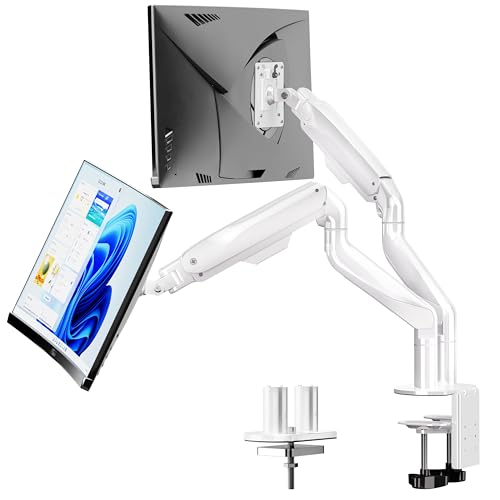
BIZUM Dual Monitor Stand 17-42 Inch Ultrawide Arm

monTEK Single Monitor Wall Mount 17-49 Inch Gas Spring

ARES WING Dual Monitor Wall Mount 24-57 Inch Ultrawide

VIVO Pneumatic Arm Dual Ultrawide Wall Mount MOUNT-V120K

Putilsen Extra Tall Aluminum Ultrawide Monitor Arm

HUANUO FlowLift Dual Monitor Stand 13-32 Inch Gaming Mount

HUANUO FlowLift Single Monitor Mount 13-32 Inch Arm

monTEK Single Monitor Arm for 17-45 Inch Ultrawide Screens
Meet The Standout Selections
The HUANUO HNDS7 sits in the comfortable middle of the category, supporting two screens from 13 to 40 inches on aluminum arms that stay planted through long editing sessions. Compared to the stacked layout later on this list, this one spreads monitors side by side, which most productivity users find more natural for spreadsheets and timelines.
USB passthrough is built into the base, so a wired keyboard and webcam plug in without crawling under the desk. VESA compatibility covers both 75x75mm and 100x100mm patterns, which catches nearly every monitor on the market. In a typical office, this mount tends to disappear into the workflow within a day.
Real-World Strengths
- Each arm holds up to 26.4 lbs, which covers most 32-inch ultrawides without complaint
- Height adjustment is smooth enough for sit-stand transitions across a workday
- USB ports on the base reduce cable clutter at the desk edge
- Dual C-clamp design grips thicker desktops more securely than single-clamp alternatives
Things To Consider
- Clamp mounting may not suit desks with curved or unusually thick edges without a grommet alternative
- The aluminum arms look utilitarian rather than premium in styled setups
Key Specs
Best Suited To
Remote workers and home-office users running two monitors between 27 and 34 inches who want one dependable arm without overthinking ergonomics.
Skip It When
The HUANUO 17-32 Inch Dual Monitor Stand stacked mount suits small desks better, because vertical stacking eats less horizontal footprint than the HNDS7 side-by-side layout.
Where the HNDS7 spreads screens across the desk, this HUANUO mount stacks them vertically on a single pole, reclaiming horizontal real estate on shallow workstations. The format works well for traders, coders, and writers who reference one screen while focusing on another.
Each arm tilts, swivels, and rotates independently, so the top display can angle down while the lower one stays level for typing. Weight tops out at 19.8 lbs per arm, which keeps the build suited to lighter 27 and 32-inch panels rather than heavier 34-inch ultrawides.
Good Reasons To Consider
- Vertical stacking reclaims desk width for keyboards, notebooks, and cameras
- Full tilt, swivel, and rotate on each arm supports ergonomic viewing angles
- Single-pole design simplifies cable routing compared to dual-arm builds
- VESA 75x75mm and 100x100mm support catches the bulk of consumer monitors
Worth Noting
- 19.8 lbs per arm rules out heavier 34-inch ultrawides with reinforced stands
- Top monitor height depends on pole extension, which may feel limited on tall users
Right Fit For
Anyone with a narrow 48-inch desk who runs two 27 or 32-inch panels and prefers stacked sightlines over side-by-side workflow.
Consider Something Else When
The HUANUO HNDS7 is a smarter match when you want true side-by-side viewing for creative work, since its dual-arm layout positions both screens at the same eye level.
The BIZUM dual arm handles the heaviest loads on this list, with 33.1 lbs of capacity per arm and aviation-grade aluminum construction. While the HNDS7 tops out at 26.4 lbs, this one pushes into territory where 38 and 42-inch ultrawides become genuinely mountable.
The dual C-clamp base and reinforced tilt joints aim to eliminate the sag that often plagues heavy panels after a few months. For users running one ultrawide alongside a secondary flat display, the asymmetry in weight tolerance rarely matters. For dual-ultrawide creators, it changes the math entirely.
Positive Takeaways
- 33.1 lbs per arm supports oversized 38 to 42-inch displays with confidence
- Aviation aluminum arms resist flex and wear over long-term daily use
- Dual C-clamp base spreads load across the desk edge for stability
- VESA compatibility covers both 75x75mm and 100x100mm patterns
Trade Offs
- The wider base footprint demands deeper desks than compact mounts
- White finish shows dust and smudges more visibly than darker alternatives
Feature Snapshot
Made For
Creators and gamers running heavy 38 or 42-inch ultrawides who refuse to compromise on stability and prefer a clamp-mounted desk solution.
Look Elsewhere When
The VIVO Pneumatic Arm Dual Ultrawide Monitor Wall Mount (MOUNT-V120K) is a better answer when wall mounting is on the table, since it frees the desk entirely and supports up to 49-inch panels.
Shifting away from desk clamps entirely, the monTEK wall mount uses a gas spring arm to float a single screen between 17 and 49 inches against a wall. For users with sit-stand desks, this clears the desktop completely so the desk surface can move freely without monitor interference.
Weight capacity lands at 44 lbs, which covers almost any consumer ultrawide on the market. The articulating arm tilts the screen +50 or -20 degrees, making glare adjustments far easier than fixed wall plates. VESA support covers both 75 and 100mm patterns, though monitors without VESA holes require a separate adapter.
What Stands Out
- Gas spring articulation glides smoothly when repositioning for glare or sharing
- 44 lbs capacity handles 49-inch screens and most ultrawide panels
- Wall mounting frees the desk for sit-stand height transitions
- Compatible with deeply curved 1000R displays where flat mounts fall short
Room For Improvement
- Requires wall studs or masonry; drywall alone is not rated for the load
- Monitors without VESA holes need a third-party adapter plate
Who It Suits Best
Single-monitor users with a deep ultrawide who want the desk surface fully uncluttered and value smooth screen repositioning throughout the day.
Swap It Out When
The monTEK Single Monitor Arm for 17-45 inch screens is a better fit when wall mounting isn’t an option, since it clamps directly to the desk and still supports heavy ultrawides.
The ARES WING pushes into supersized territory with dual-arm support for screens up to 57 inches, which most competing mounts refuse to touch. Where the monTEK wall mount handles single screens, this one floats two large panels side by side against the wall.
Each arm tolerates 60 lbs on flat panels or 22 kg on curved displays, with a bearing head structure that simplifies angle adjustments. For gaming setups and studio editing bays with multiple 49-inch or 55-inch screens, the engineering here is rare on the consumer market.
A Few Strong Suits
- 57-inch screen ceiling handles supersized panels competitors cap at 49 inches
- 60 lbs per arm capacity supports the heaviest flagship monitors without sag
- Bearing head structure makes tilt and swivel adjustments smoother than friction joints
- Wall mounting keeps both screens clear of the desk surface
Points To Note
- Curved screens cap weight at 22 kg per arm, lower than the flat-panel rating
- Wall installation requires serious structural planning and proper stud location
Perfect Match For
Dual-ultrawide gaming rooms and creative studios where screen size and weight exceed what standard desk arms can handle.
Not Your Match When
The BIZUM Dual Monitor Stand is the better pick for desk-mounted setups, since it carries 33.1 lbs per arm without requiring wall modifications.
VIVO’s MOUNT-V120K takes a different wall-mounting approach than the ARES WING, using cast aluminum arms and pneumatic joints to float two ultrawides up to 49 inches each. Cast aluminum means the arms resist scratches and corrosion better than painted steel alternatives.
The mount fits 49-inch screens stacked vertically or 38-inch screens side by side, giving flexibility for vertical or horizontal layouts. Each arm carries 33.5 lbs, which is just shy of the ARES WING’s capacity but built for slightly smaller panels.
Notable Gains
- Cast aluminum arms resist scratches and wear better than painted steel
- Pneumatic joints hold position reliably across long work sessions
- Stacked or side-by-side layouts adapt to different desk depths
- Installation targets wood studs, concrete, or brick for versatile mounting
Honest Caveats
- Drywall-only mounting is not supported, which limits apartment installs
- 49-inch ceiling falls short of the ARES WING’s 57-inch ceiling
Quick Facts
Whose Shelf It Belongs On
Studio owners and home offices with wood-stud or masonry walls running two ultrawides up to 49 inches who want cast aluminum longevity.
Another Choice May Suit
The ARES WING Dual Monitor Wall Mount handles larger 55 to 57-inch screens for users whose display budget outpaces the VIVO’s ceiling.
The Putilsen arm solves a problem most mounts ignore: vertical clearance. The extra-tall pole lifts the monitor high enough to slide laptops, notebooks, and tablets underneath, which matters on sit-stand desks where every inch of under-monitor space counts.
Weight capacity reaches 59.4 lbs for flat panels and 48.4 lbs for curved, both above what most competing single arms support. The 24 to 57-inch screen range catches everything from compact 24-inch office displays to flagship 49-inch ultrawides.
Points In Its Favor
- Extra-tall pole creates usable desk space beneath the monitor
- 59.4 lbs flat / 48.4 lbs curved capacity covers flagship ultrawides
- Aluminum construction resists corrosion in long-term desk use
- Wide screen range from 24 to 57 inches suits mixed display environments
Practical Considerations
- Adding accessories like cameras or lights reduces effective weight capacity
- Extra height may push the top edge of the screen above standard sightline for shorter users
Who Should Grab It
Tall users on sit-stand desks who want maximum under-monitor clearance and run heavy flat or curved ultrawides.
Reach For A Different Pick When
The HUANUO HNDS7 is the more sensible pick for standard-height desks without sit-stand mechanisms, where the extra-tall pole adds unnecessary height.
The HUANUO FlowLift dual mount targets lighter 13 to 32-inch screens with full motion articulation that gaming setups rely on. Each arm holds between 4.4 and 19.8 lbs, which puts it firmly in standard 27 and 32-inch panel territory rather than heavy ultrawide territory.
Full motion across tilt, swivel, and rotate means the screens pivot from landscape into portrait for streaming chat overlays or code review. Compared to the HNDS7, the FlowLift feels nimbler for users who reposition their screens multiple times a day.
A Favorable Mix
- Full motion articulation handles landscape-to-portrait rotation cleanly
- VESA 75x75mm and 100x100mm fit standard gaming and office panels
- C-clamp and grommet base options cover different desk styles
- Lightweight arms feel responsive during repeated repositioning
Soft Spots
- 19.8 lbs per arm rules out heavy 34-inch ultrawides with metal stands
- Gas spring tension may need occasional adjustment after months of use
Best Suited To
Streamers and dual-monitor gamers running two 27 or 32-inch panels who pivot between landscape and portrait regularly.
Where Another Pick Suits Better
The BIZUM Dual Monitor Stand handles heavier 38 to 42-inch ultrawides that exceed the FlowLift’s 19.8 lbs per arm ceiling.
The single-arm version of the FlowLift trims away everything a single-monitor user doesn’t need, leaving a compact arm that handles 13 to 32-inch screens between 4.4 and 19.8 lbs. For users running one ultrawide alongside a laptop, this avoids the cost and footprint of a dual-arm mount.
The clamp and grommet base options match the dual-arm sibling, so installation feels familiar. Compared to the monTEK single arms, the FlowLift prioritizes ergonomic height adjustment over extreme screen weight, which fits the standard 32-inch ultrawide sweet spot.
The Helpful Details
- Single-arm footprint suits smaller desks and minimalist setups
- VESA 75x75mm and 100x100mm compatibility covers most consumer panels
- Clamp or grommet mounting adapts to different desk edge styles
- Ergonomic height adjustment reduces neck strain over long sessions
Minor Gripes
- 19.8 lbs ceiling excludes heavier 34-inch ultrawides with reinforced stands
- No USB passthrough, unlike the HNDS7 dual mount
Right Fit For
Single-monitor home office users running 27 or 32-inch screens who want ergonomic adjustment without paying for dual-arm capacity.
Not Your Match When
The monTEK Single Monitor Arm for 17-45 inch ultrawides is the better answer for users with 38 to 45-inch screens that exceed this arm’s size ceiling.
The monTEK single arm closes out the list with broad ultrawide compatibility, fitting flat or curved screens between 17 and 45 inches and supporting up to 35.27 lbs. That range covers most flagship ultrawides sold today, including 38 and 43-inch panels that strain lighter mounts.
VESA support covers 75x75mm and 100x100mm patterns, matching the standard mounts on virtually every modern display. The full motion design suits users who switch between sit-stand positions throughout the day, where fixed mounts fail to track the desk height.
What It Does Well
- 17 to 45-inch screen range covers most single ultrawide configurations
- 35.27 lbs capacity handles flagship panels without drift
- VESA 75 and 100mm compatibility fits nearly every modern display
- Full motion articulation supports sit-stand desk transitions
Some Limits To Know
- Single arm only; dual-monitor users need to step up to other picks
- Monitors without VESA holes require a separate adapter plate
Who Will Love This
Single-screen professionals and gamers running a 38 to 45-inch ultrawide who want a clamp-mounted arm that won’t buckle under flagship weight.
A Better Fit Elsewhere
The Putilsen Extra Tall Aluminum Ultrawide Monitor Arm is worth considering when sit-stand users need extra vertical clearance beneath the screen.
What To Weigh Before Choosing Monitor Arms For Ultrawide
Mounting Style and Desk Compatibility
A clamp-mounted arm needs a flat, reachable desk edge, while a grommet base requires drilling through the desktop. Wall mounts free the desk entirely but demand proper studs or masonry. The wrong mounting style for your desk is the most common reason an arm ends up returned.
Weight Capacity and Screen Size
Manufacturers list two numbers that matter most: weight capacity per arm and maximum screen size. Ultrawide panels run heavier than standard monitors because of their wider backplates, so a 34-inch ultrawide often weighs more than a 32-inch flat panel of the same generation. Always check the heavier spec first.
VESA Pattern Compatibility
VESA refers to the standard four-hole mounting pattern on the back of monitors. The two common patterns are 75x75mm and 100x100mm, measured as the distance between the mounting holes. Most arms in this list support both, but monitors without VESA holes require a separate adapter plate.
Adjustability and Ergonomics
Height adjustment, tilt, swivel, and rotation determine whether a mount supports proper ergonomics or just floats the screen. Full motion arms handle sit-stand desks and screen sharing, while fixed arms work fine for users who rarely reposition.
Key Considerations Across These Picks
Wrong Turns To Avoid
Many shoppers pick an arm rated for their screen’s size but overlook the weight spec, and ultrawides routinely weigh more than similarly sized flat panels. Skipping a desk-edge thickness check also causes problems, since clamp mounts need a reachable lip. Adapter plates for non-VESA monitors often get forgotten until installation day.
The Upgrade Payoff
Higher-tier arms like the ARES WING and VIVO MOUNT-V120K add cast aluminum construction, smoother bearing joints, and wider weight ceilings that pay off when running 38 to 57-inch screens. The upgrade makes sense for studios and gaming rooms where stability and screen size matter daily. For standard 27 to 32-inch office panels, mid-tier arms like the HUANUO HNDS7 deliver the same ergonomic benefit at a lower cost.
Frequently Asked Questions
Do monitor arms for ultrawide need higher weight capacity than standard arms?
Yes, ultrawide panels typically weigh more than comparably sized flat monitors because of their wider backplates and reinforced stands. An arm rated for 20 lbs may handle a 27-inch flat panel but fail on a 34-inch ultrawide of the same generation.
Can I mount an ultrawide on a regular monitor arm?
Sometimes, but it depends on the arm’s weight and size ratings. Standard arms cap at 19.8 lbs or 32-inch screens, which leaves out most 34-inch and larger ultrawides. Choosing an arm rated above your panel’s actual weight is the safer path.
What’s the difference between desk clamp and grommet mounting?
A desk clamp grips the edge of the desktop from below, requiring no drilling but a reachable lip. A grommet mount threads through a hole drilled in the desktop for a cleaner look and stronger hold. Some arms support both, which gives flexibility during installation.
Are wall-mounted monitor arms better for ultrawides?
Wall mounts handle heavier screens and free the desk surface entirely, but they require proper studs or masonry to anchor safely. Drywall alone is rarely rated for ultrawide loads, so wall mounting works best in dedicated office rooms rather than rentals.
Do ultrawide monitor arms support curved screens?
Most modern arms handle curved ultrawides, but the weight capacity is often rated lower for curved panels than flat ones. The ARES WING and VIVO MOUNT-V120K both list separate curved-screen weight ratings worth checking before installation.
Wrap Up
The right arm depends on screen size, weight, and desk layout more than brand or styling. Heavy 38 to 57-inch ultrawides need arms like the BIZUM, ARES WING, or VIVO MOUNT-V120K. Standard 27 to 32-inch panels pair well with the HUANUO HNDS7 or FlowLift dual mount. Match the arm to your actual setup, and the desk will reward you with cleaner sightlines and better ergonomics for years.