Spending eight hours a day staring at a screen already punishes the neck and shoulders, and a low stock monitor forces that punishment to continue. Picking the right arm clears desk space, lifts the display to eye level, and lets the screen pivot for a quick reference check. I sorted through ten options that cover tiny desk corners, ultrawide panels, dual setups, and the support accessories that keep fragile surfaces safe.
How The Shortlist Stacks Up

Steel Monitor Mount Reinforcement Plate for Fragile Tabletops

HUANUO FlowLift Pro Monitor Arm 13–32 inch Screens
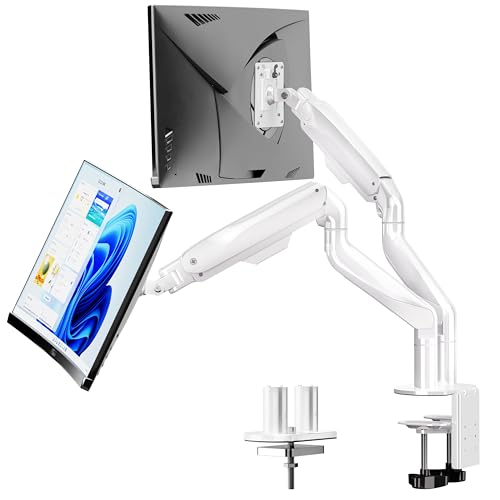
BIZUM Dual Monitor Stand 17–42 inch Heavy Duty Ultrawide

Suptek Dual LED LCD Monitor Stand Free-Standing ML6802
monTEK Adjustable Steel Monitor Mount Reinforcement Plate

PUTORSEN Laptop Desk Mount for 18 inch Laptop & Monitor

Silverstone MVA01 NUC and Monitor Arm Extension Bracket

HUANUO FlowLift Single Monitor Mount 13 to 32 Inch

Single Gaming Monitor Arm for 24–57 inch Screens White

HUANUO TitanLift Heavy Duty Monitor Arm up to 49 inch
The Details Behind The Selections
Glass desks, thin tabletops, and surfaces with a glossy finish often crack the moment a C-clamp (the bracket that grips the desk edge from above and below) tightens down hard. The ZANOLY reinforcement plate spreads the clamp pressure across a wider footprint, so the load no longer digs into one small spot. It’s a small accessory, but it solves a real problem for anyone with a glass or veneer desk who’s been afraid to clamp directly to the surface.
The plate sits between the clamp and the desk, and once the arm is mounted, the screen feels planted. The trade-off shows up in looks: it adds visible bulk under the desk edge, and you’ll want to confirm the slot pattern fits your existing C-clamp before ordering.
The Case For It
- Carbon steel build holds up under repeated tightening
- Protects thin, glass, and MDF tabletops from cracking
- Fits most C-clamp monitor arms on the market
- Adds long-term stability to a wobbly desk setup
Things To Consider
- Doesn’t include a clamp, so it’s purely a support layer
- Adds a small footprint visible under the desk edge
Who It Suits Best
Anyone with a glass, IKEA-style, or other thin tabletop who needs to clamp a monitor arm without cracking the surface.
Where Another Pick Suits Better
The monTEK Adjustable Steel Monitor Mount Reinforcement Plate offers a wider 8.7 by 6 inch spread for users with larger clamps or thicker desktops.
HUANUO’s FlowLift Pro pairs a mechanical spring (a tensioned coil that supports the weight of the monitor so it floats in place) with tool-free VESA mounting (the standard four-hole pattern on the back of most monitors: 75 by 75mm or 100 by 100mm), which makes installation the kind of job you finish before lunch. The arm accepts 13 to 32 inch screens between 4.4 and 19.8 lbs, covering most office and home displays without strain. Compared to the basic single-arm option later in this list, the Pro adds a smoother adjustment feel and a wider compatibility window.
The build feels solid for daily use, and the clamp works on most wood desks between 0.59 and 3.54 inches thick. One thing worth considering: owners commonly report that mounting it on a glass or metal desk requires the grommet (a hole drilled through the desk for the bolt to pass through) option, so plan accordingly.
Notable Upsides
- Tool-free VESA plate speeds up installation
- Gas-spring action holds position without drift
- Wide tilt, swivel, and rotation range
- Both C-clamp and grommet bases included
Trade Offs
- Maximum 19.8 lbs excludes heavier ultrawides
- Wood desks work best; other materials may need an adapter
Quick Facts
Right Fit For
Home office workers who want a single, clean monitor arm with smooth adjustment and a hassle-free install.
Skip It When
Anyone running a heavier ultrawide should look at the HUANUO TitanLift Heavy Duty Monitor Arm, which holds up to 44 lbs.
Dual-arm setups usually mean two clamps, two springs, and a tangle of cables. The BIZUM dual stand solves that with a single aviation aluminum spine and a larger base for shared stability, holding two screens up to 33.1 lbs each. Compared to the HUANUO FlowLift Pro, this one trades single-screen agility for raw payload capacity.
The dual C-clamp design keeps two monitors level even when one is tilted hard, and cable routing runs cleanly along the spine. The honest read is that the wider base demands a deeper desk, and users with shallower surfaces may struggle to mount both screens comfortably.
Bright Spots
- Aviation aluminum arms resist flex under heavy loads
- 33.1 lbs per arm covers most ultrawide panels
- Dual C-clamp base keeps both monitors aligned
- Supports curved and flat panels equally well
Small Caveats
- Wide footprint needs a deep desk surface
- Heavier than single-arm options; bulk shows during install
Made For
Programmers, traders, and creators who run two screens side by side and need a sturdy shared mount.
Look Elsewhere When
Anyone working with a single ultrawide should consider the HUANUO TitanLift Heavy Duty Monitor Arm, which dedicates its build to one heavy panel.
Renters and shared workspaces often can’t drill or clamp a desk, which is exactly where a free-standing dual stand earns its place. The Suptek ML6802 uses a weighted base instead of a clamp, so it moves with you and leaves no marks behind. Compared to the BIZUM dual stand earlier, this one trades mounting strength for portability.
The 31.5 inch center pole accommodates users with tall seating, and the swivel range hits 45 degrees in either direction. For most home setups, the 22 lbs per screen capacity is plenty, but heavy ultrawides will exceed the limit.
What Pays Off
- No clamp or grommet needed on the desk
- Tall center pole suits elevated seating
- Integrated cable management keeps cords tidy
- Moves between rooms without reinstallation
Honest Caveats
- 22 lbs per screen excludes heavier ultrawides
- Weighted base takes up desk real estate
Best Suited To
Renters, hot-deskers, and shared-office users who need a portable dual mount that doesn’t touch the desk.
Reach For A Different Pick When
Those wanting the cleanest possible desk surface with no base should consider the BIZUM Dual Monitor Stand, which clamps down instead.
The monTEK plate takes the reinforcement idea and stretches it. At roughly 8.7 by 6 inches, it’s about 40 percent larger than typical plates, which spreads the clamp load even further on soft or sagging surfaces. Unlike the ZANOLY steel plate earlier, this version adds long mounting slots for adjustable clamp placement.
The package includes EVA pads (foam rubber cushions that protect the desk finish) along with the plate, but no base or arm, so it works alongside whatever mount you already own. Owners commonly report that on particleboard or laminate, the wider spread prevents the dimpling that smaller plates can’t avoid.
Useful Strengths
- Generous 8.7 by 6 inch footprint spreads clamp pressure
- Long mounting slots fit a wide range of clamp widths
- Works on wood, MDF, particleboard, laminate, and glass
- EVA pads included to protect the desk finish
Less Ideal Details
- Base and arm are sold separately
- Slightly larger profile than minimal plates
Feature Snapshot
Perfect Match For
Anyone mounting a heavy arm on a soft or sagging desk who wants extra reassurance against surface damage.
Not Your Match When
Shoppers wanting a single integrated accessory might prefer the ZANOLY Steel Monitor Mount Reinforcement Plate, which has a more compact footprint.
Hybrid workers often toggle between a laptop and an external display, which means swapping mounts daily. The PUTORSEN hybrid mount handles both: attach the laptop tray for travel days, remove it for a single-screen focus session. The arm extends to about 831mm, so it reaches well past most compact desks.
The 19.84 lb monitor capacity is enough for most office displays, and the VESA 75 and 100mm patterns cover standard monitors. Compared to the Suptek free-standing stand earlier, this one clamps down, which keeps the desk surface clear of a base.
Good Reasons To Consider
- Two-in-one design supports laptop or monitor mode
- Long reach suits deep or L-shaped desks
- Solid clamp frees up desk surface area
- VESA 75 and 100mm compatibility built in
Practical Considerations
- Laptop tray adds bulk when not in use
- 19.84 lb capacity rules out heavier ultrawides
Who Should Grab It
Hybrid workers who alternate between laptop travel and a single external display, often in the same workspace.
Swap It Out When
Those running two screens full-time should consider the BIZUM Dual Monitor Stand, which is purpose-built for that workflow.
Mini PCs like Intel NUCs (small, cube-shaped desktop computers that mount behind a display) usually sit on the desk or get taped to the back of a monitor, neither of which is elegant. The Silverstone MVA01 solves that by adding a second VESA plate behind the existing monitor mount, letting a small computer piggyback on the arm. Built from 2.0mm SECC steel (a zinc-coated steel commonly used in PC chassis), it shrugs off the few extra pounds.
It’s a niche accessory, but for NUC owners it’s the difference between a tidy all-in-one and a clutter of cables. One thing worth considering: it’s an extension bracket, so it requires an existing monitor arm to attach to.
Where It Helps
- Mounts a mini PC behind the monitor for a clean setup
- SECC steel build resists flex
- Standard VESA 75 and 100mm patterns supported
- Lightweight enough not to strain most arms
Worth Bearing In Mind
- Requires a separate monitor arm to function
- Only useful for VESA-mounted mini PCs, not full-size towers
Built With In Mind
NUC and small-form-factor PC owners who want a single, clean monitor-plus-computer mount.
A Better Fit Elsewhere
Anyone without a mini PC should look at the PUTORSEN Laptop Desk Mount, which supports a wider range of devices.
The original HUANUO FlowLift covers the same 13 to 32 inch range as the Pro but trims back the mechanical-spring assist to a simpler gas cylinder (a pressurized piston that supports the monitor weight with fluid resistance). For most home offices that use one screen between 4.4 and 19.8 lbs, this is the dependable option. Compared to the Pro earlier, it costs less and feels slightly less smooth during adjustment.
The clamp and grommet bases both ship in the box, which simplifies installation across desk types. The honest read: it’s a tried-and-true single-monitor arm without flashy extras, which is exactly what most shoppers actually need.
Why It Works Well
- Wide compatibility for office and home screens
- Both clamp and grommet bases included
- Full adjustability for tilt, swivel, and rotation
- Reliable build for daily use
Soft Spots
- Gas-spring feel is less smooth than the Pro
- Maximum 19.8 lbs excludes heavier ultrawides
Feature Card
Whose Shelf It Belongs On
Home office users and students who run a single monitor and want a clean, ergonomic upgrade.
Consider Something Else When
Anyone running a heavy ultrawide should step up to the HUANUO TitanLift Heavy Duty Monitor Arm.
Gaming displays keep getting bigger and heavier, and most office-style arms can’t lift them. The ARES WING single gaming arm is built for that, supporting screens up to 57 inches and 60 lbs. The e-sports aesthetic and white finish lean into a gaming-room look, which sets it apart visually from the office-toned options earlier in this list.
The motion range covers tilt, swivel, and rotation for competitive setups, and the build feels like it can take years of repositioning. One thing worth considering: at this size and weight class, you may find the clamp demands a thicker desk than typical 1-inch tabletops.
Points In Its Favor
- Handles 24–57 inch screens, including ultrawide gaming panels
- 60 lb capacity covers most flagship gaming monitors
- Bold white design matches gaming-room aesthetics
- Smooth motion for repositioning during play
Worth Noting
- Heavy monitors demand a sturdy, thick desk surface
- Larger footprint than office-focused arms
The Right Fit
Gamers with large curved or ultrawide panels who want a mount that matches their setup’s look.
Reach For A Different Pick When
Office users with smaller displays may prefer the HUANUO FlowLift Single Monitor Mount, which costs less and suits lighter screens.
The TitanLift is HUANUO’s flagship single arm, built from aluminum and rated for screens up to 49 inches and 44 lbs. That covers most ultrawide productivity displays in the 34 to 49 inch range, which is exactly where most office arms tap out. Compared to the ARES WING gaming arm earlier, this one trades flashier looks for a more neutral office-friendly finish.
The dual C-clamp base anchors the heavier load without tipping, and the full adjustability covers tilt, swivel, and rotation. The honest read: this is the upgrade worth making once a single monitor gets close to 30 inches, where lighter arms start to feel nervous.
The Upside
- Aluminum construction resists flex under heavy loads
- 44 lb capacity handles 34–49 inch ultrawides
- Dual C-clamp base keeps the arm planted
- Full motion range for productivity layouts
Small Limitations
- Heavy overall weight makes install a two-person job
- Higher cost than standard arms
Key Product Details
Who Will Love This
Power users with single 34 to 49 inch ultrawides who need a premium arm that won’t sag or drift.
Where Another Pick Suits Better
Anyone running a 27-inch office display will find the HUANUO FlowLift Single Monitor Mount more than enough.
Choosing The Right Monitor Arm Mounts For Your Workspace
Match Capacity Before You Pick A Style
The single biggest mistake is choosing an arm for its looks before checking the weight range. Most single arms top out around 19.8 lbs, which covers typical 24 to 32 inch office screens but stops short of heavier ultrawides. Once a panel crosses 25 lbs or stretches past 34 inches, the arm category shifts into heavy-duty territory. Verifying VESA compatibility (the four-hole mounting pattern on the back of your monitor, usually 75x75mm or 100x100mm) before ordering prevents the most common return scenario.
Desk Thickness And Material Drive The Base Choice
C-clamps grip the desk edge from above and below, and they need a flat, sturdy lip to bite into. Grommet bases use a bolt through a drilled hole, which is cleaner but requires commitment. Glass and thin tabletops rarely hold a clamp safely, which is exactly why reinforcement plates from ZANOLY or monTEK earn their place. For renters, the Suptek free-standing stand sidesteps the desk entirely.
Single, Dual, Or Hybrid?
A single arm keeps your workflow simple and works for most knowledge workers. Dual arms from BIZUM or Suptek add real estate for traders, programmers, or anyone comparing documents side by side. Hybrid mounts like PUTORSEN handle a laptop and monitor on the same arm, useful for people who travel part of the week.
Support Accessories Solve Specific Headaches
Reinforcement plates protect fragile desks, and extension brackets like the Silverstone MVA01 tuck a mini PC behind the display. These aren’t required, but for glass desks, NUC owners, or heavy ultrawide users, they fill real gaps. Choosing based on your surface and accessories often matters more than the arm itself.
Key Considerations Across These Picks
Where Shoppers Go Wrong
The most common slip-up is buying an arm before checking the actual weight of the monitor, including the stand it’s replacing. Plastic arms marketed as heavy-duty often warp above 20 lbs. Another trap is ignoring desk thickness: a clamp that fits a 2-inch oak desk won’t grip a 0.5-inch glass surface, and the reinforcement plates earlier exist for exactly that reason.
What Separates Premium From Basic
Higher-tier arms add mechanical-spring assist, aluminum construction, and dual-clamp bases that stay planted under heavier loads. The HUANUO TitanLift and the BIZUM dual stand both show what that upgrade buys: less drift, smoother repositioning, and confidence with screens most office arms can’t lift. For a single 24-inch display, the basic tier is plenty. For an ultrawide, the premium tier earns its keep.
Frequently Asked Questions
What VESA pattern do I need for a monitor arm?
Most modern monitors use either 75x75mm or 100x100mm VESA mounting holes. Check the back of your monitor for a square pattern of four threaded holes, then match it to the arm’s listed compatibility.
Can I mount a monitor arm on a glass desk?
Glass desks need a reinforcement plate like the ZANOLY or monTEK to spread the clamp pressure and prevent cracking. Direct clamping on glass without protection risks shattering the surface.
How much weight can a typical monitor arm hold?
Standard single arms handle 4.4 to 19.8 lbs, while heavy-duty options like the HUANUO TitanLift reach 44 lbs. Always check your monitor’s actual weight before choosing an arm.
Do I need a grommet hole for installation?
Not necessarily. Most arms ship with both a C-clamp and a grommet base. The clamp grips the desk edge, while the grommet bolts through a drilled hole for a cleaner look. Choose based on your desk type.
What’s the difference between gas-spring and mechanical-spring arms?
Gas-spring arms use a pressurized cylinder for smooth motion, while mechanical-spring arms use a tensioned coil. Mechanical systems often feel smoother and hold position more reliably under heavier loads.
Final Verdict
The right arm depends on your monitor size, desk material, and how many screens you run. For most single-screen home offices, the HUANUO FlowLift Pro or the everyday FlowLift Single Monitor Mount deliver clean ergonomics without overpaying. Heavy ultrawides call for the TitanLift, and dual setups belong on the BIZUM stand. Pair any of them with a reinforcement plate if your desk is glass or thin, and the setup should hold up for years.