A second screen has quietly become standard equipment for home offices, trading desks, and creative workstations. The trouble is that two stock monitor bases swallow nearly half a typical 60-inch desk, force your neck into a low-cocked angle, and turn cable management into a daily chore. A well-chosen monitor arm lifts the displays off the surface, opens up usable space underneath, and lets you dial in eye height with a single adjustment.
I pulled together ten setups that cover the realistic range: clamp-on and grommet mounts for standard desks, a reinforcement plate for fragile tabletops, stacked layouts that free up desk depth, and a wall-mounted long-reach arm for tight corners. Each pick below was chosen for a specific reader profile, so skim the table, jump to the section that matches your monitors and your desk, and decide from there.
How The Shortlist Stacks Up

ZANOLY Steel Monitor Mount Reinforcement Plate (White)

HUANUO Dual Monitor Stand 13″–40″ with USB (HNDS7)
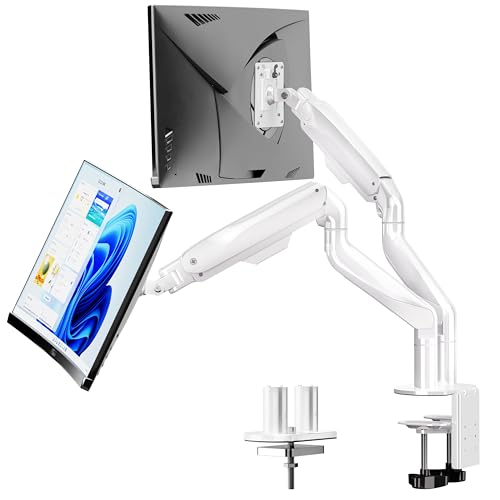
BIZUM Heavy Duty Dual Monitor Stand 17″–42″ (White)

HUANUO FlowLift Pro Dual Monitor Mount 13–27″

HUANUO 17–32″ Stacked Dual Monitor Mount

HUANUO Dual Monitor Mount up to 32″, 22 lb Arms
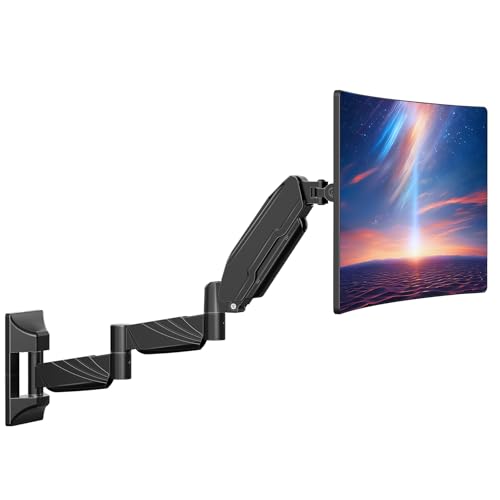
ErgoFocus Long Arm Monitor Wall Mount for 32″ Screens

HUANUO FlowLift Dual Monitor Stand 13–32″ Gaming Mount

HUANUO FlowLift Single Monitor Mount 13–32″

ARES WING Single Gaming Monitor Arm for 24″–57″ (White)
A Breakdown Of The Leading Choices
Glass tops and thin composite desks crack under the focused pressure of a C-clamp. The ZANOLY reinforcement plate spreads that clamping force across a wide carbon-steel footprint, which keeps the rest of this list usable on surfaces that would otherwise rule out a clamp-on mount entirely. It’s the kind of accessory that doesn’t show up in glamour shots but quietly decides whether a desk is even a candidate for an arm.
Think of it as insurance rather than a mount on its own, because it pairs with the arm you actually want. Glass-desk owners who tried the HUANUO HNDS7 first and worried about clamp pressure will find this plate resolves that concern without forcing a grommet hole. Anyone mounting a 27″ or larger screen onto a tempered-glass top should consider this an essential add-on.
Key Advantages
- Carbon-steel plate spreads C-clamp pressure across thin and glass tops
- White finish pairs visually with the BIZUM and ARES WING options in this list
- Fits most monitor-stand clamp installations without modification
- Lets fragile-desk owners skip a grommet hole entirely
Things To Consider
- Adds desk height; check clearance under any drawer-mounted surfaces
- Owners commonly report the plate needs a soft pad beneath on polished glass to prevent micro-slide
Key Specs
Whose Shelf It Belongs On
Owners of glass desks, IKEA Linnmon tops, or any surface where a clamp could mark or stress the material.
A Better Fit Elsewhere
Shoppers with a sturdy wood desk and standard monitors can skip the plate and put the budget toward the HUANUO Dual Monitor Mount up to 32″, 22 lb Arms instead.
The HNDS7 takes the standard HUANUO dual formula and pushes it further. Solid aluminum arms, a wider base, and a dual C-clamp design handle heavier loads than earlier HUANUO entries, while the built-in USB hub is a quiet upgrade that pays off daily once you start docking a laptop.
It accepts two 13″–40″ screens at up to 26.4 lbs per arm and supports the common VESA 75 and 100 patterns, which covers most ultrawides and large curved panels. Compared to the FlowLift Pro below, the HNDS7 trades a lighter build for noticeably more arm length, which makes it the better choice for tall users or anyone who likes to push displays well above the desk surface.
Advantages To Know
- Built-in USB hub cuts down on docking-station reliance
- Dual C-clamp design handles 26.4 lbs per arm without visible sag
- Accepts up to 40″ displays, which covers nearly every consumer ultrawide
- Both clamp and grommet mounting hardware included
Worth Noting
- Owners commonly report that the included instructions could use more detail during initial arm tensioning
- USB hub ports sit at the base, so cable reach matters when planning the layout
Quick Facts
Built With In Mind
Remote professionals and traders running two 27″–32″ monitors who want fewer dongles on the desk and a sturdier mount than entry-level arms.
Skip It When
Shoppers running a single screen should look at the HUANUO FlowLift Single Monitor Mount 13–32″ instead and keep the extra arm as a future upgrade path.
BIZUM’s take on the heavy-duty category leans on aviation aluminum arms and an enlarged base to hold 33.1 lbs per arm. The 17″–42″ envelope covers the largest curved panels on the market, including 49″ super-ultrawides that overwhelm most clamps. Where the HUANUO HNDS7 tops out at 26.4 lbs, this arm clears more headroom for heavier studio monitors.
The white finish stands out against the sea of black and silver mounts, which matters if the rest of your setup already trends light. For mixed-use setups that pair a 32″ primary with a 27″ secondary, the difference between 26 and 33 lbs per arm is the margin that decides whether the arm holds position or slowly drifts over a long workday.
Notable Gains
- 33.1 lbs per arm supports the heaviest consumer curved displays
- Aviation aluminum arms resist sag over years of daily adjustment
- Accepts 42″ screens, which is uncommon in this category
- Full motion plus tilt and rotation for portrait-mode secondary screens
Honest Caveats
- Dual-clamp footprint requires a deeper desk edge than slimmer arms
- White finish shows dust more readily in busy rooms with open windows
- Heavier overall build makes repositioning the whole assembly harder during install
Best Suited To
Power users and creative professionals mounting large curved panels who have the desk depth to accommodate a wider clamp footprint.
Consider Something Else When
Shoppers running two 24″–27″ monitors will find the HUANUO FlowLift Dual Monitor Stand 13–32″ Gaming Mount delivers similar flexibility without paying for the unused weight capacity.
The FlowLift Pro targets the popular mid-size category with a MechaSpring-assisted adjustment system and tool-free VESA plates. The spring counterbalance is the headline feature: it removes most of the friction from height changes, so you can sit-stand throughout the day without grabbing a hex key.
Each arm caps out at 15.4 lbs, which covers 24″ and most 27″ monitors but rules out heavier 27″ studio panels and anything curved above 27″. Compared with the HUANUO Dual Monitor Mount up to 32″, 22 lb Arms below, this trade-off buys smoother motion but loses the headroom for larger screens.
Notable Upsides
- MechaSpring assist makes height changes a one-handed task
- Tool-free VESA mounting speeds initial setup
- Compact base footprint suits smaller desks where the HNDS7 would feel oversized
- Recommended for wood desks 0.59″–3.54″ thick for secure clamping
Some Limits To Know
- 15.4 lb per-arm limit excludes heavier 27″ and any 32″ displays
- Spring tension may need readjusting after the first few weeks as cables settle
- Wood-desk recommendation limits safe use on metal-frame or glass tops without the ZANOLY plate
Who It Suits Best
Home-office users with two 24″ monitors who adjust height several times a day and prefer the smoother MechaSpring motion over raw capacity.
Look Elsewhere When
Anyone mounting a 32″ screen should step up to the HUANUO Dual Monitor Mount up to 32″, 22 lb Arms instead, which trades the spring assist for higher per-arm weight.
The stacked layout trades horizontal span for vertical reach, putting one screen above the other on a single pole. That’s a meaningful choice for shallow desks where two side-by-side arms would push the rear monitor uncomfortably close to the wall, or for narrow sit-stand tops under 24″ deep.
At 19.8 lbs per arm, it accepts most 27″ screens and lighter 32″ panels. Where this design really earns its keep is in document-heavy workflows: coding references on top, the active editor below, with no neck rotation between the two. Side-by-side arm users on deep desks will find the stacked layout unfamiliar, but shallow-desk shoppers gain back their full desk footprint.
Useful Highlights
- Vertical stacking reclaims shallow-desk depth
- 19.8 lb per arm covers most 27″ and lighter 32″ monitors
- VESA 75 and 100 compatibility matches most modern displays
- Reduces neck rotation in document-heavy workflows
Points To Note
- Vertical eye movement is more tiring over long sessions than side-by-side layouts
- Top monitor sits high enough that ceiling clearance matters in low-ceiling rooms
- Cable routing on the central pole needs planning for tidy results
Made For
Writers, developers, and traders working with reference material above an active window on shallow desks where a side-by-side arm won’t fit.
Not Your Match When
Designers, video editors, or anyone who needs a wide horizontal canvas should look at the HUANUO Dual Monitor Mount up to 32″, 22 lb Arms for a side-by-side layout instead.
Aerospace-grade aluminum and 22 lbs per arm land this in the everyday sweet spot. Most shoppers running two 27″ panels fall comfortably inside that envelope, with enough reserve capacity that the arm doesn’t drift downward over months of use. It accepts 17″–32″ flat or curved panels, which is the broadest practical range short of the BIZUM above.
Compared with the FlowLift Pro at item four, this arm trades the spring-assist smoothness for significantly higher per-arm weight. For someone who rarely adjusts height once set, that’s a sensible trade. For someone who switches between seated and standing all day, the MechaSpring feel of the FlowLift Pro is the better daily companion.
Everyday Perks
- 22 lb per-arm rating covers the most common dual-27″ setups with reserve
- Aerospace-grade aluminum resists the visible sag that lighter arms develop
- Accepts 32″ flat and curved displays, future-proofing for an upgrade
- VESA 75mm and 100mm match virtually every modern monitor
Trade Offs
- No spring counterbalance, so height changes require more manual effort
- Owners commonly report the included cable-management clips are small for thicker power bricks
Feature Snapshot
Right Fit For
Home and small-office setups with two standard 24″–27″ monitors where height is dialed in once and rarely changed.
Reach For A Different Pick When
Sit-stand users who adjust height multiple times daily will prefer the smoother MechaSpring motion of the HUANUO FlowLift Pro Dual Monitor Mount.
The ErgoFocus mount sidesteps the desk entirely by anchoring to a wall stud. With an arm length around 28″ compared to roughly 22″ on standard mounts, it pushes the display well away from the wall and opens up the entire desk surface underneath. For a 24″-deep desk in a small apartment, that’s the difference between a usable workspace and a cramped one.
At 17.6 lbs capacity, it covers most 27″ and lighter 32″ panels but stops short of heavy curved ultrawides. The honest trade is installation: a wall mount requires a stud, a drill, and a level, which is more commitment than any clamp in this roundup. Shoppers in rentals who can’t drill may need to default back to the ZANOLY plate paired with a clamp-on arm.
Useful Touches
- Reclaims the full desk footprint for keyboards and notebooks
- Long arm reach accommodates deep corner setups where clamps can’t reach
- Full motion tilt, swivel, and rotation for varied working angles
- VESA 100×100 compatibility matches most 24″–32″ displays
Points To Keep In Mind
- 17.6 lb capacity rules out heavier 32″ studio and curved panels
- Requires drilling into wall studs, which isn’t ideal for renters
- Owners commonly report the included wall hardware is fine but worth double-checking for masonry walls
Who Should Grab It
Owners of small desks, studio apartments, or corner workstations where every inch of desk surface matters and wall mounting is an option.
Another Choice May Suit
Renters who can’t drill should consider the HUANUO FlowLift Single Monitor Mount 13–32″ with a clamp base on the ZANOLY reinforcement plate instead.
The FlowLift dual arm covers the gaming-flavored end of this list with full-motion articulation tuned for twitch-friendly repositioning. Swapping from a slouched racing-game posture to an upright chat overlay takes seconds, and the gas-spring arms hold position cleanly once you let go.
Each arm carries 4.4–19.8 lbs, which covers most 27″ gaming panels and lighter 32″ monitors but excludes heavier studio displays. For streamers running a chat screen alongside the main panel, the side-by-side layout outperforms the stacked option above because chat and gameplay both want prime eye-level real estate.
Positive Points
- Full-motion articulation supports rapid posture changes during long sessions
- Gas-spring arms hold position without drift over multi-hour play
- 13″–32″ range covers the bulk of gaming monitor purchases
- C-clamp and grommet options included for varied desk types
Room For Improvement
- 19.8 lb per-arm ceiling rules out heavy 32″ studio monitors
- Gas springs need occasional readjustment as cable weight shifts over time
Perfect Match For
PC and sim-racing gamers running a primary 27″–32″ display with a chat or streaming secondary monitor who want fast angle changes.
Where A Sibling Pick Shines
Sim-racing enthusiasts running a single very large curved display will get more value from the ARES WING Single Gaming Monitor Arm 24″–57″, which holds up to 60 lbs.
The single-arm FlowLift distills the dual version above into a focused single-screen tool. It carries 4.4–19.8 lbs and supports 13″–32″ panels on the same VESA 75 and 100 patterns, which means anyone who starts with one monitor today can add a matching second arm later without replacing anything.
For shoppers who don’t need a second screen right now but want the option down the line, that’s the practical argument for buying single arms in stages. The flow and adjustment feel match the dual version above, so a future pair will feel consistent on the desk.
The Case For It
- Entry-friendly pricing without sacrificing full-motion adjustment
- Same gas-spring feel as the dual version, so a future second arm matches
- 19.8 lb capacity covers the bulk of single-screen home-office setups
- Clamp and grommet hardware included for varied mounting options
Possible Compromises
- Single arm means any future second screen requires a second purchase and clamp space
- 19.8 lb ceiling excludes heavier 32″ studio monitors and most curved ultrawides
Feature Card
Who Will Love This
First-time arm shoppers, students, and apartment dwellers running a single 24″–27″ monitor who want ergonomic adjustment without committing to a dual setup yet.
Swap It Out When
Anyone planning to add a second screen within six months should consider the HUANUO Dual Monitor Mount up to 32″, 22 lb Arms from the start and skip buying twice.
The ARES WING arm rounds out the list by handling the displays that break every other arm in this roundup. Up to 60 lbs of capacity covers 49″ super-ultrawides and large curved OLED panels that would sag or refuse to clamp on lighter arms. The esports-styled shell fits cleanly into a competitive gaming room rather than disappearing into office gray.
The honest trade is desk-clamp load: a 60 lb display puts real force on the mounting point, so a sturdy wood desk and the ZANOLY plate on glass are worth considering. Compared to the HUANUO single-mount above, this arm trades adjustability polish for raw weight capacity, which is exactly the right swap for owners of oversized curved screens.
Everyday Advantages
- 60 lb capacity supports the largest consumer curved and OLED panels
- 24″–57″ screen size range covers nearly every modern gaming display
- White esports-styled shell matches themed gaming setups
- Streamlined structure reduces visual bulk compared to office-gray arms
Things To Weigh
- Heavier displays require a sturdier clamp point; pair with the ZANOLY plate on glass tops
- Single-arm design means adding a second screen requires a second arm and clamp space
- Owners commonly report the cable channel is tight for power bricks with right-angle plugs
Best Suited To
Sim-racing enthusiasts, single-monitor battlestation builders, and owners of large curved OLED panels who need a mount that can hold real weight without complaint.
Where Another Pick Suits Better
Gamers running two 27″ panels side by side should consider the HUANUO FlowLift Dual Monitor Stand 13–32″ Gaming Mount above for a more balanced dual layout.
Factors That Separate A Good Monitor Arm From A Frustrating One
VESA pattern and weight check come first. VESA is the standardized hole pattern on the back of most monitors, and the two common spacings are 75×75mm and 100×100mm. Confirm both your monitor’s pattern and its actual weight before anything else, because a single mismatch sends the whole arm back.
Arm length and reach shape your usable desk. Short arms clamp close to the edge and keep the screen centered, while longer arms push displays further back or out to the side. For deep desks, the standard reach feels natural. For shallow setups under 24″, the ErgoFocus long-reach arm or a stacked layout reclaims usable space without forcing the screen against the wall.
Mounting style should match the desk material. C-clamps work on most wood desks without tools. Grommet mounts require an existing hole but look cleaner. Glass or thin tops need the ZANOLY reinforcement plate to spread the clamp force. Wall mounts trade drill work for total desk clearance.
Spring tension versus fixed joints sets the daily feel. Gas-spring arms move with one hand and hold position cleanly, which matters most for sit-stand desks and frequent posture changes. Mechanical arms with set screws cost less and stay put once dialed in, which suits a single fixed eye-height.
Key Considerations Across These Picks
Wrong Turns To Avoid
The most common mistake is buying by screen size alone. A 32″ monitor at 12 lbs and a 27″ monitor at 18 lbs both fit “27–32 inch” descriptions, but only one of them sits inside the arm’s weight rating. Always confirm the actual weight on the product page or back of the panel before committing.
The second trap is ignoring desk thickness and material. Clamps need a solid bite, and a clamp slipping on a polished surface can pull a monitor down with it. Measure your desk thickness at the intended clamp point and pair glass or thin tops with the ZANOLY plate.
When Paying More Pays Off
Higher-tier arms in this list earn their cost through smoother motion, higher weight capacity, and sturdier aluminum construction. The BIZUM and HNDS7 arms justify their premium for anyone running heavier 32″ panels, where lighter arms visibly sag over months. For users on standard 24″–27″ monitors who rarely adjust height, the everyday HUANUO arms deliver the core ergonomic benefit without the upgrade cost.
Frequently Asked Questions
How do I know which VESA pattern my monitor has? Measure the horizontal and vertical distance between the four threaded holes on the back of the monitor in millimeters. Most modern displays use either 75×75mm or 100×100mm, and either spacing fits the arms in this list.
Will a clamp damage my desk? A properly torqued C-clamp on a solid wood desk leaves no mark. On glass or thin composite tops, the clamp can stress the material, which is exactly what the ZANOLY reinforcement plate is designed to prevent.
Can I mount a curved monitor on a regular arm? Yes, as long as the curved monitor meets the arm’s VESA and weight specs. Curved panels are heavier than flat equivalents, so the per-arm weight rating matters more than the screen-size range.
Do these arms work on standing desks? All clamp-on and grommet arms in this roundup attach to the desk top, so they move with the desk as it raises and lowers. The mounted screens travel with the surface, which is the standard sit-stand setup.
What tools will I need for installation? Most clamp-on arms include a hex key and basic hardware. A separate drill and level are only required for the ErgoFocus wall mount. Budget an extra 20 minutes beyond the listed install time for cable routing on the heavier dual arms.
Closing Remarks
The best monitor arm is the one that matches your desk material, your monitor’s actual weight, and how often you change posture during the day. For most people running two standard 27″ panels, the HUANUO Dual Monitor Mount up to 32″ with 22 lb arms is a confident everyday pick. For heavier ultrawides, step up to the BIZUM or HNDS7. For tight corners and shallow desks, the wall-mounted ErgoFocus or the stacked HUANUO layout reclaims space that a standard clamp simply can’t. Measure twice, clamp once, and the upgrade pays off every workday after.