I wrote this guide for anyone staring down a messy dual-screen desk and wondering whether a monitor arm is really worth the swap. Most people notice neck strain within the first afternoon, especially after a year of hunching toward a laptop screen. Picking the right arm makes the whole workstation feel calmer, and the wrong one tends to droop within months.
A Quick View Of The Lineup

HUANUO Dual Monitor Stand for 13″–40″ (HNDS7)
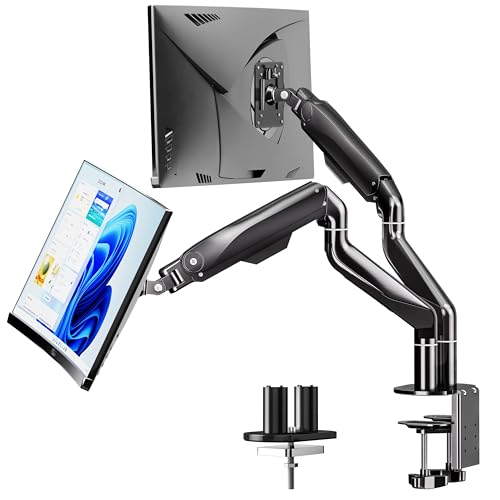
BIZUM Dual Monitor Stand for 17″–42″

VIVO Fully Adjustable Single Monitor Arm (PT-SD-AM01A)

HUANUO FlowLift Pro Monitor Arm for 13–32″

ARES WING Dual Monitor Wall Mount 24–57″

HUANUO FlowLift Dual Monitor Stand 13–32″

HUANUO FlowLift Single Monitor Mount 13–32″

HUANUO Triple Monitor Mount 17–32″

Pixio PS1S Wave White Single Monitor Arm
The Details Behind The Selections
I land on the HUANUO HNDS7 when someone needs a forgiving first arm for a mixed home office. It holds two screens between 13 and 40 inches at up to 26.4 lbs each, which covers most productivity rigs from a 24-inch secondary panel to a 32-inch primary. Compared to the heavier BIZUM coming up next, this one trades a chunk of weight capacity for a friendlier clamp footprint on thinner desks.
For someone running Zoom on one screen and a spreadsheet on the other, that range is exactly right. Owners commonly route their keyboard and notebook underneath the lifted screens to reclaim the desk surface.
Key Advantages
- Wide 13 to 40 inch compatibility for oddly paired screens
- 26.4 lbs per arm handles standard 27 and 32 inch monitors with room to spare
- VESA 75x75mm and 100x100mm fit keeps it compatible with most modern panels
- Height adjustable design lets both screens line up at eye level
- C-clamp and grommet base included for different desk setups
Things To Consider
- At the upper end of the size range, full motion tilt gets noticeably stiffer
- Plastic cable covers tend to feel loose after a few reclines
Who It Suits Best
Home office users pairing two different-sized monitors and want a forgiving clamp that fits thinner desks.
Where Another Pick Suits Better
Heavy ultrawide owners should look at the BIZUM Dual Monitor Stand, which carries 33.1 lbs per arm.
The BIZUM swings in for anyone mounting two genuine ultrawides. Each arm shoulders up to 33.1 lbs, well above the HNDS7 above, and the aviation aluminum build shrugs off the lever forces that lighter arms start to sag under. A 34-inch curved panel plus a 32-inch side monitor sits comfortably within spec.
I find the real draw is the dual C-clamp base, which spreads clamping pressure across a wider desk edge. That matters for glass tops or thinner standing desks where a single clamp can dent or slip.
Notable Gains
- 33.1 lbs per arm for genuine ultrawide territory
- Aviation aluminum arms resist flex at full extension
- Wider dual clamp base protects thinner or glass-topped desks
- 17 to 42 inch range handles curved and flat panels alike
Honest Caveats
- Heavier arms mean a longer initial setup, and you may want a second pair of hands during mounting
- On 17-inch screens the gas tension can feel a touch firm out of the box
Built With In Mind
Power users and content creators running two curved or ultrawide screens who want rock-solid support over compactness.
Consider Something Else When
Single-screen shoppers on a budget should look at the HUANUO FlowLift Single Monitor Mount instead, since they would not benefit from the extra capacity.
The VIVO PT-SD-AM01A is the simplest pick in this lineup, and that is the point. It supports one screen up to 27 inches, built around a solid steel arm that resists the wobble cheaper plastic arms develop over time. For a single-screen laptop user looking to lift their display a few inches, it is a focused tool.
The matte black finish blends into most setups, and the integrated cable channel tidies up the small mess of a single HDMI and power cord. Two of these mounted side by side could even rival the dual setups above for someone who prefers independent articulation on each screen.
Where It Helps
- Solid steel construction resists flex better than aluminum-only rivals at this size
- Compact footprint frees up the front edge of smaller desks
- Built-in cable channel keeps a single-screen setup tidy
Points To Keep In Mind
- Single-screen only, so dual-monitor shoppers need to buy two
- 27-inch ceiling means modern 32-inch panels are out of range
Right Fit For
Single-monitor home offices or remote workers who already use a laptop as their second display.
Skip It When
Anyone running two full-size desktop monitors should pick the HUANUO FlowLift Dual Monitor Stand to avoid doubling the cost and clamp count.
The FlowLift Pro is HUANUO’s refined take on the single-screen arm I covered earlier. The MechaSpring tension system supports screens from 13 to 32 inches at up to 19.8 lbs, and the tool-free VESA plate saves a frustrating minute during install. For a designer who switches between seated sketching and standing reviews, the smooth height travel is the headline.
Unlike the budget HUANUO FlowLift Single Monitor Mount, this Pro version feels noticeably more stable when pushed to full extension. The clamp and grommet base work on wood desks between roughly 0.59 and 3.54 inches thick.
Practical Advantages
- MechaSpring tension keeps screens floating at any height without drift
- Tool-free VESA plate removes the most annoying step of mounting
- Tilt, swivel, and full rotation cover portrait coding or color grading layouts
Minor Gripes
- Cable management is minimal, so owners often add their own clips
- Weight limit drops to 15.4 lbs for curved screens, which excludes some 32-inch curved panels
Best Suited To
Single-monitor professionals who change posture often and want premium-feeling articulation.
Reach For A Different Pick When
Dual-monitor buyers should skip this and choose the HUANUO HNDS7 reviewed earlier for integrated support.
The ARES WING is the outlier of this roundup. It mounts to a wall, not a desk, which sounds limiting until you see two 49-inch ultrawides floating on the bearing heads. Each arm carries up to 60 lbs (22 kg for curved screens), and the bearing head structure makes angle adjustments feel almost frictionless.
Wall mounting is a deliberate choice. Shoppers with a treadmill desk or a clean sit-stand surface benefit most, since the desk stays free of clamps entirely. For a typical home office on drywall, you would need to confirm stud placement first.
Positive Takeaways
- 60 lbs per arm handles the heaviest ultrawides on the market
- Bearing head structure makes tilt and swivel nearly weightless
- Frees the desk completely, a real advantage for sit-stand desks
Worth Noting
- Requires a suitable wall with studs, ruling out some rental setups
- Installation is permanent and less forgiving than a clamp if you reposition often
Perfect Match For
Gamers and traders running oversized ultrawide screens in a permanent workstation layout.
Look Elsewhere When
Renters or anyone wanting a non-invasive install should pick the BIZUM Dual Monitor Stand for similar capacity without wall mounting.

The PUTORSEN splits the difference between a laptop stand and a monitor arm, which is genuinely useful in 2026 hybrid work. The included laptop tray holds up to an 18-inch laptop at 11 lbs, and you can detach it to mount a 17 to 32 inch monitor at up to 19.84 lbs instead. It adapts to whatever surface you walk in with.
The 831mm extension on the three-section spring arm reaches farther than most desk-clamp rivals. In a kitchen-to-office transition, that range lets one arm do the work of two separate mounts.
Noteworthy Benefits
- Switchable laptop tray or monitor mount covers hybrid workflows
- Three-section spring arm reaches up to 831mm for deep desks
- VESA 75×75 and 100×100 fit keeps options open across brands
Some Limits To Know
- 11 lb laptop ceiling excludes heavier mobile workstations
- Owners commonly report needing a careful balance pass after swapping between modes
Who Should Grab It
Hybrid workers who alternate between laptop-only days and full-monitor productivity sessions.
A Better Fit Elsewhere
Pure dual-monitor owners will get cleaner alignment from the HUANUO FlowLift Dual Monitor Stand reviewed below.
The HUANUO FlowLift Dual is the dependable middle path. Each arm takes 4.4 to 19.8 lbs, covering the common 24 to 27 inch pairing most home offices actually use. VESA 75×75 and 100×100 plates match nearly every modern flat panel, and the full motion gas-spring action moves smoothly once tensioned.
I lean on this pick when friends ask for a single recommendation under $100. It is not flashy, but the gas-spring mechanism handles frequent height changes without the drift some rigid arms develop.
Where It Delivers
- Gas-spring motion feels steady across daily height adjustments
- Wide VESA compatibility covers most consumer monitors
- C-clamp and grommet base suit both standard and standing desks
Practical Considerations
- Cable covers are thin and tend to pop off during tilt adjustments
- At the 19.8 lb ceiling, monitors sometimes sit a fraction low after tensioning
Whose Shelf It Belongs On
Anyone running a standard 24 to 27 inch dual setup on a modest budget who values smooth motion over heavy ultrawide capacity.
Swap It Out When
Shoppers carrying heavier panels should jump up to the BIZUM Dual Monitor Stand, which adds significant capacity.
The single-screen FlowLift covers the basics for shoppers who mainly want to free up desk space. It fits 13 to 32 inch LCD monitors between 4.4 and 19.8 lbs, and the same VESA 75×75 and 100×100 compatibility as the dual-arm sibling above. For a college student converting a dorm desk into a study station, this is often the smartest starting point.
The honest read is that two of these mounted side by side would land at a similar price to the dedicated HUANUO FlowLift Dual, so single shoppers should think carefully about future needs before committing.
Benefits That Matter
- Low entry price for first-time monitor arm shoppers
- Compatible with the most common VESA patterns
- C-clamp and grommet base included for two install styles
Trade Offs
- Build quality drops noticeably compared to the Pro single-arm version
- Running two of these side by side costs more than the dual-arm HNDS7 reviewed first
Made For
Budget shoppers who only need to mount a single screen and may upgrade later.
Not Your Match When
Anyone already planning a dual setup should pick the HUANUO HNDS7 from the start to save money and desk space.
The HUANUO Triple Monitor Mount breaks out of the dual-monitor category intentionally. It supports three 17 to 32 inch screens between 4.4 and 17.6 lbs each, with full swivel, tilt, and rotation. For a sim racing setup, a trading floor, or a Twitch streamer who wants chat and dashboards visible, three panels side by side is the goal.
The desk footprint of three arms is real. Compared to the HNDS7 dual-arm setup reviewed first, this triple rig needs roughly 50% more horizontal clamp space, so a desk under 55 inches wide will feel cramped.
What Pays Off
- Three independent arms give each screen its own tilt and swivel range
- 17.6 lb per arm covers most 27-inch productivity panels
- VESA 75×75 and 100×100 keep the swap-in options open
Factors To Consider
- 17.6 lb per arm excludes most 32-inch ultrawides, which need the ARES WING instead
- Owners commonly report cable management becoming a juggling act across three arms
Who Will Love This
Sim racers, traders, and creative pros running three mid-size screens who want each one independently positioned.
Where A Sibling Pick Shines
Two-screen shoppers will overspend on the triple arm, so the HUANUO HNDS7 remains the more efficient dual choice.
The Pixio PS1S is the visual outlier, finished in white instead of the usual matte black. It supports one screen up to 32 inches and 19.8 lbs, with VESA 75×75 and 100×100 mounting plates built in. The integrated plastic cable management tray tucks away both the power cord and an adjustment tool, which is a small but thoughtful touch.
For a desk setup photographed for a portfolio or a YouTube channel, the clean white finish reads better on camera than standard black arms. Two of these in white deliver a designer dual-monitor look that dedicated dual arms in this color range rarely match.
A Favorable Mix
- White finish pairs with light wood and minimalist desk themes
- 32 inch ceiling matches most single-screen productivity panels
- Built-in cable tray doubles as a small parts storage slot
Less Ideal Details
- Plastic cable tray feels less premium than the metal channels on pricier arms
- Single-arm only, so dual shoppers buy two and lose the integrated alignment
The Right Fit
Single-screen shoppers who care about the on-camera aesthetic of a clean, light-colored workspace.
Another Choice May Suit
Dual-monitor setups focused on function should pick the HUANUO FlowLift Dual Monitor Stand for tighter screen alignment.
Choosing Monitor Arms That Fit How You Work
VESA Pattern And Weight Come First
VESA is the four-hole pattern on the back of your monitor, with 75x75mm and 100x100mm being the two most common spacings. Check your monitor’s manual or measure between the holes before picking an arm. Weight matters just as much, since under-spec arms sag visibly within months. The HNDS7 covers most home setups at 26.4 lbs per arm, while the BIZUM pushes to 33.1 lbs for genuine ultrawides.
Desk Thickness And Clamp Style
Most desk clamps grip wood surfaces between 0.6 and 3.5 inches thick. Glass desks need a grommet hole drilled through the surface for a bottom-mount bolt. Standing desks with thicker edges usually accept either style, but renters should favor clamp installs to avoid drilling.
Motion And Reach For Daily Comfort
Gas-spring arms hold height at any point without a lock lever, which makes posture changes faster. Reach, measured from the clamp to the VESA plate, matters for deep desks. The PUTORSEN’s 831mm extension is generous, while a shorter arm keeps the screen close for compact setups.
Key Considerations Across These Picks
Common Shopping Slip Ups
The biggest mistake is buying an arm rated just barely above your monitor’s weight. Springs lose tension over time, so picking an arm with at least 15% headroom prevents the slow droop owners commonly report after year one. Another trap is ignoring desk thickness. A clamp that fits a 2-inch tabletop will not grip a 1-inch glass top, and forcing it cracks the surface.
What The Higher Tier Buys
Premium arms like the HUANUO FlowLift Pro and ARES WING earn their cost through smoother bearings, wider VESA support, and heavier load ratings. The practical payoff is that heavier monitors stay exactly where you set them, even after thousands of micro-adjustments. For shoppers running under 20 lbs per screen, the mid-tier HNDS7 and FlowLift Dual deliver most of that experience at a noticeably lower cost.
Frequently Asked Questions
Do I need two separate arms or one dual arm?
A single dual-arm mount keeps both screens aligned along the same centerline, which looks cleaner and saves clamp space. Two single arms let each screen pivot independently, helpful when one user sits slightly off-center.
Will a monitor arm damage my desk?
A properly torqued C-clamp should not mark most wood surfaces. Glass desks need a grommet-mount option or a non-slip pad to prevent the clamp from sliding.
How much weight should my arm hold?
Aim for at least 15% above your monitor’s listed weight. Real-world forces during tilting add to the static load, and springs weaken gradually over years of use.
Are gas-spring arms better than mechanical arms?
Gas springs hold position without a lock lever, which suits frequent height changes. Mechanical arms with friction pivots cost less and work well for screens that rarely move.
Can I mount a curved monitor on these arms?
Yes, but check the curved-screen weight limit, which is usually lower than the flat-screen rating. The HUANUO FlowLift Pro drops from 19.8 to 15.4 lbs for curved panels, for example.
The Takeaway
A monitor arm is one of the few desk upgrades that pays you back every single workday. Match VESA pattern, weight, and desk thickness first, then choose between dual, single, or specialty mounts based on your screen count. Two of these ten picks will cover the vast majority of home and small-office setups, and the right one depends less on price than on the screens already sitting on your desk.