A cluttered desk changes how I work, and so does a wobbly dual-monitor setup. The right mount turns two screens into a single, ergonomic command center, and the wrong one turns every keystroke into a lean-and-squint.
I pulled together ten solid options across price tiers, mounting styles, and weight classes. There’s a Mac mini holder that doubles as a VESA plate, a reinforcement kit for glass desks, and several full-motion arms that handle ultrawide panels. Each entry below spells out who benefits most, what trade-offs show up, and where another pick on the list might fit better.
A Snapshot Of The Selections

Monzlteck Mac mini M4/M4 Pro Under Desk/Wall Mount Bracket/VESA Monitor Mount
HUANUO Steel Monitor Mount Reinforcement Plate for Thin, Glass and Other Fragile Tabletop

HUANUO Dual Monitor Stand for 13″–40″, Premium Dual Monitor Mount with USB, HNDS7
BIZUM Dual Monitor Stand for 17″-42″, Heavy Duty Ultrawide Monitor Arm, Holds 33.1lbs per Arm, White
monTEK Mechanical Spring Dual Monitor Arm with USB for 27 32 34inch Screens

HUANUO FlowLift™ Dual Monitor Stand, Fully Adjustable Gaming Monitor Desk Mount for 13–32″ Computer Screens

HUANUO FlowLift™ Single Monitor Mount, 13 to 32 Inch Monitor Arm

monTEK Heavy-Duty Dual Monitor Stand for 17-32″, 22 lbs Each

monTEK Freestanding Dual Monitor Stand for 17-32″ Screens, 22 lbs Each
monTEK Dual Monitor Arm Stand, 17–32″, Full Motion Adjustment, 20 lbs Each
Taking A Closer Look At The Options
Where most entries in this roundup are monitor arms, the Monzlteck bracket flips the script and does two jobs at once. It cradles an Apple Mac mini M4 or M4 Pro out of sight, then attaches to the back of any VESA-compatible display so the little computer rides along with the screen. The fit is dialed in for those specific Mac mini dimensions, which matters because Apple’s desktop is shorter than the older Mac mini tower.
The build leans on heavy-duty steel with anti-scratch padding along the contact points, and the bracket supports the standard 75x75mm and 100x100mm VESA patterns used on most monitors. If I run a clean desk setup where the Mac mini lives behind the display and tucks neatly under a desk or against a wall mount, this consolidates two accessories into one bracket. Owners commonly report the install feels solid once tightened, and the included hardware kit removes the guesswork around spacer rings and screws.
Advantages To Know
- Doubles as both a Mac mini holder and a VESA monitor mount, saving a separate accessory purchase
- Steel construction with anti-scratch padding protects both the computer and the display’s rear panel
- Compatibility with both 75x75mm and 100x100mm VESA holes covers most monitors on the market
- Frees up desk space by tucking the Mac mini behind or under the workstation
Things To Consider
- Only fits Mac mini M4 and M4 Pro, so older or larger Mac mini towers won’t work
- No height adjustment or articulation since this is a fixed bracket, not an articulating arm
Best Suited To
Mac mini M4 or M4 Pro owners who want their computer hidden behind a VESA-mounted display without buying a separate holder.
Look Elsewhere When
Anyone wanting height-adjustable ergonomic movement should reach for the HUANUO Dual Monitor Stand for 13″–40″ instead, which adds real arm articulation.
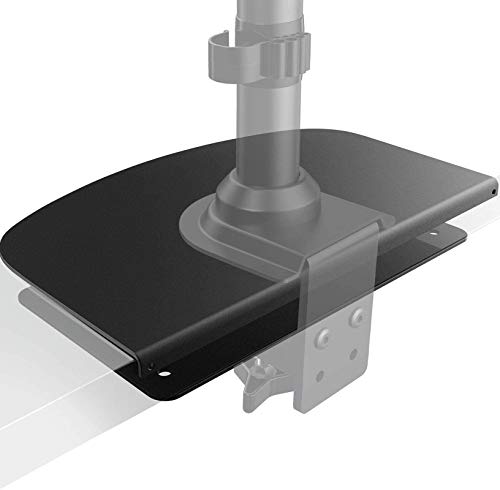
A C-clamp monitor arm can dent, warp, or even crack a glass or hollow-core desk if the clamp bites down without backing. The HUANUO reinforcement plate solves that problem by spreading the clamp force across a wider steel surface. It’s not a monitor arm itself, it’s the underlayer that lets a regular arm live safely on a fragile desktop.
The plate sits beneath the desk surface, giving the clamp something meaty to grip. That extra layer of steel turns a sketchy install into a confident one for anyone with a tempered glass top, an IKEA-style hollow desk, or any surface that flexes under pressure. I think of it less as an accessory and more as insurance, especially given how much a curved ultrawide weighs when it swings out on an arm.
Real-World Strengths
- Prevents clamp damage on glass, hollow, or thin desks that wouldn’t otherwise accept a monitor arm
- Steel construction handles the same load as the arm it supports without flexing
- Low-profile design keeps the desk surface looking clean and uncluttered
Trade Offs
- Adds setup complexity since you’re mounting the plate first, then attaching the arm on top
- Doesn’t work for standing desks in some configurations because the added height can interfere with the desk frame
- Not a standalone monitor mount, so a separate arm is still required
Who It Suits Best
Anyone running a dual-monitor arm on a glass, hollow, or particleboard desk who needs that extra layer of protection.
Consider Something Else When
People wanting a freestanding solution without clamp drama should pick the monTEK Freestanding Dual Monitor Stand, which avoids the desk entirely.
The HNDS7 lands in the sweet spot for most home and office dual-monitor setups. It holds two screens between 13 and 40 inches, with each arm rated for 26.4 pounds, and runs on solid aluminum arms paired with a wider footprint and dual C-clamp setup for stability. VESA compatibility covers both 75x75mm and 100x100mm patterns, so the bracket reaches most monitors without adapters.
The integrated USB hub is a quiet win, since cable-routing a phone or a wireless keyboard dongle straight from the arm beats fishing around behind the desk. Height and reach adjust smoothly along the arm length, which means I can dial in a stacked configuration for coding or a side-by-side spread for spreadsheet work. Compare that to the BIZUM pick further down, which trades integrated USB for a heavier 33.1-pound per-arm capacity aimed at ultrawide panels.
A Few Strong Suits
- Holds two 13″ to 40″ screens at up to 26.4 lbs per arm, covering most mid-range home office gear
- Built-in USB port gives a tidy spot to plug in peripherals without reaching behind the PC
- Dual C-clamp design and aluminum arms help reduce wobble when typing
- Full motion joints make portrait orientation easy for coding and document review
Points To Note
- Not built for the heaviest 40-inch ultrawide panels, where the BIZUM option fits better
- Requires a sturdy desk edge for the dual C-clamp, with a thickness range that excludes some glass tops without the reinforcement plate
Right Fit For
Standard home and small-office setups running two 24 to 32-inch monitors who want one mount that handles adjustments and connectivity in a single package.
A Better Fit Elsewhere
Users running 34-inch or larger ultrawide displays should look at the BIZUM Dual Monitor Stand, which has the higher 33.1 lb per-arm rating those screens demand.
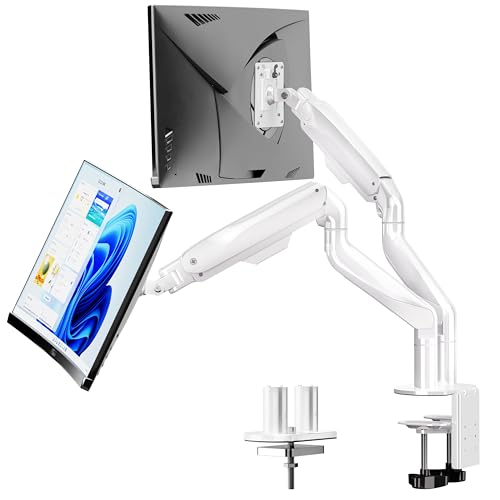
Ultrawide and curved displays stress a mount in ways flat panels never do, and the BIZUM stand is built for that abuse. The arms are forged from aviation aluminum, the base sits wider for leverage, and the dual C-clamp pulls twice the grip area on the desk edge. Each arm handles 33.1 pounds, which clears the weight of most 34-inch and even some 42-inch curved panels.
Full motion is the real point here, so the screens tilt, swivel, and rotate with the kind of confidence I want when nudging a heavy panel into a new angle. The white finish is unusual in this category, where most mounts ship in matte black, and it pairs nicely with light-colored desks. Compared with the monTEK Mechanical Spring Dual Monitor Arm that follows, this one favors raw load rating over spring-assisted lift, so the feel at the joint is stiffer and more deliberate.
Reasons It Performs
- 33.1 lbs per arm comfortably supports ultrawide and curved screens up to 42 inches
- Aviation aluminum arms with a wider base reduce the wobble heavy panels cause
- Dual C-clamp and grommet options adapt to a variety of desk thicknesses
- Full motion tilt, swivel, and rotation make ergonomic fine-tuning straightforward
Less Ideal Details
- Heavier overall weight means a sturdy desk is essential, especially without the grommet option
- White finish may clash with darker gaming setups where most accessories lean black
Made For
Curved and ultrawide owners running two flagship-sized displays who need a mount with the highest weight rating on this list.
Reach For A Different Pick When
Anyone with two standard 27-inch panels and a tighter budget should pick the monTEK Heavy-Duty Dual Monitor Stand, which trims cost and weight without giving up the dual-screen formula.
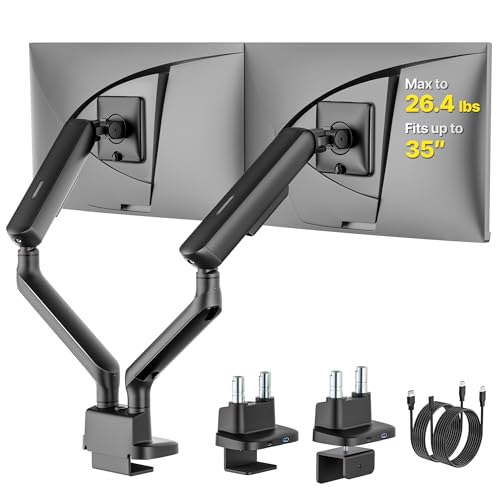
Mechanical spring arms feel different from gas cylinders, and for some desks that difference matters. The monTEK arm supports 17 to 35-inch displays at up to 26.4 lbs per arm, and uses counterbalanced springs instead of gas struts to hold the monitor in place. The result is a smoother, more controlled lift that holds its set position even when nudged.
The arm reaches both 75x75mm and 100x100mm VESA patterns, so most monitors attach without adapters, and the integrated USB port keeps a charging cable close at hand. Where the HUANUO FlowLift further down relies on a gas strut for that floaty feel, this spring-driven arm trades a bit of that weightlessness for more precise position memory. The honest read is that heavier curved screens still settle into place cleanly here, even after hours of repositioning.
Notable Gains
- Spring-assisted lift keeps the screen at the chosen height without drift
- 26.4 lbs per arm handles most 27 to 34-inch displays comfortably
- USB passthrough adds convenient desk-side charging without extra hubs
- VESA 75x75mm and 100x100mm compatibility covers the vast majority of monitors
Soft Spots
- Spring tension requires manual adjustment for heavier or lighter monitors, which can take a few tries
- Larger 38-inch ultrawides exceed the 26.4 lb limit, so the BIZUM pick fits those users better
The Right Fit
Owners of 27 to 34-inch displays who want a mount that holds position firmly rather than floating on a gas strut.
Swap It Out When
Buyers wanting a lighter, more buoyant feel should pick the HUANUO FlowLift Dual Monitor Stand instead, which uses gas springs for that classic weightless lift.
The FlowLift name hints at what this stand does best, and that’s the gas-spring arm motion that lets a monitor glide up, down, forward, and back with very little effort. It accepts 13 to 32-inch displays per arm and supports between 4.4 and 19.8 lbs on each, so it’s well matched to standard 24 to 27-inch screens rather than the heaviest ultrawides on the market.
Both C-clamp and grommet mounting options come in the box, which I appreciate because the desk thickness at home isn’t always the same as in a showroom. The arm reaches VESA 75x75mm and 100x100mm patterns, and full motion lets the screen rotate into portrait for long documents or coding sessions. Compare that to the monTEK spring arm reviewed earlier, and the FlowLift feels airier while the monTEK feels more anchored.
The Value In It
- Gas-spring motion gives a weightless feel that makes repositioning quick and easy
- Includes both clamp and grommet mounting hardware for different desk styles
- Full motion supports tilt, swivel, rotation, and height changes for ergonomic setups
- VESA 75x75mm and 100x100mm compatibility covers most mainstream monitors
A Few Limitations
- Per-arm weight limit tops out at 19.8 lbs, so heavier 32-inch panels may sit lower than expected
- Gas struts can lose a touch of tension over years of heavy repositioning, depending on use
Perfect Match For
Gamers and office workers running two standard 24 to 27-inch monitors who want fluid, one-finger adjustments throughout the day.
Not Your Match When
Anyone with a heavier curved panel should consider the monTEK Heavy-Duty Dual Monitor Stand, which trades motion smoothness for raw load capacity.
Not everyone needs two arms. The single-arm version of the FlowLift carries over the gas-spring smoothness for one screen between 13 and 32 inches, and holds between 4.4 and 19.8 lbs of display weight. It’s a useful pick when a second arm would just crowd a small desk, or when the user plans to add a second screen later and wants a proven platform to build on.
The clamp and grommet base combo gives flexibility across desk types, and VESA coverage at 75x75mm and 100x100mm keeps adapter hassle to a minimum. Compared with the dual FlowLift earlier, this single-arm version leaves a much smaller footprint on the desk edge, and the gas motion stays consistent across the lift range. The honest read is that this is the same engineering pared down for solo use, not a stripped-down version that feels cheaper in the hand.
What It Does Well
- Gas-spring motion makes a single screen feel weightless during repositioning
- Compact base leaves more desk room than dual-arm versions
- Works with both C-clamp and grommet mounting out of the box
- VESA 75x75mm and 100x100mm compatibility covers most monitors on the market
Worth Bearing In Mind
- Only supports one monitor, so dual-screen users would need two of these (and lose some of the integration)
- Same 19.8 lb ceiling as the dual FlowLift means ultrawides stay out of reach
Who Will Love This
Single-monitor home office users or anyone upgrading to a second screen later who wants the same FlowLift feel in a smaller package.
Another Choice May Suit
Dual-monitor users on a tight space budget should pair this with a second unit, or simply pick the dual-arm FlowLift reviewed earlier for a cleaner single-mount install.
The Heavy-Duty naming here isn’t marketing fluff, since the reinforced steel joints and thickened VESA plates form the backbone of a stand that’s clearly aiming at long-haul daily use. It holds two 17 to 32-inch screens at up to 22 lbs each, which covers most 27 and 32-inch office monitors with room to spare.
The anti-slip base pads do quiet work, keeping the stand planted on the desk while users lean in to type or fiddle with cables. VESA coverage matches the rest of the field at 75x75mm and 100x100mm, and the joint articulation supports tilt, swivel, and rotation for ergonomic adjustments. Where the monTEK Mechanical Spring pick above leans into spring-assisted lift, this model goes back to basics with a sturdier, more anchored feel that fits an office full of small vibrations and daily nudges.
What Works In Its Favor
- Reinforced steel joints and thicker VESA plates handle daily use without loosening
- 22 lbs per arm fits most 27 and 32-inch monitors with safety margin to spare
- Anti-slip base pads reduce wobble when typing or adjusting the desk
- Wide VESA compatibility covers mainstream displays without extra adapters
Practical Considerations
- No USB hub or integrated cable management extras like some pricier competitors
- Heavier than aluminum-arm stands at the same price tier, so a sturdy desk matters
Built With In Mind
Office workers running two 27 to 32-inch monitors who want a no-frills stand that holds position through years of daily adjustment.
Where Another Pick Suits Better
Users wanting smoother gas-spring motion should consider the HUANUO FlowLift Dual Monitor Stand, which trades some rigidity for easier repositioning.
Not every desk wants a clamp biting into its edge, and a freestanding stand sidesteps that entirely. The monTEK base sits on the desk surface with anti-slip pads holding it in place, while two articulated arms hold 17 to 32-inch screens at up to 22 lbs each. That arrangement works well for renters, glass-top desks, and anyone swapping between standing and sitting configurations.
The build carries the same reinforced steel joints and thickened head plates as the clamp-mounted sibling earlier in this list, so stability doesn’t take a hit from the missing clamp. VESA coverage spans 75x75mm and 100x100mm, and the joint articulation supports tilt, swivel, and rotation. Compared with the BIZUM clamp model, this freestanding version trades the dual C-clamp grip for the freedom to move the entire stand around the desk without leaving a mark.
Good Reasons To Consider
- Freestanding base means zero drilling, clamping, or damage to the desk
- 22 lbs per arm comfortably holds 27 and 32-inch office monitors
- Anti-slip base pads keep the stand anchored during typing or nudging
- Easy to move between sitting and standing desk configurations
Possible Compromises
- Takes up more desk surface than a clamp mount because the base sits flat on top
- Lower maximum height than some clamp-based arms because the base height starts above the desk surface
Whose Shelf It Belongs On
Renters, glass-desk owners, and standing-desk users who want a sturdy dual-monitor setup without modifying the desk at all.
Skip It When
Anyone with a small desk surface should consider the HUANUO HNDS7 clamp model, since clamp mounts reclaim more usable desk space.
Closing out the list is a balanced mechanical-spring dual arm that handles 17 to 32-inch monitors at up to 20 lbs each. Each arm lifts the screen up to 15.9 inches high and extends out to 19.9 inches, which gives plenty of room to clear a laptop dock or stack one monitor over another.
The steel frame pairs with mechanical spring arms that hold position without drifting during the day, and full motion covers tilt, swivel, and rotation for portrait work. Compared with the heavier monTEK Heavy-Duty model reviewed earlier, this arm focuses more on motion smoothness than raw rigidity, which makes it a friendlier pick for mixed-use desks where the screens shift between spreadsheet and creative layouts throughout the day. The 20 lb per-arm rating leaves a small margin under most 27-inch panels, which I find comfortable for daily repositioning.
What Stands Out
- Mechanical spring arms keep screens at the chosen height without drift
- 19.9-inch reach clears most laptop docks and stacked monitor layouts
- 20 lbs per arm fits typical 24 to 27-inch monitors with a comfortable margin
- Full motion articulation supports tilt, swivel, and rotation for ergonomic setups
Details To Watch
- 20 lb per-arm rating means heavier 32-inch panels sit at the edge of the limit, depending on exact weight
- Spring tension takes some dialing in when swapping monitor sizes later
Who Should Grab It
Standard dual-monitor home office users running 24 to 27-inch screens who want full motion and spring-assisted hold without stepping up to a heavier-duty price.
Where A Sibling Pick Shines
Anyone running heavier 32-inch panels or ultrawides should pick the BIZUM Dual Monitor Stand, which has the extra weight headroom those displays demand.
Picking The Right Dual Monitor Mount For Your Setup
VESA pattern is the first filter that matters, and the universal standard on this list is the 75x75mm or 100x100mm hole layout on the back of the monitor. Most modern displays ship with one of those patterns, and every mount here covers both, so adapter plates rarely come into play. For anyone with an older or unusually shaped monitor, measuring the hole spacing before buying saves a return trip.
Weight capacity comes next, and that’s where most dual-mount mistakes happen. A 27-inch office monitor usually weighs between 8 and 12 lbs, so most arms handle two of them with ease. Curved 34-inch ultrawides push past 20 lbs each, which is exactly why the BIZUM option carries a 33.1 lb per-arm rating. Skimping on weight capacity is the most common reason a mount sags over time, even when it looks fine on day one.
Desk compatibility decides more than specs suggest. Clamp mounts need a flat edge with enough thickness for the C-clamp to grip, while grommet mounts require a pre-drilled hole in the desk. Glass tops, hollow-core furniture, and particleboard with thin faces all benefit from the HUANUO reinforcement plate reviewed earlier. Renters and anyone who moves desks often should weigh the freestanding monTEK option, since it leaves the desk completely untouched.
Mounting style is the last big decision, and it comes down to how often the screens get repositioned. Gas-spring arms like the HUANUO FlowLift feel lighter and move with a finger, while mechanical spring arms like the monTEK models hold their position more rigidly once dialed in. For ergonomic adjustments throughout the day, gas springs win on fluidity. For users who set the monitors once and forget them, mechanical springs deliver a steadier hold.
Key Considerations Across These Picks
Pitfalls Shoppers Hit
Buyers often pick a mount by screen size alone and forget about weight, which is where most sagging and drooping problems start. A 32-inch monitor can weigh anywhere from 10 to over 20 lbs depending on the panel and stand, and a mount rated for 26 lbs per arm is already half-used by a single heavy display. Reading both the size range and the weight range together prevents most post-purchase disappointment.
Where The Extra Money Goes
Premium mounts invest in smoother joint articulation, stronger gas or mechanical springs, and integrated cable management that hides the USB and display cables along the arm itself. Higher weight ratings also cost more because the aluminum or steel gauge goes up. For users who adjust their screens multiple times a day, that smoother motion pays back quickly in comfort and posture. For static setups, a mid-tier mechanical-spring arm covers the same workload for less.
Frequently Asked Questions
What VESA pattern do I need for a dual monitor mount?
VESA refers to the four-hole pattern on the back of the monitor that attaches to the mount. The two standards on every mount in this guide are 75x75mm and 100x100mm, measured as the distance between hole centers. Most monitors from 17 to 32 inches ship with one of these patterns, and a quick measurement with a ruler confirms which one applies.
How much weight can a dual monitor arm actually hold?
Every mount in this list lists a per-arm weight rating, which is the maximum load that arm can carry safely. The HUANUO FlowLift tops out at 19.8 lbs per arm, the monTEK spring arms range from 20 to 26.4 lbs, and the BIZUM ultrawide mount reaches 33.1 lbs per arm. Staying under those numbers keeps the gas or mechanical springs from wearing out prematurely.
Can I mount a dual monitor arm on a glass desk?
Glass desks accept clamp mounts only when paired with a reinforcement plate, because the clamp force on bare glass can crack or shatter the surface. The HUANUO reinforcement plate reviewed earlier spreads that force across a steel backing plate for safe installs. Freestanding stands like the monTEK freestanding dual monitor model skip clamps entirely and work on any flat surface.
Do I need two separate single-arm mounts or one dual-arm stand?
A single dual-arm mount with a shared base keeps the screens synchronized and frees up desk space, while two separate single arms give independent placement. For most people, a dual-arm mount like the HUANUO HNDS7 or BIZUM model handles the job with cleaner cable routing. Independent arms only matter when the monitors sit far apart or need very different heights and angles.
Will a dual monitor mount work with curved screens?
Curved screens work with dual mounts as long as the weight and VESA pattern match the mount’s rating. Curved panels tend to weigh more than flat panels of the same size, so the BIZUM and monTEK heavy-duty options suit larger curved displays best. The VESA pattern is the same on flat and curved screens, so mounting hardware rarely differs.
Wrap Up
A good dual monitor mount turns a tangled desk into an organized command center, and the right choice depends on monitor weight, desk type, and how often the screens get repositioned. The HUANUO HNDS7 is my balanced pick for most setups, while the BIZUM handles ultrawide flagships and the monTEK freestanding stand saves glass-top and rental desks from clamps. Pick the combination that matches the screens on the desk, and the daily workflow tends to follow.