Setting up a second screen at home or in a hotel room used to mean lugging around a bulky desktop display. Today, a slim portable panel can sit beside your laptop and quietly double your working space without weighing down your bag. I’ve spent time studying what actually matters in this category, from panel type and connection options to how a screen physically attaches to your laptop. The eight picks below cover travelers, remote workers, multitaskers, and anyone tired of toggling between tabs on a single cramped display.
Your Options, Compared

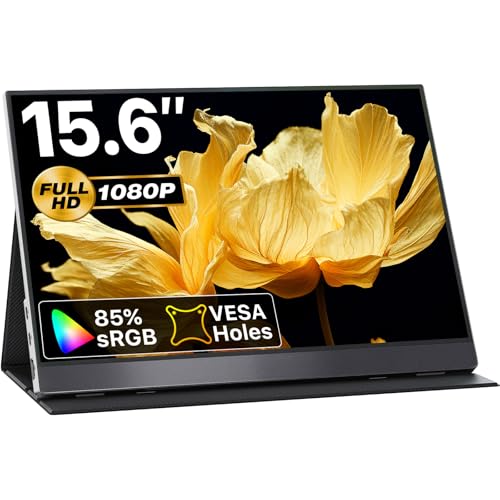
cocopar Portable Monitor 15.6 Inch 1080P FHD Travel Monitor
VisionOwl Portable Monitor 15.6 Inch 1080P FHD Travel Monitor

CIDETTY Laptop Screen Extender 14″ FHD 1080P IPS Ultra-Thin
AOC 14″ Laptop Screen Extender Portable Monitor
CIDETTY 14″ FHD 1080P IPS Dual/Triple Monitor Display
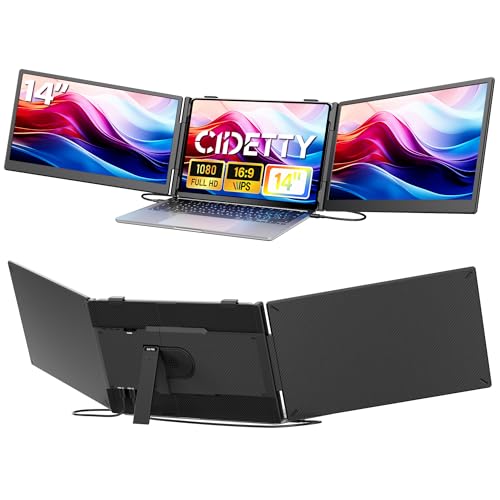
CIDETTY 14.1″ Ultra Thin 1080P FHD Triple Screen Extender
New Mobile Pixels Trio 3 Pro 14.1″ QHD 1400P Triple Monitor
New Mobile Pixels Duex Plus DS 13.3″ Full HD IPS Dual Monitor
More On The Choices That Made The List
Among standalone portable panels, the cocopar 15.6-inch screen lands in a sweet spot for working travelers. It runs at 1080p with a 60Hz refresh rate, which is plenty sharp for documents, spreadsheets, and reference material on the road.
The cover-stand design doubles as both a screen protector and a desk prop, and the unit accepts HDMI or USB-C input depending on what your laptop or console offers. Owners commonly report it pairs cleanly with MacBook, Surface, and even PS5 setups. If you already own a separate stand or expect to mount it via VESA (a standard mounting hole pattern on the back), this one is ready for it.
Why It Works Well
- 15.6-inch 1080p panel gives document work and video calls enough room to breathe.
- Dual HDMI plus USB-C input means one cable handles video and power from a modern laptop.
- VESA mounting compatibility lets you dock it next to a desktop display at home.
- Integrated speaker covers casual video playback without dragging along extra gear.
- The folding case converts into a stand, so it travels without needing a separate accessory.
Things To Consider
- Color coverage at 85% sRGB is fine for office tasks, though photo editors may want wider gamut.
- The bundled cover-stand works, but stability on a soft hotel-bed surface can wobble if you press the screen hard.
Made For
Travelers bouncing between a MacBook, a Surface, and a game console who want one panel to handle all of it.
Consider Something Else When
The VisionOwl Portable Monitor 15.6 Inch 1080P FHD Travel Monitor is a stronger match for color-sensitive work like photo editing or design.
The VisionOwl steps in where the cocopar leaves off for anyone who cares about how colors actually look on screen. The 178° viewing angle from its IPS (In-Plane Switching) panel keeps the picture consistent from either side of a hotel-room desk, which matters when a colleague leans in to review a slide deck.
HDR support and FreeSync compatibility (a feature that smooths frame delivery during gaming) give it a small edge for streaming and light console play. For most productivity days, the 1080p resolution is the comfortable ceiling this screen can render sharply. Compared to the cocopar, the VisionOwl leans harder into image quality than into mounting versatility.
Where It Delivers
- IPS panel with wide viewing angles keeps colors consistent across the screen.
- HDR and FreeSync support add value for streaming and casual gaming sessions.
- USB-C plus HDMI inputs match modern laptops and game consoles alike.
- The slim silver chassis fits a coworking-bag aesthetic without screaming “tech gear.”
Trade Offs
- No VESA mounting points, so it’s less flexible as a permanent desk companion.
- Cover-stand design is the only included support option.
Right Fit For
Designers, photographers, and streamers who want reliable color reproduction while traveling light.
Skip It When
The cocopar Portable Monitor 15.6 Inch 1080P FHD Travel Monitor suits people who prefer VESA mounting and broader device compatibility.
When backpack space is tight, the CIDETTY 14-inch extender earns its place by being thinner than most tablets at 0.27 inches deep. It mounts directly onto your laptop, so the whole rig feels like one piece of hardware once it’s clipped on.
The 226° rotation lets the screen swing around to face a colleague across a small meeting-room table, which is handy for impromptu client reviews. For travelers in 13-to-17-inch laptops, the fit range covers the bulk of consumer machines. Unlike the standalone cocopar and VisionOwl panels above, this is a slide-on extender, not a free-standing display.
Features That Help
- 0.27-inch ultra-thin profile barely registers in a laptop sleeve.
- 226° rotation supports presentation sharing without unplugging.
- Plug-and-play USB-C and HDMI hookups skip driver installs on Windows, Mac, and Chrome devices.
- IPS screen keeps colors steady when you tilt the panel.
Points To Note
- Clamp mounting depends on your laptop lid being thick enough to grip securely.
- Smaller 14-inch canvas feels tight compared to the 15.6-inch standalone panels above.
Who Should Grab It
Backpack commuters flying with carry-on only who need a featherweight second screen for email and document review.
Look Elsewhere When
The AOC 14″ Laptop Screen Extender is the better match for shoppers who want a more established display brand behind the same clip-on format.
AOC has been making panels for years, and that experience shows in this clip-on extender. The 14-inch IPS screen attaches to laptops between 13 and 17.3 inches, and the FHD 1080p resolution matches the primary laptop display closely enough that scrolling feels continuous across both screens.
Plug-and-play means no driver hunting when switching between a work MacBook and a home Windows machine. For office workers who switch between two laptops, the universal clip is a relief. The same trade-off applies here as the CIDETTY above: a smaller canvas than standalone 15.6-inch screens, in exchange for a tighter fit on the laptop lid.
Advantages To Know
- AOC’s display heritage brings panel calibration closer to standard office expectations.
- FHD 1080p IPS screen produces accurate text rendering for long reading sessions.
- Broad 13-to-17.3-inch laptop compatibility covers most consumer and prosumer notebooks.
- Plug-and-play setup requires no extra software installs.
Minor Gripes
- Laptop-clip mounting still demands careful lid-handling to avoid clamp slippage on thicker gaming laptops.
Feature Snapshot
Best Suited To
Office workers who want a recognizable display brand backing their clip-on extender.
Not Your Match When
The CIDETTY Laptop Screen Extender 14″ FHD 1080P IPS Ultra-Thin appeals more to shoppers who care about absolute thinness above brand familiarity.
This CIDETTY variant trades a slimmer profile for built-in eye-comfort features. The blue-light filter and anti-glare coating aim at anyone staring at documents for eight-hour stretches, which describes a lot of remote workers in 2026.
Built-in speakers remove the need to drag a separate audio bar to a hotel desk, though for music they only do so much. The dual-or-triple mode option means the same hardware can act as a second screen or extend a third panel, depending on your kit. The honest read is that the panel is comfortable, not class-leading in brightness.
The Good Stuff
- Blue-light filtering and anti-glare surface reduce eye strain over long sessions.
- Dual-or-triple mode flexibility lets the same panel grow with your setup.
- Built-in speakers handle video calls without external hardware.
- USB-C and HDMI plug-and-play works across Mac, Windows, and Android.
Room For Improvement
- Brightness lags behind some competing panels, which can matter in sunlit cafes.
- Integrated speakers are functional for calls but thin for music playback.
Perfect Match For
Remote workers logging long days on documents who care about eye comfort more than peak brightness.
A Better Fit Elsewhere
The CIDETTY Laptop Screen Extender 14″ FHD 1080P IPS Ultra-Thin suits shoppers who want a thinner profile above eye-care coatings.
When two screens still aren’t enough, this CIDETTY extender adds a third panel to your laptop setup. The 0.3-inch thickness keeps the whole rig from looking like a folding accordion, and the 14.1-inch diagonal pairs cleanly with most 13-to-17-inch host laptops.
The triple-screen configuration suits data-heavy roles like finance analysis or live event coverage, where two reference panels and a working window all stay visible. For lighter workflows, the added weight and cable management can feel like overkill. Compared to the slimmer CIDETTY unit above, this one prioritizes screen count over absolute thinness.
Everyday Wins
- Triple-screen output pulls reference data, communication, and work windows into view at once.
- 1080p IPS panel keeps text readable across all three displays.
- Plug-and-play USB-C and HDMI reduce setup friction on Windows, Mac, Chrome, and Android.
Worth Noting
- Triple-screen weight adds up, so backpack-only travelers may find it heavy over a full day.
- Cable routing for three panels takes more desk discipline than a single-screen extender.
Quick Facts
Who Will Love This
Traders, analysts, and operations staff who keep multiple data feeds open at once.
Another Choice May Suit
The New Mobile Pixels Trio 3 Pro 14.1″ QHD 1400P Triple Portable Monitor fits shoppers who want higher resolution across the triple-screen layout.
The Trio 3 Pro pushes past the 1080p ceiling of the other extenders on this list with QHD 1400p resolution across two attachable displays. For anyone reading dense spreadsheets or staring at code, that extra sharpness earns its keep over a long workday.
The redesigned kickstand supports all three screens at once, which means less fiddling with separate props. It runs heavier than single-screen panels, so the trade-off is real for travelers. For a home-office setup that occasionally relocates, the resolution bump is hard to give back once you’ve used it.
Benefits That Matter
- QHD 1400p resolution across both attachable displays sharpens text and UI elements.
- Built-in kickstand stabilizes all three screens together.
- Triple-screen layout removes the constant tab-switching penalty in heavy workflows.
Practical Considerations
- Heavier than single-screen alternatives, so it weighs more on a daily commute.
- Higher resolution draws more power, which can drain host laptop batteries faster.
Built With In Mind
Software developers, analysts, and creators who want sharper text rendering on every panel.
Reach For A Different Pick When
The New Mobile Pixels Duex Plus DS 13.3″ Full HD IPS Dual Laptop Monitor fits shoppers who want a lighter dual-panel setup instead of triple-screen bulk.
The Duex Plus DS keeps things simple: one extra panel that slides onto a laptop lid without much ceremony. At 1.3 pounds and 0.25 inches at the thinnest point, it’s the lightest screen in this roundup, which matters on long days when every ounce counts.
The 13.3-inch diagonal matches the host laptop for many road warriors, so the visual transition between screens feels seamless. USB-C and HDMI inputs cover the usual suspects plus the Nintendo Switch and Samsung DeX setups. For most road-tested travelers, this is the lightest dual-screen experience on the list.
Useful Highlights
- 1.3-pound weight is the lightest dual-screen option here.
- 0.25-inch thinnest point slides into a laptop sleeve without bulk.
- USB-C and HDMI inputs support laptops, the Nintendo Switch, and Samsung DeX phones.
- Multi-mode placement works on either side of the host laptop.
Honest Caveats
- Smaller 13.3-inch panel can feel tight next to a 16-inch host laptop.
Whose Shelf It Belongs On
Minimal-pack road warriors who count every gram and want a clean dual-screen setup.
Swap It Out When
The cocopar Portable Monitor 15.6 Inch 1080P FHD Travel Monitor fits shoppers who prefer a standalone panel with VESA mounting over a clip-on extender.
What Matters Most Before Choosing Monitors For Dual Monitor Setup
Panel Type And Resolution
IPS panels (In-Plane Switching) give wider viewing angles and better color than older TN panels, and that’s why almost every portable screen on this list uses IPS. For text-heavy office work, 1080p across a 14-to-15-inch diagonal lands in the comfortable zone. Higher QHD resolution, like the Trio 3 Pro offers, rewards anyone reading dense spreadsheets or code, though it does pull more battery from the host laptop.
Connection And Compatibility
Most portable panels accept USB-C and HDMI, which covers modern laptops, game consoles, and some phones. The catch is that not every USB-C port on every laptop carries a video signal, so checking the laptop’s specs matters before relying on a single-cable setup. Multi-OS support for Windows, macOS, Chrome OS, Android, and the Nintendo Switch has become a near-default expectation in 2026.
Form Factor And Mounting
Standalone panels like the cocopar and VisionOwl use a folding cover as a kickstand and often add VESA mount compatibility for permanent desks. Clip-on extenders like the CIDETTY and AOC units clamp to the laptop lid, which saves bag space but adds lid stress. Triple-screen kits add real weight, so daily commuters should weigh that against the productivity gain.
Eye Comfort And Build Quality
Blue-light filtering and anti-glare coatings, like those in the CIDETTY eye-care variant, help during long reading sessions. Build materials and hinge quality vary across brands, and clamp mounting hardware especially benefits from a more solid-feeling frame on the host laptop.
Key Considerations Across These Picks
Wrong Turns To Avoid
A common misstep is buying a portable panel without checking whether the host laptop’s USB-C port actually outputs video. Some laptops only support charging over USB-C, which forces an extra HDMI cable into the bag. Another trap is underestimating clamp clearance on thicker gaming laptops, which can prevent the clip-on extenders from seating properly.
What The Higher Tier Buys
Stepping up to a QHD panel like the Trio 3 Pro buys sharper text and more screen real estate for dense workflows. Triple-screen kits trade single-panel simplicity for genuine productivity gains in data-heavy roles, at the cost of bag weight and battery draw. The honest case for paying more is when sharper resolution or an extra panel removes daily friction that a budget option would just paper over.
Frequently Asked Questions
Do portable monitors drain laptop battery fast?
Yes, running an extra panel pulls meaningful power from the host laptop, especially at higher resolutions. A QHD panel draws more than a 1080p one, so long unplugged sessions may need a separate power source.
Will any portable monitor work with a MacBook?
Most modern portable panels with USB-C input work with MacBooks that support video over USB-C. It’s worth double-checking the MacBook model’s port specs before buying, since older Air models may need an HDMI adapter instead.
Can I use a portable monitor for console gaming?
Panels with HDMI input, like the cocopar and VisionOwl units, accept consoles such as the PS5 and Xbox. Refresh rate above 60Hz isn’t always available, which matters for fast-paced competitive titles.
What’s the difference between a clip-on extender and a standalone panel?
Clip-on extenders attach to the laptop lid and travel as one piece, which saves space. Standalone panels sit beside the laptop on a desk and offer more setup flexibility, including VESA mounting at home.
Are portable monitors good enough for photo editing?
IPS panels with high sRGB coverage, like the VisionOwl, handle casual editing well. For color-critical work, a dedicated color-calibrated desktop monitor still leads, but travel-friendly IPS panels close the gap for on-the-go tweaks.
Wrap Up
A second screen used to be a luxury, and now it travels in a laptop sleeve. The right pick depends on how you actually work: standalone panels for flexible setups, clip-on extenders for tight bags, and triple-screen kits for heavy multitaskers. Match the form factor to your routine, and the rest takes care of itself.