Curved displays change how a desk feels, and they change what a stand needs to do. The center of gravity sits a little further out, the panel is wider than it looks, and the curve itself demands more articulation than a flat screen does. I put together this list because the right mount makes the geometry disappear, while the wrong one slowly drives you nuts. Whether you’re running a single 32-inch ultrawide or stacking a triple-screen trading layout, these picks cover the spread without overpromising.
The Choices Worth Comparing

HUANUO FlowLift Pro Monitor Arm 13–32″
BIZUM Dual Monitor Stand 17–42″

Suptek ML6802 Dual Free-Standing Mount

monTEK Triple Monitor Stand 17–32″
monTEK Quad Monitor Stand 17–32″

Pixio PS1S Wave Single Monitor Arm

HUANUO FlowLift Dual Monitor Stand 13–32″

ARES WING Single Gaming Monitor Arm 24–57″

monTEK Heavy-Duty Dual Monitor Stand

HUANUO Triple Monitor Mount 17–32″
The FlowLift Pro is the arm I’d hand most people who run a single curved display. Its MechaSpring tension system is tuned for screens between 13 and 32 inches, and the tool-free VESA plate means the first ten minutes of ownership are spent dialing in position, not hunting for an Allen key. On a 32-inch curved panel, the 19.8 lb weight rating gives you healthy headroom, so the arm doesn’t drift downward after a month of use.
It mounts two ways, through a C-clamp or a grommet hole, on wood desks between roughly 0.6 and 3.5 inches thick. For most home offices that’s exactly the right range. Where it beats a flat-screen arm is in the tilt and swivel travel; the curve pulls the center of gravity forward, and the articulation here keeps the panel stable through wide sweeps.
Notable Upsides
- Tool-free VESA plate speeds up install and swaps when you upgrade monitors later.
- MechaSpring tension holds position reliably, so the screen stays where you left it.
- Wide tilt and swivel range suits curved panels, which need more articulation than flat screens.
- Solid 19.8 lb load limit covers virtually every curved 27- and 32-inch monitor on the market.
Worth Noting
- Desk material matters, since the clamp is specified for wood tops; glass or thick MDF may need the grommet route.
- Owners commonly report the cable channel can feel tight on thicker power and HDMI bundles.
Quick Facts
Made For
Anyone running a single 27- or 32-inch curved display who wants a clean, daily-driver arm without a complicated install.
Skip It When
The HUANUO FlowLift Dual Monitor Stand makes more sense if you’re moving from one screen to two curved panels in the same setup.
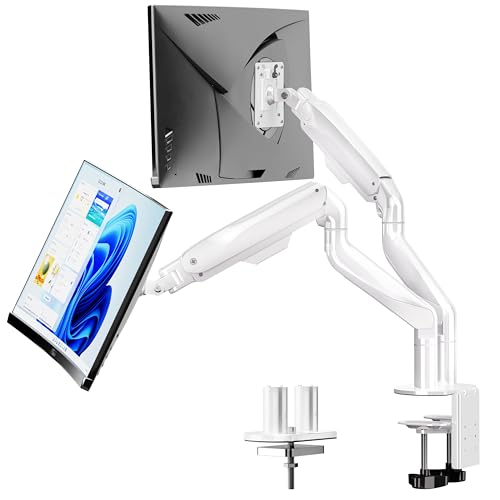
The BIZUM dual arm is built for the kind of person who has been burned by sagging mounts before. It is rated for 33.1 lbs per arm, which is meaningfully heavier than most dual stands in this category, and the aviation-aluminum construction gives the whole rig a planted feel. For a curved 34-inch ultrawide on each side, that headroom matters.
The dual C-clamp base spreads the load across a wider section of the desk, which keeps larger curved displays from tipping the stand when you swivel them out for a quick screen share. You may find, depending on your desk thickness, that the clamps leave visible pressure marks on softer wood tops over time.
Strengths Worth Knowing
- 33.1 lb-per-arm rating comfortably supports heavy ultrawide curved panels.
- Aviation-aluminum arms reduce flex, which you notice during long editing sessions.
- Dual C-clamp base distributes weight better than a single clamp when both arms are extended.
- 17–42 inch range covers both compact workstations and full ultrawide command centers.
Trade Offs
- The dual-clamp footprint requires a wider desk edge, so narrow tabletops won’t work as cleanly.
- With two arms fully loaded, you may need to rebalance tension after the first month of use.
Right Fit For
Power users running two curved ultrawides or larger who want serious weight capacity and don’t mind the wider clamp footprint.
Consider Something Else When
The monTEK Heavy-Duty Dual Monitor Stand is the better match for tighter desks where the dual C-clamp spread feels too aggressive.
Suptek’s ML6802 is the right shape for anyone who can’t drill their desk. The free-standing base means you drop it on the surface and load up two monitors, no clamp, no grommet, no commitment. For glass desks or rented workspaces where a landlord won’t forgive a drilled hole, that changes the math.
The pole stands 31.5 inches tall, which gives you real vertical adjustment for tall curved panels that want to sit closer to eye level. Each arm supports up to 22 lbs and rotates through full 360 degrees, so portrait-to-landscape swaps are part of the routine rather than a hassle.
The Helpful Details
- No-drill installation protects glass desks and rental agreements from damage.
- 31.5-inch pole provides useful vertical range for sit-stand or tall-curved setups.
- Free-standing design lets you slide the entire rig around the desk when reorganizing.
- Integrated cable management keeps the back view tidy without aftermarket clips.
Room For Improvement
- A free-standing base uses desk surface area that a clamped arm returns to you.
- Owners commonly report the base needs careful centering, especially on smooth surfaces.
Whose Shelf It Belongs On
Renters and glass-desk owners who want a dual curved setup without committing to permanent mounting hardware.
A Better Fit Elsewhere
The HUANUO FlowLift Pro Monitor Arm is the cleaner call if your desk can handle a clamp and you want back the surface area the Suptek base occupies.
Three curved monitors is where most stands start to feel like they are working harder than you are. The monTEK triple layout spreads the load across three independently articulating arms, each rated for 22 lbs and most screens from 17 to 32 inches. Compared with the Suptek free-standing pole, this one clamps down and gives back your desk surface.
The integrated cable organizers route wires through the arms rather than letting them drape behind the desk. For a creator running chat on one curved screen, timeline on the second, and preview on the third, that tidiness changes how the setup feels after eight hours.
Well-Handled Touches
- Three-arm layout frees desk surface that a stack of single arms would consume.
- 22 lb-per-arm rating covers curved 32-inch displays comfortably.
- Built-in cable channels cut down on the spaghetti that builds up behind triple rigs.
- Each arm adjusts independently, which simplifies portrait-plus-landscape mixed layouts.
Points To Keep In Mind
- Three arms plus three cables mean a longer initial setup than a dual configuration.
Best Suited To
Content creators and analysts running three curved panels who value the cable management and the reclaimed desk space.
Look Elsewhere When
The monTEK Quad Monitor Stand fits better if your workflow actually demands four screens rather than three.
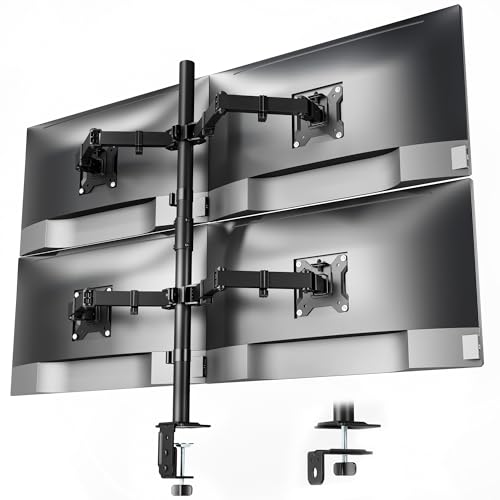
Four screens on a single mount sounds excessive until you sit in front of it. The monTEK quad stand handles 17- to 32-inch panels at 22 lbs each, and the shared central pole keeps the whole array aligned without you constantly nudging the outer screens back into position. For trading floors or simulation cockpits, that stability is the whole point.
Cable organization runs through the arms themselves, so the back of the rig stays presentable. You may find that mounting four curved panels makes the desk footprint feel crowded if the panels are deeper than 9 inches, so plan the desk depth accordingly.
Features That Help
- Four-panel array in one mount removes the clutter of two separate dual stands side by side.
- Shared pole keeps alignment consistent across all four screens.
- Cable routing through the arms protects the clean visual line of a quad layout.
- 22 lb-per-arm rating supports heavier curved panels without visible sag.
Some Limits To Know
- Four screens demand a deep desk, since curved panels add depth that flat rigs don’t have.
- The wider footprint means repositioning any single screen takes a little more coordination.
Who Should Grab It
Traders, simulation enthusiasts, and operations teams running four curved panels from one anchor point.
Swap It Out When
The monTEK Triple Monitor Stand is plenty for workflows that actually use three panels rather than four, and gives you back desk depth.
The Pixio PS1S Wave is for the corner of the market that cares how the mount looks, not just what it does. The mint-green finish and the gentle wave along the arm give it a personality most monitor hardware never bothers to have. On a desk styled around a single curved gaming display, it earns its place in the photo.
Functionally, it covers 32-inch screens up to 19.8 lbs with the same VESA 75x75mm and 100x100mm mounting patterns as the more neutral competitors. The integrated cable management tray doubles as a small storage slot for the adjustment tool, which is a thoughtful touch you only notice after you’ve used it.
Useful Touches
- Color-led design language matches gaming-room aesthetics where neutral hardware looks out of place.
- 19.8 lb capacity handles curved 32-inch displays without drift.
- Built-in tray stores the adjustment tool so you aren’t searching drawers months later.
- C-clamp and grommet mounting both ship in the box.
Honest Caveats
- The signature color means it won’t blend into a corporate or minimalist office.
Feature Snapshot
Perfect Match For
Gamers and streamers who want their curved monitor arm to read as part of the setup rather than as background hardware.
Not Your Match When
The HUANUO FlowLift Pro Monitor Arm is the more discreet call if your workspace leans neutral or corporate.
The dual version of the FlowLift is the workhorse I’d pick for a standard two-curved-monitor office. Each arm covers 13 to 32 inches at up to 19.8 lbs, and the full-motion VESA head keeps both screens adjustable independently. Compared with the monTEK Heavy-Duty option, this one feels lighter and easier to reposition, at the cost of some maximum load.
Setup uses a C-clamp or grommet base, both of which arrive in the box. You may find that two arms at full extension put more horizontal stress on the clamp than a single arm does, so a stiffer desk helps.
What Works In Its Favor
- Per-arm load rating of 19.8 lbs covers the typical curved 27-inch office display with room to spare.
- Full-motion head allows tilt, swivel, and rotation on each screen independently.
- C-clamp and grommet hardware both included for flexible install.
- Clean aesthetic suits office or home-office environments.
Practical Considerations
- Less load headroom than the BIZUM dual stand for heavier ultrawide panels.
- Wider desks tend to feel more stable under the clamp than narrow surfaces.
Who It Suits Best
Standard two-curved-monitor offices that want a clean, adjustable setup without paying for heavy-duty capacity.
Reach For A Different Pick When
The BIZUM Dual Monitor Stand is the right upgrade if your curved panels push past 30 inches or weigh more than this arm’s comfort zone.
This is the arm for the new class of 49-inch super-ultrawide and QD-OLED curved displays that have started arriving on desks. The 60 lb weight rating is the headline number, and the 24–57 inch screen range covers everything from a 27-inch curved all the way up to the widest consumer panels. It is genuinely a different category of mount than most of this list.
The white finish and the e-sports styling read clearly toward gaming setups. The geometry is engineered around heavier panels, so the tension mechanism feels stiffer than lighter-duty arms. If your curved display weighs under 20 lbs, you are paying for capacity you won’t use.
Strong Points
- 60 lb weight capacity supports 49-inch super-ultrawide and QD-OLED curved panels.
- 57-inch upper screen limit covers the largest consumer curved displays currently shipping.
- Engineered for heavier loads, so tension holds under sustained use.
- White finish complements modern gaming-room visual themes.
What To Weigh
- Heavier tension means fine adjustments take a little more effort than lighter-duty arms.
- Overkill for shoppers running sub-27-inch monitors.
Built With In Mind
Owners of super-ultrawide or QD-OLED curved displays who need genuine heavy-duty capacity in a single-arm form factor.
Another Choice May Suit
The HUANUO FlowLift Pro Monitor Arm handles a standard 32-inch curved display with less cost and lighter tension.
The Heavy-Duty dual stand is the answer when two curved screens need to stay exactly where you left them for years. Reinforced steel joints, thicker VESA plates, and anti-slip base pads add up to a stand that doesn’t drift after months of daily swiveling. Compared with the standard HUANUO FlowLift Dual, this one is built for permanence rather than flexibility.
It fits 17- to 32-inch screens at 22 lbs per arm and uses the same VESA 75x75mm and 100x100mm hole patterns as the rest of the category. You may find the install takes longer than lighter arms because the parts are heavier and the torque matters more.
Notable Gains
- Steel-reinforced joints hold position under sustained daily use.
- Thickened VESA plates reduce wobble at full extension.
- 22 lb-per-arm rating supports heavier curved panels comfortably.
- Anti-slip base pads improve stability on smooth desk surfaces.
Details To Watch
- Heavier hardware lengthens the initial setup time.
- Owners commonly report the assembly steps need a second person for alignment.
Key Product Details
The Right Fit
Long-session dual-monitor users who want a mount that holds its adjustment over years rather than months.
Where Another Pick Suits Better
The BIZUM Dual Monitor Stand is the more capable call for 42-inch ultrawides or panels pushing the 33 lb-per-arm range.
The HUANUO triple mount is built for the immersive end of the market, where three curved panels wrap a sim rig or a panoramic flight setup. Each arm takes a screen up to 32 inches at weights between 4.4 and 17.6 lbs, which lands squarely on mainstream curved gaming monitors. The clamp and grommet kit ships together.
Compared with the monTEK triple stand, this one targets a slightly lighter weight class and emphasizes gaming adjustability. Swivel, tilt, and rotation per arm keep each panel aimed at the player rather than parallel to the wall.
Key Advantages
- Triple-arm layout fits curved sim rigs without needing a custom rig frame.
- Independent swivel and tilt on each arm supports wraparound sight lines.
- Clamp and grommet hardware included for flexible desk mounting.
- Weight range of 4.4–17.6 lbs per arm matches common curved gaming displays.
Possible Compromises
- Per-arm load cap of 17.6 lbs is lower than the monTEK triple, so heavier panels are out.
- Three arms at full extension need a deep desk for stable clearance.
Who Will Love This
Sim racers and immersive-curved-monitor gamers who want three panels aligned to the cockpit sight line.
A Better Fit Elsewhere
The monTEK Triple Monitor Stand is the right call for heavier curved panels or when cable management is the priority.
## What To Weigh Before Choosing Your Curved Monitor Mount### Compatibility Comes FirstBefore anything else, match three numbers on your curved display: screen size in inches, weight in pounds, and the VESA pattern on the back (the four-hole square pattern that the arm clips onto, measured in millimeters). Most of these arms accept 75x75mm or 100x100mm VESA, which covers the bulk of curved monitors. Get those three right and the rest of the decision is about geometry.### Mount Type Shapes The Whole DeskA C-clamp needs a solid wood or composite desk edge between roughly 0.6 and 3.5 inches thick. A grommet mount needs a pre-drilled hole in the desk, which is more invasive but tidier. A free-standing base sacrifices some desk surface for the freedom of no-drill installation. Renters and glass-desk owners usually lean toward free-standing; long-term home offices usually pick clamp or grommet.### Capacity Is About More Than WeightThe stated weight limit is the maximum, not the comfortable working load. Curved displays concentrate mass forward of the mount, so a stand rated exactly at your panel’s weight may still drift over time. Picking an arm rated 20-30% above your monitor’s actual weight leaves room for adjustment without sag, especially on a 32-inch curved panel.### Articulation Matters More With CurvatureCurved screens need more tilt and swivel travel than flat panels because the curve pulls the center of gravity outward. Arms with limited tilt often feel stiff in everyday use, while arms with generous rotation make portrait-to-landscape swaps painless. For triple or quad rigs, independent per-arm articulation becomes essential rather than optional.## Key Considerations Across These Picks### Where Shoppers Go WrongThe most common slip is choosing an arm rated at exactly the monitor’s weight, with no margin for the forward-shifted center of gravity that curved panels create. Another frequent miss is overlooking desk thickness, since the C-clamp won’t seat on a glass top and the grommet option needs a hole that already exists. Triple and quad buyers often forget that curved panels add depth, and a desk that worked for a single screen may feel cramped once three wrap the sight line.### What The Higher Tier BuysPremium arms spend their extra money on stiffer joints, smoother tension mechanisms, and tighter machining tolerances. For a single 27-inch curved display, the difference between a budget arm and a premium arm mostly shows up in how long the mount holds its position. For heavier ultrawide or QD-OLED panels, the upgrade is closer to essential, since lighter arms simply weren’t engineered for that load class. The honest read is that mid-range arms handle the typical curved office setup well, and the premium tier earns its place once you cross into super-ultrawide territory.## Frequently Asked Questions### Do curved monitors need a special monitor stand? Curved monitors use the same VESA mounting patterns as flat panels, but they need arms with more tilt range and higher weight capacity, since the curve shifts the center of gravity forward.### What weight rating do I need for a 32-inch curved monitor? Most 32-inch curved displays weigh between 12 and 18 lbs, so an arm rated for at least 19.8 lbs gives you headroom for adjustment without sag over time.### Can I mount a curved monitor on a glass desk? A glass desk rules out most C-clamp installs, so a grommet mount through an existing hole or a free-standing base is the practical route.### Are triple monitor stands stable with curved screens? Triple stands hold curved screens well when each arm is rated for at least 22 lbs and the central pole is clamped to a solid wood desk edge.### How much desk depth do I need for curved ultrawides? Curved ultrawides add roughly 4 to 6 inches of depth compared with flat panels of the same diagonal, so plan on a desk at least 30 inches deep for a single ultrawide and deeper still for multi-screen rigs.## Wrap UpThe right monitor stand disappears into the setup, and the wrong one becomes the thing you nudge back into place every morning. Match your panel’s size, weight, and VESA pattern first, then choose the geometry that fits your desk and your workflow. Single-curved offices land on the FlowLift Pro, dual setups usually go to the BIZUM or monTEK Heavy-Duty, and triple or quad rigs belong on the monTEK multi-arm line. Whatever you pick, the curve deserves an arm that was actually built for it.