A rolling display setup changes how I use my desk. Instead of planting a monitor or TV in one corner and walking around it, I can push it between rooms, swing it into a meeting, or park it out of the way when the workday ends. The picks below cover three distinct needs: desktop monitor arms with caster bases, heavy-duty mobile TV carts for shared spaces, and compact portable stands for tablets and smaller screens. Each one solves a different version of the same problem, which is keeping screens flexible without sacrificing stability.
A Fast Comparison Of The Options

monTEK Triple Monitor Stand for 17-32″ Screens
monTEK Quad Monitor Stand for Four 17-32″ Screens

Maiproo Rolling TV Stand for 32-75″ Screens

Mobile TV Cart Rolling Stand for 23-65″ Screens

Urmust Portable Monitor Stand up to 18.5″ (Silver)

Urmust Portable Monitor Stand up to 18.5″ (Pink)

Urmust Tablet Stand for Desk (4.7″-15.6″)

Urmust Portable Monitor Stand 15.6″
Mobile Rolling TV Stand with Tilt (23-60″)

monTEK Heavy-Duty Dual Monitor Stand
A Deeper Look At The Lineup
Three screens on one rolling base changes the rhythm of a workday. I find traders and content editors especially benefit, since charts, timelines, and chat windows can stay visible at the same time without a cluttered stack.
Each arm holds a display between 17 and 32 inches, supporting up to 22 lbs per monitor. The VESA plate (VESA is the standard hole pattern on the back of monitors that lets them attach to mounts and arms) accepts 75x75mm or 100x100mm patterns, which covers most panels I’d consider for this kind of setup. Integrated cable routing keeps the desk looking clean.
Strong Points
- Three independent arms let me angle each panel for a wraparound view.
- 22 lbs per arm is enough headroom for most 27″ and 32″ productivity displays.
- Cable management channels are built into the arms, reducing visible clutter.
- VESA 75x75mm and 100x100mm compatibility covers the majority of mainstream monitors.
Things To Consider
- The clamp base needs a sturdy desk edge, so a thin tabletop may flex under three screens.
- Setup is more involved than a single-arm mount; I usually budget extra time for cable routing.
Key Specs
Who It Suits Best
Traders, video editors, and software developers who want three screens on a single rolling mount will find this a natural fit.
Consider Something Else When
Anyone working from a single laptop might prefer the monTEK Heavy-Duty Dual Monitor Stand for a lighter footprint.
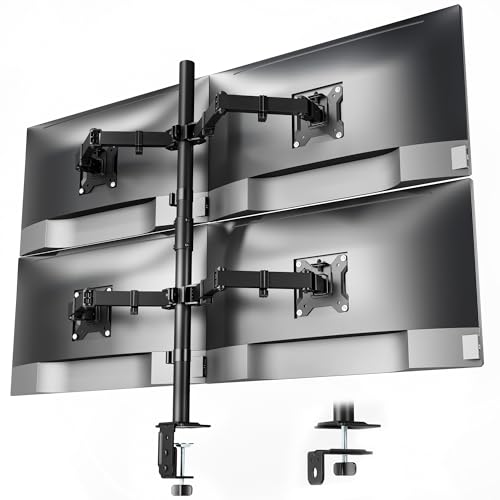
Four monitors on a rolling mount sounds excessive until the workload demands it. Surveillance teams, command-center operators, and finance pros lean on this kind of density. Compared to the triple-arm version above, this one trades desk footprint for full situational awareness.
The same 17 to 32 inch range and 22 lbs per arm apply, so each panel stays stable. Cable channels run along the arms to keep wiring tucked away, which matters when eight power and display cables run through one mount.
Benefits That Matter
- Four-arm layout supports a complete workflow without sacrificing screen real estate.
- Identical 22 lbs weight rating per arm keeps balance predictable across all panels.
- Shared VESA compatibility with the triple stand means swapping monitors between mounts is easy.
Trade Offs
- The clamp needs a thick, reinforced desk edge; lighter tables may not anchor four screens safely.
- Installation takes longer than a dual-arm setup, and I find the cable routing step fiddly with this many arms.
- Moving the base while loaded is harder than a TV cart, so the “on wheels” framing applies more to positioning than transport.
Best Suited To
Power users running simultaneous dashboards, multi-feed monitoring, or trading desks with several data streams.
Look Elsewhere When
A casual setup with one or two screens suits the Urmust Portable Monitor Stand 15.6″ much better than a quad rig.
A full-size screen on wheels solves the “where do we put the TV” question in offices and classrooms. The Maiproo handles screens from 32 to 75 inches with a 100 lb capacity, and the metal frame is the kind of build I look for when a panel will be rolled across thresholds regularly.
Multiple height positions let the screen adapt to seated viewers, standing presentations, or a crowd standing around it. A built-in shelf adds a small landing spot for a streaming stick or a laptop during a slide deck.
Real-World Strengths
- Up to 100 lb capacity covers mainstream 65″ and even some 75″ panels with confidence.
- Multiple height stops mean one cart can serve a meeting, a presentation, and a video call without swapping equipment.
- Lower shelf gives a practical spot for a laptop or small speaker.
- Wide caster base keeps the screen steady when rolled across a flat office floor.
Points To Keep In Mind
- 75″ screens at full capacity make the cart heavy; locking casters are a worthwhile add-on.
- The footprint is larger than smaller rolling stands, so narrow hallways may need a wider path.
Feature Snapshot
Made For
Conference rooms, classrooms, and event spaces where a large screen needs to move between configurations.
A Better Fit Elsewhere
Bedside tablet viewing suits the Urmust Tablet Stand for Desk (4.7″-15.6″) far more than a 75″ cart.
Where the Maiproo above starts at 32 inches, this HOLMAXD model begins at 23 inches. That range opens the door to mid-size office displays, large monitors repurposed as TVs, and outdoor patio setups. The 110 lb weight ceiling is one of the highest in this roundup.
The wide VESA support (VESA mounting patterns are the standardized screw-hole layouts on the back of TVs) goes up to 400x400mm, covering most panels at retail. A tilt mount gives viewers a better sightline when the screen sits higher than eye level.
What Works In Its Favor
- Starting at 23 inches means smaller meeting-room screens fit without an oversized cart.
- 110 lb capacity offers serious headroom for heavier 65″ panels.
- Max VESA 400x400mm compatibility spans most mainstream and pro-grade displays.
- Tilt mount adjusts the viewing angle for taller placements.
Honest Caveats
- Maximum VESA is 400x400mm, so very large or non-standard mounting plates may not fit.
- Tall configurations can feel tippy when rolled quickly, depending on the floor surface.
Whose Shelf It Belongs On
Offices and event venues that need a single rolling cart to handle a wide variety of screen sizes.
Swap It Out When
Anyone mounting a 75-inch panel should reach for the Maiproo Rolling TV Stand for 32-75″ Screens instead.
Not every screen needs a heavy rolling base. For a portable monitor or tablet on a nightstand or hotel desk, a compact aluminum stand does the job. This silver Urmust supports devices up to 18.5 inches and travels well in a laptop bag.
An anti-slip base keeps the panel planted, and an included wrench lets me tighten the joint when the screen starts to sag. I keep one of these in my travel kit for hotel-room work sessions.
The Helpful Details
- Up to 18.5 inch support covers most portable monitors and 13″ tablets in landscape mode.
- Anti-slip base keeps the screen planted on smooth surfaces.
- Included wrench lets me retighten the joint if the screen starts to lean after heavy use.
- Lightweight aluminum frame slips into a backpack without weighing things down.
Room For Improvement
- Tabletop use only; the manufacturer notes it is not designed for headboards or uneven surfaces.
- Wider tablets in heavy cases may press against the holding arms, depending on the fit.
Who Should Grab It
Travelers and remote workers who use a portable monitor or tablet in different rooms each day.
Where Another Pick Suits Better
Anyone running a multi-screen workstation should consider the monTEK Triple Monitor Stand for 17-32″ Screens instead.
The pink version of the same Urmust stand serves the same function as the silver model above, but the color choice matters when the stand sits in a visible part of a room. I find it lands well in home offices with warmer palettes.
Functionally it shares the 18.5-inch capacity, anti-slip base, and included adjustment wrench. The build is otherwise identical to its silver sibling.
Bright Spots
- Same 18.5 inch device support as the silver version, so no compromise on usability.
- Pink finish complements creative studios and warm-toned decor.
- Anti-slip base and adjustment wrench work the same way as the rest of the lineup.
Minor Gripes
- Color preference is subjective; a minimalist workspace may prefer the silver variant.
- Tabletop-only design applies here too, so it is not a substitute for a wall or headboard mount.
Right Fit For
Style-conscious users who want a compact stand that doubles as a desk accessory.
Not Your Match When
Anyone needing broad device compatibility should look at the Urmust Tablet Stand for Desk (4.7″-15.6″).
Not every household has just one device. The Urmust tablet stand covers anything from a 4.7-inch phone to a 15.6-inch laptop, which makes it the most flexible small-format stand in this roundup. For mixed-device families, that range saves buying multiple stands.
The anti-slip base and adjustment wrench carry over from the other Urmust models, so the experience is consistent. It is still tabletop-only, though, so a soft surface like a bed or couch is off the table.
A Strong Showing
- 4.7 to 15.6 inch range covers phones, tablets, e-readers, and compact laptops in one stand.
- Anti-slip base performs on most smooth surfaces.
- Included wrench keeps the joint firm after months of repeated angle changes.
- Compact footprint fits on a nightstand or shared kitchen counter.
Possible Compromises
- Not designed for headboards or uneven surfaces, so bedside reading in bed is limited.
- Heavier 15.6-inch laptops need the joint tightened regularly, depending on how often I adjust the angle.
At A Glance
Who Will Love This
Mixed-device households and shared desks where the same stand handles a phone today and a laptop tomorrow.
Reach For A Different Pick When
Rolling a 65-inch panel across a conference room calls for the Mobile TV Cart Rolling Stand for 23-65″ Screens.
When I know I’ll only ever mount a 15.6-inch portable monitor, the broader range on the previous Urmust feels like overkill. This model narrows in on the most common portable monitor size, which keeps the design tighter.
The anti-slip base and included wrench match the rest of the family. For students running a single portable monitor beside a laptop, this is the most focused pick in the small-format group.
Everyday Wins
- 15.6 inch support is dialed in for the most popular portable monitor size.
- Anti-slip base keeps the screen planted during typing sessions.
- Adjustment wrench keeps the hinge tight over months of use.
Small Caveats
- Not built for headboards or uneven surfaces, like the other Urmust tabletop stands.
- Larger tablets or laptops beyond 15.6 inches are out of scope here.
Perfect Match For
Students and remote workers who use a 15.6-inch portable monitor as their second screen.
Another Choice May Suit
Anyone cycling between a phone and a laptop would get more use out of the Urmust Tablet Stand for Desk (4.7″-15.6″).
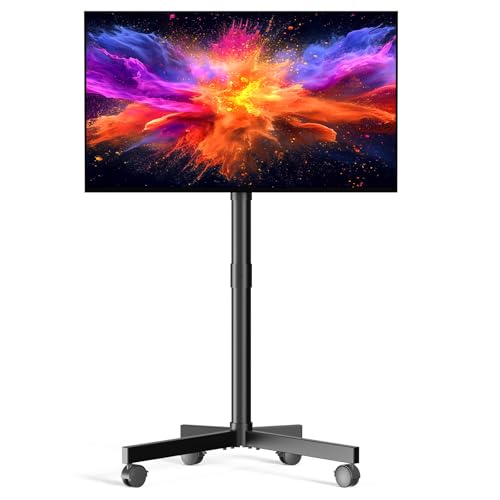
Zontera’s rolling stand covers the 23 to 60 inch range and adds a tilt adjustment I appreciate when the screen needs to angle downward from a higher position. The 88 lb capacity fits most 55″ panels at retail, and the steel frame feels steady on flat floors.
VESA compatibility up to 400x400mm covers mainstream TVs in this size range. Compared to the HOLMAXD model above, this one stops at 60 inches, so I would not push it to large 65-inch panels.
Notable Upsides
- 23 to 60 inch range covers most mid-size TVs and large office displays.
- Steel frame construction feels sturdy for daily repositioning.
- Tilt adjustment improves sightlines when the screen sits above eye level.
- Max VESA 400x400mm fits mainstream panels without adapter plates.
Less Ideal Details
- 60-inch ceiling is smaller than the HOLMAXD cart, which extends to 65 inches.
- 88 lb capacity is lower than the 110 lb ceiling on the HOLMAXD model.
Built With In Mind
Shared living areas and meeting rooms that need a moderate-size rolling TV with a tilt option.
Skip It When
Anyone mounting a 65-inch or larger panel should step up to the Mobile TV Cart Rolling Stand for 23-65″ Screens.
For a two-screen rolling setup that doesn’t push into quad-monitor territory, this monTEK dual stand is the practical middle ground. The reinforced steel joints and thickened VESA plates give it a more planted feel than lighter dual arms.
Each arm handles 17 to 32 inch displays at up to 22 lbs, with VESA 75x75mm and 100x100mm compatibility. Anti-slip base pads reduce wobble during typing. Compared to the triple stand I covered first, this one trades one arm for a more confident fit on a smaller desk.
Reasons It Performs
- Reinforced steel joints give the arms a planted feel under continuous typing.
- Thickened VESA plates reduce wobble compared to entry-level dual arms.
- Anti-slip base pads keep the mount steady on a range of desk surfaces.
- 17 to 32 inch, 22 lbs per arm range matches mainstream productivity monitors.
A Few Limitations
- Two screens may not be enough for traders or multi-feed monitoring setups that benefit from the quad version above.
- Clamp base needs a sturdy desk edge, just like the triple-arm setup.
Feature Rundown
The Right Fit
Home offices and gaming setups that want a sturdy two-screen mount on a rolling base.
Where A Sibling Pick Shines
Power users running three or four screens should look at the monTEK Triple Monitor Stand for 17-32″ Screens.
What To Weigh Before Choosing Monitor Stands On Wheels
Screen Size And VESA Match
The first check is whether the stand supports both the size and the VESA pattern of the screen. Most desktop monitor arms in this list accept 75x75mm or 100x100mm VESA plates, while the mobile TV carts extend up to 400x400mm for larger panels. Mismatched VESA is the most common reason a mount arrives and doesn’t fit, so confirming the pattern before purchase saves a return.
Weight Capacity And Daily Use
A 22 lbs per arm rating covers most productivity monitors, but heavier gaming displays or curved panels can push that limit. For TV carts, the 88 to 110 lb capacities handle mainstream sizes, but large 75-inch panels sit closer to the upper bound. I find it’s wise to leave a margin rather than max out the rating.
Mobility Versus Stability
Carts with caster bases prioritize mobility, which means they roll easily but need locking wheels for steady viewing. Desktop monitor arms with clamp bases are more stable but harder to reposition once installed. Choosing between the two depends on whether the screen will move daily or stay put.
Real-World Use Scenarios
For trading floors and control rooms, the quad or triple-arm configurations make sense. For offices with rolling screens between meeting rooms, the mobile TV carts fit the workflow. For students and travelers, the compact Urmust stands offer a lightweight footprint that packs into a bag.
Things To Think Through Before Committing
Where Shoppers Go Wrong
The most common slip-up I see is buying a stand without checking the VESA pattern of the monitor. Another is underestimating how much desk depth a triple or quad arm needs once the monitors swing out. Some shoppers also forget that caster wheels need locking, or the screen drifts mid-presentation.
When Paying More Pays Off
Higher-tier monitor arms in this list add features like reinforced steel joints, anti-slip base pads, and integrated cable management. For a setup that runs eight hours a day, those touches pay back in reduced wobble and a tidier desk. For occasional use, an entry-level stand may be enough.
Frequently Asked Questions
What does VESA mean on a monitor stand?
VESA is the standard hole pattern on the back of a monitor or TV that lets it attach to a mount or arm. Common patterns are 75x75mm, 100x100mm, and 400x400mm for larger screens.
Can I roll a TV cart over carpet?
Most mobile TV carts handle hard floors and low-pile carpet fine, depending on caster size. High-pile carpet can make rolling harder and may require larger casters or a hard pathway.
Do monitor arms need a specific desk thickness?
Clamp-based monitor arms typically need a desk edge between about 0.5 and 3 inches thick. Thinner desks may not clamp securely, and thicker surfaces can exceed the clamp range.
Are portable monitor stands stable on a bed?
Tabletop-only stands like the Urmust models are designed for flat, stable surfaces such as desks. On a bed or couch, they can wobble or tip, depending on how soft the surface is.
How do I know the stand will hold my monitor weight?
Check the stand’s listed weight capacity per arm and compare it to the weight of the monitor. Leaving a margin rather than maxing out the rating reduces strain on the joints.
Wrap Up
A rolling display setup fits how I work best, and the picks above cover everything from a single portable monitor to a four-screen command center. Match the stand to the screen size, VESA pattern, and weight, then decide how often the screen actually moves. That choice tends to point to the right pick on this list.