A good monitor stand does more than hold a screen. It lifts the display to eye level, reclaims desk space for keyboards and notebooks, and tucks away the cable mess that gathers behind every workstation. Whether you’re working from a tight apartment desk or running a multi-screen setup, the right riser or arm changes how your day feels.
The Shortlist At A Glance

EVOOMI Back Saver Monitor Stand for Desk, 2 Pack

pyntop 360° Rotation Monitor Swivel Base

WALI Monitor Stand Riser (STT001), Black

HUANUO Monitor Riser for Desk, Vented Steel Shelf

Hemudu 2 Pack Computer Monitor Riser, Height Adjustable

Fenge Dual Monitor Stand with Drawers, 42.5″, Oak

monTEK Triple Monitor Stand, 17–32″ Screens
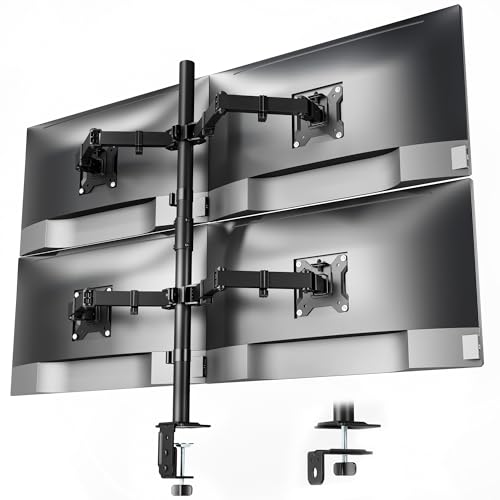
monTEK Quad Monitor Stand, Four 17–32″ Screens

monTEK Heavy-Duty Dual Monitor Stand, 17–32″

loukin Monitor Stand Riser for Desk, 22.4″ × 8.2″, Brown
More Details On Our Top Picks
I tend to favor two-pack stands for anyone running a dual-screen desk, and the EVOOMI hits that brief without weighing the surface down. The hexagonal ventilation pattern across the steel shelf isn’t decoration; it lets heat drift up and away from laptops or printers sitting on top, which matters during long working sessions.
Compared to a single-shelf riser like the WALI, this set gives you matching elevation on both sides, so the eye line stays consistent between screens. Anti-skid feet keep the steel plate planted on wood or laminate, and the included cable ties handle the spaghetti that builds up behind the monitors.
What Stands Out
- Hex-cut steel shelves pull heat away from devices, helping laptops run cooler through long shifts.
- Two-pack format means balanced eye height across a dual-screen layout without buying separate risers.
- Cable ties ship in the box, so you can tame the cord mess on day one.
- Anti-skid base grips wood, laminate, and glass without scratching the finish.
- Mesh metal construction keeps the weight low, useful for thinner desks with weight limits.
Things To Consider
- The fixed height means you can’t fine-tune elevation for taller users.
- Steel edges can show scuffs over time, so a felt pad under heavy printers is worth considering.
Feature Snapshot
Right Fit For
Remote workers and home-office setups running two side-by-side monitors who want matched, breathable risers without buying twice.
Consider Something Else When
The pyntop swivel base suits anyone who shares a screen with coworkers and needs to spin it toward another seat, not just lift it.
Most stands on this list lift, but the pyntop rotates. That’s its whole purpose. Instead of craning your neck or dragging a heavy monitor, you spin the base to share your screen with the person beside you, a useful trick during pairing sessions or quick reviews.
The aluminum-alloy top plate sits flat against the monitor’s foot, so there’s no awkward lip to deal with. It feels more like a turntable than a riser, so plan on using your existing monitor height adjustment rather than expecting a posture lift.
Why It Works Well
- Full 360° rotation lets you pivot the screen without lifting it.
- Aluminum-alloy surface resists corrosion and keeps the base low-profile.
- Flat top plate protects the underside of the monitor from scratches.
Trade Offs
- Provides minimal elevation, so it won’t fix poor eye-line posture on its own.
- Heavier monitors may need a stabilizing pad to avoid drifting mid-spin.
Made For
Anyone sharing a desk with a collaborator, from office neighbors to parents helping kids with homework across a single monitor.
Swap It Out When
The Hemudu two-pack is a smarter match for shoppers who need actual height adjustment along with ergonomic lift.
The WALI is the kind of riser that quietly does its job without fanfare. A 14.5 by 9 inch metal shelf raises a monitor roughly 4 inches off the desk, enough to take the hunch out of an afternoon’s worth of typing.
The non-slip pads under each leg protect the desk surface from scratches, which is a small detail that pays off over years of sliding the stand around. Where the EVOOMI leans into airflow, the WALI leans into clean simplicity and a 44 lb load rating that handles most monitors and printers without complaint.
Where It Delivers
- 44 lb weight capacity covers most 27-inch monitors plus a printer on the same shelf.
- Non-slip leg pads stop the stand from drifting when you nudge cables behind it.
- Compact 14.5 by 9 inch footprint tucks easily under keyboards and laptops.
- Raising the screen 4 inches noticeably eases neck strain during long sessions.
Points To Keep In Mind
- Fixed elevation means taller users may still need a chair or desk adjustment.
- Solid metal shelf traps heat under laptops, so a separate cooling pad may help.
Quick Facts
Who Should Grab It
Students and home-office workers running a single monitor who want a no-fuss riser that protects the desk surface.
Look Elsewhere When
The HUANUO is a better pick for anyone whose laptop runs hot and needs the ventilated steel shelf to keep temperatures down.
The HUANUO looks plain at first glance, but the perforated steel top is doing real work. Heat rises through those holes instead of pooling under a laptop, which is the difference between a comfortable work session and one that ends with a fan screaming.
Measuring roughly 14.57 by 9.25 by 3.94 inches, the shelf fits most laptops, monitors, and printers without crowding the desk. Compared to the WALI’s solid metal top, this one trades a small amount of perceived stiffness for much better thermal behavior.
Positive Points
- Perforated steel shelf pulls heat away from laptops running heavy workloads.
- About 3.94 inches of lift is enough to align the screen with seated eye level.
- Compact footprint tucks under laptops that close while docked underneath.
- Powder-coated finish resists scratches and wipes clean with a dry cloth.
Some Limits To Know
- Lightweight build can feel tippy under very heavy 32-inch displays without extra bracing.
- Open perforations collect dust and need occasional vacuuming.
Best Suited To
Anyone running a hot laptop docked under the riser, especially remote workers and students who push their machines hard.
A Better Fit Elsewhere
The monTEK Heavy-Duty Dual Monitor Stand suits shoppers mounting larger screens who need genuine arm support rather than a shelf.
The Hemudu stands out because it actually adjusts. While the WALI and HUANUO lock you into one height, this riser lets you tweak the elevation by sliding the stainless steel legs, then tilt the top forward up to 15 degrees to dial in the viewing angle.
Coming as a two-pack, it’s a natural fit for dual-monitor users who want symmetric risers with the same adjustment range on both sides. Stashing a closed laptop underneath is part of the pitch, so the open space beneath the shelf pulls double duty as a storage shelf.
Points In Its Favor
- Adjustable legs let you tune the height to your chair and posture.
- Forward tilt up to 15 degrees takes glare off the screen during the afternoon sun shift.
- Two-pack design keeps dual-monitor setups visually balanced.
- Stainless steel legs hold up to years of adjustment without loosening.
Trade Offs
- Tilt adjustment is manual and may drift back to level over time.
- Taller configurations can feel less rigid under heavy printers.
Feature Card
Who It Suits Best
Shoppers who switch between sitting and standing work positions, or households sharing one desk between users of different heights.
Another Choice May Suit
The Fenge Dual Monitor Stand suits anyone who also wants built-in drawer storage for office supplies along with the dual tier.
Where most risers give you a single shelf, the Fenge doubles up. The 42.5-inch top stretches wide enough to host two 32-inch monitors side by side, while a slide-out drawer hides the desk clutter that would otherwise spread across the surface.
Built from MDF with an oak finish, this stand reads more like furniture than a piece of office hardware. It pairs better with a wood-toned desk than a stark white setup, but the storage alone makes it worth considering for anyone whose desk doubles as a paperwork station.
A Strong Showing
- Two tiers and a drawer handle monitors, printers, and office supplies in one footprint.
- 42.5-inch top fits two 32-inch monitors without crowding.
- Oak finish blends with warm, wood-toned home offices.
Room For Improvement
- MDF construction is heavier and less travel-friendly than metal risers.
- Limited height adjustment means tall users may need an additional chair riser.
Whose Shelf It Belongs On
Home-office workers who run two large monitors plus a printer, and who want paperwork storage integrated into the riser.
Reach For A Different Pick When
The monTEK Triple Monitor Stand is a stronger fit for trading or creative setups that need three screens on arms rather than shelves.
The first six picks here are risers. This one is an arm-mounted stand, and the difference shows. Three monitors float above the desk on articulated arms, freeing up the entire surface for keyboards, notebooks, and the morning coffee.
Each arm handles a 17 to 32 inch screen up to 22 lbs, which covers the vast majority of monitors on the market, provided the back of the display carries a VESA mounting pattern of 75x75mm or 100x100mm. Integrated cable organizers thread the wires along the arms so the back of the desk stays clean.
Everyday Perks
- Frees up significant desk space by lifting monitors off the surface entirely.
- Each arm adjusts independently, letting you angle screens for glare-free viewing.
- Built-in cable channels keep the desk back panel tidy.
- VESA 75x75mm and 100x100mm compatibility fits most modern monitors.
Points To Note
- Installation requires drilling into or clamping onto the desk.
- Monitors without VESA mounts need an adapter plate.
Perfect Match For
Stock traders, video editors, and developers running three screens simultaneously who need maximum desk real estate.
Where A Sibling Pick Shines
The monTEK Quad Monitor Stand handles four screens for security operations desks and similar multi-display environments.
The quad version takes everything the triple offers and adds another arm. It’s overkill for most home setups, but for users who genuinely need four live screens at once, this stand keeps all of them positioned and aligned without claiming more than a single clamp footprint.
The cable organizers built into each arm matter more here than on the triple, since four sets of wires can quickly become a mess behind the monitors. VESA compatibility stays at 75x75mm or 100x100mm, with a 22 lb per-arm ceiling.
Useful Touches
- Four-arm setup supports immersive control-room and surveillance layouts.
- Cable management runs along each arm, simplifying the wiring for four screens.
- Single clamp keeps installation footprint compact on the desk edge.
Practical Considerations
- Full installation takes longer than a simple riser shelf.
- Desk-edge clamp may not suit very thick or curved-edge desks without an adapter.
Built With In Mind
Security operations centers, financial trading floors, and simulation enthusiasts who monitor four live feeds simultaneously.
Not Your Match When
The loukin stand is the right pick for anyone who wants a warm wooden riser for a single screen rather than a quad-arm rig.
Where the standard monTEK arms do their job well, this heavy-duty version goes further. Reinforced steel joints and thicker VESA plates give it the backbone to handle larger displays without wobble, which is exactly what a 32-inch monitor demands when you bump the desk.
Tilt, swivel, and rotation adjustments let each screen pivot to wherever the work takes you, from a client presentation to a long focus block. Anti-slip base pads keep the clamp locked to the desk edge even with both arms extended.
Key Advantages
- Reinforced steel joints reduce wobble when both screens are extended.
- Thickened VESA plates support larger displays with confidence.
- Anti-slip base pads protect the desk edge and keep the mount planted.
- Full tilt, swivel, and rotation on each arm suits varied workflows.
Worth Bearing In Mind
- Heavier overall mass makes desk relocation harder once mounted.
- Maximum weight per arm sits at 22 lbs, so check your monitor specs before committing.
Who Will Love This
Creators and engineers mounting two large 27 to 32 inch monitors who prioritize stability over the lightest possible arm.
A Better Fit Elsewhere
The Fenge is worth a look for shoppers who want a furniture-style dual-screen shelf rather than arm-mounted suspension.
The loukin closes out the list with a different vibe. Instead of perforated steel or MDF, this is a wide, warm-toned wooden shelf that brings an almost furniture-like finish to a desk corner.
At 22.4 by 8.2 inches, the surface sits noticeably wider than most risers, giving you room for a tablet or speaker alongside the monitor. The waterproof MDF board wipes clean with a damp cloth, which helps when the morning coffee finds its way to the wrong side of the desk.
Strong Points
- 22.4-inch width offers room for a tablet or speaker alongside the monitor.
- Waterproof MDF surface wipes clean with a damp cloth.
- Wood-tone finish suits home offices styled for warmth rather than corporate minimalism.
- Lifts the screen to a better viewing height to ease neck strain.
Honest Caveats
- MDF construction means it can’t match steel risers for raw load capacity.
- Single fixed elevation, so pairing with the right chair height matters.
Best Suited To
Home-office workers who care about how the desk looks as much as how it functions, and who run a single monitor plus tablet.
Look Elsewhere When
The Hemudu two-pack is a stronger fit for anyone needing adjustable height in addition to a clean shelf.
What To Weigh Before Choosing Your Stand
A monitor stand falls into one of two camps: shelf-style risers that lift the screen a few inches and add storage, or arm-mounted stands that suspend the display above the desk. Riser shelves suit single-screen setups, smaller desks, and shoppers who need printer or laptop storage underneath. Arm mounts shine when the desk surface matters more than shelf space, especially with two or more screens, since they free up the entire desktop below.
The next decision is material. Powder-coated steel handles heavier loads and runs cooler under laptops, which is why perforated steel tops like the HUANUO and EVOOMI stay popular. MDF shelves look warmer and work fine for lighter monitors, but they trap more heat and have lower weight ceilings. For desks that hold a 27-inch or larger screen, steel is the safer material choice.
VESA compatibility is the spec that matters most for arm-mounted stands. VESA refers to the standardized mounting hole pattern on the back of monitors, typically 75x75mm or 100x100mm. Confirm your monitor carries one of those patterns before buying an arm. Without it, you’d need an adapter plate, adding cost and bulk.
Height adjustment is where many basic risers fall short. Fixed-height shelves work for users of average height, but households sharing a desk often need the adjustable legs found on the Hemudu, which let you tune elevation to different chairs and postures. For a permanent single-user setup, fixed height is usually fine.
Smart Considerations Across This Category
Mistakes Worth Dodging
A common slip is buying a riser without measuring the monitor’s base. Some screens have wide V-shaped feet that overhang a 14.5-inch shelf, which leaves the monitor teetering on the edge. Measure your monitor’s footprint and match it to the shelf dimensions before committing.
Another trap is ignoring weight. A riser rated for 20 kg handles most setups, but heavier all-in-one printers or older CRT displays can push past that limit. Check the load rating against the heaviest device that will sit on top, not just the monitor.
What The Higher Tier Buys
Paying more for a premium monitor stand usually means better articulation, sturdier joints, and integrated cable management. The monTEK heavy-duty and triple-arm options cost more because the steel joints and gas-spring arms hold position under repeated adjustment without sagging. For a single fixed setup, a basic riser does the job; for users who adjust their screens throughout the day, the upgrade pays off in smoother motion and longer-lasting hardware.
Frequently Asked Questions
How high should a monitor stand lift my screen? Most risers lift between 3 and 5 inches. The right height puts the top of the screen at or just below eye level when seated, so the neck stays neutral rather than tilted up or down.
Do I need a VESA mount on my monitor for an arm stand? Yes, arm-mounted stands require VESA-compatible holes on the back of the monitor. Most modern displays include either 75x75mm or 100x100mm patterns. Without them, a shelf-style riser is the better fit.
Will a monitor stand damage my desk? Quality risers include non-slip pads or rubber feet that protect the surface. Clamp-mounted arm stands grip the desk edge, but a felt pad between the clamp and the desk prevents marks on wood or glass finishes.
Can a monitor stand help with neck pain? Raising the screen to eye level reduces the forward-head posture that strains the neck and upper back. For users logging long hours at a desk, even a 4-inch lift tends to take the edge off daily discomfort.
Are wooden monitor stands sturdy enough for larger monitors? MDF shelves like the loukin handle most monitors up to 27 inches comfortably, but 32-inch displays are heavier and benefit from steel construction or an arm mount rated for the load.
Closing Thoughts
A monitor stand is one of the smaller purchases that quietly changes how every workday feels. Match the stand to your screen count, desk depth, and posture needs, then let the extras like storage drawers or arm articulation follow from there. The right riser earns its keep the moment you stop noticing it, which is the goal.