I write this from the perspective of someone who keeps a laptop on a standing desk, a tablet by the couch, and a media PC hooked to a TV, and the constant hunt for the right keyboard has been real. A solid multi-device keyboard takes that headache away, letting one board glide between gear with a tap. This lineup covers compact travel picks, ergonomic split layouts, and bundled mouse combos for nearly every setup at home or in a small office.
A Closer Look At The Lineup

Perixx PERIDUO-606IIA Wireless Ergonomic Keyboard Combo
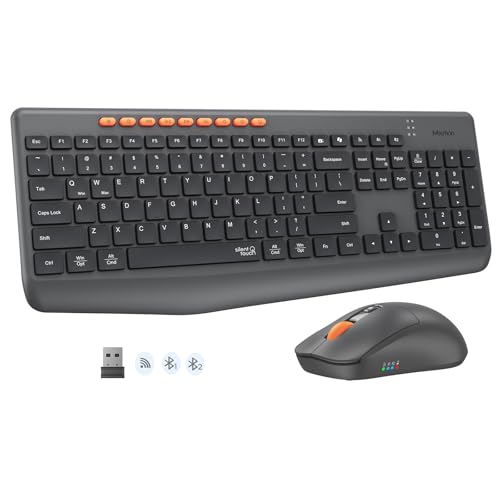
MEETION Wireless Bluetooth Keyboard and Mouse Combo
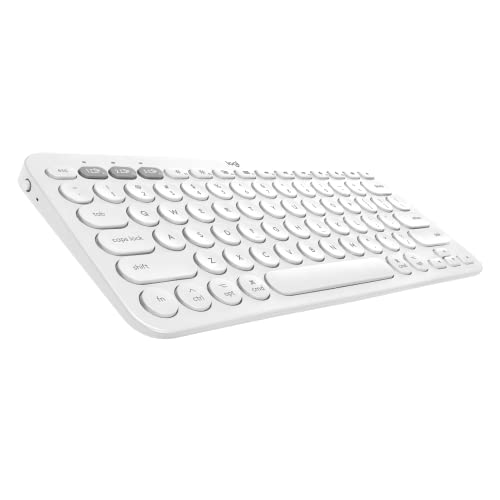
Logitech K380 Multi-Device Bluetooth Keyboard for Mac

Logitech K380 Multi-Device Bluetooth Keyboard QWERTZ Pink

Perixx PERIBOARD-512B Wired Ergonomic Split Keyboard

seenda COE64-3 Pro Wireless Bluetooth Keyboard Combo
ProtoArc EKM02 Wave Keys Ergonomic Keyboard and Mouse

Perixx PERIBOARD-835BR II Wireless Ergonomic Mechanical Keyboard

Logitech K380 Pebble Wireless Multi-Device Keyboard

CHERRY KW 9200 MINI Compact Multi-Device Keyboard
What Each Pick Brings To The Table
The Perixx PERIDUO-606IIA is the only full bundle in this roundup that pairs a split-feel keyboard with a vertical mouse and a separate numeric keypad, all running off a single USB nano receiver. For anyone logging eight-hour days at a desk, that trio targets the spots where fatigue usually shows up first: wrists, forearms, and the small muscles along the thumb side of the hand.
Where the MEETION combo keeps things simple and the Logitech K380 line focuses on portability, this Perixx set leans hard into ergonomics. It trades a compact footprint for a cushioned palm rest and adjustable tilt feet, and the keypad detaches when you want the mouse closer to the body.
Useful Highlights
- Single 2.4GHz receiver handles keyboard, mouse, and keypad, freeing up USB ports.
- Cushioned palm support plus tilt feet let owners dial in a wrist-friendly angle during long sessions.
- Twelve multimedia hotkeys via Fn plus F1–F12 put audio and media controls one tap away.
- Vertical mouse orientation reduces forearm twisting compared with flat mice in this list.
Things To Consider
- Replacement nano receivers can vanish in a busy office, so a labeled spare drawer helps.
- Three-piece footprint demands more desk real estate than a single-board option like the K380.
Feature Snapshot
Whose Desk It Earns
Daily desktop users who type for hours and want wrist relief without buying three separate accessories will get the most from this Perixx combo.
Where Another Pick Suits Better
Frequent travelers who bounce between a laptop and a tablet will find the Logitech K380 Pebble a friendlier travel companion thanks to its smaller size.
MEETION’s combo is the kind of straightforward full-size board a small office or shared apartment needs: silent key presses, a bundled mouse, and dual wireless modes (Bluetooth plus 2.4GHz) that switch between three paired devices. It skips the ergonomic theatrics of the Perixx PERIDUO-606IIA in favor of a familiar layout anyone can sit down and use.
Where the Logitech K380 drops the number pad to stay pocketable, this board keeps it. For anyone entering figures daily, that full-size layout matters more than a few extra centimeters of desk space.
Where It Helps
- Bluetooth and 2.4GHz wireless cover laptops, tablets, and phones without a cable shuffle.
- Whisper-quiet key presses keep shared rooms and late-night work sessions neighbor-friendly.
- Full-size layout with a dedicated number pad handles accounting and data entry without an add-on keypad.
Honest Caveats
- Battery-powered wireless peripherals tend to need spare cells on hand for heavy work weeks.
- Larger footprint can crowd narrower standing-desk trays.
- The bundled mouse uses the same wireless modes, so pairing two boards in the same room can occasionally need a manual channel switch.
Right Fit For
Home-office workers and shared-workspace typists who value quiet keys and a familiar full layout will appreciate this MEETION pairing.
Swap It Out When
Anyone committed to an ergonomic split setup should look at the Perixx PERIBOARD-512B instead, which trades wireless freedom for a more natural hand position.
This Logitech K380 variant is tuned for the Apple ecosystem, pairing with MacBook, iMac, and iPad setups via Bluetooth. It keeps the round key caps and compact slab form that have made the K380 a fixture on minimalist desks, while shipping with Mac layout shortcuts so owners skip the usual key-mapping dance.
Where the MEETION combo leans into a full-size footprint, the K380 in this Mac flavor goes the other direction. Think couch work with an iPad, kitchen-counter email on a MacBook, and the occasional iPhone reply session.
Where It Excels
- Mac-aware command and option keys reduce friction for users bouncing between iPad and MacBook.
- Three-device Bluetooth pairing via the Easy-Switch dial fits the way Apple households already rotate gear.
- Compact body slips into a laptop sleeve, making it a natural couch-to-desk companion.
Points To Keep In Mind
- AA battery cells are user-replaceable, so keeping spares avoids the “dead keyboard” scramble midweek.
- No backlighting means dim-room typing leans on muscle memory rather than visible keycaps.
- Compact form omits a number pad, which can slow heavy spreadsheet work.
Best Suited To
Apple households that move between MacBook, iPad, and iPhone will find this Mac K380 a low-friction daily driver.
A Better Fit Elsewhere
Windows-based offices leaning on dedicated number entry will get more from the seenda COE64-3 Pro, which keeps a full layout with backlighting.
This QWERTZ German-layout Logitech K380 ships in a pink colorway, making it the most style-forward entry on the list. It shares the same compact DNA as the Mac-tuned K380 above, including the round keys, Bluetooth pairing across three devices, and the Easy-Switch dial that flips between paired hosts.
The German layout is the genuine headline here, since QWERTZ users buying a US-layout board will fight swapped Y and Z positions forever. For typists in Germany, Austria, and Switzerland, this is the version that just works.
The Good Stuff
- Genuine QWERTZ layout saves German-language typists from daily key-mapping friction.
- Pink finish stands out on a desk full of black peripherals.
- Bluetooth pairing across three devices covers phone, tablet, and laptop without re-pairing.
Worth Bearing In Mind
- QWERTZ layout makes this the wrong fit for US or UK English typists; the regular K380 fits those keyboards better.
- Compact body omits a number pad and backlight, same trade-off as the other K380 variants.
- The pink finish shows dust and oils more readily than darker boards, depending on your environment.
Who Will Love This
German-language typists who want a colorful, compact Bluetooth keyboard will find this K380 variant ready to go out of the box.
Reach For A Different Pick When
Anyone needing a number pad for daily accounting should grab the seenda COE64-3 Pro, which keeps the dedicated numpad plus backlighting.
The Perixx PERIBOARD-512B is the keyboard for someone who plugs in once and never thinks about batteries. It uses a wired USB connection and a one-piece split layout that nudges each hand toward a more natural angle, so wrists stop bending sideways during long typing sessions.
Compare that to the wireless Perixx PERIDUO-606IIA earlier in the list, and the trade-off becomes obvious: here you give up multi-device switching for an always-on, no-latency connection that suits a single workstation perfectly.
A Few Strong Suits
- Wired USB means zero pairing headaches and no batteries to replace.
- Split key zones encourage a more natural hand position than flat keyboards.
- Extended key travel with tactile feedback feels closer to a mechanical board than a typical membrane.
Some Limits To Know
- No wireless switching, so jumping between laptop and tablet means plugging the cable back in.
- The split layout has a real learning curve; the first week can feel slow.
Quick Facts
Who Should Grab It
Single-station typists who value a stable, ergonomic setup over device-hopping will appreciate the Perixx PERIBOARD-512B.
Not Your Match When
Frequent travelers who need wireless switching should choose the Logitech K380 Pebble, which keeps multi-device pairing in a much smaller body.
The seenda COE64-3 Pro is the pick for anyone whose workday runs through spreadsheets. It keeps a full-size layout with a dedicated number pad, adds seven backlight colors with three brightness levels, and runs across three paired devices via Bluetooth. The slim 0.18-inch metal body and two tilt angles (5.5° and 9°) help it sit flatter on a desk than chunkier productivity boards.
Where the K380 Mac variant dropped the numpad for portability, this seenda doubles down on number-crunching comfort. Late-night spreadsheet sessions in dim offices feel less like guesswork with the backlight doing the work.
A Strong Showing
- Full-size layout preserves a dedicated number pad for data entry and accounting.
- Three-device Bluetooth pairing keeps laptops, tablets, and phones in rotation.
- Slim metal housing and dual tilt angles suit long typing days without bulk.
Worth Noting
- Slim metal body can feel cold to the touch in chilly rooms until it warms up.
- Bundled mouse shares the wireless channel, so occasional re-pairing may be needed.
Feature Card
Perfect Match For
Number-crunching professionals and late-night spreadsheet workers will appreciate the seenda COE64-3 Pro’s backlit number pad.
Where Another Pick Suits Better
Road warriors who need pocketable gear will prefer the Logitech K380 Pebble, which trades the number pad for a slimmer carry profile.
The ProtoArc EKM02 takes a softer ergonomic route than the Perixx split boards. Its wave-shaped key layout keeps the keyboard as one piece but bends the keys to match each hand’s natural curve, paired with a vertical mouse that encourages a handshake grip. Owners can swap between three devices with a single click.
Compared to the bundled Perixx PERIDUO-606IIA earlier, this ProtoArc skips the separate numeric keypad in favor of a more compact body. The trade-off: less wrist geometry, but a cleaner desk footprint.
Notable Upsides
- Wave-shaped keys support a more relaxed hand position than flat boards.
- Compact keyboard keeps the vertical mouse close for better shoulder alignment.
- Three-device switching via Bluetooth covers phones, tablets, and laptops.
Points To Note
- Wave key layout suits small to medium hands best, depending on grip style.
- No separate number pad, so heavy spreadsheet work may still want an add-on.
Best Suited To
Posture-focused typists with small to medium hands who want ergonomic geometry without a full split layout will get along well with this ProtoArc pair.
Look Elsewhere When
Anyone chasing a fully split design should consider the Perixx PERIBOARD-512B, which goes further on wrist alignment.
The Perixx PERIBOARD-835BR II is the only entry on this list that combines a true mechanical feel with a four-channel multi-device setup. Low-profile brown tactile switches (a switch type that gives a small bump when pressed without an audible click) sit under RGB backlighting, and owners can hop between one wired, one 2.4GHz, and two Bluetooth devices.
Compared to the membrane Perixx PERIDUO-606IIA earlier, the jump is noticeable: heavier body, more travel, and a louder typing cadence. That extra heft also pushes it toward desktop-duty rather than couch duty.
Strong Points
- Mechanical brown switches give tactile feedback without the loud click of blue switches.
- RGB backlighting makes the board usable in dim rooms and adds a bit of personality.
- Four-channel switching (wired plus 2.4GHz plus 2 Bluetooth) covers nearly any device stack.
Trade-Offs To Consider
- At 2.47 lb and over 18 inches wide, this board stays parked on a desk rather than a backpack.
- Mechanical switches type louder than the membrane picks above, so shared rooms may push back.
At A Glance
Built With In Mind
Tactile-typing enthusiasts and power users who want mechanical feedback plus device hopping will appreciate the Perixx PERIBOARD-835BR II’s combination.
Reach For A Different Pick When
Anyone needing a portable, battery-friendly board should default to the Logitech K380 Pebble, which trims size and weight dramatically.
The Logitech K380 Pebble is the OS-agnostic sibling to the Mac-tuned K380 earlier, pairing happily with Apple, Android, Chrome, and Windows devices via Bluetooth. It carries the same round keycap design and Easy-Switch dial, and the Pebble naming hints at the rounded chassis that slips into a backpack sleeve.
For hybrid device stackers bouncing between a MacBook at a coffee shop and a Surface at home, this is the board that just shows up and works. It’s a counterweight to the larger seenda COE64-3 Pro earlier, which keeps a number pad at the cost of portability.
Everyday Advantages
- Cross-OS support covers iOS, iPadOS, Android, Chrome, Windows, and Mac without fuss.
- Compact, rounded chassis fits laptop sleeves and small desks.
- Three-device Bluetooth pairing via Easy-Switch keeps the workflow fluid.
Practical Considerations
- Compact body omits a number pad, which can feel cramped during accounting work.
- AA battery cells need occasional replacement, so keeping spares in a travel pouch helps.
- No backlight means dim-room typing leans on keycap familiarity.
Perfect Match For
Hybrid device stackers and frequent travelers who want one keyboard that follows them between laptop, phone, and tablet will appreciate this Logitech K380 Pebble.
Swap It Out When
Dedicated desk workers handling heavy number entry will get more from the seenda COE64-3 Pro, which preserves the numpad and adds backlighting.
The CHERRY KW 9200 MINI is the most ambitious multi-device board in this lineup, pairing up to four devices across Bluetooth, 2.4GHz radio, and USB cable. Its panoramic compact layout squeezes function keys and arrow clusters into a footprint that still feels roomy, and the rechargeable battery cuts down on the disposable-cell churn common to other picks here.
For power users juggling a desktop, a laptop, a tablet, and a media PC, four channels is the difference between smooth flow and constant re-pairing. The CHERRY name also carries a long reputation for switch quality, even in this slim form factor.
Strengths Worth Knowing
- Four-device pairing covers laptops, tablets, phones, and a media PC in one board.
- Triple connectivity (Bluetooth, 2.4GHz, USB cable) adapts to nearly any setup.
- Rechargeable battery cuts down on disposable-cell replacements.
- Panoramic compact layout balances function keys with a small footprint.
Room For Improvement
- Compact layout skips a number pad, which heavy spreadsheet users will notice.
- Rechargeable battery means the board is unusable while topping up, depending on cable placement.
Right Fit For
Power users juggling four machines who want one rechargeable keyboard to anchor them will get the most from the CHERRY KW 9200 MINI.
Consider Something Else When
Anyone needing a number pad for daily accounting should pair up with the seenda COE64-3 Pro, which keeps the dedicated numpad plus backlighting.
Choosing A Multi-Device Keyboard That Actually Fits
A keyboard switch sits at the top of the list because it changes how the device feels every minute of ownership. Membrane (a soft rubber-dome layer under each key) keeps things quiet and light, mechanical switches give a tactile bump or audible click, and scissor mechanisms (low-profile keys found in many laptops) split the difference. Heavy typists who write all day usually prefer mechanical, while shared offices lean toward membrane for the silence.
Connectivity shapes daily habits more than most people expect. Bluetooth pairing across two or three devices is enough for a laptop, tablet, and phone, but anyone juggling a desktop, media PC, and a work laptop should look for four-channel support like the CHERRY KW 9200 MINI offers. Wired keyboards still earn their place in single-station setups where stability matters more than flexibility.
Ergonomics decide whether the keyboard survives a year of use. Split layouts like the Perixx PERIBOARD-512B bend the keys outward to match each hand, wave designs like the ProtoArc EKM02 curve gently, and traditional flat boards suit shorter sessions. Wrist rests and tilt feet go a long way toward reducing fatigue, especially for users logging eight-hour days.
Layout and size should match the real desk, not the spec sheet. A full-size board with a number pad handles spreadsheets but demands more desk depth. A compact board like the Logitech K380 line travels easily but skips the numpad. Travel-friendly picks tend to weigh less and slip into laptop sleeves, while desk-only boards can lean into heavier builds with backlighting and mechanical switches.
Quick Reflections Before You Pick
Where Shoppers Go Wrong
The most common slip is buying a board that pairs three devices when the household actually rotates four, then realizing one device gets left out. Counting machines honestly before purchase saves a return. Another mistake is ignoring layout: a US QWERTY keyboard frustrates German typists, while a QWERTZ board confuses English users. Buyers also tend to underweight battery type, grabbing disposable-cell boards and forgetting spares, then scrambling later when the board dies midweek.
Where The Extra Money Goes
Premium-tier boards like the Perixx PERIBOARD-835BR II put the budget into mechanical switches, RGB backlighting, and four-channel switching. Mechanical switches last longer and feel better under heavy typing, justifying the jump for daily writers and coders. Rechargeable batteries, like the one in the CHERRY KW 9200 MINI, save on disposable cells over years of use. For casual typists who swap devices less often, a mid-tier board may already cover the real workload without paying for features that sit idle.
Frequently Asked Questions
How many devices can a multi-device keyboard pair at once?
Most boards pair two or three devices via Bluetooth, while premium picks like the CHERRY KW 9200 MINI support four channels across Bluetooth, 2.4GHz, and USB cable. Matching the keyboard’s channel count to the actual device rotation keeps the workflow smooth.
Do multi-device keyboards work with both Mac and Windows?
Yes, most modern boards support both operating systems, and several Logitech K380 variants even ship with Mac-specific layouts. Owners of mixed ecosystems can usually switch on the fly without reconfiguring.
Are mechanical multi-device keyboards louder than regular ones?
Mechanical switches, like the brown tactile switches in the Perixx PERIBOARD-835BR II, do produce more noise than membrane or scissor boards. Brown switches land in the middle, giving a bump without a click, while blue switches run louder and may bother shared rooms.
Can I use a multi-device keyboard with a tablet or phone?
Yes, Bluetooth pairing covers most modern tablets and phones, including iPad, iPhone, and Android devices. Compact picks like the Logitech K380 Pebble are especially suited to couch and travel use with mobile gear.
Do ergonomic multi-device keyboards help with wrist pain?
Ergonomic boards reduce awkward wrist angles during long typing sessions, which many users find helpful for comfort. Split layouts like the Perixx PERIBOARD-512B and wave designs like the ProtoArc EKM02 are the most aggressive options for users who type all day.
Closing Remarks
The right multi-device keyboard mostly comes down to honestly counting devices, weighing typing feel, and matching the board to the desk. A traveler carrying a laptop and an iPad needs a different board than a desk-bound writer with three monitors, and this list covers both ends of that spectrum. Pick the one that fits the real workload, and the rest of the typing day tends to take care of itself.