Setting up a home media hub, a small studio archive, or a dedicated streaming box means wrestling with the same trade-offs: how much storage, how many streams, and how loud the thing runs in your living room. I pulled together nine multimedia servers that span rack-mounted workhorses, single-board starters, and the cabling that ties them all together, so you can match hardware to your actual workload instead of buying blind.
How The Shortlist Stacks Up

PCSP PowerEdge R640 Multimedia Server (Renewed)

PCSP DL380 G10 8B SFF 2U Multimedia Server (256GB DDR4)
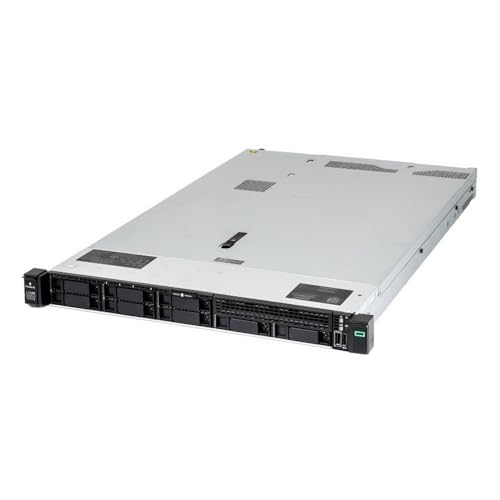
PCSP Entry-Level DL360 Gen10 40 Core SFF Multimedia Server
PCSP DL380 G10 8B SFF 2U Multimedia Server (768GB DDR4)

1aTTack Cat.6 Flat Network Cable 10-Pack 1.5m White

Raspberry Pi 4 Model B 4GB Single-Board Computer

CanaKit Raspberry Pi 4 8GB Starter Kit (8GB RAM)

Dell PowerEdge R640 Multimedia Server 7.7TB SSD Storage

PowerEdge Dell R640 Multimedia Server 16-Core (Renewed)
What Each Pick Brings To The Table
The PCSP PowerEdge R640 lands first because it threads a useful middle line between capacity and rack density. Its 1U chassis (a standard 1.75-inch rack height) holds dual Intel Xeon Silver 4110 CPUs for a combined 16 cores and 32 threads, paired with 32GB of DDR4 memory that can be upgraded through the seller’s selection options.
Two 1.2TB SAS drives (Serial Attached SCSI, a fast enterprise-class interface) run through a Dell H730 RAID controller, which means hardware-level data protection rather than software emulation. Four Gigabit Ethernet ports handle modest network traffic well, and the renewed status helps keep the entry price lower than a comparable new unit. For a media studio with a quarter-rack to spare, this one fits cleanly without overspending.
Practical Pluses
- Dual-SAS storage with hardware RAID (a dedicated chip that manages disk redundancy) protects media libraries from a single-drive failure.
- 16 physical cores translate to multiple simultaneous 1080p transcodes without choking the CPU.
- Four Gigabit NICs let you segment traffic, such as isolating a backup VLAN from streaming traffic.
- 1U form factor squeezes into shallow AV racks where 2U chassis (twice the height) won’t fit.
Points To Keep In Mind
- 32GB of RAM feels modest for large Plex libraries, depending on how many concurrent users you serve.
- No 10GbE networking out of the box, so multi-gig file transfers take longer than on later entries.
- Renewed enterprise gear may arrive with cosmetic rack scuffs that need a moment of cleaning before deployment.
Made For
A small studio or home media enthusiast who wants rack-grade reliability without committing to a full 2U footprint.
Consider Something Else When
Heavy transcoding households will get more headroom from the PCSP DL380 G10 8B SFF 2U Multimedia Server (256GB DDR4) and its larger memory pool.
The PCSP DL380 G10 8B SFF 2U Multimedia Server earns its slot by pairing 40 cores with genuinely fast storage and networking. Two Intel Xeon Gold 6148 CPUs at 2.4GHz deliver 20 cores each, while the HPE P408i-a RAID controller with 2GB of cache keeps the eight included 1.2TB 10K SAS drives humming.
What separates it from the smaller R640 above is the network stack: dual 10GbE SFP+ ports (fiber-friendly small-form-factor pluggable connections rated for 10 gigabits per second) plus four standard Gigabit ports let you push uncompressed 4K streams across the network. The 2U chassis gives the cooling system room to breathe under sustained load. This is the unit I would anchor a busy household media setup around.
Real-World Strengths
- 40 cores handle dozens of simultaneous Plex streams plus background tasks like automated downloads.
- 10GbE SFP+ ports future-proof the box for NAS-to-editor workflows and high-bitrate 4K remuxes.
- P408i-a with 2GB cache accelerates write-heavy operations like media ingestion from a capture workstation.
- Eight 2.5″ bays leave room to expand storage without swapping existing drives.
Trade Offs
- 2U rack footprint demands a deeper cabinet than the R640 above.
- Renewed enterprise fans tend to run louder than consumer NAS units, so placement matters.
Feature Snapshot
Right Fit For
Power users running Plex or Jellyfin for a household plus guests, where concurrent 4K streams are routine.
Reach For A Different Pick When
Office dwellers with shallow AV closets will find the PCSP Entry-Level DL360 Gen10 40 Core SFF Multimedia Server easier to physically accommodate.
Shallow racks kill many otherwise ideal server plans, which is where the PCSP DL360 Gen10 earns its keep. It stuffs the same 40-core Xeon Gold 6148 pair found in the DL380 above into a 1U chassis, cutting the depth demand in half while keeping dual 10GbE SFP connectivity.
Eight empty 2.5″ caddies ship with the unit, so the drives you bring define your capacity ceiling. The P408i-a RAID controller handles the disks you mount, and 512GB of preconfigured DDR4 covers dense virtualisation. For media admins who need rack horsepower but only have a wall-mounted half-rack, this is the practical compromise.
Where It Excels
- 1U depth slips into compact SoHo (small office / home office) cabinets where 2U chassis cannot.
- Dual 10GbE SFP uplinks match the bigger DL380’s throughput profile.
- Pre-installed 512GB DDR4 gives generous headroom for caching large media databases.
- Eight SFF (small form factor, meaning 2.5-inch) trays accept modern high-density SSDs.
Honest Caveats
- Drives are not included, so the all-in cost climbs once you add SSDs.
- Rail kits are not in the box, and you will likely want to source a compatible set.
- 1U airflow gets tight at full CPU load, depending on ambient rack temperature.
Perfect Match For
A media engineer in a small office or apartment who needs 40 cores in the slimmest possible rack envelope.
Swap It Out When
Storage-first projects with heavy drive counts are better served by the PCSP DL380 G10 8B SFF 2U Multimedia Server (768GB DDR4), which pairs similar compute with more chassis breathing room.
The PCSP DL380 G10 8B SFF 2U Multimedia Server (768GB DDR4) shares the same compute platform as pick two above, but the memory ceiling is the headline. 768GB of DDR4 turns this into a media database machine, not just a streamer, and lets you cache massive poster art bundles plus metadata tables in RAM.
For Plex users with libraries that have grown past 100,000 items, RAM-heavy workflows matter more than raw CPU. The eight 1.2TB SAS spindles still feed the P408i-a RAID controller, and the dual 10GbE networking carries the resulting traffic. If your bottleneck is metadata lookup latency rather than transcoding, this is the configuration to chase.
Key Advantages
- 768GB DDR4 fits enormous Jellyfin or Plex metadata caches without disk thrashing.
- Dual 10GbE SFP+ ports handle multi-user remux streams simultaneously.
- P408i-a with battery-backed cache protects write integrity during power events.
- 2U chassis supports high-memory DIMM counts that 1U units physically cannot.
Where It Is Less Suited
- Renewed enterprise memory can occasionally surface a faulty DIMM after burn-in.
- 2U depth and high RAM density combine for a heavier unit than the other rack picks, depending on rack rails.
Feature Snapshot
Best Suited To
Library curators managing huge media collections where metadata cache size dictates responsiveness more than CPU speed.
Not Your Match When
Shallow racks should pivot to the PCSP Entry-Level DL360 Gen10 40 Core SFF Multimedia Server, which trades memory headroom for a slim 1U chassis.
Even the best multimedia servers stumble on bad cabling, and the 1aTTack Cat.6 Flat Network Cable 10-Pack addresses that gap at the living-room end of the build. Each cable runs 1.5 metres, which is plenty for routing behind a TV, under a rug, or along a baseboard, and the flat profile slips under carpet edges without a tripping hazard.
Cat.6 supports Gigabit Ethernet comfortably, and these slim patch cords stay flexible enough to bend around tight AV furniture corners. The 10-pack matters because media setups usually need several runs: one for the server, one for the smart TV, one for a streaming box. Having spares on hand keeps a wiring fault from becoming a weekend project.
A Few Strong Suits
- Flat jacket slides under carpets and along baseboards for hidden runs.
- 1.5m length suits typical TV-to-shelf distances without excess slack.
- Cat.6 spec handles Gigabit Ethernet, which covers most home media traffic.
- 10-pack pricing undercuts single-cable purchases for whole-room builds.
Things To Consider
- Flat cables trade durability for flexibility, so avoid pinching them under heavy furniture feet.
- Cat.6 tops out at Gigabit; the 10GbE rack servers above benefit from Cat.6a or fibre for full throughput.
- International stock may differ in labelling or included paperwork from domestic equivalents.
Who It Suits Best
A household finishing a media centre install who needs several short patch cables without paying boutique prices per metre.
A Better Fit Elsewhere
Anyone wiring the PCSP DL380 G10 8B SFF 2U Multimedia Server (768GB DDR4) to a 10GbE switch should look at certified Cat.6a or DAC (direct attach copper) cables for that uplink.
Not every multimedia server needs to live in a rack. The Raspberry Pi 4 Model B is the card-deck-sized entry point for personal media projects, running Plex, Jellyfin, or Libretime from a board that draws less power than a bedside lamp. The quad-core ARM CPU and 4GB of RAM handle a single 1080p transcode without complaint.
Built-in WiFi and Bluetooth remove the need for extra adapters, and the Gigabit Ethernet port feeds the box into a wired backbone when reliability matters. For someone dipping a toe into self-hosted media without committing to enterprise hardware, this is the lowest-friction path I have seen.
What It Does Well
- Silent, fanless operation (with a heatsink) suits bedrooms and living rooms where rack noise would intrude.
- Sub-10W power draw keeps yearly electricity costs in the single digits for 24/7 operation.
- Native GPIO (general-purpose input/output pins on the board) lets hobbyists add sensors or LCD status screens.
- Compact footprint mounts behind a monitor or inside a media console with double-sided tape.
Small Caveats
- 4GB RAM caps you at one or two simultaneous 1080p transcodes before quality drops.
- microSD storage is the slow link; owners commonly add a USB SSD for the media library itself.
- No hardware RAID, so a single drive failure means restoring from backup.
Whose Shelf It Belongs On
Tinkerers and first-time self-hosters building a low-power media box for one or two users.
Where A Sibling Pick Shines
Anyone wanting a preassembled case and matched power supply should step up to the CanaKit Raspberry Pi 4 8GB Starter Kit to skip sourcing parts individually.
The CanaKit Raspberry Pi 4 8GB Starter Kit answers the most common Raspberry Pi 4 complaint: piecing together a working bundle from five different sellers. It ships with the 8GB Pi 4 board, a preloaded 32GB EVO+ microSD card, a high-gloss case with an integrated fan mount, a low-noise fan, a 3.5A USB-C power supply with a noise filter, and a full set of heat sinks.
Doubling the RAM to 8GB versus pick six above lifts the practical ceiling on simultaneous transcodes and large library caches. A 4K-capable micro-HDMI cable rounds out the box. For first-timers who would rather spend an afternoon configuring media software than sourcing fans and cards, the kit is well worth the bundled convenience.
A Favorable Mix
- 8GB RAM doubles the simultaneous-transcode headroom over the bare 4GB board.
- Pre-imaged microSD card saves an hour of OS flashing for newcomers.
- 3.5A USB-C power supply avoids the undervoltage warnings common with phone chargers.
- Case and fan bundle keeps the SoC (system-on-chip, the Pi’s main processor) cool under sustained load.
Practical Considerations
- Glossy case shows dust and fingerprints faster than matte alternatives.
- Fan adds the only moving part, so expect a faint hum in quiet rooms.
- microSD remains the boot drive; for media storage you’ll still want an external SSD.
Feature Snapshot
Who Should Grab It
A beginner who wants a turnkey Raspberry Pi media server without sourcing each accessory separately.
Skip It When
Experienced Pi builders already own a case and power supply can save money by buying the bare Raspberry Pi 4 Model B 4GB board and adding parts selectively.
The Dell PowerEdge R640 Multimedia Server 7.7TB SSD Storage is the unit I point people toward when spindles simply will not do. Its 7.7TB of SSD-backed capacity eliminates the seek-time penalty of the SAS drives in earlier picks, and 32 cores keep transcoding queues short.
256GB of RAM handles dense cache tables, while the 1U chassis keeps the rack footprint modest. Rails ship in the box, which removes one of the recurring annoyances of buying renewed rack hardware. For studios editing 4K or 6K source media directly off the server, SSD speed shows up immediately in scrub responsiveness.
Notable Upsides
- 7.7TB SSD capacity delivers sub-millisecond seek times for live editing workloads.
- 32 cores balance parallel transcoding with background management tasks.
- 256GB DDR4 covers metadata caches plus container workloads.
- Included rails simplify rack mounting out of the crate.
What To Weigh
- Renewed enterprise SSDs have wear histories that newer drives do not, so check SMART data (Self-Monitoring, Analysis, and Reporting Technology, which reports drive health) on arrival.
- 1U airflow stays tight under heavy SSD write workloads, depending on intake temperature.
Feature Snapshot
Built With In Mind
Video editors or media producers who scrub high-bitrate 4K timelines directly from the server.
Look Elsewhere When
Bulk-archive workflows on a tighter budget will get more terabytes per dollar from the PCSP DL380 G10 8B SFF 2U Multimedia Server (256GB DDR4) and its spinning disks.
The PowerEdge Dell R640 Multimedia Server 16-Core closes the roundup with a focus on clock speed over core count. Its dual Xeon Gold 6134 chips run at 3.2GHz, which is meaningfully faster per core than the Xeon Silver 4110 in the first R640 above. For a single high-quality 4K transcode or a low-latency live stream, that per-core speed matters more than having 40 cores idle.
Eight 2.5″ drive trays give you the same storage flexibility as the larger picks, and the H730p RAID controller (a higher-end PERC card with more cache than the base H730) adds battery-backed write protection. 32GB of RAM keeps the configuration modest, which fits single-purpose media projects where simplicity beats headroom.
Strengths Worth Knowing
- 3.2GHz per core delivers strong single-thread transcoding for live and 4K workloads.
- H730p RAID adds battery-backed cache, which protects writes during power loss events.
- 1U chassis keeps the unit compatible with shallow AV racks.
- Empty drive trays let you match storage exactly to your library rather than overbuying.
Less-Strong Areas
- 32GB RAM constrains library metadata caching versus the 256GB-equipped R640 above.
- 16 cores will queue under heavy concurrent streaming, depending on codec complexity.
Who Will Love This
Single-user media servers or small studios prioritising 4K transcode speed over multi-user streaming volume.
Another Choice May Suit
Multi-user households should pivot to the PCSP DL380 G10 8B SFF 2U Multimedia Server (256GB DDR4), which trades clock speed for substantially more cores and memory.
Getting The Most Out Of A Multimedia Server Build
The first decision is really about scale. Raspberry Pi boards work for one or two streams and consume almost no power, but they stall when several household members pull 4K at once. Rack-mounted PowerEdge and ProLiant units trade noise, heat, and depth for the headroom to serve dozens of concurrent users, run virtual machines alongside media software, and store terabytes locally.
Storage type is the next fork. Spinning SAS drives cost less per terabyte and handle bulk archives well, but SSDs in the Dell R640 7.7TB configuration trade capacity-per-dollar for speed that shows up in scrubbing and database lookups. For most home media libraries, a hybrid approach with SSDs for hot metadata plus HDDs for raw media tends to balance both budgets.
Networking matters more than people expect. Gigabit Ethernet covers single-stream 1080p comfortably, but the moment two people stream 4K simultaneously, the 10GbE SFP+ ports on the DL380 and DL360 units stop being overkill and start being necessary. The Cat.6 flat cables in this roundup handle the room-end runs, while Cat.6a or DAC cables belong in the rack-to-switch links.
Memory sizing quietly dictates responsiveness. Plex and Jellyfin cache metadata in RAM, and the 768GB-equipped DL380 responds to library searches in a way the 32GB units cannot match. For libraries under 20,000 items, 32GB suffices, but anything larger benefits from the bigger pools.
Key Considerations Across These Picks
Traps First Timers Fall Into
The most common mistake is buying a rack server without checking rack depth. Many home AV cabinets only accept 600mm chassis, and enterprise 1U units often run deeper. The DL360 Gen10 stands out here because its 1U chassis fits where larger servers cannot. Another misstep is forgetting that renewed enterprise gear rarely ships with rails or bezels, which the Dell R640 7.7TB SSD explicitly addresses but the DL360 does not.
Overlooking power and noise is the third pitfall. Server fans are louder than consumer NAS units, and the rack PSUs (power supply units) pull real wattage. Living-room placement rarely works, and a closet with ventilation tends to be the realistic spot for any of the rack picks.
Where The Extra Money Goes
Stepping up to the 256GB or 768GB RAM configurations mainly buys metadata cache headroom and database responsiveness, not raw transcoding power. The SSD-equipped Dell R640 trades spinning-disk capacity for sub-millisecond seek times that editors feel immediately. Dual 10GbE SFP+ ports future-proof the box for NAS-to-switch bandwidth that household routers do not yet saturate.
The Raspberry Pi kits bundle convenience rather than performance, and that convenience is the entire value proposition. Paying more for the 8GB version lifts transcoding ceilings and lets multiple services share the board without contention. The premium is real, but modest, and it pays off the first time two background services fight for memory.
Frequently Asked Questions
What is ECC RAM and why does it matter for a media server? ECC (error-correcting code) memory detects and corrects single-bit memory errors on the fly. For long-term media archives stored over years, those silent bit flips would otherwise corrupt files without warning.
Can a Raspberry Pi 4 really replace a rack server? For one or two simultaneous 1080p streams, yes. For multi-user 4K libraries or container workloads, the CPU and RAM limits become obvious quickly.
Do I need 10GbE networking at home? Single 1080p streams fit inside Gigabit Ethernet, but two 4K HDR streams will saturate it. The 10GbE ports on the DL380 and DL360 are useful the moment a household has more than one heavy streamer.
Why choose renewed enterprise hardware over consumer NAS? Renewed rack servers cost less per core and per gigabyte of RAM than comparably specced consumer NAS units. The trade-off is noise, heat, and the learning curve of enterprise management interfaces.