The right desktop shapes how every workday actually feels, especially for hybrid staff, small business owners, and anyone tired of laptops that groan under a dozen Chrome tabs. After sorting through six current options spanning compact mini PCs and screen-packed all-in-ones, I focused on machines that pair sensible specs with practical ergonomics. The list below leans on real-world use scenarios: video calls, spreadsheets, light creative work, and the daily multitasking that quietly chews through weaker hardware.
The Leading Options At A Glance
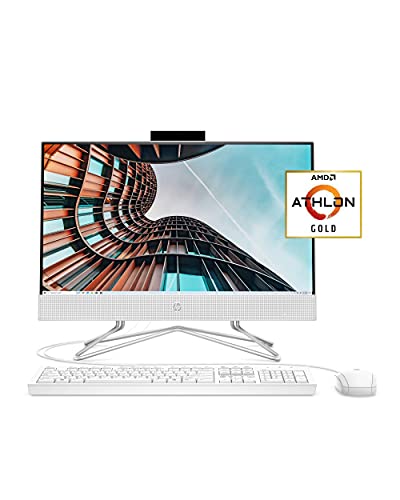
HP 22 All-in-One PC, AMD Athlon Gold 3150U

ACEMAGIC K1 Mini PC Intel 12600H 16GB 512GB

ACEMAGICIAN K1 Mini PC Ryzen 7 7730U 16GB
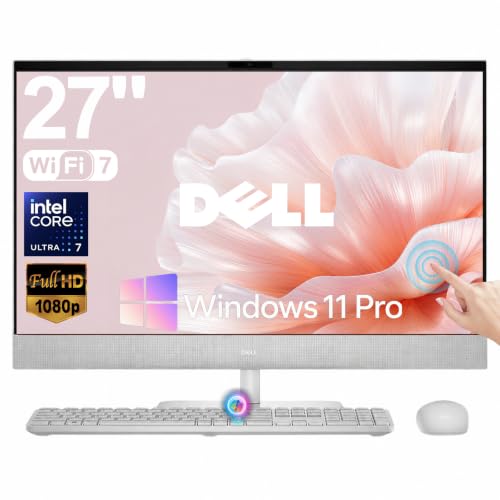
Dell 27″ All-in-One Touchscreen Ultra 7 355

HP OmniStudio 27″ FHD All-in-One Ryzen AI 5

HP All-in-One 27″ Touch Ultra 7 64GB 2TB
The Strengths Of Each Pick
Pull this HP out of the box and a full workstation sits in front of you within minutes: the 21.5-inch Full HD IPS panel, the wired mouse, and the keyboard all ship together. The AMD Athlon Gold 3150U is a dual-core, four-thread chip aimed at light office work rather than heavy compilation jobs, and the 256 GB SSD (a solid-state drive that boots and loads apps noticeably faster than older spinning disks) keeps Windows feeling responsive on routine tasks.
Compared with the mini PCs later in this list, the HP 22 surrenders some raw muscle but trades that for a tidy, single-cable setup that fits a kitchen counter, a reception desk, or a kid’s homework station. The anti-glare coating helps in sunlit rooms, and the privacy webcam is a thoughtful touch for households where the desk doubles as family space.
Everyday Wins
- All-in-one form factor removes the separate tower and cable mess.
- Full HD IPS panel (IPS means wide viewing angles and consistent color) makes long document sessions easier on the eyes.
- SSD storage cuts boot times and keeps everyday apps snappy.
- Wired keyboard and mouse included, no extra purchases needed.
- Privacy webcam shutter is a small but useful comfort for video calls.
Things To Consider
- 4 GB of RAM limits how many browser tabs and apps can stay open at once.
- The Athlon Gold chip is fine for Office and email but lags on heavier creative work.
- Owners commonly find the built-in speakers adequate only for short calls, not media work.
Right Fit For
First-time desktop shoppers and small home offices who mostly run email, browsers, and Office.
Where Another Pick Suits Better
The ACEMAGIC K1 Mini PC is a better match for tight desk setups where a built-in screen isn’t needed and more multitasking headroom matters.
The ACEMAGIC K1 Mini PC tucks a 12-core, 16-thread Intel 12600H into a chassis small enough to hide behind a monitor or slide into a cable cubby. Pair it with any monitor and the result feels closer to a mid-tier laptop squeezed into a lunchbox, and 16 GB of DDR4 RAM (the older but still capable memory standard) keeps serious multitasking fluid.
Where the HP 22 is a complete workstation in one piece, the K1 hands you the freedom to choose your own display, keyboard, and mount. That’s appealing in shared offices where the screen already exists or in hospitality settings where a small footprint under a counter matters. Running on Windows 11 Pro also means the bitlocker encryption and remote desktop tools are present for shops that need them.
Everyday Perks
- Sub-compact chassis frees up desk space and disappears behind most monitors.
- 16 GB RAM handles dozens of browser tabs and Office files without flinching.
- 512 GB SSD leaves comfortable room for projects and local file libraries.
- Windows 11 Pro brings business-friendly tools like BitLocker and Remote Desktop.
- The 12600H CPU punches well above what most office towers offered a few years ago.
Worth Noting
- A monitor, keyboard, and mouse are not included, so factor those into the setup.
- Fan noise under sustained loads is a common owner complaint in quiet rooms.
- Integrated graphics are fine for office work but not for serious gaming or 3D rendering.
Built With In Mind
Hybrid workers and small studios who already own a good monitor and want a clean, near-silent desk.
Skip It When
The HP OmniStudio 27 makes more sense for anyone wanting a single-box all-in-one with a large built-in screen.
The ACEMAGICIAN K1 Mini PC swaps the Intel silicon of its sibling for an AMD Ryzen 7 7730U, an 8-core, 16-thread chip that hums through spreadsheets, virtual machines, and code editors with the kind of headroom most office machines never reach. The 16 GB of RAM and 512 GB PCIe SSD (a faster storage interface than older SATA drives) make this thing feel like a small workstation disguised as a desktop trinket.
This is the pick I keep coming back to for power users who still want the desk-clean look. It pairs neatly with a wall-mounted 4K monitor or a hot-desk setup, and the small chassis makes it easy to swap between locations. Where the Dell all-in-one later on this list leans on a touchscreen, the ACEMAGICIAN K1 leans on raw compute.
Key Advantages
- Eight-core Ryzen CPU chews through multitasking, light video editing, and VMs.
- 16 GB RAM is comfortable for serious workloads without an immediate upgrade.
- PCIe SSD loads large project files noticeably faster than SATA drives.
- Tiny footprint suits wall-mounted or under-monitor placements.
- Plenty of USB ports for docks, drives, and accessories.
Trade Offs
- No display, keyboard, or mouse in the box.
- Heavy sustained loads can push the small chassis’s cooling audible in quiet rooms.
- Integrated graphics only, so heavy GPU work still requires a discrete card elsewhere.
Best Suited To
Analysts, developers, and small business owners juggling multiple demanding apps daily.
Reach For A Different Pick When
The Dell 27″ All-in-One Touchscreen is the better call for someone who wants a built-in touchscreen with similar CPU muscle.
Dell’s 27-inch all-in-one puts an Intel Core Ultra 7 355 at the heart of a touchscreen workstation with a dedicated NPU (neural processing unit, a chip that handles on-device AI tasks like background blur and noise reduction). The combination is genuinely useful for anyone running modern meetings: Copilot-style features, AI noise cancellation, and live transcription all share the load instead of taxing the main CPU.
Compared with the HP OmniStudio 27 further down, this Dell leans harder into the AI features and the touchscreen, which makes a real difference in creative apps and during whiteboard sessions. Wi-Fi 7 support future-proofs the wireless side for years to come, and the 27-inch screen gives spreadsheets room to breathe.
Real Benefits
- AI-accelerated processor eases the load for video calls, transcription, and smart search.
- Touchscreen adds real workflow flexibility for design, planning, and kiosk-style use.
- Wi-Fi 7 (the newest wireless standard, faster and more reliable than Wi-Fi 6) keeps networks future-proof.
- 27-inch panel reduces scrolling on dense documents and big spreadsheets.
- Single-cable setup keeps the desk uncluttered.
Honest Caveats
- All-in-one designs limit future CPU or GPU upgrades.
- The touchscreen coating can pick up glare in bright sunlit rooms, depending on window placement.
- Larger footprint than a mini PC means the desk needs space.
Feature Snapshot
Who Should Grab It
Knowledge workers and creative professionals who want AI-assisted computing without juggling cables or a separate tower.
Not Your Match When
The ACEMAGICIAN K1 Mini PC suits those who’d rather choose their own monitor and maximize desk real estate.
The HP OmniStudio 27 is the everyday workhorse in this lineup. It pairs a 27-inch Full HD panel with an AMD Ryzen AI 5 330, a four-core, eight-thread chip with AI enhancements that lend a hand during calls and content work. 8 GB of DDR5 (the newer memory standard with higher bandwidth than DDR4) and a 512 GB SSD give the system enough breathing room for office staples.
Compared with the premium Dell 27, this HP trims the touchscreen and the top-tier CPU in favor of a friendlier setup for home offices. The 20 Gbps USB-C ports (high-speed data and display connections in a single cable) are a quietly huge win for laptop dock users, and Wi-Fi 6 covers fast home networks without a fuss.
Good Reasons To Consider
- 27-inch Full HD display makes multi-window workflows comfortable.
- DDR5 memory keeps the system responsive as apps evolve.
- 20 Gbps USB-C ports simplify laptop docking and fast external storage.
- Wi-Fi 6 handles busy home networks without dropping video calls.
- Integrated Radeon graphics handle light photo edits and presentations smoothly.
Points To Keep In Mind
- 8 GB RAM is the floor for modern Office work, not a generous headroom.
- No touchscreen means the Dell 27 above still wins for stylus-driven tasks.
- Some owners report the fan spins up during long Zoom calls.
Made For
Remote employees and home managers running Office, browsers, and video calls across a normal workday.
A Better Fit Elsewhere
The HP All-in-One 27″ Touch with 64 GB RAM is the smarter choice for anyone handling large files or multitasking aggressively.
The HP 27-inch All-in-One with the Intel Core Ultra 7 155U pushes this category into proper workstation territory. The 12-core CPU hits up to 4.8 GHz, while 64 GB of DDR5 and a 2 TB SSD leave room for massive project files, local backups, or a small business’s worth of customer records.
What sets this model apart from the other all-in-ones here is the adjustable-height stand and bundled wireless keyboard, which together address a sore spot in shared offices: ergonomic fit. The touchscreen gives a tangible upgrade for note-taking or light creative work, and Windows 11 Pro rounds out the package with the security tools a growing business actually uses.
Where It Excels
- 64 GB DDR5 is overkill for email and a godsend for spreadsheets, VMs, and design files.
- 2 TB SSD removes the usual storage anxiety for years to come.
- Adjustable-height stand supports proper ergonomic positioning throughout the day.
- Touchscreen adds flexibility for kiosks, planning sessions, and creative apps.
- Wireless keyboard and bundled mouse reduce cable clutter from the first day.
A Few Limitations
- All-in-one design means the GPU cannot be swapped later for heavier graphics needs.
- The footprint is large, so a deep desk or wall mount is worth planning for.
- The specs are generous enough that lighter users may not need the extra headroom.
Spec Overview
Perfect Match For
Small business owners and power users who want one machine to handle Office, light creative work, and storage-heavy projects for years.
Where Another Pick Suits Better
The ACEMAGICIAN K1 Mini PC is a smarter pick for anyone prioritizing portability and a minimal desk footprint over built-in screen size.
What Matters Most Before Choosing Office Computers
CPU Power For Daily Tasks
Processors (the central chip that runs every app) drive how smoothly a desktop handles meetings, browsers, and spreadsheets at the same time. Light Office work runs comfortably on dual-core chips like the AMD Athlon Gold 3150U in the HP 22, but anyone juggling many tabs or creative apps should aim for an eight-core chip such as the Ryzen 7 7730U or an Intel Core Ultra series CPU.
RAM And Storage Headroom
Memory (RAM) and storage (SSD) shape everyday responsiveness. 8 GB of RAM is the practical minimum for Windows today, 16 GB is comfortable for multitasking, and 64 GB only matters for specialized workloads. A 256 GB SSD fits a basic Office setup, but 512 GB or more gives breathing room for project files, photos, and local backups without constant cleanup.
All-In-One Versus Mini PC Form Factor
All-in-ones integrate the screen and computer into one panel, cutting cables and saving desk space. Mini PCs keep the box separate so users can choose their own monitor and mount it wherever it fits. Choosing between them depends on whether the desk already has a good display and whether a single-cable setup is worth the trade-off in future upgradability.
Connectivity And Extras
USB-C ports with high data rates (10 Gbps or 20 Gbps) simplify docking for laptops, while Wi-Fi 6 or Wi-Fi 7 keeps video calls stable on modern networks. Touchscreens and bundled keyboards or mice vary by model and can quietly save a bundle of extra purchases on day one.
Key Considerations Across These Picks
Wrong Turns To Avoid
Choosing a desktop on CPU alone overlooks RAM and storage, and a fast chip with 4 GB of memory still struggles with modern browsers. Shoppers also underestimate the cost of accessories: mini PCs need a monitor, keyboard, and mouse that all-in-ones usually include. Finally, ignoring the desk footprint leaves people with a beautiful machine that does not actually fit their workspace.
Where The Extra Money Goes
Higher-tier models buy meaningful upgrades: more cores for multitasking, AI acceleration for video calls, larger SSDs for storage-heavy projects, and ergonomic touches like adjustable stands. These upgrades pay off most for power users and small business owners; lighter shoppers rarely notice the difference in everyday Office work.
Frequently Asked Questions
How Much RAM Do Office Computers Really Need?
8 GB handles light Office work comfortably, while 16 GB is the safer choice for heavier multitasking or virtual meetings. Anything beyond that mostly benefits specialized workflows like video editing or running multiple virtual machines.
Are All-In-One Desktops Good For Home Offices?
Yes, when the desk space is limited and the included screen size fits the workflow. They cut cable clutter and ship ready to use, though they usually cannot be upgraded as easily as a traditional tower setup.
Do Mini PCs Need Special Monitors?
Most mini PCs work with any monitor that has HDMI or DisplayPort input. Choosing a 4K panel maximizes the value of compact, powerful boxes like the ACEMAGIC or ACEMAGICIAN models for spreadsheet-heavy work.
Is Wi-Fi 7 Worth It On A New Desktop?
Wi-Fi 7 matters most for offices with multi-gig internet or dense device networks. For typical home use, Wi-Fi 6 still delivers reliable video calls and fast downloads.
Can These Desktops Handle Light Photo Or Video Editing?
Most of these machines can manage light edits comfortably, especially the Ryzen 7 and Core Ultra options. Heavy 4K timelines or 3D work still calls for a dedicated graphics card.
Bottom Line
The right pick depends on what fills the workday. A compact mini PC shines for tidy desks and heavier multitasking, while an all-in-one trades future flexibility for a clean, single-cable setup. For most people building a long-term home office, the sweet spot sits somewhere between generous RAM and a comfortable screen, and every option above hits that target in a slightly different way.