If your laptop is missing a built-in keypad or your main keyboard keeps eating valuable desk real estate, adding a dedicated numpad can quietly transform daily data entry. Accountants, engineers, students balancing budgets, and gamers reaching for macro commands all benefit from having those 17 (or more) number keys exactly where the right hand naturally sits. I’ve focused on options that range from full mechanical keyboards with integrated keypads to standalone numeric add-ons, so you can match the right tool to the way you actually work.
A Fast Comparison Of The Options

YUNZII C98 Cute Cake Wireless Mechanical Keyboard (Purple)

YUNZII B98 PRO 96% Wireless Mechanical Keyboard (Matcha Green)

LOONASA Wired USB-C 23-Key Number Pad

LOONASA Wired USB-C 23-Key Number Pad (White)
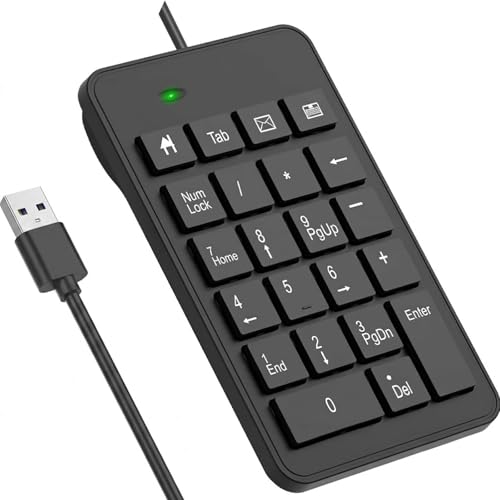
LOONASA Wired 23-Key USB Number Pad (Black)

MechLands Aula F99 96% Wireless Gaming Keyboard

LOONASA Wireless 23-Key Number Pad with Battery

LOONASA Bluetooth 23-Key Wireless Number Pad

LOONASA Wireless USB and Type-C 23-Key Number Pad
What Each Pick Brings To The Table
The YUNZII C98 leans into personality without giving up professional credibility. Its 96% layout tucks a full numeric pad alongside the main typing area, which is the practical reason to consider it over a compact board. The cake-themed colorway and PBT keycaps (a textured plastic that resists shine over time) keep the look playful, while the Milk switches underneath deliver a creamy, low-noise feel that fits late-night writing sessions and shared offices alike.
Typists who bounce between spreadsheets and prose appreciate that nothing feels stripped down. The integrated pad saves the cost of buying a separate accessory and removes one more cable from the desk. For shoppers who want personality plus genuine function, the C98 sits in a niche most keyboards ignore.
Positive Points
- Dye-sublimated PBT keycaps in MOA profile stay crisp through heavy daily use, resisting the greasy shine that ABS caps develop.
- Integrated numeric pad means fewer devices on the desk and no learning curve with a separate keypad layout.
- Milk switches produce a soft, thocky sound that won’t disturb housemates or coworkers in open-plan offices.
- Wireless connectivity declutters the workstation and lets the keyboard pull double duty on a laptop at the kitchen counter.
Things To Consider
- The cake-themed aesthetic may feel too whimsical for conservative corporate environments.
- Mechanical switches require more break-in time than membrane alternatives before they feel truly smooth.
Key Specs
Right Fit For
Content creators, students, and remote workers who want one keyboard that handles numbers and prose with equal grace.
Skip It When
The MechLands Aula F99 suits you better if a larger battery and gasket-style typing feel matter more than aesthetic flair.
Stepping up from the C98, the B98 PRO introduces a more refined typing experience wrapped in a matcha green shell. The 100-key count carries a dedicated numeric pad and the dual-knob design adds a tactile control point that handles volume by default but can be remapped through software. The build feels sturdier in the hand, which matters for heavy typists who pound the keys through full workdays.
For shoppers who already like the YUNZII flavor but want more customization room, the swappable knobs (a playful cat design and a classic round metal option) give the keyboard a small identity shift without buying a new board. It’s the same compact footprint as the C98, so desk real estate stays roughly the same.
A Favorable Mix
- Two included knobs let shoppers personalize the feel and function without extra purchases.
- Wireless operation supports tidy cable management across standing desks and laptop setups.
- Matcha green finish adds visual warmth without clashing with most office decor.
Honest Caveats
- Knob customization typically requires learning companion software, which adds setup time.
- Heavier build makes it less ideal for backpack commuters who prioritize lightweight gear.
Who It Suits Best
Office workers and hobbyist typists who want premium tactile feedback and a few personalization touches without jumping to a full custom keyboard build.
A Better Fit Elsewhere
The YUNZII C98 makes more sense for shoppers who prefer the cake aesthetic and don’t need the swappable knob system.
The first dedicated standalone keypad in this list, the LOONASA USB-C model arrives with a modern connector that matches most contemporary laptops. The 23-key layout goes beyond the traditional 17-key grid, adding quick-access buttons for backspace, tab, and equals that speed up spreadsheet navigation. For accountants and data-entry pros, those extras translate to fewer hand reaches per hour.
Where this picks stands out is its USB-C plug-and-play simplicity. No drivers, no dongles, no batteries to charge. That makes it a natural companion for road warriors using newer MacBooks, Surface devices, or modern Windows laptops where the old USB-A ports have largely disappeared.
What Works In Its Favor
- 23-key layout adds shortcut keys that reduce finger travel during long data-entry sessions.
- USB-C cable means one less adapter to pack for travel.
- Plug-and-play design gets to work without driver installation on most operating systems.
Points To Note
- Wired tether restricts placement and adds a line to manage on minimalist desks.
- Keypad-only design means pairing it with a compact TKL (tenkeyless) main keyboard is the typical setup.
Best Suited To
Finance professionals and engineers running modern laptops who want a no-fuss, modern-connector numpad for desk or hybrid work.
Swap It Out When
The LOONASA Bluetooth Number Pad is the smarter pick for anyone frequently switching between multiple devices.
Functionally identical to its black sibling above, this white LOONASA 23-key pad swaps the colorway to suit brighter desk setups. The same 23-key extended layout carries the productivity-boosting extras, and the USB-C connector keeps it friendly to modern machines. For shoppers matching accessories to a silver MacBook or a white-themed battlestation, the color change isn’t cosmetic fluff; it’s part of the aesthetic decision.
It’s worth flagging that white plastic tends to show grime and key discoloration faster than darker finishes. Owners of light-colored setups commonly report needing to wipe the surface down weekly to keep the keyboard looking fresh.
Reasons It Performs
- Crisp white finish pairs naturally with silver and rose-gold laptop families.
- Compact footprint slides easily into a laptop bag alongside a 13-inch machine.
- Same 23-key layout as the black version for consistent muscle memory if you switch between them.
Worth Noting
- White keycaps can yellow or stain over years of heavy use.
- Cable is fixed; no wireless option if the desk layout changes.
Made For
Minimalist workers who prioritize a clean, light-toned desk and want a wired keypad that visually disappears into the setup.
Consider Something Else When
The LOONASA Wireless 23-Key Number Pad with Battery suits shoppers who frequently rearrange their workspace.
This is the entry-level wired keypad in the LOONASA lineup, built around the classic USB-A connector rather than USB-C. The big-print legends on the keycaps are the standout feature for anyone who works in dim lighting or has vision that prefers high-contrast labeling. The 23-key extended layout is unchanged, so the productivity benefits carry over from the USB-C variants.
For shoppers using older desktop towers or laptops that still ship with full-size USB ports, this model skips the need for adapters. It’s a practical choice for office installations where the machine stays put and reliability matters more than aesthetics.
The Case For It
- Large-print keycaps reduce eye strain during late-night spreadsheet marathons.
- USB-A connector works directly with legacy equipment still common in office environments.
- Shorter key travel than typical laptop keys lowers finger fatigue over long sessions.
Trade Offs
- USB-A plug won’t fit modern laptops without a dongle or hub.
- Cable length and rigidity can clutter smaller workstations.
Feature Snapshot
Perfect Match For
Office administrators and bookkeepers running traditional desktop setups where high-contrast keys and stable wired connections matter most.
Where Another Pick Suits Better
The LOONASA Wired USB-C 23-Key Number Pad is the smarter pick for modern laptops lacking full-size USB ports.
The MechLands Aula F99 is the heavyweight of this roundup, and the 8000mAh battery is the headline number. For shoppers tired of weekly charging cycles, that capacity translates to multi-week runtime depending on backlight usage. The 96% layout includes a dedicated numeric pad alongside arrow keys, and the gasket-mounted structure (a design where the plate floats on rubber gaskets for a softer typing feel) softens the acoustic profile compared to traditional tray-mount boards.
It’s overkill for pure office work, but hybrid users who game after hours get a board that handles both without compromise. The single-piece silicone pad inside the chassis helps reduce ping and rattle, which is the kind of detail that matters to keyboard enthusiasts.
A Few Highlights
- 8000mAh battery supports weeks of use per charge, reducing charging interruptions.
- Gasket-mount design delivers a cushioned, low-rattle typing feel favored by mechanical keyboard fans.
- 99-key layout balances compact footprint with full numeric pad access.
- Wireless connectivity supports cleaner desk configurations across work and play.
Room For Improvement
- Larger battery adds noticeable weight for travelers who carry gear daily.
- Gasket-mount tuning often requires swapping switches or adding foam to reach the feel enthusiasts want.
Spec Overview
Who Will Love This
Gamers and power users who want one board that can handle spreadsheets by day and fast-paced games by night.
Reach For A Different Pick When
The YUNZII B98 PRO 96% Wireless Mechanical Keyboard suits shoppers who prefer swappable knobs over a larger battery.
Cutting the cable entirely, this wireless LOONASA keypad ships with batteries included and pairs via a USB receiver. The 23-key extended layout carries the same productivity extras as the wired versions, but the freedom to reposition the pad on the desk is the real selling point. Switch between left-handed and right-handed placement without crawling behind the computer.
It’s a pragmatic upgrade for shared desks and standing-sitter workstations where the keypad moves often. Battery life tends to last several months under typical use, depending on the receiver type and brand chosen.
Points In Its Favor
- Wireless freedom lets the pad sit anywhere within receiver range, including the left side of the keyboard.
- Batteries ship in the box, so setup takes seconds.
- Same 23-key layout means no retraining for spreadsheet veterans.
Small Caveats
- USB receiver uses one port that could otherwise host another accessory.
- Battery replacement adds a recurring ownership cost over years of use.
Whose Shelf It Belongs On
Shared-office workers and standing-desk users who reconfigure their workspace frequently enough that cables become a hassle.
Where A Sibling Pick Shines
The LOONASA Bluetooth Number Pad is a stronger fit when pairing across laptops, tablets, and phones without USB ports.
The Bluetooth version drops the USB receiver entirely and pairs directly with laptops, tablets, and phones that support Bluetooth keyboards. That’s the difference that matters for anyone bouncing between a MacBook, an iPad, and a Surface during a single workday. The 23-key layout carries over, and batteries ship in the box so setup is fast.
The catch is occasional pairing quirks. New owners commonly report needing to re-pair after OS updates, especially on Windows machines where Bluetooth stack changes can orphan the device temporarily. For most users, this is a minor hiccup rather than a deal-breaker.
A Strong Showing
- Bluetooth connection frees the USB ports for other peripherals.
- Pairs with phones and tablets, not just laptops.
- Wireless design suits flexible workstation setups.
Areas To Watch
- Bluetooth pairing can require reconnection after operating system updates.
- Latency (input delay) is typically slightly higher than wired or 2.4GHz wireless alternatives.
Who Should Grab It
Mobile professionals working across laptops, tablets, and phones who value a dongle-free connection over absolute lowest latency.
Look Elsewhere When
The LOONASA Wireless USB and Type-C 23-Key Number Pad is a better choice when dual connectivity options matter more than Bluetooth-only pairing.
The final LOONASA entry covers shoppers who want flexibility baked in: dual connection modes via USB receiver and Type-C transfer cable. The 23-key layout stays consistent with the rest of the lineup, but the included Type-C adapter means the pad can switch between wireless convenience and wired reliability depending on the situation. That’s the kind of redundancy that pays off when one connection method acts up.
For mixed-device households where the keypad hops between an older desktop tower and a newer laptop, the dual-mode setup removes the friction of buying two separate pads. The package includes the keypad, manual, USB receiver, and Type-C cable, so nothing extra hits the shopping list.
The Practical Payoff
- Wireless and wired modes cover older desktops and modern laptops in one device.
- Type-C cable and USB receiver both ship in the box.
- 23-key extended layout supports efficient spreadsheet work.
- Batteries included means setup takes minutes out of the package.
Possible Compromises
- Managing two connection modes adds a small learning curve for first-time wireless users.
- Slightly heavier than single-mode keypads due to extra internal components.
Quick Facts
Built With In Mind
Shoppers with mixed-device environments who want one keypad that travels between an older work tower and a newer personal laptop.
Not Your Match When
The LOONASA Wired USB-C 23-Key Number Pad is the leaner pick if wireless functionality is unnecessary.
What Matters Most Before Choosing Numpads
Connector Type Decides Compatibility
The single most consequential decision is the connector: USB-A, USB-C, or wireless. Older desktops and many office towers still ship with USB-A ports, so a wired USB-A pad plugs in without adapters. Modern laptops, especially recent MacBooks and many ultrabooks, lean heavily on USB-C and may not have a single full-size USB port. For those machines, a USB-C wired pad or a Bluetooth model saves the dongle tax. Wireless keypads split further into 2.4GHz USB receiver models (typically lowest latency) and Bluetooth versions (most universal across phones and tablets but slightly higher latency).
Layout And Key Count
A traditional numpad ships with 17 keys, covering digits 0 through 9, basic operators, Enter, and a decimal. Extended 23-key layouts add Tab, Backspace, Equals, and sometimes a Num Lock indicator shortcut. For spreadsheet-heavy work, those extras trim meaningful hand movement over the course of a day. For lighter use, the standard 17-key grid is plenty and keeps the footprint smaller.
Wired Stability Versus Wireless Freedom
Wired pads offer plug-and-play reliability with no batteries to manage, which suits stationary desk setups. Wireless pads add placement flexibility and a cleaner look, but introduce pairing steps, battery swaps, and occasional interference. For multi-device workstations or standing desks that reconfigure often, wireless pays off. For a fixed home office where the keypad never moves, wired keeps things simple.
Build And Key Feel
Membrane keypads (which use a rubber dome under each key, requiring more force and offering softer feedback) keep costs low and noise down, which works fine for occasional entry. Mechanical pads, like the YUNZII boards above, offer crisper feedback, longer lifespans, and the tactile satisfaction many typists prefer. For all-day use, the mechanical option tends to reduce finger fatigue even though the upfront cost runs higher.
Common Shopping Slip Ups and What The Higher Tier Buys
Where Shoppers Go Wrong
The most common mistake is buying a wireless numpad without confirming the receiver type fits the available ports. A 2.4GHz USB-A receiver is useless on a USB-C-only laptop without a hub. The second frequent error is overlooking the 17-key versus 23-key distinction: shoppers expecting Tab and Backspace shortcuts find themselves missing those when they need them most. Finally, some shoppers chase mechanical switches for the sound but skip checking keycap durability, ending up with shiny, worn legends within a year.
Why Top Tier Costs More
Premium tiers in this category typically invest in PBT keycaps (which resist shine and keep legends sharp), gasket or tray-mount construction for better acoustics, and larger batteries for longer wireless runtime. The YUNZII boards above are good examples: their dye-sublimated PBT caps and creamy Milk switches cost more than the budget LOONASA pads but deliver a noticeably better long-term typing experience. For shoppers who type on their numpad daily, that upgrade pays for itself in comfort and longevity.
Frequently Asked Questions
Do I need a mechanical or membrane numpad?
Mechanical switches offer crisper feedback and longer lifespan, making them a solid pick for daily use. Membrane pads are quieter and typically cheaper, suiting light or occasional entry.
Will a USB-C numpad work with an older USB-A laptop?
Not directly. A USB-C wired numpad needs a USB-C port. For older laptops, either choose a USB-A model like the LOONASA Wired 23-Key USB Number Pad, or add a USB-C hub.
Can I use a Bluetooth numpad with my phone or tablet?
Most modern phones and tablets that support Bluetooth keyboards will pair with a Bluetooth numpad without issue. The LOONASA Bluetooth 23-Key Wireless Number Pad works across laptops, phones, and tablets.
How long do batteries last in a wireless numpad?
Battery life depends on usage, but most wireless numpads run several months on standard AAA cells under typical use. Heavy daily use shortens that window, while occasional use stretches it.
What is a 23-key layout versus the standard 17 keys?
A 23-key layout adds shortcut keys like Tab, Backspace, and Equals to the standard 17-key grid. The extras reduce finger travel during spreadsheet work and speed up navigation noticeably.
Bottom Line
The right numpad depends on your connector situation, your daily workload, and whether wireless freedom or wired reliability fits your desk better. Full mechanical keyboards with integrated pads suit shoppers replacing a tired main board, while standalone LOONASA pads add a numeric layer to compact laptops without breaking the bank. Match the connection type to your machine, decide on 17 versus 23 keys based on how often you reach for shortcuts, and the rest of the choice tends to fall into place.