When typing becomes painful, slow, or simply unreachable on a full-size board, the right one-handed setup can change a workday. People recovering from a stroke, living with one functional hand, managing RSI, or supporting a senior relative all hit the same wall: standard keyboards assume two hands. I’ve spent years watching this category evolve from clunky numeric pads into genuinely thoughtful designs, and the current crop is more varied than ever. This list covers dedicated one-handed keypads, large-print boards for low vision, split ergo layouts that reduce wrist strain, and pocket-sized companions that pair over Bluetooth. Each pick fits a specific situation, so the goal here is matching the keyboard to the hands that will actually use it.
A Closer Look At The Lineup

AZERON Cyborg Gaming Keypad Programmable One Handed Keyboard
MIKUSO Large Print Computer Keyboard High Contrast Big Letters

BTXETUEL SayoDevice 8-Key Programmable Macro Keypad

Redragon K585 Wired One-Handed RGB Gaming Keypad 42-Key

RedThunder One Handed Gaming Keyboard RGB Backlit 35 Keys

Nuklz N Large Print Computer Keyboard High Contrast Black and White

Perixx PERIBOARD-512B Wired Ergonomic Split Keyboard

Perixx PERIBOARD-426 Wired Mini Low Profile Keyboard

A4tech Ergonomic Left Handed Keyboard Natural_A Keycaps
Rii Bluetooth Wireless Mini Keyboard with Backlit
Taking A Closer Look At The Options
The AZERON Cyborg is built around a 3D-printed chassis shaped to cradle the left hand, and it shows the moment you pick it up. Tower clusters hold 29 individually wired keys, which means no matrix ghosting, and an analog thumbstick handles movement or can be remapped for menus. Setup runs through a desktop tool that pushes profiles to two onboard memory slots, so a desktop switch happens without software.
For someone with full motion in one hand who games or drives CAD software, the angle and reach adjustments are the headline feature. The thumbstick supports 360-degree input, and dead zones are tunable per profile. Compared to the BTXETUEL macro pad I cover below, this is a far more ambitious piece of hardware aimed at precision input rather than shortcut shortcuts.
Everyday Perks
- 29 keys, each on its own circuit, eliminate key-ghosting for fast combos.
- Tunable analog thumbstick covers WASD or full 360 movement depending on the game.
- Tower spacing and top-button position adjust to match the user’s hand size.
- Onboard memory stores two profiles for quick swapping between titles.
- Map keys as keyboard, mouse, or macro without firmware headaches.
Points To Keep In Mind
- Right-handed only by design, mouse lives on the opposite hand.
- Calibration software takes patience during the first setup session.
- 3D-printed finish can show wear after heavy daily travel.
Built With In Mind
Gamers, sim pilots, and creators with full use of one hand who want surgical control and don’t mind tuning profiles.
Reach For A Different Pick When
Someone wanting simple shortcut keys for everyday office work should look at the BTXETUEL SayoDevice instead.
MIKUSO’s full-size board trades the usual cramped letters for labels about four times larger than standard. The contrast scheme pushes black legends against a light keycap, which is the easier read direction for many low-vision users. There’s no backlight, which keeps the legends crisp rather than bleeding under illumination.
This is a standard 104-key layout rather than a one-handed design, so it’s a great fit for users who simply need bigger letters while still using both hands comfortably. If the goal is reduced eye strain during long writing sessions, the laser-etched characters don’t wear off the way printed legends can.
The Helpful Details
- Keys carry roughly four times the standard legend size.
- High-contrast coloring helps in dim or uneven lighting.
- Laser-etched legends resist fading through years of typing.
- Full layout means existing muscle memory still applies.
Trade Offs
- No backlight, so late-night typing needs a room lamp.
- Not a true one-handed keypad, only helps the visual side.
The Right Fit
Seniors, low-vision users, and anyone wanting clear, large lettering without learning a new layout.
Swap It Out When
Someone who genuinely operates with one hand should look at the AZERON Cyborg Gaming Keypad for input rather than visibility help.
This mini keypad is the smallest item in the roundup, eight mechanical switches with default mappings for copy, paste, search, backspace, save, cut, select-all, and enter. A detachable USB-C cable keeps the desk tidy, and the unit sits beside a full keyboard without conflicts thanks to standard HID input.
OSU players and productivity power-users love the pre-labeled defaults, since they remove the need to remap anything for the most common clipboard and editing commands. For one-handed users who still have a full keyboard nearby, the right hand can keep typing while the left hand triggers shortcuts from this compact brick.
Good Reasons To Consider
- Eight pre-labeled shortcuts cover the most common editing tasks.
- Detachable USB-C cable simplifies travel and replacement.
- Mechanical switches give clearer feedback than membrane pads.
- Plug-and-play works alongside a regular keyboard without setup.
Possible Compromises
- Only eight keys means it can’t replace a full keyboard.
- Macro remapping requires configuration software not everyone needs.
Whose Shelf It Belongs On
One-handed typists and OSU players who want fast shortcut access within reach of the dominant hand.
Where A Sibling Pick Shines
For gaming macros with deeper customization, the Redragon K585 offers 42 keys and 28 macro slots.
The K585 is a chunky, mechanical one-handed keypad with 42 keys arranged in a tactical cluster, plus a side attachment that adds seven dedicated macro keys. A detachable wrist rest helps during long raid sessions, and the USB pass-through port keeps a mouse or headset connected without reaching for the PC tower.
Hot-swappable switches sit underneath every key, so owners can swap 3-pin or 5-pin switches without a soldering iron. For one-handed MMO and MOBA players, the four onboard profiles add up to 28 macro bindings, which covers ability rotations that would otherwise require a full keyboard.
Where It Helps
- Hot-swappable switch sockets accept almost any 3-pin or 5-pin switch.
- Seven macro keys plus four profiles total 28 bindings.
- Detachable wrist rest reduces fatigue across multi-hour sessions.
- USB pass-through keeps peripherals connected without cable juggling.
Things To Consider
- Wired only, no wireless option for tidy desk setups.
- Larger footprint than the BTXETUEL mini pad or RedThunder 35-key.
Made For
One-handed MMO and MOBA players who want deep macro control and the option to tune switch feel.
Not Your Match When
Someone needing only a few shortcuts should look at the BTXETUEL SayoDevice for a smaller, simpler option.
RedThunder’s 35-key pad lands as the lighter, simpler sibling to the K585. All 35 keys support anti-ghosting, meaning fast chorded inputs register cleanly, and two macro recording keys (FN+F1 and FN+F2) capture sequences on the fly. The RGB backlighting cycles through modes with a function key combination.
For gamers who want a one-handed companion board without committing to hot-swap switches or 42 keys, this sits in a comfortable middle. It’s noticeably lighter than the K585 and travels well between setups.
The Case For It
- 35 keys with anti-ghosting handle fast gaming inputs cleanly.
- Two macro recording slots capture sequences without software.
- RGB backlighting helps locate keys in dim rooms.
- Lighter chassis than the Redragon K585 makes travel easier.
Small Caveats
- Macro keys are limited to two slots versus the K585’s seven.
- Switch type is fixed, no hot-swap option.
Perfect Match For
One-handed gamers on a tighter budget who still want RGB and anti-ghosting without the heavier K585 build.
Skip It When
Heavy MMO players needing many macro bindings should step up to the Redragon K585 instead.
Nuklz N’s keyboard flips the contrast scheme of the MIKUSO model: black keys with white legends on top, which is often easier to read for users with macular degeneration or general low vision. The keys are quiet, soft, and designed to keep hands in a relaxed neutral position during typing. Like the MIKUSO, this is a full-size board aimed at the visual accessibility side.
For seniors learning to type, or anyone whose vision struggles in low light, the high-contrast keys reduce errors and frustration. Wired USB connectivity means no battery concerns, and the soft key action is gentle on arthritic fingers compared to mechanical boards.
Why It Works Well
- Black keys with bright white legends improve contrast for many low-vision users.
- Soft key action reduces finger fatigue and joint strain.
- Neutral hand position supports comfortable long sessions.
- Wired design eliminates charging or battery swaps.
Honest Caveats
- Wired USB cable limits placement around the desk.
- Not a true one-handed design, only addresses visual needs.
Best Suited To
Seniors and first-time typists who need high-contrast keys and a soft touch.
Consider Something Else When
Users needing one-handed operation should look at the AZERON Cyborg or A4tech left-handed keyboard.
The PERIBOARD-512B is a one-piece split keyboard with the keys divided into left and right zones, which encourages a more natural wrist angle. A built-in palm rest sits under the keys, and the long key travel gives a tactile bump similar to brown mechanical switches. The split is mild rather than dramatic, so the typing curve is shorter than fully split boards.
For office workers logging long days or anyone managing RSI, the ergonomic angle is the main pitch. Wired USB keeps the connection stable, and the standard US English layout means existing muscle memory transfers without relearning.
A Few Highlights
- Split layout reduces inward wrist bending during typing.
- Built-in palm rest supports wrists across long sessions.
- Long key travel offers clear tactile feedback.
- Standard layout avoids a steep learning curve.
Points To Note
- Larger desk footprint than a standard keyboard.
- Not truly one-handed, helps ergonomics rather than operation.
Who It Suits Best
Office workers, writers, and RSI sufferers who want a gentler typing angle without relearning layouts.
Look Elsewhere When
One-handed operation is the priority, the A4tech left-handed keyboard or AZERON Cyborg serves that better.
The PERIBOARD-426 shrinks a full layout into a 10.87 by 5.43 inch footprint, just over half a pound, with low-profile keys that have a short travel distance. The slim chassis slips into backpacks or drawer organizers, and the wired USB cable measures roughly 4.9 feet so it reaches most desktop setups without an extender.
For cramped desks, lap typing, or pairing with a secondary device, the compact size pays off. It’s not one-handed in the strict sense, but the small footprint helps users who need to keep a mouse close or who work in tight spaces.
Points In Its Favor
- Compact 10.87 by 5.43 inch chassis saves desk space.
- Low-profile keys reduce finger travel and wrist lift.
- Lightweight at roughly 0.84 pounds for travel use.
- Wired USB connection keeps input lag-free.
A Few Limitations
- No backlight in this configuration limits dim-room use.
- Smaller key spacing may feel cramped for larger hands.
Who Should Grab It
Users working in small spaces, on the road, or with limited desk real estate who still want a full layout.
A Better Fit Elsewhere
For wireless freedom and a backlight, the Rii Bluetooth Mini Keyboard is the more travel-friendly pick.
The A4tech left-handed keyboard is a genuinely one-handed design with the numeric keypad relocated to the left side, paired with a patented “natural A” keycap shape that encourages a more relaxed finger angle. Eight multimedia hotkeys sit along the top, and the keyboard ships with software for remapping. Dimensions run roughly 18.72 by 8.1 by 0.98 inches.
It’s a niche pick: accounting and data-entry professionals who lost right-hand function, or left-handers who prefer everything on one side. Compared to the dedicated gaming keypads earlier in this list, this is a more office-focused board.
The Upside
- Left-side numeric pad keeps all input reachable for left-handed users.
- Patented natural_A keycap shape reduces finger reach strain.
- Eight multimedia hotkeys speed up common tasks.
- Laser-inscribed legends resist wear from heavy daily use.
Factors To Consider
- Large footprint at nearly 19 inches wide demands desk space.
- Compatible with older OS versions, newer drivers may need manual setup.
Built With In Mind
Left-handed accountants and data-entry workers who need a numpad reachable from the dominant hand.
Consider Something Else When
Gamers wanting macro-heavy layouts should look at the Redragon K585 instead.
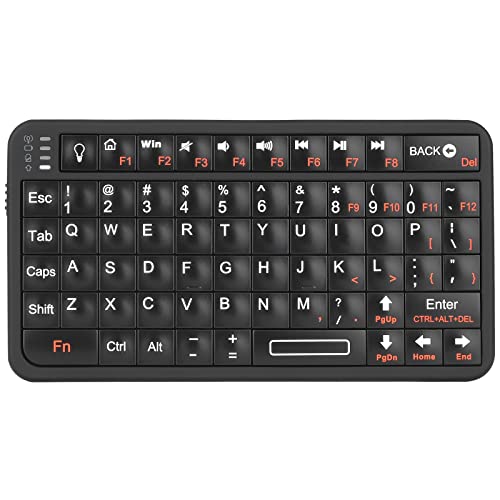
Rii’s mini keyboard squeezes 66 keys into a pocket-sized chassis with a white LED backlight that helps typing in dim rooms. Bluetooth pairs with Android, Windows, and iOS, and on iOS devices the manufacturer recommends enabling AssistiveTouch for smooth cursor control. Hobbyists working with Raspberry Pi and Arduino projects often pick this kind of board for tight workbenches.
For users who want wireless freedom and a portable companion, the Rii covers the basics without weighing down a bag. Pairing takes a moment the first time, but the wireless freedom is worth the setup.
What It Does Well
- Wireless Bluetooth cuts cable clutter across devices.
- White LED backlight helps locate keys in dim rooms.
- 66 keys in a pocket chassis travels well in bags.
- Cross-platform support covers Android, Windows, and iOS.
Less Ideal Details
- iOS pairing requires enabling AssistiveTouch first.
- Smaller key spacing may slow fast typists.
Made For
Travelers, hobbyists, and assistive-tech users wanting a wireless companion board that pairs across devices.
Consider Something Else When
Hardcore gaming macros are the goal, the Redragon K585 covers that with far more keys and binding slots.
Matching Keyboards To Hands And Workflows
Choosing a one-handed keyboard starts with honestly assessing what the user needs. Someone with full motion in one hand but limited reach across a full board benefits from a dedicated keypad like the AZERON Cyborg or Redragon K585, where every input lives within a few inches of the thumb. Users managing RSI or wrist pain often do better with split ergonomic layouts such as the PERIBOARD-512B, which keeps wrists in a more neutral position without forcing a complete relearning. Visual accessibility is a separate problem: large-print keyboards like the MIKUSO and Nuklz N solve the eye-strain issue without changing the input method, which matters for seniors who don’t want to learn a new layout. For mobile users or anyone using a single device in multiple locations, wireless options like the Rii remove cable clutter and pair across operating systems. The right pick depends on whether the priority is reducing hand travel, reducing wrist strain, improving legibility, or untethering from a desk.
Key Considerations Across These Picks
Common Slip Ups Shoppers Hit
The biggest mistake is buying a one-handed gaming keypad when the real problem is vision or ergonomics. None of the gaming keypads here help users who can’t read the legends, and large-print boards don’t help users who genuinely need only one hand. The other common trap is ignoring desk footprint: the A4tech left-handed keyboard is nearly 19 inches wide and won’t fit on a small tray table, while the BTXETUEL and Rii sit comfortably anywhere. Compatibility also matters, particularly the Rii on iOS, which needs AssistiveTouch enabled before pairing.
Why Top Tier Costs More
Higher-tier keypads like the AZERON Cyborg earn their cost through individually wired keys, adjustable ergonomic geometry, and analog thumbsticks that handle 360-degree input. Mid-tier boards such as the Redragon K585 add hot-swappable switches and a detachable wrist rest, which extend the keyboard’s lifespan as preferences change. Budget options like the RedThunder 35-key still deliver anti-ghosting and macro recording, but use fixed switches and lighter construction. For users logging daily hours, the upgraded materials and tunability tend to pay back through reduced fatigue and longer product life. For occasional or travel use, the budget tier often delivers enough capability without the extra cost.
Frequently Asked Questions
What is a one-handed keyboard?
A one-handed keyboard consolidates the keys needed for typing, shortcuts, or gaming into a single device designed for use with one hand. Designs range from dedicated left-hand gaming keypads to left-only numeric layouts.
Who benefits most from a one-handed keyboard?
Users with limited function in one hand, people recovering from injury or stroke, gamers seeking faster input, and office workers managing RSI all benefit. The specific design depends on which hand is functional and what tasks dominate the workflow.
Can one-handed keyboards replace a full keyboard?
For full text entry, no. Most one-handed keypads handle shortcuts, macros, or gaming commands rather than complete typing. Pairing a one-handed keypad with a standard keyboard is common for users who want shortcut access without abandoning full typing.
Are wireless one-handed keyboards reliable?
Modern Bluetooth keyboards like the Rii are generally reliable for everyday use, though gaming setups often prefer wired connections to avoid any input lag. Battery life varies, so checking the manufacturer’s runtime claims matters for travel use.
How do I know if I need an ergonomic or one-handed keyboard?
Ergonomic split keyboards help users with wrist or shoulder strain who still have full use of both hands. True one-handed keyboards help users who can only operate one hand, regardless of pain level. The decision comes down to which limitation applies.
Closing Remarks
The best one-handed keyboard is the one that matches the actual limitation, whether that’s hand function, vision, or workspace size. Take stock of the real bottleneck first, then match the design to that need. Each pick in this list solves a different problem well, so the right choice depends less on features and more on which hand will be doing the work.