Most desk setups assume both hands are free. That assumption breaks down the moment you need your right hand on a mouse for aim, or you’re nursing a wrist injury, or you just want fewer keystrokes between copy and paste. One handed keyboards solve those small, real problems, and the category has quietly matured into something far more interesting than a few novelty keypads.
The picks below split into two groups: dedicated left-hand or single-hand keypads built for shortcuts and gaming movement, plus full wireless boards that pair well with a separate numeric keypad for a one-handed setup. Choose by hand, by task, and by the kind of input your work actually demands.
A Quick View Of The Lineup

Aula WIN60 HE 60% Mechanical Gaming Keyboard (Hall Effect, 8000Hz)

EDJO Wireless Keyboard and Mouse Combo (Black)
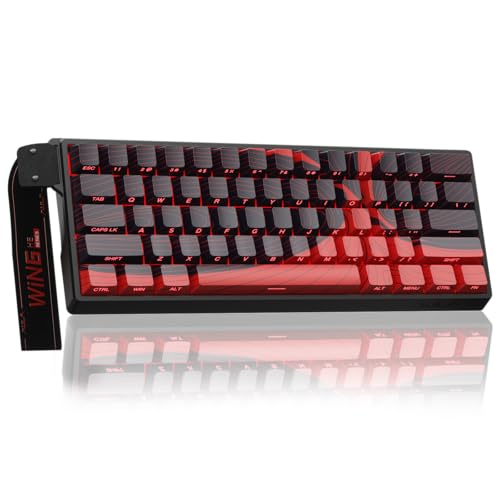
AULA WIN60 HE MAX 60% Mechanical Gaming Keyboard (Hall Effect)

BTXETUEL 8-Key SayoDevice OSU Keypad (Mechanical, Programmable)

EDJO Wireless Keyboard, Windows & Mac Compatible (Black)

Redragon One-Handed RGB Mechanical Gaming Keyboard

EDJO Wireless Keyboard and Mouse Combo (Quiet Key)

AZERON Cyborg II Compact Gaming Keypad (Galaxy Purple)

BTXETUEL Mini 4-Key Mechanical WASD Keypad (USB-C)
The Strengths Of Each Pick
The Aula WIN60 HE is built around magnetic Hall Effect switches, a different mechanism than traditional mechanical springs: a sensor detects how far a key travels, so actuation depth is software-adjustable rather than fixed. Paired with a polling rate up to 8000Hz (how often the keyboard reports its position to the PC each second), this board leans hard into competitive FPS responsiveness.
For one-handed setups, the 60% layout is friendly. There is no numpad, no arrow cluster, and the board sits small enough on a desk that your mouse hand has room to roam. The trade-off shows up in typing: if you rely on a dedicated arrow cluster or numpad, you’ll layer this with a separate hand device like the BTXETUEL 8-Key OSU keypad further down the list.
Positive Takeaways
- Adjustable actuation means you can tune the trigger point for fast taps in Valorant or CS2 without swapping hardware.
- Hot-swappable switches make it easier to swap the feel later without soldering.
- Compact 60% footprint keeps the right side of the desk clear for wide mouse sweeps during aim training.
- High polling rate gives lower input latency, useful for ranked play where every millisecond counts.
Points To Keep In Mind
- The 60% layout drops dedicated arrows and a numpad, so you’ll need a secondary input device for productivity work.
- Hall Effect switches require the companion software for tuning, which adds a setup step most basic mechanical boards skip.
Key Specs
Made For
Competitive FPS players who want adjustable trigger behavior on a tight desk and don’t mind pairing this with a separate keypad for arrows.
Consider Something Else When
The BTXETUEL 8-Key SayoDevice OSU Keypad suits you better if your priority is a true one-handed shortcut device rather than a compact main keyboard.
The EDJO wireless combo lands in the lineup not as a one-handed keypad, but as a full-size keyboard designed for ergonomic comfort. A folding holder at the back creates an inclined slope, and a built-in palm rest reduces wrist extension during long sessions. For anyone working one-handed for accessibility reasons, or who simply wants a wireless board that doesn’t punish the wrist, this is a sensible anchor piece.
Plug-and-play USB wireless means you can move the keyboard freely between desks, and anti-slide pads help it stay planted when you type quickly. Pair it with a left-side keypad like the BTXETUEL 8-Key SayoDevice OSU Keypad if you want a layered one-handed workflow, since the combo itself covers both hands.
Useful Strengths
- Ergonomic palm rest supports the wrist during multi-hour typing sessions.
- Wireless USB receiver cuts cable clutter, useful on small desks where every wire competes for space.
- Anti-slide base pads keep the board steady when typing at speed.
- Included mouse means one setup step instead of two for a new home office.
Things To Weigh Up
- This is a full-size board, not a true one-handed keypad, so it doesn’t shrink the desk footprint the way the Aula WIN60 HE does.
- Battery life depends on usage; wireless convenience always trades against eventual recharging.
Right Fit For
Remote workers logging long typing days who want ergonomic wrist support and the freedom of a wireless connection.
A Better Fit Elsewhere
The Aula WIN60 HE suits you better if your goal is freeing desk space for mouse-heavy gaming rather than full-time typing comfort.
The WIN60 HE MAX is the upgraded sibling of the standard Aula WIN60 HE, and the meaningful jump is in the rapid trigger mode. Rapid trigger resets the key the instant it travels back upward, so repeated taps register faster than a traditional mechanical switch. For Valorant strafing and CS2 counter-strafing, this is the kind of feature players typically upgrade specifically to access.
Like the standard WIN60 HE, this is a wired 60% board, so it sits in roughly the same footprint. The MAX pulls ahead when you actually push the actuation tuning into fast-paced play; casual users may find the standard WIN60 HE plenty capable and save the difference for a secondary keypad.
Good Reasons To Consider
- Rapid trigger mode is genuinely useful for FPS titles that reward quick directional resets.
- Hall Effect sensors deliver consistent actuation without the debounce tuning that traditional switches sometimes need.
- Compact 60% layout keeps the mouse hand free to roam without losing your main keys.
- Hot-swappable design supports personal switch experimentation down the line.
Honest Caveats
- Pricing typically runs higher than the standard WIN60 HE, so casual users get less return for the extra cost.
- The advanced features only matter if you actually play the games that benefit from rapid trigger; for RPGs or office work, the gains are minimal.
Feature Snapshot
Who It Suits Best
Tournament-focused competitive players who want rapid trigger responsiveness on a wired, compact board.
Look Elsewhere When
The standard Aula WIN60 HE is a smarter pick if you don’t play the specific games that benefit from rapid trigger and want to save on cost.
This little keypad from BTXETUEL is purpose-built around the rhythm game OSU, where players tap, hold, and spin with a small grid of mechanical keys. Eight keys cover Copy, Paste, Search, Backspace, Save, Cut, All, and Enter by default, but the board is programmable, so you can reassign any key to a macro that suits your workflow.
The genuine appeal is how it sits beside a full keyboard without interfering. The detachable USB-C cable keeps the layout tidy, and the small footprint makes it easy to position wherever your left or right hand falls naturally. Anyone doing a lot of copy-paste editing or working in dense spreadsheets will find the default mapping alone saves real time.
Everyday Advantages
- Mechanical key feel gives a satisfying tactile response that membrane shortcuts rarely match.
- Default shortcut mapping (copy, paste, save, backspace) speeds up repetitive editing tasks.
- Detachable USB-C cable means easier packing and a replaceable cord if it ever wears out.
- Plug-and-play means no driver installation for the default functions, and no conflict with a full-size keyboard used at the same time.
Trade Offs
- Only eight keys limits what you can map without overlapping shortcuts.
- OSU-focused marketing may confuse shoppers looking for a general productivity pad, even though it serves that role well.
Best Suited To
OSU players and editing-heavy professionals who want shortcut keys within thumb’s reach without abandoning a normal keyboard.
Not Your Match When
The BTXETUEL Mini 4-Key Mechanical WASD Keypad fits better if you only need arrow-key replacement rather than eight shortcut options.
The solo EDJO wireless keyboard strips out the mouse and keeps focus on the typing surface. You get the same ergonomic slope and palm rest approach as the combo, but on its own for users who already own a mouse they like or who split input across multiple devices. The 2.4GHz wireless receiver promises a stable connection up to about 33 feet, which is generous for any normal desk.
Compatibility with both Windows and Mac means swapping between a work laptop and a personal desktop doesn’t require learning two layouts. For one-handed use, the palm rest and slope matter more than the wireless signal, and EDJO has leaned into that ergonomic angle consistently.
The Case For It
- Ergonomic slope reduces wrist extension over long sessions, helpful for one-handed users managing strain.
- Cross-platform compatibility means no relearning when switching between Windows and Mac environments.
- Wireless receiver setup avoids cable clutter on minimalist desks.
- Anti-slide pads help the board stay planted when typing with a single hand at speed.
Small Caveats
- No mouse included means an extra purchase if you don’t already own one.
- Wireless design means occasional battery replacement or recharging.
Who Will Love This
Cross-platform users who bounce between Windows and Mac and want a single wireless keyboard with ergonomic support.
Skip It When
The EDJO Wireless Keyboard and Mouse Combo (Quiet Key) is the smarter buy if you also need a mouse and value quieter typing.
Redragon has long been a go-to brand for gamers stepping into mechanical keyboards for the first time, and this one-handed RGB board keeps that tradition alive. Mechanical switches give a tactile bump that helps new users feel confident about key presses, and RGB backlighting adds personality without driving up cost much.
This is a great starting point for anyone curious about one-handed gaming keypads but unsure whether they want to invest in a more specialized AZERON Cyborg II Compact later. The mechanical key feel carries over, and the layout stays approachable for first-time buyers.
Notable Gains
- Mechanical switches help newcomers build muscle memory with a clear tactile response.
- RGB backlighting improves key visibility in low-light setups.
- One-handed layout pairs naturally with a mouse for shooters and MOBAs.
Areas To Watch
- Not programmable in the same depth as the AZERON Cyborg II Compact, so layout customization is limited.
- Fewer keys than a full numpad, which matters for productivity users beyond gaming.
Perfect Match For
First-time one-handed gaming keyboard shoppers who want mechanical feel and RGB without a steep entry cost.
Another Choice May Suit
The AZERON Cyborg II Compact fits better if you want deep programmability and analog stick control for serious PC gaming.
The Quiet Key version of the EDJO combo keeps the ergonomic slope and Windows/Mac compatibility, but swaps to keys designed for low-noise typing. The ultra-slim profile and quiet keys make this a natural fit for shared spaces, late-night work sessions, or open-plan offices where keyboard clatter becomes background noise for everyone.
Function switching between systems is handled through an Fn+P or Fn+O combination, which is faster than digging through system settings. Combined with the included mouse, this combo covers a full desk refresh in one purchase.
What Earns Its Place
- Quiet key design reduces typing noise in shared offices or home environments.
- Ultra-slim profile keeps wrists in a more neutral position compared to thicker boards.
- Quick system toggle (Fn+P / Fn+O) avoids menu diving when swapping devices.
- Included mouse completes a desk setup in one package.
Possible Compromises
- Quiet keys typically feel lighter than mechanical switches, so tactile feedback is reduced.
- Like other wireless combos, the keyboard and mouse both need charging or battery replacement over time.
Who Should Grab It
Shared-space workers and late-night typists who want a full wireless setup with quieter keys and cross-platform support.
Reach For A Different Pick When
The EDJO Wireless Keyboard, Windows & Mac Compatible is the better choice if you don’t need the bundled mouse or quiet keys.
The AZERON Cyborg II Compact sits at the serious end of one-handed gaming hardware. With 30 programmable keys arranged under the fingers and a Hall Effect analog thumbstick (a thumbstick that detects how far and hard you push, not just whether it’s pressed), this is a keypad built for right-handed PC gamers who want their left hand to handle movement, abilities, and macros while the right hand stays on the mouse.
The 3D-printed chassis allows for tighter customization than typical injection-molded plastic, and adjustable parts help dial in fit across different hand sizes. For anyone transitioning from a controller or looking to push past WASD limitations, this is the closest thing to a competitive edge.
Bright Spots
- 30 programmable keys give room for complex ability layouts in MOBAs, shooters, and MMOs.
- Hall Effect analog thumbstick eliminates stick drift, a common failure point in cheaper gamepads.
- Adjustable components support different hand sizes for a more natural reach.
- Designed specifically for right-handed use with mouse on the right, which mirrors most PC gaming setups.
Practical Considerations
- Right-handed only; left-handed gamers need to look elsewhere.
- Learning curve is steep, so casual users may not unlock the value of 30 programmable keys.
- Higher cost than most keypads in this list, which makes sense for the engineering but rules out budget buyers.
At A Glance
Built With In Mind
Right-handed PC gamers who want analog movement, programmable keys, and a tailored fit for competitive play.
Where A Sibling Pick Shines
The Redragon One-Handed RGB Mechanical Gaming Keyboard fits better for first-time buyers who want a simpler, lower-cost entry into one-handed gaming.
The Mini 4-Key keypad is the smallest device on this list, and that’s the point. Four mechanical keys, default-mapped to Up, Left, Down, and Right, sit in a footprint that barely takes up any desk space. The detachable USB-C cable matches the larger BTXETUEL 8-Key keypad, so you can mix the two if you want shortcuts in one hand and arrows in the other.
It works alongside a normal keyboard without conflict, which matters when you want arrow-key control on the left while your right hand stays free. For travelers with cramped hotel desks, this is one of the easiest ways to keep arrow functionality within reach.
Strengths Worth Knowing
- Ultra-compact size fits on crowded desks and packs easily into a laptop bag.
- Mechanical key feel gives a cleaner press than membrane alternatives.
- Plug-and-play with no software required for default functions.
- Detachable USB-C cable is replaceable and travel-friendly.
Things That May Matter
- Only four keys means no room for extra shortcuts beyond the default arrow layout.
- Lacks a palm rest or ergonomic slope, so long sessions may fatigue the wrist more than the EDJO keyboards.
Whose Shelf It Belongs On
Travelers and gamers with extremely tight desks who only need a small arrow-key replacement.
Swap It Out When
The BTXETUEL 8-Key SayoDevice OSU Keypad fits better if you want shortcut buttons in addition to arrow movement.
What To Weigh Before Choosing A One Handed Keyboard
Match The Layout To Your Hand
One handed keyboards split into three layout families. Compact 60% boards like the Aula WIN60 HE keep both hands available but shrink the desk footprint. Dedicated left-hand keypads like the AZERON Cyborg II Compact take over movement and macros so the right hand can stay on a mouse. Mini shortcut pads like the BTXETUEL 8-Key sit beside a full keyboard and handle the small, repeated actions. Picking the wrong family usually means the device ends up unused, so decide which hand does what before you buy.
Know Your Switch Type
Mechanical switches give a tactile bump and audible click, while Hall Effect magnetic switches (used in the Aula WIN60 HE and AULA WIN60 HE MAX) detect key travel with a sensor and let you adjust the actuation point in software. Hall Effect suits competitive gaming where you want software-tunable triggers. Mechanical suits everyday typing and rhythm games where consistent feel matters more than tuning.
Check Software And Cable Requirements
Some boards in this category, particularly the Hall Effect models and the AZERON Cyborg II Compact, lean on companion software to unlock their full feature set. That means an extra setup step and an occasional driver update. Others, like the BTXETUEL keypads, run plug-and-play out of the box with no software required. If you don’t want to install anything, the plug-and-play devices save real time.
Think About Ergonomics For Long Sessions
One-handed users often type or play for long stretches, so wrist support matters more than raw feature count. Boards with palm rests and inclined slopes, such as the EDJO wireless models, reduce extension strain. Mini keypads save space but rarely include palm support, so pair them with a wrist rest if you game for hours at a time.
Key Considerations Across These Picks
Pitfalls Shoppers Hit
The most common mistake is buying a one-handed keypad expecting it to replace a full keyboard. The AZERON Cyborg II Compact and BTXETUEL keypads are designed to sit beside a main keyboard or a mouse, not on their own. Another trap is choosing a Hall Effect board for casual gaming and paying for features like rapid trigger that only matter in ranked FPS titles. Finally, ignoring cable and software requirements leaves some boards stuck at default behavior when the user expected custom mapping.
What The Higher Tier Buys
Stepping up from the BTXETUEL mini keypads to the Aula WIN60 HE MAX or AZERON Cyborg II Compact buys software-tunable actuation, faster input reporting, and deeper programmability. Those features matter if you play games where milliseconds decide outcomes, or if you rely on complex macro layouts for streaming and editing. For casual use, a mid-range board with mechanical switches typically delivers better value than a premium model whose advanced features go unused.
Frequently Asked Questions
What Is A One Handed Keyboard?
A one handed keyboard is an input device designed to be operated primarily with a single hand. Some are compact keypads that sit beside a mouse, while others are 60% mechanical keyboards that shrink the layout to free desk room. The category includes shortcut pads, gaming keypads, and compact main boards.
Are One Handed Keyboards Only For Gaming?
No. Plenty of one handed keyboards serve productivity roles, including the BTXETUEL 8-Key OSU keypad which handles copy, paste, save, and backspace shortcuts. The ergonomic EDJO wireless keyboards also work for accessibility use, where typing with one hand full-time is more comfortable on a well-supported board.
Do I Need Special Software To Use These?
Most plug-and-play boards, including the BTXETUEL keypads, work immediately with default mappings. Boards with Hall Effect switches or programmable keypads like the AZERON Cyborg II Compact rely on companion software to unlock advanced features, but the default functions usually work without it.
Can I Use A One Handed Keyboard Alongside A Regular Keyboard?
Yes. Most compact keypads and dedicated one-handed devices are designed to coexist with a full keyboard. Plug both into your PC and they run as separate input devices, so you can map your shortcuts on one side and keep your typing on the other.
Are Mechanical Switches Better Than Membrane?
Mechanical switches give a clearer tactile feel and typically last longer than membrane alternatives, though the exact durability depends on the switch brand. For rhythm games, mechanical is the standard. For quiet office use, low-profile membrane designs like the EDJO Quiet Key combo may actually suit the environment better.
Wrap Up
A one handed keyboard earns its place when it solves a specific problem: clearing desk space for aim, putting shortcuts under your thumb, or supporting a single-handed workflow for accessibility. The Aula WIN60 HE MAX and AZERON Cyborg II Compact serve the competitive side, the BTXETUEL keypads handle shortcuts and arrows, and the EDJO wireless boards anchor an ergonomic home setup. Match the layout to the hand that needs help, and the rest falls into place.