Building a PC from scratch, or just refreshing the parts that hold you back, means sorting through a stack of choices that look similar on the surface but behave nothing alike once installed. I’ve pulled together ten components that earn their place in a real build, covering airflow, storage, memory, and graphics without making you wade through filler.
How The Shortlist Stacks Up
How The Shortlist Stacks Up
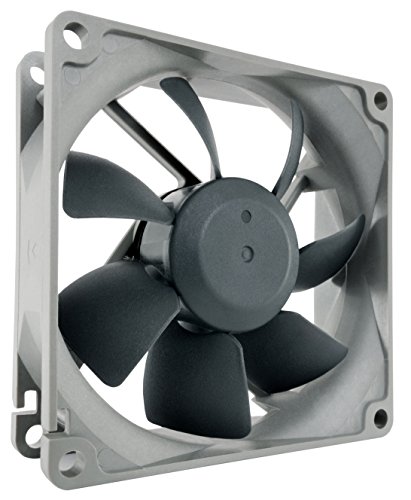
Noctua NF-R8 redux-1800 PWM Fan

TEAMGROUP MP44 4TB PCIe 4.0 NVMe SSD

ARCTIC P8 PWM PST 80mm Fan

TEAMGROUP A2 Pro Plus 2TB Micro SDXC

PowerColor Red Devil RX 9070 XT 16GB

fanxiang S101 1TB SATA SSD
fanxiang S101 512GB SATA SSD

fanxiang S101 2TB SATA SSD

TEAMGROUP T-Force Delta RGB DDR5 32GB
More Details On Our Top Picks
The Noctua NF-R8 redux-1800 is built around an 80mm frame that fits where most modern fans cannot, including compact ITX cases, NAS enclosures, and older towers that still need a real cooling push. It runs on a 4-pin PWM header (a four-connector plug that lets the motherboard vary fan speed automatically based on temperature), so it idles down when your system is cool and ramps up under load without making a fuss about it.
Where this fan differs from the cheaper 80mm models is how it sounds at full tilt: rated up to 17.1 dB(A) (a logarithmic measure of perceived loudness where lower numbers mean quieter operation), it stays in the background even when pushed to 1800 RPM. For small-form builders who care about acoustics over RGB, this is the kind of component that disappears into the build and never gets noticed again.
Useful Highlights
- PWM support lets the motherboard throttle the fan curve for silent idle and full-speed cooling when needed.
- Long-life SSO bearing (a self-stabilizing oil-impregnated sleeve bearing designed for low wear) is rated for well over 100,000 hours of operation.
- Optimized blade geometry pushes decent static pressure (the force a fan exerts against resistance, important when cooling heatsinks) through dense radiator fins.
- Compact 80mm size drops into NAS boxes, HTPCs, and small-form cases where larger fans simply will not fit.
Trade Offs
- 80mm fans move less air overall than 120mm or 140mm models, so you may need two of them to match a single larger fan.
- No RGB or addressable lighting, which is a non-issue for some builders but a deal-breaker for themed glass-panel cases.
- Cable is relatively short, so routing through tight cases may require a PWM splitter or extension.
Who It Suits Best
Small-form-factor builders and NAS owners who want a quiet, dependable 80mm fan for tight enclosures where larger cooling options will not physically fit.
Look Elsewhere When
If you need higher airflow for a full-size mid-tower, the ARCTIC P8 PWM PST covers a similar RPM range with more aggressive static pressure for radiator duties.
The TEAMGROUP MP44 4TB is the kind of drive that lets you stop juggling game libraries between three smaller SSDs. Running on PCIe Gen 4 x4 (a fourth-generation slot interface using four data lanes for high bandwidth), it pushes up to 7000 MB/s reads and 6000 MB/s writes, which is the kind of throughput that makes loading screens feel like a footnote.
The M.2 2280 form factor (a gumstick-sized 22mm-wide, 80mm-long module that plugs directly into a motherboard slot) fits any modern desktop or laptop with an M-keyed slot, and the graphene heat-dissipation label helps the drive stay cool under sustained writes. For content creators working with multi-gigabyte project files, the SLC cache (a small fast-acting memory layer that absorbs bursts of writes before spilling to the slower main flash) keeps short bursts of heavy writes from choking.
Notable Gains
- 4TB capacity means one drive covers operating system, current games, and project files without manual juggling.
- PCIe Gen 4 x4 performance hits the upper limits of what mainstream motherboards can feed it.
- Graphene-coated label reduces thermal throttling (where the drive slows itself down to avoid overheating) during sustained file transfers.
- Patented monitoring software gives real-time drive health and temperature readouts.
Minor Gripes
- Drives this fast need a real motherboard heatsink in cramped cases for sustained performance.
- 4TB is overkill for users with simple document and web workflows.
Key Specs
Made For
Gamers and creative professionals who want a single high-capacity drive that holds a full library without sacrificing PCIe 4.0 speed.
Skip It When
You only need modest capacity for documents and a few games; the fanxiang S101 1TB SATA SSD is the more practical fit for that scenario.
The ARCTIC P8 PWM PST is built for builders running multiple fans off a single motherboard header. Its PWM Sharing Technology, or PST, daisy-chains RPM signals from fan to fan, so when one P8 speeds up under heat, every chained P8 follows along without needing extra PWM splitters or a fan hub.
Speed-wise, it spans roughly 200 to 3000 RPM through PWM control, which gives you a quiet idle and serious cooling headroom when a CPU or GPU starts working hard. Compared to the Noctua NF-R8 above, this fan trades the ultra-premium acoustics for stronger static pressure, which makes it the smarter pick when you’re pushing air through dense heatsink fins.
Well-Handled Touches
- PWM Sharing Technology synchronizes multiple fans from one header without extra splitters.
- Wide 200 to 3000 RPM range balances low-noise idle with serious cooling when temperatures spike.
- Optimized blade and frame geometry produce strong static pressure for radiator and heatsink use.
- Standard 4-pin PWM connector plugs into any modern motherboard fan header.
Things To Consider
- Acoustic profile at full speed leans more toward noticeable than silent compared to premium options like the Noctua NF-R8.
- PST daisy-chain cables are short, so careful cable routing is required in larger cases.
Right Fit For
Builders running multi-fan heatsink or radiator arrays who want synchronized fan curves from a single motherboard header without buying a separate fan hub.
Consider Something Else When
You want whisper-quiet operation above all else; the Noctua NF-R8 redux-1800 is the quieter 80mm option.
The TEAMGROUP A2 Pro Plus 2TB is one of those cards that turns a Steam Deck or Nintendo Switch from “carry two or three games” into “carry the whole library.” Rated at up to 160 MB/s reads and 110 MB/s writes, it sits comfortably in the UHS-I U3 class (a speed tier that guarantees at least 30 MB/s sustained write for 4K video recording).
The A2 app rating (a performance class that guarantees at least 4000 read and 2000 write IOPS, or input/output operations per second, for running apps directly from the card) means apps and games load with less stutter when launched straight from the card. The included adapter lets you slot it into laptops or full-size SD card readers without buying extras.
Advantages To Know
- 2TB capacity fits a massive game library on a single card for handhelds like Steam Deck.
- A2 rating reduces load stutter when running games or apps directly from the card.
- U3 and V30 ratings (speed classes that guarantee minimum sustained write speeds suitable for 4K video) handle 4K recording on action cameras without dropped frames.
- Included full-size SD adapter broadens compatibility with laptops and card readers.
Small Caveats
- Real-world capacity sits below the labeled 2TB once formatting is applied, which is normal but worth knowing upfront.
- Sustained write speeds can dip below the 110 MB/s peak during very long transfers as the SLC cache fills.
Feature Snapshot
Best Suited To
Steam Deck and Nintendo Switch owners who want one card that holds a full library, plus photographers shooting 4K who need a roomy U3-rated card.
Not Your Match When
You need internal storage for a desktop; the TEAMGROUP MP44 4TB NVMe handles that workload with far higher throughput.
The PowerColor Red Devil Spectral White is a flagship take on AMD’s Radeon RX 9070 XT, dressed in a bright white shroud that finally gives white-themed PC builders a proper high-end GPU option. The 16GB of GDDR6 (a high-bandwidth graphics memory standard that feeds the GPU large textures and frame data quickly) gives modern games room to breathe at high resolutions, especially with ray-traced effects enabled.
It draws power through three 8-pin PCIe connectors and asks for at least a 900W PSU, so this is firmly a high-end build card rather than a drop-in upgrade. With HDMI 2.1 and three DisplayPort 2.1a outputs, you can drive a 4K panel plus a wide secondary monitor or VR headset without compromise.
Positive Takeaways
- White Spectral finish matches clean, white-themed builds that other flagship cards ignore.
- 16GB GDDR6 handles 1440p and 4K gaming with headroom for texture-heavy modern titles.
- HDMI 2.1 plus three DisplayPort 2.1a outputs support multi-monitor and high-refresh 4K panels.
- Red Devil cooling is built for sustained boost clocks (the temporary speed the GPU runs at when thermal and power headroom allow) under heavy gaming loads.
Points To Note
- At 340mm long, it will not fit in many mid-towers without checking clearance.
- Requires a 900W PSU and three 8-pin PCIe connectors, so older power supplies need replacing.
- High-end performance pricing makes this overkill for esports or 1080p-only gaming.
Core Details
Who Should Grab It
Enthusiast builders running 1440p or 4K who want a white-themed flagship GPU that pushes modern games with ray tracing on.
A Better Fit Elsewhere
Mid-range builders who mostly play esports titles should pair a TEAMGROUP MP44 4TB SSD with a cheaper mainstream GPU instead.
The fanxiang S101 1TB is the SATA SSD I tend to recommend when someone wants a noticeable speed bump without re-engineering their whole system. Running on SATA III at 6 Gb/s (the third-generation SATA interface with a 6 gigabit-per-second ceiling, roughly 550 MB/s after encoding overhead), it delivers up to 520 MB/s sequential reads, which is the practical ceiling for any SATA drive.
Drop this into a five-year-old laptop or desktop and the boot time, app launch, and file copy experience all jump up. The 3D NAND TLC flash (a stacked-cell memory type where each cell stores three bits, balancing cost against write endurance) gives it better write endurance than cheaper QLC drives, so it should hold up under years of daily use.
Practical Pluses
- 1TB is the sweet-spot capacity for most users who want OS plus apps on one drive.
- 3D NAND TLC flash outlasts QLC alternatives under typical daily write loads.
- Standard 2.5-inch form factor fits laptops and desktops with no adapter needed.
- Easy upgrade path for older systems that lack NVMe slots.
Honest Caveats
- SATA III tops out near 550 MB/s, so it cannot match NVMe drives for raw throughput.
- Bundled warranty support is handled through third-party plans rather than direct manufacturer service in some regions.
Built With In Mind
Anyone reviving a 2018-era laptop or office desktop who wants a meaningful speed boost without replacing the motherboard.
Swap It Out When
Your motherboard has a free M.2 slot and you want faster boot and load times; the TEAMGROUP MP44 4TB NVMe runs circles around SATA.
The 512GB version of the fanxiang S101 keeps the same SATA III 6 Gb/s interface and 2.5-inch form factor as the 1TB model, just with a smaller capacity and a slightly lower 500 MB/s read ceiling. For tight-budget laptop swaps or office PCs that only need a snappy boot drive, that trade-off is usually invisible in daily use.
It runs the same 3D NAND TLC flash as the larger sibling, so endurance stays respectable for a budget drive. Where this model really earns its place is in old corporate laptops that came with a small spinning hard drive: popping the S101 in transforms a sluggish machine into something that feels responsive again, without forcing a motherboard swap.
Useful Touches
- Lower price point makes it a smart pick for budget laptop refresh projects.
- 3D NAND TLC flash offers better endurance than entry-level QLC drives.
- Standard 2.5-inch SATA form factor works in most laptops and desktops built in the last decade.
Less Ideal Details
- 512GB fills up fast with modern games and 4K video files.
- Sequential speeds lag the 1TB sibling by a small but real margin.
Whose Shelf It Belongs On
Budget shoppers reviving an aging office laptop who want boot and app responsiveness without overspending on capacity.
Reach For A Different Pick When
You want extra room for a game library alongside the OS; the fanxiang S101 1TB or 2TB covers that need.
The 256GB fanxiang S101 is the smallest drive in this shortlist, and that’s its actual job. It exists for ultra-budget builds, kiosks, and office PCs that just need a clean OS drive without paying for unused space.
Speed-wise, it shares the 500 MB/s SATA III ceiling with the 512GB sibling, so on a small office PC the difference between 256GB and 512GB is purely about how much room you have for files. For a Windows install plus a handful of productivity apps, 256GB is still workable in 2026, though game and video collectors will fill it in a week.
A Few Strong Suits
- Smallest, lowest-priced entry in the S101 line for ultra-budget refresh projects.
- Same SATA III ceiling as larger siblings, so daily responsiveness is identical.
- 3D NAND TLC flash handles daily write loads better than cheap QLC alternatives.
A Few Limitations
- 256GB fills fast once a few modern games or 4K video clips land on it.
- Not the right pick for content creators handling raw photo or video projects.
Who Will Love This
Office IT refreshes, classroom PCs, and basic home computers that only need a snappy boot drive for documents and web apps.
Where A Sibling Pick Shines
Home users who stream, edit photos, or keep a game library should step up to the fanxiang S101 1TB or 2TB for breathing room.
The 2TB fanxiang S101 is the largest SATA option in the lineup, which makes it the right pick when someone needs serious capacity but their system only supports SATA drives. It runs at the same 520 MB/s ceiling as the 1TB model, with an SLC cache (a small pool of fast memory that absorbs bursts of writes before spilling over to the slower TLC cells) to keep short transfers snappy.
For older editing rigs or NAS-adjacent builds, 2TB of solid-state storage changes the workflow entirely compared to juggling multiple drives. The 3D NAND TLC flash keeps endurance reasonable for sustained write sessions like media transcodes.
The Case For It
- 2TB on SATA gives large capacity for systems without NVMe slots.
- SLC cache keeps burst writes at advertised speeds for everyday file work.
- 3D NAND TLC flash outlasts QLC drives under heavy write cycles.
- Single-drive simplicity for media libraries and project archives.
Potential Drawbacks
- Still capped by SATA III, so it cannot replace an NVMe drive for raw speed.
- Higher capacity commands a premium versus the 1TB sibling.
Perfect Match For
Video editors and photographers with SATA-only motherboards who need a single roomy drive for active projects.
Another Choice May Suit
If your system has a free M.2 slot, the TEAMGROUP MP44 4TB NVMe serves the same capacity need with much higher throughput.
The TEAMGROUP T-Force Delta RGB kit delivers 32GB of DDR5 (the latest memory standard, offering higher speeds and lower power draw than DDR4) running at 6000 MHz with CL30 timings, which sits right in the sweet spot for both Intel XMP 3.0 and AMD EXPO overclocking profiles (one-click BIOS presets that automatically configure memory to its rated speed). The 2x16GB dual-channel configuration is what modern gaming and productivity builds expect.
The white heat spreader with diffused RGB looks sharp behind a tempered-glass side panel, and the 120-degree ultra-wide lighting bar gives you smooth, even color without the dotted look cheaper kits produce. Built-in PMIC (a small chip on the memory module that regulates voltage delivery for stable operation) and on-die ECC (error-correcting code built into the memory chips that fixes single-bit errors on the fly) help with long-term stability under sustained load.
Notable Upsides
- 6000 MHz CL30 is the practical sweet spot for current Intel and AMD platforms.
- XMP 3.0 and EXPO support let the rated speed load automatically from BIOS.
- On-die ECC improves stability under heavy memory loads.
- Wide-angle RGB lighting looks clean behind glass without harsh hotspots.
Things To Weigh
- RGB control software sometimes needs an update for the latest motherboard sync tools to recognize the kit fully.
- Tall heat spreaders can interfere with oversized CPU air coolers in compact cases.
Quick Technical Notes
The Right Fit
Builders putting together a white-themed gaming or creator PC who want high-speed DDR5 with clean RGB and one-click overclocking.
Look Elsewhere When
Your build is purely functional and you do not care about RGB; the saved cost goes further toward a larger TEAMGROUP MP44 SSD instead.
Choosing Components That Actually Fit Your Build
Match the Platform Before You Match the Part
Every component in this shortlist has a physical and electrical interface that has to agree with your motherboard. NVMe SSDs like the TEAMGROUP MP44 need a free M.2 slot, SATA SSDs need a SATA port plus power cable, DDR5 memory needs a board that supports DDR5, and an 80mm fan needs a header that physically accepts it. Building parts first and checking compatibility second is the most common reason a perfectly good component ends up sitting in a box for a week.
Think About Bottlenecks, Not Just Brand Names
Pairing a flagship PowerColor Red Devil RX 9070 XT with a tiny 256GB SATA boot drive is technically allowed, but it undersells the GPU you just installed. A balanced build often means matching storage speed to workload, memory capacity to the apps you actually run, and cooling headroom to the parts that throw the most heat. The picks in this list cover a range of tiers precisely because most builds have one weak link worth upgrading first.
Check Real Clearance, Not Just Spec Sheets
A 340mm GPU will not fit every mid-tower, and tall RGB memory can interfere with bulky CPU air coolers. Measure your case, check the GPU clearance on the manufacturer’s site, and confirm RAM height before you order. This applies to airflow too: an 80mm fan needs physical room to pull or push air, and dense cable bundles behind the motherboard tray can choke even the best fan.
Decide What You Actually Need RGB For
RGB lighting looks great behind a tempered-glass panel and adds nothing to a tucked-away office PC. If your case is opaque and sits under a desk, skip the RGB tax and put the savings toward faster storage or a quieter fan. If the build is going in a window-facing showcase, RGB becomes a real feature rather than decoration.
Key Considerations Across These Picks
Mistakes Worth Dodging
The biggest miss I see is buying NVMe storage for a system that only has SATA ports, or grabbing DDR5 for a DDR4 board. Check the motherboard spec sheet before anything else. Another common trap is choosing a flagship GPU for 1080p esports titles, which leaves most of its performance sitting idle. Match the component tier to the resolution and refresh rate you actually game at.
Where The Extra Money Goes
Paying more for the 4TB NVMe over the 1TB SATA buys you both capacity and roughly ten times the throughput, which matters once you start moving multi-gigabyte project files. The Red Devil RX 9070 XT over a mid-range GPU buys you headroom for ray tracing and 4K gaming rather than raw FPS gains at 1080p. Higher tiers cost more because they remove limits you would otherwise hit within a year or two of ownership.
Frequently Asked Questions
What should I upgrade first in an older PC?
A SATA SSD is usually the single biggest perceived speed upgrade, even on older systems. Replacing a spinning hard drive with a fanxiang S101 1TB typically delivers a more noticeable day-to-day improvement than a CPU or RAM upgrade on the same budget.
Do I need PCIe 4.0 NVMe for gaming?
PCIe 3.0 NVMe is still fast enough for most game loads, but PCIe 4.0 drives like the TEAMGROUP MP44 4TB help with very large file transfers and modern engines that stream gigabytes of data per second.
Is DDR5 worth it over DDR4 right now?
DDR5 makes sense for new Intel 700-series or AMD AM5 builds, where it is required. For older DDR4 platforms, sticking with DDR4 keeps your budget available for storage or GPU upgrades that move the needle more.
How loud should I expect an 80mm fan to be?
An 80mm fan running at 1500 to 1800 RPM at full tilt usually hovers around 15 to 20 dB(A), which is quieter than a typical office conversation. Models like the Noctua NF-R8 redux-1800 stay at the low end of that range even when pushed hard.
What PSU do I need for an RX 9070 XT build?
The PowerColor Red Devil RX 9070 XT is rated for a 900W minimum system PSU. Pairing it with anything below that risks instability during long gaming sessions, so a quality 900W or higher unit is the safe pick.
The Takeaway
A good parts list is one that matches the build you actually want to use, not the build that looks the most impressive on a spec sheet. Start with the bottleneck that bothers you most, pick the component in this list that addresses it directly, and let the rest of the system follow. That is how a thoughtful PC comes together, piece by piece.