Shopping for a new computer means balancing speed, storage, screen quality, and portability against what fits your day. I focused on machines that match clear, common routines: students bouncing between classes, home offices that need quiet reliability, and gamers who want strong frame rates without building a rig from scratch. Every pick below earned its spot on those terms.
The Choices Worth Comparing

DEHEYA 15.6-inch Laptop, 8GB DDR, 256GB SSD, AMD up to 3.2GHz

STORMCRAFT Sirius AI Gaming Desktop, Intel i5 14400F, Arc B570 10GB

Apple Mac mini M4, 10-core CPU, 16GB Unified Memory, 256GB SSD
Apple Mac mini M4, 10-core CPU, 16GB Unified Memory, 512GB SSD
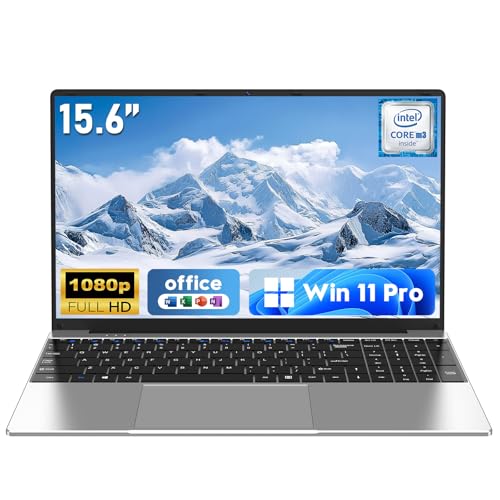
NAIKLULU 15.6″ Laptop, Win 11 Pro, 16GB RAM, 512GB SSD, M3-6Y30

Exilapsire 16″ Laptop, Win 11, 8GB RAM, 256GB SSD, AMD A9

NAIKLULU 15.6″ Laptop, Win 11 Pro, 16GB RAM, 512GB SSD, 2-Year Warranty
Apple Mac mini M4 Pro, 12-core CPU, 24GB Unified Memory, 512GB SSD

GEEKOM A5 Mini PC, Ryzen 7 7730U, 16GB RAM, 512GB SSD

NIMO 15.6″ Student Laptop, 8GB RAM, 256GB SSD, N150, 2-Year Warranty
Taking A Closer Look At The Options
At around 3.3 pounds with a slim body, the DEHEYA slips into a backpack without much fuss. I see this working for someone bouncing between lecture halls, coffee shops, and a kitchen table, where every ounce matters and a dead battery is a deal-breaker.
The integrated Radeon R5 graphics will not impress anyone chasing modern games, but for documents, video calls, and streaming it is honestly enough. Compared with the larger 16-inch Exilapsire later in this list, the DEHEYA trades screen real estate for portability, which is the right call for daily commuters.
Well-Handled Touches
- 10,000mAh battery stretches through a typical commute and class schedule without a midday top-up
- Numeric keypad supports spreadsheet work and quick data entry for coursework or invoicing
- SSD is expandable to 1TB, leaving room for growing photo libraries or project files
- Type-C and USB 3.0 ports cover most modern accessories without needing a dongle
Things To Consider
- RAM sits at 8GB with no easy upgrade path, so heavy multitaskers may feel the ceiling
- Wi-Fi 5 and Bluetooth 4.2 are a step behind the NIMO’s newer Wi-Fi 6 setup
- Built-in Radeon graphics are fine for everyday work, not for sustained gaming loads
Key Specs
Who It Suits Best
Students and remote workers who carry their computer most days and need all-day battery without paying premium prices.
Consider Something Else When
Gamers chasing smooth frame rates should look at the STORMCRAFT Sirius AI Gaming Desktop, which pairs a desktop-class CPU with a dedicated GPU.
The STORMCRAFT Sirius is the first desktop on this list, and it makes the most of that form factor for gaming. The Intel Core i5-14400F pairs with an Arc B570 graphics card carrying 10GB of GDDR6 video memory, a combination aimed squarely at 1440p play.
For someone stepping up from a laptop-integrated setup like the DEHEYA above, the leap in frame rates is significant. The 1TB NVMe SSD keeps load times short, and 16GB of DDR4 RGB memory is a thoughtful touch for builders who care about the inside looking as sharp as the outside.
Noteworthy Benefits
- 10-core, 16-thread CPU handles gaming, streaming, and chat apps at the same time without choking
- Dedicated GPU with 10GB VRAM targets smooth play at 1440p on most modern titles
- 1TB NVMe SSD gives plenty of room for a sizeable Steam library out of the box
- Prebuilt format removes the trial-and-error of part compatibility for first-time buyers
Worth Noting
- The 148W TDP (thermal design power, the heat a CPU is expected to shed under load) means fan noise ramps up during long sessions
- Intel Arc drivers have matured but still trail Nvidia on certain older or indie titles
- A full tower takes more floor or desk space than any mini PC in this roundup
Made For
Gamers and streamers who want 1440p performance without picking out individual parts and assembling a tower themselves.
Not Your Match When
People working in tight studio apartments should look at the GEEKOM A5 Mini PC, which delivers serious CPU power in a fraction of the footprint.
The M4 Mac mini is roughly five inches square, a footprint that disappears behind a monitor. For someone setting up a clean desk, the size alone is the headline feature. Apple’s M4 silicon pairs a 10-core CPU with a 10-core GPU on the same chip, which is why even the base model feels quick.
This entry-level config suits writing, browsing, photo edits, and light video work. The Mac mini works hand in hand with iPhone and iPad for handoff and continuity features. Compared with the GEEKOM A5 reviewed later, the Mac mini trades user-upgradable RAM for a quieter, more efficient cooling profile.
Everyday Perks
- Five-by-five-inch chassis fits next to a monitor, on a bookshelf, or even mounted behind a display
- Apple silicon runs cool and quiet, with the fan rarely spinning up during normal office work
- 16GB of unified memory helps the system share resources efficiently across CPU and GPU tasks
- Front-and-back port placement removes the awkward reach-around common with mini PCs
Honest Caveats
- RAM is fixed at purchase, so choose carefully if you anticipate heavy future workloads
- 256GB of storage fills quickly with photo or video libraries
- macOS has a steeper learning curve for those coming from Windows-only backgrounds
Right Fit For
Anyone who already lives inside the Apple ecosystem and wants a quiet, capable desktop for everyday creative work.
Look Elsewhere When
Users needing more local storage for raw photo projects should consider the 512GB Mac mini M4 a few rows down in this list.
Step up from the 256GB Mac mini and the chassis is identical, but the doubled storage changes day-to-day use. A photo library, Logic project files, or a few large games stop demanding constant cleanup.
The 16GB of unified memory stays the same, which means CPU and GPU share that pool. The M4 chip continues to handle macOS Sequoia tasks without stutter. This is the most balanced Mac configuration for someone who wants the mini form factor but plans to keep the machine for several years.
The Good Stuff
- 512GB SSD lets photographers and home editors work locally without external drives
- Same M4 10-core CPU keeps performance snappy across multitasking
- Compact five-inch body fits into any minimalist setup
- Gigabit Ethernet handles fast wired backups and large file transfers
Points To Note
- Still no user-upgradeable RAM or storage after purchase
- For sustained pro video work, the M4 Pro version is a meaningful jump
- Accessories like keyboard, mouse, and display are sold separately
Best Suited To
Creators and remote professionals who want a tidy Mac setup with breathing room for project files.
Skip It When
Anyone rendering long video timelines or running heavy simulations should look at the Apple Mac mini M4 Pro reviewed below.
The NAIKLULU 15.6-inch laptop focuses on the basics that matter for coursework and home offices. Win 11 Pro is preinstalled, which means less fiddling at first boot, and the M3-6Y30 dual-core processor keeps the system quiet under document and browser loads.
The combination of 16GB RAM and a 512GB SSD is generous for the price bracket. Students juggling large PDFs, multiple browser tabs, and Zoom sessions will appreciate the headroom. Against the Exilapsire 16-inch later in this roundup, the NAIKLULU gives up a slightly larger screen for a more balanced memory configuration.
Features That Help
- 15.6-inch FHD display at 1920×1080 keeps text sharp for long reading sessions
- 16GB RAM allows dozens of browser tabs without sluggishness
- 512GB SSD holds a full course’s worth of files, videos, and notes
- 7W low-power CPU contributes to a quieter, cooler laptop under typical work
Less Ideal Details
- 2.2GHz max frequency is conservative for video editing or large compiles
- 5,000mAh battery is smaller than the DEHEYA’s, so unplugged time may feel limited
- No mention of keyboard backlighting for late-night study sessions
Feature Snapshot
Who Will Love This
Students and remote workers who value quiet operation, generous storage, and a familiar Windows Pro environment for school or small business tasks.
A Better Fit Elsewhere
Shoppers who want a longer warranty bundled in should consider the NAIKLULU with 4425Y processor covered below, which adds two years of coverage.
The Exilapsire 16-inch leans hard into screen size at a low cost. The AMD A9 processor reaches up to 3.2GHz under load, which is healthy for a budget machine aimed at everyday browsing and document work. The 16-inch panel gives a more relaxed workspace than the typical 14 or 15-inch laptop.
For a spare-room family computer or a first laptop for a younger student, the formula makes sense. Compared with the DEHEYA at the top of this list, the Exilapsire gives up some battery capacity and the numeric keypad in exchange for a noticeably bigger display.
A Few Strong Suits
- 16-inch screen offers more vertical space for documents and split-window work
- 3.2GHz burst speed handles everyday apps with little hesitation
- 256GB SSD keeps boot and app launch times quick
- Preinstalled Win 11 means setup is fast out of the box
Trade-Offs
- 8GB of RAM is the practical minimum for modern multitasking
- A9 architecture is older than Ryzen-based laptops for sustained workloads
- Lower tier specs can age quickly as software demands grow
Perfect Match For
Casual home users and families who need a roomy screen for browsing, streaming, and school basics without overspending.
Another Choice May Suit
Users who want newer connectivity should look at the NIMO 15.6″ Student Laptop, which adds Wi-Fi 6 and Bluetooth 5.2 for modern wireless accessories.
This NAIKLULU keeps the same 15.6-inch footprint and Win 11 Pro setup as the earlier model but swaps the processor for the 4425Y and, more importantly, layers on a two-year warranty plus a 180-day return policy. For long-term ownership, that warranty is the headline.
Many laptop makers ship with one year of coverage, so the extra year reduces the risk of an out-of-pocket repair during the second winter of use. The IPS FHD panel brings wider viewing angles than basic TN screens, which helps when sharing the screen for a class project or family planning session.
Notable Upsides
- Two-year warranty eases the worry of an early hardware issue
- IPS display gives more accurate colors and wider viewing angles than older TN panels
- 16GB RAM and 512GB SSD keep the configuration competitive with newer laptops
- Win 11 Pro brings BitLocker (full-disk encryption) and remote desktop support for small business use
Practical Considerations
- 4425Y is a modest chip, so heavy compiles and large exports will feel slow
- 5,000mAh battery trails behind the DEHEYA’s larger capacity
- IPS improves viewing angles but does not raise resolution beyond FHD
Built With In Mind
Buyers who keep their computers three to four years and value manufacturer support during that window.
Swap It Out When
Anyone needing stronger raw performance per dollar should consider the STORMCRAFT gaming desktop, which trades portability for serious CPU and GPU muscle.
The M4 Pro Mac mini is the same quiet, five-inch box as the base model, but the silicon inside is the point. A 12-core CPU paired with a 16-core GPU handles tasks like 4K video timelines, large RAW photo batches, and software builds without breaking a sweat.
24GB of unified memory is the meaningful jump for creative workloads, since the CPU and GPU share that pool. Against the standard M4 Mac mini earlier in this list, this is the version for users who actually push their machines. The compact form means it disappears into a studio setup while doing workstation-grade work.
Bright Spots
- 12-core CPU and 16-core GPU deliver strong sustained performance under load
- 24GB unified memory lets multiple heavy apps run in parallel without thrashing
- Same tiny five-inch chassis as the entry Mac mini, so desk footprint stays minimal
- Cooling is efficient enough that the fan stays quiet during long renders
Things To Weigh
- Costs more than the base Mac mini, which may be hard to justify for casual users
- RAM and storage are still locked at purchase time
- Display, keyboard, and mouse are separate purchases that add up quickly
The Right Fit
Creators, developers, and home studio owners who need workstation-class power but do not want a tower on the floor.
Where A Sibling Pick Shines
Gamers targeting high-refresh 1440p titles will get more frames per dollar from the STORMCRAFT gaming desktop.
The GEEKOM A5 squeezes a Ryzen 7 7730U into a mini PC body, which is the kind of feat that makes a tidy desk possible. AMD’s Ryzen 7 line is a step up from entry-level chips, so 16GB of RAM and a 512GB SSD feel matched rather than underwhelming.
This is the pick for someone running a home office monitor setup who wants desktop performance without a tower. Compared with the Mac mini M4 Pro, the A5 stays in the Windows ecosystem and offers more conventional upgrade options depending on the configuration.
Real-World Strengths
- Ryzen 7 7730U brings strong multi-thread performance for productivity apps
- Compact mini PC body fits behind a monitor or in a media cabinet
- 16GB RAM and 512GB SSD make the configuration usable straight out of the box
- Three-year manufacturer coverage is uncommon in the mini PC category
Some Limits To Know
- Integrated graphics are not built for serious 1440p gaming like the STORMCRAFT’s dedicated GPU
- Cooling in a small chassis can ramp up under sustained loads
- Peripherals and display are still separate purchases
Whose Shelf It Belongs On
Home office professionals and home theater PC enthusiasts who want a quiet, compact Windows machine with serious CPU capability.
Reach For A Different Pick When
Apple households will find a smoother software fit with the Mac mini M4 or Mac mini M4 Pro, both reviewed earlier.
The NIMO closes out this list with a feature set aimed at students and shared households. The Intel N150 chip is a low-power, modern design (around 15W TDP) that keeps the laptop cool and quiet for browsing, note-taking, and video calls. Wi-Fi 6 and Bluetooth 5.2 bring modern wireless speeds for newer routers and accessories.
A backlit keyboard and fingerprint reader are nice touches at this tier, and 65W Type-C charging means a single cable can power the laptop from a compatible monitor or travel charger. Compared with the Exilapsire reviewed earlier, the NIMO trades a larger screen for newer connectivity and a longer bundled warranty.
The Value In It
- Two-year warranty backs a laptop built for daily classroom or family use
- Wi-Fi 6 handles crowded networks, like dorms or apartment buildings, with more headroom
- Backlit keyboard and fingerprint reader add everyday convenience
- 65W Type-C charging simplifies cables for travel and desk setups
A Few Limitations
- 8GB RAM and 256GB storage are minimums for modern multitasking
- N150 chip is efficient but not built for video editing or gaming
- Display resolution is FHD rather than higher-res QHD options
Who Should Grab It
Students, parents buying a first laptop, and shared-household users who want modern connectivity and a warranty that stretches past year one.
Look Elsewhere When
Power users chasing creative workloads should consider the Mac mini M4 Pro or the STORMCRAFT gaming desktop for more CPU and GPU headroom.
What To Weigh Before Picking Your Next Pc Computer
Processor Power That Fits The Workload
The processor (CPU) is the brain of any computer, and matching it to your workload saves money and frustration. Light browsing, documents, and streaming run fine on entry-level chips like the AMD A9 in the Exilapsire or the Intel N150 in the NIMO. Photo editing, large spreadsheets, and code editors benefit from mid-range options like the Ryzen 7 7730U in the GEEKOM A5 or the M4 in either Mac mini. Video timelines, 3D work, and modern gaming want the headroom of the M4 Pro or a dedicated GPU like the STORMCRAFT’s Arc B570.
Memory And Storage Trade-Offs
RAM is what lets your computer juggle apps at once, and 8GB is the practical floor for modern browsing. 16GB is the comfortable sweet spot for students, home offices, and most creative work. Storage matters differently: SSDs (solid-state drives) are dramatically faster than older spinning hard drives, but 256GB fills up fast with photos and videos. Pick the smallest SSD that fits your needs today, then check whether the system supports later upgrades, since the Mac mini line locks RAM and storage at purchase.
Form Factor And Real-World Use
Laptops trade raw power for portability, while desktops trade desk space for cooling and upgrade headroom. The DEHEYA and NAIKLULU laptops target students and commuters who need battery and weight to matter most. The Mac mini and GEEKOM A5 prove that mini PCs can deliver desktop-class performance in a fraction of the space. Full towers like the STORMCRAFT make sense when you need a powerful GPU and do not mind the footprint.
Key Considerations Across These Picks
Pitfalls Shoppers Hit
The most common mistake is buying more computer than the workload needs, then paying for power that never gets used. The flip side is just as bad: choosing an 8GB laptop for a video-heavy college program and watching it crawl by midterm. Storage fills up faster than most people expect, especially with high-res phone photos and video projects. A two-year warranty, like the ones bundled with the NAIKLULU and NIMO, can prevent a painful repair bill in year two.
What The Higher Tier Buys
Stepping up to a higher-tier model usually buys you one or more of three things: more CPU cores for multitasking, more RAM for juggling large files, and a dedicated GPU for games or creative software. The Mac mini M4 Pro is a clean example of paying for unified memory and GPU cores that pay off in real exports and renders. The STORMCRAFT adds a discrete GPU to reach smooth 1440p play, a feature integrated graphics cannot match. For casual users, the entry tier is plenty, but for sustained creative workloads or modern gaming, the upgrade has clear value.
Frequently Asked Questions
How much RAM do I really need in 2026?
For most students and home offices, 16GB is the right target. 8GB works for very light use, but modern browsers and video calls push that boundary quickly. If you edit video or run creative apps regularly, 16GB is a floor and 24GB like the Mac mini M4 Pro is a smarter long-term play.
Is a Mac mini powerful enough for everyday work?
Yes. The M4 Mac mini handles documents, browsing, streaming, and even mid-level photo and video editing without strain. For heavier creative timelines or code compilation, the M4 Pro is the more comfortable fit, especially with its 24GB of unified memory.
Do I need a dedicated graphics card?
Gamers and creative professionals benefit most. Integrated graphics, like those in the DEHEYA or GEEKOM A5, are fine for general work and light photo edits but struggle with modern 3D games and GPU-accelerated effects. The STORMCRAFT’s Arc B570 is the right kind of step up for 1440p gaming.
Are mini PCs a good replacement for a full desktop?
For most home offices, yes. The Mac mini and GEEKOM A5 both deliver strong performance in a fraction of the space. The trade-off shows up when you want a high-end dedicated GPU, since full-size towers cool and power those parts more comfortably.
How important is the warranty on a laptop?
Two years of coverage, like on the NAIKLULU and NIMO, is genuinely valuable. Many laptops fail in the second year of ownership, and an extended warranty keeps that risk manageable. For long-term peace of mind, that bundled coverage is worth real consideration.
Closing Remarks
A good computer is the one that fits your routine, not the one with the longest spec sheet. Match the processor, memory, and form factor to what your week actually looks like, and the right pick tends to become obvious. The machines above cover the most common paths through that decision, and any of them should serve you well for the years ahead.