I spend a lot of time at my desk, hopping between Zoom calls, OBS sessions, and the occasional gaming marathon, so I know how much the right gear quietly shapes a workday. The picks below cover macro decks, gaming microphones, and a themed mouse pad, all chosen for real productivity and streaming setups. Whether you are laying down a podcast or just want your desk to feel less cluttered, there is something here worth a closer look.
Your Options, Compared
TreasLin VSDinside XL Streaming Deck 32 Customizable Keys

TreasLin VSDinside Stream Dock XL Advanced Studio Controller 32 Macro Keys (White)

GENSHIN IMPACT Mouse Pad Moonlight Merriment

MAONO DGM20 USB Gaming Microphone with RGB Lighting

MAONO DGM20S Gaming Microphone with Noise Reduction
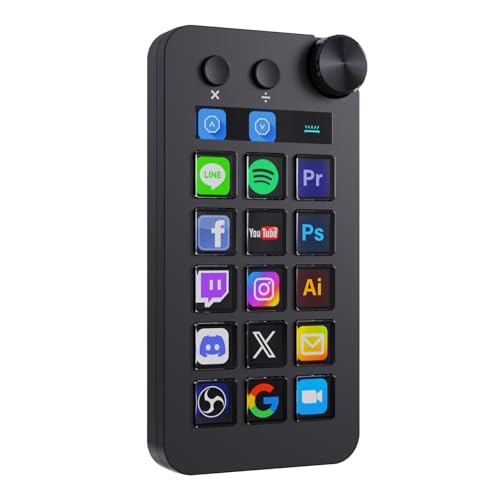
TreasLin VSDinside Stream Controller Deck N1 Black 18 Macro Keys

TreasLin VSDinside Macro Keyboard Stream Controller Deck N1 White
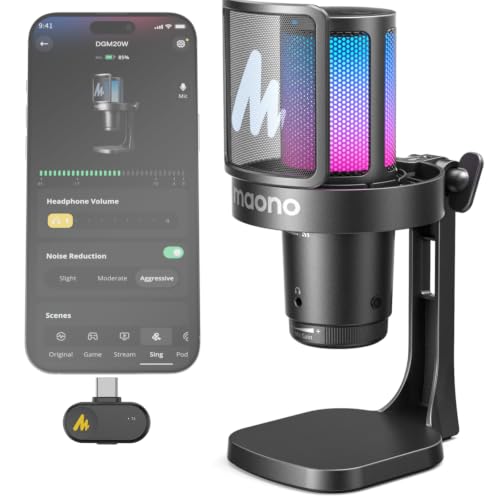
MAONO DGM20W Wireless Gaming Microphone for PC and Smartphones
More On The Choices That Made The List
The XL Streaming Deck leans into the upper end of macro hardware, and on a busy stream setup it shows. The deck pairs 32 programmable LCD keys with twin scroll wheels and a strip of RGB lighting, so live producers can swap scenes, ride audio levels, and fire off chat macros without breaking eye contact with the broadcast.
For most creators running OBS or streaming across Twitch, the dual scroll wheels make a measurable difference. Where the smaller N1 siblings focus on key density, this model hands you tactile control over timeline scrubbing or volume mixing.
Useful Strengths
- 32 LCD keys display custom icons, GIFs, and dynamic badges for at-a-glance scene switching.
- Dual scroll wheels handle timeline scrubbing, audio mixing, or zoom control without keyboard shortcuts.
- RGB lighting integrates with the rest of the deck for visual feedback during live sessions.
- Profile switching lets the same keys trigger different shortcuts in OBS, Photoshop, or Excel.
Things To Consider
- The footprint demands serious desk space, so compact setups may feel crowded.
- Setup software has a learning curve, and commonly reported behavior suggests a session of trial and error before profiles feel natural.
Key Specs
Built With In Mind
Established streamers, video editors, and content creators running multi-scene productions who want hardware-level control over their workflow.
A Better Fit Elsewhere
Streamers with minimal desk space or very simple setups will find the TreasLin VSDinside Stream Controller Deck N1 Black a friendlier fit.
The Stream Dock XL in white offers the same 32-key core as the first pick, but in a brighter housing with a different personality. It works equally well on a Mac mini or a Windows rig, so cross-platform creators can pull it into almost any studio without driver headaches.
Compared to the RGB-heavy first pick, this model leans more toward a clean studio aesthetic. The white finish suits minimalist desks and bright setups where black hardware tends to look out of place.
Useful Touches
- Double-layer LCD design supports full-screen dynamic backgrounds with translucent icons.
- Customizable ambient backlight gives visual cues during streams without flooding the room with color.
- Plug-and-go compatibility with OBS, Twitch, and YouTube cuts the configuration time for new creators.
- White housing pairs naturally with aluminum desks and Mac setups for a clean studio look.
Worth Noting
- White finish shows dust and fingerprints more readily than darker variants.
- Without the dual scroll wheels of the RGB model, volume and timeline control falls back to key presses.
Right Fit For
Studio-focused creators on Mac or PC who want a clean, light-colored controller that disappears into a minimalist desk setup.
Look Elsewhere When
Streamers who depend on physical scroll wheels for mixing will be better served by the TreasLin VSDinside XL Streaming Deck with RGB Lighting.
The Moonlight Merriment pad is a piece of themed desk art first and a mouse surface second. It carries the festive Genshin Impact event art across a generous footprint, which gives low-DPI mouse users real room to sweep without lifting the sensor.
Among the high-spec peripherals on this list, it plays a different role. You will not find a microphone capsule or a macro processor here, but a desk still needs a base layer, and themed pads do a lot for personality.
Why It Works Well
- Full-surface Moonlight Merriment artwork doubles as desk decor for fans of the game.
- Extended footprint supports both a mouse and a small keyboard on the same surface.
- Printed fabric top tends to glide smoothly for both optical and laser sensors.
Minor Gripes
- Themed fabrics tend to show wear at the heel of the mouse over months of daily use.
- Lacks the stitched edges found on pads aimed at competitive gaming.
Whose Shelf It Belongs On
Genshin Impact fans who want a themed workspace centerpiece more than a tournament-grade tracking surface.
Skip It When
Gamers chasing pure tracking precision will be better served by a hard-surface pad built for competitive aim.
The DGM20 is a USB condenser that aims at the gaming corner of the streaming world. Plug-and-play USB means no interface box or mixer between you and your PC, which keeps a first streaming setup minimal.
Set beside the macro decks above, this microphone covers the audio half of a creator rig. RGB lighting rounds out the gaming-PC aesthetic and ties the mic into the same visual language as a keyboard and tower.
Well-Handled Touches
- USB plug-and-play skips extra drivers, so new streamers can go live within minutes of unboxing.
- RGB underglow complements gaming setups and helps the mic stand out on cluttered desks.
- Condenser capsule captures voice clearly for Discord, casual streaming, and team chat.
- Tap-to-mute control on the body lets you cut audio mid-game without hunting for software toggles.
Points To Keep In Mind
- Condenser pickups tend to grab keyboard clicks, so placement matters in noisy rooms.
- Commonly reported behavior suggests firmware or driver updates are worth checking for first-time Windows users.
Key Specs
Best Suited To
Entry-level streamers and PC gamers who want a USB mic with on-board controls and RGB flair without an external audio interface.
Consider Something Else When
Competitive players who want stronger noise rejection should look at the MAONO DGM20S Gaming Microphone with one-click noise reduction.
The DGM20S is the more disciplined sibling of the RGB-lit DGM20. The cardioid pickup pattern (a directional pattern that favors sound coming from the front while reducing noise from the sides and back) focuses on the speaker’s voice and trims background distractions, with one-click noise reduction to back it up.
Compared to the louder, RGB-forward DGM20, this mic keeps a quieter profile. For squad play on Discord, that often translates to clearer callouts during clutch moments.
Practical Advantages
- One-click noise reduction reduces keyboard clicks and ambient hum without a complex chain of filters.
- Cardioid pickup pattern targets voice in front of the mic and ignores much of the room.
- Tuned for Discord, competitive gaming, and streaming, where call clarity matters more than warmth.
Trade Offs
- Less flashy than the RGB DGM20, so it may not blend into every gaming battlestation.
- Cardioid pattern still benefits from a treated room for the cleanest signal.
Made For
Competitive gamers and Discord-heavy squads who prioritize voice clarity over visual flair in their microphone.
Reach For A Different Pick When
Creators who want RGB lighting to match their rig will find the MAONO DGM20 USB Gaming Microphone a more visually cohesive choice.
The N1 Black trims the XL down to a desk-friendly 18-key layout while keeping the rotary knob intact. The knob switches between shortcut mode, calculator mode, and numeric keypad mode, which gives the deck real off-stream value.
Where the first two decks lean into maximalist streaming rigs, the N1 fits tighter creator desks and small apartment workstations. For solo creators running lean setups, it covers the core of what a macro deck should do.
Useful Highlights
- Triple-mode rotary knob covers shortcuts, calculator, and numeric entry without switching devices.
- 18 customizable keys still cover scene switching, audio cues, and chat macros for solo streams.
- Compact footprint suits smaller desks, laptop setups, and minimal creator spaces.
- Cross-platform support covers OBS on Mac and PC out of the box.
Honest Caveats
- Fewer keys than the 32-key XL options, so larger productions may outgrow it quickly.
- Mode-switching on the knob is helpful, though commonly reported behavior suggests the labels take some getting used to.
Feature Snapshot
Perfect Match For
Solo creators with smaller desks who want a stream deck that doubles as a numeric keypad during office work.
Where A Sibling Pick Shines
Producers running multi-scene broadcasts will get more mileage from the TreasLin VSDinside XL Streaming Deck with 32 keys.
The N1 White shares the N1 Black’s spec sheet but flips the finish to a clean, studio-friendly color. Inside, 15 visual LCD keys, 2 tap buttons, and 1 rotary knob handle the same triple-mode versatility.
For hybrid creators who switch between spreadsheets and stream software, the calculator and numeric modes quietly earn their keep. The deck earns its place in any mixed-use workflow.
What Pays Off
- Triple operating modes let one device replace a numeric pad, calculator, and stream deck.
- 15 LCD keys display custom icons so functions stay readable at a glance.
- White finish complements bright Mac or studio-themed desks without clashing.
- Cross-platform compatibility covers both Mac and PC creators without extra drivers.
Softer Spots
- Smaller key count than 32-key decks, so multi-scene producers may bump into limits.
- White housing requires more frequent wiping to stay fingerprint-free in daily use.
Who Should Grab It
Hybrid office and streaming users who want one device that handles both spreadsheets and OBS shortcuts.
Not Your Match When
Streamers running heavy multi-camera productions will be better served by the 32-key TreasLin VSDinside Stream Dock XL Advanced Studio Controller.
The DGM20W trades the cable of its siblings for 2.4GHz wireless freedom, and it pairs with both PCs and smartphones. That makes it the most flexible mic in the lineup for creators who record in more than one spot.
Among the wired DGM20 and DGM20S, this wireless version reads as the most mobile-friendly. For someone moving between a desk and a living-room recording spot, the lack of cable is the headline feature.
Reasons It Performs
- Wireless 2.4GHz connectivity removes cable clutter from minimal or shared desks.
- Dual-mode pairing supports both PC and smartphone for cross-device recording.
- Clean desktop footprint fits mobile creator setups and small recording spaces.
A Few Limitations
- Wireless operation depends on battery life, so daily charging becomes part of the routine.
- 2.4GHz signals can occasionally share spectrum with crowded USB 3.0 ports, so placement may need a moment’s thought in dense setups.
Feature Snapshot
Made For
Creators who move between rooms or pair their mic with a phone for mobile recording and gaming.
Swap It Out When
Studio-bound streamers who never move their setup will get a more reliable wired signal from the MAONO DGM20 USB Gaming Microphone.
Picking The Right Pc Peripherals For Your Workflow
The best PC peripherals tend to disappear into the routine. Once a macro deck, microphone, or mouse pad is configured, you stop thinking about the device and start thinking about the work.
Match The Deck To The Workload
A 32-key streaming deck makes sense for anyone juggling multiple scenes, audio sources, and live alerts. For solo creators or hybrid office use, an 18-key deck with calculator and numeric modes covers most needs while saving space. Pick the key count that matches your busiest stream, not your calmest one.
Microphone Choice Depends On Environment
A condenser microphone captures detail, but also captures the room. For untreated home offices, a cardioid pattern with built-in noise reduction cleans up keyboard and HVAC noise without extra gear. RGB lighting and wireless freedom are bonuses, not the foundation of good audio.
Think About Footprint And Aesthetics
A streaming deck and a gaming microphone both claim real estate on a small desk. White housings suit bright, minimalist setups, while black housings blend into gaming rigs. Pick a finish that complements the desk you already have, rather than redecorating around a single peripheral.
Smart Choices That Hold Up Over Time
Pitfalls Shoppers Hit
Overbuying keys is the most common trap. Many shoppers pick the largest deck on the market, then realize they only trigger six shortcuts during a typical stream. Buying more deck than needed wastes desk space and adds configuration overhead. A practical approach is to list your real shortcuts first, then pick a deck that covers them with room to grow.
Where The Extra Money Goes
Higher-tier streaming decks invest in better LCD panels, more durable key switches, and software that handles layered profiles cleanly. For microphones, the upgrade usually means better preamps, sturdier capsules, or wireless hardware that holds a stable connection. The honest read is that spending up pays off most for daily drivers, and matters less for casual use.
Frequently Asked Questions
How many macro keys do I really need?
Count the shortcuts you trigger during a typical stream or project. Most solo creators use between six and twelve, so an 18-key deck covers current needs with a little headroom.
Are wireless gaming microphones reliable enough for streaming?
Modern 2.4GHz wireless mics hold a stable connection in most home environments. In a dense office with many USB 3.0 devices, you may need to reposition the receiver for the cleanest signal.
Can I use a streaming deck for non-streaming work?
Yes. Profile switching lets a single deck handle OBS shortcuts during a stream and Excel macros during a workday. Models with calculator or numeric modes stretch that versatility further.
Do cardioid microphones need a quiet room?
Cardioid patterns reduce side and rear noise, but they still pick up room reflections. A soft surface behind the microphone and a bit of distance from a hard wall make a noticeable difference.
How long do gaming microphones typically last?
With reasonable care, a USB condenser microphone should serve daily streaming and gaming for several years. Storing it on a stand away from direct sunlight and dust is the simplest way to extend its life.
Closing Remarks
A clean streaming setup rarely comes from buying everything at once. Start with the microphone or macro deck that solves your biggest daily friction, then build out from there. The picks above cover a range of budgets, room sizes, and aesthetic preferences, so any one of them is a solid place to begin.