Building or refreshing a desktop in 2026 means sorting through a flood of SSDs, memory kits, fittings, switches, and boards, all promising the same things on paper. I pulled together ten components that actually move the needle, whether you’re chasing fast load times, smoother game installs, cooler-running drives, or a cleaner loop. The list covers storage across four capacities, an AM5 motherboard foundation, DDR5 memory, a water-cooling fitting, and even switches for keyboard tinkerers. Each pick below earned its spot by solving a specific ownership pain point, not by chasing a spec sheet headline.
The Shortlist At A Glance

TEAMGROUP MP44 4TB Gen4 NVMe M.2 SSD

EKWB EK-Torque 90 Degree Angled Rotary Fitting

TEAMGROUP A2 Pro Plus 2TB Micro SDXC Card

Kailh Butterfly Blue Linear Switch (10-Pack)

Ediloca EN600 PRO 256GB NVMe SSD

Ediloca EN600 PRO 512GB NVMe SSD
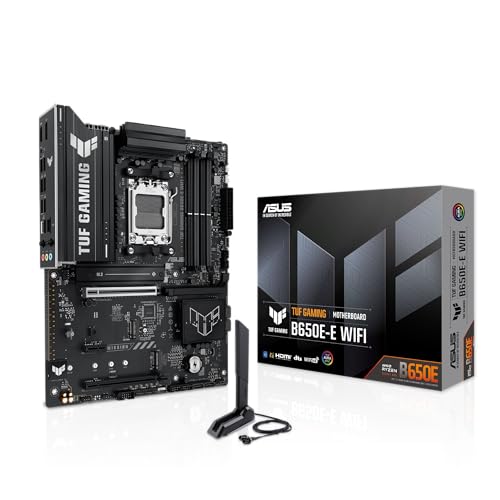
ASUS TUF GAMING B650E-E WIFI AM5 Motherboard

Ediloca EN600 PRO 1TB NVMe SSD

Ediloca EN600 PRO 2TB NVMe SSD

TEAMGROUP T-Force Delta RGB DDR5-6000 32GB Kit
A Breakdown Of The Leading Choices
The TEAMGROUP MP44 leans into capacity where most Gen4 drives tap out at 2TB. For builders running modern titles that swallow 100GB apiece, or content creators hoarding raw footage, a 4TB boot-class drive removes the juggling act. The PCIe 4.0 x4 interface, a high-speed lane standard that doubles bandwidth over PCIe 3.0, pushes sequential reads (large-block file transfers) past the 7,000MB/s mark, so even multi-gigabyte project files open fast.
It uses the M.2 2280 form factor (22mm wide, 80mm long), which fits the slot on the vast majority of current ATX and mATX boards. A graphene heat-dissipation label sits on the top surface, helping spread heat across the drive during heavy writes and keeping thermal throttling (automatic speed reduction to prevent overheating) at bay when paired with a motherboard’s existing heatsink.
A Few Strong Suits
- 4TB capacity replaces a separate game drive for most people.
- Gen4 speeds feel instant when loading large open-world games or scrubbing through 4K timelines.
- Graphene label plus onboard SLC cache (a small high-speed memory buffer that absorbs burst writes) helps sustain performance under long file copies.
- Recyclable packaging cuts down on unnecessary box waste.
- Brand monitoring software tracks health, temperature, and firmware status from the desktop.
Things To Consider
- Peak throughput requires a PCIe 4.0 motherboard slot; Gen3 systems will run, but at lower speeds.
- Sustained writes after the SLC cache fills will drop noticeably on most consumer TLC drives, and the MP44 is no exception.
Who It Suits Best
Gamers juggling a 200GB+ library and creators managing project archives will appreciate the room more than the raw benchmark numbers.
Consider Something Else When
Shoppers on tighter budgets or with lighter storage needs should look at the Ediloca EN600 PRO 1TB, which costs noticeably less.
Custom water loops rarely cooperate with rigid tubing on the first try, which is exactly where a 90-degree rotary fitting earns its keep. EKWB’s Torque adapter bends the tubing path by 90 degrees while letting you rotate the outlet independently of the inlet, so final alignment happens with the fitting installed rather than at the bench. The joint stays locked once tightened, eliminating that wobble cheaper adapters tend to develop over time.
The CNC-machined brass body (shaped by computer-controlled milling from solid brass) handles repeated hand-tightening without thread galling, and the matte black finish matches the wider EK Torque aesthetic for a unified look. Standard G1/4″ threads (the most common fitting thread in PC water cooling) mean it drops into nearly any loop, and the compact 23mm outer diameter keeps it from crowding crowded radiators or multi-block configurations.
Benefits That Matter
- Revolvable joint takes the trial-and-error out of final tube routing.
- Solid brass body resists corrosion and holds shape under temperature swings.
- Standard G1/4″ threading fits the rest of a custom loop without adapters.
- Matte black coating blends into modern stealth builds.
Worth Noting
- The narrow 23mm profile can be harder to grip during installation; builders with larger hands may need a fitting wrench.
- One fitting solves one bend; multi-direction runs still need additional adapters or angled runs.
Made For
Loop builders running rigid tubing in tight cases where every millimeter of routing clearance matters.
Not Your Match When
Anyone sticking with an all-in-one liquid cooler should skip this entirely, since AIO units (closed-loop coolers with sealed, non-serviceable radiators) ship with pre-attached tubing that doesn’t use G1/4 fittings.
Handheld gaming PCs and the Switch line have an insatiable appetite for storage once a library starts to grow. The TEAMGROUP A2 Pro Plus is built around the A2 application performance class (a standard measuring random read/write speed in IOPS, or input/output operations per second, for running apps and games directly from the card). That rating matters for handhelds, since slow cards cause hitching during open-world streaming. The included SD adapter broadens use to laptops, drones, and action cameras.
The V30 video speed class guarantees a minimum 30MB/s sustained write, which keeps 4K recording on phones and cameras stable without dropped frames. At 2TB, the card handles roughly a dozen modern AAA games on Steam Deck plus room for indie favorites, though some of that space gets eaten by formatting overhead.
Everyday Wins
- A2 rating keeps game load times tight on Steam Deck and Switch.
- 160MB/s read speed cuts large file transfers when moving captures to a PC.
- V30 video class supports clean 4K capture on supported phones and cameras.
- Adapter included for use in full-size SD slots.
Trade Offs
- The 110MB/s sequential write rating drops for sustained transfers once the card’s internal buffer fills.
- MicroSD slots on handhelds often cap real-world speeds below the card’s theoretical ceiling.
Right Fit For
Steam Deck and Switch owners carrying more than ten installed titles at a time, plus mobile shooters who film 4K clips regularly.
Skip It When
Shoppers looking for internal desktop storage should turn to the TEAMGROUP MP44 4TB for far greater capacity at the same budget tier.
For competitive gamers and keyboard builders, a switch’s pre-travel, or the distance the key travels before it registers a press, makes the difference between a reaction that lands and one that doesn’t. The Kailh Butterfly Blue brings pre-travel down to around 1.2mm, roughly half what a standard Cherry MX Red offers, so the actuation point sits much closer to the top of the keypress. Linear travel (no tactile bump or click) keeps movement smooth and predictable under fast double-taps.
Pre-lubing means the factory applies lubricant to the stem and housing surfaces, removing the most tedious step of a custom build. POM plastic construction in the stem, top, and bottom housings (POM, or polyoxymethylene, is a low-friction engineering plastic known for its smooth, self-lubricating feel) keeps friction low and the sound profile clean. The 45gf actuation force (the grams of pressure needed to trigger a keypress) lands in the middle of the linear range, firm enough to prevent typos, light enough for long sessions.
Good Reasons To Consider
- Short pre-travel gives a measurable edge in twitch-driven games.
- Pre-lubed from the factory cuts build time for first-time switch installers.
- 5-pin design (five metal prongs for PCB mounting, including two plastic alignment posts) locks firmly into hot-swap sockets without wobble.
- MX-compatible footprint fits standard keycap sets and most hot-swap PCBs (printed circuit boards that let you swap switches without soldering).
Points To Keep In Mind
- The short pre-travel can cause accidental presses during typing-heavy workloads.
- Only 10 switches per pack; a full 65% keyboard needs around 70, so plan on multiple packs.
Best Suited To
Gamers chasing faster trigger response and hobbyists who want a quality linear switch without spending an evening hand-lubing.
A Better Fit Elsewhere
People who type more than they game may prefer a tactile switch with a firmer bump, which sits outside this list.
A first build or a tired laptop often just needs a small, reliable boot drive to feel new again. The Ediloca EN600 PRO 256GB uses the NVMe protocol over PCIe 3.0 x4 (four data lanes), reaching around 1,400MB/s sequential reads, which is several times faster than a typical SATA SSD (an older drive interface capped around 600MB/s) and roughly 25 times faster than a spinning hard drive. For most people, the visible jump comes from boot times and app launches, not benchmark chasing.
The M.2 2280 form factor drops into any modern motherboard slot, and the included graphene cooling sticker adds a thin thermal layer that helps in cramped laptop chassis where airflow is limited. 3D NAND TLC flash (stacked memory cells using three bits per cell, balancing cost and endurance) keeps the price accessible without sacrificing the lifespan needed for a daily-driver boot partition.
Everyday Advantages
- 256GB hits the sweet spot for a clean Windows install plus core apps.
- Gen3 interface is widely compatible with older motherboards and laptops.
- Graphene label tames thermals in tight enclosures without adding bulk.
- SLC cache absorbs burst writes during everyday file operations.
Honest Caveats
- Sequential read speeds cap well below Gen4 drives, so heavy workloads feel the difference.
- 256GB fills up fast for anyone installing modern games on the same partition.
Perfect Match For
First-time builders, students, or anyone reviving a five-year-old laptop with a clean Windows boot drive.
Look Elsewhere When
Anyone planning to install more than a couple of modern games should jump to the Ediloca EN600 PRO 1TB for breathing room.
The 512GB EN600 PRO doubles the capacity of its smaller sibling while stretching closer to Gen3’s ceiling at around 3,000MB/s sequential reads. That extra headroom shows up in daily use: large Photoshop files open faster, video timelines scrub more smoothly, and game load screens shrink by several seconds. It stays on the PCIe 3.0 bus, so it’s a clean upgrade for older AM4 or early AM5 systems that don’t need bleeding-edge bandwidth.
Like the other EN600 PRO drives, it carries a graphene thermal label and an SLC cache for absorbing burst writes. 3D NAND TLC keeps the price-to-capacity ratio reasonable, and the M.2 2280 form factor slots directly into most boards without extras.
Strong Points
- 512GB handles Windows, core apps, and a few large games comfortably.
- 3,000MB/s reads approach the practical ceiling of PCIe Gen3.
- Thermal label helps in compact cases with limited airflow.
- Affordable stepping stone for builders not chasing Gen4 speeds.
Less Ideal Details
- Sustained writes slow once the SLC cache fills, common for budget TLC drives.
- Doesn’t take advantage of PCIe 4.0 bandwidth on newer motherboards.
The Right Fit
Mainstream builders who want solid everyday performance without paying for Gen4 overhead they won’t use.
Reach For A Different Pick When
Creators storing massive project files will find the Ediloca EN600 PRO 2TB far more accommodating.
Feature Snapshot
The TUF GAMING B650E-E WIFI is the kind of board you build a new AMD system around when you want headroom for upgrades. The 8+2+1 DrMOS power stage design (a power delivery layout combining high-side, low-side, and driver MOSFETs into single compact chips rated at 80 amps each) feeds clean voltage to current and next-gen Ryzen chips, which matters when paired with power-hungry X3D or higher-core-count models. DDR5 support (the latest memory standard offering higher bandwidth and lower power than DDR4) and PCIe 5.0 readiness on the primary slot keep the platform relevant for years.
Three M.2 slots give storage flexibility, including a PCIe 5.0 M.2 slot for future-gen drives when they land at friendly prices. Wi-Fi 6E and 2.5Gb Ethernet handle networking without adapters, and front-panel USB 20Gbps Type-C (a USB standard offering data transfer rates up to 20 gigabits per second) covers fast external storage. BIOS FlashBack (a feature that lets you update the motherboard firmware using only a USB drive and power supply, no CPU needed) is genuinely useful when swapping to a newer CPU before booting.
What Stands Out
- DrMOS power stages give stable voltage under sustained multi-core loads.
- PCIe 5.0 on the primary x16 slot and one M.2 slot future-proofs the build.
- Three M.2 slots let you split OS, games, and creator libraries across drives.
- Wi-Fi 6E and 2.5Gb LAN remove the need for separate adapters.
- 8-layer PCB (printed circuit board) improves signal integrity for high-frequency DDR5 and PCIe signals.
Practical Considerations
- The board leans toward the upper end of the B650 lineup, so budget builders may prefer a stripped-down alternative.
- Realizing PCIe 5.0 speeds requires a GPU and drive that actually use the standard; current parts often run fine on Gen4.
Whose Shelf It Belongs On
Gamers and creators stepping into the AM5 platform who want a sturdy foundation for current Ryzen chips and future upgrades.
Swap It Out When
Shoppers running an older DDR4 system and not yet ready to invest in DDR5 memory should hold off and stick with their current platform.
Feature Rundown
1TB has quietly become the comfortable size for a primary drive in 2026, large enough for Windows plus a working library of games without constant pruning. The Ediloca EN600 PRO 1TB pushes to around 3,200MB/s sequential reads on PCIe 3.0, which is near the ceiling of the standard and roughly five times faster than a SATA SSD. For most desktop users, the jump from Gen3 to Gen4 only shows up in synthetic benchmarks, not in real-world gameplay.
The same graphene thermal label and SLC cache carry over from the smaller EN600 PRO drives, keeping thermals under control during big file moves. It works in both desktops and laptops with M.2 slots, and the TLC NAND keeps cost-per-gigabyte reasonable.
The Good Stuff
- 1TB fits OS plus a healthy game or project library without juggling partitions.
- 3,200MB/s reads approach the practical Gen3 limit.
- Graphene sticker adds a slim thermal layer for laptop installs.
- Compatible with most desktops and laptops built in the last several years.
Minor Gripes
- Doesn’t unlock Gen4 throughput on newer motherboards, so future-proofing is limited.
- Heavy sustained writes can outpace the SLC cache on this capacity tier.
Best Suited To
Daily-driver builders who want a single drive that handles work, browsing, and gaming without thinking about storage management.
Where A Sibling Pick Shines
Content creators with large raw video libraries should step up to the Ediloca EN600 PRO 2TB instead.
Key Specs
Video editors and photographers routinely burn through 2TB just keeping a few project folders active. The EN600 PRO 2TB keeps the same 3,200MB/s ceiling as its 1TB sibling while doubling usable room. For creators working with 4K timelines or RAW photo libraries, the extra space means fewer midnight file purges and more breathing room for client revisions.
The graphene label becomes more useful at this capacity, since longer sustained writes produce more heat. 3D NAND TLC keeps pricing approachable relative to higher-tier MLC or enterprise drives, though endurance ratings fall below pro-grade alternatives.
A Favorable Mix
- 2TB comfortably holds active project folders plus software libraries.
- Same 3,200MB/s ceiling as the 1TB model, no performance penalty.
- Thermal label helps during the long file copies creators run daily.
- Costs less per gigabyte than smaller capacities on the same model.
A Few Limitations
- TLC NAND endurance lags behind MLC or enterprise drives under constant heavy writes.
- Gen3 interface caps throughput on systems that could otherwise move faster.
Who Should Grab It
Content creators and photo/video hobbyists who routinely work with multi-gigabyte files and need room to keep projects live.
Another Choice May Suit
Gamers chasing maximum install space at Gen4 speeds will find more headroom with the TEAMGROUP MP44 4TB.
DDR5 settled into a sweet spot at 6000MHz with tight CL30 timings, and the T-Force Delta RGB kit lands right in that zone. The 2x16GB configuration (two matched sticks, totaling 32GB) runs in dual-channel mode, doubling memory bandwidth by letting the CPU talk to both modules simultaneously. On-die ECC (error-correcting code built directly into the memory chips) catches single-bit errors before they cause crashes, which matters during long renders or all-night downloads.
The 120-degree ultra-wide light diffuser spreads the RGB glow across the top bar rather than clustering it in a narrow strip. Both Intel XMP 3.0 (Intel’s memory overclocking profile standard, applied via a one-click BIOS setting) and AMD EXPO compatibility (AMD’s equivalent one-click memory overclocking profile) are onboard, so the rated speed loads automatically on either platform without manual tuning.
Reasons It Performs
- 6000MHz CL30 hits the proven sweet spot for AMD Ryzen 7000/9000 platforms.
- 32GB covers modern games, browser-heavy multitasking, and creative apps simultaneously.
- On-die ECC improves stability under sustained load.
- Dual-platform XMP/EXPO support avoids manual tweaking on either AMD or Intel boards.
- Wide light bar fills the top of the DIMM with diffused RGB.
Points To Note
- Tall heatspreaders can interfere with oversized air coolers; case clearance should be checked before purchase.
- RGB software control requires a compatible motherboard header to unlock full effects.
Built With In Mind
AM5 builders chasing a clean 6000MHz baseline and showcase builders who want RGB that actually fills the DIMM slot.
Where Another Pick Suits Better
Shoppers sticking with an older DDR4 motherboard need a different memory type entirely.
At A Glance
What Matters When Picking Pc Parts For A 2026 Build
Match the component to the bottleneck first. Storage drives only help if the rest of the system feeds them data quickly, so an older PCIe 3.0 motherboard won’t unlock the full potential of a Gen4 NVMe like the TEAMGROUP MP44. On the flip side, paying for Gen5 bandwidth on a board that only loads a few games at once is wasted money.
Capacity usually matters more than peak speed for everyday users. A 1TB drive that never fills up beats a fast 256GB drive that constantly needs cleanup. For creators and serious gamers, jumping to 2TB or 4TB removes the daily friction of pruning files.
Memory speed and timings matter less than capacity for most workflows, but on AMD’s AM5 platform, 6000MHz CL30 is the well-documented sweet spot. Lower CAS Latency (CL, the number of clock cycles between a memory request and the data being delivered; lower numbers mean faster response) means snappier response under multi-tasking loads.
Motherboards set the ceiling for every other part. A board with weak power delivery will throttle even mid-range CPUs, while one with too few M.2 slots forces storage compromises later. PCIe 5.0 readiness matters only if you plan to upgrade the GPU or storage within the next couple of years.
Specialty parts, like water-cooling fittings or hot-swap switches, earn their keep in specific builds but add nothing to a basic productivity rig. Match specialty gear to the use case rather than the spec sheet.
Smart Choices When Shopping Pc Parts
Hidden Buying Traps
Mismatched platforms catch a lot of first-time builders. Pairing a DDR5 memory kit with a DDR4 motherboard, or an AM5 CPU with an AM4 socket, leaves a pile of parts that simply won’t boot. Double-check the socket type and memory generation listed on the motherboard page before anything else.
Storage overshoot is the other common slip. Buyers chasing a 4TB drive often don’t need one if their workflow fits comfortably in 1TB, and the savings could fund a faster GPU or more memory. Calculate current usage and add a comfortable margin, rather than jumping to the largest available size.
RGB and aesthetics sometimes mask weak underlying components. A glowing RAM kit with poor timings or a flashy SSD with no SLC cache still underperforms a plain-looking part with better specs. Judge performance first, then add lighting as a bonus.
When Paying More Pays Off
The premium tier earns its keep when you genuinely use the extra headroom. A 4TB Gen4 drive makes sense for someone installing multiple modern AAA titles and keeping raw video files active; for a casual user browsing and streaming, a 1TB Gen3 drive handles the job at lower cost.
On the motherboard side, paying more for stronger DrMOS power stages and PCIe 5.0 readiness matters most for higher-core-count CPUs and for builders planning to upgrade the GPU next cycle. A budget B650 board works fine for a six-core chip today but may feel constrained a few years from now.
Memory kits with tighter timings (CL30 versus CL36, for instance) show measurable gains in frame pacing during heavy CPU-bound games, but the gap shrinks at 4K resolution where the GPU does more work. Gamers running 1440p or higher resolutions benefit most from the tighter timings.
Frequently Asked Questions
What PC parts matter most for gaming performance? The GPU carries the heaviest load in most modern games, followed by the CPU for frame pacing and minimum frame rates. Storage affects load times but rarely impacts in-game performance once levels are loaded, and memory speed matters more than capacity past 16GB for gaming.
Is DDR5 worth the upgrade over DDR4? DDR5 makes sense on new AMD AM5 or Intel 7000-series builds where the platform requires it. On older DDR4 systems, the cost of replacing memory, motherboard, and CPU usually outweighs the gains for general use, though creative workloads do benefit from the extra bandwidth.
How much storage do most people actually need? A 1TB boot drive covers Windows, productivity apps, and a healthy game library for most households. Power users managing video projects or large photo archives usually step up to 2TB, while 4TB tends to serve dedicated creators or gamers with massive installed libraries.
Do SSDs need cooling? M.2 NVMe drives throttle under sustained heavy writes, so a basic heatsink or thermal label helps in tight enclosures with limited airflow. In open desktop cases with good case fans, bare drives often run fine without extra cooling.
Are custom water cooling fittings worth the effort? Fittings like the EK Torque 90-degree adapter solve specific routing problems in custom loops, but they add nothing to systems running all-in-one liquid coolers. The investment only pays off for builders running rigid tubing in cases where every angle matters.
The Takeaway
Ten components, ten different jobs, and most builds only need two or three of them to feel complete. Start with the bottleneck: storage if load times drive you crazy, memory if multitasking stalls, or a board if the whole platform is aging. The picks above cover the spots where a single upgrade pays back the most in everyday use.