I’ve spent enough late nights wrestling with sluggish compile times and spinning fans to know that the right mini PC changes the daily grind. Coding demands responsive shells, clean multitasking, and enough headroom for Docker containers, browser tabs stacked tall, and the occasional VM. The ten machines below balance CPU muscle, memory bandwidth, and quiet thermals across a range of budgets and use cases.
How The Shortlist Stacks Up

Apple Mac mini M4 Desktop Computer 16GB
Getorli Mini PC Ryzen 5 6600H 16GB 512GB

Getorli Mini PC Ryzen 5 3550H 16GB 1TB
Getorli Mini PC Ryzen 7 8745HS 16GB 1TB

GMKtec G3S Mini PC Intel N95 8GB 256GB
Huidun H50 Mini PC Ryzen 3300U 16GB 512GB
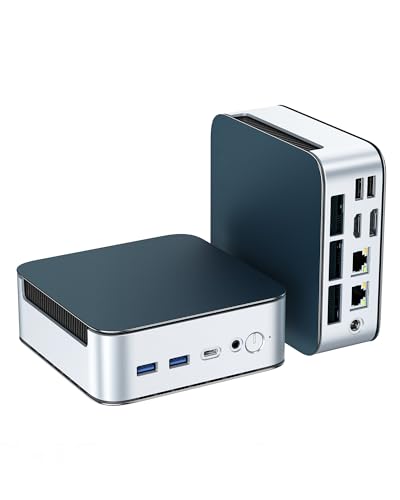
Glorlin Mini PC Ryzen 5300U 16GB 512GB

GMKtec G10 Mini PC Ryzen 5 3500U 16GB 1TB

GMKtec G11 Mini PC Ryzen Embedded R2514

GMKtec G10 Mini PC Ryzen 5 3500U 16GB 1TB
The Details Behind The Selections
The new Mac mini leans hard into what Apple silicon does best: balance. It measures roughly five inches per side, which means it slips behind a monitor or rides next to a laptop dock without a fight. The M4 chip pairs a 10-core CPU with a 10-core GPU (a graphics processor that handles rendering and parallel workloads), and 16GB of unified memory feeds both at once. Unified memory means the CPU and GPU share the same RAM pool rather than carving off separate chunks.
For developers working in Xcode, Swift, or terminal-heavy web stacks, the day feels friction-free. Containers spin up fast, and the machine stays cool under sustained compile loads. Anyone deeply tied to Windows-only toolchains, though, will feel the friction of macOS.
What It Does Well
- Front-and-back port layout keeps cables tidy for two-monitor setups.
- Unified memory means fewer stalls when the same dataset feeds compile jobs and preview rendering.
- Apple Intelligence support adds on-device AI helpers for code suggestions and text refactoring.
- Silent thermal behavior, since the chassis is dense enough to dissipate heat without a loud fan curve.
Things To Consider
- macOS limits anyone running Visual Studio or heavy .NET workloads natively.
- The base 256GB SSD fills quickly with project files and Docker images.
Key Specs
Made For
Apple-stack developers and Swift or Xcode power users who prize silence and a minimal desk footprint.
Consider Something Else When
The Getorli Mini PC Ryzen 7 8745HS 16GB 1TB suits developers committed to Linux toolchains and multi-container workflows.
The Ryzen 5 6600H brings six cores and twelve threads, and the LPDDR5 memory at 6400MT/s is the kind of bandwidth (data transfer rate per cycle) that keeps a developer’s IDE, browser, and emulator responsive all at once. That pairing alone separates it from the budget tier where RAM speed often lags behind the CPU. Triple display support makes split-screen code, docs, and logs practical without an external dock.
WiFi 6 and dual LAN mean container builds pulling dependencies or pushing to Git don’t bottleneck on the network. It handles React frontends, Node APIs, and Python notebooks with ease, and the 512GB NVMe (Non-Volatile Memory Express, a fast SSD interface) keeps cold build caches quick to access.
What Helps Most
- High-bandwidth LPDDR5 keeps multiple services and browsers snappy.
- Triple display support makes reference tabs visible while you code.
- Dual LAN ports ease the path to self-hosted testing setups.
- Compact metal chassis dissipates heat well under load.
Worth Noting
- The Radeon 660M integrated graphics handles light gaming but stumbles on heavier 3D pipelines.
- WiFi 6 (not 6E) means fewer empty channels in crowded apartments.
Right Fit For
Polyglot developers juggling web, mobile, and backend stacks in parallel.
A Better Fit Elsewhere
The GMKtec G3S Mini PC Intel N95 8GB 256GB fits leaner setups focused on coursework rather than container-heavy dev.
The Ryzen 5 3550H is a generation behind the leaders here, but it carries four cores and eight threads at boost speeds up to 3.7GHz, and the 1TB NVMe SSD is a generous allotment for project archives and language tooling. For someone learning web development, building a small game, or running a homelab, this is where the budget sweet spot lands. Triple 4K output is the kind of spec bonus you rarely see at this tier.
Compared to the G3S reviewed earlier, this Getorli trades peak single-thread speed for significantly more storage. That math works well when you keep multiple language SDKs installed alongside virtual machines.
The Helpful Details
- 1TB storage removes the constant juggling of which project to keep locally.
- Triple 4K output makes window management for editors and terminals ergonomic.
- WiFi 6 and Bluetooth 5.3 keep peripherals and mesh networks modern.
Honest Caveats
- Older Zen+ architecture means longer compile times on massive codebases.
- Radeon Vega graphics won’t substitute for a discrete card on shader work.
- The DDR4 RAM ceiling caps long-term upgrade paths.
Best Suited To
Bootcamp learners, junior developers, and homelab tinkerers who want storage headroom on a budget.
Skip It When
The Getorli Mini PC Ryzen 5 6600H 16GB 512GB suits anyone running frequent CI pipelines or compiling heavy monorepos.
The Ryzen 7 8745HS delivers eight cores and sixteen threads with boost speeds reaching 4.9GHz, which puts genuine heavy-lift performance into a chassis you can tuck behind a monitor. DDR5 RAM and PCIe 4.0 SSD (a fourth-generation PCIe interface that doubles bandwidth over PCIe 3.0) feed the CPU without becoming the bottleneck, so file-heavy projects compile faster than on older memory standards. The Radeon 780M integrated graphics raise the ceiling for GPU-accelerated tasks too.
Quad display support and dual 2.5G LAN (Ethernet ports rated for 2.5 gigabits per second, ten times faster than typical home wired connections) mean this is a serious candidate for the developer who runs multiple test environments at once. USB4 (a high-speed port standard supporting Thunderbolt-class data and display) rounds out the I/O for fast external drives or eGPUs.
Good Reasons To Consider
- Eight-core CPU chews through parallel build jobs and test suites.
- DDR5 memory keeps the platform future-proof against heavier workloads.
- Quad 4K display support fits elaborate multi-window development setups.
- USB4 unlocks fast external storage and dock flexibility.
Points To Keep In Mind
- Power draw climbs noticeably under sustained turbo loads.
- The integrated GPU, while strong, won’t replace a workstation card for serious 3D rendering.
- The fan can ramp up audibly during long compile sessions in warm rooms.
Who It Suits Best
Full-stack developers, data engineers, and anyone experimenting with on-device ML inference.
Reach For A Different Pick When
The Apple Mac mini M4 Desktop Computer 16GB fits developers whose stack centers on Apple’s tooling and iOS targets.
The Intel N95 sits firmly in the entry-level tier with four cores and a turbo speed reaching 3.4GHz, and that’s exactly why it earns its spot: not every coding task needs eight cores. Light scripting, online IDE usage, learning Python, or building a static site runs smoothly on this hardware. The 8GB of DDR4 RAM is the practical minimum for modern editors, and the 256GB SSD handles a reasonable set of tools.
The catch is RAM. Once a developer opens VS Code, a browser with docs, Docker, and a terminal, the memory ceiling becomes the limiter. For a first PC or a dedicated kiosk machine, though, this lands in a budget sweet spot that few AMD-equipped rivals touch at the same price.
Advantages To Know
- Very approachable cost for first-time buyers building a starter rig.
- Dual HDMI outputs allow a simple dual-monitor workstation.
- Compact footprint fits behind a monitor or inside a small shelving cubby.
Trade Offs
- 8GB RAM caps the number of services and tabs you can run in parallel.
- The N95 trails Ryzen chips significantly on multi-threaded compile times.
- Storage fills quickly when project tooling stacks up.
Quick Facts
Who Will Love This
Students, hobbyists, and first-time coders setting up a learning rig on a tight budget.
Swap It Out When
The Getorli Mini PC Ryzen 5 3550H 16GB 1TB fits anyone wanting genuine upgrade room for heavier coursework.
The H50 arrives with Windows 11 Pro pre-installed, which matters in office environments where BitLocker encryption and Remote Desktop are non-negotiable. The Ryzen 3300U is a quad-core chip that handles everyday development tasks and HTPC (Home Theater PC) duties without breaking a sweat. Dual-band WiFi, plus DisplayPort and HDMI 4K at 60Hz, give it a polished workstation feel.
Linux compatibility is well documented for Ubuntu and several other distributions, so developers aren’t locked to Windows. Compared to the GMKtec G10 reviewed later, this Huidun emphasizes OS readiness and warranty length over raw specs.
Everyday Advantages
- Windows 11 Pro ready out of the box for enterprise environments.
- 16GB of RAM supports comfortable multitasking for typical dev workloads.
- DP and HDMI 4K@60Hz outputs enable clean high-refresh external displays.
Points To Note
- The Ryzen 3300U trails newer Ryzen chips on multi-threaded compilation.
- Limited GPU muscle rules out heavier CUDA or shader-heavy work.
Whose Shelf It Belongs On
Small business owners, IT departments, and developers who need Pro-tier OS features on day one.
Not Your Match When
The Getorli Mini PC Ryzen 7 8745HS 16GB 1TB fits developers who want stronger headroom for parallel workloads.
The Ryzen 3 5300U offers four cores and eight threads with boost speeds to 3.8GHz, sitting in a comfortable middle ground for general development. The standout here is the expandability: Glorlin advertises support for memory upgrades to 64GB and storage up to 4TB, which is rare in mini PCs at this size. Triple 4K outputs across HDMI, DisplayPort, and Type-C let you spread across a multi-monitor layout without an external dock.
Dual 2.5G LAN ports are unusually generous for the price bracket. Anyone running local development against self-hosted databases benefits from the throughput headroom. WiFi 6 and Bluetooth 5.3 cover the wireless side cleanly.
Useful Touches
- Memory expansion ceiling of 64GB protects against growing project complexity.
- Triple 4K output covers laptops, monitors, and Type-C tablets in one chain.
- Dual 2.5G LAN is a forward-looking network upgrade for power users.
Potential Drawbacks
- Storage and RAM upgrades require opening the chassis, which can feel fiddly.
- The integrated graphics cap applies to any ML prototyping beyond simple inference.
Feature Snapshot
Perfect Match For
Developers planning to scale toolchains upward over the next few years.
Look Elsewhere When
The GMKtec G11 Mini PC Ryzen Embedded R2514 suits always-on server or kiosk deployments instead.
The Ryzen 5 3500U uses the same Zen+ generation as the 3550H, but pairs it with HDMI 2.1, USB-C, and 2.5G LAN, which together form a more future-facing port array. Triple 4K output and a 1TB SSD make this a friendly homelab companion for Proxmox (an open-source virtualization platform), Docker, and lightweight self-hosted services. At 15W TDP (Thermal Design Power, the wattage the cooling system is designed to dissipate), it’s gentle on the wall outlet too.
The G10’s profile fits developers who want a single box that doubles as a workstation and a quiet home server. If you compare it to the Glorlin reviewed above, the G10 trades expandability for a more appliance-like, ready-to-go feel.
Real Benefits
- Triple 4K output makes reference materials and terminals visible side-by-side.
- HDMI 2.1 and USB-C ports cover modern displays and high-speed storage.
- 15W TDP keeps the system cool and energy-efficient for 24/7 use.
- 1TB SSD stores project files and VM images comfortably.
Room For Improvement
- The integrated GPU can’t carry serious machine learning workloads.
- RAM is capped at lower thresholds than the Glorlin variant.
Feature Rundown
Built With In Mind
Home lab enthusiasts and developers running virtualized environments on a small footprint.
Where A Sibling Pick Shines
The GMKtec G11 Mini PC Ryzen Embedded R2514 is the stronger choice for true 24/7 always-on deployments.
The Ryzen Embedded R2514 isn’t aimed at raw speed. It’s built on the Zen+ architecture and engineered for continuous 24/7 operation, which makes it the right fit for digital signage, industrial control, kiosk deployments, and self-hosted development servers that never sleep. The 1.2GHz Radeon GPU is modest, though it reportedly outpaces Intel’s N150 UHD in certain graphics benchmarks.
For coders, the practical appeal is reliability. Long-running CI runners, build servers, or always-on homelab controllers stay up without thermal throttling under sustained loads. This is the rare mini PC explicitly marketed for industrial uptime rather than peak throughput.
What Stands Out
- Engineered for continuous 24/7 operation in commercial environments.
- Solid choice for self-hosted build agents and homelab controllers.
- Compact chassis slots into racks, kiosks, and signage cabinets.
Some Limits To Know
- Modest CPU speed rules out heavy compilation on this unit.
- The integrated GPU isn’t suited for graphics-heavy development.
- Specialty positioning means less mainstream driver support than consumer Ryzen chips.
Who Should Grab It
Developers deploying build runners, kiosks, or industrial control systems.
Another Choice May Suit
The GMKtec G10 Mini PC Ryzen 5 3500U 16GB 1TB is a more mainstream workstation-style pick for general coding.
This is the alternate configuration of the G10 reviewed above, sharing the same Ryzen 5 3500U and triple 4K display support. The chassis is small enough to mount behind a monitor with a VESA bracket (a standard mounting pattern on the back of most displays), and the fan profile tends to stay quiet during normal coding tasks. For home offices where noise matters, that low acoustic footprint is often the deciding factor.
It offers a familiar, dependable setup: 16GB DDR4, a 1TB SSD, and modest integrated Radeon graphics. Compared to its sibling listing above, the practical differences mostly come down to which variant is in stock.
Well-Handled Touches
- Compact VESA-friendly form factor keeps desks uncluttered.
- Triple 4K display support enables productive multi-window coding layouts.
- Quiet thermal profile suits open-plan home offices.
Where It May Fall Short
- Older Zen+ architecture trails newer Ryzen chips on heavy compile jobs.
- Single LAN port limits self-hosted networking without an external switch.
Feature Snapshot
Best Suited To
Developers working in quiet home offices who want a tidy, monitor-mounted setup.
Not Your Match When
The Getorli Mini PC Ryzen 7 8745HS 16GB 1TB fits anyone needing stronger multi-core muscle for parallel builds.
What To Weigh Before Picking A Coding Mini PC
CPU Cores And Memory Bandwidth
The single biggest factor in how a coding PC feels is the pairing of CPU core count with memory bandwidth. A high-bandwidth memory standard like LPDDR5 or DDR5 keeps the processor fed, while eight cores open the door to parallel test runs and containerized services. For most general work, six cores and 16GB of DDR4 or better handle modern toolchains comfortably.
Storage And Expansion Ceiling
Project repositories, virtual machines, and Docker images grow quickly, so a 512GB NVMe SSD is the realistic starting point, with 1TB being the more comfortable choice. Look for systems advertising easy RAM or storage upgrades if you anticipate scaling. Pick items 7 and 8 if expansion matters to you.
Ports, Networking, And Displays
Triple 4K output is increasingly common and useful for code, docs, and terminals on separate screens. Dual LAN at 2.5G is a quiet bonus for self-hosted setups. USB4 and WiFi 6 keep the platform from feeling dated in two years.
Form Factor And Acoustics
Mini PCs live on desks, behind monitors, and inside homelab shelves. Quiet fan behavior and VESA compatibility often matter more than people expect during long compile sessions in shared spaces.
Things Worth Knowing Across The List
Pitfalls Shoppers Hit
Underestimating RAM is the most common slip: 8GB feels fine on day one and crowded by month three once Docker and a modern IDE join the workflow. Skipping the storage ceiling is another quiet regret, since reinstalling toolchains when an SSD fills up wastes hours. Thermal behavior also surprises first-time mini PC owners, so verify clearance around vents in tight shelving.
Where The Extra Money Goes
Premium-tier mini PCs invest in newer CPU architectures, faster memory, and more capable integrated graphics. That translates directly to shorter compile times, smoother multi-monitor output, and platforms that age better over a three-to-five-year window. The Mac mini, Getorli 8745HS, and Glorlin 5300U sit in that bracket for good reason: each gives a meaningful uplift that budget picks cannot match.
Frequently Asked Questions
How Much RAM Do I Need For Coding?
16GB of RAM is the practical minimum for modern development, covering an editor, browser, and a few lightweight services. Anything heavier, including Docker-heavy stacks or running multiple VMs, benefits from 32GB or more.
Is An Integrated GPU Enough For Programming?
For most development tasks, integrated graphics handle the workload fine. Dedicated GPUs only become necessary for machine learning training, heavy shader compilation, or game-engine development.
Do Mini PCs Run Linux Well?
Most modern mini PCs support Ubuntu, Fedora, and other major distributions without driver headaches, especially those with AMD Ryzen processors. Verify Linux compatibility per model if your workflow depends on it.
What Storage Size Should I Aim For?
512GB handles a starter setup, but 1TB is the safer long-term choice once Docker images, language SDKs, and project caches accumulate. NVMe SSDs are standard at this point and offer fast read speeds for build tools.
Should I Pick Apple Silicon Or x86 For Coding?
It depends entirely on your toolchain. Apple silicon excels for iOS, macOS, and Swift development, while x86 (the standard architecture used by AMD and Intel processors) is the right fit for Windows-only enterprise stacks and broad Linux compatibility.
Closing Remarks
The right mini PC for coding matches the toolchain you actually run. Students and hobbyists find solid footing in the budget tier, while full-stack developers benefit from the headroom of mid-range Ryzen chips. Heavy multitaskers and ML-adjacent projects should look at the premium picks. Whichever path feels right, prioritize memory bandwidth, a generous SSD, and quiet thermals, and the rest falls into place.