A solid DJ setup doesn’t have to drain the budget, and the right mix of gear matters more than chasing the flashiest name on the box. I’ve spent time digging through controllers, headphones, mini PCs, and accessories that beginners and intermediate spinners actually reach for in 2026. Whether you’re mixing in a bedroom, streaming sets, or building a portable rig, this roundup covers the practical options worth knowing about. I’ll break down what each piece does, who it suits, and where the trade-offs hide.
An Overview Of The Picks

Hercules DJControl Inpulse 500 2-Deck USB DJ Controller

Hercules DJ Control Inpulse 300 2-Channel USB Controller

GEEKOM IT12 Mini PC Intel i3-12300HE 16GB 256GB
OneOdio A71D Wired Over-Ear DJ Headphones

MAONO MH601 Wired Studio Headphones for DJ Mixing

Pioneer DJ DM-40-W 4-Inch Active Monitor Pair White
Syndesmos Wired Over-Ear DJ Headphones

OneOdio A71 Hi-Res Wired DJ Headphones Red

Pyle PLPTS55 Portable Folding Laptop Stand
The Details Behind The Selections
The Hercules DJControl Inpulse 500 sits in a sweet spot for home DJs stepping past the basics. A built-in audio interface means there’s no need to buy a separate soundcard, and the hardware input mixer handles audio sources directly. The 16 backlit RGB pads give room for hot cues, loops, and samples without crowding the layout.
For a bedroom studio where you want room to grow, the large jog wheels respond to touch for scratching, and the Filter/FX section helps smooth out transitions. Compared to the Hercules Inpulse 300 below, this one offers more pads and better integration with Serato DJ, which is included alongside DJUCED. The retractable feet lift the unit, which protects against accidental spills during long practice sessions.
What Stands Out
- Built-in audio interface removes the need for a separate soundcard
- Large touch-sensitive jog wheels support expressive scratching
- 16 RGB-backlit pads handle hot cues, loops, and slicing
- Dedicated Filter/FX area creates smoother transitions
- Compatible with both Serato DJ and DJUCED software
- Retractable feet lift the chassis for spill safety
Things To Consider
- The two-deck layout may feel limited if you want to mix three or more sources simultaneously
- Plastic construction feels sturdy but lightweight during travel
- Some users find the bundled software takes time to learn
Key Specs
Who Will Love This
Intermediate DJs working in a home or small studio who want Serato compatibility and a built-in audio interface will find this a comfortable upgrade path.
Where Another Pick Suits Better
Complete beginners still finding their footing with beatmatching should consider the Hercules DJControl Inpulse 300, which has simpler teaching lights and a friendlier learning curve.
The Hercules DJControl Inpulse 300 is built around the assumption that the person using it has never mixed a track before. The tempo and beat-align light guides on the deck flash to show when two songs are perfectly in sync, which takes a lot of guesswork out of early practice sessions. DJUCED software comes bundled, complete with tutorials and an “IMA” music assistant that suggests tracks.
Two channels keep the layout uncluttered, and the controller works straight out of the box with most laptops. For anyone transitioning from bedroom experiments to a first public gig, the hardware feels approachable without being toy-like. Compared to the Inpulse 500 above, this model trades some pad count and software flexibility for a lighter, more focused setup that helps newcomers build real skills.
Useful Highlights
- Beatmatch guide with light prompts teaches timing visually
- DJUCED software includes tutorials and track suggestions
- Compact 2-channel layout keeps controls simple
- Lightweight enough to toss in a bag for small gigs
Worth Noting
- Fewer performance pads than the Inpulse 500
- Limited to DJUCED; no Serato support out of the box
- Smaller jog wheels may frustrate scratch-heavy learners
Made For
First-time DJs who want guided practice and bundled tutorials rather than a complex pro-style controller.
Skip It When
If you already know how to beatmatch by ear and want deeper Serato integration, the Hercules DJControl Inpulse 500 offers more headroom.
A laptop isn’t the only way to run DJ software, and the GEEKOM IT12 Mini PC makes a compelling case for a dedicated desktop brain. The Intel i3-12300HE processor, paired with 16GB of RAM, handles Serato or DJUCED without breaking a sweat, while the tiny chassis disappears behind a monitor or tucks next to a controller. For mobile DJs hauling gear to weddings or club nights, this thing weighs almost nothing.
The integrated Intel UHD graphics handle 4K output, which means you can run waveform displays on a large external screen without lag. Compared to a laptop, the IT12 runs cooler and quieter during long sets, and the 256GB SSD keeps boot times snappy. The catch is that you’ll need to bring your own monitor, keyboard, and mouse, but that’s part of the trade for such a small footprint.
What Helps Most
- Tiny form factor fits anywhere a laptop would
- 16GB RAM keeps multiple DJ apps responsive
- Whisper-quiet operation during long sets
- 4K-capable display output for large waveform screens
Points To Keep In Mind
- 256GB SSD fills up fast with large music libraries
- No display, keyboard, or mouse included
- Limited upgrade potential compared to a desktop tower
Best Suited To
Mobile DJs and home producers who want a permanent, space-saving computer dedicated to running their DJ software without laptop fan noise.
Consider Something Else When
Anyone who needs an all-in-one portable solution with built-in screen and battery should stick with a laptop rather than a mini PC.
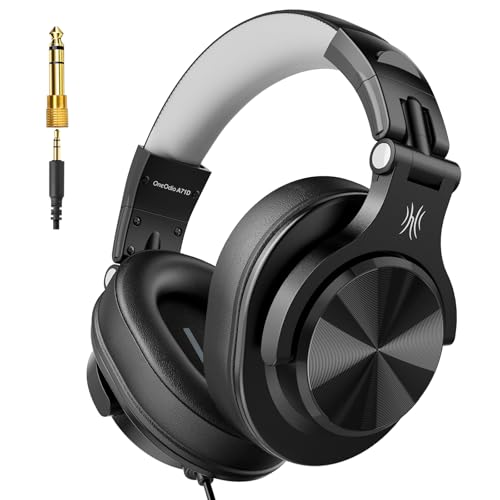
Headphones are arguably the most personal piece of a DJ’s kit, and the OneOdio A71D delivers genuine monitoring utility without the premium markup. The 90-degree swiveling ear cups let you cue up a track with one ear while the other stays open to the room, which is the standard DJ monitoring technique. Soft padded cushions and an adjustable headband keep things comfortable during long transitions.
The 40mm drivers handle deep bass for cueing kick drums and crisp highs for catching vocals in a busy mix. Compared to the OneOdio A71 reviewed below, the A71D emphasizes DJ-style monitoring with its swiveling design and studio-style sound profile. For practice sessions at home where you need to hear every detail, these punch above their tier, though the plastic build feels light during rough handling.
Useful Strengths
- 90-degree swiveling cups enable single-ear cueing
- 40mm drivers deliver clear bass and treble response
- Padded headband reduces fatigue during long sets
- Foldable design fits in a backpack
Honest Caveats
- Wired-only connection limits movement on stage
- Plastic construction may not survive heavy travel abuse
- Closed-back design can feel warm during summer sessions
Whose Shelf It Belongs On
Home DJs and bedroom producers who want reliable monitoring without paying for flagship-tier headphones.
Not Your Match When
Stage performers who need wireless freedom or extreme durability should look at higher-end closed-back models designed for live use.
Streaming sessions and marathon podcast recordings demand headphones that don’t fight back, and the MAONO MH601 leans into comfort without sacrificing sound. The 50mm large-aperture drivers push deep, accurate bass that translates well to DJ mixing, while the soft closed-back ear pads seal out background noise for cleaner monitoring. For creators spending hours at a time, the lightweight build avoids the head-clamp fatigue common in cheaper cans.
What separates these from the OneOdio A71D above is the bigger driver and broader frequency response, which matters when you’re picking out subtle mix details in a track. The closed-back design helps during noisy recording sessions, though you’ll want to take breaks during summer gigs. Owners commonly report the cushions hold up well over months of daily use, which is a meaningful reassurance for anyone mixing every evening.
Strengths Worth Knowing
- 50mm drivers produce full-range sound for accurate mixing
- Closed-back pads block external noise during recording
- Lightweight frame prevents head fatigue during long sessions
- Compatible with most audio interfaces and mixers
Trade Offs
- Wired only, no Bluetooth fallback option
- Cushions can get warm in hot environments
Perfect Match For
Streamers, podcasters, and DJs who spend three or more hours a day with headphones on and want comfort-driven design.
Look Elsewhere When
Mobile performers needing single-ear swivel monitoring should pick up the OneOdio A71D instead, which is purpose-built for that style.
If headphones aren’t enough and you want a real reference of how your mix sounds in a room, the Pioneer DJ DM-40-W monitors deliver genuine studio quality in a compact size. The 4-inch fiberglass woofers fire forward with tight, punchy bass, and the 0.75-inch soft dome tweeters use DECO convex diffusers to spread sound across a wide sweet spot. That’s important for home DJs who move around their setup rather than sitting dead-center.
The white finish gives the pair a clean look that suits modern bedrooms and content creator setups. Front-loaded bass reflex ducts reduce air friction, which keeps low-end clean even at higher volumes. For anyone practicing in a small room, these offer a noticeable step up from computer speakers, though you’ll still want acoustic treatment to truly trust what you’re hearing.
Key Advantages
- 4-inch fiberglass woofers deliver punchy, articulate bass
- DECO diffuser technology widens the stereo sweet spot
- Front-loaded bass reflex reduces port noise
- Compact size fits on most desks
- Active design means no separate amplifier needed
Possible Compromises
- Small woofers can’t reproduce sub-bass below about 50Hz
- No Bluetooth or wireless input options
- Active electronics generate slight heat during long sessions
The Right Fit
Home DJs who want to A/B their mixes against speakers and hear how tracks translate beyond headphones.
Reach For A Different Pick When
If you primarily mix on headphones and don’t need room monitoring, the MAONO MH601 or OneOdio A71D covers your needs at a lower cost.
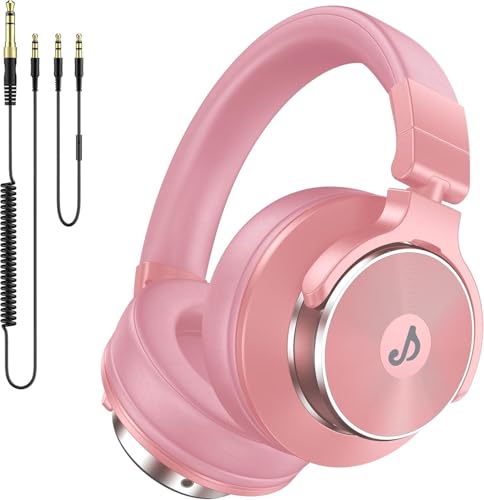
The Syndesmos wired headphones cover the full audible spectrum from 20Hz to 20kHz, which is the range most music is mixed for. The 50mm drivers handle bass-heavy electronic tracks without distortion, and the design focuses on all-day wear with padded cups and a flexible headband. For DJs who split time between home and small gigs, this pair adapts well.
Compared to the OneOdio A71 below, the Syndesmos leans toward balanced sound rather than bass emphasis, which suits mix work better than casual listening. The foldable frame slips into a backpack pocket, and the wired connection drops any concerns about battery life mid-set. The build is mostly plastic, so rougher transport habits might show wear sooner than metal-reinforced alternatives.
A Favorable Mix
- Full 20Hz to 20kHz frequency response for accurate monitoring
- 50mm drivers maintain clarity at higher volumes
- Lightweight design with cushioned ear cups
- Foldable for easy transport between venues
A Few Limitations
- Plastic construction feels less durable than metal-reinforced models
- Wired only, no Bluetooth option for casual listening
Who Should Grab It
Working DJs who want honest sound across the full frequency spectrum and value comfort during back-to-back sets.
A Better Fit Elsewhere
Listeners who prefer bass-heavy sound signatures for casual enjoyment might prefer the OneOdio A71, which emphasizes low-end punch.
The OneOdio A71 in red is a familiar sight in budget-conscious DJ circles, and for good reason. The 40mm drivers produce Hi-Res certified sound, which means the headphones can reproduce detail above standard CD quality when paired with high-bitrate audio files. The foldable design and adjustable headband keep the build practical for transport.
For anyone starting out and not ready to commit to flagship cans, this model hits a friendly middle ground. Sound leans slightly warm with boosted bass, which works well for electronic genres but may color the accuracy of acoustic mixes. The red finish stands out on stage, and the soft cushions hold up well during typical practice sessions, though heavy sweating during summer gigs can wear the padding over time.
The Upside
- Hi-Res audio certification supports detailed playback
- Foldable frame tucks into bags easily
- Warm sound signature suits electronic music styles
- Eye-catching red color for stage visibility
Where It May Fall Short
- Bass emphasis may not suit critical acoustic mixing
- Plastic hinge is a known wear point over years of use
Built With In Mind
Beginner to intermediate DJs focused on electronic genres who want solid sound without overspending on flagship tiers.
Swap It Out When
If you mix acoustic, jazz, or live recordings and need a flatter response, the Syndesmos wired headphones offer a more neutral sound profile.
Setup ergonomics often get overlooked, but a good stand transforms how a DJ works for hours on end. The Pyle PLPTS55 folds flat, adjusts in height and angle, and uses a four-prong tray that grips laptops, tablets, and small DJ mixers without sliding. For someone running Serato on a laptop alongside a controller, this gives the screen a proper eye-level position.
The construction feels lighter than a permanent studio stand, which is the trade for portability. Owners commonly report the anti-slip prongs doing their job on smooth surfaces, though very thin laptops may shift slightly under aggressive typing. For mobile DJs carrying gear to multiple venues in a week, the fold-flat design slips into a gig bag without adding much weight.
Benefits That Matter
- Four-prong tray holds laptops and mixers securely
- Adjustable height and angle for ergonomic positioning
- Folds flat for transport between gigs
- Works with tablets, turntables, and small controllers
Things To Weigh
- Lightweight build may wobble with heavier equipment
- Not as stable as a fixed studio stand
Right Fit For
Mobile DJs and bedroom producers who want adjustable screen height without dedicating permanent desk space to a stand.
Another Choice May Suit
If your setup stays in one place and weight matters less, a fixed studio desk mount may feel more solid than the portable Pyle design.
Choosing DJ Gear That Actually Fits Your Setup
Match the Controller to Your Skill Level
Beginners benefit most from controllers with built-in teaching aids, like the Hercules Inpulse 300 with its light-guided beatmatching. Intermediate DJs moving toward club or event work should prioritize built-in audio interfaces and Serato compatibility, which the Inpulse 500 covers cleanly. Spending on pro-tier four-deck controllers before you’ve logged real practice hours usually means paying for features you won’t touch yet.
Headphones Are Worth Prioritizing Early
A solid pair of closed-back headphones with swiveling cups makes every other piece of your kit more useful. The OneOdio A71D and MAONO MH601 both handle DJ-style monitoring at approachable tiers. The honest read is that most beginners outgrow cheap earbuds before they outgrow a mid-tier controller, so investing in headphones first tends to pay off faster than chasing a flagship mixer.
Don’t Forget the Supporting Cast
A mini PC like the GEEKOM IT12 changes how portable a setup feels, and a folding stand like the Pyle PLPTS55 keeps your body comfortable during long sessions. These accessories rarely get top billing, but they determine whether your gear actually gets used or collects dust. For anyone working in tight spaces, the cumulative effect of these smaller choices matters more than people expect.
Room Acoustics Still Beat Better Speakers
Even the Pioneer DJ DM-40-W monitors can’t fix a square room with bare walls and parallel surfaces. Treat your space first if you’re serious about critical listening, and add monitors second. Otherwise, you’ll hear the room more than the mix.
Key Considerations Across These Picks
Mistakes Worth Dodging
Shopping for a controller with more features than your laptop can run is a common trap. A four-deck flagship unit becomes a paperweight when your machine struggles with the software. Check your laptop’s specs against the controller’s requirements before anything else.
Skipping headphone quality to spend more on flashy speakers is another wrong turn. You can always add monitors later, but bad headphones distort your sense of every mix you practice on.
Where The Extra Money Goes
Higher-tier controllers usually mean better build materials, more responsive jog wheels, and deeper software integration. The jump from the Inpulse 300 to the Inpulse 500 adds Serato support and more pads, which is meaningful for intermediate work but not for absolute beginners still learning phrasing.
Premium headphones add wider frequency response, better driver quality, and more durable hinges. The upgrade is worth it once you start performing live or mixing for other people, since your audience won’t tolerate the same compromises you’ll accept at home.
Frequently Asked Questions
Do I need a dedicated audio interface?
Most modern DJ controllers include a built-in audio interface, so an external unit isn’t strictly necessary unless you’re recording mixes or running multiple outputs simultaneously. The Hercules Inpulse 500 covers typical home setups without extras.
What’s the difference between Serato and DJUCED?
Serato DJ is the industry-standard software used by many clubs, while DJUCED is Hercules’s own platform with built-in tutorials and an intelligent music assistant. Beginners often find DJUCED easier to learn, while Serato offers broader compatibility with club setups.
Can I use regular headphones for DJing?
Regular headphones work for casual listening, but DJ-specific models like the OneOdio A71D feature swiveling ear cups for single-ear cueing. This technique is essential for beatmatching without headphones blocking all ambient sound.
How much storage do I need on a DJ computer?
A 256GB SSD like the one in the GEEKOM IT12 holds roughly 5,000 to 8,000 tracks at typical quality, which is enough for most working DJs. Larger libraries may require an external drive or cloud storage.
Is a mini PC better than a laptop for DJing?
Mini PCs run cooler, quieter, and often faster than equivalently priced laptops, but they require you to bring your own monitor and peripherals. For permanent setups, this trade-off usually favors the mini PC. Mobile DJs who need an all-in-one solution still do better with a laptop.
The Takeaway
The right DJ gear comes down to matching your skill level, your space, and how often you perform. Start with headphones and a controller that fits your current ability, then add monitors, stands, or a dedicated computer as your needs grow. Every pick in this list covers a specific job, and combining two or three of them thoughtfully usually beats buying the most expensive option in any single category.