Not every desk needs the same machine, and the wrong pick can cost a whole year of friction. I put together this list for people who actually sit down and get work done: hybrid professionals juggling video calls, small-business owners running a register and a spreadsheet at the same time, students tired of a freezing laptop, and anyone setting up a home office without turning it into a server room. Everything below is aimed at the kind of machine you can plug in, forget about, and trust on a deadline.
A Side-By-Side Look

Apple MacBook Air M1 13″ 8GB 256GB (Space Gray)

EUREKA ERGONOMIC PC Stand Height Adjustable Black

PADIX 15.6 Inch Laptop N4020 4GB 128GB

GEEKOM IT12 Mini PC i3-12300HE 16GB 512GB

Beelink SER5 Mini PC Ryzen 5 5500U 16GB 480GB
Beelink EQR7 Mini PC Ryzen 7 7735U 24GB 500GB
Beelink SER5 MAX Mini PC Ryzen 7 7735U 24GB 1TB
Beelink SER5 Mini PC Ryzen 5 5500U Windows 11 Pro

Beelink SER9 MAX Mini PC Ryzen 7 H 255 64GB 1TB
Beelink SER9 Mini PC Ryzen 7 H 255 24GB 1TB
Why These Options Stand Out
I keep coming back to the MacBook Air M1 when someone asks for a laptop that simply gets out of the way. The M1 chip is Apple’s first in-house silicon for Mac, built to run cool and sip power rather than roar through benchmarks. In a real workday, that translates to silent operation: no fan spooling up during a Zoom call, no warm keyboard under your palms while you type a long report.
The 13-inch Retina display is sharp enough for detailed spreadsheets and color-accurate enough for light creative work. Backlit keys save you in dim home offices, and Touch ID lets you unlock without typing your full password ten times a day. Compared to the tower-style picks later in this list, the MacBook Air trades raw expandability for portability, which matters more to hybrid workers than desk-bound power users.
The Value In It
- Up to 18 hours of battery life covers a full workday plus a flight home
- Fanless design means truly silent operation in quiet offices
- Apple silicon handles photo edits and multitasking without slowing down
- Touch ID and the backlit keyboard speed up everyday authentication
Things To Consider
- Only two USB-C ports, so a dock or hub is almost required for full desk setups
- Storage and RAM are not user-upgradable after purchase, so choose carefully up front
Made For
Writers, consultants, and remote professionals who travel light and value a silent, long-lasting machine over ports and expandability.
Where Another Pick Suits Better
Creative pros running heavy renders will want the Beelink SER9 MAX Mini PC instead, where the Ryzen 7 H 255 and 64GB of RAM outclass the Air for sustained workloads.
This is the odd one out in the lineup, and that’s deliberate. If your work machine is a full-size ATX tower (the standard large desktop case used in many offices), the EUREKA ERGONOMIC PC Stand solves a very specific problem: where to put it. The two-tier steel frame on caster wheels lets you slide the tower under a desk, beside a printer station, or out into the room for cleaning without lifting anything heavy.
Six gear positions adjust the height in roughly two-inch increments between 23.25 and 33.25 inches. That range matters because tower heights vary, and you want clearance for airflow underneath. The smooth-rolling wheels lock once parked, which is a small detail that matters when carpet or uneven floors are involved.
Key Advantages
- Two-tier design supports both a tower and a smaller device like a printer
- Steel frame handles full-size ATX cases without flexing
- Wheels make deep cleaning behind the desk genuinely easy
Worth Noting
- Not useful for laptop-only or mini-PC users, since there is nothing to wheel around
- Wide footprint means it won’t tuck into tight cubicle corners
Right Fit For
Office managers and IT staff setting up shared workstations with traditional tower PCs, especially in spaces that need flexible cleaning access.
Swap It Out When
Anyone running a compact setup should skip this and go straight to the Beelink SER9 Mini PC, which doesn’t need a rolling stand at all.
The PADIX 15.6-inch laptop sits firmly in the entry-level category, and that’s its purpose. The Intel Celeron N4020 is a dual-core chip designed for low power draw rather than raw speed, paired here with 4GB of DDR4 RAM and 128GB of eMMC storage. That’s enough headroom for document editing, web research, video calls, and streaming lectures without the fan sounding like a hairdryer.
The full HD display runs at 1920×1080 with slim bezels, which feels generous at this tier. Windows 11 Home comes preinstalled, so setup mostly involves signing in and connecting to Wi-Fi. Compared to the MacBook Air above, this is a much more limited machine, but for a student or first-time laptop owner, the trade-off in price is significant.
Where It Excels
- 15.6-inch FHD screen gives ample room for split-window work
- Low-power Celeron keeps thermals modest and battery drain slow
- Windows 11 ready out of the box for familiar workflows
Points To Keep In Mind
- 4GB RAM limits how many browser tabs and apps can run side by side
- 128GB eMMC fills up quickly with large project files or media
Best Suited To
Students, retirees, and budget-conscious first-time users who mainly need word processing, browsing, and video calls.
Skip It When
Anyone editing video or running engineering software should look at the Beelink SER5 Mini PC with Ryzen 5 5500U instead, which doubles the thread count for noticeably faster work.
The GEEKOM IT12 reads like it was designed for fleet rollouts rather than a single home setup. The Intel i3-12300HE is a 12th-generation mobile-class chip with hybrid cores, which handles office multitasking without burning through power. The metal enclosure is a sensible touch: it dissipates heat well and survives the bumps of being relocated between desks.
With 16GB of RAM and a 512GB SSD already installed, the IT12 arrives ready to slot into a multi-monitor office environment. The standout feature, though, is the 3-year coverage that GEEKOM includes, which matters more in a five-unit deployment than in a personal purchase. For solo buyers, the Beelink models later in this list may run hotter in spec terms, but the GEEKOM wins on support.
What Earns Its Place
- 16GB RAM handles dozens of browser tabs alongside Office apps
- 512GB SSD leaves room for shared files and project archives
- 3-year coverage eases fleet deployment for small businesses
Trade Offs
- i3-class performance trails Ryzen 5 and Ryzen 7 alternatives in this roundup
- Less suited to sustained creative workloads than higher-tier Beelink models
Who It Suits Best
IT admins and small-business owners buying in bulk for general office productivity where reliability and warranty matter more than top-tier speed.
Not Your Match When
Solopreneurs running creative software should pivot to the Beelink EQR7 Mini PC, whose Ryzen 7 chip comfortably chews through heavier tasks.
Here’s where the Beelink SER5 makes its case for the everyday home office. The AMD Ryzen 5 5500U is a six-core, twelve-thread chip built on a 7nm process (a measurement of how tightly transistors are packed, which affects efficiency and heat). It idles cool and ramps up when you actually need it, whether that’s a giant Excel workbook or twenty Chrome tabs.
16GB of DDR4 RAM and a 480GB NVMe SSD (a faster storage standard than older SATA drives) keep the system responsive across reboots. Owners commonly report that the SER5 disappears behind a monitor, where it stays out of mind and out of the way. It’s a step up from the PADIX laptop in raw performance while costing far less than the premium picks below.
Benefits That Matter
- Six-core Ryzen 5 handles multitasking without stuttering
- NVMe storage keeps boot and load times short
- Compact form factor mounts behind most VESA-compatible monitors
Honest Caveats
- No dedicated GPU, so heavy 3D or video editing falls to software rendering
- RAM is upgradable in some configurations but not always user-friendly
Whose Shelf It Belongs On
Home-office workers and freelancers who run browser-heavy workflows and want a small, quiet machine without paying for creator-tier specs.
Look Elsewhere When
Anyone editing 4K video or running virtual machines will be happier with the Beelink SER9 MAX Mini PC and its 64GB of DDR5 RAM.
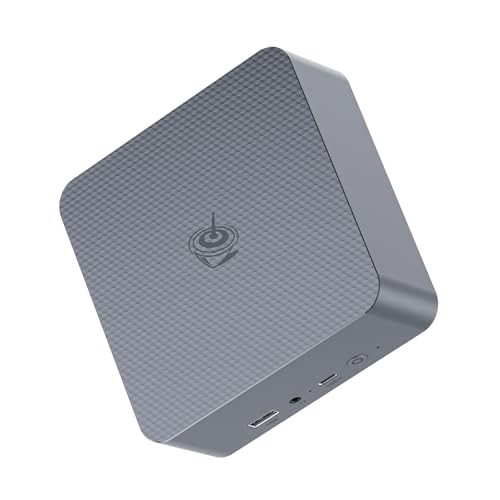
The EQR7 is the sweet spot of this list for power-hungry creators. The Ryzen 7 7735U brings eight cores, sixteen threads, and 6nm efficiency to a chassis smaller than a hardcover book. Base clocks start at 2.7GHz with boost speeds up to 4.75GHz, which matters when you’re pushing Photoshop filters or compiling code.
24GB of LPDDR5 RAM is faster and more power-efficient than the DDR4 in earlier picks, and 500GB of SSD storage handles mid-size project files comfortably. Triple-display support lets you spread work across a primary panel plus two references, which is the kind of setup that genuinely changes how a desk feels.
Advantages To Know
- Eight-core Ryzen 7 chews through photo and video edits
- LPDDR5 RAM improves responsiveness in memory-heavy apps
- Multi-display output supports ambitious workstation layouts
A Few Limitations
- 500GB storage fills quickly when working with raw 4K footage
- Higher thermals under sustained load mean the fan ramps audibly
Perfect Match For
Designers, video editors, and developers who need real CPU horsepower but still want a desk-friendly footprint rather than a tower.
Consider Something Else When
Users running large datasets or virtual machines will appreciate the Beelink SER9 MAX Mini PC, whose 64GB of RAM outclasses this configuration.
Feature Snapshot
The SER5 MAX takes the same Ryzen 7 7735U chip found in the EQR7 and pairs it with a full terabyte of storage, doubling the room for project files, local backups, and media libraries. For most home offices, a terabyte means you stop thinking about disk management for at least a couple of years.
With 24GB of LPDDR5 RAM and boost clocks reaching 4.75GHz, performance lands in the same territory as the EQR7 above. The practical difference is the storage ceiling, which matters more for users who keep growing media archives or run multiple development environments side by side.
A Favorable Mix
- 1TB SSD removes the constant need to offload files
- Ryzen 7 chip handles Photoshop, Premiere, and code builds comfortably
- Compact enclosure stays out of sight behind a monitor
Worth Bearing In Mind
- Costs more than the EQR7 without changing CPU performance
- Still no dedicated GPU for hardware-accelerated 3D work
Who Will Love This
Professionals managing large local datasets, photographers with big RAW libraries, and creators who’d rather not juggle external drives.
Reach For A Different Pick When
Heavy multitaskers running virtual machines should consider the Beelink SER9 MAX Mini PC, where the 64GB RAM configuration keeps more services in memory at once.
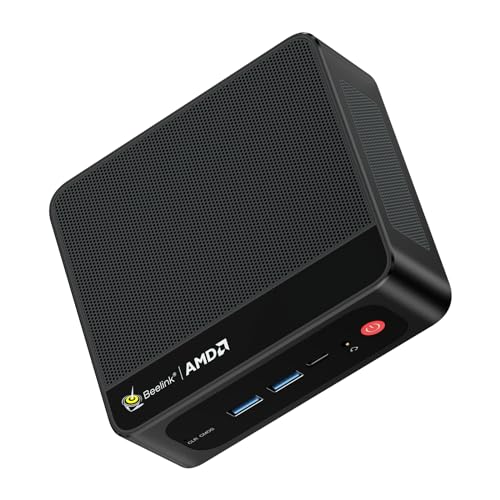
This SER5 variant is the most work-focused configuration in the Ryzen 5 lineup, since it ships with Windows 11 Pro rather than Home. Pro unlocks features like BitLocker device encryption and Remote Desktop hosting, both of which matter in any business or hybrid-work scenario.
The Ryzen 5 5500U delivers the same six-core, twelve-thread performance as the SER5 in the earlier slot, which is plenty for Office apps, browser-based workflows, and light creative work. Owners commonly note that the unit runs cool under typical office loads, with the fan barely audible during video calls.
Where It Helps
- Windows 11 Pro adds business-grade security and remote access
- Six-core Ryzen 5 balances cost and capability well
- Compact size suits small desks and hoteling workstations
Soft Spots
- Storage configuration is more limited than the SER5 MAX above
- No Thunderbolt connectivity on this tier
Built With In Mind
Hybrid employees and small-business operators who want Pro features without stepping up to a Ryzen 7 price tag.
A Better Fit Elsewhere
Creative professionals should consider the Beelink EQR7 Mini PC instead, where the extra cores and threads handle heavier workloads more comfortably.
The SER9 MAX is the heavyweight of the lineup. The Ryzen 7 H 255 runs eight cores and sixteen threads with boost speeds up to 4.9GHz, built on a 4nm process that pushes efficiency further than the 6nm and 7nm chips in the picks above. In real terms, that means faster compiles, smoother multitasking, and quicker turnaround on large spreadsheet recalculations.
64GB of DDR5 RAM is overkill for typical office work and exactly right for users running multiple virtual machines, large databases, or browser-based apps with dozens of tabs and pinned extensions. The 1TB SSD keeps everything local without resorting to external drives, and the chassis stays compact enough for any monitor-arm-friendly desk.
Practical Advantages
- 4nm Ryzen 7 H chip leads the pack in single and multi-thread speed
- 64GB DDR5 RAM supports heavy multitasking and VM workflows
- 1TB SSD handles large media archives without external storage
Practical Considerations
- Higher price than most picks on this list
- Under sustained load, expect the fan to work harder than quieter entries
Right Fit For
Engineers, analysts, and power users who want workstation-class muscle without dedicating floor space to a full tower.
Skip It When
Anyone whose work fits comfortably into Office and a browser should save money with the Beelink SER5 Ryzen 5 model in an earlier slot.
Quick Facts
The SER9 rounds out the list with the same Ryzen 7 H 255 chip as the MAX above, paired with 24GB of LPDDR5X RAM and a 1TB PCIe 4.0 SSD. PCIe 4.0 is the latest generation of the slot standard that connects the SSD to the motherboard, doubling theoretical bandwidth over PCIe 3.0 and shortening load times for large project files.
This configuration strikes a middle path: the processor still leads the lineup, while memory and storage trim back to a more comfortable price. It’s the pick for someone who wants flagship CPU performance but doesn’t need 64GB of RAM sitting idle.
Practical Pluses
- Ryzen 7 H 255 offers top-tier CPU performance in a small box
- PCIe 4.0 SSD keeps file transfers and app launches snappy
- LPDDR5X memory balances speed and power efficiency
Less Ideal Details
- 24GB RAM caps heavy VM and database workloads
- Costs more than Ryzen 5 picks without the headroom of the MAX
Best Suited To
Small-office power users and home creators who want strong CPU speed without the full workstation price tag.
Where A Sibling Pick Shines
Users running many simultaneous services should look at the Beelink SER9 MAX Mini PC, whose 64GB RAM configuration is purpose-built for that workload.
Feature Rundown
Choosing Pcs For Work Without Regret
A work PC is the kind of purchase that quietly shapes your whole week, so it pays to match the machine to the actual workload rather than the spec sheet. CPU cores and RAM are the two attributes that decide whether a system feels fast three years from now or already sluggish. For most office tasks, six cores and 16GB of RAM is the floor; creative work deserves eight cores and 24GB at minimum.
Storage type matters more than raw capacity at the point of purchase. SSDs boot and launch apps several times faster than older spinning drives, and PCIe 4.0 SSDs improve on that further. Form factor matters too: a laptop gives you portability, while a mini PC trades that for quieter operation and easier connection to multiple monitors. People running hybrid weeks tend to land on a desktop-plus-laptop combination rather than choosing one.
Port selection often gets overlooked until the second day of ownership. Count the USB ports, check whether HDMI or DisplayPort is included, and confirm the Wi-Fi standard supported. For most desk setups, four or more USB ports plus at least one modern video output will save the cost of a dock later.
Smart Considerations Before You Commit
Mistakes Worth Dodging
The most common slip is buying more CPU than the workload uses. A Ryzen 7 in a setup that only runs email and a browser is wasted headroom, while a Celeron in a video editing studio becomes a daily frustration. Match the chip tier to the heaviest task you actually run, not the one you might try someday. Another frequent misstep is underestimating storage: 128GB fills up faster than expected once project files, downloads, and software updates stack up.
The Case For Spending Up
Premium tiers earn their keep when sustained workloads push the CPU for long stretches, or when multitasking includes many simultaneous apps. The Ryzen 7 H 255 configurations in this list handle sustained loads better than mid-tier chips, with thermal headroom that prevents throttling. For most users running typical office software, the value tier delivers everything needed, but anyone editing media, compiling code, or running virtual machines will feel the upgrade.
Frequently Asked Questions
How much RAM do I really need for office work?
For standard Office apps, browsers, and video calls, 16GB is the comfortable minimum. Heavy multitaskers running many tabs or creative software should aim for 24GB or more.
Are mini PCs good for everyday work?
Yes, especially for desk-bound setups. Mini PCs like the Beelink SER5 and SER9 series run quietly, mount behind monitors, and offer comparable performance to traditional towers.
Should I get Windows 11 Pro or Home?
Pro adds features like BitLocker encryption, Remote Desktop hosting, and group policy management. Small-business operators benefit most; casual home users typically don’t need these.
How long do these PCs typically last?
With SSD storage and modern CPUs, a well-chosen work PC should serve comfortably for five to seven years before feeling slow, especially with 16GB of RAM or more.
Is a laptop or mini PC better for hybrid work?
Hybrid schedules usually benefit from both: a laptop for travel days and a mini PC docked at the main desk. Choosing only one depends on how often the workspace actually changes.
Wrap Up
The right work PC is the one that disappears into your day, leaving only the work behind. Match the chip and memory to your heaviest task, give yourself breathing room in storage, and don’t overpay for ports and power you’ll never use. Any pick on this list can carry a real workday; the differences come down to how loud, how portable, and how future-proof you need it to be.