Most people don’t think about their computer until it starts lagging. I hear it all the time from friends setting up a new home office, replacing a dying laptop, or finally carving out a corner for serious gaming. A solid PC-plus-monitor combo fixes that gap, but the choices on Amazon can feel endless: tiny cubes, full towers, single 27-inch screens, ultrawide panels, monitors that curve around your whole desk. This guide breaks down ten setups that cover the realistic ways people actually work and play in 2026, from compact quad-monitor productivity rigs to massive curved displays that replace two screens at once.
The Picks In Brief

HP OmniDesk Desktop PC 16GB DDR5 1.5TB Storage
KTC 27 Inch QHD 144Hz Gaming Monitor H27T27S
HP OmniDesk Desktop PC 64GB DDR5 3TB Storage

INNOCN 34 Inch Ultrawide WQHD 180Hz IPS 34C1R

INNOCN 49 Inch Curved DQHD 240Hz Ultrawide Monitor
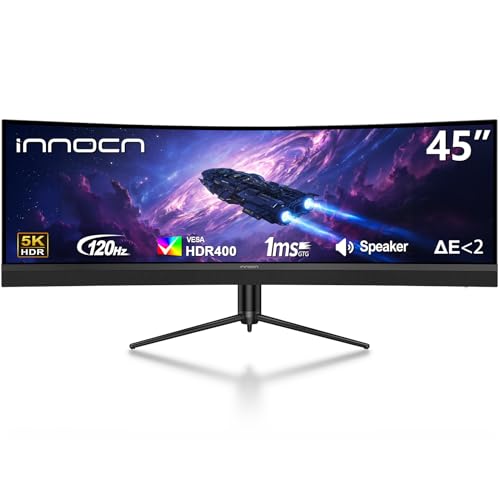
INNOCN 45 Inch 5K2K 120Hz Ultrawide Curved Monitor
HP OmniDesk Desktop PC 32GB DDR5 3TB Storage

INNOCN 49 Inch Curved 144Hz Ultrawide 49C1G

INNOCN 45C1R 45 Inch 5K2K Ultrawide Curved Monitor

INNOCN 40C1R 40 Inch Ultrawide WQHD 144Hz IPS
The Picks, Examined More Closely
This HP OmniDesk slots in as the friendliest entry point for anyone wanting quad-monitor muscle without overshooting the budget. The AMD Ryzen 5 8500G handles daily spreadsheets, browser stacks, and light photo work, while the integrated Radeon 740M graphics quietly drives up to four screens at once, no graphics card drama required. For a typical remote worker running Slack, a video call, and a few docs side by side, the headroom feels generous rather than tight.
Compared to the tower-only options on this list, this OmniDesk ships with a wireless keyboard and mouse, so setup stays simple. Wi-Fi 6 plus Bluetooth 5.4 means newer routers and accessories pair without adapters, and the 1.5TB storage split (a 512GB SSD for the OS and a 1TB HDD for archives) keeps things snappy at boot without puny capacity.
Key Advantages
- Quad-monitor support through integrated Radeon 740M graphics, ideal for trading desks or command-center workflows
- 16GB DDR5 RAM handles dozens of browser tabs and Office files without choking
- Dual-drive setup (512GB SSD plus 1TB HDD) balances speed and storage for typical households
- Wi-Fi 6 and Bluetooth 5.4 keep wireless peripherals and modern routers happy
- Wireless keyboard and mouse included, removing two extra purchases from the cart
Honest Caveats
- Integrated graphics aren’t aimed at heavy 3D gaming or video rendering, so creators may feel the ceiling quickly
- Compact OmniDesk chassis limits future internal expansion compared with full mid-towers
Quick Facts
Right Fit For
Remote workers, students, and small-business owners who need four screens for productivity and don’t run heavy creative software.
Swap It Out When
Power users juggling massive spreadsheets or creative apps should step up to the HP OmniDesk 64GB DDR5 3TB model further down this list.
The KTC H27T27S proves you don’t need a massive panel to get great picture quality. Its 27-inch QHD screen hits 2560 by 1440, which is a noticeable jump in sharpness over standard 1080p without pushing your graphics card into overdrive. The 4000:1 contrast ratio, made possible by the HVA panel, gives dark games and movies real depth, with deeper blacks than typical IPS displays at this size.
A 144Hz refresh rate, a term that means the screen redraws up to 144 times per second, paired with adaptive sync, keeps motion smooth in shooters and racing titles. Compared to the ultrawide picks further along, this KTC fits on a standard 24-inch desk footprint, which makes it a tidy upgrade for dorm rooms, studio apartments, and small home offices where space runs tight.
Practical Pluses
- QHD resolution at 27 inches hits a sharp pixel density without overworking mid-range GPUs
- 4000:1 contrast ratio delivers deeper blacks for movies and dim-lit games
- 144Hz refresh plus adaptive sync smooths fast motion and reduces screen tearing
Points To Keep In Mind
- No USB-C input means laptop users will need an HDMI or DisplayPort adapter
- 27-inch size doesn’t replace dual-monitor setups for serious multitaskers
Feature Snapshot
Made For
Gamers and everyday users who want sharp visuals and high refresh on a single, desk-friendly screen.
Skip It When
Editors and traders who need the horizontal real estate of an ultrawide should look at the INNOCN 34 Inch Ultrawide WQHD 180Hz IPS 34C1R instead.
The upgraded OmniDesk stretches the entry-level model into a proper workstation. The same Ryzen 5 8500G processor and Radeon 740M graphics return, but the jump to 64GB DDR5 RAM transforms how the machine feels under load: massive Excel workbooks, dozens of Chrome tabs, and virtual machines all run side by side without that dreaded swap-to-disk pause. Storage scales accordingly, with a 2TB SSD for active projects and a 1TB HDD for archives.
Compared to the 16GB version, this model trades money for breathing room. For people who don’t want to think about upgrading for the next five or six years, the headroom here is genuinely reassuring, and the quad-monitor capability still lets you build a panoramic trading floor or editing bay.
A Favorable Mix
- 64GB DDR5 RAM handles pro software and dozens of browser tabs without slowdown
- 2TB SSD delivers roomy, fast storage for active project files and games
- Quad-monitor support through integrated graphics keeps the desk cable-friendly
- Wi-Fi 6 and Bluetooth 5.4 future-proof wireless connectivity
Trade Offs
- Integrated Radeon 740M still isn’t built for AAA gaming at high settings
- Pricier than the 16GB sibling for users who don’t tap into that RAM ceiling
Built With In Mind
Power users running data analysis, large codebases, or content workflows who refuse to feel bottlenecks during peak work hours.
Consider Something Else When
Gamers chasing frame rates should pair a dedicated graphics card with the HP OmniDesk 32GB DDR5 3TB model and pair it with a high-refresh monitor.
The INNOCN 34C1R hits the sweet spot for people who want one monitor instead of two. Its 21:9 aspect ratio gives roughly the width of two 24-inch screens stitched together, which means a video-editing timeline plus preview, or a code editor plus documentation, can sit side by side without a bezel cutting through. The 3440 by 1440 resolution keeps text crisp across that extra horizontal space.
Where the KTC model above leans into gaming contrast, this INNOCN leans into versatility. The IPS panel (a panel type known for accurate colors and wide viewing angles) renders photos and documents faithfully, while the 180Hz refresh rate plus G-SYNC compatibility keeps games smooth. PIP and PBP modes, meaning Picture-in-Picture and Picture-by-Picture, let you connect two devices at once, so a work laptop and a gaming console can share the screen.
The Upside
- 21:9 ultrawide replaces a dual-monitor setup without the bezel gap
- IPS panel delivers accurate colors for editing and document work
- 180Hz refresh rate with G-SYNC support handles fast gaming
- PIP and PBP modes run two inputs simultaneously
Worth Noting
- Ultrawide format means some older games render with black bars on the sides
- Stand supports tilt and height, but a heavy aftermarket arm may be needed for VESA-mounted multi-display desks
Feature Snapshot
Best Suited To
Video editors, coders, and hybrid professionals who want ultrawide real estate without juggling two separate screens.
Look Elsewhere When
Esports players chasing 240Hz should check the INNOCN 49 Inch Curved DQHD 240Hz Ultrawide Monitor higher up.
This is the panel for anyone whose desk doubles as a cockpit. The 49-inch curved screen wraps at an 1800R radius, meaning it bends gently to match natural eye curvature, with a DQHD resolution of 5120 by 1440. That’s the equivalent of two 27-inch QHD monitors merged into one seamless display. For sim pilots, racing game fans, and stock traders who want twelve charts visible at once, the immersion is on another level.
The 240Hz refresh rate is the highest on this list, which translates to noticeably smoother motion when paired with a capable graphics card. Compared to the 34-inch INNOCN, this monitor trades desk depth for total wraparound. Owners commonly report the stand needs a deep desk, so plan for at least 30 inches of clearance.
Where It Excels
- 5120 x 1440 DQHD replaces two QHD monitors without a bezel gap
- 240Hz refresh rate supports competitive and fast-paced games
- 1800R curve reduces eye strain across the wide field of view
Factors To Consider
- Massive footprint demands a deep desk and a wide viewing distance
- Full DQHD resolution needs a strong graphics card to drive at high refresh
Perfect Match For
Sim-racing enthusiasts, flight-sim hobbyists, and esports fans who want flagship refresh rates on a wraparound display.
A Better Fit Elsewhere
Casual multitaskers on smaller desks should consider the INNOCN 40C1R 40 Inch Ultrawide WQHD 144Hz IPS for similar benefits at a friendlier size.
The 45-inch INNOCN leans into content creation rather than pure speed. Its 5120 by 1440 5K2K panel gives video editors the horizontal canvas to spread out 4K timelines and preview windows side by side. The 1500R curve feels just right for a single user sitting dead center, and HDR400 support adds a touch of pop in highlights without the aggressive brightness of higher HDR tiers.
USB-C connectivity with 65W power delivery is a quiet hero here, since that single cable can carry video, data, and laptop charging at the same time. For someone bouncing between a work laptop and a desktop tower, the cable management gets a lot cleaner. The 120Hz refresh rate isn’t chasing esports numbers, but it keeps general motion fluid.
What Pays Off
- 5K2K resolution gives 4K video timelines room to breathe alongside tool panels
- 65W USB-C power delivery charges a connected laptop through one cable
- 1500R curve keeps the wide panel comfortable for solo viewing
- HDR400 support adds highlight depth for compatible content
Things To Weigh Up
- 120Hz refresh rate is slower than the 240Hz INNOCN flagship above
- Wide 32:9 aspect ratio requires a deep desk for natural viewing distance
Feature Snapshot
Whose Shelf It Belongs On
Video editors, streamers, and creators who live inside timelines and want accurate, color-rich canvas space.
Reach For A Different Pick When
Competitive gamers should pivot to the INNOCN 49 Inch Curved DQHD 240Hz Ultrawide Monitor for higher refresh headroom.
The middle sibling in the OmniDesk lineup lands where most households actually live. 32GB DDR5 handles multitasking better than the 16GB entry model, while the 2TB SSD plus 1TB HDD storage matches the premium 64GB version. For families where one person edits photos, another games casually, and someone else runs a small business, this configuration balances all three without obvious weak spots.
The Ryzen 5 8500G and Radeon 740M remain consistent across the OmniDesk trio, so quad-monitor support and Wi-Fi 6 stay intact. Compared to the value pick, this model sacrifices the lowest sticker price for noticeably smoother performance when more apps run simultaneously. For shared desks, that compromise tends to feel like a fair trade.
What Earns Its Place
- 32GB DDR5 RAM handles multitasking and modern apps without constant slowdowns
- 2TB SSD plus 1TB HDD provides generous fast storage for shared family use
- Quad-monitor support through integrated Radeon 740M graphics
- Wireless keyboard and mouse included for plug-and-play setup
Some Limits To Know
- Integrated graphics still cap serious 3D gaming and rendering performance
- Compact OmniDesk chassis leaves less room for internal expansion later
Who Should Grab It
Families, shared desks, and small offices that want one PC covering work, study, and casual play without compromise.
Where Another Pick Suits Better
Heavy multitaskers handling truly massive workloads should step up to the HP OmniDesk Desktop PC 64GB DDR5 3TB model.
The 49C1G takes the same wraparound 32:9 format as the flagship DQHD panel but steps down to WDFHD resolution, 3840 by 1080. That keeps file sizes and graphics demands friendlier for mid-range GPUs while still delivering that dual-screen feel without a bezel cutting the middle. The 1800R curve and 99% sRGB color coverage (a measure of how much of the standard color gamut the screen can display) keep visuals consistent for everyday content and casual gaming.
Compared to the 240Hz DQHD INNOCN above, this model trades resolution and refresh for a more approachable entry into ultrawide life. USB-C connectivity keeps laptop docking simple, and the height-adjustable stand means most desks can dial in a comfortable viewing height without buying extras.
Notable Gains
- 32:9 ultrawide replaces a dual-monitor setup on a single stand
- 144Hz refresh rate keeps casual and mid-tier gaming smooth
- 99% sRGB coverage supports accurate everyday color
- USB-C input simplifies laptop connections
Possible Compromises
- 1080p vertical resolution feels short for detailed editing timelines
- Wide curve requires a deep desk and centered seating for the best experience
Who Will Love This
Sim racers, flight-sim hobbyists, and budget-conscious multitaskers who want the wraparound feel without flagship pricing.
Not Your Match When
Creators needing vertical pixel density should opt for the INNOCN 45 Inch 5K2K 120Hz Ultrawide Curved Monitor further up the list.
The 45C1R shares the 5K2K resolution and 1500R curve of its sibling above, but bumps USB-C power delivery up to 90W. For users running a laptop that demands more charging headroom, that single-cable docking feels genuinely liberating, and it removes the second power brick from the desk entirely. The PIP/PBP modes, meaning Picture-in-Picture and Picture-by-Picture, let you display two devices at once, which is helpful for people toggling between a work machine and a personal PC.
Compared to the 65W INNOCN model, this version caters to power-hungry laptops like 14- and 16-inch workstation models. The 120Hz refresh rate stays consistent, and HDR400 support keeps highlights from feeling washed out. Owners commonly report the stand adjustments (tilt, swivel, height) make daily ergonomics easier than chasing VESA mounts.
Useful Touches
- 90W USB-C power delivery charges demanding laptops through one cable
- 5K2K resolution keeps detailed editing and document work crisp
- PIP and PBP modes display two sources side by side
- Height, tilt, and swivel adjustments support ergonomic setups
Less Ideal Details
- 120Hz refresh rate lags behind the 240Hz flagship for competitive gaming
- Wide panel needs deep desk space for natural viewing distance
Right Fit For
Laptop-centric professionals and docked workstation setups where a single USB-C cable should do everything.
Look Elsewhere When
Esports-focused gamers should jump to the INNOCN 49 Inch Curved DQHD 240Hz Ultrawide Monitor for top-tier refresh rates.
The 40C1R rounds out the list with a balanced take on ultrawide. Its 40-inch 21:9 panel is wider than the 34C1R above but smaller than the 49-inch flagships, so it lands in the middle ground for desk space. The 3440 by 1440 resolution matches the 34-inch sibling, which means the pixel density feels comfortable rather than stretched.
The IPS panel covers 95% of DCI-P3 (a wide color gamut used in digital cinema), and 500 nits of brightness give HDR400 content some real punch. FreeSync Premium support (AMD’s variable refresh technology that reduces screen tearing) handles mid-range gaming cleanly. For someone bouncing between work docs, casual creative edits, and weekend games, this monitor tries to do it all without specializing in any one direction.
Strengths Worth Knowing
- 40-inch 21:9 panel balances ultrawide benefits with manageable desk footprint
- IPS panel covers 95% DCI-P3 for color-accurate work
- 144Hz refresh rate with FreeSync Premium keeps gaming smooth
- 500 nits brightness gives HDR400 content visible depth
Worth Bearing In Mind
- 144Hz tops out below the 240Hz INNOCN flagship for esports players
- 21:9 aspect ratio means older games may show black bars on the sides
Who Should Grab It
Hybrid users who want ultrawide workspace for editing and casual gaming on a desk that can’t quite handle a 49-inch panel.
Swap It Out When
Creators chasing maximum color canvas should consider the INNOCN 45C1R 45 Inch 5K2K Ultrawide Curved Monitor for vertical breathing room.
Matching Pcs With Monitor Setups To Your Daily Reality
Match The Tower To Your Workload, Not The Spec Sheet
A common trap is chasing the highest RAM or storage number without thinking about what actually gets opened daily. For office workers running browsers, email, and Office apps, 16GB is usually enough, but the moment virtual machines, large datasets, or photo editing enter the picture, 32GB becomes the comfortable floor. For most households splitting work and play, 32GB tends to age well over five years, while 64GB pays off mainly for creators and analysts running heavy workloads in parallel.
The processor matters just as much. The AMD Ryzen 5 8500G in the OmniDesk trio pairs six cores with integrated Radeon 740M graphics, which is a strong balance for productivity. People chasing AAA gaming or 3D rendering should know that integrated graphics cap frame rates quickly, and a dedicated GPU becomes the real upgrade path.
Size And Resolution: A Real-World Trade-Off
A 27-inch QHD monitor fits comfortably on a small desk and keeps text readable from a normal viewing distance. A 34-inch ultrawide replaces two monitors with one panel but demands roughly 24 inches of depth for a natural viewing angle. Going further, the 49-inch DQHD monitors wrap around the user like a cockpit, which is incredible for sim racing and trading setups but punishes shallow desks.
Resolution interacts with screen size in ways that matter. A 3440 by 1440 monitor at 34 inches looks crisp, but the same resolution stretched across 40 inches shows softer text. The 5K2K panels at 45 and 49 inches push pixel density back up, which keeps icons and timelines sharp across the wider canvas.
Refresh Rate, Adaptive Sync, And Why They Matter
Refresh rate, measured in hertz (Hz), tells you how many times per second the screen redraws. A 60Hz monitor feels smooth for documents but can show blur during fast camera pans in games. 144Hz is the comfortable sweet spot for mixed use, while 240Hz pays off mostly in competitive shooters and esports.
Adaptive sync, whether called FreeSync, G-SYNC, or VESA Adaptive-Sync, keeps the monitor’s refresh in lockstep with the graphics card’s frame delivery. That reduces screen tearing and stutter without introducing the input lag of older V-sync approaches. For most users shopping today, adaptive sync support is worth prioritizing over chasing the absolute highest refresh number.
Key Considerations Across These Picks
Pitfalls Shoppers Hit
The most common mistake is underestimating desk depth. Ultrawide and super-ultrawide monitors, especially the 49-inch INNOCN models, need at least 28 to 30 inches of clearance for natural viewing. Without that depth, the edges of the screen distort and your eyes work harder to track across the panel.
Another trap is assuming all USB-C ports behave the same. Some carry video and data only, while others add power delivery. For laptop docking, you specifically want USB-C with at least 65W power delivery to charge the laptop while driving the display, which is why the 90W INNOCN 45C1R stands out for workstation laptops.
Where The Extra Money Goes
Higher-tier pricing in this category usually buys three things: bigger or sharper panels, faster refresh rates, and richer connectivity. The 5K2K monitors cost more than WQHD ones because manufacturers push more pixels per inch. 240Hz panels command premiums over 144Hz because the underlying LCD technology responds faster. And USB-C power delivery, built-in speakers, and broader ergonomic stands add manufacturing cost that trickles down to the sticker.
For shoppers with focused needs, paying up makes sense. A video editor gains real time back on a 5K2K panel. A competitive gamer feels the smoothness difference at 240Hz. A laptop-first household saves daily frustration with 90W USB-C. For everyone else, the well-rounded mid-tier options often hit the highest value sweet spot.
Frequently Asked Questions
Do I Need A Dedicated Graphics Card For Quad-Monitor Setups?
Not necessarily. The AMD Radeon 740M graphics built into these Ryzen 5 8500G towers supports up to four displays from a single chip. Light productivity across four screens works fine. Heavy 3D gaming or rendering, however, still wants a dedicated GPU, because integrated graphics cap frame rates and shading performance.
How Much Desk Space Does An Ultrawide Monitor Really Need?
A 34-inch 21:9 monitor sits comfortably on a 24-inch-deep desk, while a 49-inch 32:9 super-ultrawide needs closer to 30 inches of depth. Sitting too close to a wide curved panel forces your eyes to track more, which can cause fatigue during long sessions. Measure the depth from the front edge of your monitor back to where you sit.
Is USB-C Power Delivery Worth Prioritizing On A Monitor?
For laptop users, yes. A monitor with 65W or higher USB-C power delivery charges your laptop through the same cable that carries video, which means one cable to plug in when you sit down. Under 65W, the monitor charges slowly or not at all on demanding laptops, so 90W is the comfortable target for most modern workstations.
What’s The Real Difference Between 144Hz And 240Hz?
In casual use, the difference feels subtle. In competitive shooters, racing games, and fast scrolling, 240Hz reduces motion blur and makes tracking moving targets easier. The upgrade is worth it for esports players and sim racers, but most office and creative workflows won’t notice much beyond 144Hz.
How Do I Choose Between 32GB And 64GB Of RAM?
Start with what you actually run. Office apps, browsers, and email rarely push past 16GB. Photo editing, large spreadsheets, and dozens of browser tabs can hit 32GB. Video editing, virtual machines, and data analysis workloads can swallow 64GB comfortably. Pick the smallest amount that comfortably covers your peak day, then add headroom for future software.
Bottom Line
The right PC-plus-monitor pairing depends less on chasing specs and more on matching your real day. Remote workers with four screens of spreadsheets do well with the HP OmniDesk trio, while creators and gamers get the most from the INNOCN ultrawide and super-ultrawide panels. Measure your desk, list the apps you actually open, and pick the smallest setup that handles that list comfortably. That simple filter keeps the choices honest and the upgrade dollars focused where they matter most.