A pre-built desktop that simply boots, runs the games or apps you care about, and stays quiet under load is a tougher find than it sounds. This list cuts through spec sheets and brand noise to highlight ten systems worth a closer look, from full-size gaming towers to compact mini PCs that slip behind a monitor. Whether you’re chasing 1440p frame rates, a tidy home office workstation, or a small-footprint AI rig, there’s something here that earns its place.
A Snapshot Of The Selections

STORMCRAFT Sirius AI Gaming Desktop (Intel i5 14400F, Arc B570 10GB)

CYBERPOWERPC Gamer Master Gaming PC (Ryzen 5 7600, RTX 4060)

Skytech Gaming PC Azure 3 (Ultra 7, RTX 5060)
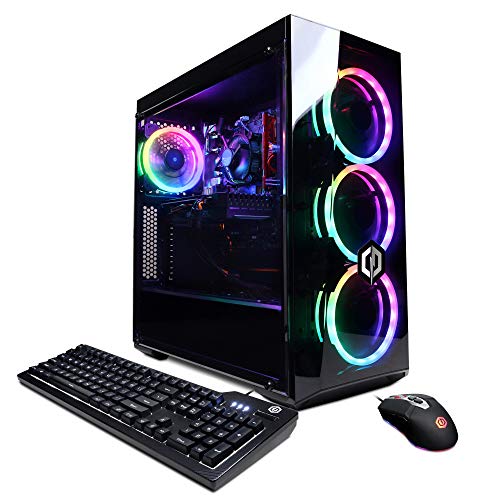
CyberpowerPC Gamer Xtreme VR (i5-10400F, GTX 1660 Super)

Lenovo Legion Tower 5i (Ultra 7 265F, RTX 5070 Ti)

MINISFORUM AI X1 Pro-370 Mini PC (Ryzen AI 9 HX 370)

MINISFORUM M1 Pro Mini PC (Core Ultra 5 125H)

GEEKOM A5 2027 Edition Mini PC (Ryzen 7 7730U)

ASUS ROG G700 (2025) Gaming Desktop (Ultra 7 265F, RTX 5070)

MINISFORUM X1-255 Mini PC (Ryzen 7 255, Barebone)
Taking A Closer Look At The Options
The STORMCRAFT Sirius AI lands as a sensible starter for anyone stepping into PC gaming without overshooting a budget. Its Intel Core i5 14400F (a mid-range processor with 10 cores and strong single-thread speed) pairs with an Intel Arc B570 graphics card carrying 10GB of GDDR6 VRAM (dedicated video memory), which is enough headroom for 1440p (1440p = 2560×1440 resolution, sharper than standard 1080p) play in most modern titles at reasonable settings. The 16GB of DDR4 RGB memory and 1TB NVMe SSD (a fast solid-state drive that uses the NVMe interface) keep load times short and multitasking smooth.
For someone replacing an aging office tower with something that can actually run games after hours, this rig hits the right balance. It’s not a frame-rate monster, but it handles esports titles comfortably and looks good doing it.
Bright Spots
- 10GB of GDDR6 VRAM is generous for the price bracket, which helps at higher resolutions and with texture-heavy games.
- 1TB NVMe storage means most gamers won’t need an immediate secondary drive for their library.
- RGB-equipped DDR4 memory adds visual flair without requiring aftermarket module swaps.
- VR-ready capability covers entry-level headsets, useful for anyone exploring virtual reality on a budget.
Things To Consider
- Intel Arc B570 drivers have matured considerably, but niche titles may still need manual tuning for stable frame rates.
- Air cooling is typical at this tier, so expect fan noise to creep up during long gaming sessions.
Quick Facts
Best Suited To
A first-time PC gamer moving up from a laptop who wants 1440p capability without crossing into premium pricing.
Consider Something Else When
The CYBERPOWERPC Gamer Master Gaming PC is a smarter match for someone who prioritizes NVIDIA-based ray tracing (a rendering technique that simulates realistic lighting) at 1080p instead of Arc’s newer driver stack.
The Gamer Master leans on an AMD Ryzen 5 7600 with 6 cores and 12 threads, a chip that’s already proven itself as a reliable mainstream gaming CPU. The NVIDIA GeForce RTX 4060 with 8GB of VRAM brings DLSS (NVIDIA’s AI upscaling technology that boosts frame rates) and ray tracing into a more accessible price band, and the 16GB of DDR5 memory (the newest RAM standard, faster than DDR4) is a nice future-proofing touch at this tier. Wi-Fi and a tempered-glass side panel come standard, so the unboxing-to-playing transition is short.
For a household that wants one machine to handle schoolwork, creative projects, and weekend gaming, this is a confident middle-of-the-road pick. The RTX 4060 also opens the door to DLSS-supported titles, stretching longevity nicely.
Advantages To Know
- RTX 4060 enables DLSS frame-rate boosts in supported games, effectively extending the GPU’s useful life.
- PCIe Gen4 NVMe SSD delivers quick load times on a platform built for the latest storage standard.
- Tempered-glass case panel showcases internal components without extra modifications.
- Front and rear USB ports (six USB 3.1 plus two USB 2.0) make plugging in peripherals painless.
Worth Noting
- 500GB of storage fills up fast with modern titles, so budgeting for a secondary drive may be wise.
- Custom RGB lighting is included, but software control can feel basic compared to enthusiast ecosystems.
- Windows 11 Home comes preinstalled, which is generally smooth but adds to initial setup time for those upgrading from older systems.
Right Fit For
A family or student who wants a versatile tower for school, streaming, and 1080p gaming without breaking the budget.
Look Elsewhere When
The STORMCRAFT Sirius AI Gaming Desktop makes more sense for shoppers specifically targeting higher VRAM capacity at this budget.
The Skytech Azure 3 pulls together an Intel Core Ultra 7 270K (a high-end chip with boost clocks near 5.4GHz) and an NVIDIA RTX 5060 with 8GB of GDDR7 memory, the newest graphics memory standard that pushes bandwidth well beyond GDDR6. A 360mm AIO liquid cooler (an all-in-one closed-loop liquid cooler mounted to the CPU) keeps thermals under control, and the 32GB of DDR5 RAM at 5200MT/s leaves plenty of room for streaming software, chat apps, and game launchers at once.
This is a serious build aimed at gamers who care about high-refresh 1440p monitors and creators who render occasionally. The 1TB NVMe boot drive is fast and generous, and Wi-Fi 6 handles wireless connectivity cleanly.
What Helps Most
- 32GB of DDR5 RAM lets streamers keep OBS (broadcasting software) and game launchers running simultaneously without slowdowns.
- 360mm AIO liquid cooling helps the Ultra 7 270K sustain boost clocks during long sessions.
- GDDR7 VRAM on the RTX 5060 offers higher bandwidth, helping in texture-heavy and future-proofed games.
- 1TB NVMe M.2 SSD balances capacity and speed for a primary game library.
Room For Improvement
- AIO liquid coolers typically require a check on tube routing and pump noise after the first year of ownership.
- No listed keyboard and mouse in the package, so peripherals are a separate decision.
At A Glance
Made For
Competitive gamers chasing high refresh rates and content creators who need extra RAM headroom.
Swap It Out When
The CyberpowerPC Gamer Xtreme VR is a more cost-conscious option if 1080p at medium settings is the goal.
The Gamer Xtreme VR is an honest budget gaming PC. Its Intel Core i5-10400F still delivers six cores of dependable performance, and the GTX 1660 Super with 6GB of VRAM handles esports and older AAA (high-budget, blockbuster-tier) games at 1080p with ease. The 8GB of DDR4 RAM is the bare minimum for modern gaming, so owners may want to plan an upgrade. The 500GB NVMe SSD keeps Windows snappy.
For a household dipping into PC gaming without committing to a premium build, this hits the basics. It’s also a sensible choice for a second family PC or a starter machine for a teen’s bedroom.
What It Does Well
- GTX 1660 Super is well-tuned for 1080p and runs cool in most mid-tower cases.
- NVMe boot drive makes Windows updates and game launches noticeably quicker than older SATA SSDs.
- Wi-Fi ready out of the box removes a common setup hurdle.
Trade Offs
- 8GB of RAM may bottleneck newer titles, and adding a second stick later requires matching speed and timings.
- No ray tracing support means visual fidelity in modern titles relies on traditional rasterization (standard rendering without light-simulation effects).
Who It Suits Best
Casual gamers and families who mostly play esports or older titles at 1080p resolution.
A Better Fit Elsewhere
The CYBERPOWERPC Gamer Master Gaming PC is a stronger match for shoppers wanting DLSS support and DDR5 memory out of the box.
Lenovo’s Legion Tower 5i leans hard into current-generation silicon. The Intel Core Ultra 7 265F (an F-series chip, meaning it lacks integrated graphics and requires a discrete GPU) pairs with an NVIDIA RTX 5070 Ti, which handles ray tracing and DLSS with serious muscle. A 32GB memory kit and a 1TB storage drive fill out a build aimed at high-refresh gaming and AI-accelerated workloads, and three months of PC Game Pass gives new owners a runway into a sizable game library.
For shoppers who want a prebuilt that won’t feel underpowered within two years, this is a confident pick. The Legion Coldfront cooling system aims to keep noise reasonable during intense sessions.
A Few Highlights
- RTX 5070 Ti delivers strong ray-tracing performance and next-gen DLSS support for future titles.
- 32GB of memory supports heavy multitasking and large creative projects.
- Three months of PC Game Pass expands the value beyond just the hardware.
- Legion Coldfront cooling design aims to balance thermals and acoustics.
Small Caveats
- A premium configuration typically means a larger footprint, so desk placement may need planning.
- High-end prebuilts often ship with tightly tuned BIOS settings that limit beginner overclocking.
Perfect Match For
Hardcore gamers and creative professionals who want high frame rates plus AI-accelerated tools without building their own rig.
Skip It When
The GEEKOM A5 2027 Edition Mini PC is a calmer fit for someone whose workload is mostly office apps and light editing.
The MINISFORUM AI X1 Pro-370 crams 12 cores and 24 threads into a mini PC chassis, with an AMD Ryzen AI 9 HX 370 processor built on the Zen 5 architecture. The integrated Radeon 890M graphics handle light gaming and accelerated AI tasks, and the included NPU (neural processing unit, a chip dedicated to AI workloads) pushes up to 50 TOPS (tera operations per second, a measure of AI compute power) for local AI features. A full set of ports including dual USB4, dual 2.5G RJ45 Ethernet, HDMI, and DisplayPort makes this a flexible hub.
For a tidy desk setup where the tower disappears behind the monitor, this is a real engineering achievement. It runs cool under typical office loads and stays quiet, which matters in shared spaces.
Notable Upsides
- Radeon 890M integrated graphics handle esports titles and older games at playable frame rates.
- Dual USB4 ports support fast external storage and modern docking stations.
- Two 2.5G Ethernet ports enable link aggregation (combining two network connections for higher throughput) or separated networks for work and personal use.
- Wi-Fi 7 and Bluetooth 5.4 cover current wireless standards for years to come.
Points To Note
- Integrated graphics won’t replace a discrete GPU for AAA gaming at high settings.
- Mini PC cases can trap heat over time, so periodic dust clearing from vents is a good habit.
Feature Snapshot
Who Should Grab It
Developers and AI-curious users who want a compact machine with serious CPU performance and modern I/O.
Another Choice May Suit
The MINISFORUM M1 Pro Mini PC is the better call for shoppers who prioritize Intel Arc graphics over AMD’s integrated solution.
The M1 Pro runs on Intel’s Core Ultra 5 125H, a 14-core processor with Intel Arc integrated graphics that handle hardware-accelerated ray tracing. With 32GB of DDR5 memory clocked up to 5600MHz (overclockable to 6400MHz in some configurations) and a 1TB SSD, this little box covers productivity, light gaming, and creative workloads without taking up shelf space. The Oculink port (a high-bandwidth external PCIe connector for adding a dedicated GPU) is an unusual bonus for a mini PC at this size, letting ambitious users attach an external graphics enclosure.
It’s a strong match for anyone transitioning from a chunky tower to a cleaner desk arrangement. The port selection, including dual USB4, makes monitor hookups simple.
Noteworthy Benefits
- Intel Arc integrated graphics add ray-tracing hardware to a small-form-factor build.
- Oculink port supports external GPU enclosures for users who want to expand later.
- 32GB of DDR5 memory at 5600MHz leaves headroom for browsers, Office apps, and editing software.
- Dual USB4 plus HDMI and DisplayPort allow multi-monitor setups straight out of the box.
Honest Caveats
- Realizing the full 6400MHz memory speed may require BIOS adjustments that vary by batch.
- Mini PC cooling fans can ramp up under sustained loads, so placement away from enclosed shelves helps.
Built With In Mind
A home office worker or hobbyist who wants a near-silent PC with room to grow via external GPU.
Reach For A Different Pick When
The MINISFORUM AI X1 Pro-370 is a smarter fit for users whose primary workload is AI inference on the NPU.
The GEEKOM A5 leans on AMD’s Ryzen 7 7730U, an 8-core, 16-thread chip with Radeon Vega 8 integrated graphics. It’s a thoughtful fit for office tasks, video calls, and light photo editing, with 16GB of RAM and a 512GB NVMe SSD handling the day-to-day. The compact chassis fits behind a monitor via a standard VESA mount (the flat-pattern mounting holes on the back of most monitors), which is exactly the kind of practical detail that helps in a tidy workspace.
For someone working remotely who values a quiet, dependable box more than GPU muscle, the A5 covers the basics without fuss. It’s also energy-efficient enough to leave on for backup tasks or as a low-power home server.
The Good Stuff
- Ryzen 7 7730U balances eight cores with low power draw, useful for always-on workflows.
- Compact form factor mounts behind most monitors to keep the desk surface clear.
- Radeon Vega 8 graphics handle light photo edits and casual gaming at modest settings.
Factors To Consider
- 512GB of storage can feel tight for users with large media libraries.
- Vega 8 graphics won’t keep pace with discrete GPUs in modern games.
- Mini PC power supplies are typically external bricks, so cable management around the desk matters.
Key Attributes
Whose Shelf It Belongs On
A remote professional or student who needs a compact, quiet machine for daily productivity tasks.
Not Your Match When
The ASUS ROG G700 is the better call for shoppers chasing ray-traced gaming performance at high settings.
ASUS leans into design language with the ROG G700, pairing dual-glass panels and Aura Sync RGB (ASUS’s customizable lighting ecosystem) with serious hardware. The Intel Core Ultra 7 265F and NVIDIA RTX 5070 make for a capable high-refresh gaming platform, and the 1TB PCIe 4.0 NVMe SSD plus 32GB of DDR5 RAM round out a build that handles both gaming and creative tasks. Windows 11 Home is preinstalled.
For a living-room gaming setup or a desk that doubles as a centerpiece, the G700’s aesthetic earns attention. The internals back up the looks, too.
What Works In Its Favor
- Dual-glass chassis showcases internal components with Aura Sync RGB coordination.
- RTX 5070 supports next-gen DLSS and ray tracing for modern titles.
- 32GB of DDR5 RAM handles streaming and creative software without strain.
Less Ideal Details
- Glass panels require regular fingerprint cleaning, especially in brightly lit spaces.
- Premium chassis designs sometimes limit airflow, so placement away from walls helps thermals.
Who Will Love This
A shopper who values aesthetic polish alongside high-refresh gaming performance in a showcase build.
Where A Sibling Pick Shines
The Lenovo Legion Tower 5i offers similar core specs with a more traditional tower layout for users who prefer understated cases.
The X1-255 ships as a barebone system, meaning the core chassis and processor are included but RAM and storage are user-supplied. The AMD Ryzen 7 255 with 8 cores and 16 threads handles productivity and light gaming well, and the port selection is generous: HDMI 2.1, DisplayPort 2.0, dual USB4, Oculink for external PCIe devices, and 2.5G Ethernet. Wi-Fi 7 and Bluetooth 5.4 round out the wireless side.
For a tinkerer who likes choosing their own memory and SSD, this is a clean canvas. The Oculink port in particular opens doors to external GPUs for those who want gaming muscle on demand.
Features That Help
- Oculink port supports external GPU enclosures for flexible graphics upgrades.
- HDMI 2.1 and DisplayPort 2.0 handle high-refresh 4K monitors natively.
- Barebone format lets owners pick RAM and SSD to fit their workload and budget.
- Wi-Fi 7 future-proofs wireless networking for years to come.
Practical Considerations
- Barebone means RAM and storage are separate purchases, so total cost adds up quickly.
- Mini PC cases limit internal expansion, so choosing storage capacity wisely on day one pays off.
Spec Overview
The Right Fit
A tinkerer or compact-desk user who enjoys customizing memory and storage to match their exact needs.
Not Your Match When
The GEEKOM A5 2027 Edition Mini PC is a friendlier plug-and-play pick for shoppers who don’t want to source components separately.
Factors To Weigh Before Choosing Your Next Desktop
A pre-built PC is only as good as the use case it gets matched to. Start with the workload: esports and indie games at 1080p don’t demand the same GPU as a 1440p AAA title with ray tracing on. CPU cores matter more for streaming, video editing, and running AI models locally, so shoppers in those lanes should prioritize processors with higher thread counts. RAM sits at a comfortable 32GB for most modern multitasking, while 16GB works for lighter office and gaming routines if a future upgrade is planned.
Form factor changes the ownership experience just as much as the specs. Mini PCs disappear behind monitors and run cool for daily office tasks, but they constrain future upgrades and can trap heat under sustained load. Full towers offer better airflow, easier component swaps, and room for storage expansion, which matters for gamers with growing libraries. Storage type is another quiet but important factor: NVMe SSDs (which connect directly to the motherboard’s PCIe lanes for much higher throughput than SATA drives) boot Windows and load games in seconds, while traditional hard drives still earn their place for bulk media archives. Connectivity like Wi-Fi 7, USB4, and 2.5G Ethernet adds real convenience for modern networks and peripherals.
Common Shopping Slip Ups
One of the easiest mistakes is chasing the largest VRAM number without checking the underlying GPU generation. Older cards with high VRAM often trail newer mid-range chips in real-world frame rates. Another common trap is overlooking the power supply and cooling on pre-builts; a beefy GPU paired with a weak cooler throttles under long gaming sessions. Buyers should also watch for tight storage configurations, since modern games routinely exceed 100GB each, and a 500GB boot drive fills faster than expected.
Where The Extra Money Goes
Higher-tier builds typically pair stronger GPUs with newer memory standards, faster SSDs, and improved cooling. The jump from RTX 4060 to RTX 5070 Ti brings meaningful ray-tracing gains, and DDR5 over DDR4 offers bandwidth headroom that extends a system’s useful life. Premium cases and quiet cooling solutions also matter: a well-cooled machine sustains boost clocks longer and stays quieter in shared rooms. For shoppers who plan to keep a desktop for four or more years, paying up front for stronger thermals and a larger SSD often saves the cost of an early upgrade.