A solid desktop doesn’t have to drain the wallet. I’ve spent years watching compact NUC-style boxes and slim towers squeeze real productivity into surprisingly small footprints, and the current crop at the lower price points has gotten smarter about where they cut costs. The picks below lean toward small-business, classroom, and home-office users who want Windows 11 Pro or Home pre-installed, modern wireless, and enough muscle for everyday multitasking without paying for parts they don’t need. I’ll walk through ten real options, call out honest trade-offs, and flag who each one actually suits.
An Overview Of The Picks
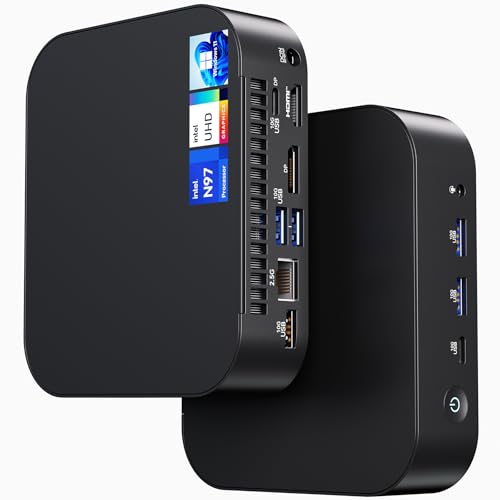
NENCHIN ASUS NUC 14 Essential Mini PC N97

NENCHIN ASUS NUC 13 Pro Barebone Kit i5-1340P
HP Pro Tower 290 G9 Desktop i3-13100

BOSGAME E2 Plus Mini PC Ryzen 5 3501U
HP ProDesk 600 G6 SFF Desktop i5-10400F

Dell Slim Desktop Core Ultra 5-225 ECS1250

HP 2026 Desktop i5-12500 1TB SSD

BOSGAME P3 Lite Mini PC Ryzen 7 6800H

BOSGAME P3 Plus Mini PC Ryzen 7 7840HS

NENCHIN ASUS NUC 13 Pro Mini PC 1340P 16GB 512GB
A Closer Look At Each Pick
The NENCHIN ASUS NUC 14 Essential Mini PC N97 is one of those boxes that disappears behind a monitor and never asks for attention. Powered by the Intel Processor N97 with 8GB of RAM and a 256GB SSD, it ships ready to plug in with Windows 11 Pro already loaded. Wi-Fi 6E (the newer wireless standard that adds a 6GHz band for cleaner signal in crowded offices) and Bluetooth 5.3 round out the modern connectivity, which matters when you’re tethering peripherals or pushing a 4K display.
For kiosks, signage, classroom carts, and POS terminals, that combination hits a sweet spot. It handles browser dashboards, spreadsheets, and light multitasking without thermal drama, and the small chassis leaves desk space for paperwork. Compared with the barebones kit later in this list, you’re paying a premium for the convenience of a fully configured system.
Where It Helps
- Pre-installed Windows 11 Pro skips the setup marathon for non-technical staff.
- Wi-Fi 6E keeps wireless throughput steady in offices saturated with older routers.
- Compact chassis tucks behind a VESA-mounted monitor, freeing the desk.
- Low thermal footprint suits always-on digital signage duties.
Things To Consider
- The N97 chip handles everyday work comfortably but can struggle with heavier creative apps.
- 256GB of storage fills quickly once video files and project archives land on it.
Made For
Small businesses, schools, and signage operators who want a quiet, pre-configured box they can deploy in minutes.
A Better Fit Elsewhere
Power users running virtualization or large spreadsheets should look at the BOSGAME P3 Lite Mini PC Ryzen 7 6800H for the extra memory headroom.
The NENCHIN ASUS NUC 13 Pro Barebone Kit i5-1340P is the polar opposite of the first pick. There’s no RAM, no SSD, and no operating system in the box. What you do get is the 13th Gen Intel Core i5-1340P, a 12-core hybrid CPU (mixing performance and efficiency cores for better multitasking) paired with the NUC chassis, gigabit Ethernet, Wi-Fi 6, and 8K-capable graphics output.
For anyone who already owns compatible DDR4 SODIMMs (the small laptop-style memory modules) and an NVMe drive lying around, this is a smart way to recycle parts into a tidy new machine. The Arena Canyon platform also handles up to four displays, which is a quiet superpower for trading desks or control rooms. It’s a more involved path than the pre-built NENCHIN ASUS NUC 14 Essential above, but the ceiling on performance is higher once you load it up.
Everyday Perks
- i5-1340P brings 12 cores to bear on spreadsheets, code, and browser-heavy work.
- Quad-display support turns one box into a multi-monitor workstation.
- Compact NUC chassis fits VESA mounts and tight AV racks.
- Reusing existing RAM and storage keeps the total spend in check.
Trade-Offs
- No OS means budgeting for a Windows license on top of the hardware.
- Building out a barebones system requires basic comfort with component installation.
Right Fit For
Tinkerers, IT staff rebuilding fleets, and home users with spare laptop-style parts ready to drop in.
Swap It Out When
Anyone wanting a plug-and-play experience will find the NENCHIN ASUS NUC 13 Pro Mini PC 1340P 16GB 512GB a friendlier choice.
The HP Pro Tower 290 G9 Desktop i3-13100 is a refreshingly traditional option. A proper mid-tower with the 13th Gen Intel Core i3-13100, 16GB of RAM, and a 512GB SSD, it ships with Windows 11 Pro and a wired keyboard and mouse. HDMI and VGA outputs cover older projectors and dual-monitor reception desks alike.
There’s real value in a case with expansion bays and full-height PCIe slots when you anticipate adding a capture card, a dedicated GPU down the road, or simply more storage. It also tends to run cooler and quieter under sustained load than a tight mini PC. For a front-office workstation that mostly handles email and spreadsheets, this is a sensible pick. Compared to the slim Dell later in this list, you trade footprint for future-proofing.
The Good Stuff
- 16GB of RAM out of the box handles heavy browser sessions and Office multitasking.
- Tower chassis leaves room for storage upgrades and PCIe add-ins.
- HDMI plus VGA covers legacy projector hookups in older meeting rooms.
- Wired peripherals mean no extra purchases on day one.
Honest Caveats
- The i3-13100 has four cores, which is fine for office work but limits heavier workloads.
- Mid-tower footprint demands more floor or desk space than the mini PCs in this roundup.
Built With In Mind
Reception areas, small offices, and anyone planning to add components later.
Reach For A Different Pick When
Tiny desks and clean setups will appreciate the Dell Slim Desktop Core Ultra 5-225 ECS1250 more.
The BOSGAME E2 Plus Mini PC Ryzen 5 3501U takes AMD’s older but capable Ryzen 5 3501U, pairs it with 8GB of DDR4 and a 256GB SSD, and wraps it in a small desktop shell aimed at home users. Four cores and eight threads are plenty for streaming, browser tabs, and schoolwork.
Students and remote learners tend to appreciate the compact size most. It slides into a dorm setup without dominating it, and the price tag leaves room in the budget for a decent monitor. You won’t be running modern games on this one, but for what it claims to do, the value holds up. Stepping up to the BOSGAME P3 Plus later in this list brings a much newer Zen 4 chip if your needs grow.
Where It Delivers
- Affordable entry point for first-time desktop shoppers.
- Small case fits cramped desks and dorm rooms comfortably.
- Radeon Vega graphics handle streaming and light photo edits.
Small Limitations
- 8GB of RAM is the floor for modern Windows, so heavy multitaskers will feel the squeeze.
- Older 3501U architecture lags behind newer Ryzen chips in raw speed.
- Storage tops out at 256GB, which fills fast with course materials and media.
Who Should Grab It
Students, casual home users, and anyone setting up a secondary workstation on a tight budget.
Look Elsewhere When
Creators wanting modern Zen 4 speed should consider the BOSGAME P3 Plus Mini PC Ryzen 7 7840HS instead.
The HP ProDesk 600 G6 SFF Desktop i5-10400F is a small-form-factor refurb-class option centered on a 10th Gen Intel Core i5-10400F with 6 cores and 12 threads. With 16GB of DDR4 RAM and a 256GB SSD in the spec sheet, it offers a surprising amount of headroom for the price tier.
The “F” suffix means the chip lacks integrated graphics, so a discrete card is required for any display output. Buyers in this segment typically pick up a basic low-profile GPU alongside it. Once equipped, the ProDesk handles spreadsheet models, light databases, and multi-monitor office setups without breaking a sweat. Compared with the newer Dell slim tower, this is a generation behind on architecture but stronger on core count.
Real-World Strengths
- Six physical cores deliver genuine multitasking muscle for the price.
- 16GB of RAM out of the box keeps browser-heavy office sessions smooth.
- HP ProDesk chassis supports standard low-profile PCIe cards.
Worth Noting
- No integrated graphics means a discrete GPU is mandatory for display output.
- 10th Gen silicon is older and less efficient than current options.
- 256GB SSD is on the slim side for media-heavy users.
Best Suited To
Spreadsheet analysts and SMB operators willing to add a basic GPU for a competent office rig.
Another Choice May Suit
Buyers who want integrated graphics and newer silicon should consider the Dell Slim Desktop Core Ultra 5-225 ECS1250.
The Dell Slim Desktop Core Ultra 5-225 ECS1250 pushes newer silicon into the slim-tower category. The Intel Core Ultra 5-225, 16GB of DDR5 (the latest memory standard, offering higher bandwidth than DDR4), a 512GB SSD, and Windows 11 Home make it one of the more future-leaning picks in the roundup. Wi-Fi 6 and Bluetooth handle wireless duties, and a wired keyboard comes in the box.
The Core Ultra line brings a neural processing unit (NPU), a small chip dedicated to AI tasks like background blur and noise suppression in video calls. That makes the ECS1250 a natural fit for remote workers who live in Teams and Zoom meetings. It also keeps the case footprint modest enough to slide under a monitor stand. Against the HP Pro Tower earlier, this one trades expansion room for a newer platform.
Points In Its Favor
- DDR5 memory delivers measurable bandwidth gains over older DDR4 systems.
- Core Ultra NPU accelerates on-device AI features in modern apps.
- 512GB SSD balances speed and capacity for most home offices.
- Slim case fits under monitor stands without dominating the desk.
Points To Note
- Windows 11 Home lacks the BitLocker and remote desktop features of Pro editions.
- Slim case limits internal expansion compared with a full tower.
Whose Shelf It Belongs On
Remote professionals and home-office setups wanting modern silicon in a tidy footprint.
Consider Something Else When
Those needing Pro-tier security features should look at the HP Pro Tower 290 G9 Desktop i3-13100 with Windows 11 Pro.
The HP 2026 Desktop i5-12500 1TB SSD pairs a 12th Gen Intel Core i5-12500 with 16GB of RAM and a generous 1TB SSD. Six cores and a turbo ceiling up to 4.6GHz give it real punch for spreadsheets, light photo work, and many-tab browsing sessions.
That 1TB of solid-state storage is the headline feature. For freelancers juggling client folders, video files, and backups, it removes the usual anxiety about running out of room in the first month. Windows 11 comes pre-installed, so setup is straightforward. Compared with the BOSGAME P3 Lite further down, this trades raw CPU generation for sheer storage capacity.
The Upside
- 1TB SSD absorbs large project folders without resorting to external drives.
- i5-12500 reaches 4.6GHz under turbo, helping during burst-heavy tasks.
- 16GB of RAM supports heavy multitasking for office and creative workflows.
A Few Limitations
- 12th Gen silicon sits between older 10th Gen and current Core Ultra options.
- Integrated graphics limit serious gaming or GPU-accelerated work.
Perfect Match For
Freelancers and small studios who need generous local storage without buying an external drive.
Where Another Pick Suits Better
Gamers wanting modern Zen 4 graphics should consider the BOSGAME P3 Plus Mini PC Ryzen 7 7840HS instead.
The BOSGAME P3 Lite Mini PC Ryzen 7 6800H brings serious firepower to a tiny box. The Ryzen 7 6800H pairs eight cores and sixteen threads with Radeon 680M integrated graphics, and BOSGAME backs it with 32GB of DDR5 RAM and a 1TB NVMe SSD (a fast solid-state drive that plugs directly into the motherboard). That memory figure alone puts it ahead of nearly every other pick here.
For users running virtual machines, large spreadsheets, or many browser tabs in parallel, the headroom is immediately noticeable. The Radeon 680M also handles light creative work and casual gaming that would choke lesser integrated chips. Against the older BOSGAME E2 Plus earlier in this list, the leap in memory and CPU generation is substantial.
Notable Upsides
- 32GB DDR5 is double what most competitors offer out of the box.
- Ryzen 7 6800H handles virtualization and heavy multitasking comfortably.
- Radeon 680M graphics manage 4K media and light creative apps.
- 1TB NVMe SSD keeps boot and load times short.
Potential Drawbacks
- Mini-PC thermals can throttle under sustained all-core loads.
- Premium specs push the price above simpler NUC alternatives.
Who Will Love This
Power users, developers, and creative hobbyists running multiple demanding applications at once.
Not Your Match When
Plug-and-play office users will find the pre-built NENCHIN ASUS NUC 14 Essential Mini PC N97 simpler to deploy.
The BOSGAME P3 Plus Mini PC Ryzen 7 7840HS is the fastest mini PC in the roundup. Built on AMD’s Zen 4 architecture (the latest generation of Ryzen CPU cores), the Ryzen 7 7840HS offers eight cores, sixteen threads, and boost speeds up to 5.1GHz, with Radeon 780M graphics that handle modern gaming at modest settings. The spec sheet also lists 16GB of DDR5 and a 1TB NVMe SSD.
For shoppers who want a mini PC that can genuinely run games, edit short videos, and crunch code without complaint, this is the obvious target. It also makes sense as a living-room media box thanks to the capable iGPU (integrated graphics processor). Against the BOSGAME P3 Lite reviewed just above, the newer CPU architecture is the main draw, even with the memory stepping down to 16GB.
Advantages To Know
- Ryzen 7 7840HS is among the fastest mobile chips available today.
- Radeon 780M iGPU plays modern titles at 1080p with sensible settings.
- 1TB NVMe SSD gives creators and gamers plenty of room.
- Zen 4 architecture improves power efficiency under load.
Room For Improvement
- 16GB RAM is generous but lower than the P3 Lite’s 32GB at this tier.
- Compact chassis can run warm during long gaming sessions.
Who Should Grab It
Gamers, content creators, and tech enthusiasts wanting near-desktop performance in a mini case.
Skip It When
Pure office deployments get more value from the HP Pro Tower 290 G9 Desktop i3-13100’s traditional layout.
The NENCHIN ASUS NUC 13 Pro Mini PC 1340P 16GB 512GB is the pre-built sibling to the barebones kit earlier in the list. The 13th Gen Intel Core i5-1340P, 16GB of RAM, a 512GB SSD, and Windows 11 Pro arrive ready to plug in and use. It’s effectively the same NUC platform as pick 2, just fully configured.
For small businesses standardizing on a known chassis, that consistency matters. Procurement teams can deploy the same form factor across offices and know what to expect from support and BIOS behavior. The 12-core hybrid CPU handles everyday productivity comfortably, and the 512GB SSD is generous for typical document and email workflows. Compared with the Dell Slim Desktop, this trades DDR5 and a newer CPU family for the Pro operating system and known NUC reliability.
Features That Help
- Pre-installed Windows 11 Pro enables BitLocker and remote management out of the box.
- 512GB SSD balances capacity and speed for typical office workloads.
- Compact NUC form factor is familiar to many IT departments.
- 12-core hybrid CPU manages multitasking with room to spare.
Where It May Fall Short
- 13th Gen silicon trails the latest Core Ultra and Ryzen 7000-series chips.
- Compact NUC cooling can get audible under extended heavy loads.
Perfect Match For
Small businesses and remote staff wanting a known, manageable Pro-class NUC out of the box.
A Better Fit Elsewhere
Users chasing the newest platform should look at the Dell Slim Desktop Core Ultra 5-225 ECS1250 for DDR5 and NPU support.
What To Weigh Before Choosing Pcs Under 300
Form Factor And Footprint
Mini PCs like the NENCHIN ASUS NUC 14 Essential and the BOSGAME P3 Plus vanish behind a monitor, while slim towers and mid-towers like the HP Pro Tower 290 G9 need their own patch of desk or floor. Decide first whether the desk real estate matters more than internal expandability. I find that home-office users tend to favor mini PCs, while IT managers stocking shared workspaces lean toward slim towers for serviceability.
CPU Generation And Memory Type
Newer Intel Core Ultra and AMD Ryzen 7000-series chips bring efficiency gains and features like on-device AI. DDR5 memory is another dividing line: it’s faster than DDR4, and systems that include it tend to age better. For shoppers holding onto a desktop for five-plus years, paying slightly more for a newer platform usually pays off.
Storage And OS
SSD capacity ranges from a tight 256GB on entry picks to a comfortable 1TB on the BOSGAME P3 Lite and HP 2026 Desktop. Windows 11 Pro adds BitLocker and remote management that Home editions skip, which can matter for business fleets. For pure home use, Home is usually fine.
Real Use Cases
Kiosks and signage lean toward fanless or low-power mini PCs with stable wireless. Spreadsheet-heavy offices benefit from extra cores and RAM. Creators and hobbyists want stronger iGPUs and bigger SSDs. Match the pick to the workload rather than the spec sheet alone.
Key Considerations Across These Picks
Common Shopping Slip Ups
Many shoppers fixate on the headline CPU and overlook memory and storage ceilings. A fast chip with only 8GB of RAM will feel sluggish under heavy browser loads, and a 256GB SSD fills up faster than expected once Windows updates, project files, and media libraries land on it. Checking the full spec sheet before committing avoids the usual regret.
Where The Extra Money Goes
Stepping up from a barebones NUC kit or a basic mini PC to a fully configured system adds Windows licensing, RAM, and storage that you would otherwise source yourself. Paying more for a newer platform like Core Ultra or Ryzen 7000-series buys DDR5 memory, newer integrated graphics, and longer practical lifespan. For most home offices, the mid-tier options hit the best balance between cost and longevity.
Frequently Asked Questions
Are mini PCs powerful enough for everyday office work? Modern mini PCs with 8th Gen and newer Intel or Ryzen 3000-series and later AMD chips handle documents, email, video calls, and browser-heavy workloads comfortably. For heavier creative or gaming tasks, look for Ryzen 7 or Core Ultra models with stronger integrated graphics.
Do these desktops come with Windows pre-installed? Most picks in this roundup ship with Windows 11 Home or Pro ready to use. The exception is the barebones NUC kit, which arrives without an OS so you can install your own choice.
Can I upgrade the RAM and storage later? Mini PCs typically support RAM and SSD upgrades through accessible panels, while slim and mid-towers offer more room for additional drives and expansion cards. Always confirm the maximum supported memory and available slots before buying.
Is a refurbished ProDesk a smart choice? Refurbished business desktops often deliver strong performance per dollar because they use proven enterprise components. The trade-off is older CPU generations and the need to verify the seller’s warranty terms and return policy.
Which pick suits a small business best? For standardized deployments with Pro features, the NENCHIN ASUS NUC 13 Pro Mini PC 1340P 16GB 512GB is a sensible choice. For shops wanting the newest platform, the Dell Slim Desktop Core Ultra 5-225 ECS1250 offers DDR5 and AI acceleration.
The Takeaway
The right pick depends less on chasing the highest benchmark and more on matching the form factor, memory, and platform to your actual workload. Mini PCs make sense for tight desks and signage, slim and mid-towers reward anyone planning to expand, and newer CPU families buy longer practical life. Start with the use case, then choose the spec sheet that fits it, and the rest of the decision tends to fall into place.